Bojujete s zabezpečením privilegovaných účtov bez vytvárania prekážok pre vašich administrátorov? Statické heslá a staršie metódy MFA ponechávajú prostredia PAM vystavené phishingu, krádeži poverení a únosu relácií. Táto stránka vysvetľuje, ako autentifikácia založená na QR kódoch rieši tieto medzery – pokrýva prostredie hrozieb, ako funguje registrácia, mechaniku TOTP a bezpečnostné postupy, ktoré váš tím potrebuje na jej správnu implementáciu.
Prečo tradičná autentifikácia PAM zlyháva
Systémy správy privilegovaného prístupu chránia najcitlivejšie účty vo vašej organizácii. Keď sa tieto účty spoliehajú na statické heslá, zdieľané poverenia alebo MFA založené na SMS, útočníci majú dobre zdokumentované cesty na ich zneužitie.
Phishing a krádež poverení zostávajú najbežnejším vstupným bodom. Privilegovaní používatelia sú cieľom práve preto, že ich účty odomykajú kritické systémy. Dokonca aj skúsení administrátori môžu byť oklamaní presvedčivými falošnými prihlasovacími stránkami, najmä keď útočníci používajú sociálne inžinierstvo na vydávanie sa za dodávateľov alebo IT podporu. Po ukradnutí poverení sa útočníci pohybujú laterálne, eskalujú privilégiá a udržiavajú trvalý prístup.
Zdieľané účty problém zhoršujú. Keď viacerí administrátori používajú rovnaké poverenia, individuálna zodpovednosť mizne. Vyšetrovania narušení sa zastavia, monitorovanie súladu sa naruší a jedno kompromitované heslo odomkne prístup k viacerým systémom.
Únos relácie predstavuje tretie hlavné riziko. Po legitímnej autentifikačnej udalosti môžu útočníci zachytiť tokeny relácií, zneužiť súbory cookie alebo použiť techniky man-in-the-middle na vydávanie sa za autentifikovaných používateľov – to všetko bez toho, aby poznali pôvodné heslo. Trvalé tokeny relácií sťažujú detekciu týchto útokov, pretože útočník sa mieša s bežnou administratívnou prevádzkou.
Tieto zraniteľnosti majú spoločnú príčinu: autentifikáciu, ktorá závisí od statických, opakovane použiteľných tajomstiev. Autentifikácia založená na QR kódoch to rieši priamo.
Ako funguje autentifikácia QR kódom v PAM
Autentifikácia QR kódom nahrádza statické poverenia dynamickými kódmi špecifickými pre zariadenie. Namiesto zadávania hesla administrátor naskenuje QR kód registrovaným mobilným zariadením. Zariadenie prečíta kód, aplikuje bezpečné kľúče uložené v hardvéri a dokončí autentifikáciu v priebehu niekoľkých sekúnd.
Najbežnejšia implementácia v podnikových prostrediach PAM spája QR kódy s TOTP (časovo založené jednorazové heslo) ako je definované v RFC 6238. Takto funguje tento tok:
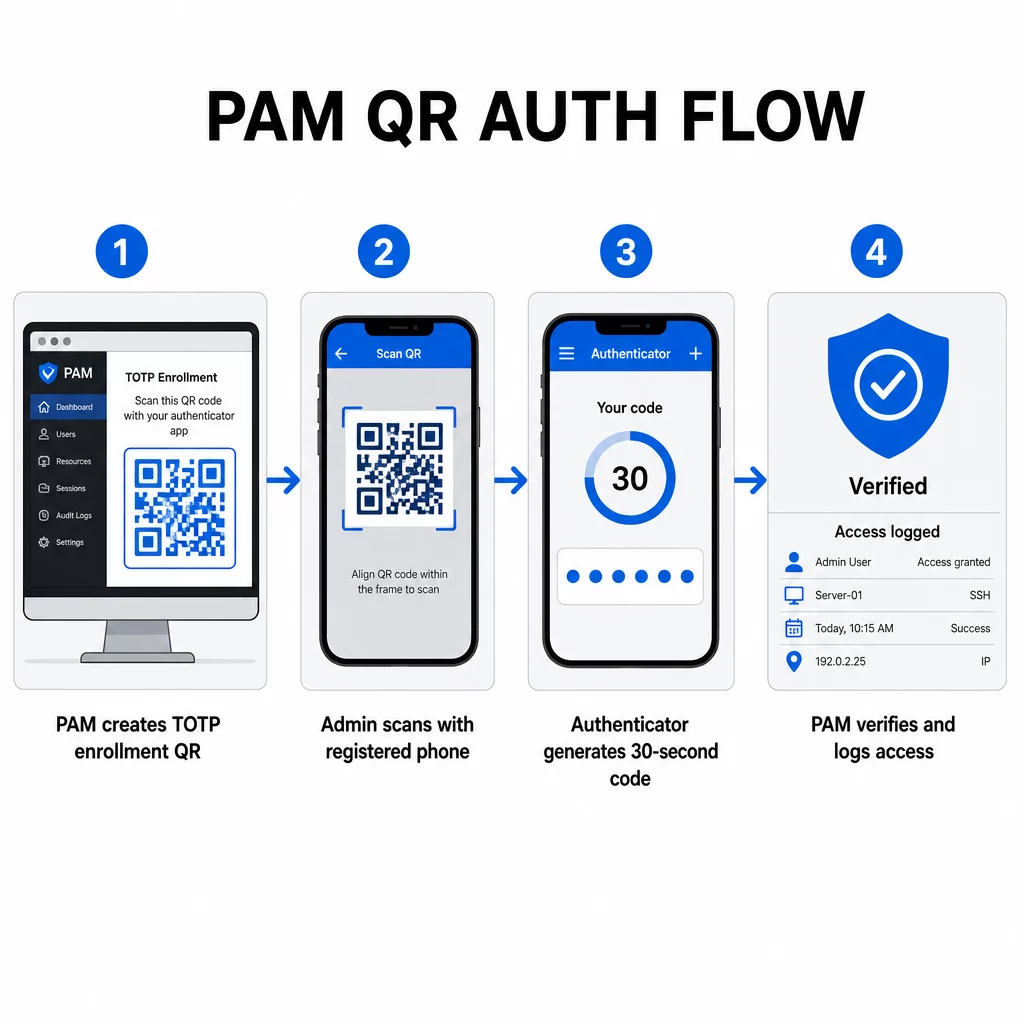
- Počas registrácie systém vygeneruje zdieľaný tajný kľúč a zakóduje ho do QR kódu ako URI formátované ako `otpauth://totp/LABEL?secret=SECRET&issuer=ISSUER`
- Používateľ naskenuje tento QR kód pomocou autentifikačnej aplikácie (ako napríklad Google Authenticator, Microsoft Authenticator alebo Okta Verify), ktorá uloží tajný kľúč lokálne na zariadenie
- Pri prihlásení aplikácia aplikuje algoritmus HOTP na časovo založený počítadlo odvodené od aktuálneho času Unix, čím vygeneruje jednorazový prístupový kód platný štandardne 30 sekúnd
- Server vykoná rovnaký výpočet nezávisle a akceptuje kódy z aktuálneho a bezprostredne predchádzajúceho časového kroku, aby zohľadnil časový posun
Pretože prístupový kód je odvodený od času a tajného kľúča viazaného na zariadenie – nie je prenášaný cez sieť – jeho zachytenie počas prenosu neposkytuje žiadnu trvalú hodnotu. Každý kód je nepoužiteľný do 30 sekúnd.
Platformy ako CyberArk implementujú tento model priamo. Administrátori povolia registráciu používateľov na základe QR kódu pod Nastavenia → Autentifikácia → Platforma → Nastavenia zabezpečenia → Možnosti autentifikácie, potom definujú politiky MFA, ktoré spustia sprievodcu registráciou pri prvom prihlásení. Mobilná aplikácia CyberArk Identity tiež podporuje možnosť “Registrovať pomocou QR”, kde používatelia naskenujú kód zobrazený na portáli Identity, aby aktivovali svoje zariadenie ako faktor MFA.
Nastavenie registrácie MFA pomocou QR kódu
Pre DevOps inžinierov konfigurujúcich MFA na základe QR v prostredí PAM, všeobecný proces registrácie nasleduje tieto kroky bez ohľadu na konkrétnu platformu:
- Povoľte registráciu QR v nastaveniach autentifikácie platformy. Väčšina podnikových systémov PAM to sprístupňuje ako prepínač v rámci možností konfigurácie autentifikácie alebo zabezpečenia.
- Definujte politiku MFA ktorá určuje, ktorí používatelia alebo roly vyžadujú MFA, kedy sa vynucuje a čo sa stane pri prvom prihlásení.
- Predložte registračný QR kód používateľovi počas jeho prvej autentifikovanej relácie. Kód kóduje zdieľaný TOTP tajný kľúč vo formáte URI `otpauth://`.
- Navedte používateľa, aby naskenoval kód pomocou ich registrovanej autentifikačnej aplikácie. Poskytnite záložnú možnosť manuálneho zadania (surový tajný kľúč) pre prípady, keď kamera nedokáže prečítať kód.
- Overte registráciu tým, že požiadate používateľa, aby pred dokončením nastavenia zadal TOTP kód, čím potvrdíte, že tajný kľúč bol prenesený správne.
- Vygenerujte a uložte záložné kódy na obnovenie aby používatelia neboli zablokovaní, ak stratia svoje zariadenie.
Pre tímy spravujúce rozsiahle nasadenia, spárovanie tohto registračného toku s Dynamický QR kód generátor vám umožňuje centrálne aktualizovať, sledovať a zrušiť registračné kódy – dôležité, keď je potrebné obmieňať poverenia alebo keď je zariadenie nahlásené ako stratené.
Sledujte a spravujte autentifikačné QR kódy vo veľkom rozsahu Potrebujete vydať, aktualizovať alebo zrušiť QR kódy naprieč distribuovaným tímom? Použite Dynamický QR kód generátor na vytvorenie upraviteľných kódov s analýzou v reálnom čase a centralizovanou správou.
Dynamické vs. Statické QR kódy v prostrediach PAM
Voľba medzi statickými a dynamickými QR kódmi má priame bezpečnostné dôsledky pre pracovné postupy PAM.
| FUNKCIA | Statické QR kódy | Dynamické QR kódy |
|---|---|---|
| Obsah po vytvorení | Pevný, nedá sa zmeniť | Upraviteľný kedykoľvek |
| Zrušenie | Vyžaduje opätovné vydanie a redistribúciu | Okamžite, z centrálneho ovládacieho panela |
| ANALYTIKA | Žiadne | Časové pečiatky skenovania, typy zariadení, polohy |
| Riziko útoku opätovným prehratím | Vyššie (kód je trvalý) | Nižšie (možnosti vypršania platnosti a jednorazového použitia) |
| Najlepší prípad použitia | Nízkorizikový, jednorazový obsah | Privilegovaný prístup, citlivé pracovné postupy |
Pre autentifikáciu PAM a registráciu MFA sú silne preferované dynamické QR kódy. Ak je zariadenie nahlásené ako stratené, správca môže okamžite deaktivovať príslušný registračný kód. Časovo obmedzené kódy zabraňujú útokom opätovným prehratím tým, že akýkoľvek zachytený kód sa stane nepoužiteľným v priebehu niekoľkých okamihov. A analýza skenov poskytuje auditnú stopu, ktorá podporuje požiadavky na súlad.
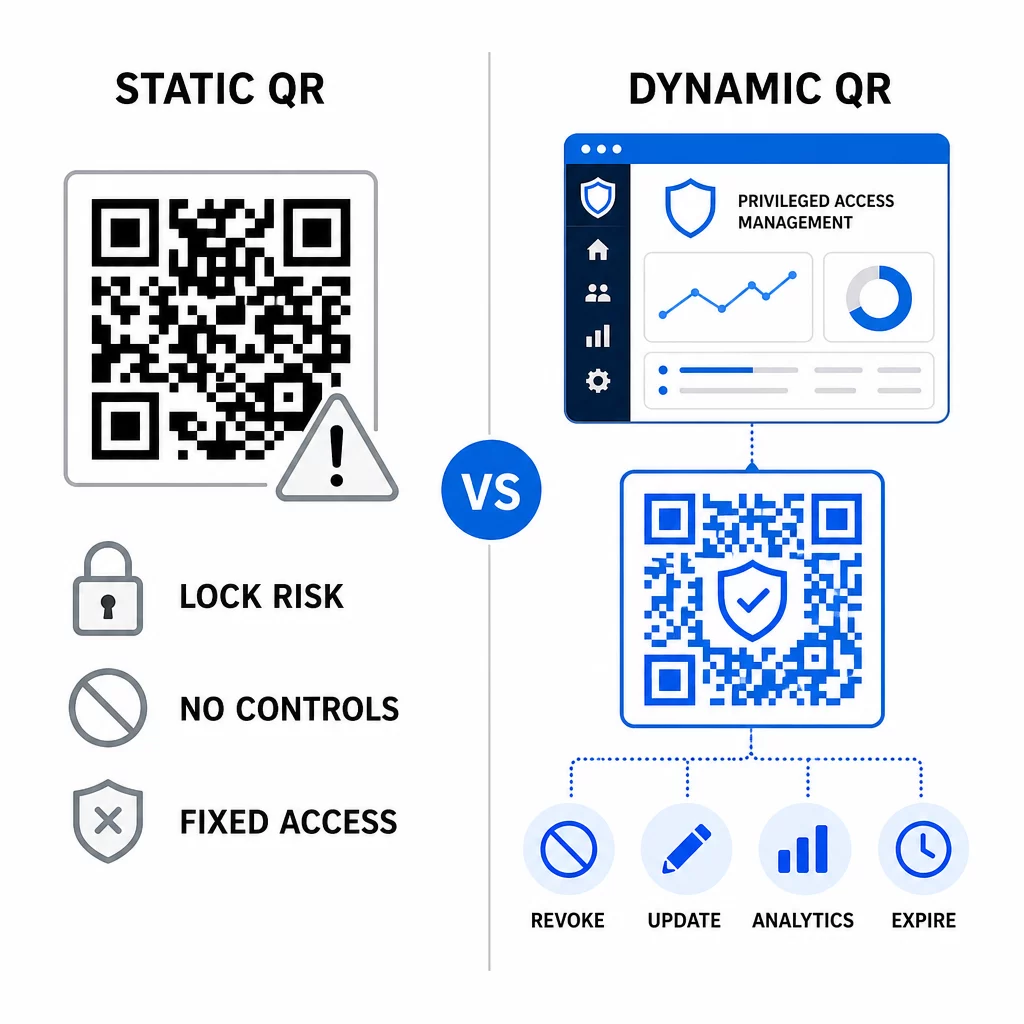
Statické QR kódy môžu stále slúžiť v interných prípadoch použitia s nižším rizikom – ako je prepojenie na dokumentáciu alebo zdroje len na čítanie – ale nemali by sa používať pre autentifikačné toky zahŕňajúce privilegovaný prístup.
Kľúčové bezpečnostné aspekty pre autentifikáciu PAM založenú na QR kódoch
Implementácia autentifikácie pomocou QR kódu v prostredí PAM prináša vlastnú útočnú plochu. Pochopenie týchto rizík a ich zmiernenie je nevyhnutné pred nasadením do produkcie.
Zraniteľnosť registračného QR kódu. Zdieľaný tajný kľúč zakódovaný v registračnom QR kóde TOTP sám o sebe nevyprší. Ak je tento kód zachytený na snímke obrazovky, preposlaný e-mailom alebo uložený v zálohe, útočník ho môže neskôr použiť na opätovnú registráciu zariadenia a generovanie platných TOTP kódov neobmedzene. Zmiernenie je jednoduché: nakonfigurujte registračné kódy tak, aby vypršali po jednom úspešnom skenovaní. Auditujte a vyčistite všetky historické registračné QR kódy uložené v e-mailových systémoch alebo zálohách a opätovne zaregistrujte dotknutých používateľov s novými jednorazovými kódmi.
Phishing pomocou QR kódu (quishing). Útočníci zdokumentovali kampane, v ktorých sa vydávajú za procesy registrácie MFA, posielajú e-maily, ktoré inštruujú používateľov, aby naskenovali škodlivý QR kód vedúci na stránku na získavanie prihlasovacích údajov. Vyškolte svojich používateľov, aby s podozrením pristupovali k nevyžiadaným požiadavkám na skenovanie QR kódu, nezávisle overili odosielateľa pred skenovaním a používali autentifikačné aplikácie, ktoré spracúvajú `otpauth://` payload v izolovanom prostredí namiesto otvárania ľubovoľných URL adries. Pre podrobnejšie usmernenie pozri Overenie identity pomocou QR kódu v kybernetickej bezpečnosti.
Zrušenie SMS. Usmernenie NIST pre digitálnu identitu výslovne odrádza od používania SMS a hlasových hovorov pre out-of-band autentifikáciu kvôli rizikám ako výmena SIM karty, výmena zariadenia a prenos čísla. Registrácia pomocou QR kódu založená na TOTP s autentifikačnými aplikáciami je silnejšou alternatívou, ktorú NIST uznáva ako platný out-of-band mechanizmus, ak je doručená prostredníctvom zabezpečeného sekundárneho kanála.
Viazanie zariadenia a biometria. Prepojenie autentifikácie pomocou QR kódu s vopred zaregistrovanými zariadeniami pridáva hardvérovú vrstvu, ktorú SMS nemôže poskytnúť. Pridanie biometrického overenia – odtlačok prsta alebo rozpoznávanie tváre – vytvára trojfaktorový model: niečo, čo máte (zaregistrované zariadenie), niečo, čím ste (biometria) a časovo obmedzený kód (závislý od kontextu). Pre operácie s vysokým rizikom nakonfigurujte kratšie TOTP okná alebo vyžadujte ďalšie kroky overenia.
Testovanie pred nasadením. Vždy testujte toky autentifikácie pomocou QR kódu naprieč viacerými zariadeniami, operačnými systémami a autentifikačnými aplikáciami pred spustením do produkcie. Overte, či registračné kódy vypršia po použití, či zrušenie funguje podľa očakávania a či záložné vstupné cesty fungujú správne.
Pre komplexný pohľad na posilnenie implementácie QR kódu pozri osvedčené postupy pre bezpečnosť QR kódov v kybernetickej obrane a osvedčené postupy pre bezpečnú generáciu QR kódov.
Integrácia QR autentifikácie s existujúcimi MFA a SSO
QR kódy fungujú dobre popri existujúcej autentifikačnej infraštruktúre, namiesto toho, aby ju úplne nahradili. V nastaveniach MFA pôsobí TOTP založené na QR ako faktor “niečo, čo máte”, dopĺňajúci heslo alebo biometriu. V prostrediach SSO môže QR kód slúžiť ako krok výzvy a odpovede, ktorý potvrdzuje držbu zariadenia pred vydaním tokenu relácie. Pre podrobné porovnanie týchto prístupov pozri QR kódy vs. heslá v SSO.
Vzor registrácie sa rozširuje aj za hranice PAM. Tímy, ktoré už používajú správcov hesiel ako LastPass, môžu postupovať podľa takmer identického procesu nastavenia skenovania QR kódu – skenovanie na prepojenie, potvrdenie kódom TOTP, uloženie obnovovacích kódov – čím sa pracovný postup stáva známym pre používateľov, ktorí už inde nastavili MFA. Pozri Sprievodca nastavením QR kódu LastPass pre podrobný odkaz.
Každý pokus o autentifikáciu v dobre nakonfigurovanom systéme by mal vygenerovať záznam v protokole zachytávajúci identifikátor QR kódu, informácie o zariadení, biometrický výsledok (ak je relevantný), časovú pečiatku a geografickú polohu. Tieto protokoly sú kľúčové pre audity súladu, detekciu anomálií a reakciu na incidenty.
Pokročilé funkcie: Analytika, prispôsobenie a kontrola v reálnom čase
Podnikové platformy QR kódov pridávajú možnosti nad rámec základného generovania kódov, ktoré sú priamo relevantné pre operácie PAM.
Analytika v reálnom čase umožňujú bezpečnostným tímom monitorovať vzorce autentifikácie v reálnom čase. Metriky, ktoré stojí za to sledovať, zahŕňajú časové pečiatky skenovania, typy zariadení, geografické polohy a základné línie správania používateľov. Algoritmy, ktoré označujú odchýlky – neobvyklý typ zariadenia, sken z neočakávanej krajiny, nárast neúspešných pokusov – môžu spustiť zvýšenú autentifikáciu alebo automatické upozornenia. Viac o tom, ako tieto metriky vyzerajú v praxi, nájdete na ako QR kódy zjednodušujú viacfaktorové overovanie.
Značkové autentifikačné kódy slúžia praktickej bezpečnostnej funkcii nad rámec estetiky. Keď vaša organizácia používa konzistentné, značkové QR kódy s logami spoločnosti a farebnými schémami, používatelia si vytvoria vizuálnu základnú líniu pre legitímne požiadavky na autentifikáciu. Kód, ktorý sa od tejto základnej línie odchyľuje, sa stáva varovným signálom. Zabezpečenie dostatočného farebného kontrastu – pomeru aspoň 4,5:1 – tiež udržuje kódy spoľahlivo skenovateľné naprieč zariadeniami a svetelnými podmienkami.
Dynamická kontrola je funkcia, ktorá najpriamejšie znižuje prevádzkové riziko. Keď zamestnanec odíde, okamžite deaktivujete jeho kódy z centrálneho panelu bez čakania na cykly rotácie poverení. Keď sa zistí bezpečnostný incident, zrušíte a znovu vydáte bez opätovnej tlače. Dynamický QR kód generátor na Pageloot podporuje všetky tieto pracovné postupy, s integrovaným sledovaním skenov v reálnom čase a editovateľnými destináciami.
Pre tímy, ktoré spracovávajú šifrované poverenia alebo tokenové dáta v rámci QR dátových blokov, pozri šifrovaných QR kódov pre autentifikačné platformy pre usmernenie k prístupom šifrovania AES a RSA.
Priemyselné aplikácie
Rovnaký model PAM založený na QR kódoch sa uplatňuje naprieč odvetviami s rôznymi profilmi privilegovaného prístupu.
In bankovníctve a finančných službách, administrátori používajú časovo citlivé QR kódy na prístup k hlavným bankovým systémom, obchodným platformám a zákazníckym databázam. Každá privilegovaná relácia je zaznamenaná proti konkrétnemu použitému kódu, čo poskytuje jasnú auditnú stopu pre dodržiavanie predpisov.
In vývoj softvéru, distribuované tímy používajú QR kódy na prístup k produkčným systémom, úložiskám kódu a nasadzovacím kanálom bez statických poverení. Dynamické kódy urýchľujú nástup a okamžite zaisťujú odchod – žiadne čakanie na šírenie rotácií hesiel.
In zdravotná starostlivosť, klinický personál, ktorý sa pohybuje medzi pracovnými stanicami, sa môže rýchlo overiť skenovaním namiesto písania, čím sa znižuje trenie pri prihlasovaní pri zachovaní auditných záznamov vyžadovaných HIPAA.
Vzor je konzistentný: QR kódy v kombinácii s dynamickou správou a analýzou poskytujú bezpečnostným tímom kontrolu, ktorú potrebujú, bez spomaľovania používateľov, ktorí závisia od rýchleho a spoľahlivého prístupu. Overovanie pomocou QR kódu nie je náhradou za zrelú stratégiu PAM – je to mechanizmus, ktorý posilňuje jednu z najzraniteľnejších komponentov PAM. Nahradením statických poverení časovo obmedzenými kódmi viazanými na zariadenie, vynútením jednorazovej registrácie a monitorovaním každej udalosti overenia zatvoríte medzery v phishingu a krádeži poverení, ktoré zanechávajú otvorené staršie metódy. Začnite povolením registrácie QR vo vašich nastaveniach overovania platformy PAM, definujte svoje politiky MFA a používajte dynamické kódy s centralizovanou platformou na správu na udržanie kontroly prístupu v reálnom čase.
Vytvárajte a spravujte QR kódy pre vaše autentifikačné pracovné postupy Použi Generátor QR kódov na začiatok, alebo preskúmajte Dynamický QR kód generátor pre registračné kódy, ktoré môžete aktualizovať, sledovať a zrušiť z jedného ovládacieho panela.
Často kladené otázky
Počas registrácie systém PAM generuje zdieľaný tajný kľúč a zakóduje ho ako QR kód pomocou formátu URI `otpauth://totp/`. Používateľ to naskenuje pomocou aplikácie autentifikátora, ktorá uloží tajný kľúč na zariadenie. Pri prihlásení aplikácia a server nezávisle vypočítajú 30-sekundový prístupový kód z tohto tajného kľúča a aktuálneho času. Pretože kód je časovo obmedzený a viazaný na zariadenie, jeho zachytenie počas prenosu neposkytuje útočníkovi žiadnu trvalú hodnotu.
Zraniteľnosť registračného QR kódu je najčastejšie prehliadané riziko. TOTP tajomstvo vložené do registračného QR kódu nevyprší samo od seba, takže akákoľvek snímka obrazovky, preposlaná e-mailom alebo záložná kópia tohto kódu zostáva použiteľná neobmedzene. Zmiernite to nastavením registračných kódov tak, aby vypršali po jedinom úspešnom skenovaní, a auditujte svoje e-mailové a záložné systémy na vymazanie všetkých uložených historických registračných kódov.
Vždy uprednostňujte dynamické QR kódy pre autentifikáciu a toky registrácie MFA. Dynamické kódy môžu byť okamžite zrušené, ak sa zariadenie stratí, aktualizované bez opätovnej distribúcie fyzických materiálov a monitorované pomocou analýzy v reálnom čase. Statické kódy sú vhodné len pre nízkorizikový obsah len na čítanie, kde nie je potrebné okamžité zrušenie a zaznamenávanie auditu.