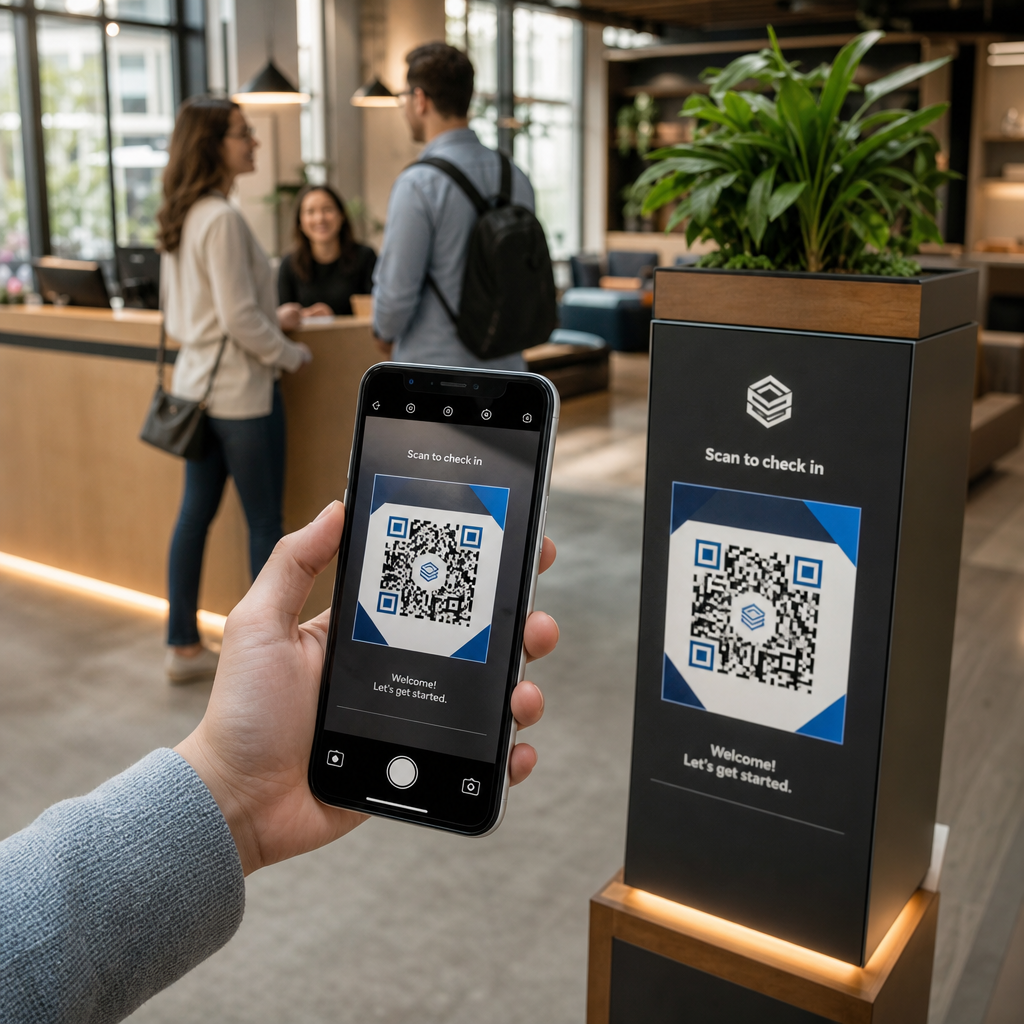
Vă confruntați cu dificultăți în securizarea conturilor privilegiate fără a crea fricțiune pentru administratorii dumneavoastră? Parolele statice și metodele MFA vechi lasă mediile PAM expuse la phishing, furt de credențiale și deturnare de sesiune. Această pagină explică modul în care autentificarea bazată pe coduri QR abordează aceste lacune – acoperind peisajul amenințărilor, modul în care funcționează înregistrarea, mecanica TOTP și practicile de securitate pe care echipa dumneavoastră trebuie să le implementeze corect.
De ce autentificarea PAM tradițională este insuficientă
Sistemele de gestionare a accesului privilegiat protejează cele mai sensibile conturi din organizația dumneavoastră. Atunci când aceste conturi se bazează pe parole statice, credențiale partajate sau MFA bazată pe SMS, atacatorii au căi bine documentate pentru a le exploata.
Phishingul și furtul de credențiale rămân cel mai comun punct de intrare. Utilizatorii privilegiați sunt vizați tocmai pentru că conturile lor deblochează sisteme critice. Chiar și administratorii experimentați pot fi înșelați de pagini de conectare false convingătoare, mai ales atunci când atacatorii folosesc ingineria socială pentru a se da drept furnizori sau suport IT. Odată ce credențialele sunt furate, atacatorii se mișcă lateral, escaladează privilegiile și mențin accesul persistent.
Conturile partajate agravează problema. Atunci când mai mulți administratori utilizează aceleași credențiale, responsabilitatea individuală dispare. Investigațiile privind breșele stagnează, monitorizarea conformității se întrerupe, iar o singură parolă compromisă deblochează accesul la mai multe sisteme.
Deturnarea sesiunii prezintă un al treilea risc major. După un eveniment de autentificare legitim, atacatorii pot intercepta token-uri de sesiune, pot exploata cookie-uri sau pot utiliza tehnici de tip man-in-the-middle pentru a se da drept utilizatori autentificați – toate acestea fără a cunoaște vreodată parola originală. Token-urile de sesiune persistente fac aceste atacuri deosebit de dificil de detectat, deoarece atacatorul se integrează în traficul administrativ normal.
Aceste vulnerabilități au o cauză comună: autentificarea care depinde de secrete statice, reutilizabile. Autentificarea bazată pe coduri QR abordează direct acest aspect.
Cum funcționează autentificarea cu cod QR în PAM
Autentificarea cu cod QR înlocuiește credențialele statice cu coduri dinamice, specifice dispozitivului. În loc să tasteze o parolă, un administrator scanează un cod QR cu un dispozitiv mobil înregistrat. Dispozitivul citește codul, aplică chei securizate stocate în hardware și finalizează autentificarea în câteva secunde.
Cea mai comună implementare în mediile PAM de întreprindere combină codurile QR cu TOTP (Parolă Unică Bazată pe Timp) așa cum este definit în RFC 6238. Iată cum funcționează acest flux:
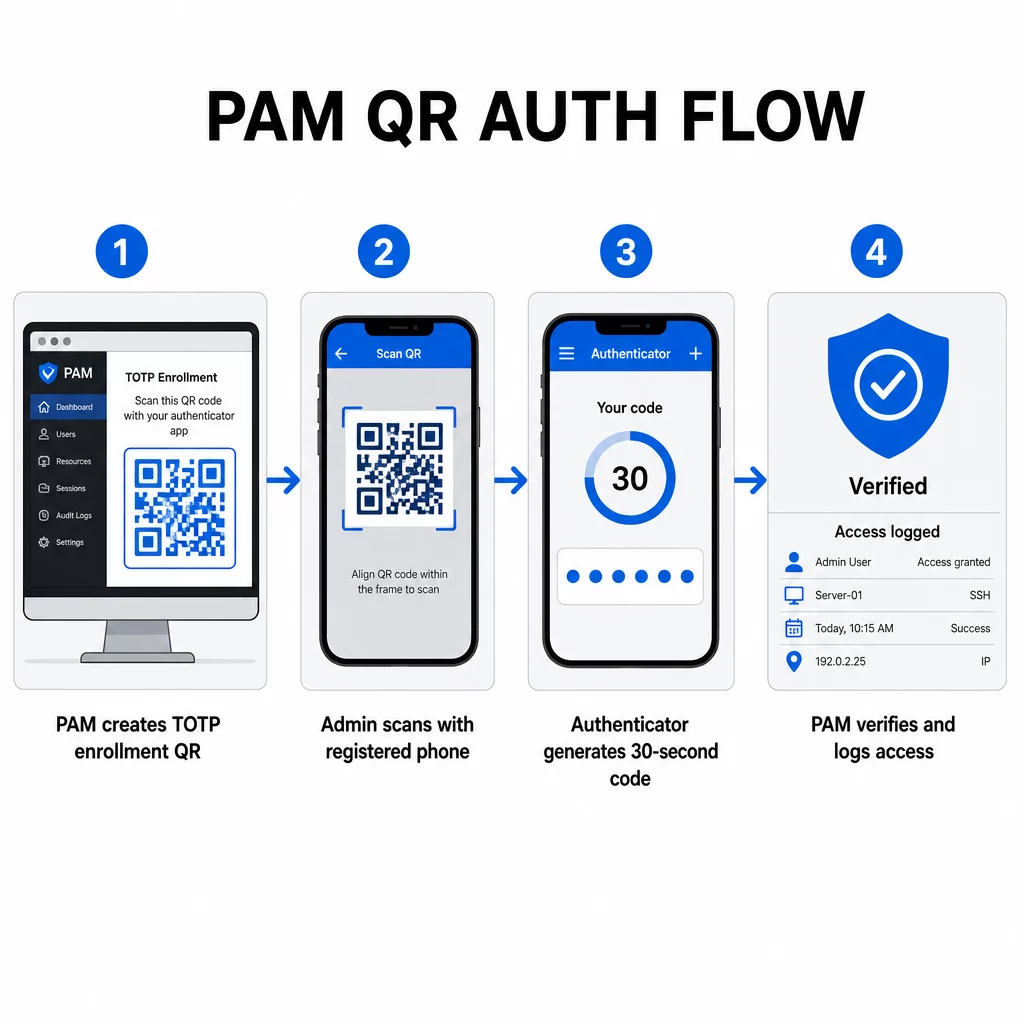
- În timpul înregistrării, sistemul generează o cheie secretă partajată și o codifică într-un cod QR ca un URI formatat ca `otpauth://totp/LABEL?secret=SECRET&issuer=ISSUER`
- Utilizatorul scanează acest cod QR cu o aplicație de autentificare (cum ar fi Google Authenticator, Microsoft Authenticator sau Okta Verify), care stochează secretul local pe dispozitiv
- La autentificare, aplicația aplică algoritmul HOTP unui contor bazat pe timp derivat din ora Unix curentă, generând o parolă unică valabilă 30 de secunde în mod implicit
- Serverul efectuează același calcul independent și acceptă coduri din pasul de timp curent și imediat anterior pentru a ține cont de desincronizarea ceasului
Deoarece parola este derivată din timp și dintr-un secret legat de dispozitiv – nu este transmisă prin rețea – interceptarea acesteia în tranzit nu oferă nicio valoare durabilă. Fiecare cod este inutil în 30 de secunde.
Platforme precum CyberArk implementează direct acest model. Administratorii activează înregistrarea utilizatorilor bazată pe cod QR sub Setări → Autentificare → Platformă → Setări de securitate → Opțiuni de autentificare, apoi definesc politici MFA care declanșează expertul de înregistrare la prima autentificare. Aplicația mobilă CyberArk Identity acceptă, de asemenea, o opțiune “Înregistrare cu QR”, unde utilizatorii scanează un cod prezentat pe portalul Identity pentru a-și activa dispozitivul ca factor MFA.
Configurarea înregistrării MFA cu cod QR
Pentru inginerii DevOps care configurează MFA bazată pe QR într-un mediu PAM, procesul general de înregistrare urmează acești pași, indiferent de platforma specifică:
- Activați înregistrarea QR în setările de autentificare ale platformei. Majoritatea sistemelor PAM de întreprindere expun această opțiune ca un comutator sub opțiunile de configurare a autentificării sau securității.
- Definiți o politică MFA care determină ce utilizatori sau roluri necesită MFA, când este aplicată și ce se întâmplă la prima autentificare.
- Prezentați codul QR de înregistrare utilizatorului în timpul primei sesiuni autentificate. Codul criptează secretul TOTP partajat în formatul URI `otpauth://`.
- Ghidați utilizatorul să scaneze codul folosind aplicația lor de autentificare înregistrată. Oferiți o alternativă de introducere manuală (cheia secretă brută) pentru cazurile în care camera nu poate citi codul.
- Verificați înregistrarea cerând utilizatorului să trimită un cod TOTP înainte de a finaliza configurarea, confirmând că secretul a fost transferat corect.
- Generați și stocați coduri de recuperare de rezervă astfel încât utilizatorii să nu fie blocați dacă își pierd dispozitivul.
Pentru echipele care gestionează implementări la scară largă, asocierea acestui flux de înregistrare cu un Generator cod QR dinamic vă permite să actualizați, să urmăriți și să revocați codurile de înregistrare centralizat – important atunci când credențialele trebuie rotite sau când un dispozitiv este raportat pierdut.
Urmăriți și Gestionați Codurile QR de Autentificare la Scară Trebuie să emiteți, să actualizați sau să revocați coduri QR într-o echipă distribuită? Utilizați Generator cod QR dinamic pentru a crea coduri editabile cu analize în timp real și gestionare centralizată.
Coduri QR Dinamice vs. Statice în Medii PAM
Alegerea între codurile QR statice și dinamice are implicații directe de securitate pentru fluxurile de lucru PAM.
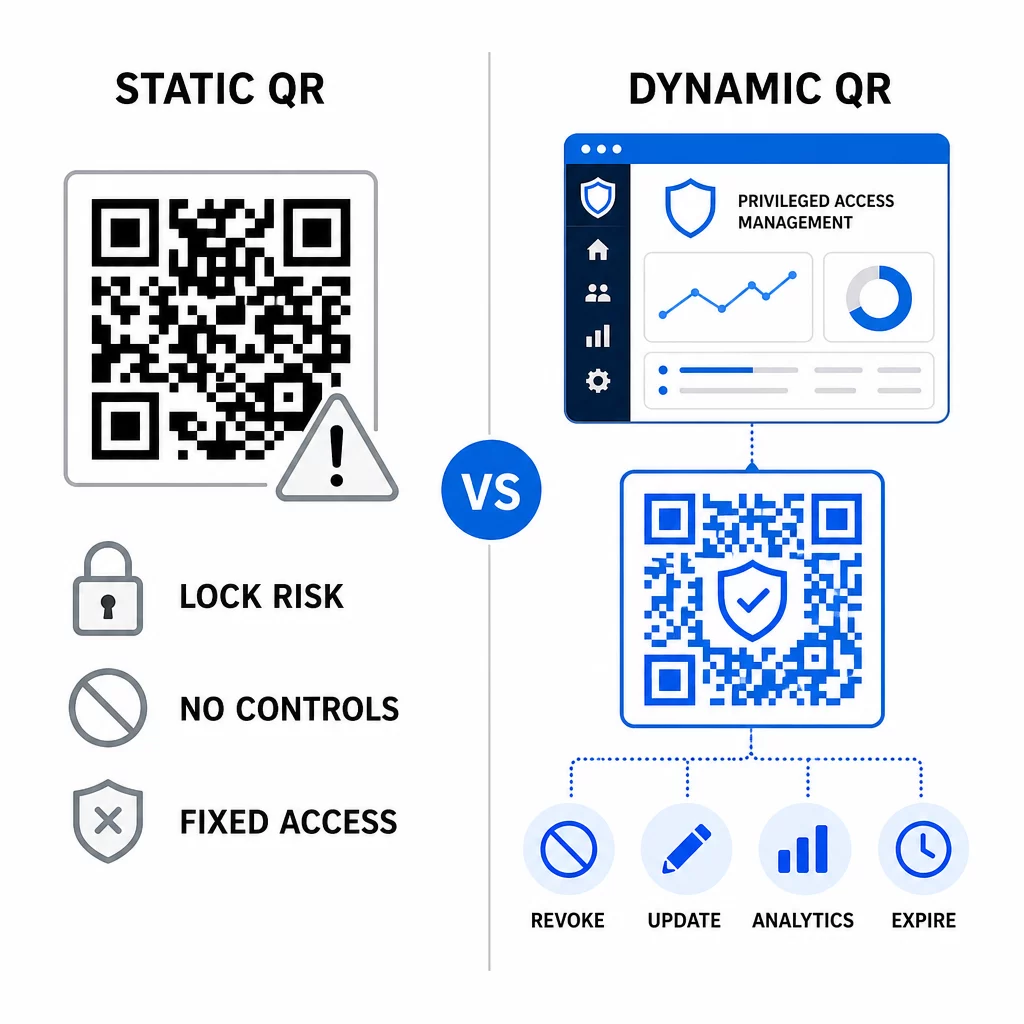
| FUNCȚIE | Coduri QR statice | Coduri QR dinamice |
|---|---|---|
| Conținut după creare | Fix, nu poate fi modificat | Editabil oricând |
| Revocare | Necesită reemitere și redistribuire | Instantaneu, dintr-un tablou de bord central |
| STATISTICI | Niciuna | Scanează marcaje temporale, tipuri de dispozitive, locații |
| Risc de atac de tip replay | Mai mare (codul este permanent) | Mai mic (opțiuni de expirare și de utilizare unică) |
| Cel mai bun caz de utilizare | Conținut cu risc scăzut, de o singură utilizare | Acces privilegiat, fluxuri de lucru sensibile |
Pentru autentificarea PAM și înregistrarea MFA, codurile QR dinamice sunt puternic preferate. Dacă un dispozitiv este raportat ca pierdut, un administrator poate dezactiva imediat codul de înregistrare asociat. Codurile cu limită de timp previn atacurile de tip replay, făcând orice cod interceptat inutil în câteva momente. Iar analizele scanărilor oferă o pistă de audit care susține cerințele de conformitate.
Codurile QR statice pot juca în continuare un rol în cazurile de utilizare internă cu risc mai scăzut – cum ar fi legarea la documentație sau resurse doar pentru citire – dar nu ar trebui utilizate pentru fluxurile de autentificare care implică acces privilegiat.
Considerații cheie de securitate pentru autentificarea PAM bazată pe QR
Implementarea autentificării cu cod QR într-un mediu PAM introduce propria suprafață de atac. Înțelegerea și atenuarea acestor riscuri este esențială înainte de a implementa în producție.
Vulnerabilitatea codului QR de înregistrare. Secretul partajat codificat într-un cod QR de înregistrare TOTP nu expiră de la sine. Dacă acel cod este capturat într-o captură de ecran, trimis prin e-mail sau stocat într-un backup, un atacator îl poate folosi ulterior pentru a reînregistra un dispozitiv și a genera coduri TOTP valide pe termen nelimitat. Atenuarea este simplă: configurați codurile de înregistrare să expire după o singură scanare reușită. Auditați și ștergeți orice coduri QR de înregistrare istorice stocate în sistemele de e-mail sau backup-uri și reînregistrați utilizatorii afectați cu coduri noi, de o singură utilizare.
Phishing cu cod QR (quishing). Atacatorii au documentat campanii în care se prefac că sunt procese de înregistrare MFA, trimițând e-mailuri care instruiesc utilizatorii să scaneze un cod QR malițios care duce la o pagină de colectare a credențialelor. Instruiți-vă utilizatorii să trateze cu suspiciune cererile nesolicitate de scanare QR, să verifice independent expeditorul înainte de a scana și să utilizeze aplicații de autentificare care gestionează sarcina utilă `otpauth://` într-un mediu izolat, mai degrabă decât să deschidă URL-uri arbitrare. Pentru îndrumări mai detaliate, consultați Verificarea identității prin cod QR în securitatea cibernetică.
Deprecierea SMS-ului. Ghidul NIST privind identitatea digitală descurajează în mod explicit utilizarea SMS-urilor și a apelurilor vocale pentru autentificarea în afara benzii din cauza riscurilor precum schimbul de SIM, schimbul de dispozitiv și portarea numărului. Înregistrarea QR bazată pe TOTP cu aplicații de autentificare este o alternativă mai puternică pe care NIST o recunoaște ca un mecanism valid în afara benzii atunci când este livrată printr-un canal secundar securizat.
Legarea dispozitivului și biometria. Legarea autentificării prin cod QR de dispozitivele preînregistrate adaugă un strat hardware pe care SMS-ul nu îl poate oferi. Adăugarea verificării biometrice – amprentă digitală sau recunoaștere facială – creează un model cu trei factori: ceva ce ai (dispozitivul înregistrat), ceva ce ești (biometria) și codul dependent de timp (dependent de context). Pentru operațiuni cu risc ridicat, configurați ferestre TOTP mai scurte sau solicitați pași suplimentari de verificare.
Testare înainte de implementare. Întotdeauna testați fluxurile de autentificare prin cod QR pe mai multe dispozitive, sisteme de operare și aplicații de autentificare înainte de a le lansa în producție. Verificați dacă codurile de înregistrare expiră după utilizare, dacă revocarea funcționează conform așteptărilor și dacă căile de intrare de rezervă funcționează corect.
Pentru o privire cuprinzătoare asupra consolidării implementării codului QR, consultați cele mai bune practici pentru securitatea codurilor QR în apărarea cibernetică și cele mai bune practici pentru generarea sigură de coduri QR.
Integrarea autentificării QR cu MFA și SSO existente
Codurile QR funcționează bine alături de infrastructura de autentificare existentă, mai degrabă decât să o înlocuiască în totalitate. În configurațiile MFA, TOTP bazat pe QR acționează ca factorul “ceva ce ai”, suplimentând o parolă sau o biometrică. În mediile SSO, un cod QR poate servi ca pas de provocare-răspuns care confirmă posesia dispozitivului înainte de a emite un token de sesiune. Pentru o comparație detaliată a acestor abordări, consultați Coduri QR vs. parole în SSO.
Modelul de înregistrare se extinde și dincolo de PAM. Echipele care utilizează deja manageri de parole precum LastPass pot urma un proces de configurare prin scanare QR aproape identic – scanează pentru a lega, confirmă cu un cod TOTP, stochează coduri de recuperare – făcând fluxul de lucru familiar utilizatorilor care au configurat deja MFA în altă parte. Consultați Ghidul de configurare a codului QR LastPass pentru o referință pas cu pas.
Fiecare tentativă de autentificare într-un sistem bine configurat ar trebui să genereze o intrare în jurnal care să capteze identificatorul codului QR, informațiile despre dispozitiv, rezultatul biometric dacă este cazul, marcajul temporal și locația geografică. Aceste jurnale sunt critice pentru auditurile de conformitate, detectarea anomaliilor și răspunsul la incidente.
Funcționalități avansate: Analiză, Personalizare și Control în Timp Real
Platformele de coduri QR pentru întreprinderi adaugă capabilități dincolo de generarea de coduri de bază, care sunt direct relevante pentru operațiunile PAM.
Statistici în timp real permit echipelor de securitate să monitorizeze tiparele de autentificare pe măsură ce acestea se întâmplă. Metricile care merită urmărite includ marcajele temporale ale scanărilor, tipurile de dispozitive, locațiile geografice și liniile de bază ale comportamentului utilizatorilor. Algoritmii care semnalează abateri – un tip de dispozitiv neobișnuit, o scanare dintr-o țară neașteptată, o creștere a tentativelor eșuate – pot declanșa autentificarea pas cu pas sau alerte automate. Pentru mai multe despre cum arată aceste metrici în practică, consultați modul în care codurile QR simplifică autentificarea multi-factor.
Coduri de autentificare personalizate îndeplinesc o funcție practică de securitate dincolo de estetică. Atunci când organizația dumneavoastră utilizează coduri QR consistente, personalizate, cu logo-uri și scheme de culori ale companiei, utilizatorii dezvoltă o linie de bază vizuală pentru cererile legitime de autentificare. Un cod care se abate de la această linie de bază devine un semn de avertizare. Asigurarea unui contrast de culoare suficient – un raport de cel puțin 4.5:1 – menține, de asemenea, codurile scanabile în mod fiabil pe diferite dispozitive și în diverse condiții de iluminare.
Control dinamic este funcționalitatea care reduce cel mai direct riscul operațional. Atunci când un angajat pleacă, îi dezactivați codurile instantaneu dintr-un tablou de bord central, fără a aștepta ciclurile de rotație a credențialelor. Atunci când este detectat un incident de securitate, revocați și reemiteți fără a retipări. Generator cod QR dinamic pe Pageloot suportă toate aceste fluxuri de lucru, cu urmărire a scanărilor în timp real și destinații editabile încorporate.
Pentru echipele care gestionează credențiale criptate sau date token în cadrul încărcăturilor utile QR, consultați codurilor QR criptate pentru platformele de autentificare pentru îndrumări privind abordările de criptare AES și RSA.
4. Aplicații Industriale
Același model PAM bazat pe QR se aplică în diverse industrii cu profile diferite de acces privilegiat.
În servicii bancare și financiare, administratorii utilizează coduri QR sensibile la timp pentru a accesa sistemele bancare centrale, platformele de tranzacționare și bazele de date ale clienților. Fiecare sesiune privilegiată este înregistrată în raport cu codul specific utilizat, oferind o pistă de audit clară pentru conformitatea reglementară.
În dezvoltare software, echipele distribuite utilizează coduri QR pentru a accesa sisteme de producție, depozite de cod și conducte de implementare fără credențiale statice. Codurile dinamice accelerează integrarea și fac dezintegrarea imediată – fără a aștepta propagarea rotațiilor de parole.
În asistență medicală, personalul clinic care se deplasează între stațiile de lucru se poate autentifica rapid prin scanare, mai degrabă decât prin tastare, reducând fricțiunea la conectare, menținând în același timp pistele de audit cerute de HIPAA.
Modelul este consecvent: codurile QR combinate cu gestionarea dinamică și analizele oferă echipelor de securitate controlul de care au nevoie fără a încetini utilizatorii care depind de acces rapid și fiabil. Autentificarea cu cod QR nu este un înlocuitor pentru o strategie PAM matură – este un mecanism care întărește una dintre cele mai vulnerabile componente ale PAM. Prin înlocuirea credențialelor statice cu coduri legate de timp și de dispozitiv, impunerea înregistrării de unică folosință și monitorizarea fiecărui eveniment de autentificare, închideți lacunele de phishing și furt de credențiale pe care metodele vechi le lasă deschise. Începeți prin a activa înregistrarea QR în setările de autentificare ale platformei dvs. PAM, definiți-vă politicile MFA și utilizați coduri dinamice cu o platformă de gestionare centralizată pentru a menține controlul în timp real asupra accesului.
Creați și Gestionați Coduri QR pentru Fluxurile Dvs. de Autentificare Folosește Generator de coduri QR pentru a începe, sau explorați Generator cod QR dinamic pentru coduri de înregistrare pe care le puteți actualiza, urmări și revoca dintr-un singur tablou de bord.
Întrebări frecvente
În timpul înregistrării, sistemul PAM generează o cheie secretă partajată și o codifică sub formă de cod QR folosind formatul URI `otpauth://totp/`. Utilizatorul scanează acest lucru cu o aplicație de autentificare, care stochează secretul pe dispozitiv. La autentificare, aplicația și serverul calculează independent o parolă valabilă 30 de secunde din acel secret și ora curentă. Deoarece codul este legat de timp și de dispozitiv, interceptarea acestuia în tranzit nu oferă nicio valoare durabilă unui atacator.
Vulnerabilitatea codului QR de înrolare este cel mai frecvent risc trecut cu vederea. Secretul TOTP încorporat într-un cod QR de înrolare nu expiră de la sine, astfel încât orice captură de ecran, redirecționare de e-mail sau copie de rezervă a acelui cod rămâne utilizabil pe termen nelimitat. Atenuați acest risc configurând codurile de înrolare să expire după o singură scanare reușită și auditați-vă sistemele de e-mail și de rezervă pentru a șterge orice coduri de înrolare istorice stocate.
Întotdeauna preferați codurile QR dinamice pentru fluxurile de autentificare și înrolare MFA. Codurile dinamice pot fi revocate instantaneu dacă un dispozitiv este pierdut, actualizate fără a redistribui materiale fizice și monitorizate cu analize în timp real. Codurile statice sunt adecvate doar pentru conținut cu risc scăzut, doar pentru citire, unde revocarea instantanee și înregistrarea jurnalului de audit nu sunt necesare.