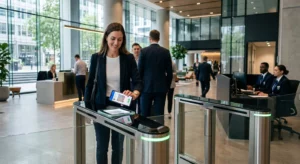
Kamppailetko suojataksesi etuoikeutettuja tilejä aiheuttamatta kitkaa järjestelmänvalvojillesi? Staattiset salasanat ja vanhat MFA-menetelmät jättävät PAM-ympäristöt alttiiksi tietojenkalastelulle, tunnistetietojen varkaudelle ja istunnon kaappaukselle. Tämä sivu selittää, miten QR-koodiin perustuva todennus korjaa nämä puutteet – käsitellen uhkamaisemaa, rekisteröinnin toimintaa, TOTP-mekaniikkaa ja tietoturvakäytäntöjä, jotka tiimisi tarvitsee toteuttaakseen sen oikein.
Miksi perinteinen PAM-todennus ei riitä
Etuoikeutetun pääsyn hallintajärjestelmät suojaavat organisaatiosi arkaluonteisimpia tilejä. Kun nämä tilit perustuvat staattisiin salasanoihin, jaettuihin tunnistetietoihin tai tekstiviestipohjaiseen MFA:han, hyökkääjillä on hyvin dokumentoituja tapoja hyödyntää niitä.
Tietojenkalastelu ja tunnistetietojen varkaus pysyvät yleisimpänä sisääntulopisteenä. Etuoikeutettuja käyttäjiä kohdistetaan juuri siksi, että heidän tilinsä avaavat kriittisiä järjestelmiä. Jopa kokeneet järjestelmänvalvojat voivat joutua vakuuttavien väärennettyjen kirjautumissivujen uhreiksi, erityisesti kun hyökkääjät käyttävät sosiaalista manipulointia esiintyäkseen myyjinä tai IT-tukena. Kun tunnistetiedot on varastettu, hyökkääjät liikkuvat sivusuunnassa, laajentavat oikeuksiaan ja ylläpitävät jatkuvaa pääsyä.
Jaetut tilit pahentavat ongelmaa. Kun useat järjestelmänvalvojat käyttävät samoja tunnistetietoja, yksilöllinen vastuullisuus katoaa. Tietoturvaloukkausten tutkinnat pysähtyvät, vaatimustenmukaisuuden seuranta hajoaa, ja yksi vaarantunut salasana avaa pääsyn useisiin järjestelmiin.
Istunnon kaappaus muodostaa kolmannen merkittävän riskin. Laillisen todennustapahtuman jälkeen hyökkääjät voivat siepata istuntotunnuksia, hyödyntää evästeitä tai käyttää man-in-the-middle-tekniikoita esiintyäkseen todennettuina käyttäjinä – kaikki tämä ilman, että he tietävät alkuperäistä salasanaa. Pysyvät istuntotunnukset tekevät näistä hyökkäyksistä erityisen vaikeasti havaittavia, koska hyökkääjä sulautuu normaaliin hallinnolliseen liikenteeseen.
Näillä haavoittuvuuksilla on yhteinen perussyy: todennus, joka perustuu staattisiin, uudelleenkäytettäviin salaisuuksiin. QR-koodiin perustuva todennus puuttuu tähän suoraan.
Miten QR-kooditodennus toimii PAMissa
QR-kooditodennus korvaa staattiset tunnistetiedot dynaamisilla, laitekohtaisilla koodeilla. Salasanan kirjoittamisen sijaan järjestelmänvalvoja skannaa QR-koodin rekisteröidyllä mobiililaitteella. Laite lukee koodin, soveltaa laitteistoon tallennettuja turvallisia avaimia ja suorittaa todennuksen sekunneissa.
Yleisin toteutus yritysten PAM-ympäristöissä yhdistää QR-koodit TOTP (aikaperusteinen kertakäyttösalasana) kuten määritelty RFC 6238:ssa. Näin tämä kulku toimii:
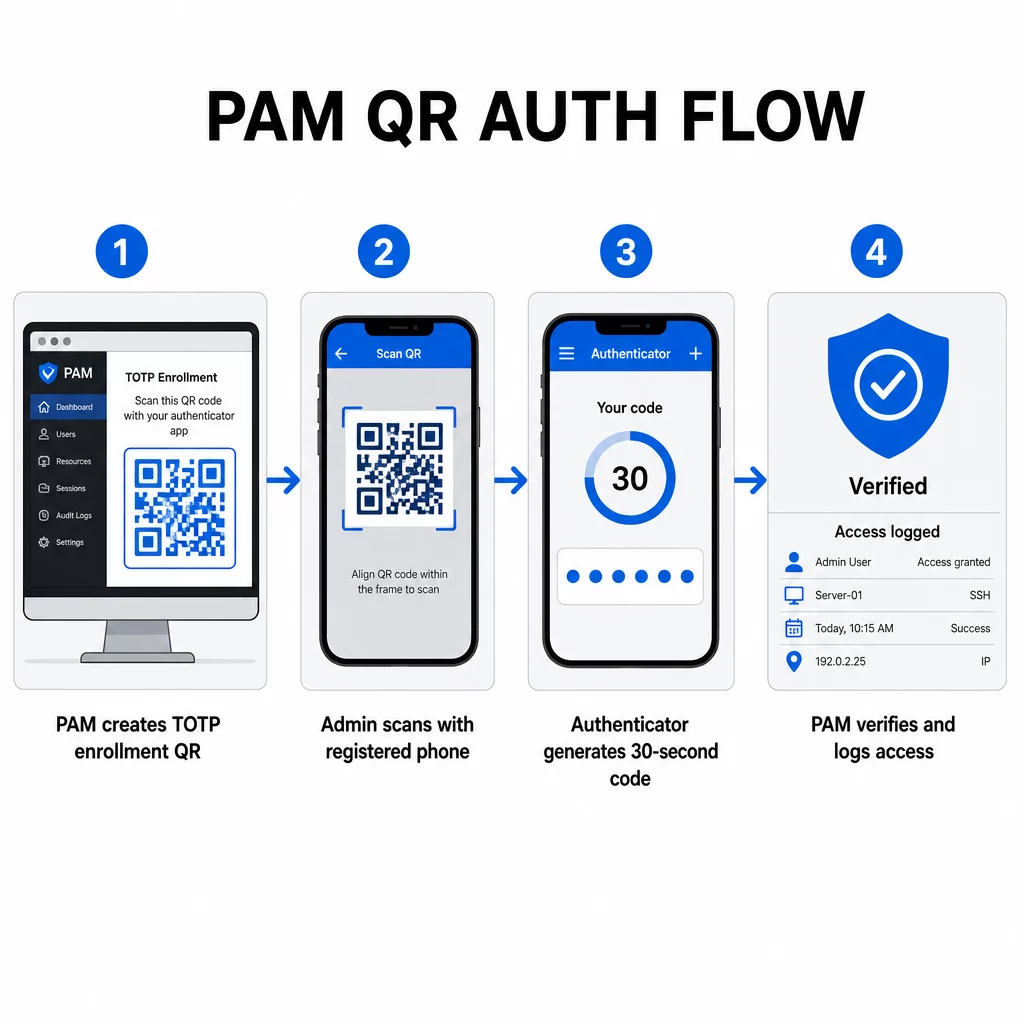
- Rekisteröinnin aikana järjestelmä luo jaetun salaisen avaimen ja koodaa sen QR-koodiin URI-muodossa, kuten `otpauth://totp/LABEL?secret=SECRET&issuer=ISSUER`
- Käyttäjä skannaa tämän QR-koodin todennussovelluksella (kuten Google Authenticator, Microsoft Authenticator tai Okta Verify), joka tallentaa salaisuuden paikallisesti laitteeseen
- Kirjautuessa sovellus soveltaa HOTP-algoritmia nykyisestä Unix-ajasta johdettuun aikaperusteiseen laskuriin, luoden kertakäyttöisen pääsykoodin, joka on oletuksena voimassa 30 sekuntia
- Palvelin suorittaa saman laskelman itsenäisesti ja hyväksyy koodit nykyisestä ja välittömästi edellisestä aika-askeleesta kellon poikkeaman huomioimiseksi
Koska pääsykoodi on johdettu ajasta ja laitekohtaisesta salaisuudesta – eikä sitä lähetetä verkon yli – sen sieppaaminen siirron aikana ei tuota pysyvää arvoa. Jokainen koodi on hyödytön 30 sekunnin kuluessa.
Alustat, kuten CyberArk, toteuttavat tämän mallin suoraan. Järjestelmänvalvojat ottavat QR-koodiin perustuvan käyttäjän rekisteröinnin käyttöön kohdassa Asetukset → Todennus → Alusta → Turvallisuusasetukset → Todennusvaihtoehdot, ja määrittävät sitten MFA-käytännöt, jotka käynnistävät rekisteröintiohjatun toiminnon ensimmäisellä kirjautumiskerralla. CyberArk Identity -mobiilisovellus tukee myös “Rekisteröidy QR-koodilla” -vaihtoehtoa, jossa käyttäjät skannaavat Identity-portaalissa esitetyn koodin aktivoidakseen laitteensa MFA-tekijäksi.
QR-koodiin perustuvan MFA-rekisteröinnin määrittäminen
DevOps-insinööreille, jotka määrittävät QR-pohjaista MFA:ta PAM-ympäristössä, yleinen rekisteröintiprosessi noudattaa näitä vaiheita alustasta riippumatta:
- Ota QR-rekisteröinti käyttöön alustan todennusasetuksissa. Useimmat yritysten PAM-järjestelmät tarjoavat tämän vaihtoehdon todennus- tai suojausmääritysasetusten alla.
- Määritä MFA-käytäntö , joka määrittää, mitkä käyttäjät tai roolit vaativat MFA:ta, milloin se pannaan täytäntöön ja mitä tapahtuu ensimmäisellä kirjautumiskerralla.
- Esitä rekisteröinnin QR-koodi käyttäjälle heidän ensimmäisen todennetun istuntonsa aikana. Koodi koodaa jaetun TOTP-salaisuuden `otpauth://` URI-muodossa.
- Ohjaa käyttäjää skannaamaan koodin rekisteröidyllä todennussovelluksellaan. Tarjoa manuaalinen syöttövaihtoehto (raaka salainen avain) tapauksiin, joissa kamera ei pysty lukemaan koodia.
- Vahvista rekisteröinti pyytämällä käyttäjää syöttämään TOTP-koodin ennen asennuksen viimeistelyä, mikä vahvistaa salaisuuden siirtyneen oikein.
- Luo ja tallenna varmuuskopiointikoodit jotta käyttäjät eivät jää lukkoon, jos he menettävät laitteensa.
Suurten käyttöönottojen hallinnassa oleville tiimeille tämän rekisteröintivirran yhdistäminen Dynaaminen QR-koodi generaattori antaa sinun päivittää, seurata ja peruuttaa rekisteröintikoodeja keskitetysti – tärkeää, kun tunnistetietoja on vaihdettava tai kun laite ilmoitetaan kadonneeksi.
Seuraa ja hallitse todennuksen QR-koodeja laajasti Tarvitseeko sinun myöntää, päivittää tai peruuttaa QR-koodeja hajautetussa tiimissä? Käytä Dynaaminen QR-koodi generaattori luodaksesi muokattavia koodeja reaaliaikaisella analytiikalla ja keskitetyllä hallinnalla.
Dynaamiset vs. staattiset QR-koodit PAM-ympäristöissä
Staattisten ja dynaamisten QR-koodien valinnalla on suoria tietoturvavaikutuksia PAM-työnkulkuihin.
| OMINAISUUS | Staattiset QR-koodit | Dynaamiset QR-koodit |
|---|---|---|
| Sisältö luomisen jälkeen | Kiinteä, ei voi muuttaa | Muokattavissa milloin tahansa |
| Peruutus | Vaatii uudelleenmyöntämistä ja uudelleenjakelua | Välitön, keskitetystä hallintapaneelista |
| ANALYTIIKKA | Ei mitään | Skannaa aikaleimat, laitetyypit, sijainnit |
| Uudelleentoistohyökkäyksen riski | Korkeampi (koodi on pysyvä) | Matalampi (vanhenemis- ja kertakäyttövaihtoehdot) |
| Paras käyttötapaus | Matalan riskin, kertaluonteinen sisältö | Etuoikeutettu pääsy, arkaluonteiset työnkulut |
PAM-todennukseen ja MFA-rekisteröintiin dynaamiset QR-koodit ovat vahvasti suositeltavia. Jos laite ilmoitetaan kadonneeksi, järjestelmänvalvoja voi deaktivoida siihen liittyvän rekisteröintikoodin välittömästi. Aikarajoitetut koodit estävät uudelleentoistohyökkäykset tekemällä kaapatusta koodista hyödyttömän hetkessä. Ja skannausanalytiikka tarjoaa auditointijäljen, joka tukee vaatimustenmukaisuusvaatimuksia.
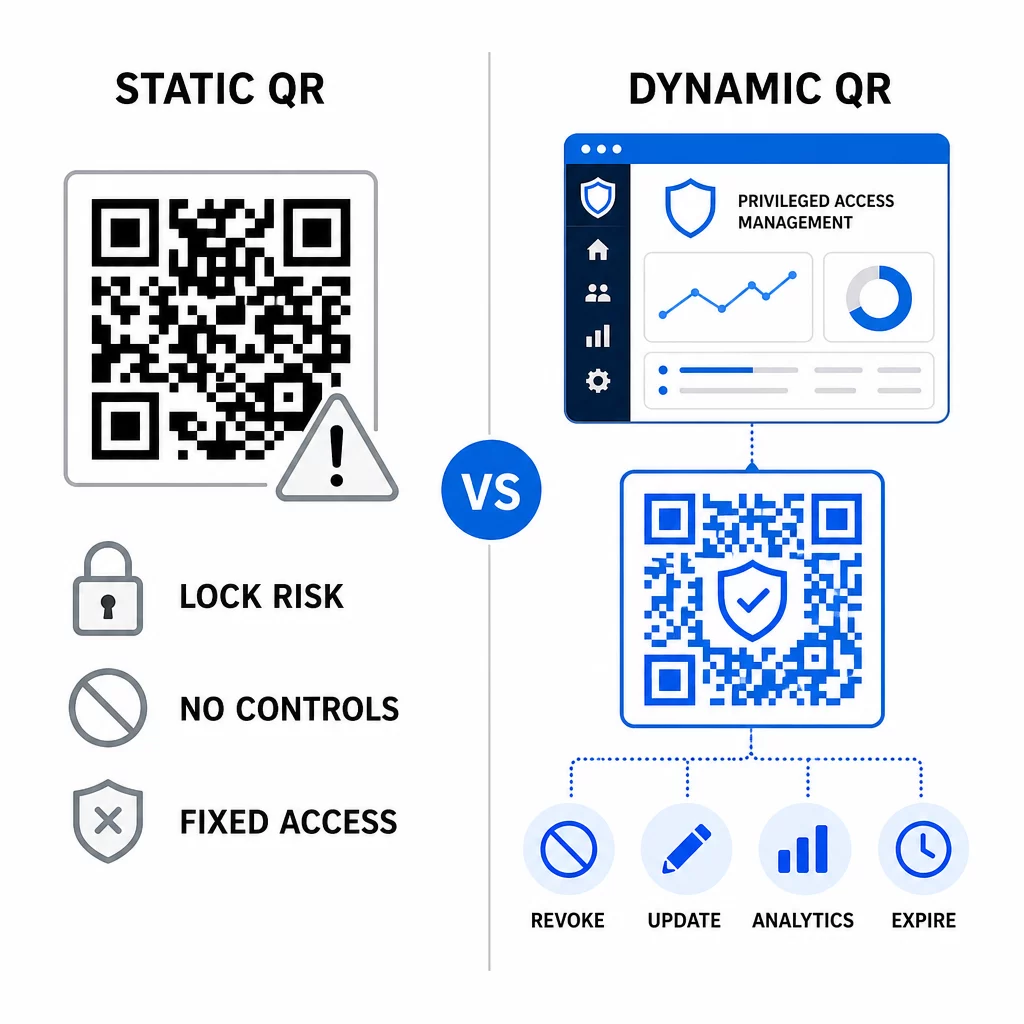
Staattiset QR-koodit voivat edelleen palvella matalamman riskin sisäisissä käyttötapauksissa – kuten linkittäminen dokumentaatioon tai vain luku -resursseihin – mutta niitä ei tulisi käyttää todennusvirroissa, jotka sisältävät etuoikeutetun pääsyn.
Tärkeimmät tietoturvanäkökohdat QR-pohjaisessa PAM-todennuksessa
QR-kooditodennuksen käyttöönotto PAM-ympäristössä luo oman hyökkäyspintansa. Näiden riskien ymmärtäminen ja niiden lieventäminen on olennaista ennen tuotantoon siirtymistä.
Rekisteröinnin QR-koodin haavoittuvuus. TOTP-rekisteröinnin QR-koodiin koodattu jaettu salaisuus ei vanhene itsestään. Jos koodi kaapataan kuvakaappauksena, välitetään sähköpostitse tai tallennetaan varmuuskopioon, hyökkääjä voi myöhemmin käyttää sitä laitteen uudelleenrekisteröintiin ja kelvollisten TOTP-koodien luomiseen loputtomiin. Lievennys on suoraviivainen: määritä rekisteröintikoodit vanhenemaan yhden onnistuneen skannauksen jälkeen. Tarkasta ja poista kaikki historialliset rekisteröinnin QR-koodit, jotka on tallennettu sähköpostijärjestelmiin tai varmuuskopioihin, ja rekisteröi uudelleen kaikki käyttäjät uusilla kertakäyttökoodeilla.
QR-koodin tietojenkalastelu (quishing). Hyökkääjät ovat dokumentoineet kampanjoita, joissa he esiintyvät MFA-rekisteröintiprosesseina lähettäen sähköposteja, jotka ohjaavat käyttäjiä skannaamaan haitallisen QR-koodin, joka johtaa tunnistetietojen kalastelusivulle. Kouluta käyttäjiäsi suhtautumaan epäluuloisesti pyytämättömiin QR-skannauspyyntöihin, varmistamaan lähettäjän itsenäisesti ennen skannausta ja käyttämään todennussovelluksia, jotka käsittelevät `otpauth://`-sisältöä eristetyssä ympäristössä mieluummin kuin avaavat mielivaltaisia URL-osoitteita. Syvempää ohjeistusta varten katso QR-koodin henkilöllisyyden varmennus kyberturvallisuudessa.
SMS-käytöstä poistaminen. NISTin digitaalisen identiteetin ohjeistus nimenomaisesti kehottaa välttämään tekstiviestien ja puheluiden käyttöä out-of-band-todennukseen SIM-kortin vaihdon, laitteen vaihdon ja numeronsiirron kaltaisten riskien vuoksi. TOTP-pohjainen QR-rekisteröinti todennussovelluksilla on vahvempi vaihtoehto, jonka NIST tunnustaa päteväksi out-of-band-mekanismiksi, kun se toimitetaan turvallisen toissijaisen kanavan kautta.
Laitteen sidonta ja biometriset tiedot. QR-kooditodennuksen linkittäminen ennalta rekisteröityihin laitteisiin lisää laitteistokerroksen, jota tekstiviestit eivät voi tarjota. Biometrisen varmennuksen – sormenjäljen tai kasvojentunnistuksen – lisääminen luo kolmen tekijän mallin: jotain mitä sinulla on (rekisteröity laite), jotain mitä olet (biometriset tiedot) ja aikaan sidottu koodi (kontekstista riippuvainen). Suuren riskin toiminnoissa määritä lyhyemmät TOTP-ikkunat tai vaadi lisävarmennusvaiheita.
Testaus ennen käyttöönottoa. Aina testaa QR-koodin todennusvirtoja useilla laitteilla, käyttöjärjestelmillä ja todennussovelluksilla ennen tuotantoon siirtämistä. Varmista, että rekisteröintikoodit vanhenevat käytön jälkeen, että peruutus toimii odotetusti ja että varautumispolut toimivat oikein.
Kattavan katsauksen QR-kooditoteutuksen koventamiseen löydät osoitteesta kyberturvallisuuden parhaita käytäntöjä QR-koodien turvallisuudessa ja turvalliset QR-koodin luomisen parhaat käytännöt.
QR-todennuksen integrointi olemassa oleviin MFA- ja SSO-järjestelmiin
QR-koodit toimivat hyvin olemassa olevan todennusinfrastruktuurin rinnalla sen sijaan, että ne korvaisivat sen kokonaan. MFA-asetuksissa QR-pohjainen TOTP toimii “jotain mitä sinulla on” -tekijänä, täydentäen salasanaa tai biometristä tunnistusta. SSO-ympäristöissä QR-koodi voi toimia haaste-vastausvaiheena, joka vahvistaa laitteen hallussapidon ennen istuntotunnuksen myöntämistä. Yksityiskohtaisen vertailun näistä lähestymistavoista löydät osoitteesta QR-koodit vs. salasanat SSO:ssa.
Rekisteröintimalli ulottuu myös PAMin ulkopuolelle. Tiimit, jotka jo käyttävät salasanojen hallintaohjelmia, kuten LastPassia, voivat noudattaa lähes identtistä QR-skannauksen asennusprosessia – skannaa linkittääksesi, vahvista TOTP-koodilla, tallenna palautuskoodit – mikä tekee työnkulusta tutun käyttäjille, jotka ovat jo määrittäneet MFA:n muualla. Katso LastPassin QR-koodin asennusopas vaiheittaista ohjetta varten.
Jokaisen todennusyrityksen hyvin konfiguroidussa järjestelmässä tulisi luoda lokimerkintä, joka sisältää QR-koodin tunnisteen, laitetiedot, biometrisen tuloksen (jos sovellettavissa), aikaleiman ja maantieteellisen sijainnin. Nämä lokit ovat kriittisiä vaatimustenmukaisuustarkastuksissa, poikkeamien havaitsemisessa ja tapausten hallinnassa.
Edistyneet ominaisuudet: Analytiikka, mukauttaminen ja reaaliaikainen hallinta
Yritystason QR-koodialustat lisäävät peruskoodin luomisen lisäksi ominaisuuksia, jotka ovat suoraan merkityksellisiä PAM-toiminnoille.
Reaaliaikainen analytiikka antavat tietoturvatiimien seurata todennusmalleja niiden tapahtuessa. Seurattavia mittareita ovat skannausaikaleimat, laitetyypit, maantieteelliset sijainnit ja käyttäytymisen peruslinjat. Algoritmit, jotka merkitsevät poikkeamia – epätavallinen laitetyyppi, skannaus odottamattomasta maasta, epäonnistuneiden yritysten piikki – voivat laukaista tehostetun todennuksen tai automaattiset hälytykset. Lisätietoja siitä, miltä nämä mittarit näyttävät käytännössä, katso miten QR-koodit yksinkertaistavat monivaiheista tunnistautumista.
Brändätyt todennuskoodit palvelevat käytännöllistä turvallisuustoimintoa estetiikan lisäksi. Kun organisaatiosi käyttää johdonmukaisia, brändättyjä QR-koodeja yrityksen logoilla ja värimaailmoilla, käyttäjät kehittävät visuaalisen peruslinjan laillisille todennuspyynnöille. Koodi, joka poikkeaa tästä peruslinjasta, muuttuu varoitusmerkiksi. Riittävän värikontrastin varmistaminen – vähintään 4,5:1 suhde – pitää koodit myös luotettavasti skannattavissa eri laitteilla ja valaistusolosuhteissa.
Dynaaminen hallinta on ominaisuus, joka vähentää suorimmin operatiivista riskiä. Kun työntekijä lähtee, voit deaktivoida hänen koodinsa välittömästi keskitetystä hallintapaneelista odottamatta tunnistetietojen kiertokulkuja. Kun tietoturvapoikkeama havaitaan, voit peruuttaa ja uudelleenmyöntää koodit ilman uudelleenpainatusta. Dynaaminen QR-koodi generaattori Pagelootissa tukee kaikkia näitä työnkulkuja, ja siinä on sisäänrakennettu reaaliaikainen skannauksen seuranta ja muokattavat kohteet.
Tiimeille, jotka käsittelevät salattuja tunnistetietoja tai tunnustietoja QR-hyötykuormissa, katso salattuja QR-koodeja todennusalustoille ohjeita AES- ja RSA-salausmenetelmiin.
Alan sovellukset
Sama QR-pohjainen PAM-malli soveltuu eri toimialoille, joilla on erilaiset etuoikeutetun pääsyn profiilit.
Alalla pankki- ja rahoituspalvelut, järjestelmänvalvojat käyttävät aikaherkkiä QR-koodeja päästäkseen pankkijärjestelmiin, kaupankäyntialustoihin ja asiakastietokantoihin. Jokainen etuoikeutettu istunto kirjataan käytettyä koodia vastaan, mikä tarjoaa selkeän tarkastusketjun sääntelyn noudattamista varten.
Alalla ohjelmistokehitys, hajautetut tiimit käyttävät QR-koodeja päästäkseen tuotantojärjestelmiin, koodivarastoihin ja käyttöönotto-putkiin ilman staattisia tunnuksia. Dynaamiset koodit nopeuttavat perehdytystä ja tekevät poistamisesta välitöntä – ei tarvitse odottaa salasanojen vaihtumisen leviämistä.
Alalla terveydenhuolto, työasemien välillä liikkuva kliininen henkilöstö voi todentaa nopeasti skannaamalla kirjoittamisen sijaan, mikä vähentää kirjautumisen kitkaa säilyttäen samalla HIPAA:n edellyttämät tarkastusketjut.
Kuvio on johdonmukainen: QR-koodit yhdistettynä dynaamiseen hallintaan ja analytiikkaan antavat tietoturvatiimeille tarvittavan hallinnan hidastamatta käyttäjiä, jotka ovat riippuvaisia nopeasta ja luotettavasta pääsystä. QR-kooditodennus ei korvaa kypsää PAM-strategiaa – se on mekanismi, joka vahvistaa yhtä PAM:n haavoittuvimmista komponenteista. Korvaamalla staattiset tunnukset aikasidonnaisilla, laitesidonnaisilla koodeilla, pakottamalla kertakäyttöisen rekisteröinnin ja valvomalla jokaista todennustapahtumaa suljet tietojenkalastelu- ja tunnusvarkausaukot, jotka vanhat menetelmät jättävät auki. Aloita ottamalla QR-rekisteröinti käyttöön PAM-alustasi todennusasetuksissa, määrittele MFA-käytäntösi ja käytä dynaamisia koodeja keskitetyn hallinta-alustan kanssa ylläpitääksesi reaaliaikaista pääsynhallintaa.
Luo ja hallitse QR-koodeja todennustyönkulkuillesi Käytä QR-koodigeneraattori aloittaaksesi, tai tutustu Dynaaminen QR-koodi generaattori rekisteröintikoodeihin, joita voit päivittää, seurata ja peruuttaa yhdestä hallintapaneelista.
Usein kysytyt kysymykset
Rekisteröinnin aikana PAM-järjestelmä luo jaetun salaisen avaimen ja koodaa sen QR-koodiksi käyttäen `otpauth://totp/` URI-muotoa. Käyttäjä skannaa tämän todennussovelluksella, joka tallentaa salaisuuden laitteelle. Kirjautumisen yhteydessä sovellus ja palvelin laskevat itsenäisesti 30 sekunnin pääsykoodin kyseisestä salaisuudesta ja nykyisestä ajasta. Koska koodi on aikaan sidottu ja laitteeseen sidottu, sen sieppaaminen siirron aikana ei tarjoa pysyvää arvoa hyökkääjälle.
Ilmoittautumisen QR-koodin haavoittuvuus on yleisimmin huomiotta jäävä riski. Ilmoittautumisen QR-koodiin upotettu TOTP-salaisuus ei vanhene itsestään, joten mikä tahansa kuvakaappaus, sähköpostin edelleenlähetys tai varmuuskopio kyseisestä koodista pysyy käyttökelpoisena toistaiseksi. Lievitä tätä määrittämällä ilmoittautumiskoodit vanhenemaan yhden onnistuneen skannauksen jälkeen, ja tarkasta sähköposti- ja varmuuskopiojärjestelmäsi poistaaksesi kaikki tallennetut historialliset ilmoittautumiskoodit.
Suosi aina dynaamisia QR-koodeja todennukseen ja MFA-rekisteröintivirtoihin.