האם אתם מתקשים לאבטח חשבונות מיוחסים מבלי ליצור חיכוך עבור המנהלים שלכם? סיסמאות סטטיות ושיטות MFA מדור קודם מותירות סביבות PAM חשופות לפישינג, גניבת אישורים וחטיפת סשנים. עמוד זה מסביר כיצד אימות מבוסס קוד QR מטפל בפערים אלו – מכסה את נוף האיומים, כיצד פועלת ההרשמה, מכניקת TOTP, ושיטות האבטחה שצוותכם צריך ליישם נכון.
מדוע אימות PAM מסורתי אינו מספק
מערכות ניהול גישה מיוחסת (PAM) מגנות על החשבונות הרגישים ביותר בארגון שלכם. כאשר חשבונות אלו מסתמכים על סיסמאות סטטיות, אישורים משותפים או MFA מבוסס SMS, לתוקפים יש נתיבים מתועדים היטב לנצל אותם.
פישינג וגניבת אישורים נשארים נקודת הכניסה הנפוצה ביותר. משתמשים מיוחסים ממוקדים בדיוק מכיוון שחשבונותיהם פותחים מערכות קריטיות. אפילו מנהלי מערכת מנוסים יכולים להיות מרומים על ידי דפי התחברות מזויפים ומשכנעים, במיוחד כאשר תוקפים משתמשים בהנדסה חברתית כדי להתחזות לספקים או לתמיכת IT. ברגע שהאישורים נגנבים, תוקפים נעים לרוחב, מעלים הרשאות ושומרים על גישה מתמשכת.
חשבונות משותפים מחמירים את הבעיה. כאשר מספר מנהלי מערכת משתמשים באותם אישורים, האחריות האישית נעלמת. חקירות פרצות נתקעות, ניטור תאימות קורס, וסיסמה אחת שנפרצה פותחת גישה על פני מספר מערכות.
חטיפת סשנים מציגה סיכון מרכזי שלישי. לאחר אירוע אימות לגיטימי, תוקפים יכולים ליירט אסימוני סשן, לנצל קובצי Cookie, או להשתמש בטכניקות "אדם באמצע" כדי להתחזות למשתמשים מאומתים – כל זאת מבלי לדעת את הסיסמה המקורית. אסימוני סשן מתמשכים הופכים התקפות אלו לקשות במיוחד לזיהוי, מכיוון שהתוקף משתלב בתעבורה הניהולית הרגילה.
פגיעויות אלו חולקות גורם שורש משותף: אימות התלוי בסודות סטטיים וניתנים לשימוש חוזר. אימות מבוסס קוד QR מטפל בכך ישירות.
כיצד פועל אימות קוד QR ב-PAM
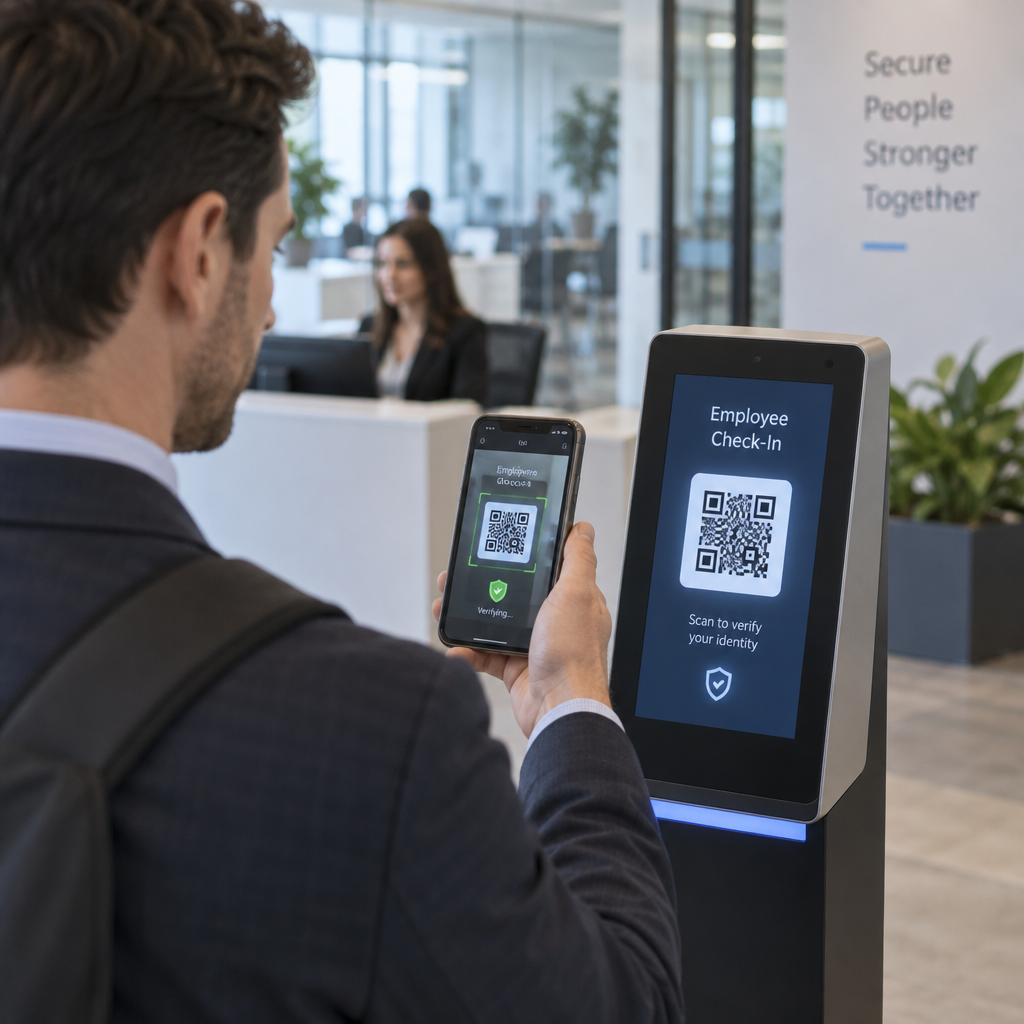
אימות קוד QR מחליף אישורים סטטיים בקודים דינמיים וספציפיים למכשיר. במקום להקליד סיסמה, מנהל מערכת סורק קוד QR באמצעות מכשיר נייד רשום. המכשיר קורא את הקוד, מיישם מפתחות מאובטחים המאוחסנים בחומרה, ומשלים את האימות תוך שניות.
היישום הנפוץ ביותר בסביבות PAM ארגוניות משלב קודי QR עם TOTP (סיסמה חד-פעמית מבוססת זמן) כפי שהוגדר ב-RFC 6238. כך פועל התהליך:
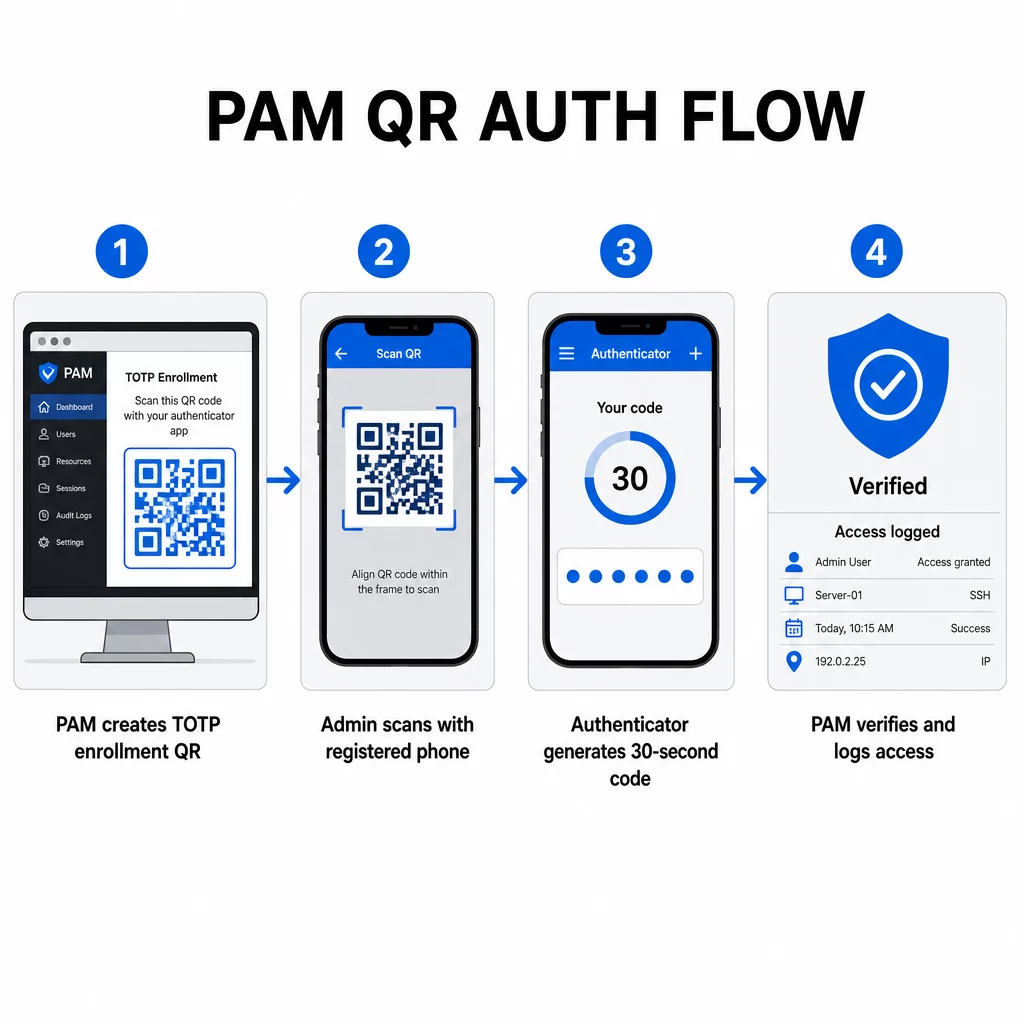
- במהלך ההרשמה, המערכת מייצרת מפתח סודי משותף ומקודדת אותו לקוד QR כ-URI בפורמט `otpauth://totp/LABEL?secret=SECRET&issuer=ISSUER`
- המשתמש סורק קוד QR זה באמצעות אפליקציית אימות (כגון Google Authenticator, Microsoft Authenticator או Okta Verify), אשר מאחסנת את הסוד באופן מקומי במכשיר
- בעת ההתחברות, האפליקציה מיישמת את אלגוריתם HOTP על מונה מבוסס זמן הנגזר מזמן יוניקס הנוכחי, ומייצרת קוד גישה חד-פעמי התקף למשך 30 שניות כברירת מחדל
- השרת מבצע את אותו חישוב באופן עצמאי ומקבל קודים משלב הזמן הנוכחי ומשלב הזמן שקדם לו מיד, כדי להתחשב בסחף שעון
מכיוון שקוד הגישה נגזר מזמן ומסוד הקשור למכשיר – ולא מועבר דרך הרשת – יירוטו במעבר אינו מספק ערך מתמשך. כל קוד חסר תועלת תוך 30 שניות.
פלטפורמות כמו CyberArk מיישמות מודל זה ישירות. מנהלים מאפשרים הרשמת משתמשים מבוססת קוד QR תחת הגדרות ← אימות ← פלטפורמה ← הגדרות אבטחה ← אפשרויות אימות, ולאחר מכן מגדירים מדיניות MFA המפעילה את אשף ההרשמה בכניסה הראשונה. אפליקציית CyberArk Identity לנייד תומכת גם באפשרות “הירשם עם QR”, שבה משתמשים סורקים קוד המוצג בפורטל Identity כדי להפעיל את המכשיר שלהם כגורם MFA.
הגדרת הרשמת MFA באמצעות קוד QR
עבור מהנדסי DevOps המגדירים MFA מבוסס QR בסביבת PAM, תהליך ההרשמה הכללי עוקב אחר שלבים אלה ללא קשר לפלטפורמה הספציפית:
- אפשר הרשמת QR בהגדרות האימות של הפלטפורמה. רוב מערכות ה-PAM הארגוניות חושפות זאת כמתג תחת אפשרויות תצורת אימות או אבטחה.
- הגדר מדיניות MFA הקובעת אילו משתמשים או תפקידים דורשים MFA, מתי הוא נאכף, ומה קורה בכניסה הראשונה.
- הצג את קוד ה-QR של ההרשמה למשתמש במהלך ההפעלה המאומתת הראשונה שלו. הקוד מקודד את סוד ה-TOTP המשותף בפורמט URI של `otpauth://`.
- הנחה את המשתמש לסרוק את הקוד באמצעות אפליקציית האימות הרשומה שלהם. ספק חלופה להזנה ידנית (מפתח הסוד הגולמי) למקרים שבהם המצלמה אינה יכולה לקרוא את הקוד.
- אמת את ההרשמה על ידי בקשת המשתמש להזין קוד TOTP לפני השלמת ההגדרה, ובכך לאשר שהסוד הועבר כהלכה.
- צור ואחסן קודי שחזור גיבוי כדי שמשתמשים לא יינעלו מחוץ לחשבון אם יאבדו את המכשיר שלהם.
עבור צוותים המנהלים פריסות בקנה מידה גדול, שילוב זרימת הרשמה זו עם מחולל QR דינמי מאפשר לך לעדכן, לעקוב ולבטל קודי הרשמה באופן מרכזי – חשוב כאשר יש צורך לסובב אישורים או כאשר מכשיר מדווח כאבוד.
עקוב ונהל קודי QR לאימות בקנה מידה גדול צריך להנפיק, לעדכן או לבטל קודי QR בצוות מבוזר? השתמש ב- מחולל QR דינמי כדי ליצור קודים ניתנים לעריכה עם ניתוח נתונים בזמן אמת וניהול מרכזי.
קודי QR דינמיים לעומת סטטיים בסביבות PAM
הבחירה בין קודי QR סטטיים לדינמיים בעלת השלכות אבטחה ישירות על תהליכי עבודה של PAM.
| תכונה | קודי QR סטטיים | קודי QR דינמיים |
|---|---|---|
| תוכן לאחר יצירה | קבוע, לא ניתן לשינוי | ניתן לעריכה בכל עת |
| ביטול | דורש הנפקה מחדש והפצה מחדש | מיידי, מלוח מחוונים מרכזי |
| ניתוח נתונים | אין | חותמות זמן של סריקה, סוגי מכשירים, מיקומים |
| סיכון להתקפת שידור חוזר | גבוה יותר (הקוד קבוע) | נמוך יותר (אפשרויות תפוגה ושימוש חד פעמי) |
| מקרה שימוש מיטבי | תוכן חד פעמי בסיכון נמוך | גישה מיוחסת, תהליכי עבודה רגישים |
עבור אימות PAM והרשמת MFA, קודי QR דינמיים מועדפים מאוד. אם מכשיר מדווח כאבוד, מנהל מערכת יכול לבטל את קוד ההרשמה המשויך באופן מיידי. קודים מוגבלים בזמן מונעים התקפות שידור חוזר על ידי הפיכת כל קוד שייורט לחסר תועלת תוך רגעים. וניתוח סריקות מספק שביל ביקורת התומך בדרישות תאימות.
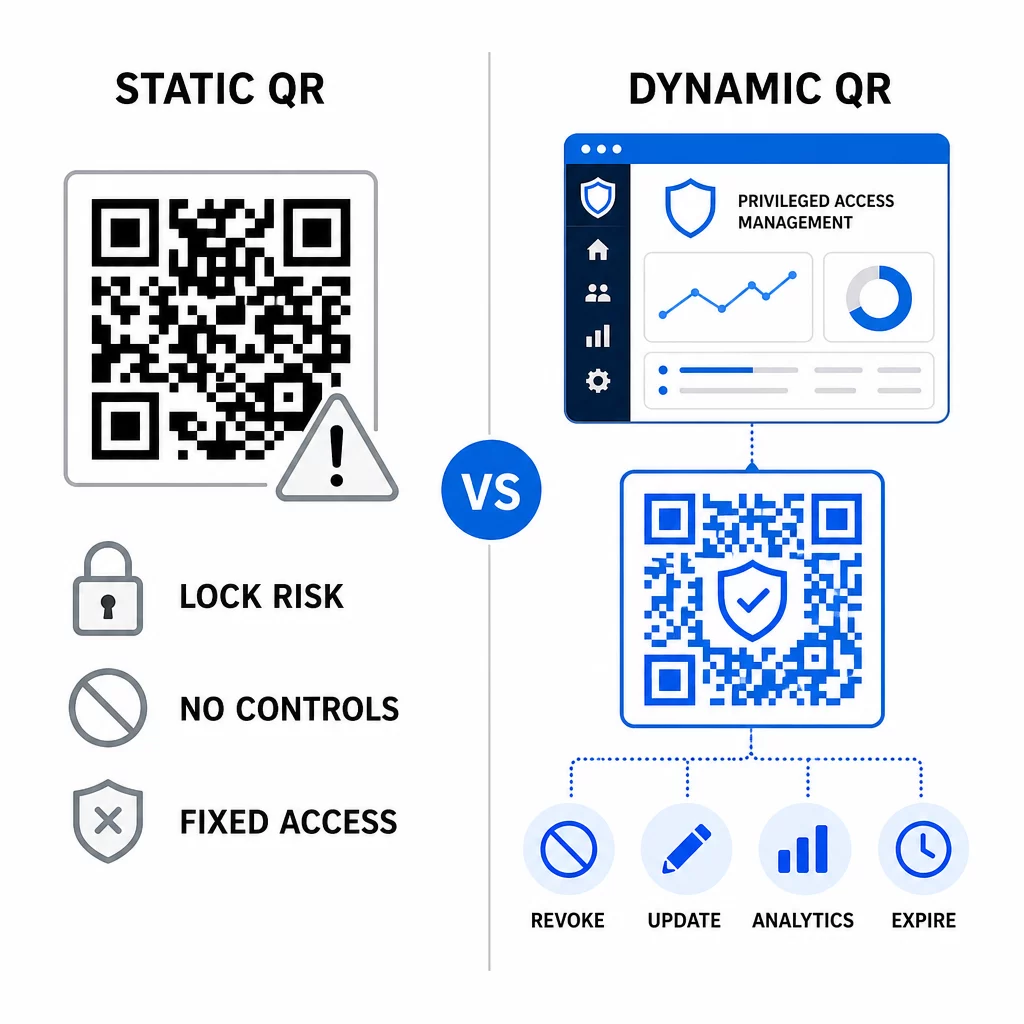
קודי QR סטטיים עדיין יכולים למלא תפקיד במקרי שימוש פנימיים בסיכון נמוך יותר – כגון קישור לתיעוד או למשאבים לקריאה בלבד – אך אין להשתמש בהם עבור זרימות אימות הכוללות גישה מיוחסת.
שיקולי אבטחה מרכזיים עבור אימות PAM מבוסס QR
הטמעת אימות קוד QR בסביבת PAM מציגה משטח תקיפה משלה. הבנת סיכונים אלה והפחתתם חיונית לפני ההשקה לייצור.
פגיעות קוד QR של הרשמה. הסוד המשותף המקודד בקוד QR של הרשמת TOTP אינו פג תוקפו מעצמו. אם קוד זה נלכד בצילום מסך, הועבר באמצעות דוא"ל, או אוחסן בגיבוי, תוקף יכול מאוחר יותר להשתמש בו כדי לרשום מחדש מכשיר ולייצר קודי TOTP תקפים ללא הגבלה. ההפחתה פשוטה: הגדר קודי הרשמה לפוג תוקפם לאחר סריקה מוצלחת אחת. בקר ונקה כל קודי QR היסטוריים של הרשמה המאוחסנים במערכות דוא"ל או בגיבויים, ורשום מחדש משתמשים מושפעים עם קודים חדשים לשימוש חד פעמי.
דיוג קודי QR (קווישינג). תוקפים תיעדו קמפיינים שבהם הם מתחזים לתהליכי הרשמה ל-MFA, ושולחים מיילים המורים למשתמשים לסרוק קוד QR זדוני המוביל לדף איסוף פרטי התחברות. אמן את המשתמשים שלך להתייחס לבקשות סריקת QR לא רצויות בחשדנות, לאמת באופן עצמאי את השולח לפני הסריקה, ולהשתמש באפליקציות אימות המטפלות במטען `otpauth://` בסביבה מבודדת במקום לפתוח כתובות URL שרירותיות. להדרכה מעמיקה יותר, ראה אימות זהות באמצעות קוד QR באבטחת סייבר.
הוצאת SMS משימוש. הנחיות הזהות הדיגיטלית של NIST מרתיעות במפורש משימוש ב-SMS ובשיחות קוליות לאימות מחוץ לפס (out-of-band authentication) עקב סיכונים כמו החלפת SIM, החלפת מכשיר והעברת מספר. הרשמת QR מבוססת TOTP עם אפליקציות אימות היא חלופה חזקה יותר ש-NIST מכירה כמנגנון תקף מחוץ לפס כאשר הוא מועבר דרך ערוץ משני מאובטח.
קישור מכשירים וביומטריה. קישור אימות קוד QR למכשירים רשומים מראש מוסיף שכבת חומרה ש-SMS אינו יכול לספק. הוספת אימות ביומטרי – טביעת אצבע או זיהוי פנים – יוצרת מודל תלת-גורמי: משהו שיש לך (המכשיר הרשום), משהו שאתה (ביומטריה), והקוד מוגבל בזמן (תלוי הקשר). עבור פעולות בסיכון גבוה, הגדר חלונות TOTP קצרים יותר או דרוש שלבי אימות נוספים.
בדיקה לפני פריסה. תָמִיד בדוק זרימות אימות קוד QR על פני מספר מכשירים, מערכות הפעלה ואפליקציות אימות לפני העברה לייצור. ודא שקודי הרשמה פגים לאחר שימוש, שהביטול פועל כמצופה, ושנתיבי כניסה חלופיים מתפקדים כהלכה.
למבט מקיף על חיזוק יישום קוד ה-QR שלך, ראה שיטות עבודה מומלצות לאבטחת קודי QR בהגנת סייבר ו שיטות עבודה מומלצות ליצירת קוד QR מאובטח.
שילוב אימות QR עם MFA ו-SSO קיימים
קודי QR עובדים היטב לצד תשתית אימות קיימת במקום להחליף אותה לחלוטין. בהגדרות MFA, TOTP מבוסס QR פועל כגורם ה“משהו שיש לך”, ומשלים סיסמה או ביומטריה. בסביבות SSO, קוד QR יכול לשמש כשלב האתגר-תגובה המאשר החזקת מכשיר לפני הנפקת אסימון הפעלה. להשוואה מפורטת של גישות אלו, ראה קודי QR מול סיסמאות ב-SSO.
תבנית ההרשמה מתרחבת גם מעבר ל-PAM. צוותים שכבר משתמשים במנהלי סיסמאות כמו LastPass יכולים לעקוב אחר תהליך הגדרת סריקת QR כמעט זהה – סרוק לקישור, אשר עם קוד TOTP, אחסן קודי שחזור – מה שהופך את זרימת העבודה למוכרת למשתמשים שכבר הגדירו MFA במקומות אחרים. ראה את מדריך הגדרת קוד QR של LastPass להתייחסות שלב אחר שלב.
כל ניסיון אימות במערכת מוגדרת היטב צריך לייצר רשומת יומן הלוכדת את מזהה קוד ה-QR, פרטי המכשיר, תוצאה ביומטרית אם רלוונטי, חותמת זמן ומיקום גאוגרפי. יומנים אלה קריטיים לביקורות תאימות, זיהוי חריגות ותגובה לאירועים.
תכונות מתקדמות: ניתוח נתונים, התאמה אישית ובקרה בזמן אמת
פלטפורמות קוד QR ארגוניות מוסיפות יכולות מעבר ליצירת קוד בסיסית הרלוונטיות ישירות לפעולות PAM.
נתונים בזמן אמת מאפשרות לצוותי אבטחה לנטר דפוסי אימות בזמן אמת. מדדים שכדאי לעקוב אחריהם כוללים חותמות זמן של סריקות, סוגי מכשירים, מיקומים גאוגרפיים וקווי בסיס של התנהגות משתמשים. אלגוריתמים שמסמנים חריגות – סוג מכשיר חריג, סריקה ממדינה בלתי צפויה, עלייה חדה בניסיונות כושלים – יכולים להפעיל אימות מוגבר או התראות אוטומטיות. למידע נוסף על איך מדדים אלה נראים בפועל, ראה כיצד קודי QR מפשטים אימות רב-גורמי.
קודי אימות ממותגים משרתים פונקציית אבטחה מעשית מעבר לאסתטיקה. כאשר הארגון שלך משתמש בקודי QR עקביים וממותגים עם לוגו החברה וסכימות צבעים, משתמשים מפתחים קו בסיס ויזואלי לבקשות אימות לגיטימיות. קוד שחורג מקו בסיס זה הופך לסימן אזהרה. הבטחת ניגודיות צבע מספקת – יחס של לפחות 4.5:1 – גם שומרת על קודים ניתנים לסריקה באופן אמין על פני מכשירים ותנאי תאורה שונים.
שליטה דינמית היא התכונה שמפחיתה באופן הישיר ביותר סיכון תפעולי. כאשר עובד עוזב, אתה מנטרל את הקודים שלהם באופן מיידי מלוח מחוונים מרכזי מבלי להמתין למחזורי סיבוב אישורים. כאשר מתגלה אירוע אבטחה, אתה מבטל ומנפיק מחדש מבלי להדפיס מחדש. ה- מחולל QR דינמי ב-Pageloot תומך בכל זרימות עבודה אלה, עם מעקב סריקות בזמן אמת ויעדים ניתנים לעריכה מובנים.
לצוותים המטפלים באישורים מוצפנים או נתוני אסימונים בתוך מטעני QR, ראה קודי QR מוצפנים עבור פלטפורמות אימות להנחיות בנושאי גישות הצפנה AES ו-RSA.
יישומים בתעשייה
אותו מודל PAM מבוסס QR חל על פני תעשיות שונות עם פרופילי גישה מועדפת שונים.
ב- בנקאות ושירותים פיננסיים, מנהלים משתמשים בקודי QR רגישים לזמן כדי לגשת למערכות בנקאות ליבה, פלטפורמות מסחר ומאגרי מידע של לקוחות. כל סשן מועדף נרשם כנגד הקוד הספציפי ששימש, ומספק שביל ביקורת ברור לצורך עמידה בתקנות.
ב- פיתוח תוכנה, צוותים מבוזרים משתמשים בקודי QR כדי לגשת למערכות ייצור, מאגרי קוד וצינורות פריסה ללא אישורים סטטיים. קודים דינמיים מזרזים את תהליך הקליטה והופכים את תהליך העזיבה למיידי – ללא המתנה להפצת סיבובי סיסמאות.
ב- שירותי בריאות, צוות קליני שעובר בין עמדות עבודה יכול לאמת את זהותו במהירות על ידי סריקה במקום הקלדה, מה שמפחית את חיכוך הכניסה תוך שמירה על מסלולי הביקורת הנדרשים על ידי HIPAA.
התבנית עקבית: קודי QR בשילוב עם ניהול דינמי ואנליטיקה מעניקים לצוותי אבטחה את השליטה שהם צריכים מבלי להאט את המשתמשים התלויים בגישה מהירה ואמינה. אימות קוד QR אינו תחליף לאסטרטגיית PAM בשלה – זהו מנגנון שמחזק את אחד הרכיבים הפגיעים ביותר של PAM. על ידי החלפת אישורים סטטיים בקודים מוגבלים בזמן ומקושרים למכשיר, אכיפת הרשמה חד-פעמית, וניטור כל אירוע אימות, אתה סוגר את פערי הדיוג וגניבת האישורים ששיטות מדור קודם משאירות פתוחים. התחל בהפעלת הרשמת QR בהגדרות האימות של פלטפורמת ה-PAM שלך, הגדר את מדיניות ה-MFA שלך, והשתמש בקודים דינמיים עם פלטפורמת ניהול מרכזית כדי לשמור על שליטה בזמן אמת על הגישה.
צור ונהל קודי QR עבור זרימות העבודה של האימות שלך להשתמש ב מחולל קודי QR כדי להתחיל, או חקור את מחולל QR דינמי עבור קודי הרשמה שתוכל לעדכן, לעקוב ולבטל מלוח מחוונים יחיד.
שאלות נפוצות
במהלך ההרשמה, מערכת ה-PAM מייצרת מפתח סודי משותף ומקודדת אותו כקוד QR באמצעות פורמט ה-URI `otpauth://totp/`. המשתמש סורק זאת באמצעות אפליקציית אימות, אשר מאחסנת את הסוד במכשיר. בעת ההתחברות, האפליקציה והשרת מחשבים באופן עצמאי קוד גישה בן 30 שניות מאותו סוד ומהשעה הנוכחית. מכיוון שהקוד מוגבל בזמן ומוגבל למכשיר, יירוטו במעבר אינו מספק ערך מתמשך לתוקף.
פגיעות קוד ה-QR של ההרשמה היא הסיכון הנפוץ ביותר שמתעלמים ממנו. הסוד של TOTP המוטמע בקוד QR של הרשמה אינו פג תוקף מעצמו, ולכן כל צילום מסך, העברה במייל או עותק גיבוי של קוד זה נשאר שמיש ללא הגבלה. צמצמו זאת על ידי קביעת תצורה של קודי הרשמה שיפוגו לאחר סריקה מוצלחת אחת, ובדקו את מערכות הדוא"ל והגיבוי שלכם כדי לטהר כל קודי הרשמה היסטוריים מאוחסנים.
תמיד העדיפו קודי QR דינמיים עבור זרימות אימות והרשמה ל-MFA. קודים דינמיים ניתנים לביטול מיידי אם מכשיר אבד, ניתנים לעדכון ללא הפצה מחדש של חומרים פיזיים, וניתנים לניטור עם ניתוח נתונים בזמן אמת. קודים סטטיים מתאימים רק לתוכן בסיכון נמוך, לקריאה בלבד, שבו ביטול מיידי ורישום ביקורת אינם נדרשים.