Da li se mučite da obezbedite privilegovane naloge bez stvaranja problema za vaše administratore? Statičke lozinke i zastarele MFA metode ostavljaju PAM okruženja izloženim fišingu, krađi akreditiva i otmici sesija. Ova stranica objašnjava kako autentifikacija zasnovana na QR kodovima rešava te nedostatke – pokrivajući pretnje, kako funkcioniše registracija, mehaniku TOTP-a i bezbednosne prakse koje vaš tim treba da primeni ispravno.
Zašto tradicionalna PAM autentifikacija nije dovoljna
Sistemi za upravljanje privilegovanim pristupom štite najosetljivije naloge u vašoj organizaciji. Kada se ti nalozi oslanjaju na statičke lozinke, deljene akreditive ili MFA zasnovan na SMS-u, napadači imaju dobro dokumentovane puteve da ih iskoriste.
Fišing i krađa akreditiva ostaju najčešća ulazna tačka. Privilegovani korisnici su meta upravo zato što njihovi nalozi otključavaju kritične sisteme. Čak i iskusni administratori mogu biti prevareni uverljivim lažnim stranicama za prijavu, posebno kada napadači koriste socijalni inženjering da se predstave kao dobavljači ili IT podrška. Kada se akreditivi ukradu, napadači se kreću bočno, eskaliraju privilegije i održavaju trajan pristup.
Deljeni nalozi pogoršavaju problem. Kada više administratora koristi iste akreditive, individualna odgovornost nestaje. Istrage povreda se zaustavljaju, praćenje usklađenosti se prekida, a jedna kompromitovana lozinka otključava pristup preko više sistema.
Otmica sesije predstavlja treći veliki rizik. Nakon legitimnog događaja autentifikacije, napadači mogu presresti tokene sesije, iskoristiti kolačiće ili koristiti tehnike "čovek u sredini" da se predstave kao autentifikovani korisnici – sve to bez ikakvog znanja originalne lozinke. Trajni tokeni sesije čine ove napade posebno teškim za otkrivanje, jer se napadač stapa sa normalnim administrativnim saobraćajem.
Ove ranjivosti dele zajednički uzrok: autentifikacija koja zavisi od statičkih, ponovo upotrebljivih tajni. Autentifikacija zasnovana na QR kodovima direktno rešava ovaj problem.
Kako funkcioniše autentifikacija QR kodom u PAM-u
Autentifikacija QR kodom zamenjuje statičke akreditive dinamičkim kodovima specifičnim za uređaj. Umesto kucanja lozinke, administrator skenira QR kod registrovanim mobilnim uređajem. Uređaj čita kod, primenjuje sigurne ključeve pohranjene u hardveru i završava autentifikaciju za nekoliko sekundi.
Najčešća implementacija u PAM okruženjima preduzeća kombinuje QR kodove sa TOTP (jednokratna lozinka zasnovana na vremenu) kako je definisano u RFC 6238. Evo kako taj tok funkcioniše:
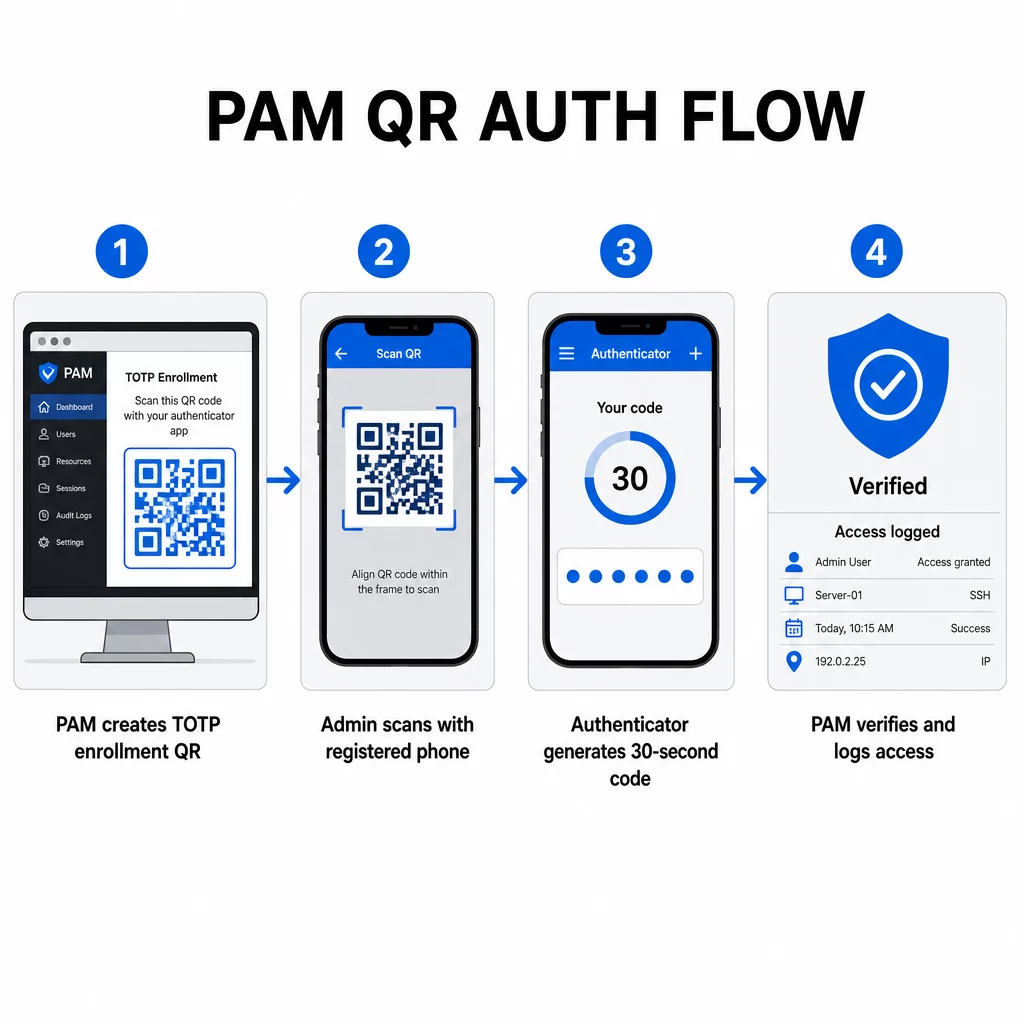
- Tokom registracije, sistem generiše deljeni tajni ključ i kodira ga u QR kod kao URI formatiran kao `otpauth://totp/LABEL?secret=SECRET&issuer=ISSUER`
- Korisnik skenira ovaj QR kod sa aplikacijom za autentifikaciju (kao što su Google Authenticator, Microsoft Authenticator ili Okta Verify), koja čuva tajnu lokalno na uređaju
- Prilikom prijave, aplikacija primenjuje HOTP algoritam na brojač zasnovan na vremenu izveden iz trenutnog Unix vremena, generišući jednokratnu lozinku koja je podrazumevano važeća 30 sekundi
- Server samostalno vrši isti proračun i prihvata kodove iz trenutnog i neposredno prethodnog vremenskog koraka kako bi se uzelo u obzir odstupanje sata
Budući da je lozinka izvedena iz vremena i tajne vezane za uređaj – ne prenosi se preko mreže – presretanje u tranzitu ne pruža trajnu vrednost. Svaki kod je beskoristan u roku od 30 sekundi.
Platforme poput CyberArka direktno implementiraju ovaj model. Administratori omogućavaju upis korisnika putem QR koda pod Podešavanja → Autentifikacija → Platforma → Bezbednosna podešavanja → Opcije autentifikacije, zatim definišu MFA politike koje pokreću čarobnjak za upis pri prvoj prijavi. Mobilna aplikacija CyberArk Identity takođe podržava opciju “Upis putem QR-a”, gde korisnici skeniraju kod prikazan na Identity portalu kako bi aktivirali svoj uređaj kao MFA faktor.
Podešavanje Upisa MFA putem QR koda
Za DevOps inženjere koji konfigurišu MFA zasnovan na QR-u u PAM okruženju, opšti proces upisa prati ove korake bez obzira na specifičnu platformu:
- Omogućite upis putem QR-a u podešavanjima autentifikacije platforme. Većina PAM sistema preduzeća ovo izlaže kao prekidač pod opcijama konfiguracije autentifikacije ili bezbednosti.
- Definišite MFA politiku koja određuje koji korisnici ili uloge zahtevaju MFA, kada se primenjuje, i šta se dešava pri prvoj prijavi.
- Predstavite QR kod za upis korisniku tokom njegove prve autentifikovane sesije. Kod kodira deljenu TOTP tajnu u `otpauth://` URI formatu.
- Uputite korisnika da skenira kod koristeći njihovu registrovanu aplikaciju za autentifikaciju. Obezbedite rezervnu opciju ručnog unosa (sirovi tajni ključ) za slučajeve kada kamera ne može da pročita kod.
- Potvrdite registraciju tako što ćete tražiti od korisnika da unese TOTP kod pre završetka podešavanja, potvrđujući da je tajna ispravno prenesena.
- Generišite i sačuvajte rezervne kodove za oporavak kako korisnici ne bi bili zaključani ako izgube svoj uređaj.
Za timove koji upravljaju velikim implementacijama, uparivanje ovog toka registracije sa Dinamički QR kod generator omogućava vam da centralno ažurirate, pratite i opozivate kodove za registraciju – važno kada je potrebno rotirati akreditive ili kada se uređaj prijavi kao izgubljen.
Pratite i upravljajte QR kodovima za autentifikaciju u velikom obimu Potrebno je izdati, ažurirati ili opozvati QR kodove u distribuiranom timu? Koristite Dinamički QR kod generator za kreiranje kodova koji se mogu uređivati sa analitikom u realnom vremenu i centralizovanim upravljanjem.
Dinamički naspram statičkih QR kodova u PAM okruženjima
Izbor između statičkih i dinamičkih QR kodova ima direktne bezbednosne implikacije za PAM radne tokove.
| FUNKCIJA | Statički QR kodovi | Dinamički QR kodovi |
|---|---|---|
| Sadržaj nakon kreiranja | Fiksno, ne može se menjati | Može se uređivati u bilo kom trenutku |
| Opoziv | Zahteva ponovno izdavanje i redistribuciju | Trenutno, sa centralne kontrolne table |
| ANALITIKA | Nema | Vremenske oznake skeniranja, tipovi uređaja, lokacije |
| Rizik od napada ponovnog slanja | Viši (kod je trajan) | Niži (opcije isteka i jednokratne upotrebe) |
| Najbolji slučaj upotrebe | Niskorizičan, jednokratan sadržaj | Privilegovani pristup, osetljivi tokovi rada |
Za PAM autentifikaciju i MFA upis, dinamički QR kodovi su izrazito preferirani. Ako je uređaj prijavljen kao izgubljen, administrator može odmah deaktivirati povezani kod za upis. Vremenski ograničeni kodovi sprečavaju napade ponovnog slanja čineći svaki presretnuti kod beskorisnim u roku od nekoliko trenutaka. A analitika skeniranja pruža revizorski trag koji podržava zahteve usklađenosti.
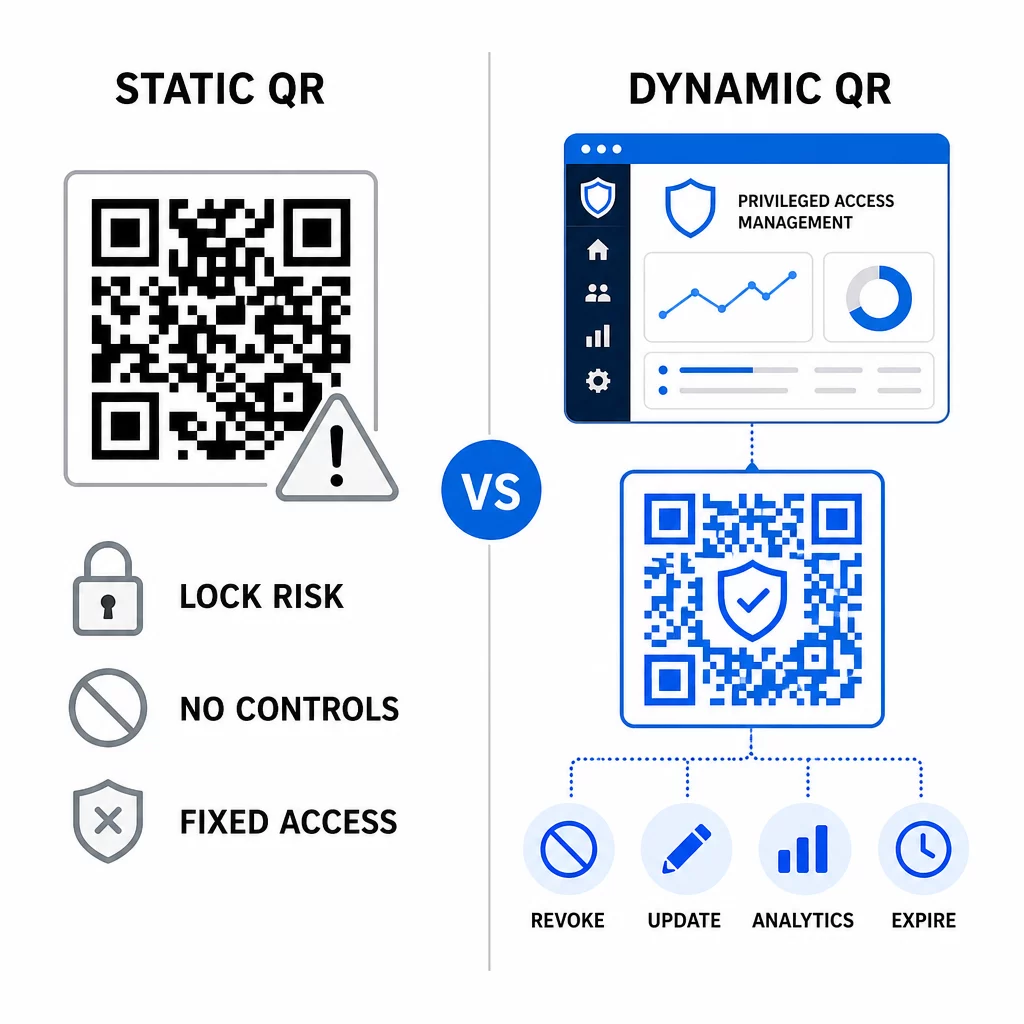
Statički QR kodovi i dalje mogu imati ulogu u internim slučajevima upotrebe nižeg rizika – kao što je povezivanje sa dokumentacijom ili resursima samo za čitanje – ali ih ne bi trebalo koristiti za tokove autentifikacije koji uključuju privilegovani pristup.
Ključna bezbednosna razmatranja za PAM autentifikaciju zasnovanu na QR kodovima
Implementacija autentifikacije QR kodom u PAM okruženju uvodi sopstvenu površinu napada. Razumevanje ovih rizika i njihovo ublažavanje je od suštinskog značaja pre puštanja u proizvodnju.
Ranjivost QR koda za upis. Zajednička tajna kodirana u TOTP QR kodu za upis ne ističe sama od sebe. Ako je taj kod snimljen snimkom ekrana, prosleđen putem e-pošte ili sačuvan u rezervnoj kopiji, napadač ga kasnije može koristiti za ponovni upis uređaja i generisanje validnih TOTP kodova neograničeno. Ublažavanje je jednostavno: konfigurišite kodove za upis da isteknu nakon jednog uspešnog skeniranja. Revidirajte i očistite sve istorijske QR kodove za upis sačuvane u sistemima e-pošte ili rezervnim kopijama, i ponovo upišite pogođene korisnike sa svežim jednokratnim kodovima.
Fišing QR kodom (quishing). Napadači su dokumentovali kampanje u kojima se lažno predstavljaju kao procesi registracije za MFA, šaljući e-poštu koja upućuje korisnike da skeniraju zlonamerni QR kod koji vodi do stranice za prikupljanje akreditiva. Obučite svoje korisnike da sa sumnjom tretiraju nezahtevane zahteve za skeniranje QR koda, da nezavisno provere pošiljaoca pre skeniranja i da koriste aplikacije za autentifikaciju koje obrađuju `otpauth://` sadržaj unutar izolovanog okruženja umesto otvaranja proizvoljnih URL-ova. Za detaljnije smernice, pogledajte Verifikacija identiteta QR kodom u sajber bezbednosti.
Ukidanje SMS-a. NIST-ove smernice za digitalni identitet eksplicitno obeshrabruju korišćenje SMS-a i glasovnih poziva za vanopsežnu autentifikaciju zbog rizika kao što su zamena SIM kartice, zamena uređaja i prenos broja. Registracija QR kodom zasnovana na TOTP-u sa aplikacijama za autentifikaciju je jača alternativa koju NIST priznaje kao validan vanopsežni mehanizam kada se isporučuje putem sigurnog sekundarnog kanala.
Povezivanje uređaja i biometrija. Povezivanje autentifikacije QR kodom sa unapred registrovanim uređajima dodaje hardverski sloj koji SMS ne može da pruži. Dodavanje biometrijske verifikacije – otiska prsta ili prepoznavanja lica – stvara model sa tri faktora: nešto što imate (registrovani uređaj), nešto što jeste (biometrija) i vremenski ograničen kod (zavisan od konteksta). Za operacije visokog rizika, konfigurišite kraće TOTP prozore ili zahtevajte dodatne korake verifikacije.
Testiranje pre implementacije. Увек testirajte tokove autentifikacije QR kodom na više uređaja, operativnih sistema i aplikacija za autentifikaciju pre puštanja u produkciju. Proverite da li kodovi za registraciju ističu nakon upotrebe, da li opoziv radi kako se očekuje i da li rezervni putevi za unos funkcionišu ispravno.
Za sveobuhvatan pregled jačanja vaše implementacije QR koda, pogledajte najbolje prakse za bezbednost QR kodova u sajber odbrani и bezbedne najbolje prakse za generisanje QR koda.
Integracija QR autentifikacije sa postojećim MFA i SSO
QR kodovi dobro funkcionišu uz postojeću infrastrukturu za autentifikaciju, umesto da je u potpunosti zamene. U MFA postavkama, TOTP zasnovan na QR kodu deluje kao faktor “nešto što imate”, dopunjujući lozinku ili biometriju. U SSO okruženjima, QR kod može poslužiti kao korak izazova i odgovora koji potvrđuje posedovanje uređaja pre izdavanja tokena sesije. Za detaljno poređenje ovih pristupa, pogledajte QR kodovi naspram lozinki u SSO.
Obrazac registracije se takođe proteže izvan PAM-a. Timovi koji već koriste menadžere lozinki kao što je LastPass mogu pratiti gotovo identičan proces podešavanja skeniranja QR koda – skenirajte za povezivanje, potvrdite TOTP kodom, sačuvajte kodove za oporavak – čineći radni tok poznatim korisnicima koji su već postavili MFA negde drugde. Pogledajte LastPass vodič za podešavanje QR koda za referencu korak po korak.
Svaki pokušaj autentifikacije u dobro konfigurisanom sistemu treba da generiše unos u dnevnik koji beleži identifikator QR koda, informacije o uređaju, biometrijski rezultat ako je primenljivo, vremensku oznaku i geografsku lokaciju. Ovi dnevnici su ključni za revizije usklađenosti, detekciju anomalija i odgovor na incidente.
Napredne funkcije: Analitika, prilagođavanje i kontrola u realnom vremenu
Enterprise platforme za QR kodove dodaju mogućnosti izvan osnovnog generisanja kodova koje su direktno relevantne za PAM operacije.
Analitika u realnom vremenu omogućavaju bezbednosnim timovima da prate obrasce autentifikacije kako se dešavaju. Metrike vredne praćenja uključuju vremenske oznake skeniranja, tipove uređaja, geografske lokacije i osnovne linije ponašanja korisnika. Algoritmi koji označavaju odstupanja – neobičan tip uređaja, skeniranje iz neočekivane zemlje, nagli porast neuspelih pokušaja – mogu pokrenuti pojačanu autentifikaciju ili automatska upozorenja. Za više o tome kako ove metrike izgledaju u praksi, pogledajte kako QR kodovi pojednostavljuju višefaktorsku autentifikaciju.
Brendirani kodovi za autentifikaciju služe praktičnoj bezbednosnoj funkciji izvan estetike. Kada vaša organizacija koristi dosledne, brendirane QR kodove sa logotipima kompanije i šemama boja, korisnici razvijaju vizuelnu osnovu za legitimne zahteve za autentifikaciju. Kod koji odstupa od te osnove postaje znak upozorenja. Obezbeđivanje dovoljnog kontrasta boja – odnosa od najmanje 4,5:1 – takođe omogućava pouzdano skeniranje kodova na različitim uređajima i u različitim svetlosnim uslovima.
Dinamička kontrola je funkcija koja najdirektnije smanjuje operativni rizik. Kada zaposleni ode, odmah deaktivirate njegove kodove sa centralne kontrolne table bez čekanja na cikluse rotacije akreditiva. Kada se otkrije bezbednosni incident, opozivate i ponovo izdajete bez ponovnog štampanja. The Dinamički QR kod generator na Pageloot-u podržava sve ove radne tokove, sa ugrađenim praćenjem skeniranja u realnom vremenu i destinacijama koje se mogu uređivati.
Za timove koji rukuju šifrovanim akreditivima ili podacima tokena unutar QR paketa, pogledajte šifrovanih QR kodova za platforme za autentifikaciju za smernice o AES i RSA pristupima šifrovanju.
Primene u industriji
Isti PAM model zasnovan na QR kodovima primenjuje se u različitim industrijama sa različitim profilima privilegovanog pristupa.
In bankarstvu i finansijskim uslugama, administratori koriste vremenski osetljive QR kodove za pristup osnovnim bankarskim sistemima, platformama za trgovanje i bazama podataka klijenata. Svaka privilegovana sesija se beleži u odnosu na korišćeni specifični kod, pružajući jasan trag revizije za regulatornu usklađenost.
In razvoju softvera, distribuirani timovi koriste QR kodove za pristup proizvodnim sistemima, repozitorijumima koda i cevovodima za implementaciju bez statičkih akreditiva. Dinamički kodovi ubrzavaju uvođenje novih zaposlenih i čine isključivanje trenutnim – nema čekanja da se rotacije lozinki prošire.
In здравствене заштите, kliničko osoblje koje se kreće između radnih stanica može se brzo autentifikovati skeniranjem umesto kucanjem, smanjujući trenje pri prijavi uz održavanje revizionih tragova koje zahteva HIPAA.
Obrazac je dosledan: QR kodovi u kombinaciji sa dinamičkim upravljanjem i analitikom daju bezbednosnim timovima kontrolu koja im je potrebna bez usporavanja korisnika koji zavise od brzog i pouzdanog pristupa. Autentifikacija QR kodom nije zamena za zrelu PAM strategiju – to je mehanizam koji jača jednu od najranjivijih komponenti PAM-a. Zamenom statičkih akreditiva kodovima vezanim za vreme i uređaj, primenom jednokratne registracije i praćenjem svakog događaja autentifikacije, zatvarate praznine za fišing i krađu akreditiva koje ostavljaju otvorene nasleđene metode. Započnite omogućavanjem QR registracije u podešavanjima autentifikacije vaše PAM platforme, definišite svoje MFA politike i koristite dinamičke kodove sa centralizovanom platformom za upravljanje kako biste održali kontrolu pristupa u realnom vremenu.
Kreirajte i upravljajte QR kodovima za vaše tokove rada autentifikacije Користити Генератор QR kodova da započnete, ili istražite Dinamički QR kod generator za kodove za registraciju koje možete ažurirati, pratiti i opozvati sa jedne kontrolne table.
Često postavljana pitanja
Prilikom upisa, PAM sistem generiše deljeni tajni ključ i kodira ga kao QR kod koristeći `otpauth://totp/` URI format. Korisnik ovo skenira pomoću aplikacije za autentifikaciju, koja čuva tajnu na uređaju. Prilikom prijave, aplikacija i server nezavisno izračunavaju 30-sekundnu lozinku iz te tajne i trenutnog vremena. Pošto je kod vremenski ograničen i vezan za uređaj, njegovo presretanje tokom prenosa ne pruža trajnu vrednost napadaču.
Ranjivost QR koda za upis je najčešće zanemaren rizik. TOTP tajna ugrađena u QR kod za upis ne ističe sama od sebe, tako da bilo koji snimak ekrana, prosleđena e-pošta ili rezervna kopija tog koda ostaje upotrebljiva neograničeno. Ublažite ovo konfiguracijom kodova za upis da isteknu nakon jednog uspešnog skeniranja, i revidirajte svoje sisteme e-pošte i rezervnih kopija kako biste uklonili sve uskladištene istorijske kodove za upis.
Uvek preferirajte dinamičke QR kodove za autentifikaciju i tokove upisa u MFA. Dinamički kodovi se mogu odmah opozvati ako se uređaj izgubi, ažurirati bez ponovne distribucije fizičkih materijala i pratiti uz analitiku u realnom vremenu. Statički kodovi su prikladni samo za sadržaj niskog rizika, samo za čitanje, gde trenutno opozivanje i evidentiranje revizije nisu potrebni.