Sliter du med å sikre privilegerte kontoer uten å skape friksjon for administratorene dine? Statiske passord og eldre MFA-metoder etterlater PAM-miljøer utsatt for phishing, stjålne legitimasjoner og sesjonskapring. Denne siden forklarer hvordan QR-kodebasert autentisering adresserer disse hullene – og dekker trusselbildet, hvordan registrering fungerer, TOTP-mekanikk, og sikkerhetspraksisen teamet ditt trenger for å implementere det riktig.
Hvorfor tradisjonell PAM-autentisering kommer til kort
Privileged Access Management-systemer beskytter de mest sensitive kontoene i organisasjonen din. Når disse kontoene er avhengige av statiske passord, delte legitimasjoner eller SMS-basert MFA, har angripere veldokumenterte veier for å utnytte dem.
Phishing og legitimasjonstyveri forblir det vanligste inngangspunktet. Privilegerte brukere blir målrettet nettopp fordi kontoene deres låser opp kritiske systemer. Selv erfarne administratorer kan bli lurt av overbevisende falske innloggingssider, spesielt når angripere bruker sosial manipulering for å utgi seg for å være leverandører eller IT-støtte. Når legitimasjonen er stjålet, beveger angripere seg sidelengs, eskalerer privilegier og opprettholder vedvarende tilgang.
Delte kontoer forverrer problemet. Når flere administratorer bruker de samme legitimasjonene, forsvinner individuelt ansvar. Brudd-etterforskninger stopper opp, samsvarskontroll bryter sammen, og et enkelt kompromittert passord låser opp tilgang på tvers av flere systemer.
Sesjonskapring utgjør en tredje stor risiko. Etter en legitim autentiseringshendelse kan angripere avskjære sesjonstokener, utnytte informasjonskapsler eller bruke man-in-the-middle-teknikker for å utgi seg for å være autentiserte brukere – alt uten å noensinne vite det originale passordet. Vedvarende sesjonstokener gjør disse angrepene spesielt vanskelige å oppdage, siden angriperen blander seg inn med normal administrativ trafikk.
Disse sårbarhetene deler en grunnårsak: autentisering som avhenger av statiske, gjenbrukbare hemmeligheter. QR-kodebasert autentisering adresserer dette direkte.
Hvordan QR-kodeautentisering fungerer i PAM
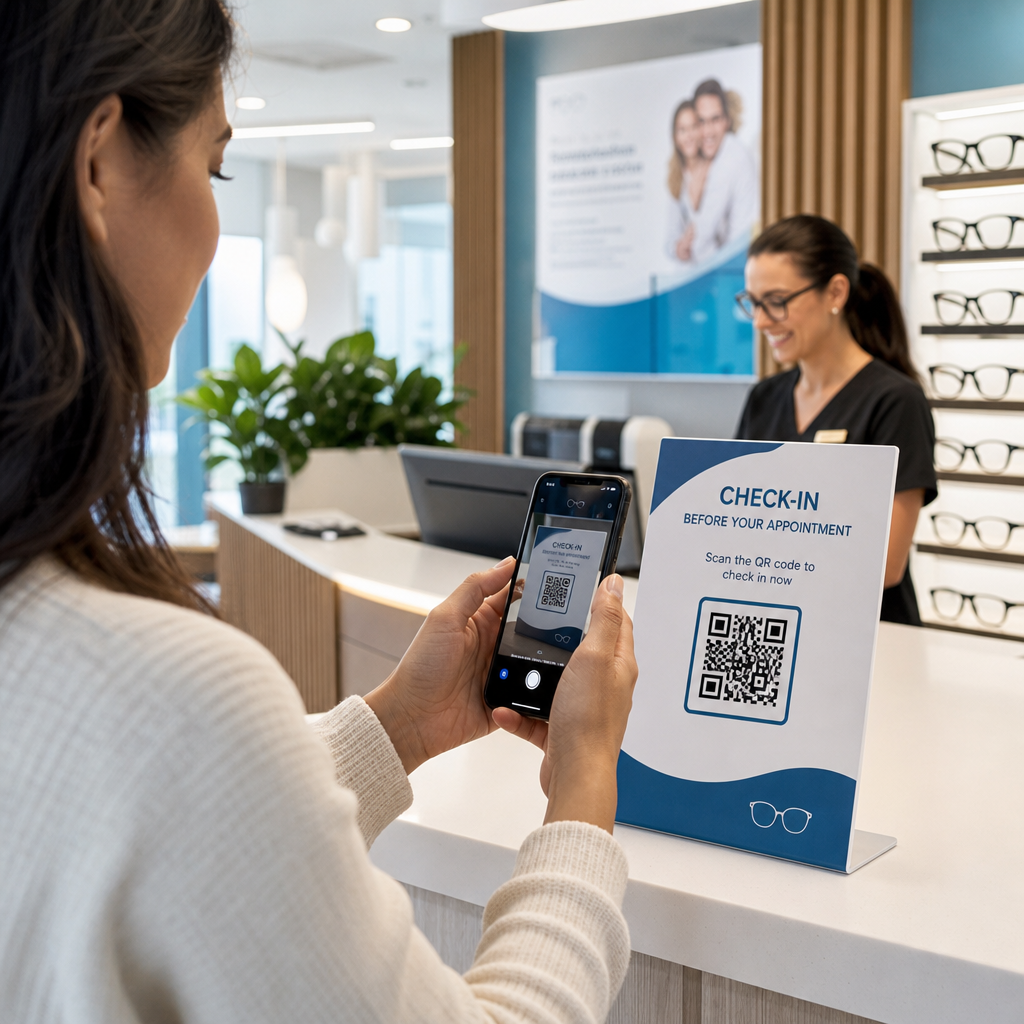
QR-kodeautentisering erstatter statiske legitimasjoner med dynamiske, enhetsspesifikke koder. I stedet for å skrive inn et passord, skanner en administrator en QR-kode med en registrert mobilenhet. Enheten leser koden, bruker sikre nøkler lagret i maskinvare, og fullfører autentiseringen på sekunder.
Den vanligste implementeringen i bedrifts-PAM-miljøer parer QR-koder med TOTP (Tidsbasert engangspassord) som definert i RFC 6238. Slik fungerer denne flyten:
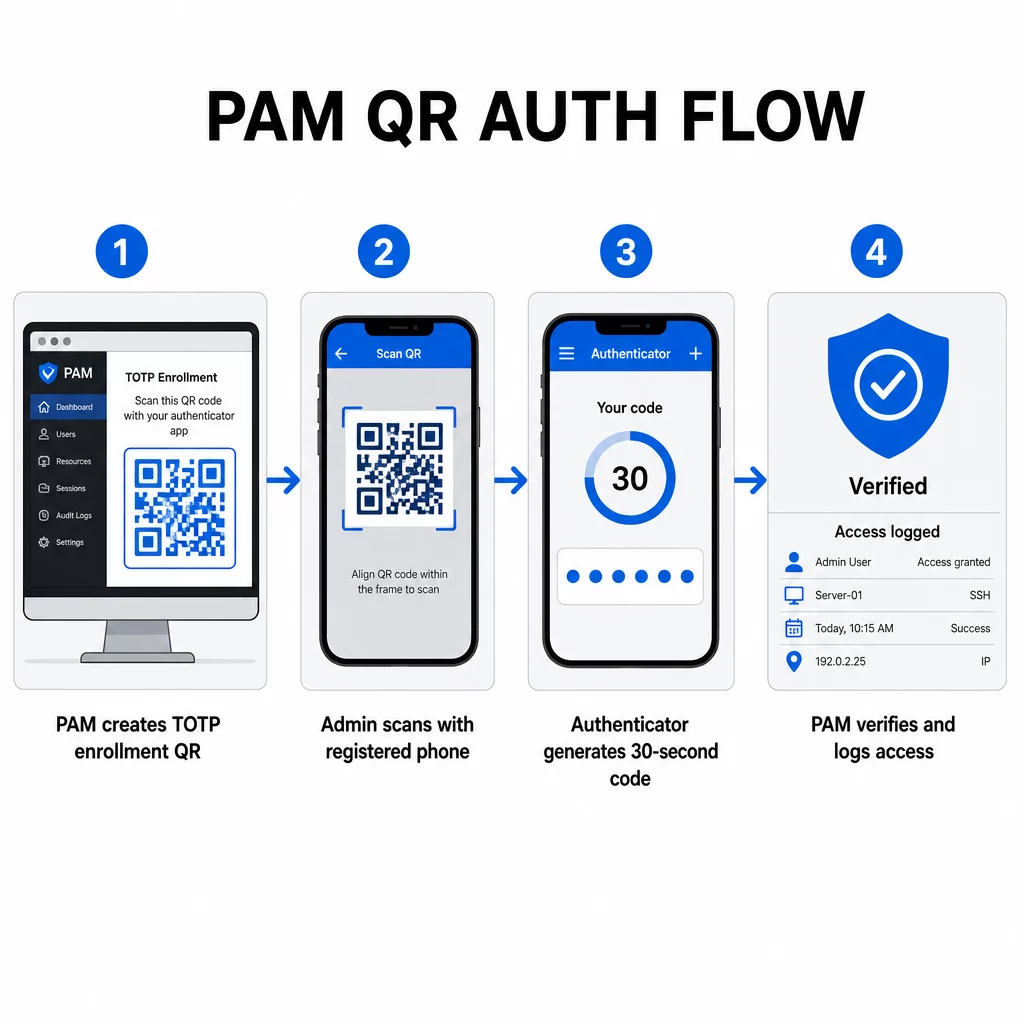
- Under registrering genererer systemet en delt hemmelig nøkkel og koder den inn i en QR-kode som en URI formatert som `otpauth://totp/LABEL?secret=SECRET&issuer=ISSUER`
- Brukeren skanner denne QR-koden med en autentiseringsapp (som Google Authenticator, Microsoft Authenticator eller Okta Verify), som lagrer hemmeligheten lokalt på enheten
- Ved pålogging bruker appen HOTP-algoritmen på en tidsbasert teller avledet fra gjeldende Unix-tid, og genererer et engangspassord gyldig i 30 sekunder som standard
- Serveren utfører den samme beregningen uavhengig og aksepterer koder fra gjeldende og umiddelbart forrige tidssteg for å ta hensyn til klokkedrift
Fordi passordet er avledet fra tid og en enhetsbundet hemmelighet – ikke overført over nettverket – gir avskjæring av det under overføring ingen varig verdi. Hver kode er ubrukelig innen 30 sekunder.
Plattformen som CyberArk implementerer denne modellen direkte. Administratorer aktiverer QR-kodebasert brukerregistrering under Innstillinger → Autentisering → Plattform → Sikkerhetsinnstillinger → Autentiseringsalternativer, og definerer deretter MFA-policyer som utløser registreringsveiviseren ved første pålogging. CyberArk Identity-mobilappen støtter også et “Registrer med QR”-alternativ, der brukere skanner en kode presentert på Identity-portalen for å aktivere enheten sin som en MFA-faktor.
Sette opp QR-kode MFA-registrering
For DevOps-ingeniører som konfigurerer QR-basert MFA i et PAM-miljø, følger den generelle registreringsprosessen disse trinnene uavhengig av den spesifikke plattformen:
- Aktiver QR-registrering i plattformens autentiseringsinnstillinger. De fleste bedrifts-PAM-systemer eksponerer dette som en veksleknapp under autentiserings- eller sikkerhetskonfigurasjonsalternativer.
- Definer en MFA-policy som bestemmer hvilke brukere eller roller som krever MFA, når det håndheves, og hva som skjer ved første pålogging.
- Presenter registrerings-QR-koden til brukeren under deres første autentiserte økt. Koden koder den delte TOTP-hemmeligheten i `otpauth://` URI-format.
- Veiled brukeren til å skanne koden ved hjelp av deres registrerte autentiseringsapp. Gi en manuell inntastingsreserve (den rå hemmelige nøkkelen) for tilfeller der kameraet ikke kan lese koden.
- Bekreft registreringen ved å be brukeren om å sende inn en TOTP-kode før oppsettet fullføres, som bekrefter at hemmeligheten ble overført riktig.
- Generer og lagre reservegjenopprettingskoder slik at brukere ikke blir utestengt hvis de mister enheten sin.
For team som administrerer storskala utrullinger, kan det å pare denne registreringsflyten med en Dynamisk QR-kode generator la deg oppdatere, spore og tilbakekalle registreringskoder sentralt – viktig når legitimasjon må roteres eller når en enhet rapporteres tapt.
Spor og administrer autentiserings-QR-koder i stor skala Trenger du å utstede, oppdatere eller tilbakekalle QR-koder på tvers av et distribuert team? Bruk Dynamisk QR-kode generator for å lage redigerbare koder med sanntidsanalyse og sentralisert administrasjon.
Dynamiske vs. statiske QR-koder i PAM-miljøer
Valget mellom statiske og dynamiske QR-koder har direkte sikkerhetsimplikasjoner for PAM-arbeidsflyter.
| FUNKSJON | Statiske QR-koder | Dynamiske QR-koder |
|---|---|---|
| Innhold etter opprettelse | Fast, kan ikke endres | Redigerbar når som helst |
| Tilbakekalling | Krever nyutstedelse og redistribusjon | Øyeblikkelig, fra et sentralt dashbord |
| STATISTIKK | Ingen | Skann tidsstempler, enhetstyper, lokasjoner |
| Risiko for gjenbruksangrep | Høyere (koden er permanent) | Lavere (utløps- og engangsalternativer) |
| Beste bruksområde | Lavrisiko, engangsinnhold | Privilegert tilgang, sensitive arbeidsflyter |
For PAM-autentisering og MFA-registrering er dynamiske QR-koder sterkt foretrukket. Hvis en enhet rapporteres tapt, kan en administrator umiddelbart deaktivere den tilhørende registreringskoden. Tidsbegrensede koder forhindrer gjenbruksangrep ved å gjøre enhver avlyttet kode ubrukelig i løpet av øyeblikk. Og skanneanalyser gir et revisjonsspor som støtter samsvarskrav.
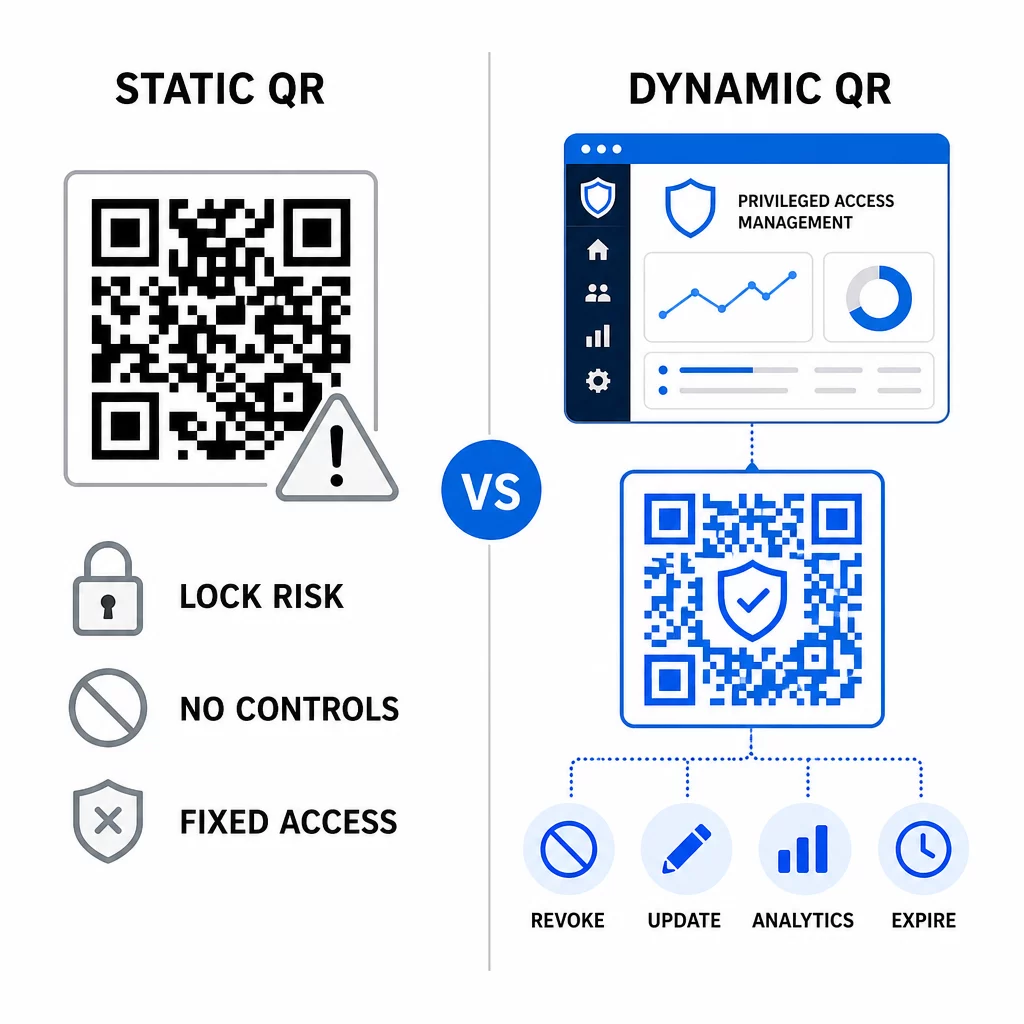
Statiske QR-koder kan fortsatt spille en rolle i interne bruksområder med lavere risiko – som å lenke til dokumentasjon eller skrivebeskyttede ressurser – men de bør ikke brukes for autentiseringsflyter som involverer privilegert tilgang.
Viktige sikkerhetshensyn for QR-basert PAM-autentisering
Implementering av QR-kodeautentisering i et PAM-miljø introduserer sin egen angrepsflate. Å forstå disse risikoene og redusere dem er avgjørende før utrulling til produksjon.
Sårbarhet for registrerings-QR-kode. Den delte hemmeligheten kodet i en TOTP-registrerings-QR-kode utløper ikke av seg selv. Hvis den koden fanges i et skjermbilde, videresendes via e-post eller lagres i en sikkerhetskopi, kan en angriper senere bruke den til å registrere en enhet på nytt og generere gyldige TOTP-koder på ubestemt tid. Avbøtningen er enkel: konfigurer registreringskoder til å utløpe etter en enkelt vellykket skanning. Reviser og slett eventuelle historiske registrerings-QR-koder lagret i e-postsystemer eller sikkerhetskopier, og registrer berørte brukere på nytt med nye engangskoder.
QR-kode phishing (quishing). Angripere har dokumentert kampanjer der de utgir seg for å være MFA-registreringsprosesser, og sender e-poster som instruerer brukere til å skanne en ondsinnet QR-kode som fører til en side for innhenting av legitimasjon. Tren brukerne dine til å behandle uoppfordrede QR-skanneforespørsler med mistanke, uavhengig verifisere avsenderen før skanning, og bruke autentiseringsapper som håndterer `otpauth://`-nyttelasten i et sandkasse-miljø i stedet for å åpne vilkårlige URL-er. For dypere veiledning, se QR-kode identitetsverifisering i cybersikkerhet.
Utfasing av SMS. NISTs veiledning for digital identitet fraråder eksplisitt bruk av SMS og taleanrop for out-of-band autentisering på grunn av risikoer som SIM-bytte, enhetsbytte og nummerportering. TOTP-basert QR-registrering med autentiseringsapper er et sterkere alternativ som NIST anerkjenner som en gyldig out-of-band mekanisme når den leveres via en sikker sekundær kanal.
Enhetsbinding og biometri. Å koble QR-kodeautentisering til forhåndsregistrerte enheter legger til et maskinvarelag som SMS ikke kan tilby. Å legge til biometrisk verifisering – fingeravtrykk eller ansiktsgjenkjenning – skaper en trefaktormodell: noe du har (den registrerte enheten), noe du er (biometri), og den tidsbegrensede koden (kontekstavhengig). For høyrisikooperasjoner, konfigurer kortere TOTP-vinduer eller krev ytterligere verifiseringstrinn.
Testing før utrulling. Alltid test QR-kode autentiseringsflyter på tvers av flere enheter, operativsystemer og autentiseringsapper før du publiserer til produksjon. Verifiser at registreringskoder utløper etter bruk, at tilbakekalling fungerer som forventet, og at reserveinngangsveier fungerer korrekt.
For en omfattende oversikt over hvordan du kan styrke din QR-kodeimplementering, se beste praksis for QR-kode-sikkerhet innen cyberforsvar og sikker QR-kodegenerering beste praksis.
Integrering av QR-autentisering med eksisterende MFA og SSO
QR-koder fungerer godt sammen med eksisterende autentiseringsinfrastruktur i stedet for å erstatte den fullstendig. I MFA-oppsett fungerer QR-basert TOTP som “noe du har”-faktoren, som et supplement til et passord eller biometri. I SSO-miljøer kan en QR-kode fungere som utfordrings-respons-trinnet som bekrefter enhetsbesittelse før en sesjonstoken utstedes. For en detaljert sammenligning av disse tilnærmingene, se QR-koder vs. passord i SSO.
Registreringsmønsteret strekker seg også utover PAM. Team som allerede bruker passordadministratorer som LastPass kan følge en nesten identisk QR-skanneoppsettprosess – skann for å koble, bekreft med en TOTP-kode, lagre gjenopprettingskoder – noe som gjør arbeidsflyten kjent for brukere som allerede har satt opp MFA andre steder. Se LastPass QR-kode oppsettguide for en trinnvis referanse.
Hvert autentiseringsforsøk i et godt konfigurert system bør generere en loggoppføring som fanger opp QR-kodeidentifikatoren, enhetsinformasjon, biometrisk resultat hvis aktuelt, tidsstempel og geografisk plassering. Disse loggene er kritiske for samsvarsrevisjoner, avviksdeteksjon og hendelseshåndtering.
Avanserte funksjoner: Analyse, tilpasning og sanntidskontroll
Enterprise QR-kodeplattformer legger til funksjonalitet utover grunnleggende kodegenerering som er direkte relevant for PAM-operasjoner.
Statistikk i sanntid lar sikkerhetsteam overvåke autentiseringsmønstre etter hvert som de skjer. Målinger verdt å spore inkluderer skanningstidsstempler, enhetstyper, geografiske plasseringer og grunnlinjer for brukeratferd. Algoritmer som flagger avvik – en uvanlig enhetstype, en skanning fra et uventet land, en økning i mislykkede forsøk – kan utløse trinnvis autentisering eller automatiske varsler. For mer om hvordan disse målingene ser ut i praksis, se hvordan QR-koder forenkler flerfaktorautentisering.
Merkevarebaserte autentiseringskoder tjener en praktisk sikkerhetsfunksjon utover estetikk. Når organisasjonen din bruker konsistente, merkevarebaserte QR-koder med firmalogoer og fargevalg, utvikler brukere en visuell grunnlinje for legitime autentiseringsforespørsler. En kode som avviker fra denne grunnlinjen blir et advarselstegn. Å sikre tilstrekkelig fargekontrast – et forhold på minst 4,5:1 – holder også kodene pålitelig skannbare på tvers av enheter og lysforhold.
Dynamisk kontroll er funksjonen som mest direkte reduserer operasjonell risiko. Når en ansatt slutter, deaktiverer du kodene deres umiddelbart fra et sentralt dashbord uten å vente på sykluser for legitimasjonsrotasjon. Når en sikkerhetshendelse oppdages, tilbakekaller og utsteder du på nytt uten å skrive ut på nytt. Den Dynamisk QR-kode generator på Pageloot støtter alle disse arbeidsflytene, med sanntids skanningssporing og redigerbare destinasjoner innebygd.
For team som håndterer krypterte legitimasjoner eller token-data innenfor QR-nyttelast, se krypterte QR-koder for autentiseringsplattformer for veiledning om AES- og RSA-krypteringsmetoder.
Bransjeapplikasjoner
Den samme QR-baserte PAM-modellen gjelder på tvers av bransjer med forskjellige profiler for privilegert tilgang.
In bank og finansielle tjenester, bruker administratorer tidsfølsomme QR-koder for å få tilgang til kjernebankingsystemer, handelsplattformer og kundedatabaser. Hver privilegerte sesjon logges mot den spesifikke koden som ble brukt, noe som gir en klar revisjonsspor for regulatorisk samsvar.
In programvareutvikling, distribuerte team bruker QR-koder for å få tilgang til produksjonssystemer, kodearkiver og distribusjonsrørledninger uten statiske legitimasjoner. Dynamiske koder fremskynder onboarding og gjør offboarding umiddelbar – ingen venting på at passordrotasjoner skal spre seg.
In helsevesenet, klinisk personell som flytter mellom arbeidsstasjoner kan autentisere seg raskt ved å skanne i stedet for å skrive, noe som reduserer påloggingsfriksjon samtidig som revisjonssporene som kreves av HIPAA opprettholdes.
Mønsteret er konsistent: QR-koder kombinert med dynamisk administrasjon og analyse gir sikkerhetsteamene den kontrollen de trenger uten å bremse ned brukerne som er avhengige av rask, pålitelig tilgang. QR-kodeautentisering er ikke en erstatning for en moden PAM-strategi – det er en mekanisme som styrker en av PAMs mest sårbare komponenter. Ved å erstatte statiske legitimasjoner med tidsbegrensede, enhetsbundne koder, håndheve engangsregistrering og overvåke hver autentiseringshendelse, lukker du hullene for phishing og legitimasjonstyveri som eldre metoder etterlater åpne. Start med å aktivere QR-registrering i PAM-plattformens autentiseringsinnstillinger, definer dine MFA-retningslinjer, og bruk dynamiske koder med en sentralisert administrasjonsplattform for å opprettholde sanntidskontroll over tilgang.
Opprett og administrer QR-koder for dine autentiseringsarbeidsflyter Bruke QR-kodegenerator for å komme i gang, eller utforsk Dynamisk QR-kode generator for registreringskoder du kan oppdatere, spore og tilbakekalle fra et enkelt dashbord.
Ofte stilte spørsmål
Under registrering genererer PAM-systemet en delt hemmelig nøkkel og koder den som en QR-kode ved å bruke `otpauth://totp/` URI-formatet. Brukeren skanner dette med en autentiseringsapp, som lagrer hemmeligheten på enheten. Ved pålogging beregner appen og serveren uavhengig en 30-sekunders passordkode fra den hemmeligheten og gjeldende tid. Fordi koden er tidsbegrenset og enhetsbundet, gir avskjæring av den under overføring ingen varig verdi for en angriper.
Sårbarheten med påmeldings-QR-koden er den mest vanlig oversette risikoen. TOTP-hemmeligheten innebygd i en påmeldings-QR-kode utløper ikke av seg selv, så ethvert skjermbilde, e-postvideresending eller sikkerhetskopi av den koden forblir brukbar på ubestemt tid. Avbøt dette ved å konfigurere påmeldingskoder til å utløpe etter en enkelt vellykket skanning, og revider e-post- og sikkerhetskopisystemene dine for å slette eventuelle lagrede historiske påmeldingskoder.
Foretrekk alltid dynamiske QR-koder for autentisering og MFA-registreringsflyter. Dynamiske koder kan tilbakekalles umiddelbart hvis en enhet mistes, oppdateres uten å måtte omfordele fysiske materialer, og overvåkes med sanntidsanalyse. Statiske koder er kun egnet for lavrisiko, skrivebeskyttet innhold der umiddelbar tilbakekalling og revisjonslogging ikke er påkrevd.