Haben Sie Schwierigkeiten, privilegierte Konten zu sichern, ohne Reibungsverluste für Ihre Administratoren zu verursachen? Statische Passwörter und veraltete MFA-Methoden lassen PAM-Umgebungen anfällig für Phishing, Zugangsdatendiebstahl und Session Hijacking. Diese Seite erklärt, wie die QR-Code-basierte Authentifizierung diese Lücken schließt – sie behandelt die Bedrohungslandschaft, wie die Registrierung funktioniert, die TOTP-Mechanik und die Sicherheitspraktiken, die Ihr Team für eine korrekte Implementierung benötigt.
Warum traditionelle PAM-Authentifizierung nicht ausreicht
Privileged Access Management-Systeme schützen die sensibelsten Konten in Ihrer Organisation. Wenn diese Konten auf statischen Passwörtern, geteilten Zugangsdaten oder SMS-basierter MFA basieren, haben Angreifer gut dokumentierte Wege, diese auszunutzen.
Phishing und Zugangsdatendiebstahl bleiben der häufigste Einstiegspunkt. Privilegierte Benutzer werden genau deshalb angegriffen, weil ihre Konten kritische Systeme freischalten. Selbst erfahrene Administratoren können durch überzeugende gefälschte Anmeldeseiten getäuscht werden, insbesondere wenn Angreifer Social Engineering nutzen, um sich als Anbieter oder IT-Support auszugeben. Sobald Zugangsdaten gestohlen wurden, bewegen sich Angreifer lateral, eskalieren Privilegien und behalten dauerhaften Zugriff.
Geteilte Konten verschärfen das Problem. Wenn mehrere Administratoren dieselben Zugangsdaten verwenden, verschwindet die individuelle Verantwortlichkeit. Untersuchungsberichte stagnieren, die Compliance-Überwachung bricht zusammen, und ein einziges kompromittiertes Passwort ermöglicht den Zugriff auf mehrere Systeme.
Session Hijacking stellt ein drittes großes Risiko dar. Nach einem legitimen Authentifizierungsereignis können Angreifer Session-Tokens abfangen, Cookies ausnutzen oder Man-in-the-Middle-Techniken verwenden, um authentifizierte Benutzer zu imitieren – alles, ohne jemals das ursprüngliche Passwort zu kennen. Persistente Session-Tokens machen diese Angriffe besonders schwer zu erkennen, da sich der Angreifer in den normalen administrativen Datenverkehr einfügt.
Diese Schwachstellen haben eine gemeinsame Ursache: Authentifizierung, die von statischen, wiederverwendbaren Geheimnissen abhängt. Die QR-Code-basierte Authentifizierung begegnet diesem Problem direkt.
Wie die QR-Code-Authentifizierung in PAM funktioniert
Die QR-Code-Authentifizierung ersetzt statische Zugangsdaten durch dynamische, gerätespezifische Codes. Anstatt ein Passwort einzugeben, scannt ein Administrator einen QR-Code mit einem registrierten Mobilgerät. Das Gerät liest den Code, wendet in der Hardware gespeicherte sichere Schlüssel an und schließt die Authentifizierung in Sekunden ab.
Die häufigste Implementierung in PAM-Umgebungen von Unternehmen kombiniert QR-Codes mit TOTP (zeitbasiertes Einmalpasswort) wie in RFC 6238 definiert. So funktioniert dieser Ablauf:
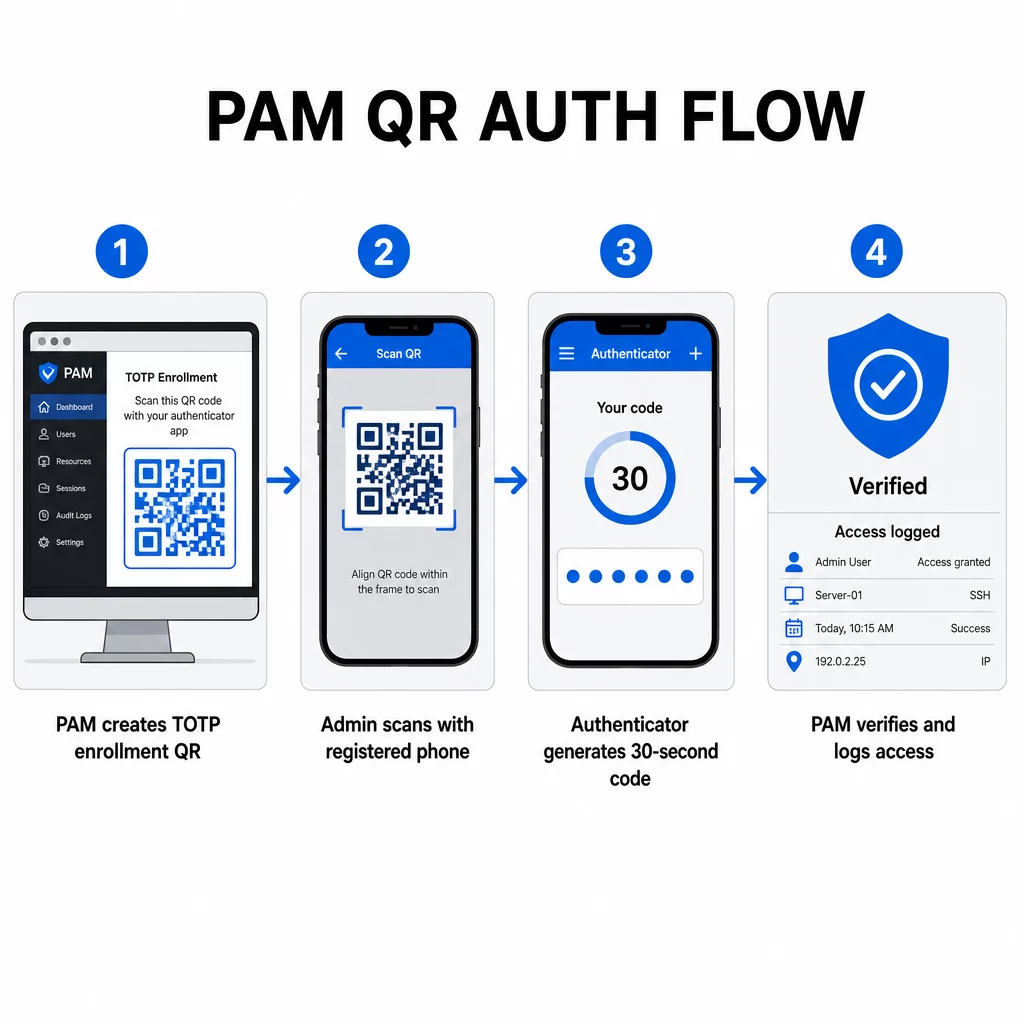
- Während der Registrierung generiert das System einen gemeinsamen geheimen Schlüssel und kodiert ihn als URI im Format `otpauth://totp/LABEL?secret=SECRET&issuer=ISSUER` in einen QR-Code.
- Der Benutzer scannt diesen QR-Code mit einer Authenticator-App (wie Google Authenticator, Microsoft Authenticator oder Okta Verify), die das Geheimnis lokal auf dem Gerät speichert
- Beim Login wendet die App den HOTP-Algorithmus auf einen zeitbasierten Zähler an, der von der aktuellen Unix-Zeit abgeleitet ist, und generiert standardmäßig einen Einmal-Passcode, der 30 Sekunden lang gültig ist
- Der Server führt dieselbe Berechnung unabhängig durch und akzeptiert Codes vom aktuellen und unmittelbar vorhergehenden Zeitschritt, um die Zeitverschiebung zu berücksichtigen
Da der Passcode aus der Zeit und einem gerätegebundenen Geheimnis abgeleitet wird – und nicht über das Netzwerk übertragen wird – bietet das Abfangen während der Übertragung keinen dauerhaften Wert. Jeder Code ist innerhalb von 30 Sekunden nutzlos.
Plattformen wie CyberArk implementieren dieses Modell direkt. Administratoren aktivieren die QR-Code-basierte Benutzerregistrierung unter Einstellungen → Authentifizierung → Plattform → Sicherheitseinstellungen → Authentifizierungsoptionen, definieren dann MFA-Richtlinien, die den Registrierungsassistenten beim ersten Login auslösen. Die mobile CyberArk Identity App unterstützt auch eine Option “Mit QR registrieren”, bei der Benutzer einen auf dem Identity-Portal angezeigten Code scannen, um ihr Gerät als MFA-Faktor zu aktivieren.
Einrichten der QR-Code-MFA-Registrierung
Für DevOps-Ingenieure, die QR-basierte MFA in einer PAM-Umgebung konfigurieren, folgt der allgemeine Registrierungsprozess diesen Schritten, unabhängig von der spezifischen Plattform:
- Aktivieren Sie die QR-Registrierung in den Authentifizierungseinstellungen der Plattform. Die meisten PAM-Systeme für Unternehmen stellen dies als Umschalter unter den Authentifizierungs- oder Sicherheitskonfigurationsoptionen bereit.
- Definieren Sie eine MFA-Richtlinie die festlegt, welche Benutzer oder Rollen MFA benötigen, wann es erzwungen wird und was beim ersten Login geschieht.
- Präsentieren Sie den Registrierungs-QR-Code dem Benutzer während seiner ersten authentifizierten Sitzung. Der Code kodiert das gemeinsame TOTP-Geheimnis im `otpauth://`-URI-Format.
- Leiten Sie den Benutzer zum Scannen an den Code mit ihrer registrierten Authenticator-App. Bieten Sie eine manuelle Eingabemöglichkeit (den rohen geheimen Schlüssel) für Fälle an, in denen die Kamera den Code nicht lesen kann.
- Die Registrierung überprüfen indem der Benutzer aufgefordert wird, einen TOTP-Code einzugeben, bevor die Einrichtung abgeschlossen wird, um zu bestätigen, dass der Schlüssel korrekt übertragen wurde.
- Backup-Wiederherstellungscodes generieren und speichern damit Benutzer nicht ausgesperrt werden, wenn sie ihr Gerät verlieren.
Für Teams, die groß angelegte Rollouts verwalten, ermöglicht die Kombination dieses Registrierungsflusses mit einem Dynamischer QR-Code Generator die zentrale Aktualisierung, Verfolgung und den Widerruf von Registrierungscodes – wichtig, wenn Anmeldeinformationen geändert werden müssen oder ein Gerät als verloren gemeldet wird.
Authentifizierungs-QR-Codes im großen Maßstab verfolgen und verwalten Müssen Sie QR-Codes in einem verteilten Team ausstellen, aktualisieren oder widerrufen? Verwenden Sie die Dynamischer QR-Code Generator um bearbeitbare Codes mit Echtzeit-Analysen und zentraler Verwaltung zu erstellen.
Dynamische vs. statische QR-Codes in PAM-Umgebungen
Die Wahl zwischen statischen und dynamischen QR-Codes hat direkte Sicherheitsauswirkungen auf PAM-Workflows.
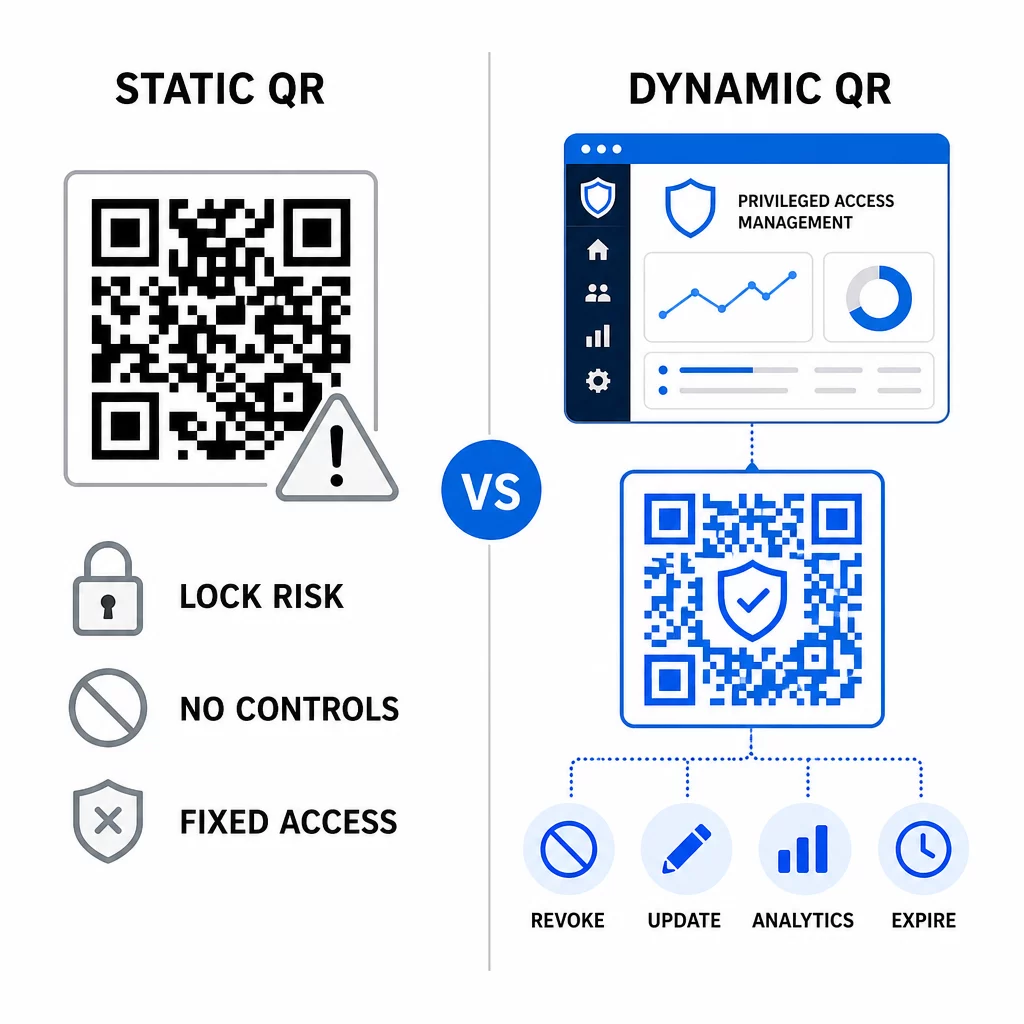
| FUNKTION | Statische QR-Codes | Dynamische QR-Codes |
|---|---|---|
| Inhalt nach der Erstellung | Fest, kann nicht geändert werden | Jederzeit bearbeitbar |
| Widerruf | Erfordert Neuausstellung und Neuverteilung | Sofort, von einem zentralen Dashboard aus |
| ANALYSE | Keine | Scan-Zeitstempel, Gerätetypen, Standorte |
| Risiko von Replay-Angriffen | Höher (Code ist permanent) | Niedriger (Ablauf- und Einmalnutzungsoptionen) |
| Bester Anwendungsfall | Inhalte mit geringem Risiko, einmalig | Privilegierter Zugriff, sensible Workflows |
Für die PAM-Authentifizierung und MFA-Registrierung werden dynamische QR-Codes dringend bevorzugt. Wenn ein Gerät als verloren gemeldet wird, kann ein Administrator den zugehörigen Registrierungscode sofort deaktivieren. Zeitlich begrenzte Codes verhindern Replay-Angriffe, indem sie jeden abgefangenen Code innerhalb von Augenblicken nutzlos machen. Und Scan-Analysen bieten einen Audit-Trail, der Compliance-Anforderungen unterstützt.
Statische QR-Codes können immer noch eine Rolle in internen Anwendungsfällen mit geringerem Risiko spielen – wie z.B. das Verknüpfen mit Dokumentationen oder schreibgeschützten Ressourcen – sollten aber nicht für Authentifizierungsabläufe verwendet werden, die privilegierten Zugriff beinhalten.
Wichtige Sicherheitsüberlegungen für die QR-basierte PAM-Authentifizierung
Die Implementierung der QR-Code-Authentifizierung in einer PAM-Umgebung führt zu einer eigenen Angriffsfläche. Das Verständnis dieser Risiken und deren Minderung ist unerlässlich, bevor die Lösung in Produktion geht.
Schwachstelle bei Registrierungs-QR-Codes. Das in einem TOTP-Registrierungs-QR-Code kodierte gemeinsame Geheimnis läuft nicht von selbst ab. Wenn dieser Code in einem Screenshot erfasst, per E-Mail weitergeleitet oder in einem Backup gespeichert wird, kann ein Angreifer ihn später verwenden, um ein Gerät erneut zu registrieren und unbegrenzt gültige TOTP-Codes zu generieren. Die Abhilfe ist einfach: Konfigurieren Sie Registrierungscodes so, dass sie nach einem einzigen erfolgreichen Scan ablaufen. Überprüfen und löschen Sie alle historischen Registrierungs-QR-Codes, die in E-Mail-Systemen oder Backups gespeichert sind, und registrieren Sie betroffene Benutzer mit neuen Einmalcodes neu.
QR-Code-Phishing (Quishing). Angreifer haben Kampagnen dokumentiert, bei denen sie MFA-Registrierungsprozesse imitieren und E-Mails versenden, die Benutzer anweisen, einen bösartigen QR-Code zu scannen, der zu einer Seite zur Erfassung von Anmeldeinformationen führt. Schulen Sie Ihre Benutzer, unaufgeforderte QR-Scan-Anfragen mit Misstrauen zu behandeln, den Absender vor dem Scannen unabhängig zu überprüfen und Authentifizierungs-Apps zu verwenden, die die `otpauth://`-Nutzlast in einer Sandbox-Umgebung verarbeiten, anstatt beliebige URLs zu öffnen. Für weitere Anleitungen siehe QR-Code-Identitätsprüfung in der Cybersicherheit.
Veraltung von SMS. Die Richtlinien von NIST zur digitalen Identität raten explizit von der Verwendung von SMS und Sprachanrufen für die Out-of-Band-Authentifizierung ab, da Risiken wie SIM-Swapping, Geräteaustausch und Rufnummernportierung bestehen. Die TOTP-basierte QR-Registrierung mit Authentifizierungs-Apps ist eine stärkere Alternative, die NIST als gültigen Out-of-Band-Mechanismus anerkennt, wenn sie über einen sicheren sekundären Kanal bereitgestellt wird.
Gerätebindung und Biometrie. Die Verknüpfung der QR-Code-Authentifizierung mit vorregistrierten Geräten fügt eine Hardware-Ebene hinzu, die SMS nicht bieten kann. Das Hinzufügen biometrischer Verifizierung – Fingerabdruck- oder Gesichtserkennung – schafft ein Drei-Faktor-Modell: etwas, das Sie besitzen (das registrierte Gerät), etwas, das Sie sind (Biometrie), und den zeitgebundenen Code (kontextabhängig). Für risikoreiche Operationen konfigurieren Sie kürzere TOTP-Fenster oder verlangen zusätzliche Verifizierungsschritte.
Testen vor der Bereitstellung. Stets QR-Code-Authentifizierungsabläufe testen auf mehreren Geräten, Betriebssystemen und Authentifizierungs-Apps, bevor sie in Produktion gehen. Überprüfen Sie, ob Registrierungscodes nach Gebrauch ablaufen, dass die Widerrufung wie erwartet funktioniert und dass Fallback-Eingabepfade korrekt funktionieren.
Für einen umfassenden Überblick zur Härtung Ihrer QR-Code-Implementierung siehe Best Practices für die QR-Code-Sicherheit in der Cyberabwehr und Best Practices für die sichere QR-Code-Generierung.
Integration von QR-Authentifizierung mit bestehender MFA und SSO
QR-Codes funktionieren gut neben bestehender Authentifizierungsinfrastruktur, anstatt sie vollständig zu ersetzen. In MFA-Setups fungiert QR-basiertes TOTP als der Faktor “etwas, das Sie besitzen” und ergänzt ein Passwort oder eine Biometrie. In SSO-Umgebungen kann ein QR-Code als der Challenge-Response-Schritt dienen, der den Gerätebesitz bestätigt, bevor ein Sitzungstoken ausgegeben wird. Für einen detaillierten Vergleich dieser Ansätze siehe QR-Codes vs. Passwörter in SSO.
Das Registrierungsmuster erstreckt sich auch über PAM hinaus. Teams, die bereits Passwortmanager wie LastPass verwenden, können einen nahezu identischen QR-Scan-Einrichtungsprozess befolgen – scannen zum Verknüpfen, mit einem TOTP-Code bestätigen, Wiederherstellungscodes speichern – was den Workflow für Benutzer vertraut macht, die MFA bereits an anderer Stelle eingerichtet haben. Siehe die LastPass QR-Code-Einrichtungsanleitung für eine Schritt-für-Schritt-Referenz.
Jeder Authentifizierungsversuch in einem gut konfigurierten System sollte einen Protokolleintrag generieren, der den QR-Code-Identifikator, Geräteinformationen, biometrische Ergebnisse (falls zutreffend), Zeitstempel und den geografischen Standort erfasst. Diese Protokolle sind entscheidend für Compliance-Audits, Anomalieerkennung und Incident Response.
Erweiterte Funktionen: Analysen, Anpassung und Echtzeitkontrolle
Enterprise-QR-Code-Plattformen fügen Funktionen hinzu, die über die grundlegende Codegenerierung hinausgehen und direkt für PAM-Operationen relevant sind.
Analyse in Echtzeit ermöglichen Sicherheitsteams, Authentifizierungsmuster in Echtzeit zu überwachen. Zu den verfolgenswerten Metriken gehören Scan-Zeitstempel, Gerätetypen, geografische Standorte und Baselines des Benutzerverhaltens. Algorithmen, die Abweichungen kennzeichnen – ein ungewöhnlicher Gerätetyp, ein Scan aus einem unerwarteten Land, ein Anstieg fehlgeschlagener Versuche – können eine Step-up-Authentifizierung oder automatische Warnungen auslösen. Weitere Informationen dazu, wie diese Metriken in der Praxis aussehen, finden Sie unter wie QR-Codes die Multi-Faktor-Authentifizierung vereinfachen.
Markenauthentifizierungscodes erfüllen eine praktische Sicherheitsfunktion jenseits der Ästhetik. Wenn Ihre Organisation konsistente, gebrandete QR-Codes mit Firmenlogos und Farbschemata verwendet, entwickeln Benutzer eine visuelle Baseline für legitime Authentifizierungsanfragen. Ein Code, der von dieser Baseline abweicht, wird zu einem Warnsignal. Die Sicherstellung eines ausreichenden Farbkontrasts – ein Verhältnis von mindestens 4,5:1 – sorgt zudem dafür, dass Codes auf verschiedenen Geräten und unter verschiedenen Lichtverhältnissen zuverlässig scannbar bleiben.
Dynamische Kontrolle ist die Funktion, die das Betriebsrisiko am direktesten reduziert. Wenn ein Mitarbeiter das Unternehmen verlässt, deaktivieren Sie dessen Codes sofort von einem zentralen Dashboard aus, ohne auf die Zyklen der Anmeldeinformationsrotation zu warten. Wenn ein Sicherheitsvorfall erkannt wird, widerrufen und stellen Sie Codes neu aus, ohne sie neu zu drucken. Die Dynamischer QR-Code Generator auf Pageloot unterstützt all diese Workflows, mit integrierter Echtzeit-Scan-Verfolgung und bearbeitbaren Zielen.
Für Teams, die verschlüsselte Anmeldeinformationen oder Token-Daten innerhalb von QR-Nutzlasten verarbeiten, siehe verschlüsselten QR-Codes für Authentifizierungsplattformen für Anleitungen zu AES- und RSA-Verschlüsselungsansätzen.
Branchenanwendungen
Dasselbe QR-basierte PAM-Modell gilt branchenübergreifend mit unterschiedlichen Profilen für privilegierten Zugriff.
Im Banken- und Finanzdienstleistungssektor, verwenden Administratoren zeitkritische QR-Codes, um auf Kernbankensysteme, Handelsplattformen und Kundendatenbanken zuzugreifen. Jede privilegierte Sitzung wird dem verwendeten spezifischen Code zugeordnet, was einen klaren Audit-Trail für die Einhaltung gesetzlicher Vorschriften bietet.
Im Softwareentwicklung, verteilte Teams verwenden QR-Codes, um auf Produktionssysteme, Code-Repositories und Bereitstellungspipelines ohne statische Anmeldeinformationen zuzugreifen. Dynamische Codes beschleunigen das Onboarding und machen das Offboarding sofort – kein Warten auf die Verbreitung von Passwortrotationen.
Im Gesundheitswesen, klinisches Personal, das zwischen Arbeitsplätzen wechselt, kann sich schnell durch Scannen statt Tippen authentifizieren, was die Anmeldereibung reduziert und gleichzeitig die von HIPAA geforderten Audit-Trails beibehält.
Das Muster ist konsistent: QR-Codes in Kombination mit dynamischem Management und Analysen geben Sicherheitsteams die Kontrolle, die sie benötigen, ohne die Benutzer zu verlangsamen, die auf schnellen, zuverlässigen Zugriff angewiesen sind. Die QR-Code-Authentifizierung ist kein Ersatz für eine ausgereifte PAM-Strategie – sie ist ein Mechanismus, der eine der anfälligsten Komponenten von PAM stärkt. Indem Sie statische Anmeldeinformationen durch zeitgebundene, gerätegebundene Codes ersetzen, die einmalige Registrierung erzwingen und jedes Authentifizierungsereignis überwachen, schließen Sie die Lücken bei Phishing und Anmeldeinformationsdiebstahl, die ältere Methoden offen lassen. Beginnen Sie, indem Sie die QR-Registrierung in den Authentifizierungseinstellungen Ihrer PAM-Plattform aktivieren, Ihre MFA-Richtlinien definieren und dynamische Codes mit einer zentralisierten Verwaltungsplattform verwenden, um die Kontrolle über den Zugriff in Echtzeit aufrechtzuerhalten.
QR-Codes für Ihre Authentifizierungs-Workflows erstellen und verwalten Verwenden Sie die QR-Code-Generator um loszulegen, oder erkunden Sie die Dynamischer QR-Code Generator für Registrierungscodes, die Sie von einem einzigen Dashboard aus aktualisieren, verfolgen und widerrufen können.
Häufig gestellte Fragen
Während der Registrierung generiert das PAM-System einen gemeinsamen geheimen Schlüssel und kodiert ihn als QR-Code unter Verwendung des URI-Formats `otpauth://totp/`. Der Benutzer scannt diesen mit einer Authenticator-App, die den geheimen Schlüssel auf dem Gerät speichert. Beim Login berechnen die App und der Server unabhängig voneinander einen 30-sekündigen Passcode aus diesem geheimen Schlüssel und der aktuellen Uhrzeit. Da der Code zeitgebunden und gerätegebunden ist, bietet das Abfangen des Codes während der Übertragung einem Angreifer keinen dauerhaften Wert.
Die Schwachstelle im Registrierungs-QR-Code ist das am häufigsten übersehene Risiko. Das im Registrierungs-QR-Code eingebettete TOTP-Geheimnis läuft nicht von selbst ab, sodass jeder Screenshot, jede E-Mail-Weiterleitung oder jede Sicherungskopie dieses Codes unbegrenzt nutzbar bleibt. Mindern Sie dies, indem Sie Registrierungscodes so konfigurieren, dass sie nach einem einzigen erfolgreichen Scan ablaufen, und überprüfen Sie Ihre E-Mail- und Sicherungssysteme, um alle gespeicherten historischen Registrierungscodes zu löschen.
Bevorzugen Sie immer dynamische QR-Codes für Authentifizierungs- und MFA-Registrierungsabläufe. Dynamische Codes können sofort widerrufen werden, wenn ein Gerät verloren geht, ohne Neuverteilung physischer Materialien aktualisiert und mit Echtzeit-Analysen überwacht werden. Statische Codes sind nur für risikoarme, schreibgeschützte Inhalte geeignet, bei denen ein sofortiger Widerruf und eine Audit-Protokollierung nicht erforderlich sind.