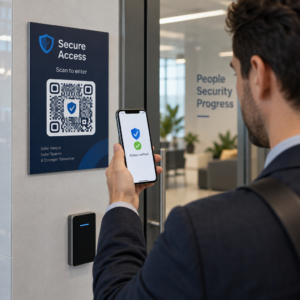
Ayrıcalıklı hesapları yöneticileriniz için sorun yaratmadan güvence altına almakta zorlanıyor musunuz? Statik parolalar ve eski MFA yöntemleri, PAM ortamlarını kimlik avı, kimlik bilgisi hırsızlığı ve oturum ele geçirme saldırılarına açık bırakır. Bu sayfa, QR kod tabanlı kimlik doğrulamanın bu boşlukları nasıl giderdiğini açıklıyor – tehdit ortamını, kaydın nasıl çalıştığını, TOTP mekaniklerini ve ekibinizin doğru bir şekilde uygulamak için ihtiyaç duyduğu güvenlik uygulamalarını kapsıyor.
Geleneksel PAM Kimlik Doğrulaması Neden Yetersiz Kalıyor?
Ayrıcalıklı Erişim Yönetimi sistemleri, kuruluşunuzdaki en hassas hesapları korur. Bu hesaplar statik parolalara, paylaşılan kimlik bilgilerine veya SMS tabanlı MFA'ya dayandığında, saldırganların bunları istismar etmek için iyi belgelenmiş yolları vardır.
Kimlik avı ve kimlik bilgisi hırsızlığı en yaygın giriş noktası olmaya devam etmektedir. Ayrıcalıklı kullanıcılar, hesapları kritik sistemlerin kilidini açtığı için özellikle hedeflenir. Deneyimli yöneticiler bile ikna edici sahte giriş sayfalarıyla kandırılabilir, özellikle saldırganlar satıcıları veya BT desteğini taklit etmek için sosyal mühendislik kullandığında. Kimlik bilgileri çalındığında, saldırganlar yanal hareket eder, ayrıcalıkları yükseltir ve kalıcı erişimi sürdürür.
Paylaşılan hesaplar sorunu daha da kötüleştirir. Birden fazla yönetici aynı kimlik bilgilerini kullandığında, bireysel hesap verebilirlik ortadan kalkar. İhlal soruşturmaları durur, uyumluluk izleme bozulur ve tek bir ele geçirilmiş parola birden fazla sistemde erişimin kilidini açar.
Oturum ele geçirme üçüncü büyük riski oluşturur. Meşru bir kimlik doğrulama olayından sonra, saldırganlar oturum belirteçlerini ele geçirebilir, çerezleri istismar edebilir veya kimliği doğrulanmış kullanıcıları taklit etmek için ortadaki adam tekniklerini kullanabilir – tüm bunları orijinal parolayı asla bilmeden yapabilirler. Kalıcı oturum belirteçleri, saldırgan normal yönetim trafiğiyle karıştığı için bu saldırıları tespit etmeyi özellikle zorlaştırır.
Bu güvenlik açıkları ortak bir temel nedene sahiptir: statik, yeniden kullanılabilir sırlara dayanan kimlik doğrulama. QR kod tabanlı kimlik doğrulama bunu doğrudan ele alır.
PAM'de QR Kod Kimlik Doğrulaması Nasıl Çalışır?
QR kod kimlik doğrulaması, statik kimlik bilgilerini dinamik, cihaza özel kodlarla değiştirir. Bir parola yazmak yerine, bir yönetici kayıtlı bir mobil cihazla bir QR kodu tarar. Cihaz kodu okur, donanımda depolanan güvenli anahtarları uygular ve saniyeler içinde kimlik doğrulamayı tamamlar.
Kurumsal PAM ortamlarındaki en yaygın uygulama, QR kodlarını şunlarla eşleştirir: TOTP (Zaman Tabanlı Tek Kullanımlık Parola) RFC 6238'de tanımlandığı gibi. İşte bu akışın nasıl çalıştığı:
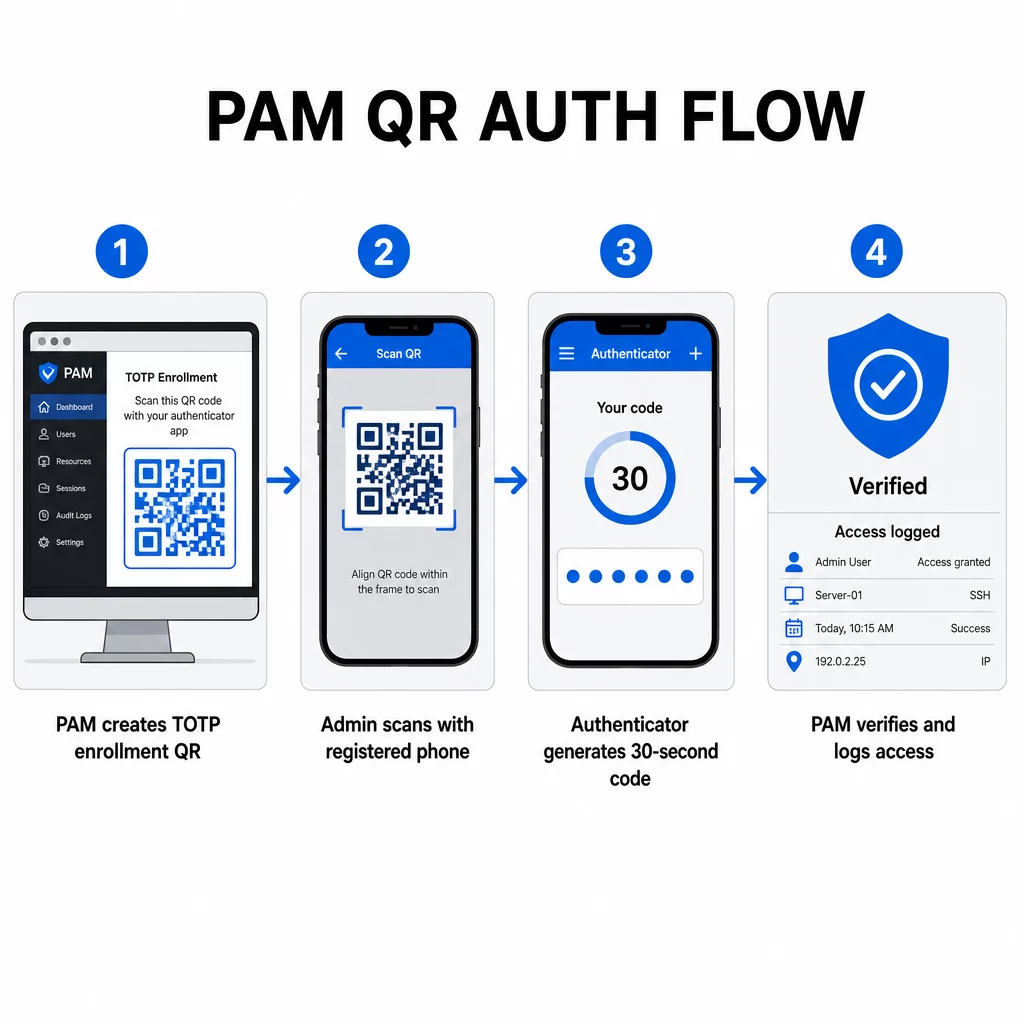
- Kayıt sırasında sistem, paylaşılan bir gizli anahtar oluşturur ve bunu `otpauth://totp/LABEL?secret=SECRET&issuer=ISSUER` gibi biçimlendirilmiş bir URI olarak bir QR koduna kodlar.
- Kullanıcı bu QR kodunu bir kimlik doğrulayıcı uygulamasıyla (Google Authenticator, Microsoft Authenticator veya Okta Verify gibi) tarar ve bu uygulama sırrı cihaza yerel olarak kaydeder
- Giriş sırasında, uygulama HOTP algoritmasını mevcut Unix zamanından türetilen zaman tabanlı bir sayaca uygular ve varsayılan olarak 30 saniye geçerli tek kullanımlık bir parola oluşturur
- Sunucu aynı hesaplamayı bağımsız olarak yapar ve saat kaymasını hesaba katmak için mevcut ve hemen önceki zaman adımından gelen kodları kabul eder
Parola zamandan ve cihaza bağlı bir sırdan türetildiği için – ağ üzerinden iletilmediği için – geçiş sırasında ele geçirilmesi kalıcı bir değer sağlamaz. Her kod 30 saniye içinde kullanılamaz hale gelir.
CyberArk gibi platformlar bu modeli doğrudan uygular. Yöneticiler, QR kod tabanlı kullanıcı kaydını şu adresten etkinleştirir: Ayarlar → Kimlik Doğrulama → Platform → Güvenlik Ayarları → Kimlik Doğrulama Seçenekleri, ardından ilk girişte kayıt sihirbazını tetikleyen MFA politikaları tanımlar. CyberArk Identity mobil uygulaması ayrıca, kullanıcıların cihazlarını bir MFA faktörü olarak etkinleştirmek için Identity portalında sunulan bir kodu taradığı bir “QR ile Kaydol” seçeneğini de destekler.
QR Kodu MFA Kaydını Kurma
Bir PAM ortamında QR tabanlı MFA yapılandıran DevOps mühendisleri için, genel kayıt süreci belirli platformdan bağımsız olarak şu adımları izler:
- Platformun kimlik doğrulama ayarlarında QR kaydını etkinleştirin. Çoğu kurumsal PAM sistemi bunu kimlik doğrulama veya güvenlik yapılandırma seçenekleri altında bir geçiş düğmesi olarak sunar.
- Bir MFA politikası tanımlayın hangi kullanıcıların veya rollerin MFA gerektirdiğini, ne zaman uygulandığını ve ilk girişte ne olduğunu belirler.
- Kayıt QR kodunu sunun kullanıcıya ilk kimliği doğrulanmış oturumu sırasında. Kod, paylaşılan TOTP sırrını `otpauth://` URI formatında kodlar.
- Kullanıcıyı taramaya yönlendirin kodu kayıtlı kimlik doğrulayıcı uygulamalarını kullanarak. Kameranın kodu okuyamadığı durumlar için manuel giriş yedeklemesi (ham gizli anahtar) sağlayın.
- Kaydı doğrulayın kurulumu tamamlamadan önce kullanıcıdan bir TOTP kodu göndermesini isteyerek, gizli anahtarın doğru aktarıldığını onaylayın.
- Yedek kurtarma kodları oluşturun ve saklayın böylece kullanıcılar cihazlarını kaybetmeleri durumunda kilitlenmezler.
Büyük ölçekli dağıtımları yöneten ekipler için, bu kayıt akışını bir ile eşleştirmek Dinamik QR Kod Oluşturucu kayıt kodlarını merkezi olarak güncellemenizi, izlemenizi ve iptal etmenizi sağlar – kimlik bilgilerinin döndürülmesi gerektiğinde veya bir cihazın kaybolduğu bildirildiğinde önemlidir.
Kimlik Doğrulama QR Kodlarını Ölçekli Olarak İzleyin ve Yönetin Dağıtılmış bir ekip genelinde QR kodları yayınlamanız, güncellemeniz veya iptal etmeniz mi gerekiyor? Kullanın Dinamik QR Kod Oluşturucu gerçek zamanlı analizler ve merkezi yönetim ile düzenlenebilir kodlar oluşturmak için.
PAM Ortamlarında Dinamik ve Statik QR Kodları
Statik ve dinamik QR kodları arasındaki seçim, PAM iş akışları için doğrudan güvenlik etkilerine sahiptir.
| ÖZELLİK | Statik QR Kodları | Dinamik QR Kodları |
|---|---|---|
| Oluşturulduktan sonra içerik | Sabit, değiştirilemez | İstediğiniz zaman düzenlenebilir |
| İptal | Yeniden düzenleme ve yeniden dağıtma gerektirir | Merkezi bir panodan anında |
| ANALİZ | Yok | Tarama zaman damgaları, cihaz türleri, konumlar |
| Tekrar saldırısı riski | Daha yüksek (kod kalıcıdır) | Daha düşük (son kullanma ve tek kullanımlık seçenekler) |
| En iyi kullanım durumu | Düşük riskli, tek seferlik içerik | Ayrıcalıklı erişim, hassas iş akışları |
PAM kimlik doğrulaması ve MFA kaydı için dinamik QR kodları şiddetle tercih edilir. Bir cihazın kaybolduğu bildirilirse, bir yönetici ilgili kayıt kodunu hemen devre dışı bırakabilir. Süre sınırlı kodlar, ele geçirilen herhangi bir kodu anlar içinde işe yaramaz hale getirerek tekrar saldırılarını önler. Tarama analizleri ise uyumluluk gereksinimlerini destekleyen bir denetim izi sağlar.
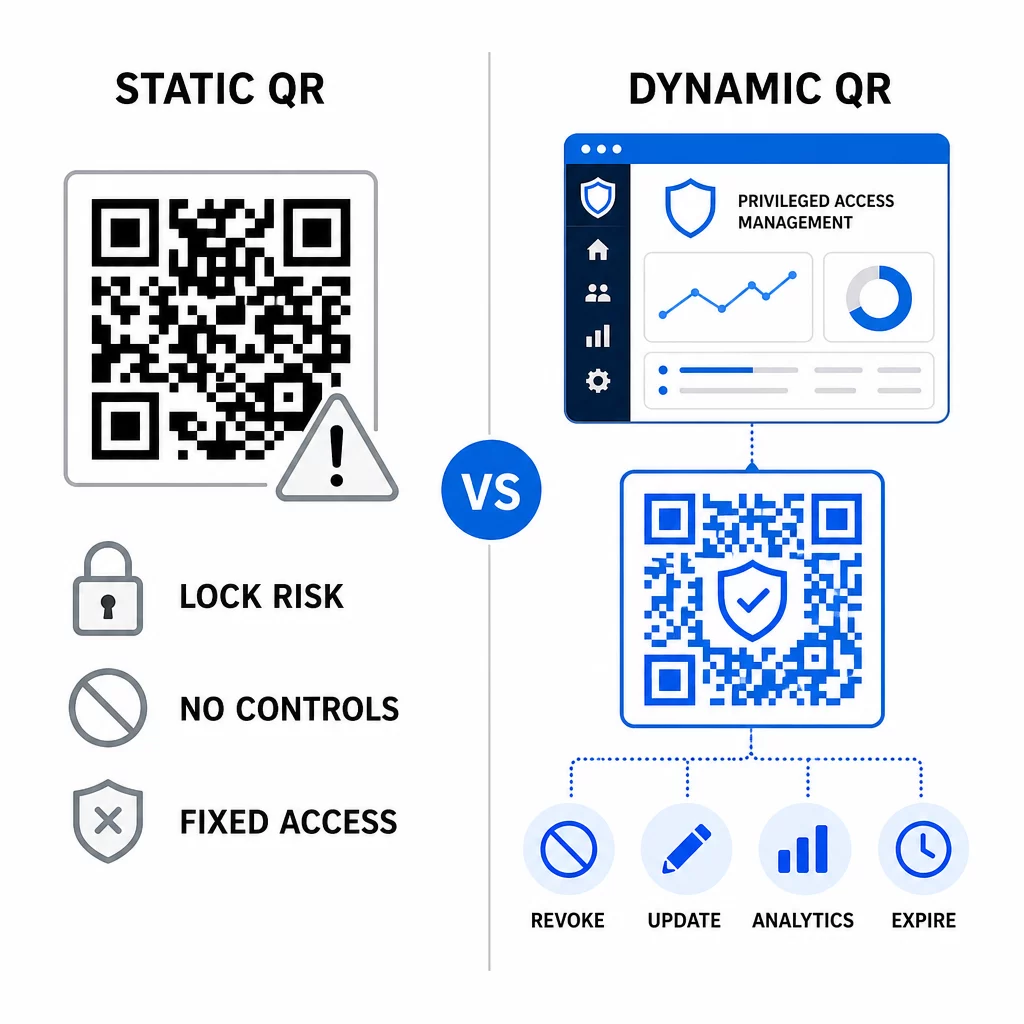
Statik QR kodları, belgeler veya salt okunur kaynaklara bağlantı gibi daha düşük riskli dahili kullanım durumlarında hala bir rol oynayabilir, ancak ayrıcalıklı erişim içeren kimlik doğrulama akışları için kullanılmamalıdır.
QR Tabanlı PAM Kimlik Doğrulaması için Temel Güvenlik Hususları
Bir PAM ortamında QR kod kimlik doğrulamasını uygulamak, kendi saldırı yüzeyini beraberinde getirir. Bu riskleri anlamak ve azaltmak, üretime geçmeden önce çok önemlidir.
Kayıt QR kodu güvenlik açığı. Bir TOTP kayıt QR kodunda kodlanmış paylaşılan sırrın kendi başına süresi dolmaz. Bu kod bir ekran görüntüsünde yakalanırsa, e-posta ile iletilirse veya bir yedekte saklanırsa, bir saldırgan daha sonra bunu bir cihazı yeniden kaydetmek ve süresiz olarak geçerli TOTP kodları oluşturmak için kullanabilir. Azaltma basittir: kayıt kodlarını tek bir başarılı taramadan sonra sona erecek şekilde yapılandırın. E-posta sistemlerinde veya yedeklerde depolanan tüm geçmiş kayıt QR kodlarını denetleyin ve temizleyin ve etkilenen kullanıcıları yeni tek kullanımlık kodlarla yeniden kaydedin.
QR kod kimlik avı (quishing). Saldırganlar, MFA kayıt süreçlerini taklit ettikleri, kullanıcılara kimlik bilgilerini çalan bir sayfaya yönlendiren kötü amaçlı bir QR kodunu taramalarını söyleyen e-postalar gönderdikleri kampanyaları belgelediler. Kullanıcılarınızı istenmeyen QR tarama isteklerine şüpheyle yaklaşmaları, taramadan önce göndereni bağımsız olarak doğrulamaları ve rastgele URL'ler açmak yerine `otpauth://` yükünü korumalı bir ortamda işleyen kimlik doğrulayıcı uygulamalar kullanmaları konusunda eğitin. Daha derinlemesine rehberlik için bkz. Siber güvenlikte QR kodu kimlik doğrulaması.
SMS'in kullanımdan kaldırılması. NIST'in dijital kimlik rehberliği, SIM takası, cihaz takası ve numara taşıma gibi riskler nedeniyle bant dışı kimlik doğrulama için SMS ve sesli aramaların kullanımını açıkça önermemektedir. Kimlik doğrulayıcı uygulamalarla TOTP tabanlı QR kaydı, NIST'in güvenli bir ikincil kanal aracılığıyla teslim edildiğinde geçerli bir bant dışı mekanizma olarak kabul ettiği daha güçlü bir alternatiftir.
Cihaz bağlama ve biyometri. QR kodu kimlik doğrulamasını önceden kaydedilmiş cihazlara bağlamak, SMS'in sağlayamayacağı bir donanım katmanı ekler. Biyometrik doğrulama (parmak izi veya yüz tanıma) eklemek, üç faktörlü bir model oluşturur: sahip olduğunuz bir şey (kayıtlı cihaz), olduğunuz bir şey (biyometri) ve zamana bağlı kod (bağlama bağlı). Yüksek riskli işlemler için daha kısa TOTP pencereleri yapılandırın veya ek doğrulama adımları gerektirin.
Dağıtımdan önce test etme. Her zaman QR kodu kimlik doğrulama akışlarını test edin üretime geçmeden önce birden fazla cihazda, işletim sisteminde ve kimlik doğrulayıcı uygulamasında. Kayıt kodlarının kullanımdan sonra sona erdiğini, iptalin beklendiği gibi çalıştığını ve yedek giriş yollarının doğru çalıştığını doğrulayın.
QR kodu uygulamanızı güçlendirmeye kapsamlı bir bakış için bkz. siber savunmada QR kodu güvenliği için en iyi uygulamaları ve güvenli QR kodu oluşturma en iyi uygulamaları.
QR Kimlik Doğrulamasını Mevcut MFA ve SSO ile Entegre Etme
QR kodları, mevcut kimlik doğrulama altyapısını tamamen değiştirmek yerine onunla iyi çalışır. MFA kurulumlarında, QR tabanlı TOTP, bir parola veya biyometriyi tamamlayan “sahip olduğunuz bir şey” faktörü olarak işlev görür. SSO ortamlarında, bir QR kodu, oturum belirteci vermeden önce cihaz sahipliğini onaylayan meydan okuma-yanıt adımı olarak hizmet edebilir. Bu yaklaşımların ayrıntılı bir karşılaştırması için bkz. SSO'da QR kodları ve parolalar.
Kayıt modeli PAM'ın ötesine de uzanır. LastPass gibi parola yöneticilerini zaten kullanan ekipler, neredeyse aynı bir QR tarama kurulum sürecini takip edebilirler – bağlamak için tarama, bir TOTP koduyla onaylama, kurtarma kodlarını saklama – bu da iş akışını başka yerlerde MFA kurmuş kullanıcılara tanıdık hale getirir. Bkz. LastPass QR kodu kurulum rehberi adım adım bir referans için.
İyi yapılandırılmış bir sistemdeki her kimlik doğrulama girişimi, QR kodu tanımlayıcısını, cihaz bilgilerini, uygulanabilirse biyometrik sonucu, zaman damgasını ve coğrafi konumu yakalayan bir günlük girişi oluşturmalıdır. Bu günlükler, uyumluluk denetimleri, anomali tespiti ve olay müdahalesi için kritik öneme sahiptir.
Gelişmiş Özellikler: Analiz, Özelleştirme ve Gerçek Zamanlı Kontrol
Kurumsal QR kodu platformları, temel kod oluşturmanın ötesinde, PAM operasyonlarıyla doğrudan ilgili yetenekler ekler.
Gerçek zamanlı analiz güvenlik ekiplerinin kimlik doğrulama modellerini anında izlemesini sağlar. İzlemeye değer metrikler arasında tarama zaman damgaları, cihaz türleri, coğrafi konumlar ve kullanıcı davranış taban çizgileri bulunur. Sapmaları işaretleyen algoritmalar – alışılmadık bir cihaz türü, beklenmedik bir ülkeden bir tarama, başarısız denemelerde bir artış – kademeli kimlik doğrulamayı veya otomatik uyarıları tetikleyebilir. Bu metriklerin pratikte neye benzediği hakkında daha fazla bilgi için bkz. QR kodlarının çok faktörlü kimlik doğrulamayı nasıl basitleştirdiği.
Markalı kimlik doğrulama kodları estetiğin ötesinde pratik bir güvenlik işlevi görür. Kuruluşunuz, şirket logoları ve renk şemalarıyla tutarlı, markalı QR kodları kullandığında, kullanıcılar meşru kimlik doğrulama istekleri için görsel bir temel geliştirir. Bu temelden sapan bir kod, bir uyarı işareti haline gelir. Yeterli renk kontrastı sağlamak – en az 4.5:1 oranı – kodların cihazlar ve aydınlatma koşulları arasında güvenilir bir şekilde taranabilir kalmasını da sağlar.
Dinamik kontrol operasyonel riski en doğrudan azaltan özelliktir. Bir çalışan ayrıldığında, kimlik bilgisi rotasyon döngülerini beklemeden kodlarını merkezi bir panodan anında devre dışı bırakırsınız. Bir güvenlik olayı tespit edildiğinde, yeniden yazdırmadan iptal eder ve yeniden düzenlersiniz. Dinamik QR Kod Oluşturucu Pageloot'taki tüm bu iş akışlarını, gerçek zamanlı tarama takibi ve düzenlenebilir hedeflerle destekler.
QR yükleri içinde şifrelenmiş kimlik bilgilerini veya jeton verilerini işleyen ekipler için bkz. kimlik doğrulama platformları için şifreli QR kodları AES ve RSA şifreleme yaklaşımları hakkında rehberlik için.
Endüstri Uygulamaları
Aynı QR tabanlı PAM modeli, farklı ayrıcalıklı erişim profillerine sahip sektörlerde de geçerlidir.
İçinde bankacılık ve finans hizmetleri, yöneticiler, temel bankacılık sistemlerine, ticaret platformlarına ve müşteri veritabanlarına erişmek için zamana duyarlı QR kodları kullanır. Her ayrıcalıklı oturum, kullanılan belirli koda karşı günlüğe kaydedilir ve düzenleyici uyumluluk için net bir denetim izi sağlar.
İçinde yazılım geliştirme, dağıtık ekipler, statik kimlik bilgileri olmadan üretim sistemlerine, kod depolarına ve dağıtım hatlarına erişmek için QR kodlarını kullanır. Dinamik kodlar işe alımı hızlandırır ve işten çıkarmayı anında yapar – parola rotasyonlarının yayılmasını beklemeye gerek kalmaz.
İçinde sağlık hizmetleri, iş istasyonları arasında hareket eden klinik personel, yazmak yerine tarayarak hızlı bir şekilde kimlik doğrulayabilir, böylece HIPAA tarafından gerekli denetim izlerini korurken oturum açma sürtünmesini azaltır.
Desen tutarlıdır: Dinamik yönetim ve analitik ile birleştirilmiş QR kodları, güvenlik ekiplerine hızlı ve güvenilir erişime bağımlı kullanıcıları yavaşlatmadan ihtiyaç duydukları kontrolü sağlar. QR kod kimlik doğrulaması, olgun bir PAM stratejisinin yerini tutmaz – PAM'in en savunmasız bileşenlerinden birini güçlendiren bir mekanizmadır. Statik kimlik bilgilerini zamana bağlı, cihaza bağlı kodlarla değiştirerek, tek kullanımlık kaydı zorunlu kılarak ve her kimlik doğrulama olayını izleyerek, eski yöntemlerin açık bıraktığı kimlik avı ve kimlik bilgisi hırsızlığı boşluklarını kapatırsınız. PAM platformunuzun kimlik doğrulama ayarlarında QR kaydını etkinleştirerek başlayın, MFA politikalarınızı tanımlayın ve erişim üzerinde gerçek zamanlı kontrol sağlamak için merkezi bir yönetim platformuyla dinamik kodları kullanın.
Kimlik Doğrulama İş Akışlarınız İçin QR Kodları Oluşturun ve Yönetin Kullan QR Kod Oluşturucu başlamak için veya keşfedin Dinamik QR Kod Oluşturucu tek bir panodan güncelleyebileceğiniz, izleyebileceğiniz ve iptal edebileceğiniz kayıt kodları için.
Sıkça sorulan sorular
Kayıt sırasında, PAM sistemi paylaşılan bir gizli anahtar oluşturur ve bunu `otpauth://totp/` URI formatını kullanarak bir QR kodu olarak kodlar. Kullanıcı bunu bir kimlik doğrulayıcı uygulamasıyla tarar, bu da gizli anahtarı cihaza kaydeder. Giriş yaparken, uygulama ve sunucu, o gizli anahtardan ve mevcut zamandan bağımsız olarak 30 saniyelik bir parola hesaplar. Kod zaman ve cihaza bağlı olduğu için, aktarım sırasında onu ele geçirmek bir saldırgana kalıcı bir değer sağlamaz.
Kayıt QR kodu güvenlik açığı, en sık göz ardı edilen risktir. Bir kayıt QR koduna gömülü TOTP sırrı kendiliğinden sona ermez, bu nedenle o kodun herhangi bir ekran görüntüsü, e-posta iletisi veya yedek kopyası süresiz olarak kullanılabilir kalır. Bunu, kayıt kodlarını tek bir başarılı taramadan sonra sona erecek şekilde yapılandırarak ve depolanmış tüm geçmiş kayıt kodlarını temizlemek için e-posta ve yedekleme sistemlerinizi denetleyerek azaltın.
Kimlik doğrulama ve MFA kayıt akışları için her zaman dinamik QR kodlarını tercih edin. Dinamik kodlar, bir cihaz kaybolduğunda anında iptal edilebilir, fiziksel materyaller yeniden dağıtılmadan güncellenebilir ve gerçek zamanlı analizlerle izlenebilir. Statik kodlar yalnızca anında iptal ve denetim kaydı gerektirmeyen düşük riskli, salt okunur içerikler için uygundur.