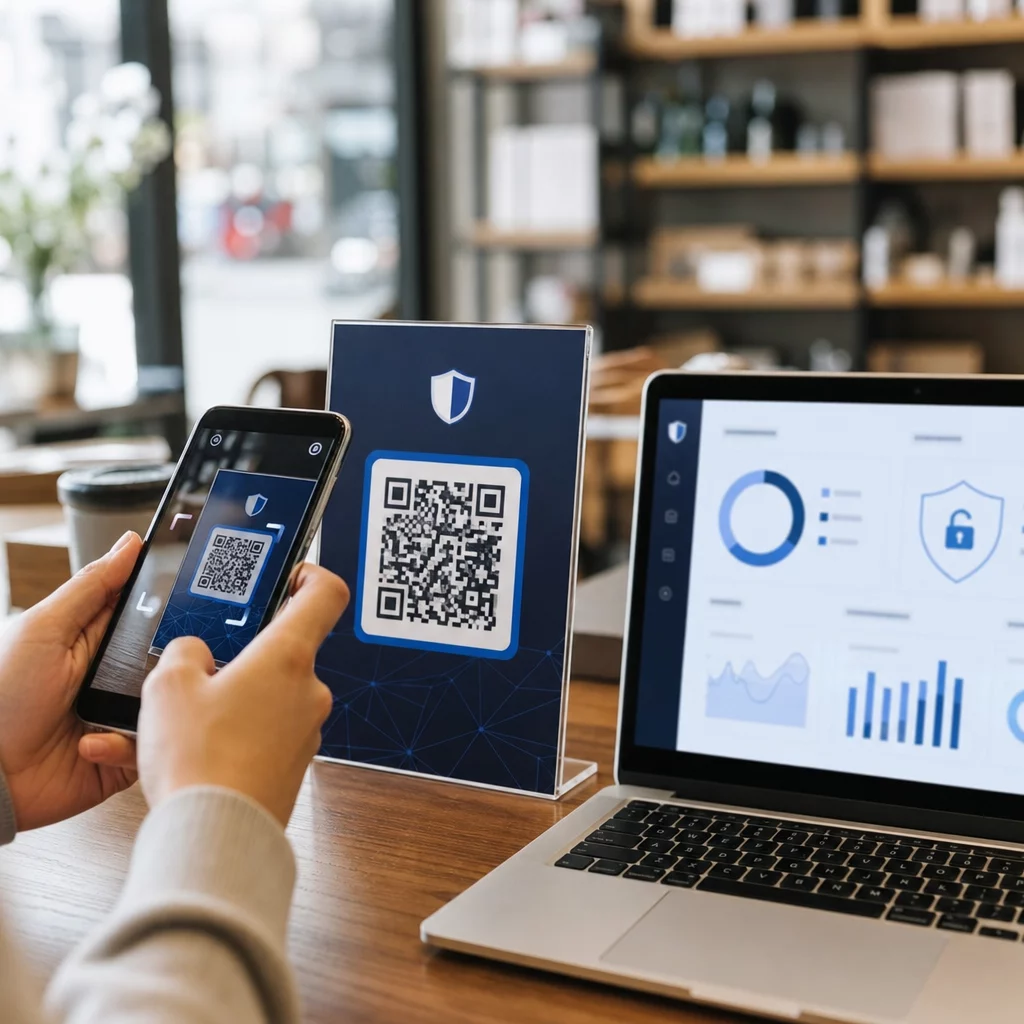
Avez-vous du mal à sécuriser les comptes privilégiés sans créer de friction pour vos administrateurs ? Les mots de passe statiques et les méthodes MFA héritées exposent les environnements PAM au phishing, au vol d'identifiants et au détournement de session. Cette page explique comment l'authentification par code QR comble ces lacunes – en couvrant le paysage des menaces, le fonctionnement de l'inscription, les mécanismes TOTP et les pratiques de sécurité que votre équipe doit mettre en œuvre correctement.
Pourquoi l'authentification PAM traditionnelle est insuffisante
Les systèmes de gestion des accès privilégiés protègent les comptes les plus sensibles de votre organisation. Lorsque ces comptes reposent sur des mots de passe statiques, des identifiants partagés ou une MFA basée sur SMS, les attaquants disposent de voies bien documentées pour les exploiter.
Phishing et vol d'identifiants restent le point d'entrée le plus courant. Les utilisateurs privilégiés sont ciblés précisément parce que leurs comptes déverrouillent des systèmes critiques. Même les administrateurs expérimentés peuvent être trompés par des pages de connexion factices convaincantes, surtout lorsque les attaquants utilisent l'ingénierie sociale pour usurper l'identité de fournisseurs ou du support informatique. Une fois les identifiants volés, les attaquants se déplacent latéralement, élèvent leurs privilèges et maintiennent un accès persistant.
Comptes partagés aggravent le problème. Lorsque plusieurs administrateurs utilisent les mêmes identifiants, la responsabilité individuelle disparaît. Les enquêtes sur les violations stagnent, le suivi de la conformité échoue et un seul mot de passe compromis déverrouille l'accès à plusieurs systèmes.
Détournement de session présente un troisième risque majeur. Après un événement d'authentification légitime, les attaquants peuvent intercepter des jetons de session, exploiter des cookies ou utiliser des techniques d'homme du milieu pour usurper l'identité d'utilisateurs authentifiés – le tout sans jamais connaître le mot de passe original. Les jetons de session persistants rendent ces attaques particulièrement difficiles à détecter, car l'attaquant se fond dans le trafic administratif normal.
Ces vulnérabilités partagent une cause profonde : une authentification qui dépend de secrets statiques et réutilisables. L'authentification par code QR y remédie directement.
Comment l'authentification par code QR fonctionne dans PAM
L'authentification par code QR remplace les identifiants statiques par des codes dynamiques et spécifiques à l'appareil. Plutôt que de taper un mot de passe, un administrateur scanne un code QR avec un appareil mobile enregistré. L'appareil lit le code, applique des clés sécurisées stockées dans le matériel et complète l'authentification en quelques secondes.
L'implémentation la plus courante dans les environnements PAM d'entreprise associe les codes QR à TOTP (mot de passe à usage unique basé sur le temps) tel que défini dans la RFC 6238. Voici comment ce flux fonctionne :
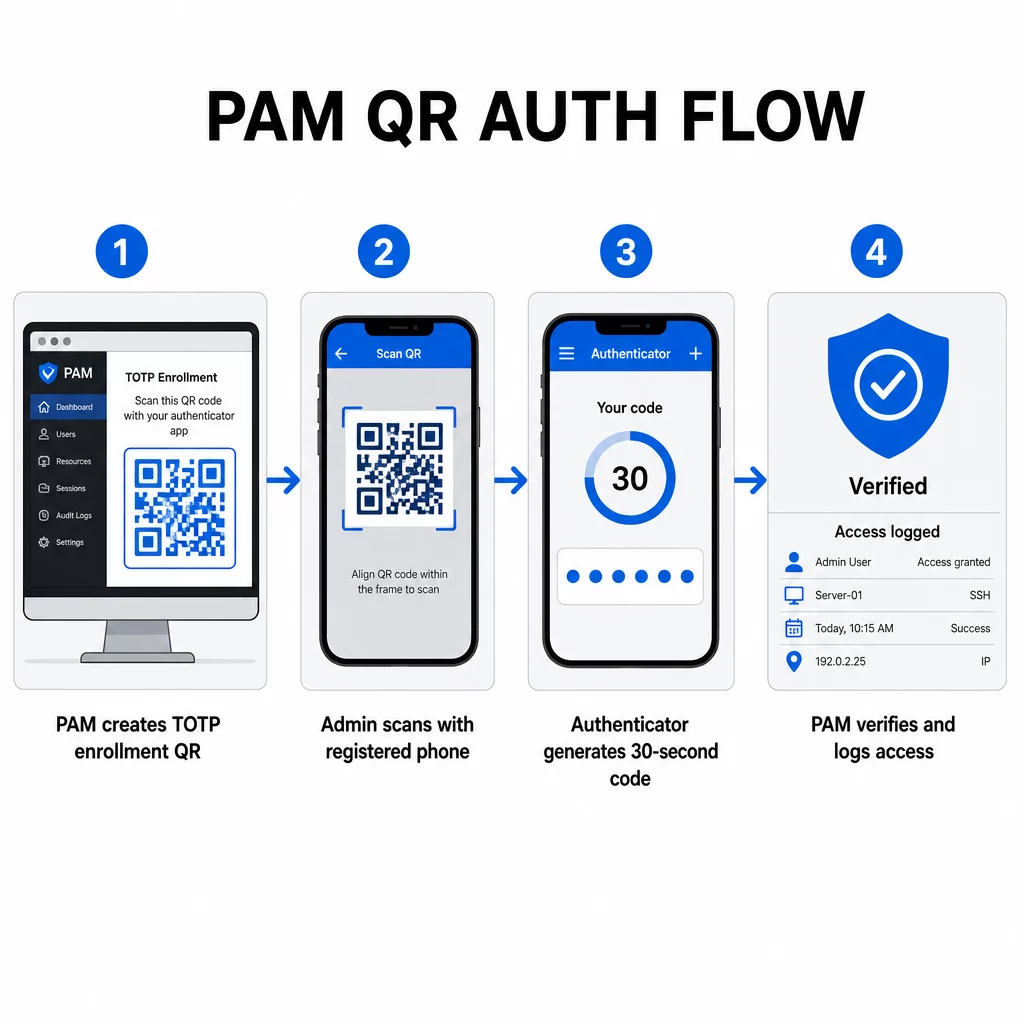
- Lors de l'inscription, le système génère une clé secrète partagée et l'encode dans un code QR sous forme d'URI formatée comme `otpauth://totp/LABEL?secret=SECRET&issuer=ISSUER`
- L'utilisateur scanne ce code QR avec une application d'authentification (telle que Google Authenticator, Microsoft Authenticator ou Okta Verify), qui stocke le secret localement sur l'appareil
- Lors de la connexion, l'application applique l'algorithme HOTP à un compteur basé sur le temps dérivé de l'heure Unix actuelle, générant un code d'accès unique valide pendant 30 secondes par défaut
- Le serveur effectue le même calcul indépendamment et accepte les codes de l'étape de temps actuelle et immédiatement précédente pour tenir compte de la dérive d'horloge
Étant donné que le code d'accès est dérivé du temps et d'un secret lié à l'appareil – non transmis sur le réseau – son interception en transit n'offre aucune valeur durable. Chaque code est inutile dans les 30 secondes.
Des plateformes comme CyberArk implémentent ce modèle directement. Les administrateurs activent l'inscription des utilisateurs basée sur le code QR sous Paramètres → Authentification → Plateforme → Paramètres de sécurité → Options d'authentification, puis définissent des politiques MFA qui déclenchent l'assistant d'inscription lors de la première connexion. L'application mobile CyberArk Identity prend également en charge une option “ S'inscrire avec QR ”, où les utilisateurs scannent un code présenté sur le portail Identity pour activer leur appareil en tant que facteur MFA.
Configuration de l'inscription MFA par code QR
Pour les ingénieurs DevOps configurant la MFA basée sur QR dans un environnement PAM, le processus d'inscription général suit ces étapes quelle que soit la plateforme spécifique :
- Activer l'inscription QR dans les paramètres d'authentification de la plateforme. La plupart des systèmes PAM d'entreprise exposent cela comme un interrupteur sous les options de configuration d'authentification ou de sécurité.
- Définir une politique MFA qui détermine quels utilisateurs ou rôles nécessitent la MFA, quand elle est appliquée et ce qui se passe lors de la première connexion.
- Présenter le code QR d'inscription à l'utilisateur lors de sa première session authentifiée. Le code encode le secret TOTP partagé au format URI `otpauth://`.
- Guider l'utilisateur à scanner le code à l'aide de leur application d'authentification enregistrée. Fournissez une option de saisie manuelle de secours (la clé secrète brute) pour les cas où la caméra ne peut pas lire le code.
- Vérifier l'inscription en demandant à l'utilisateur de soumettre un code TOTP avant de finaliser la configuration, confirmant que le secret a été transféré correctement.
- Générer et stocker des codes de récupération de secours afin que les utilisateurs ne soient pas bloqués s'ils perdent leur appareil.
Pour les équipes gérant des déploiements à grande échelle, associer ce flux d'inscription à un Générateur de QR code dynamique vous permet de mettre à jour, de suivre et de révoquer les codes d'inscription de manière centralisée – important lorsque les identifiants doivent être renouvelés ou lorsqu'un appareil est signalé comme perdu.
Suivre et gérer les codes QR d'authentification à grande échelle Besoin d'émettre, de mettre à jour ou de révoquer des codes QR au sein d'une équipe distribuée ? Utilisez le Générateur de QR code dynamique pour créer des codes modifiables avec des analyses en temps réel et une gestion centralisée.
Codes QR dynamiques vs. statiques dans les environnements PAM
Le choix entre les codes QR statiques et dynamiques a des implications directes en matière de sécurité pour les flux de travail PAM.
| FONCTIONNALITÉ | Codes QR statiques | Dynamic QR Codes |
|---|---|---|
| Contenu après création | Fixe, ne peut pas être modifié | Modifiable à tout moment |
| Révocation | Nécessite une réémission et une redistribution | Instantané, depuis un tableau de bord central |
| STATISTIQUES | Aucune | Horodatages de scan, types d'appareils, emplacements |
| Risque d'attaque par rejeu | Plus élevé (le code est permanent) | Plus faible (options d'expiration et d'utilisation unique) |
| Meilleur cas d'utilisation | Contenu à faible risque et à usage unique | Accès privilégié, flux de travail sensibles |
Pour l'authentification PAM et l'enregistrement MFA, les codes QR dynamiques sont fortement préférés. Si un appareil est signalé comme perdu, un administrateur peut désactiver immédiatement le code d'enregistrement associé. Les codes à durée limitée empêchent les attaques par rejeu en rendant tout code intercepté inutile en quelques instants. Et les analyses de scan fournissent une piste d'audit qui prend en charge les exigences de conformité.
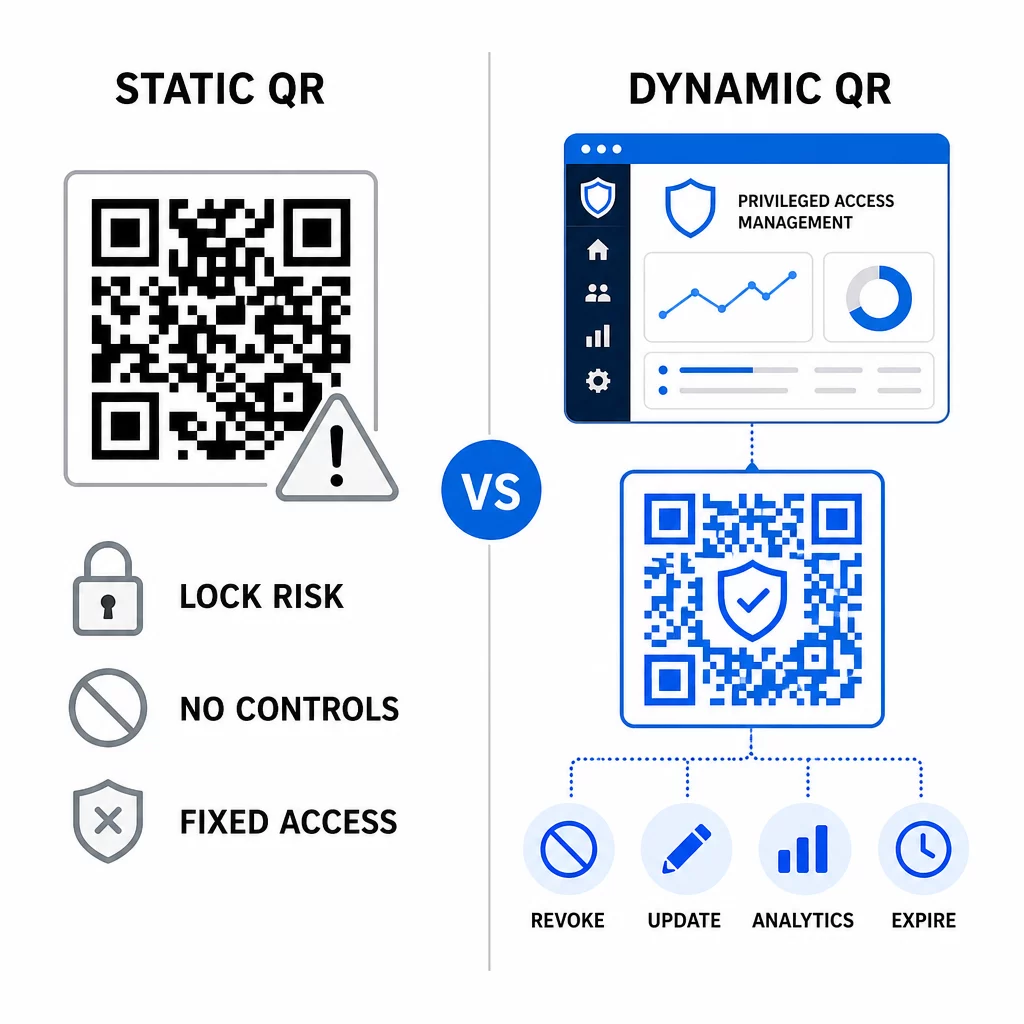
Les codes QR statiques peuvent toujours jouer un rôle dans les cas d'utilisation internes à faible risque – tels que la liaison vers de la documentation ou des ressources en lecture seule – mais ils ne doivent pas être utilisés pour les flux d'authentification impliquant un accès privilégié.
Considérations de sécurité clés pour l'authentification PAM basée sur les codes QR
L'implémentation de l'authentification par code QR dans un environnement PAM introduit sa propre surface d'attaque. Comprendre et atténuer ces risques est essentiel avant le déploiement en production.
Vulnérabilité du code QR d'enregistrement. Le secret partagé encodé dans un code QR d'enregistrement TOTP n'expire pas de lui-même. Si ce code est capturé dans une capture d'écran, transmis par e-mail ou stocké dans une sauvegarde, un attaquant peut ultérieurement l'utiliser pour réenregistrer un appareil et générer des codes TOTP valides indéfiniment. L'atténuation est simple : configurez les codes d'enregistrement pour qu'ils expirent après un seul scan réussi. Auditez et purgez tous les codes QR d'enregistrement historiques stockés dans les systèmes de messagerie ou les sauvegardes, et réenregistrez les utilisateurs affectés avec de nouveaux codes à usage unique.
Hameçonnage par code QR (quishing). Les attaquants ont documenté des campagnes où ils usurpent l'identité des processus d'inscription MFA, envoyant des e-mails qui demandent aux utilisateurs de scanner un code QR malveillant menant à une page de collecte d'identifiants. Formez vos utilisateurs à traiter les demandes de scan de QR non sollicitées avec suspicion, à vérifier indépendamment l'expéditeur avant de scanner, et à utiliser des applications d'authentification qui gèrent la charge utile `otpauth://` dans un environnement sandbox plutôt que d'ouvrir des URL arbitraires. Pour des conseils plus approfondis, voir Vérification d'identité par code QR en cybersécurité.
Dépréciation des SMS. Les directives de NIST en matière d'identité numérique découragent explicitement l'utilisation des SMS et des appels vocaux pour l'authentification hors bande en raison de risques tels que l'échange de carte SIM, l'échange d'appareil et le portage de numéro. L'inscription par code QR basée sur TOTP avec des applications d'authentification est une alternative plus robuste que le NIST reconnaît comme un mécanisme hors bande valide lorsqu'elle est fournie via un canal secondaire sécurisé.
Liaison d'appareil et biométrie. Lier l'authentification par code QR à des appareils pré-enregistrés ajoute une couche matérielle que les SMS ne peuvent pas fournir. L'ajout de la vérification biométrique – empreinte digitale ou reconnaissance faciale – crée un modèle à trois facteurs : quelque chose que vous possédez (l'appareil enregistré), quelque chose que vous êtes (la biométrie) et le code limité dans le temps (dépendant du contexte). Pour les opérations à haut risque, configurez des fenêtres TOTP plus courtes ou exigez des étapes de vérification supplémentaires.
Tests avant le déploiement. Toujours tester les flux d'authentification par code QR sur plusieurs appareils, systèmes d'exploitation et applications d'authentification avant de passer en production. Vérifiez que les codes d'inscription expirent après utilisation, que la révocation fonctionne comme prévu et que les chemins d'entrée de secours fonctionnent correctement.
Pour un aperçu complet du renforcement de votre implémentation de code QR, voir les meilleures pratiques en matière de sécurité des codes QR dans la cyberdéfense et bonnes pratiques de génération de codes QR sécurisés.
Intégration de l'authentification QR avec les MFA et SSO existants
Les codes QR fonctionnent bien avec l'infrastructure d'authentification existante plutôt que de la remplacer entièrement. Dans les configurations MFA, le TOTP basé sur QR agit comme le facteur “ quelque chose que vous possédez ”, complétant un mot de passe ou une biométrie. Dans les environnements SSO, un code QR peut servir d'étape de défi-réponse qui confirme la possession de l'appareil avant d'émettre un jeton de session. Pour une comparaison détaillée de ces approches, voir Codes QR vs. mots de passe en SSO.
Le modèle d'inscription s'étend également au-delà de PAM. Les équipes utilisant déjà des gestionnaires de mots de passe comme LastPass peuvent suivre un processus de configuration par scan QR presque identique – scanner pour lier, confirmer avec un code TOTP, stocker les codes de récupération – rendant le flux de travail familier aux utilisateurs qui ont déjà configuré la MFA ailleurs. Voir le guide de configuration du code QR LastPass pour une référence étape par étape.
Chaque tentative d'authentification dans un système bien configuré devrait générer une entrée de journal capturant l'identifiant du code QR, les informations sur l'appareil, le résultat biométrique le cas échéant, l'horodatage et la localisation géographique. Ces journaux sont essentiels pour les audits de conformité, la détection d'anomalies et la réponse aux incidents.
Fonctionnalités avancées : Analyse, Personnalisation et Contrôle en temps réel
Les plateformes de codes QR d'entreprise ajoutent des capacités au-delà de la génération de codes de base qui sont directement pertinentes pour les opérations PAM.
Statistiques en temps réel permettent aux équipes de sécurité de surveiller les modèles d'authentification au fur et à mesure qu'ils se produisent. Les métriques à suivre incluent les horodatages de scan, les types d'appareils, les localisations géographiques et les bases de référence du comportement des utilisateurs. Des algorithmes qui signalent les déviations – un type d'appareil inhabituel, un scan depuis un pays inattendu, un pic de tentatives échouées – peuvent déclencher une authentification renforcée ou des alertes automatiques. Pour en savoir plus sur l'apparence de ces métriques en pratique, voir comment les codes QR simplifient l'authentification multi-facteurs.
Codes d'authentification de marque remplissent une fonction de sécurité pratique au-delà de l'esthétique. Lorsque votre organisation utilise des codes QR cohérents et de marque avec les logos et les schémas de couleurs de l'entreprise, les utilisateurs développent une base visuelle pour les demandes d'authentification légitimes. Un code qui s'écarte de cette base devient un signe d'avertissement. Assurer un contraste de couleur suffisant – un rapport d'au moins 4,5:1 – permet également de maintenir les codes fiablement scannables sur tous les appareils et dans toutes les conditions d'éclairage.
Contrôle dynamique est la fonctionnalité qui réduit le plus directement le risque opérationnel. Lorsqu'un employé quitte l'entreprise, vous désactivez ses codes instantanément depuis un tableau de bord central sans attendre les cycles de rotation des identifiants. Lorsqu'un incident de sécurité est détecté, vous révoquez et réémettez sans réimpression. Le Générateur de QR code dynamique sur Pageloot prend en charge tous ces flux de travail, avec un suivi des scans en temps réel et des destinations modifiables intégrés.
Pour les équipes gérant des identifiants chiffrés ou des données de jetons dans les charges utiles QR, voir codes QR chiffrés pour les plateformes d'authentification pour des conseils sur les approches de chiffrement AES et RSA.
Applications industrielles
Le même modèle PAM basé sur les codes QR s'applique à travers les industries avec différents profils d'accès privilégié.
Dans les services bancaires et financiers, les administrateurs utilisent des codes QR sensibles au temps pour accéder aux systèmes bancaires centraux, aux plateformes de trading et aux bases de données clients. Chaque session privilégiée est enregistrée par rapport au code spécifique utilisé, fournissant une piste d'audit claire pour la conformité réglementaire.
Dans le développement logiciel, les équipes distribuées utilisent des codes QR pour accéder aux systèmes de production, aux dépôts de code et aux pipelines de déploiement sans identifiants statiques. Les codes dynamiques accélèrent l'intégration et rendent le départ immédiat – plus besoin d'attendre que les rotations de mots de passe se propagent.
Dans soins de santé, le personnel clinique qui se déplace entre les postes de travail peut s'authentifier rapidement en scannant plutôt qu'en tapant, réduisant ainsi la friction de connexion tout en maintenant les pistes d'audit requises par la HIPAA.
Le modèle est cohérent : les codes QR combinés à une gestion dynamique et à des analyses donnent aux équipes de sécurité le contrôle dont elles ont besoin sans ralentir les utilisateurs qui dépendent d'un accès rapide et fiable. L'authentification par code QR ne remplace pas une stratégie PAM mature – c'est un mécanisme qui renforce l'un des composants les plus vulnérables de PAM. En remplaçant les identifiants statiques par des codes liés au temps et à l'appareil, en imposant une inscription à usage unique et en surveillant chaque événement d'authentification, vous comblez les lacunes en matière de phishing et de vol d'identifiants que les méthodes héritées laissent ouvertes. Commencez par activer l'inscription QR dans les paramètres d'authentification de votre plateforme PAM, définissez vos politiques MFA et utilisez des codes dynamiques avec une plateforme de gestion centralisée pour maintenir un contrôle en temps réel sur l'accès.
Créer et gérer des codes QR pour vos flux d'authentification Utilisez le Générateur de codes QR pour commencer, ou explorez le Générateur de QR code dynamique pour les codes d'inscription que vous pouvez mettre à jour, suivre et révoquer depuis un tableau de bord unique.
Questions fréquentes
Lors de l'inscription, le système PAM génère une clé secrète partagée et l'encode sous forme de code QR en utilisant le format d'URI `otpauth://totp/`. L'utilisateur scanne ceci avec une application d'authentification, qui stocke le secret sur l'appareil. Lors de la connexion, l'application et le serveur calculent indépendamment un code d'accès de 30 secondes à partir de ce secret et de l'heure actuelle. Étant donné que le code est lié au temps et à l'appareil, son interception en transit n'offre aucune valeur durable à un attaquant.
La vulnérabilité du code QR d'inscription est le risque le plus souvent négligé. Le secret TOTP intégré dans un code QR d'inscription n'expire pas de lui-même, de sorte que toute capture d'écran, tout transfert par e-mail ou toute copie de sauvegarde de ce code reste utilisable indéfiniment. Atténuez ce risque en configurant les codes d'inscription pour qu'ils expirent après une seule numérisation réussie, et auditez vos systèmes de messagerie et de sauvegarde pour purger tout code d'inscription historique stocké.
Toujours préférer les codes QR dynamiques pour les flux d'authentification et d'inscription MFA. Les codes dynamiques peuvent être révoqués instantanément si un appareil est perdu, mis à jour sans redistribuer de matériel physique, et surveillés avec des analyses en temps réel. Les codes statiques ne conviennent que pour le contenu à faible risque et en lecture seule où la révocation instantanée et la journalisation d'audit ne sont pas requises.