Are you struggling to secure privileged accounts without creating friction for your admins? Static passwords and legacy MFA methods leave PAM environments exposed to phishing, credential theft, and session hijacking. This page explains how QR code–based authentication addresses those gaps – covering the threat landscape, how enrollment works, TOTP mechanics, and the security practices your team needs to implement it correctly.
Why Traditional PAM Authentication Falls Short
Privileged Access Management systems protect the most sensitive accounts in your organization. When those accounts rely on static passwords, shared credentials, or SMS-based MFA, attackers have well-documented paths to exploit them.
Phishing and credential theft remain the most common entry point. Privileged users are targeted precisely because their accounts unlock critical systems. Even experienced administrators can be deceived by convincing fake login pages, especially when attackers use social engineering to impersonate vendors or IT support. Once credentials are stolen, attackers move laterally, escalate privileges, and maintain persistent access.
Shared accounts compound the problem. When multiple admins use the same credentials, individual accountability disappears. Breach investigations stall, compliance monitoring breaks down, and a single compromised password unlocks access across multiple systems.
Session hijacking presents a third major risk. After a legitimate authentication event, attackers can intercept session tokens, exploit cookies, or use man-in-the-middle techniques to impersonate authenticated users – all without ever knowing the original password. Persistent session tokens make these attacks especially difficult to detect, since the attacker blends in with normal administrative traffic.
These vulnerabilities share a root cause: authentication that depends on static, reusable secrets. QR code–based authentication addresses this directly.
How QR Code Authentication Works in PAM
QR code authentication replaces static credentials with dynamic, device-specific codes. Rather than typing a password, an administrator scans a QR code with a registered mobile device. The device reads the code, applies secure keys stored in hardware, and completes authentication in seconds.
The most common implementation in enterprise PAM environments pairs QR codes with TOTP (Time-Based One-Time Password) as defined in RFC 6238. Here is how that flow works:
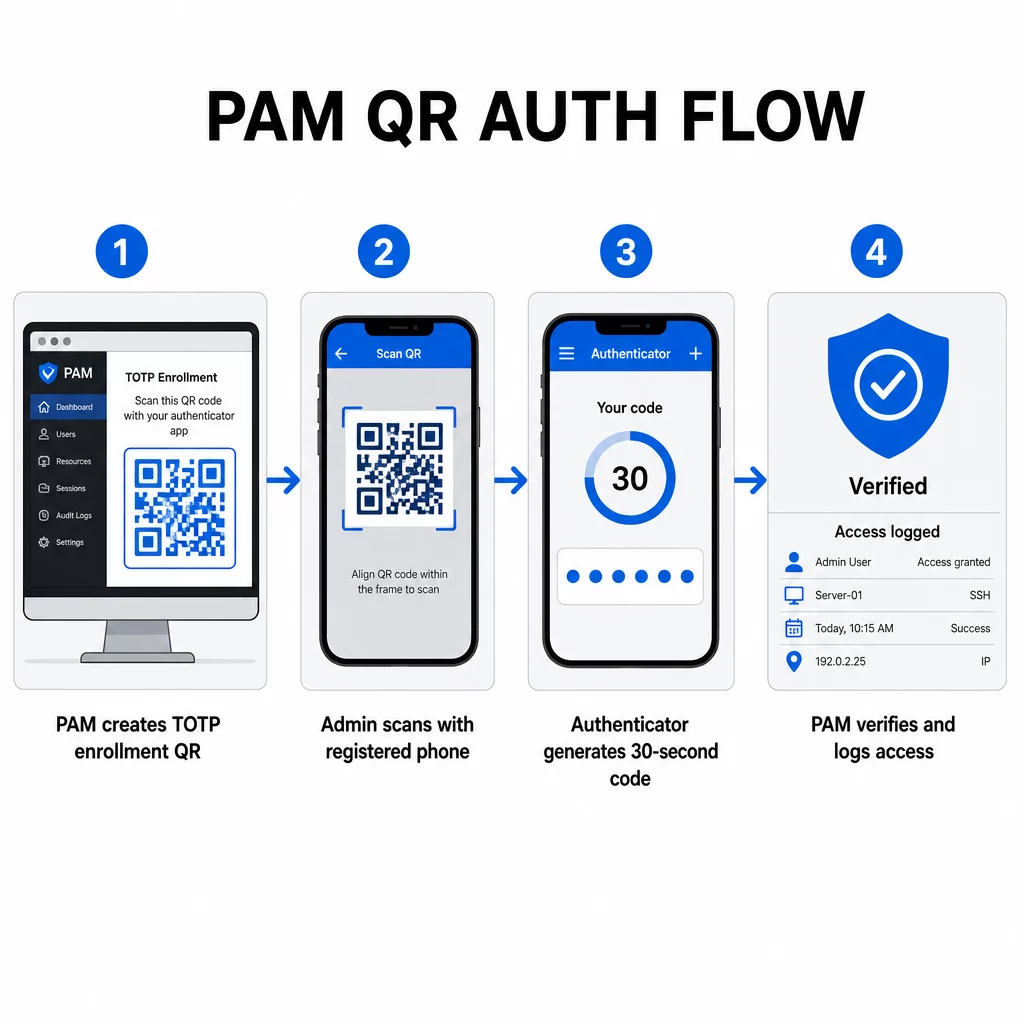
- During enrollment, the system generates a shared secret key and encodes it into a QR code as a URI formatted like `otpauth://totp/LABEL?secret=SECRET&issuer=ISSUER`
- The user scans this QR code with an authenticator app (such as Google Authenticator, Microsoft Authenticator, or Okta Verify), which stores the secret locally on the device
- At login, the app applies the HOTP algorithm to a time-based counter derived from the current Unix time, generating a one-time passcode valid for 30 seconds by default
- The server performs the same calculation independently and accepts codes from the current and immediately prior time step to account for clock drift
Because the passcode is derived from time and a device-bound secret – not transmitted over the network – intercepting it in transit provides no lasting value. Each code is useless within 30 seconds.
Platforms like CyberArk implement this model directly. Administrators enable QR code–based user enrollment under Settings → Authentication → Platform → Security Settings → Authentication Options, then define MFA policies that trigger the enrollment wizard on first login. The CyberArk Identity mobile app also supports an “Enroll with QR” option, where users scan a code presented on the Identity portal to activate their device as an MFA factor.
Setting Up QR Code MFA Enrollment
For DevOps engineers configuring QR-based MFA in a PAM environment, the general enrollment process follows these steps regardless of the specific platform:
- Enable QR enrollment in the platform’s authentication settings. Most enterprise PAM systems expose this as a toggle under authentication or security configuration options.
- Define an MFA policy that determines which users or roles require MFA, when it is enforced, and what happens on first login.
- Present the enrollment QR code to the user during their first authenticated session. The code encodes the shared TOTP secret in `otpauth://` URI format.
- Guide the user to scan the code using their registered authenticator app. Provide a manual entry fallback (the raw secret key) for cases where the camera cannot read the code.
- Verify the enrollment by asking the user to submit a TOTP code before completing setup, confirming the secret transferred correctly.
- Generate and store backup recovery codes so users are not locked out if they lose their device.
For teams managing large-scale rollouts, pairing this enrollment flow with a gerador de código QR dinâmico lets you update, track, and revoke enrollment codes centrally – important when credentials need to rotate or when a device is reported lost.
Track and Manage Authentication QR Codes at Scale Need to issue, update, or revoke QR codes across a distributed team? Use the Gerador de Código QR Dinâmico to create editable codes with real-time analytics and centralized management.
Dynamic vs. Static QR Codes in PAM Environments
The choice between static and dynamic QR codes has direct security implications for PAM workflows.
| Recurso | Códigos QR Estáticos | Códigos QR Dinâmicos |
|---|---|---|
| Content after creation | Fixed, cannot be changed | Editable at any time |
| Revocation | Requires reissuing and redistributing | Instant, from a central dashboard |
| Analíticos | Nenhum | Scan timestamps, device types, locations |
| Replay attack risk | Higher (code is permanent) | Lower (expiration and single-use options) |
| Best use case | Low-risk, one-time content | Privileged access, sensitive workflows |
For PAM authentication and MFA enrollment, dynamic QR codes are strongly preferred. If a device is reported lost, an admin can deactivate the associated enrollment code immediately. Time-limited codes prevent replay attacks by making any intercepted code useless within moments. And scan analytics provide an audit trail that supports compliance requirements.
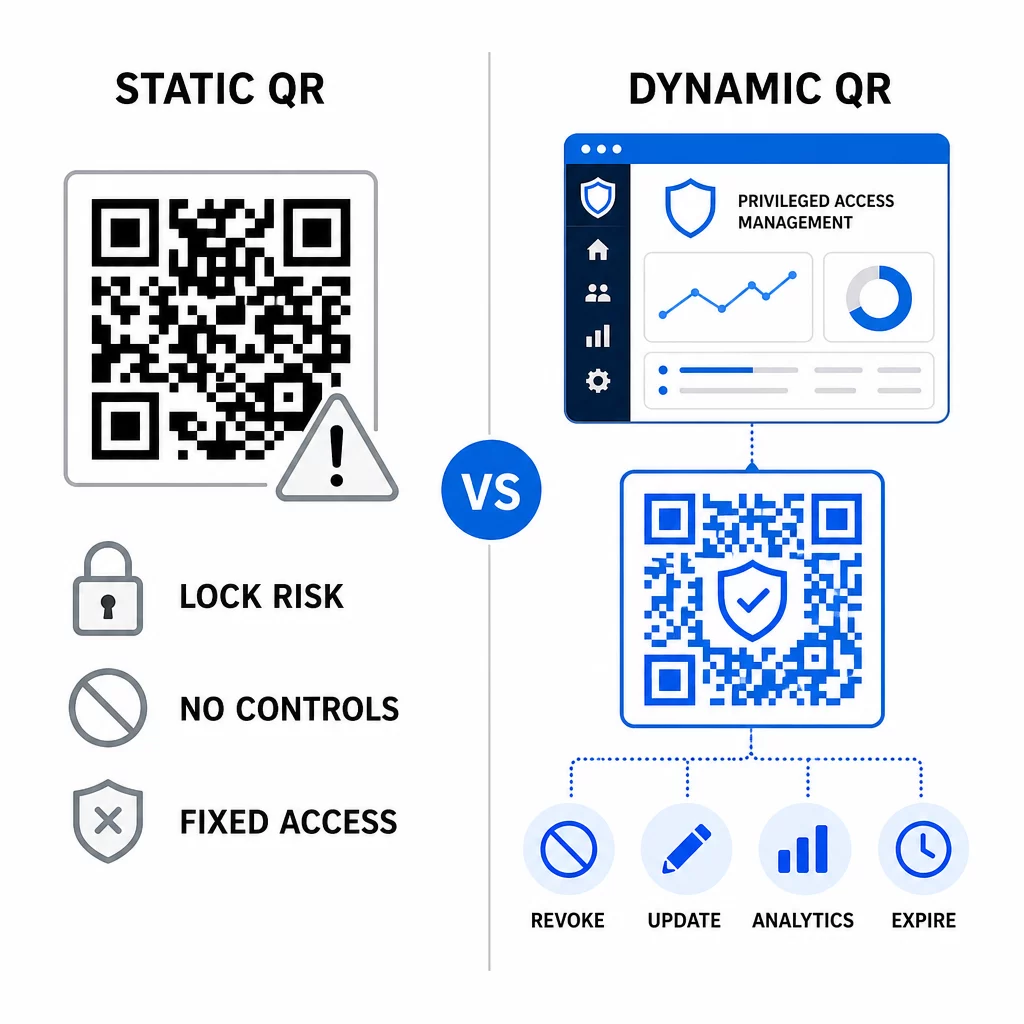
Static QR codes can still serve a role in lower-risk internal use cases – such as linking to documentation or read-only resources – but they should not be used for authentication flows involving privileged access.
Key Security Considerations for QR-Based PAM Auth
Implementing QR code authentication in a PAM environment introduces its own attack surface. Understanding these risks and mitigating them is essential before rolling out to production.
Enrollment QR code vulnerability. The shared secret encoded in a TOTP enrollment QR code does not expire on its own. If that code is captured in a screenshot, forwarded via email, or stored in a backup, an attacker can later use it to re-enroll a device and generate valid TOTP codes indefinitely. The mitigation is straightforward: configure enrollment codes to expire after a single successful scan. Audit and purge any historical enrollment QR codes stored in email systems or backups, and re-enroll affected users with fresh single-use codes.
QR code phishing (quishing). Attackers have documented campaigns where they impersonate MFA enrollment processes, sending emails that instruct users to scan a malicious QR code leading to a credential-harvesting page. Train your users to treat unsolicited QR-scan requests with suspicion, independently verify the sender before scanning, and use authenticator apps that handle the `otpauth://` payload within a sandboxed environment rather than opening arbitrary URLs. For deeper guidance, see QR code identity verification in cybersecurity.
SMS deprecation. NIST’s digital identity guidance explicitly discourages the use of SMS and voice calls for out-of-band authentication due to risks like SIM swapping, device swap, and number porting. TOTP-based QR enrollment with authenticator apps is a stronger alternative that NIST acknowledges as a valid out-of-band mechanism when delivered via a secure secondary channel.
Device binding and biometrics. Linking QR code authentication to pre-registered devices adds a hardware layer that SMS cannot provide. Adding biometric verification – fingerprint or facial recognition – creates a three-factor model: something you have (the registered device), something you are (biometrics), and the time-bound code (context-dependent). For high-risk operations, configure shorter TOTP windows or require additional verification steps.
Testing before deployment. Sempre test QR code authentication flows across multiple devices, operating systems, and authenticator apps before pushing to production. Verify that enrollment codes expire after use, that revocation works as expected, and that fallback entry paths function correctly.
For a comprehensive look at hardening your QR code implementation, see as melhores práticas para segurança de códigos QR em defesa cibernética e melhores práticas de geração segura de código QR.
Integrating QR Auth with Existing MFA and SSO
QR codes work well alongside existing authentication infrastructure rather than replacing it wholesale. In MFA setups, QR-based TOTP acts as the “something you have” factor, supplementing a password or biometric. In SSO environments, a QR code can serve as the challenge-response step that confirms device possession before issuing a session token. For a detailed comparison of these approaches, see QR codes vs. passwords in SSO.
The enrollment pattern also extends beyond PAM. Teams already using password managers like LastPass can follow a nearly identical QR-scan setup process – scan to link, confirm with a TOTP code, store recovery codes – making the workflow familiar to users who have already set up MFA elsewhere. See the LastPass QR code setup guide for a step-by-step reference.
Every authentication attempt in a well-configured system should generate a log entry capturing the QR code identifier, device information, biometric result if applicable, timestamp, and geographic location. These logs are critical for compliance audits, anomaly detection, and incident response.
Advanced Features: Analytics, Customization, and Real-Time Control
Enterprise QR code platforms add capabilities beyond basic code generation that are directly relevant to PAM operations.
Análise em tempo real let security teams monitor authentication patterns as they happen. Metrics worth tracking include scan timestamps, device types, geographic locations, and user behavior baselines. Algorithms that flag deviations – an unusual device type, a scan from an unexpected country, a spike in failed attempts – can trigger step-up authentication or automatic alerts. For more on what these metrics look like in practice, see como os códigos QR simplificam a autenticação multifator.
Branded authentication codes serve a practical security function beyond aesthetics. When your organization uses consistent, branded QR codes with company logos and color schemes, users develop a visual baseline for legitimate authentication requests. A code that deviates from that baseline becomes a warning sign. Ensuring sufficient color contrast – a ratio of at least 4.5:1 – also keeps codes reliably scannable across devices and lighting conditions.
Dynamic control is the feature that most directly reduces operational risk. When an employee leaves, you deactivate their codes instantly from a central dashboard without waiting for credential rotation cycles. When a security incident is detected, you revoke and reissue without reprinting. The gerador de código QR dinâmico on Pageloot supports all of these workflows, with real-time scan tracking and editable destinations built in.
For teams handling encrypted credentials or token data within QR payloads, see códigos QR criptografados para plataformas de autenticação for guidance on AES and RSA encryption approaches.
Industry Applications
The same QR-based PAM model applies across industries with different privileged access profiles.
In banking and financial services, administrators use time-sensitive QR codes to access core banking systems, trading platforms, and customer databases. Every privileged session is logged against the specific code used, providing a clear audit trail for regulatory compliance.
In software development, distributed teams use QR codes to access production systems, code repositories, and deployment pipelines without static credentials. Dynamic codes speed up onboarding and make offboarding immediate – no waiting for password rotations to propagate.
In assistência médica, clinical staff who move between workstations can authenticate quickly by scanning rather than typing, reducing login friction while maintaining the audit trails required by HIPAA.
The pattern is consistent: QR codes combined with dynamic management and analytics give security teams the control they need without slowing down the users who depend on fast, reliable access. QR code authentication is not a replacement for a mature PAM strategy – it is a mechanism that strengthens one of PAM’s most vulnerable components. By replacing static credentials with time-bound, device-bound codes, enforcing single-use enrollment, and monitoring every authentication event, you close the phishing and credential-theft gaps that legacy methods leave open. Start by enabling QR enrollment in your PAM platform’s authentication settings, define your MFA policies, and use dynamic codes with a centralized management platform to maintain real-time control over access.
Create and Manage QR Codes for Your Authentication Workflows Use o Gerador de Código QR to get started, or explore the Gerador de Código QR Dinâmico for enrollment codes you can update, track, and revoke from a single dashboard.
Perguntas Frequentes
During enrollment, the PAM system generates a shared secret key and encodes it as a QR code using the `otpauth://totp/` URI format. The user scans this with an authenticator app, which stores the secret on the device. At login, the app and the server independently compute a 30-second passcode from that secret and the current time. Because the code is time-bound and device-bound, intercepting it in transit provides no lasting value to an attacker.
The enrollment QR code vulnerability is the most commonly overlooked risk. The TOTP secret embedded in an enrollment QR code does not expire on its own, so any screenshot, email forward, or backup copy of that code remains usable indefinitely. Mitigate this by configuring enrollment codes to expire after a single successful scan, and audit your email and backup systems to purge any stored historical enrollment codes.
Always prefer dynamic QR codes for authentication and MFA enrollment flows. Dynamic codes can be revoked instantly if a device is lost, updated without redistributing physical materials, and monitored with real-time analytics. Static codes are appropriate only for low-risk, read-only content where instant revocation and audit logging are not required.