Heeft u moeite om bevoorrechte accounts te beveiligen zonder wrijving te veroorzaken voor uw beheerders? Statische wachtwoorden en verouderde MFA-methoden laten PAM-omgevingen blootgesteld aan phishing, diefstal van inloggegevens en sessiekaping. Deze pagina legt uit hoe authenticatie op basis van QR-codes deze hiaten aanpakt – inclusief het dreigingslandschap, hoe inschrijving werkt, TOTP-mechanismen en de beveiligingspraktijken die uw team moet implementeren om het correct te gebruiken.
Waarom traditionele PAM-authenticatie tekortschiet
Privileged Access Management-systemen beschermen de meest gevoelige accounts in uw organisatie. Wanneer die accounts afhankelijk zijn van statische wachtwoorden, gedeelde inloggegevens of SMS-gebaseerde MFA, hebben aanvallers goed gedocumenteerde paden om deze te misbruiken.
Phishing en diefstal van inloggegevens blijven het meest voorkomende toegangspunt. Bevoorrechte gebruikers worden juist aangevallen omdat hun accounts kritieke systemen ontgrendelen. Zelfs ervaren beheerders kunnen worden misleid door overtuigende nep-inlogpagina's, vooral wanneer aanvallers social engineering gebruiken om zich voor te doen als leveranciers of IT-ondersteuning. Zodra inloggegevens zijn gestolen, bewegen aanvallers lateraal, escaleren ze privileges en behouden ze persistente toegang.
Gedeelde accounts verergeren het probleem. Wanneer meerdere beheerders dezelfde inloggegevens gebruiken, verdwijnt individuele verantwoordelijkheid. Onderzoeken naar datalekken stagneren, compliance-monitoring valt weg en één gecompromitteerd wachtwoord ontgrendelt toegang tot meerdere systemen.
Sessiekaping vormt een derde groot risico. Na een legitieme authenticatiegebeurtenis kunnen aanvallers sessietokens onderscheppen, cookies misbruiken of man-in-the-middle-technieken gebruiken om zich voor te doen als geauthenticeerde gebruikers – allemaal zonder ooit het originele wachtwoord te kennen. Persistente sessietokens maken deze aanvallen bijzonder moeilijk te detecteren, aangezien de aanvaller opgaat in normaal administratief verkeer.
Deze kwetsbaarheden delen een hoofdoorzaak: authenticatie die afhankelijk is van statische, herbruikbare geheimen. Authenticatie op basis van QR-codes pakt dit direct aan.
Hoe QR-code authenticatie werkt in PAM
QR-code authenticatie vervangt statische inloggegevens door dynamische, apparaatspecifieke codes. In plaats van een wachtwoord te typen, scant een beheerder een QR-code met een geregistreerd mobiel apparaat. Het apparaat leest de code, past veilige sleutels toe die in hardware zijn opgeslagen, en voltooit de authenticatie in seconden.
De meest voorkomende implementatie in enterprise PAM-omgevingen combineert QR-codes met TOTP (Time-Based One-Time Password) zoals gedefinieerd in RFC 6238. Zo werkt die stroom:
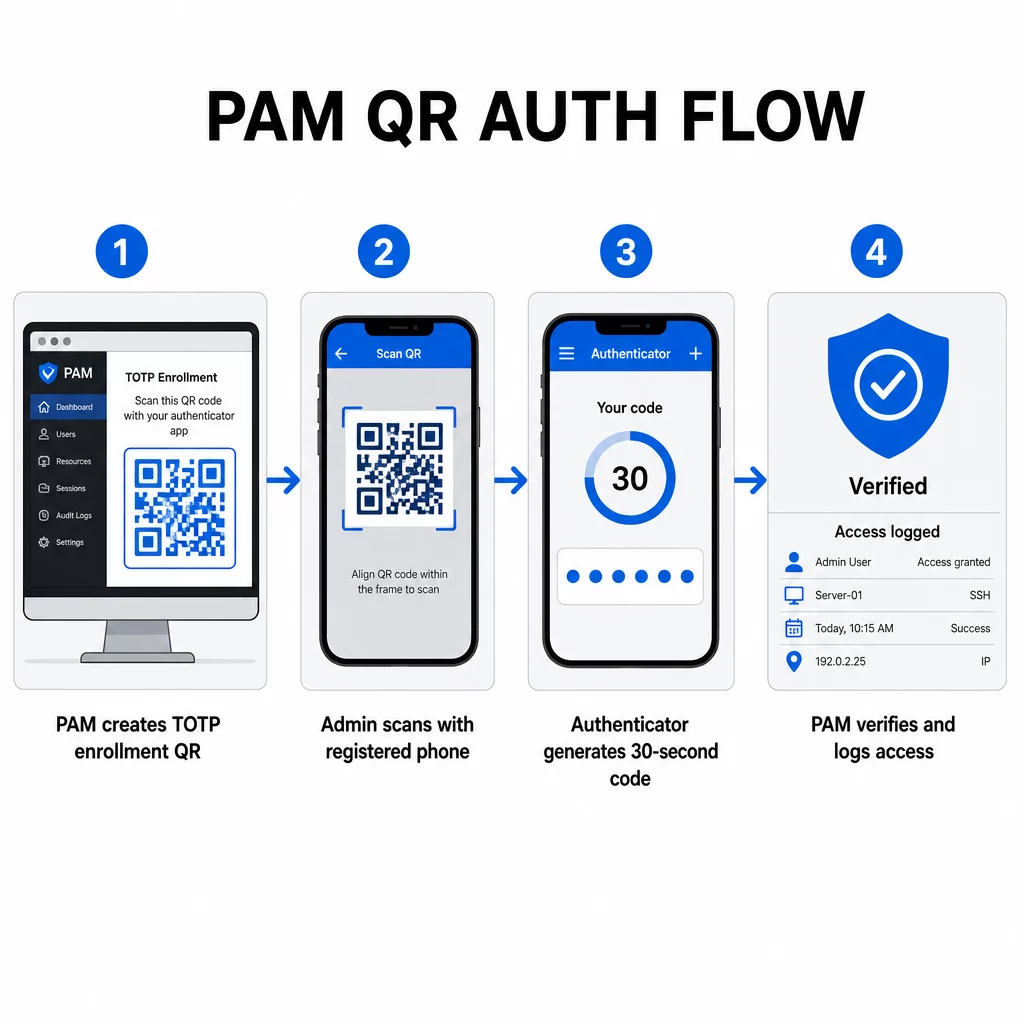
- Tijdens de inschrijving genereert het systeem een gedeelde geheime sleutel en codeert deze in een QR-code als een URI geformatteerd als `otpauth://totp/LABEL?secret=SECRET&issuer=ISSUER`
- De gebruiker scant deze QR-code met een authenticator-app (zoals Google Authenticator, Microsoft Authenticator of Okta Verify), die het geheim lokaal op het apparaat opslaat
- Bij het inloggen past de app het HOTP-algoritme toe op een tijdgebaseerde teller die is afgeleid van de huidige Unix-tijd, en genereert een eenmalige toegangscode die standaard 30 seconden geldig is
- De server voert onafhankelijk dezelfde berekening uit en accepteert codes van de huidige en direct voorgaande tijdstap om rekening te houden met klokdrift
Omdat de toegangscode is afgeleid van tijd en een apparaatgebonden geheim – niet via het netwerk wordt verzonden – heeft het onderscheppen ervan tijdens de overdracht geen blijvende waarde. Elke code is binnen 30 seconden nutteloos.
Platforms zoals CyberArk implementeren dit model direct. Beheerders schakelen gebruikersinschrijving op basis van QR-codes in onder Instellingen → Authenticatie → Platform → Beveiligingsinstellingen → Authenticatieopties, en definiëren vervolgens MFA-beleid dat de inschrijvingswizard activeert bij de eerste aanmelding. De mobiele app van CyberArk Identity ondersteunt ook een optie “Inschrijven met QR”, waarbij gebruikers een code scannen die op het Identity-portaal wordt gepresenteerd om hun apparaat als MFA-factor te activeren.
QR-code MFA-inschrijving instellen
Voor DevOps-engineers die QR-gebaseerde MFA configureren in een PAM-omgeving, volgt het algemene inschrijvingsproces deze stappen, ongeacht het specifieke platform:
- Schakel QR-inschrijving in de authenticatie-instellingen van het platform in. De meeste enterprise PAM-systemen bieden dit aan als een schakelaar onder authenticatie- of beveiligingsconfiguratieopties.
- Definieer een MFA-beleid dat bepaalt welke gebruikers of rollen MFA vereisen, wanneer het wordt afgedwongen en wat er gebeurt bij de eerste aanmelding.
- Presenteer de inschrijvings-QR-code aan de gebruiker tijdens hun eerste geauthenticeerde sessie. De code codeert het gedeelde TOTP-geheim in `otpauth://` URI-formaat.
- Begeleid de gebruiker om te scannen de code met hun geregistreerde authenticator-app. Bied een handmatige invoer-fallback (de onbewerkte geheime sleutel) voor gevallen waarin de camera de code niet kan lezen.
- Verifieer de inschrijving door de gebruiker te vragen een TOTP-code in te dienen voordat de installatie is voltooid, waarmee wordt bevestigd dat het geheim correct is overgedragen.
- Genereer en bewaar back-up herstelcodes zodat gebruikers niet worden buitengesloten als ze hun apparaat verliezen.
Voor teams die grootschalige uitrol beheren, kunt u door deze inschrijvingsstroom te koppelen aan een Dynamische QR code generator inschrijvingscodes centraal bijwerken, volgen en intrekken – belangrijk wanneer inloggegevens moeten worden geroteerd of wanneer een apparaat als verloren wordt gemeld.
Authenticatie QR-codes op schaal volgen en beheren Moet u QR-codes uitgeven, bijwerken of intrekken binnen een verspreid team? Gebruik de Dynamische QR code generator om bewerkbare codes te maken met realtime analyses en gecentraliseerd beheer.
Dynamische versus statische QR-codes in PAM-omgevingen
De keuze tussen statische en dynamische QR-codes heeft directe beveiligingsimplicaties voor PAM-workflows.
| FUNCTIE | Statische QR-codes | Dynamische QR-codes |
|---|---|---|
| Inhoud na creatie | Vast, kan niet worden gewijzigd | Bewerkbaar op elk moment |
| Intrekking | Vereist opnieuw uitgeven en distribueren | Direct, vanuit een centraal dashboard |
| ANALYSE | Geen | Scan tijdstempels, apparaattypen, locaties |
| Risico op herhalingsaanval | Hoger (code is permanent) | Lager (vervaldatum en eenmalige opties) |
| Beste gebruiksscenario | Laag risico, eenmalige inhoud | Beheerdersrechten, gevoelige workflows |
Voor PAM-authenticatie en MFA-registratie hebben dynamische QR-codes sterk de voorkeur. Als een apparaat als verloren wordt gemeld, kan een beheerder de bijbehorende registratiecode onmiddellijk deactiveren. Tijdgebonden codes voorkomen herhalingsaanvallen door elke onderschepte code binnen enkele ogenblikken nutteloos te maken. En scananalyses bieden een audit trail die voldoet aan de compliance-eisen.
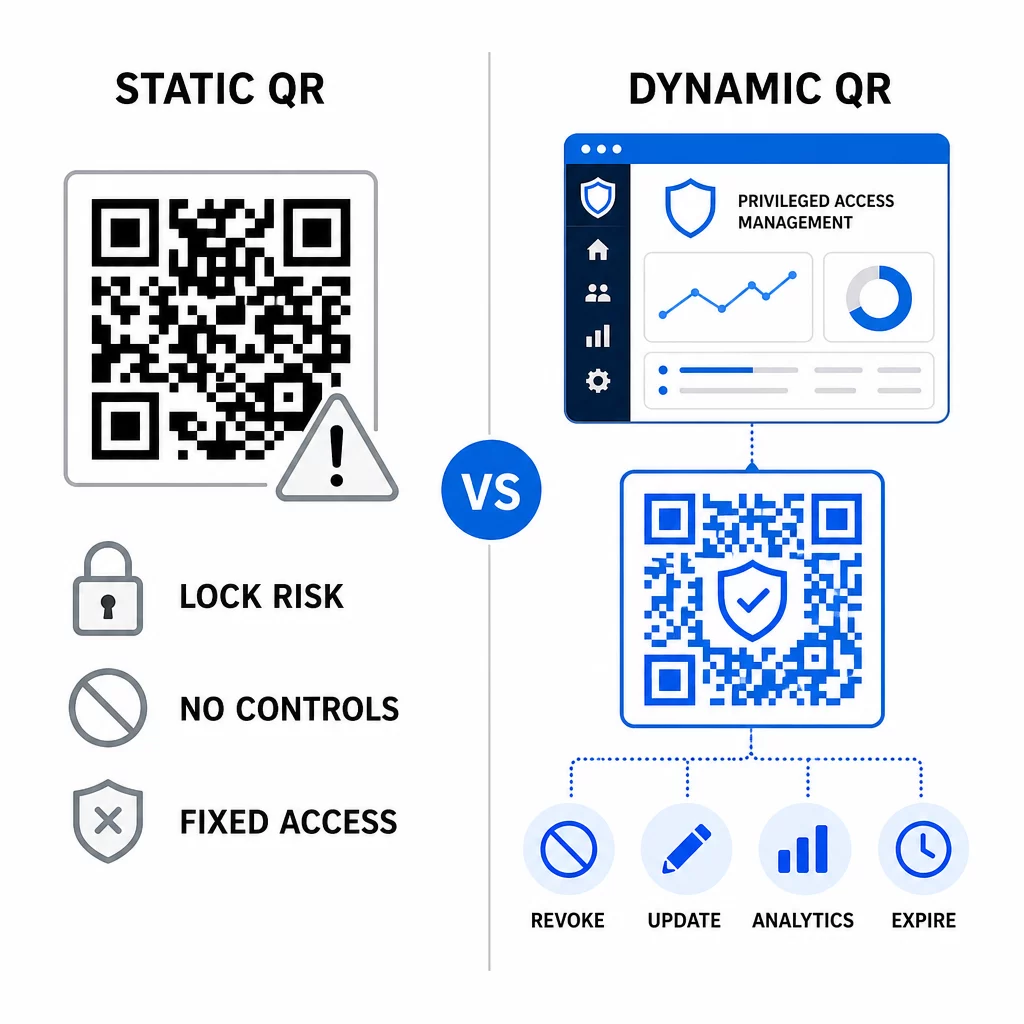
Statische QR-codes kunnen nog steeds een rol spelen in interne gebruiksscenario's met een lager risico – zoals het linken naar documentatie of alleen-lezen bronnen – maar ze mogen niet worden gebruikt voor authenticatiestromen die gepaard gaan met bevoorrechte toegang.
Belangrijke beveiligingsoverwegingen voor QR-gebaseerde PAM-authenticatie
Het implementeren van QR-codeauthenticatie in een PAM-omgeving introduceert een eigen aanvalsoppervlak. Het begrijpen en mitigeren van deze risico's is essentieel voordat de implementatie in productie wordt genomen.
Kwetsbaarheid van registratie-QR-code. Het gedeelde geheim dat is gecodeerd in een TOTP-registratie-QR-code verloopt niet vanzelf. Als die code wordt vastgelegd in een screenshot, doorgestuurd via e-mail of opgeslagen in een back-up, kan een aanvaller deze later gebruiken om een apparaat opnieuw te registreren en onbeperkt geldige TOTP-codes te genereren. De mitigatie is eenvoudig: configureer registratiecodes om te verlopen na één succesvolle scan. Controleer en verwijder alle historische registratie-QR-codes die zijn opgeslagen in e-mailsystemen of back-ups, en registreer getroffen gebruikers opnieuw met nieuwe eenmalige codes.
QR-code phishing (quishing). Aanvallers hebben campagnes gedocumenteerd waarin ze MFA-inschrijvingsprocessen imiteren, door e-mails te sturen die gebruikers instrueren een kwaadaardige QR-code te scannen die leidt naar een pagina voor het oogsten van inloggegevens. Train uw gebruikers om ongevraagde QR-scanverzoeken met argwaan te behandelen, de afzender onafhankelijk te verifiëren voordat ze scannen, en authenticator-apps te gebruiken die de `otpauth://` payload binnen een sandboxed omgeving verwerken in plaats van willekeurige URL's te openen. Voor verdere begeleiding, zie QR-code identiteitsverificatie in cybersecurity.
Afschaffing van SMS. De richtlijnen voor digitale identiteit van NIST ontmoedigen expliciet het gebruik van SMS en spraakoproepen voor out-of-band authenticatie vanwege risico's zoals SIM-swapping, apparaatwissel en nummerportering. TOTP-gebaseerde QR-inschrijving met authenticator-apps is een sterker alternatief dat NIST erkent als een geldig out-of-band mechanisme wanneer het via een veilig secundair kanaal wordt geleverd.
Apparaatbinding en biometrie. Het koppelen van QR-code authenticatie aan vooraf geregistreerde apparaten voegt een hardwarelaag toe die SMS niet kan bieden. Het toevoegen van biometrische verificatie – vingerafdruk- of gezichtsherkenning – creëert een driefactormodel: iets wat je hebt (het geregistreerde apparaat), iets wat je bent (biometrie), en de tijdgebonden code (contextafhankelijk). Voor risicovolle operaties configureert u kortere TOTP-vensters of vereist u aanvullende verificatiestappen.
Testen vóór implementatie. Altijd test QR-code authenticatiestromen over meerdere apparaten, besturingssystemen en authenticator-apps voordat u naar productie gaat. Controleer of inschrijvingscodes verlopen na gebruik, dat intrekking werkt zoals verwacht, en dat fallback-toegangspaden correct functioneren.
Voor een uitgebreide blik op het beveiligen van uw QR-code implementatie, zie best practices voor QR-codebeveiliging in cyberdefensie en beste praktijken voor veilige QR-codegeneratie.
QR-authenticatie integreren met bestaande MFA en SSO
QR-codes werken goed naast bestaande authenticatie-infrastructuur in plaats van deze volledig te vervangen. In MFA-configuraties fungeert QR-gebaseerde TOTP als de “iets wat je hebt”-factor, ter aanvulling op een wachtwoord of biometrie. In SSO-omgevingen kan een QR-code dienen als de uitdaging-antwoordstap die het bezit van het apparaat bevestigt voordat een sessietoken wordt uitgegeven. Voor een gedetailleerde vergelijking van deze benaderingen, zie QR-codes versus wachtwoorden in SSO.
Het inschrijvingspatroon strekt zich ook uit buiten PAM. Teams die al wachtwoordmanagers zoals LastPass gebruiken, kunnen een vrijwel identiek QR-scan installatieproces volgen – scannen om te koppelen, bevestigen met een TOTP-code, herstelcodes opslaan – waardoor de workflow bekend is voor gebruikers die MFA al elders hebben ingesteld. Zie de LastPass QR-code installatiegids voor een stap-voor-stap referentie.
Elke authenticatiepoging in een goed geconfigureerd systeem moet een logboekvermelding genereren die de QR-code-identificatie, apparaatinformatie, biometrisch resultaat indien van toepassing, tijdstempel en geografische locatie vastlegt. Deze logboeken zijn cruciaal voor compliance-audits, anomaliedetectie en incidentrespons.
Geavanceerde functies: analyse, aanpassing en real-time controle
Enterprise QR-codeplatforms voegen mogelijkheden toe die verder gaan dan basiscodegeneratie en die direct relevant zijn voor PAM-activiteiten.
Realtime analyse laten beveiligingsteams authenticatiepatronen monitoren terwijl ze plaatsvinden. Te volgen statistieken omvatten scantijdstempels, apparaattypen, geografische locaties en basislijnen voor gebruikersgedrag. Algoritmen die afwijkingen signaleren – een ongebruikelijk apparaattype, een scan vanuit een onverwacht land, een piek in mislukte pogingen – kunnen step-up authenticatie of automatische waarschuwingen activeren. Voor meer informatie over hoe deze statistieken er in de praktijk uitzien, zie hoe QR-codes multi-factor authenticatie vereenvoudigen.
Gemerkt authenticatiecodes dienen een praktische beveiligingsfunctie die verder gaat dan esthetiek. Wanneer uw organisatie consistente, gemerkte QR-codes gebruikt met bedrijfslogo's en kleurenschema's, ontwikkelen gebruikers een visuele basislijn voor legitieme authenticatieverzoeken. Een code die afwijkt van die basislijn wordt een waarschuwingssignaal. Het waarborgen van voldoende kleurcontrast – een verhouding van ten minste 4,5:1 – zorgt er ook voor dat codes betrouwbaar scanbaar blijven op verschillende apparaten en onder verschillende lichtomstandigheden.
Dynamische controle is de functie die het operationele risico het meest direct vermindert. Wanneer een werknemer vertrekt, deactiveert u hun codes onmiddellijk vanuit een centraal dashboard zonder te wachten op credential-rotatiecycli. Wanneer een beveiligingsincident wordt gedetecteerd, trekt u codes in en geeft u ze opnieuw uit zonder opnieuw te printen. De Dynamische QR code generator op Pageloot ondersteunt al deze workflows, met ingebouwde real-time scan tracking en bewerkbare bestemmingen.
Voor teams die versleutelde referenties of tokengegevens binnen QR-payloads verwerken, zie versleutelde QR-codes voor authenticatieplatforms voor richtlijnen over AES- en RSA-versleutelingsbenaderingen.
Toepassingen in de industrie
Hetzelfde QR-gebaseerde PAM-model is van toepassing in verschillende sectoren met uiteenlopende profielen voor bevoorrechte toegang.
In bank- en financiële diensten, gebruiken beheerders tijdgevoelige QR-codes om toegang te krijgen tot kernbanksystemen, handelsplatforms en klantendatabases. Elke bevoorrechte sessie wordt gelogd tegen de specifieke gebruikte code, wat een duidelijk auditspoor oplevert voor naleving van regelgeving.
In softwareontwikkeling, gedistribueerde teams gebruiken QR-codes om toegang te krijgen tot productiesystemen, code-repositories en implementatiepijplijnen zonder statische inloggegevens. Dynamische codes versnellen de onboarding en maken offboarding onmiddellijk – geen wachttijden voor het doorvoeren van wachtwoordrotaties.
In gezondheidszorg, klinisch personeel dat tussen werkstations wisselt, kan snel authenticeren door te scannen in plaats van te typen, waardoor de inlogwrijving wordt verminderd terwijl de door HIPAA vereiste audit trails behouden blijven.
Het patroon is consistent: QR-codes gecombineerd met dynamisch beheer en analyses geven beveiligingsteams de controle die ze nodig hebben zonder de gebruikers te vertragen die afhankelijk zijn van snelle, betrouwbare toegang. QR-code authenticatie is geen vervanging voor een volwassen PAM-strategie – het is een mechanisme dat een van de meest kwetsbare componenten van PAM versterkt. Door statische inloggegevens te vervangen door tijdgebonden, apparaatgebonden codes, eenmalige inschrijving af te dwingen en elke authenticatiegebeurtenis te monitoren, dicht u de gaten voor phishing en diefstal van inloggegevens die oudere methoden openlaten. Begin met het inschakelen van QR-inschrijving in de authenticatie-instellingen van uw PAM-platform, definieer uw MFA-beleid en gebruik dynamische codes met een gecentraliseerd beheerplatform om real-time controle over de toegang te behouden.
QR-codes maken en beheren voor uw authenticatieworkflows Gebruik de QR-codegenerator om te beginnen, of verken de Dynamische QR code generator voor inschrijvingscodes die u kunt bijwerken, volgen en intrekken vanuit één dashboard.
Veelgestelde vragen
Tijdens de inschrijving genereert het PAM-systeem een gedeelde geheime sleutel en codeert deze als een QR-code met behulp van het `otpauth://totp/` URI-formaat. De gebruiker scant dit met een authenticator-app, die het geheim op het apparaat opslaat. Bij het inloggen berekenen de app en de server onafhankelijk een 30-seconden toegangscode uit dat geheim en de huidige tijd. Omdat de code tijdgebonden en apparaatgebonden is, biedt het onderscheppen ervan tijdens de overdracht geen blijvende waarde voor een aanvaller.
De kwetsbaarheid van de inschrijvings-QR-code is het meest over het hoofd geziene risico. Het TOTP-geheim dat is ingebed in een inschrijvings-QR-code verloopt niet vanzelf, dus elke screenshot, doorgestuurde e-mail of back-upkopie van die code blijft voor onbepaalde tijd bruikbaar. Beperk dit door inschrijvingscodes te configureren zodat ze verlopen na één succesvolle scan, en controleer uw e-mail- en back-upsystemen om alle opgeslagen historische inschrijvingscodes te verwijderen.
Geef altijd de voorkeur aan dynamische QR-codes voor authenticatie- en MFA-inschrijvingsstromen. Dynamische codes kunnen direct worden ingetrokken als een apparaat verloren gaat, bijgewerkt zonder fysieke materialen opnieuw te verspreiden, en gemonitord met realtime analyses. Statische codes zijn alleen geschikt voor inhoud met laag risico en alleen-lezen, waar directe intrekking en auditlogging niet vereist zijn.