Da li pokušavate da promenite veličinu QR koda samo da biste dobili zamagljen, neskenabilan rezultat? Pogrešne dimenzije – ili korišćenje pogrešnog formata datoteke – mogu učiniti vaš QR kod potpuno beskorisnim nakon štampanja. Ovaj vodič vas provodi kroz tačno kako pravilno promeniti veličinu QR koda, pokrivajući formate datoteka, pravila veličine, zahteve za rezoluciju i najčešće greške koje treba izbegavati.
Zašto promena veličine QR koda ide pogrešno
Većina problema sa kvalitetom QR koda svodi se na jedno od dva pitanja: počevši od pogrešnog formata datoteke ili skaliranja slike izvan onoga što njena rezolucija može podržati.
Kada uzmete rastersku sliku niske rezolucije – JPEG ili mali PNG – i rastegnete je u svom dizajnerskom softveru, skener mora da čita zamagljene, nejasne module umesto oštrih crno-belih kvadrata. Rastezanje QR koda niske rezolucije je jedan od najpouzdanijih načina za proizvodnju zamagljen, neskenabilan rezultat štampanja. Postoji i manje očigledan problem: promena veličine može nenamerno izobličiti proporcije koda ili ukloniti tihu zonu – jasnu belu marginu koja okružuje kod – što uzrokuje da skeneri pogrešno pročitaju ili potpuno promaše obrazac. Razumevanje ovih tačaka neuspeha pre nego što promenite veličinu je najdirektniji put do koda koji zaista radi.
Vektor naspram Rastera: Odluka o formatu datoteke koja je najvažnija
Jedini najuticajniji izbor koji donosite prilikom promene veličine QR koda je da li radite sa vektorskom ili rasterskom datotekom.
Vektorski formati (SVG, EPS, PDF) čuvaju QR kod kao matematičke instrukcije, a ne kao fiksnu mrežu piksela. To znači da se skaliraju na bilo koju veličinu – od poštanske marke do bilborda – bez ikakvog gubitka oštrine ili jasnoće. Za sve što ide u štampu, vektor je pravi izbor.
Rasterski formati (PNG, JPEG, BMP) čuvaju kod kao mrežu piksela sa fiksnom gornjom granicom rezolucije. Kada ih skalirate iznad njihove originalne rezolucije, softver mora da izmisli podatke o pikselima, što proizvodi zamućenje. JPEG je posebno problematičan jer njegov algoritam kompresije zaglađuje ivice, direktno podrivajući oštar kontrast koji QR skeneru treba da pročita svaki modul.
| Формат | Skalira bez gubitka | Препоручено за | Напомене |
|---|---|---|---|
| СВГ | да | Štampa, veliki format | Najbolje ukupno za promenu veličine |
| EPS | да | Profesionalna štampa | Standard u radnim tokovima dizajna za štampu |
| ПДФ | да | Štampa, deljenje | Čuva vektorske podatke |
| ПНГ | Ne (fiksna rezolucija) | Veb, digitalni prikaz | Prihvatljivo pri visokoj rezoluciji |
| JPEG | Ne (kompresija sa gubitkom) | Nijedno | Potpuno izbegavati za QR kodove |
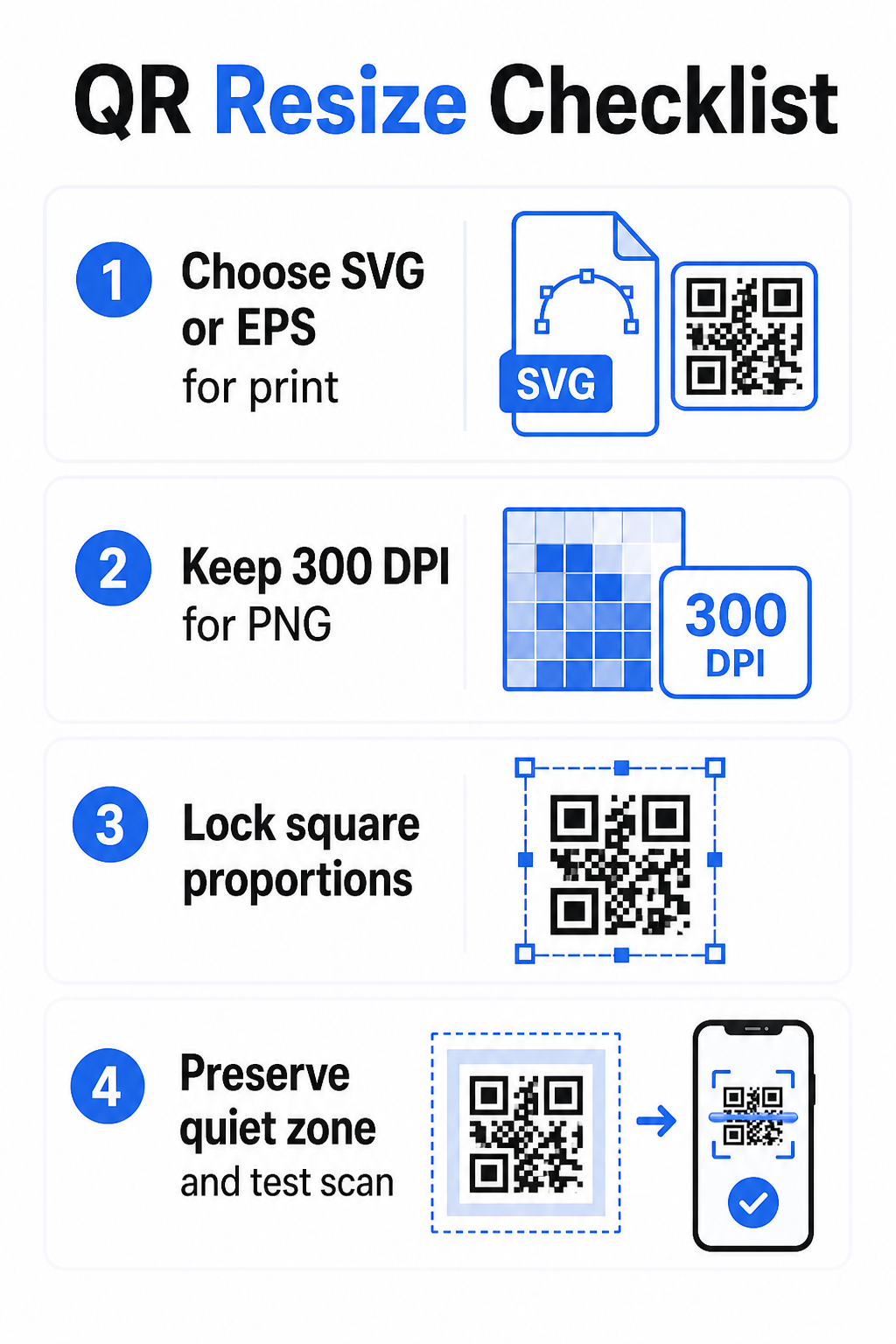
Kada preuzimate QR kod za štampanje, uvek izaberite SVG ili EPS. Kada vam je potrebna rasterska datoteka za digitalni ekran ili platformu koja ne prihvata vektorske formate, izvezite PNG visoke rezolucije – nikada JPEG.
Kreirajte QR kodove spremne za štampu u pravom formatu Generišite svoj QR kod i preuzmite ga kao SVG, EPS ili PDF datoteku spremnu za štampu koristeći the Пагелоот генератор КР кодова. Nije potreban dizajnerski softver.
Pravila rezolucije za rasterske datoteke
Ako radite sa PNG-om za štampu, rezolucija – merena u DPI (tačkama po inču) – određuje da li kod ostaje oštar na svojoj konačnoj štampanoj veličini.
Minimalni standard za štampu je 300 DPI na konačnim štampanim dimenzijama. To znači da dimenzije piksela vaše datoteke slike moraju odgovarati nameravanoj fizičkoj veličini pri toj gustini. Na primer:
- QR kod odštampan na 1 inč × 1 inč potrebno je najmanje 300 × 300 piksela
- QR kod odštampan na 4 inča × 4 inča potrebno je najmanje 200 × 1.200 piksela
Ako vaša datoteka ne ispunjava ovaj prag na vašoj ciljnoj veličini, pojedinačni moduli – sitni kvadrati koji nose QR podatke – će se zamagliti. U tom trenutku, skener više ne može da razlikuje tamno od svetlog, i kod ne uspeva. Za digitalne ekrane, minimum od otprilike 240 × 240 piksela je praktična smernica za kodove za prikaz na ekranu, iako je veće uvek sigurnije za zumiranje i kompatibilnost među uređajima. Čistije rešenje za štampu je potpuno preskočiti raster i koristiti vektorsku datoteku, što vam daje beskonačnu skalabilnost bez brige o rezoluciji.
Kako promeniti veličinu QR koda korak po korak
Korak 1: Počnite sa pravom izvornom datotekom
Preuzmite ili izvezite svoj QR kod u SVG ili EPS formatu ako ide u štampu. Ako imate samo rastersku datoteku, proverite da li dimenzije piksela podržavaju 300 DPI na vašoj ciljnoj veličini za štampu pre promene veličine. PNG QR kod može dobro funkcionisati za digitalna postavljanja kada se izveze u dovoljnoj rezoluciji – možete ga kreirati direktno sa a PNG QR kod generator i koristite ga gde god je potrebna transparentnost ili rasterska kompatibilnost.
Korak 2: Skalirajte proporcionalno
Uvek zadržite originalni odnos širine i visine prilikom promene veličine. QR kodovi su po definiciji kvadratni, a njihovo rastezanje horizontalno ili vertikalno iskrivljuje module iz kvadrata u pravougaonike, što može zbuniti ili onemogućiti skenere. U bilo kojoj dizajnerskoj aplikaciji – Illustrator, Canva, InDesign, Photoshop – zaključajte odnos širine i visine pre povlačenja ugla. Čak i suptilno izobličenje je dovoljno da izazove probleme sa strožim implementacijama skenera.
Korak 3: Sačuvajte tihu zonu
Tiha zona je jasna bela ivica koja okružuje QR kod sa sve četiri strane. Standard ISO/IEC 18004 propisuje da ova margina mora biti široka najmanje četiri modula sa svake strane. Kada promenite veličinu QR koda i postavite ga unutar većeg dizajna, ova zona je često prva stvar koja se iseče ili naruši drugim elementima dizajna. Ako je svaki modul u vašem kodu širok 2 mm, vaša tiha zona mora biti široka najmanje 8 mm sa svih strana. Tretirajte ovaj prostor kao nepregovarački – njegovo uklanjanje prekida prepoznavanje skenera.
Korak 4: Proverite kontrast nakon promene veličine
Promena veličine na obojenoj ili teksturiranoj pozadini može smanjiti efikasan kontrast između modula koda i njegovog okruženja. Skeneri se oslanjaju na razliku između tamnih i svetlih područja za čitanje koda. Najsigurnija kombinacija ostaju tamni moduli na svetloj pozadini – crna na beloj pruža odnos kontrasta 21:1. Ciljajte na minimalni odnos kontrasta od 4:1 između boja prednjeg plana i pozadine, i izbegavajte postavljanje koda na gradijente, pretrpane šare ili reflektujuće površine. Za detaljne smernice, pogledajte najbolje prakse za kontrast boja QR koda.
Korak 5: Testirajte pre štampanja
Odštampajte probni otisak u tačnoj nameravanoj veličini na tačnom nameravanom materijalu, zatim testirajte sa više uređaja – i iOS i Android – pre nego što se posvetite punoj proizvodnoj seriji. Testirajte na stvarnoj udaljenosti skeniranja koju će korisnici iskusiti. Kod koji se savršeno skenira na dohvat ruke može propasti na udaljenosti na kojoj je zapravo postavljen. Pogledajte kako testirati QR kodove za mobilnu upotrebljivost za potpunu kontrolnu listu testiranja.
Smernice za minimalnu i maksimalnu veličinu
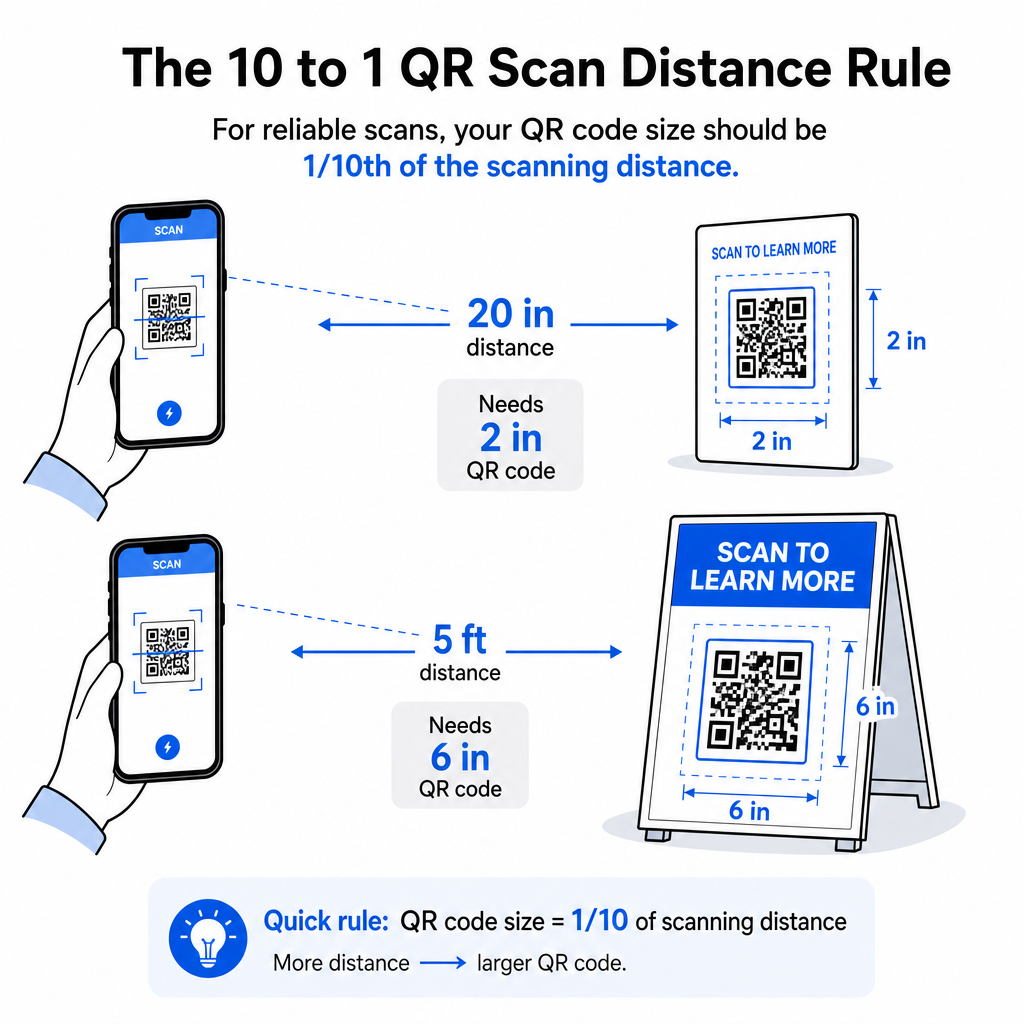
Odgovorno menjanje veličine QR koda znači poznavanje granica veličine za vaš specifičan slučaj upotrebe. Osnovno pravilo je odnos udaljenosti i veličine 10:1: maksimalna nameravana udaljenost skeniranja treba da bude približno deset puta veća od širine QR koda. Kod skeniran sa udaljenosti od 20 inča treba da bude širok najmanje 2 inča; onaj skeniran sa 5 stopa treba da bude širok najmanje 6 inča; kod za bilbord skeniran sa 30 stopa treba da bude širok najmanje 36 inča.
Za uobičajene aplikacije za štampu, evo pouzdanih početnih tačaka:
| Случај употребе | Minimalna preporučena veličina |
|---|---|
| Vizit karte | 0.8 × 0.8 in (2 × 2 cm) |
| Flajeri i brošure | 1.2 × 1.2 in (3 × 3 cm) |
| Poster i signalizacija | 6 × 1.6 in (4 × 4 cm) |
| Bilbordi i baneri | 16 × 16 in (40 × 40 cm) ili veće |
Za aplikacije vizit karti, 0.8 × 0.8 inča je praktični minimum za pouzdano skeniranje izbliza – smanjivanje veličine značajno povećava rizik od neuspeha skeniranja. Pogledajte vodič za veličine QR kodova za vizit karte za specifične preporuke za taj format. Ne postoji zvanično gornje ograničenje veličine; skalirajte po potrebi na osnovu udaljenosti skeniranja. Za sveobuhvatan pregled za svaki slučaj upotrebe, vodiču za veličinu QR koda pokriva sve od vizit karti do bilborda. Možete takođe istražiti kako veličina QR koda utiče na vidljivost da biste razumeli širi odnos između dimenzija i uspeha skeniranja.
Potreban vam je QR kod za vašu vizit kartu? Користити Vizit karte sa QR kodom: generator da kreirate kod dimenzionisan i dizajniran za štampanje vizit karti, sa uključenim SVG izvozom.
Kako gustina podataka utiče na promenu veličine
Jedan faktor koji komplikuje promenu veličine je gustina podataka – količina informacija kodiranih u QR kodu. Što više podataka QR kod sadrži, to je gušća njegova mreža modula. Gušće mreže zahtevaju veće fizičke veličine kako bi pojedinačni moduli ostali čitljivi na nivou kamere.
QR kod koji kodira dugačak URL sa parametrima praćenja sadrži daleko više podataka od onog koji pokazuje na kratak URL za preusmeravanje. Kada smanjite kod visoke gustine, moduli postaju premali da bi ih većina kamera pametnih telefona pouzdano razrešila. Dinamički QR kodovi rešavaju ovaj problem direktno. Umesto kodiranja pune odredišne URL adrese, dinamički kod kodira kratko interno preusmeravanje, održavajući gustinu podataka koda niskom bez obzira na to gde pokazuje. To znači da možete štampati kod manji bez žrtvovanja mogućnosti skeniranja – i ažurirati odredište kasnije bez ponovnog štampanja.
Korekcija grešaka i tolerancija promene veličine
QR kodovi uključuju ugrađenu korekciju grešaka koja im omogućava da ostanu skenabilni čak i kada su delimično oštećeni ili zaklonjeni. Standard ISO/IEC 18004 definiše četiri nivoa:
| Nivo | Mogućnost oporavka |
|---|---|
| Л (низак) | ~7% podataka |
| М (средњи) | ~15% podataka |
| К (квартил) | ~25% podataka |
| Х (високо) | ~30% podataka |
Ako menjate veličinu QR koda na manju veličinu, ili dodajete logo u centar koda, povećanje nivoa korekcije grešaka daje vam zaštitu od oštećenja na nivou modula ili nepreciznosti skeniranja. Nivo Q ili H je prikladan za brendirane ili visoko prilagođene kodove. Imajte na umu da veća korekcija grešaka povećava gustinu podataka, što može zahtevati nešto veću minimalnu veličinu za kompenzaciju.
Uobičajene greške pri promeni veličine koje treba izbegavati
- Korišćenje snimka ekrana kao izvornog fajla. Snimci ekrana su rasterski zapisi niske rezolucije. Uvećavanje istih za štampu je jedan od najčešćih uzroka neskenabilnih QR kodova.
- Rastezanje koda neproporcionalno. Čak i blago horizontalno ili vertikalno izobličenje menja oblike modula iz kvadrata u pravougaonike, što može sprečiti skenere da pravilno pročitaju kod.
- Orezivanje tihe zone. Promena veličine.
- Pretpostavljajući da će kod koji radi na ekranu raditi i u štampi. Prikaz na ekranu i štampani izlaz su različita okruženja. Kod koji izgleda oštro na 72 DPI na ekranu može se štampati mutno na 300 DPI ako osnovna rezolucija datoteke to ne podržava.
- Netestiranje nakon promene veličine. Uvek proverite mogućnost skeniranja na konačnom materijalu, u konačnoj veličini, sa predviđene udaljenosti skeniranja.
Za detaljnije smernice, vodiču za rezoluciju štampe QR koda и najbolje prakse za čitljivost QR kodova pokrivaju detalje specifične za štampu koje vredi znati pre nego što krenete u proizvodnju.
Određivanje veličine za različite materijale za štampu
Površina na koju štampate utiče na to koliko veliki vaš QR kod treba da bude, nezavisno od razmatranja udaljenosti skeniranja. Grube, teksturirane ili zakrivljene površine mogu izobličiti module i smanjiti efikasan kontrast, zahtevajući da ga uvećate iznad onoga što bi samo pravilo 10:1 sugerisalo.
- Gladak papir ili karton – Primenjuju se standardne smernice za veličinu; mat završne obrade su poželjnije od sjajnih kako bi se smanjio odsjaj i refleksije.
- Valoviti karton – Dodajte 10–25% minimalnoj veličini da biste kompenzovali teksturu površine i nepravilnosti ivica.
- Tkanina – Gladak poliester može koristiti standardne minimume; grubi ili rastegljivi tekstili često zahtevaju 25–50% veće kodove.
- Metal ili staklo – Visoka refleksivnost uzrokuje probleme pri skeniranju; koristite mat površine ili vinilne prekrivače i povećajte veličinu koda.
Za potpunu analizu po vrsti materijala, pogledajte dimenzionisanju QR koda za različite materijale za štampu, a za smernice o tome kako sama metoda štampanja utiče na kvalitet izlaza, kako tehnike štampanja utiču na skeniranje QR koda vredi pročitati pre nego što naručite štampu. Za odluke o postavljanju koje prevazilaze određivanje veličine, Vodič za postavljanje QR koda za marketing pokriva pozicioniranje prema vrsti materijala i kontekstu kampanje.
Pravilno menjanje veličine QR koda znači odabir pravog formata datoteke pre nego što promenite veličinu, održavanje proporcija i margina tihe zone tokom celog procesa, i proveru da li vaš izlaz ispunjava standarde rezolucije i kontrasta u konačnoj štampanoj ili prikazanoj veličini. Početak sa vektorskom datotekom u potpunosti uklanja većinu rizika – ona se čisto skalira u bilo kom smeru bez ograničenja rezolucije koje nameću rasterske slike. Ako pravite QR kodove za tekuće kampanje, korišćenje динамички КР код daje vam dodatnu prednost ažuriranja odredišta nakon štampanja, tako da odluka o veličini ili postavljanju danas ne znači da ćete snositi troškove ponovnog štampanja u budućnosti.
Često postavljana pitanja
SVG, EPS, ili PDF su najbolji formati za promenu veličine jer su vektorski bazirani i skaliraju se na bilo koju veličinu bez gubitka oštrine. PNG je prihvatljiv za digitalnu upotrebu kada se izveze u visokoj rezoluciji. JPEG bi trebalo u potpunosti izbegavati – njegova kompresija zaglađuje oštre ivice koje skeneri trebaju da razlikuju svaki modul.
Praktični minimum za većinu aplikacija za štampu na maloj udaljenosti je 0,8 × 0,8 inča (2 × 2 cm). Smanjivanje povećava rizik od neuspešnog skeniranja. Za skeniranje na većim udaljenostima, primenite pravilo 10:1: širina koda treba da bude najmanje jedna desetina maksimalne predviđene udaljenosti skeniranja – tako da kod skeniran sa udaljenosti od 20 inča treba da bude širok najmanje 2 inča.
Ne – kodirani podaci i nivo korekcije grešaka su fiksni kada se kod generiše. Promena veličine menja samo fizičke ili pikselne dimenzije slike. Ono na šta promena veličine može uticati je da li moduli ostaju jasni i prepoznatljivi na novoj veličini, zbog čega je održavanje 300 DPI za štampu, očuvanje margina tihe zone i proporcionalno skaliranje, sve to bitni koraci.