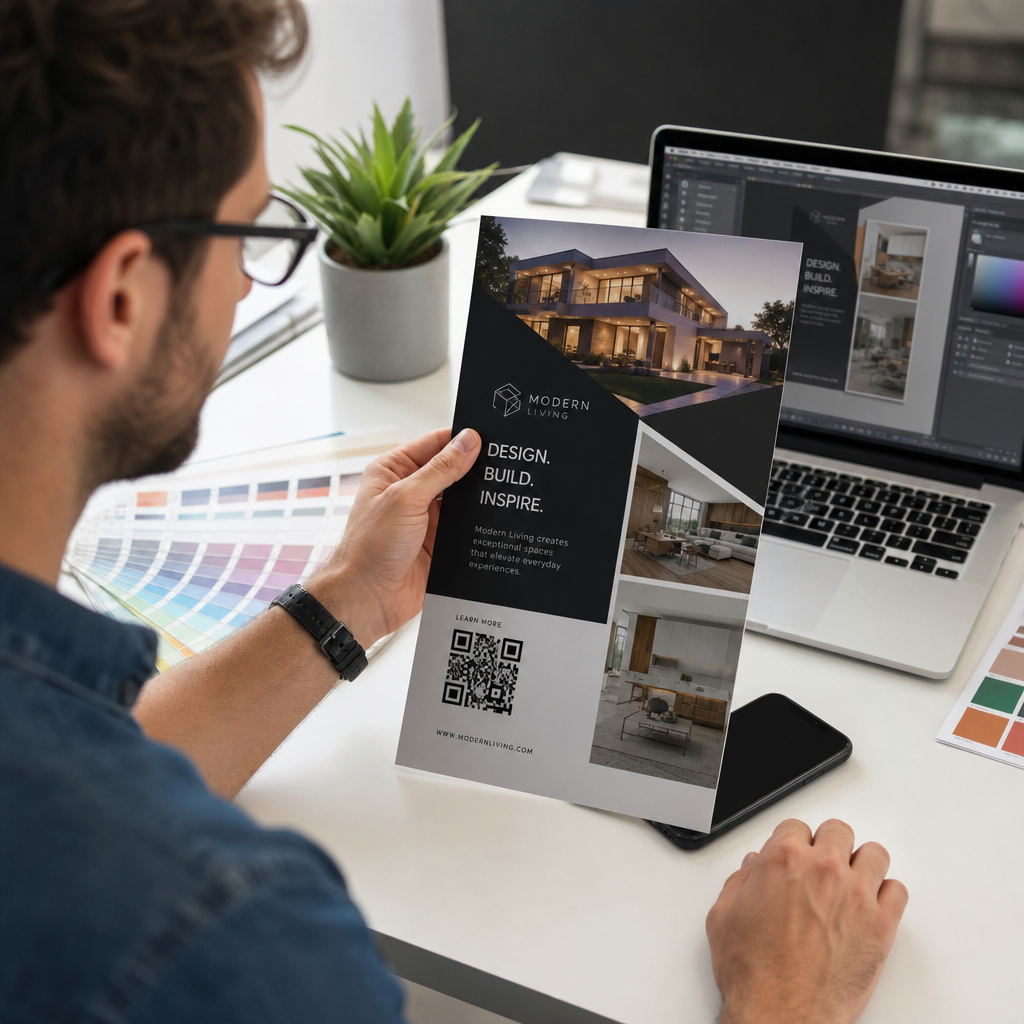
Ali poskušate spremeniti velikost QR kode, a na koncu dobite zamegljen, neberljiv rezultat? Napačne dimenzije – ali uporaba napačnega formata datoteke – lahko povzročijo, da je vaša QR koda po tiskanju popolnoma neuporabna. Ta vodnik vas bo popeljal skozi točno to, kako pravilno spremeniti velikost QR kode, zajema formate datotek, pravila velikosti, zahteve glede ločljivosti in najpogostejše napake, ki se jim je treba izogniti.
Zakaj spreminjanje velikosti QR kode gre narobe
Večina težav s kakovostjo QR kode se nanaša na eno od dveh težav: začetek z napačnim formatom datoteke ali skaliranje slike preko tistega, kar lahko podpira njena ločljivost.
Ko vzamete rastrsko sliko nizke ločljivosti – JPEG ali majhen PNG – in jo raztegnete večjo v svoji oblikovalski programski opremi, mora skener brati zamegljene, nejasne module namesto ostrih črno-belih kvadratkov. Raztezanje QR kode nizke ločljivosti je eden najzanesljivejših načinov za izdelavo zamegljenega, neberljivega rezultata tiskanja. Obstaja tudi manj očiten problem: spreminjanje velikosti lahko nenamerno popači razmerja kode ali odstrani tiho cono – jasen bel rob, ki obdaja kodo – kar povzroči, da skenerji napačno preberejo ali popolnoma zgrešijo vzorec. Razumevanje teh točk napake, preden spremenite velikost, je najbolj neposredna pot do kode, ki dejansko deluje.
Vektor proti rastru: Odločitev o formatu datoteke, ki je najpomembnejša
Ena najvplivnejših odločitev, ki jo sprejmete pri spreminjanju velikosti QR kode, je, ali delate z vektorsko ali rastrsko datoteko.
Vektorski formati (SVG, EPS, PDF) shranijo QR kodo kot matematična navodila namesto fiksne mreže slikovnih pik. To pomeni, da se skalirajo na poljubno velikost – od poštne znamke do jumbo plakata – brez izgube ostrine ali jasnosti. Za vse, kar gre v tisk, je vektor pravilna izbira.
Rastrske formati (PNG, JPEG, BMP) shranijo kodo kot mrežo slikovnih pik s fiksno zgornjo mejo ločljivosti. Ko jih skalirate nad njihovo izvirno ločljivost, mora programska oprema izumiti podatke o slikovnih pikah, kar povzroči zameglitev. JPEG je še posebej problematičen, ker njegov kompresijski algoritem zgladi robove, kar neposredno spodkopava oster kontrast, ki ga skener QR potrebuje za branje vsakega modula.
| Oblika | Skalira brez izgube | Priporočljivo za | Opombe |
|---|---|---|---|
| SVG | Da | Tisk, velik format | Najboljše na splošno za spreminjanje velikosti |
| EPS | Da | Profesionalni tisk | Standard v delovnih tokovih tiskarskega oblikovanja |
| Da | Tisk, deljenje | Ohranja vektorske podatke | |
| PNG | Ne (fiksna ločljivost) | Splet, digitalni prikaz | Sprejemljivo pri visoki ločljivosti |
| JPEG | Ne (kompresija z izgubo) | Noben | Popolnoma se izogibajte za QR kode |
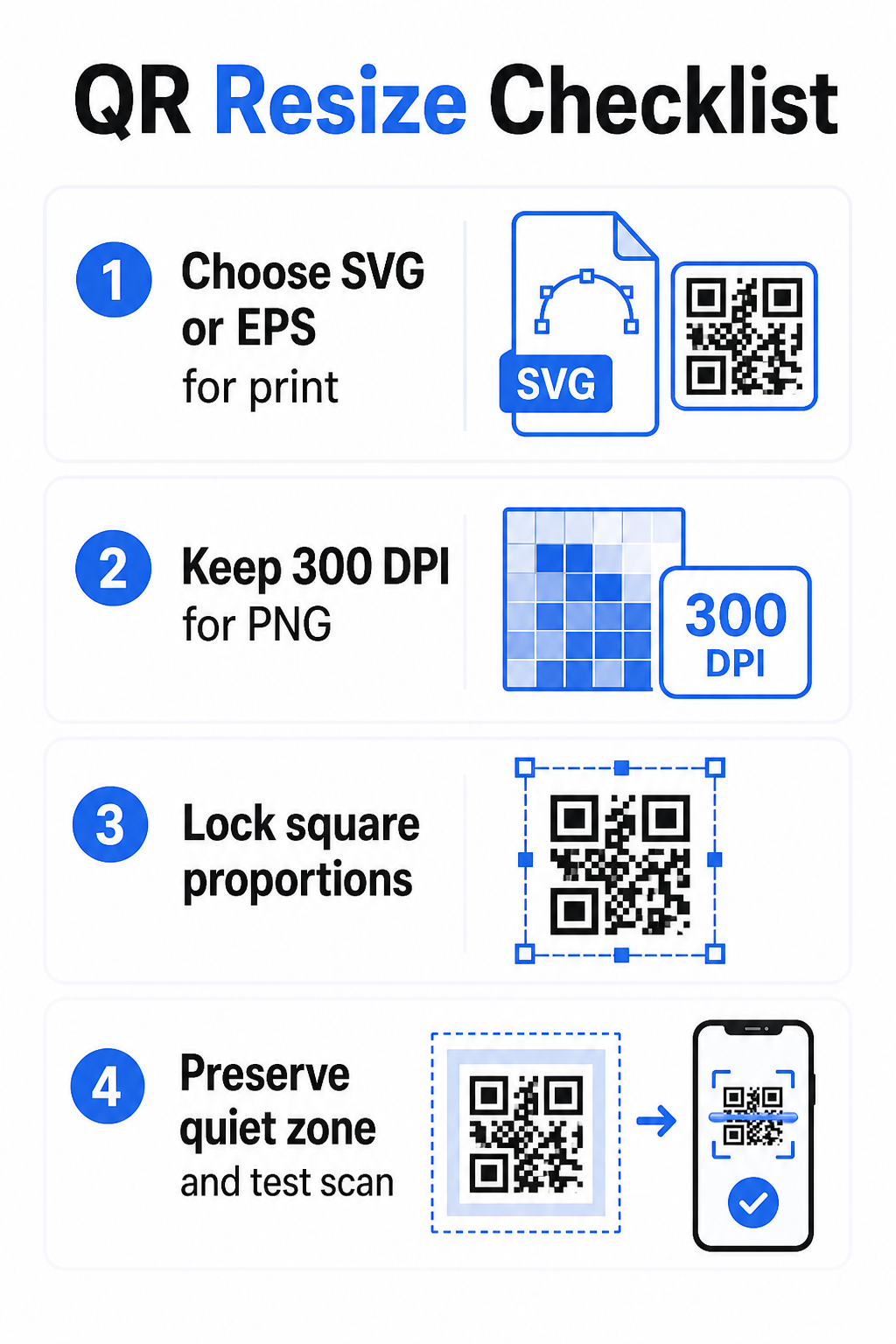
Ko prenesete QR kodo za tiskanje, vedno izberite SVG ali EPS. Ko potrebujete rastrsko datoteko za digitalni zaslon ali platformo, ki ne sprejema vektorskih formatov, izvozite PNG visoke ločljivosti – nikoli JPEG.
Ustvarite QR kode, pripravljene za tisk, v pravem formatu Generirajte svojo QR kodo in jo prenesite kot SVG, EPS ali PDF datoteko, pripravljeno za tisk, z uporabo Generator QR kode Pageloot. Ni potrebna nobena oblikovalska programska oprema.
Pravila ločljivosti za rastrske datoteke
Če delate s PNG za tisk, ločljivost – merjena v DPI (pik na palec) – določa, ali koda ostane ostra pri svoji končni natisnjeni velikosti.
Minimalni standard za tisk je 300 DPI pri končnih natisnjenih dimenzijah. To pomeni, da se dimenzije slikovnih pik vaše slikovne datoteke morajo ujemati z željeno fizično velikostjo pri tej gostoti. Na primer:
- QR koda, natisnjena pri 1 palec × 1 palec potrebuje vsaj 300 × 300 slikovnih pik
- QR koda, natisnjena pri 4 palci × 4 palci potrebuje vsaj 200 × 1.200 slikovnih pik
Če vaša datoteka ne dosega tega praga pri vaši ciljni velikosti, se bodo posamezni moduli – majhni kvadratki, ki prenašajo podatke QR – zameglili. Takrat skener ne more več ločiti temnega od svetlega in koda odpove. Za digitalne zaslone je minimalno približno 240 × 240 slikovnih pik praktična smernica za kode za prikaz na zaslonu, čeprav je večje vedno varneje za povečavo in združljivost med napravami. Čistejša rešitev za tisk je, da popolnoma preskočite raster in uporabite vektorsko datoteko, ki vam omogoča neskončno skalabilnost brez skrbi glede ločljivosti.
Kako spremeniti velikost QR kode korak za korakom
Korak 1: Začnite s pravo izvorno datoteko
Prenesite ali izvozite svojo QR kodo v formatu SVG ali EPS, če gre v tisk. Če imate samo rastrsko datoteko, preverite, ali dimenzije slikovnih pik podpirajo 300 DPI pri vaši ciljni velikosti tiskanja pred spreminjanjem velikosti. QR koda PNG lahko dobro deluje za digitalne umestitve, ko je izvožena z zadostno ločljivostjo – lahko jo ustvarite neposredno z Generator QR kod PNG in jo uporabite povsod, kjer je potrebna prosojnost ali rastrska združljivost.
Korak 2: Skalirajte proporcionalno
Vedno ohranite izvirno razmerje stranic pri spreminjanju velikosti. QR kode so po definiciji kvadratne, in raztezanje vodoravno ali navpično popači module iz kvadratov v pravokotnike, kar lahko zmede ali onemogoči skenerje. V kateri koli oblikovalski aplikaciji – Illustrator, Canva, InDesign, Photoshop – zaklenite razmerje stranic, preden povlečete vogalni ročaj. Že subtilna popačenja so dovolj, da povzročijo težave pri strožjih implementacijah skenerjev.
korak: Ohranjanje tihe cone
Tiha cona je jasna bela obroba, ki obdaja QR kodo na vseh štirih straneh. Standard ISO/IEC 18004 določa, da mora biti ta rob širok vsaj štiri module na vsaki strani. Ko spremenite velikost QR kode in jo postavite v večjo zasnovo, je ta cona pogosto prva stvar, ki se obreže ali jo posežejo drugi oblikovalski elementi. Če je vsak modul v vaši kodi širok 2 mm, mora biti vaša tiha cona široka vsaj 8 mm na vseh straneh. Obravnavajte ta prostor kot nepogrešljiv – njegovo odstranjevanje prekine prepoznavanje skenerja.
korak: Preverite kontrast po spreminjanju velikosti
Spreminjanje velikosti na barvno ali teksturirano ozadje lahko zmanjša učinkovit kontrast med moduli kode in njeno okolico. Skenerji se zanašajo na razliko med temnimi in svetlimi območji za branje kode. Najvarnejša kombinacija ostaja temni moduli na svetlem ozadju – črna na beli zagotavlja kontrastno razmerje 21:1. Prizadevajte si za minimalno kontrastno razmerje 4:1 med barvami ospredja in ozadja ter se izogibajte postavljanju kode na prelive, živahne vzorce ali odsevne površine. Za podrobna navodila glejte najboljšim praksam barvnega kontrasta QR kod.
korak: Testiranje pred tiskanjem
Natisnite preizkusni izvod v točno določeni velikosti na točno določenem materialu, nato preizkusite z več napravami – tako iOS kot Android – preden se zavežete k polni proizvodnji. Preizkusite na dejanski razdalji skeniranja, ki jo bodo uporabniki izkusili. Koda, ki se popolnoma skenira na dosegu roke, lahko odpove na razdalji, na kateri je dejansko postavljena. Glejte kako testirati QR kode za mobilno uporabnost za celoten kontrolni seznam testiranja.
Minimalne in maksimalne smernice za velikost
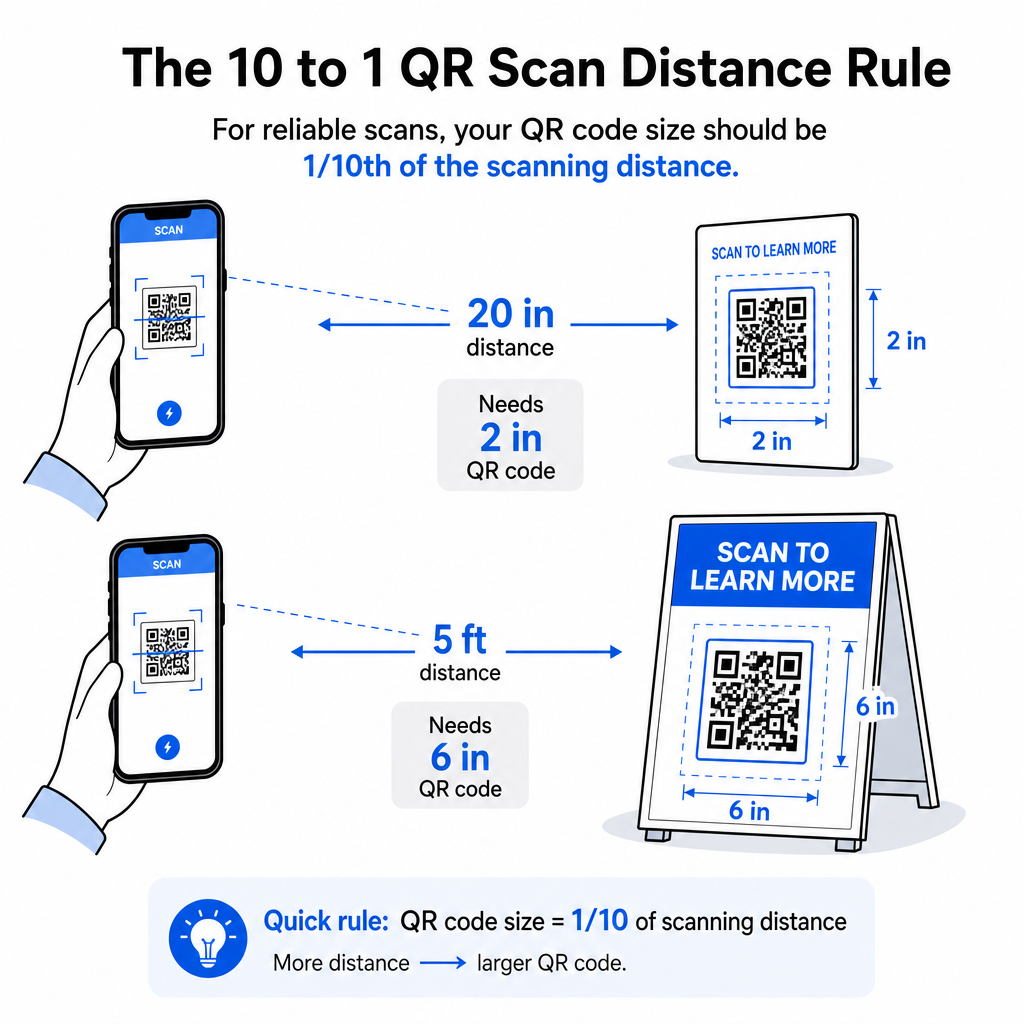
Odgovorno spreminjanje velikosti QR kode pomeni poznavanje omejitev velikosti za vaš specifičen primer uporabe. Osnovno pravilo je: razmerje med razdaljo in velikostjo 10:1: maksimalna predvidena razdalja skeniranja naj bo približno desetkratnik širine QR kode. Koda, skenirana z razdalje 20 palcev, naj bo široka vsaj 2 palca; tista, skenirana z razdalje 5 čevljev, naj bo široka vsaj 6 palcev; koda na jumbo plakatu, skenirana z razdalje 30 čevljev, naj bo široka vsaj 36 palcev.
Za običajne tiskane aplikacije so tukaj zanesljive izhodiščne točke:
| Primer uporabe | Minimalna priporočena velikost |
|---|---|
| Vizitke | 0.8 × 0.8 in (2 × 2 cm) |
| Letaki in brošure | 1.2 × 1.2 in (3 × 3 cm) |
| Plakati in signalizacija | 1,6 × 1,6 palca (4 × 4 cm) |
| Jumbo plakati in transparenti | 16 × 16 palcev (40 × 40 cm) ali več |
Za uporabo na vizitkah je 0,8 × 0,8 palca praktični minimum za zanesljivo skeniranje na kratke razdalje – zmanjšanje velikosti bistveno poveča tveganje za neuspešno skeniranje. Glejte vodnik za velikosti QR kod za vizitke za specifična priporočila za ta format. Uradne zgornje omejitve velikosti ni; povečajte po potrebi glede na razdaljo skeniranja. Za celovito razčlenitev za vsak primer uporabe, vodniku po velikosti QR kod zajema vse od vizitk do jumbo plakatov. Raziskujete lahko tudi kako velikost QR kode vpliva na vidljivost da bi razumeli širše razmerje med dimenzijami in uspešnostjo skeniranja.
Potrebujete QR kodo za svojo vizitko? Uporabi Izdelava QR kode za vizitke za ustvarjanje kode velikosti in oblike za tiskanje na vizitke, z vključenim izvozom SVG.
Kako gostota podatkov vpliva na spreminjanje velikosti
Eden od dejavnikov, ki otežuje spreminjanje velikosti, je gostota podatkov – količina informacij, kodiranih v QR kodi. Več podatkov kot vsebuje QR koda, gostejša postane njena mreža modulov. Gostejše mreže zahtevajo večje fizične velikosti za ohranjanje berljivosti posameznih modulov na ravni kamere.
QR koda, ki kodira dolg URL s parametri sledenja, vsebuje veliko več podatkov kot tista, ki kaže na kratek preusmeritveni URL. Ko pomanjšate kodo visoke gostote, postanejo moduli premajhni, da bi jih večina kamer pametnih telefonov zanesljivo prepoznala. Dinamične QR kode rešujejo ta problem neposredno. Namesto kodiranja celotnega ciljnega URL-ja, dinamična koda kodira kratko interno preusmeritev, s čimer ohranja nizko gostoto podatkov kode, ne glede na to, kam kaže. To pomeni, da lahko kodo natisnete manjšo, ne da bi žrtvovali možnost skeniranja – in posodobite destinacijo pozneje brez ponovnega tiskanja.
Popravljanje napak in toleranca pri spreminjanju velikosti
QR kode vključujejo vgrajeno popravljanje napak, ki jim omogoča, da ostanejo skenljive tudi, če so delno poškodovane ali zakrite. Standard ISO/IEC 18004 določa štiri ravni:
| Raven | Zmožnost obnovitve |
|---|---|
| L (nizko) | ~7 % podatkov |
| M (srednje) | ~15 % podatkov |
| Q (kvartil) | ~25 % podatkov |
| H (visoko) | ~30 % podatkov |
Če spreminjate velikost QR kode na manjšo velikost ali dodajate logotip v sredino kode, povečanje ravni popravljanja napak zagotavlja zaščito pred poškodbami na ravni modulov ali netočnostjo skeniranja. Raven Q ali H je primerna za blagovne znamke ali močno prilagojene kode. Upoštevajte, da višje popravljanje napak poveča gostoto podatkov, kar lahko zahteva nekoliko večjo minimalno velikost za kompenzacijo.
Pogoste napake pri spreminjanju velikosti, ki se jim je treba izogniti
- Uporaba posnetka zaslona kot izvorne datoteke. Posnetki zaslona so rastrske slike nizke ločljivosti. Povečanje le-teh za tisk je eden najpogostejših vzrokov za neskenabilne QR kode.
- Neproporcionalno raztezanje kode. Že majhna horizontalna ali vertikalna popačenja spremenijo oblike modulov iz kvadratov v pravokotnike, kar lahko prepreči skenerjem pravilno branje kode.
- Obrezovanje tihe cone. Spremin.
- Predpostavka, da bo koda, ki deluje na zaslonu, delovala tudi v tisku. Zaslonski prikaz in tiskani izpis sta različni okolji. Koda, ki je na zaslonu videti ostra pri 72 DPI, se lahko pri 300 DPI natisne zamegljeno, če osnovna ločljivost datoteke tega ne podpira.
- Ne testiranje po spreminjanju velikosti. Vedno preverite možnost skeniranja na končnem materialu, v končni velikosti, z načrtovane razdalje skeniranja.
Za podrobnejše smernice, vodniku za ločljivost tiskanja QR kod in najboljšim praksam za berljivost QR kod pokrivajo podrobnosti, specifične za tisk, ki jih je vredno poznati, preden greste v proizvodnjo.
Določanje velikosti za različne tiskarske materiale
Površina, na katero tiskate, vpliva na to, kako velika mora biti vaša QR koda, neodvisno od upoštevanja razdalje skeniranja. Grobe, teksturirane ali ukrivljene površine lahko popačijo module in zmanjšajo učinkovit kontrast, kar zahteva, da povečate kodo preko tistega, kar bi samo pravilo 10:1 predlagalo.
- Gladek papir ali karton – Veljajo standardne smernice za velikost; mat površine so prednostne pred sijočimi za zmanjšanje bleščanja in odsevov
- Valovita lepenka – Dodajte 10–25 % k minimalni velikosti, da kompenzirate teksturo površine in nepravilnosti robov
- Tkanina – Gladek poliester lahko uporablja standardne minimume; grobi ali raztegljivi tekstil pogosto zahteva 25–50 % večje kode
- Kovina ali steklo – Visoka odbojnost povzroča težave pri skeniranju; uporabite mat površine ali vinilne prevleke in povečajte velikost kode
Za popolno razčlenitev po vrsti materiala glejte velikosti QR kode za različne tiskane materiale, in za smernice o tem, kako sama metoda tiskanja vpliva na kakovost izpisa, kako tiskarske tehnike vplivajo na skenirljivost QR kode je vredno prebrati, preden oddate naročilo za tisk. Za odločitve o postavitvi, ki presegajo določanje velikosti, Vodnik za namestitev kode QR za trženje pokriva pozicioniranje glede na vrsto materiala in kontekst kampanje.
Pravilno spreminjanje velikosti QR kode pomeni izbiro pravega formata datoteke pred spreminjanjem velikosti, ohranjanje razmerij in robov tihe cone ves čas ter preverjanje, ali vaš izpis ustreza standardom ločljivosti in kontrasta pri končni natisnjeni ali prikazani velikosti. Začetek z vektorsko datoteko v celoti odstrani večino tveganja – čisto se skalira v katero koli smer brez omejitve ločljivosti, ki jo nalagajo rastrske slike. Če gradite QR kode za tekoče kampanje, uporaba dinamična QR koda vam daje dodatno prednost posodabljanja destinacije po tiskanju, tako da odločitev o velikosti ali postavitvi danes ne pomeni, da boste v prihodnosti vezani na stroške ponovnega tiskanja.
Pogosta vprašanja
SVG, EPS ali PDF so najboljši formati za spreminjanje velikosti, ker so vektorski in se prilagodijo kateri koli velikosti brez izgube ostrine. PNG je sprejemljiv za digitalno uporabo, ko je izvožen v visoki ločljivosti. JPEG se je treba v celoti izogibati – njegovo stiskanje zgladi ostre robove, ki jih skenerji potrebujejo za razlikovanje vsakega modula.
Praktični minimum za večino tiskarskih aplikacij na kratke razdalje je 0,8 × 0,8 palca (2 × 2 cm). Manjša velikost poveča tveganje za neuspešno skeniranje. Za skeniranje na večje razdalje uporabite pravilo 10:1: širina kode mora biti vsaj ena desetina največje predvidene razdalje skeniranja – torej mora biti koda, skenirana z razdalje 20 palcev, široka vsaj 2 palca.
Ne – kodirani podatki in raven popravljanja napak so določeni, ko je koda generirana. Spreminjanje velikosti spremeni le fizične ali pikselske dimenzije slike. Na kar lahko vpliva spreminjanje velikosti, je, ali moduli ostanejo jasni in razločljivi pri novi velikosti, zato so ohranjanje 300 DPI za tisk, ohranjanje robov tihe cone in sorazmerno skaliranje vsi bistveni koraki.