هل تحاول تغيير حجم رمز QR لتنتهي بنتيجة ضبابية وغير قابلة للمسح؟ قد يؤدي تحديد الأبعاد بشكل خاطئ – أو استخدام تنسيق ملف غير صحيح – إلى جعل رمز QR الخاص بك عديم الفائدة تمامًا بعد الطباعة. يرشدك هذا الدليل بالضبط إلى كيفية تغيير حجم رمز QR بشكل صحيح، ويغطي تنسيقات الملفات، وقواعد الحجم، ومتطلبات الدقة، والأخطاء الأكثر شيوعًا التي يجب تجنبها.
لماذا يسوء تغيير حجم رمز QR
تعود معظم مشاكل جودة رمز QR إلى إحدى مشكلتين: البدء بتنسيق ملف خاطئ أو تكبير صورة بما يتجاوز ما يمكن أن تدعمه دقتها.
عندما تأخذ صورة نقطية منخفضة الدقة – مثل JPEG أو PNG صغير – وتمددها لتكبيرها في برنامج التصميم الخاص بك، يتعين على الماسح الضوئي قراءة وحدات ضبابية وغير واضحة بدلاً من مربعات واضحة بالأبيض والأسود. يعد تمديد رمز QR منخفض الدقة أحد أكثر الطرق الموثوقة لإنتاج نتيجة طباعة ضبابية وغير قابلة للمسح. هناك أيضًا مشكلة أقل وضوحًا: يمكن أن يؤدي تغيير الحجم عن غير قصد إلى تشويه نسب الرمز أو إزالة المنطقة الهادئة – الهامش الأبيض الواضح المحيط بالرمز – مما يتسبب في قراءة الماسحات الضوئية بشكل خاطئ أو تفويت النمط تمامًا. إن فهم نقاط الفشل هذه قبل تغيير الحجم هو المسار الأكثر مباشرة لرمز يعمل بالفعل.
متجه مقابل نقطي: قرار تنسيق الملف الأكثر أهمية
إن الخيار الأكثر تأثيرًا الذي تتخذه عند تغيير حجم رمز QR هو ما إذا كنت تعمل بملف متجه أو نقطي.
تنسيقات المتجهات (SVG، EPS، PDF) تخزن رمز QR كتعليمات رياضية بدلاً من شبكة ثابتة من البكسلات. هذا يعني أنها تتكيف مع أي حجم – من طابع بريد إلى لوحة إعلانية – دون أي فقدان للحدة أو الوضوح. لأي شيء سيتم طباعته، المتجه هو الخيار الصحيح.
تنسيقات النقطية (PNG، JPEG، BMP) تخزن الرمز كشبكة بكسل بسقف دقة ثابت. بمجرد تكبيرها فوق دقتها الأصلية، يجب على البرنامج اختراع بيانات البكسل، مما ينتج عنه ضبابية. JPEG إشكالي بشكل خاص لأن خوارزمية الضغط الخاصة به تنعم الحواف، مما يقوض مباشرة التباين الحاد الذي يحتاجه ماسح QR لقراءة كل وحدة.
| شكل | تتكيف بدون فقدان | تنصح ل | ملحوظات |
|---|---|---|---|
| SVG | نعم | طباعة، تنسيق كبير | الأفضل بشكل عام لتغيير الحجم |
| EPS | نعم | طباعة احترافية | معيار في سير عمل تصميم الطباعة |
| بي دي إف | نعم | طباعة، مشاركة | يحافظ على بيانات المتجهات |
| بي إن جي | لا (دقة ثابتة) | الويب، عرض رقمي | مقبول بدقة عالية |
| JPEG | لا (ضغط مع فقدان) | لا شيء منهما | تجنب تمامًا لرموز QR |
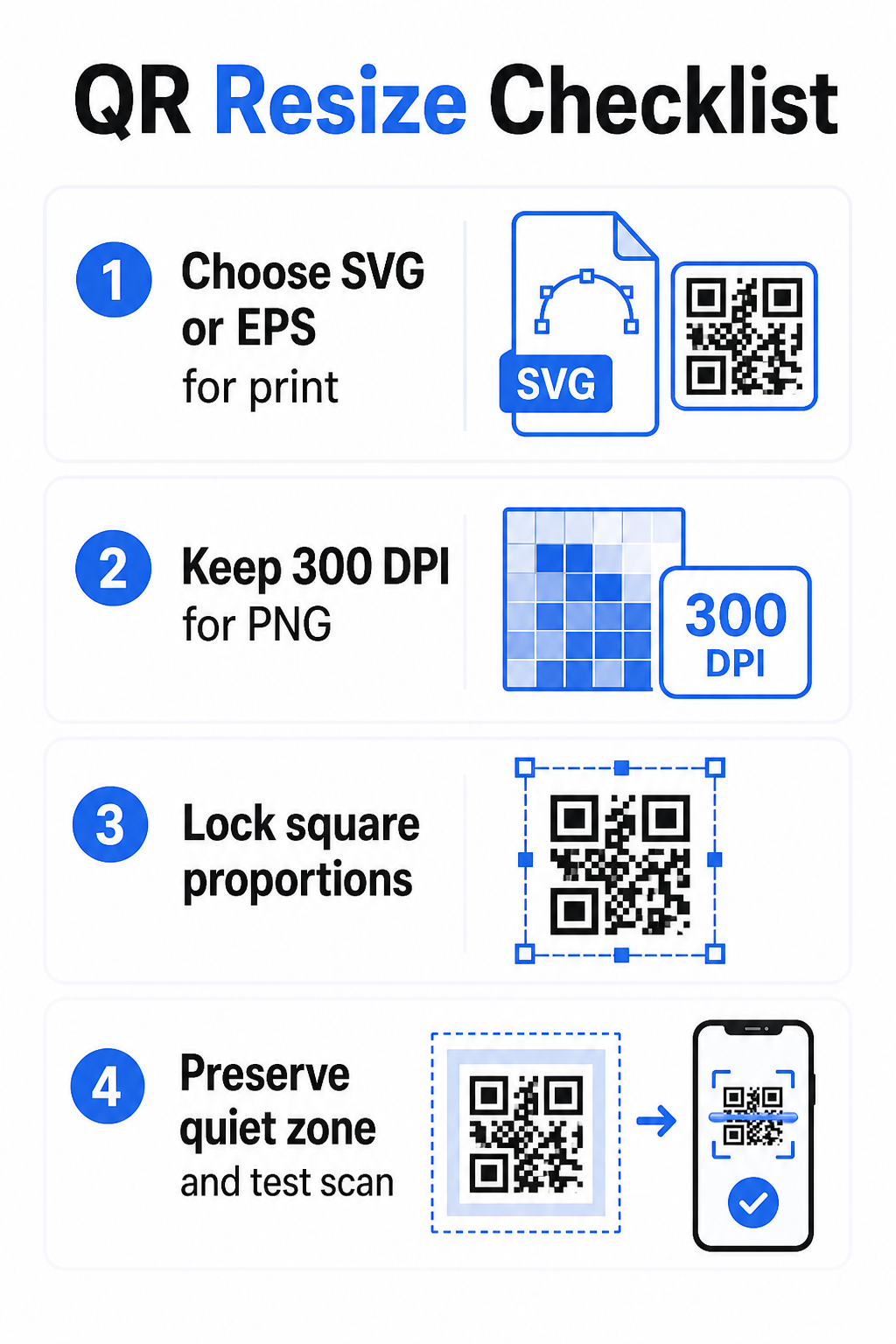
عندما تقوم بتنزيل رمز QR للطباعة، اختر دائمًا SVG أو EPS. عندما تحتاج إلى ملف نقطي لشاشة رقمية أو منصة لا تقبل تنسيقات المتجهات، صدّر ملف PNG عالي الدقة – لا تستخدم JPEG أبدًا.
أنشئ رموز QR جاهزة للطباعة بالتنسيق الصحيح أنشئ رمز QR الخاص بك ونزّله كملف SVG أو EPS أو PDF جاهز للطباعة باستخدام الـ Pageloot مولد رمز الاستجابة السريعة. لا يتطلب برنامج تصميم.
قواعد الدقة للملفات النقطية
إذا كنت تعمل بملف PNG للطباعة، فإن الدقة – المقاسة بالنقاط في البوصة (DPI) – تحدد ما إذا كان الرمز يبقى حادًا عند حجمه المطبوع النهائي.
الحد الأدنى القياسي للطباعة هو 300 DPI عند الأبعاد المطبوعة النهائية. هذا يعني أن أبعاد البكسل لملف صورتك يجب أن تتطابق مع الحجم المادي المقصود عند تلك الكثافة. على سبيل المثال:
- رمز QR مطبوع بحجم ١ بوصة × ١ بوصة يحتاج إلى ما لا يقل عن ٣٠٠ × ٣٠٠ بكسل
- رمز QR مطبوع بحجم ٤ بوصة × ٤ بوصة يحتاج إلى ما لا يقل عن ١,٢٠٠ × ١,٢٠٠ بكسل
إذا كان ملفك لا يفي بهذا الحد عند حجمك المستهدف، فإن الوحدات الفردية – المربعات الصغيرة التي تحمل بيانات QR – ستتداخل وتصبح ضبابية. عند هذه النقطة، لم يعد بإمكان الماسح التمييز بين الظلام والضوء، ويفشل الرمز. بالنسبة للشاشات الرقمية، فإن حدًا أدنى تقريبيًا لـ ٢٤٠ × ٢٤٠ بكسل هو إرشادات عملية لرموز العرض على الشاشة، على الرغم من أن الأكبر دائمًا أكثر أمانًا للتكبير والتوافق عبر الأجهزة. الحل الأنظف للطباعة هو تخطي النقطية تمامًا واستخدام ملف متجه، مما يمنحك قابلية التوسع اللانهائية مع صفر مخاوف بشأن الدقة.
كيفية تغيير حجم رمز QR خطوة بخطوة
الخطوة 1: ابدأ بملف المصدر الصحيح
نزّل أو صدّر رمز QR الخاص بك بتنسيق SVG أو EPS إذا كان سيتم طباعته. إذا كان لديك ملف نقطي فقط، تحقق من أن أبعاد البكسل تدعم 300 DPI عند حجم الطباعة المستهدف قبل تغيير الحجم. يمكن أن يعمل رمز QR بتنسيق PNG بشكل جيد للمواضع الرقمية عند تصديره بدقة كافية – يمكنك إنشاء واحد مباشرة باستخدام مولد باركود QR بصيغة PNG واستخدمه أينما كانت الشفافية أو التوافق النقطي مطلوبًا.
الخطوة 2: قم بتغيير الحجم بشكل متناسب
حافظ دائمًا على نسبة العرض إلى الارتفاع الأصلية عند إعادة التحجيم. رموز QR مربعة بطبيعتها، وتمديدها أفقيًا أو رأسيًا يشوه الوحدات من مربعات إلى مستطيلات، مما قد يربك الماسحات الضوئية أو يعطلها. في أي تطبيق تصميم – Illustrator، Canva، InDesign، Photoshop – قم بقفل نسبة العرض إلى الارتفاع قبل سحب مقبض الزاوية. حتى التشويه الطفيف يكفي لإحداث مشاكل مع تطبيقات الماسحات الضوئية الأكثر صرامة.
الخطوة 3: الحفاظ على المنطقة الهادئة
المنطقة الهادئة هي الحدود البيضاء الواضحة المحيطة برمز QR من جميع الجوانب الأربعة. يحدد معيار ISO/IEC 18004 أن هذا الهامش يجب أن يكون بعرض أربع وحدات على الأقل من كل جانب. عندما تقوم بإعادة تحجيم رمز QR ووضعه ضمن تصميم أكبر، غالبًا ما تكون هذه المنطقة هي أول ما يتم قصه أو التعدي عليه بواسطة عناصر التصميم الأخرى. إذا كانت كل وحدة في الرمز الخاص بك بعرض 2 مم، فيجب أن تكون منطقتك الهادئة 8 مم على الأقل من جميع الجوانب. تعامل مع هذه المساحة على أنها غير قابلة للتفاوض – إزالتها تكسر تعرف الماسح الضوئي.
الخطوة 4: التحقق من التباين بعد إعادة التحجيم
إعادة التحجيم على خلفية ملونة أو ذات نسيج يمكن أن يقلل من التباين الفعال بين وحدات الرمز ومحيطه. تعتمد الماسحات الضوئية على الفرق بين المناطق الداكنة والفاتحة لقراءة الرمز. يظل المزيج الأكثر أمانًا هو الوحدات الداكنة على خلفية فاتحة – الأسود على الأبيض يوفر نسبة تباين 21:1. اهدف إلى نسبة تباين لا تقل عن 4:1 بين ألوان المقدمة والخلفية، وتجنب وضع الرمز على تدرجات، أو أنماط مزدحمة، أو أسطح عاكسة. للحصول على إرشادات مفصلة، انظر أفضل ممارسات تباين ألوان رمز QR.
الخطوة 5: الاختبار قبل الطباعة
اطبع نسخة تجريبية بالحجم المقصود بالضبط على المادة المقصودة بالضبط، ثم اختبر باستخدام أجهزة متعددة – سواء iOS أو Android – قبل الالتزام بدورة إنتاج كاملة. اختبر على مسافة المسح الفعلية التي سيختبرها المستخدمون. قد يفشل الرمز الذي يتم مسحه بشكل مثالي على مسافة ذراع في المسافة التي يتم وضعه فيها فعليًا. انظر كيفية اختبار رموز QR من حيث سهولة الاستخدام على الجوال للحصول على قائمة تحقق اختبار كاملة.
إرشادات الحد الأدنى والأقصى للحجم
إعادة تحجيم رمز QR بمسؤولية يعني معرفة حدود الحجم لحالة الاستخدام الخاصة بك. القاعدة الأساسية هي نسبة المسافة إلى الحجم 10:1: يجب أن تكون أقصى مسافة مسح مقصودة حوالي عشرة أضعاف عرض رمز QR. يجب أن يكون الرمز الذي يتم مسحه من مسافة 20 بوصة على الأقل 2 بوصة عرضًا؛ والرمز الذي يتم مسحه من مسافة 5 أقدام يجب أن يكون على الأقل 6 بوصات عرضًا؛ ورمز لوحة إعلانية يتم مسحه من مسافة 30 قدمًا يجب أن يكون على الأقل 36 بوصة عرضًا.
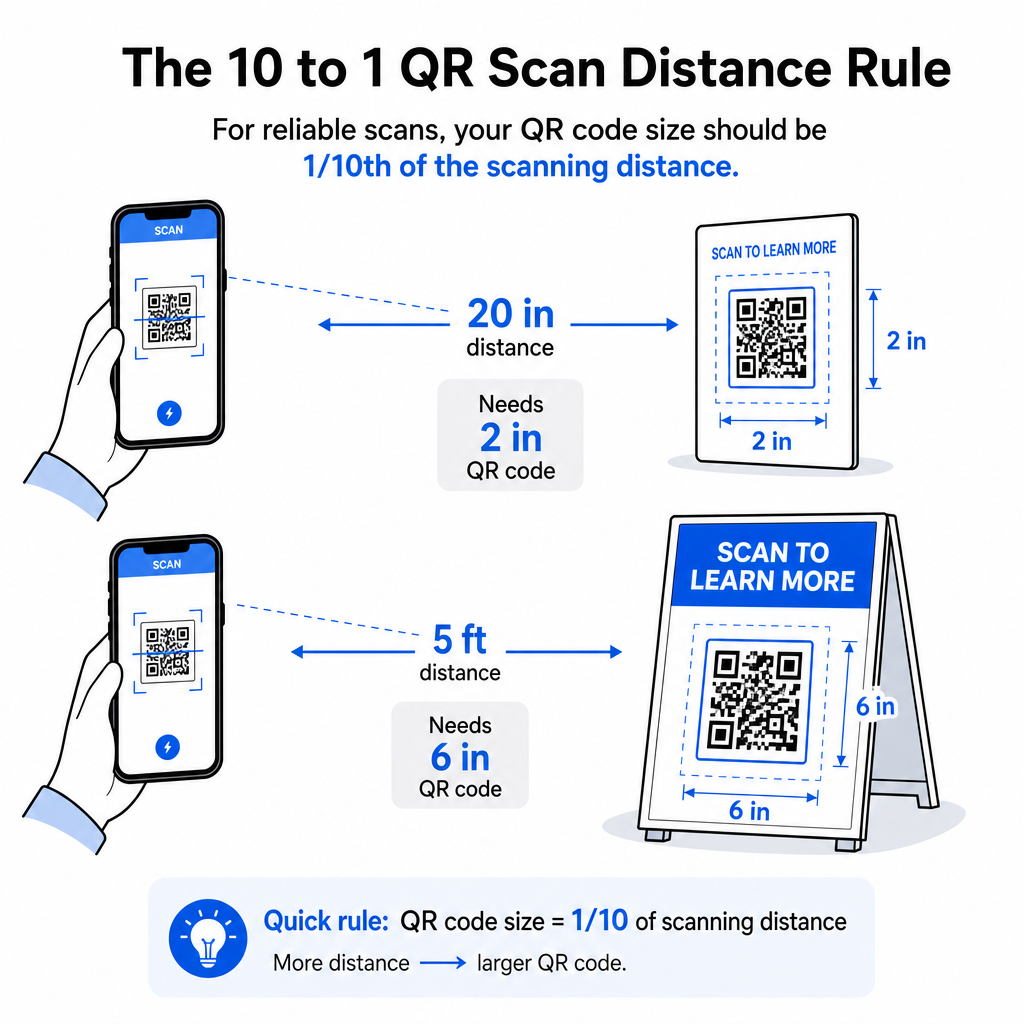
لتطبيقات الطباعة الشائعة، إليك نقاط بداية موثوقة:
| حالة الاستخدام | الحد الأدنى للحجم الموصى به |
|---|---|
| بطاقات الأعمال | 0.8 × 0.8 بوصة (2 × 2 سم) |
| النشرات الإعلانية والكتيبات | 1.2 × 1.2 بوصة (3 × 3 سم) |
| الملصقات واللافتات | 6 × 1.6 بوصة (4 × 4 سم) |
| اللوحات الإعلانية واللافتات | 16 × 16 بوصة (40 × 40 سم) أو أكبر |
لتطبيقات بطاقات العمل، 0.8 × 0.8 بوصة هو الحد الأدنى العملي للمسح الموثوق به من مسافة قريبة – التصغير يزيد بشكل كبير من خطر فشل المسح. انظر دليل أحجام رموز QR لبطاقات العمل للحصول على توصيات محددة بشأن هذا التنسيق. لا يوجد حد أقصى رسمي للحجم؛ قم بالتكبير حسب الحاجة بناءً على مسافة المسح. للحصول على تحليل شامل عبر كل حالة استخدام، فإن دليل حجم رمز QR يغطي كل شيء من بطاقات العمل إلى اللوحات الإعلانية. يمكنك أيضًا استكشاف كيف يؤثر حجم رمز QR على الرؤية لفهم العلاقة الأوسع بين الأبعاد ونجاح المسح.
هل تحتاج إلى رمز QR لبطاقة عملك؟ استخدم ال مولد رمز QR لبطاقة العمل لإنشاء رمز بحجم وتصميم لطباعة بطاقات العمل، مع تضمين تصدير SVG.
كيف تؤثر كثافة البيانات على إعادة التحجيم
أحد العوامل التي تعقد إعادة التحجيم هو كثافة البيانات – كمية المعلومات المشفرة في رمز QR. كلما زادت البيانات التي يحتوي عليها رمز QR، أصبحت شبكة وحداته أكثر كثافة. تتطلب الشبكات الأكثر كثافة أحجامًا مادية أكبر للحفاظ على الوحدات الفردية قابلة للقراءة على مستوى الكاميرا.
رمز QR الذي يشفر عنوان URL طويلًا بمعلمات تتبع يحتوي على بيانات أكثر بكثير من رمز يشير إلى عنوان URL قصير لإعادة التوجيه. عندما تقوم بتصغير رمز عالي الكثافة، تصبح الوحدات صغيرة جدًا بحيث لا تستطيع معظم كاميرات الهواتف الذكية التعرف عليها بشكل موثوق. تحل رموز QR الديناميكية هذه المشكلة مباشرة. بدلاً من تشفير عنوان URL وجهة كامل، يشفر الرمز الديناميكي إعادة توجيه داخلية قصيرة، مما يحافظ على كثافة بيانات الرمز منخفضة بغض النظر عن المكان الذي يشير إليه. هذا يعني أنه يمكنك طباعة الرمز بحجم أصغر دون التضحية بإمكانية المسح – وتحديث الوجهة لاحقًا دون إعادة الطباعة.
تصحيح الأخطاء وتحمل إعادة التحجيم
تتضمن رموز QR تصحيح أخطاء مدمجًا يسمح لها بالبقاء قابلة للمسح حتى عند تلفها جزئيًا أو حجبها. يحدد معيار ISO/IEC 18004 أربعة مستويات:
| المستوى | قدرة الاسترداد |
|---|---|
| ل (منخفض) | ~7% من البيانات |
| م (متوسط) | ~15% من البيانات |
| س (الربع) | ~25% من البيانات |
| ح (عالي) | ~30% من البيانات |
إذا كنت تقوم بتغيير حجم رمز QR إلى حجم أصغر، أو إضافة شعار إلى مركز الرمز، فإن زيادة مستوى تصحيح الخطأ يمنحك حاجزًا ضد التلف على مستوى الوحدة أو عدم دقة المسح. المستوى Q أو H مناسب للرموز ذات العلامات التجارية أو المخصصة بشكل كبير. ضع في اعتبارك أن تصحيح الخطأ الأعلى يزيد من كثافة البيانات، مما قد يتطلب حجمًا أدنى أكبر قليلاً للتعويض.
أخطاء شائعة في تغيير الحجم يجب تجنبها
- استخدام لقطة شاشة كملف مصدر لك. لقطات الشاشة هي صور نقطية منخفضة الدقة. تكبيرها للطباعة هو أحد الأسباب الأكثر شيوعًا لرموز QR غير القابلة للمسح.
- تمديد الرمز بشكل غير متناسب. حتى التشويه الأفقي أو الرأسي الطفيف يغير أشكال الوحدات من مربعات إلى مستطيلات، مما قد يمنع الماسحات الضوئية من قراءة الرمز بشكل صحيح.
- قص المنطقة الهادئة. غالبًا ما يؤدي تغيير الحجم ضمن تصميم ضيق إلى تعدي عناصر أخرى على المنطقة الهادئة. حافظ على مسافة واضحة لا تقل عن أربع وحدات من جميع الجوانب – هذا الهامش هو متطلب تقني، وليس اختيارًا جماليًا.
- افتراض أن رمزًا يعمل على الشاشة سيعمل في الطباعة. عرض الشاشة والمخرجات المطبوعة بيئات مختلفة. قد يظهر الرمز الذي يبدو حادًا بدقة 72 نقطة في البوصة على الشاشة ضبابيًا عند الطباعة بدقة 300 نقطة في البوصة إذا كانت دقة الملف الأساسي لا تدعم ذلك.
- عدم الاختبار بعد تغيير الحجم. تحقق دائمًا من قابلية المسح على المادة النهائية، بالحجم النهائي، من مسافة المسح المقصودة.
لمزيد من الإرشادات المتعمقة، فإن 10. دليل دقة طباعة رمز QR و أفضل الممارسات لقابلية قراءة رمز الاستجابة السريعة تغطي التفاصيل الخاصة بالطباعة التي تستحق المعرفة قبل الانتقال إلى الإنتاج.
تحديد الحجم لمواد الطباعة المختلفة
يؤثر السطح الذي تطبع عليه على حجم رمز QR الذي يجب أن يكون عليه، بغض النظر عن اعتبارات مسافة المسح. يمكن للأسطح الخشنة أو المنسوجة أو المنحنية أن تشوه الوحدات وتقلل من التباين الفعال، مما يتطلب منك التكبير بما يتجاوز ما تقترحه قاعدة 10:1 وحدها.
- ورق أملس أو ورق مقوى – تنطبق إرشادات الحجم القياسية؛ يفضل التشطيبات غير اللامعة على اللامعة لتقليل الوهج والانعكاسات
- ورق مقوى مموج – أضف 10–25% إلى الحجم الأدنى للتعويض عن نسيج السطح وعدم انتظام الحواف
- قماش – يمكن استخدام البوليستر الأملس بالحد الأدنى القياسي؛ غالبًا ما تتطلب المنسوجات الخشنة أو المطاطية رموزًا أكبر بنسبة 25–50%
- معدن أو زجاج – تسبب الانعكاسية العالية مشاكل في المسح؛ استخدم الأسطح غير اللامعة أو الأغطية الفينيل وزد حجم الرمز
للحصول على تفصيل كامل حسب نوع المادة، انظر تحديد حجم رمز الاستجابة السريعة لمواد الطباعة المختلفة, ، وللحصول على إرشادات حول كيفية تأثير طريقة الطباعة نفسها على جودة الإخراج،, 15. كيف تؤثر تقنيات الطباعة على قابلية مسح رمز QR ضوئيًا تعتمد بشكل كبير على عوامل مثل انتشار الحبر. على المواد الماصة مثل القماش أو الورق المزخرف، يمكن أن ينتشر الحبر، مما يؤدي إلى توسيع الوحدات الداكنة وتقليص المسافات البيضاء بينها. تستحق القراءة قبل تقديم طلب طباعة. لقرارات التنسيب التي تتجاوز تحديد الحجم، فإن دليل وضع رمز الاستجابة السريعة (QR) للتسويق تغطي تحديد الموضع حسب نوع المادة وسياق الحملة.
يعني تغيير حجم رمز QR بشكل صحيح اختيار تنسيق الملف الصحيح قبل تغيير الحجم، والحفاظ على النسب وهوامش المنطقة الهادئة طوال الوقت، والتحقق من أن مخرجاتك تلبي معايير الدقة والتباين بالحجم المطبوع أو المعروض النهائي. البدء بملف متجه يزيل معظم المخاطر بالكامل – فهو يتدرج بشكل نظيف في أي اتجاه دون سقف الدقة الذي تفرضه الصور النقطية. إذا كنت تقوم بإنشاء رموز QR لحملات مستمرة، فإن استخدام رمز الاستجابة السريعة الديناميكي يمنحك ميزة إضافية تتمثل في تحديث الوجهة بعد الطباعة، لذلك فإن قرار تحديد الحجم أو التنسيب اليوم لا يلزمك بتكاليف إعادة الطباعة في المستقبل.
الأسئلة الشائعة
SVG، EPS، أو PDF هي أفضل التنسيقات لتغيير الحجم لأنها قائمة على المتجهات وتتوسع إلى أي حجم دون فقدان الحدة. PNG مقبول للاستخدام الرقمي عند تصديره بدقة عالية. يجب تجنب JPEG بالكامل – يقلل ضغطه من حدة الحواف الحادة التي تحتاجها الماسحات الضوئية لتمييز كل وحدة.
الحد الأدنى العملي لمعظم تطبيقات الطباعة القريبة هو 0.8 × 0.8 بوصة (2 × 2 سم). التصغير يزيد من خطر فشل المسح. للمسح على مسافات أكبر، طبق قاعدة 10:1: يجب أن يكون عرض الرمز على الأقل عُشر مسافة المسح القصوى المقصودة – لذا فإن الرمز الذي يتم مسحه من مسافة 20 بوصة يجب أن يكون عرضه 2 بوصة على الأقل.
لا – يتم تثبيت البيانات المشفرة ومستوى تصحيح الخطأ عندما يتم إنشاء الرمز. يغير تغيير الحجم فقط الأبعاد المادية أو أبعاد البكسل للصورة. ما يمكن أن يؤثر عليه تغيير الحجم هو ما إذا كانت الوحدات تظل واضحة ومميزة بالحجم الجديد، ولهذا السبب فإن الحفاظ على 300 نقطة في البوصة للطباعة، والحفاظ على هوامش المنطقة الهادئة، والتحجيم المتناسب كلها خطوات أساسية.