Butuh cara yang lebih cepat untuk berbagi detail kontak atau mendaftar peserta di acara Anda berikutnya? Detail yang diketik secara manual hilang, kartu nama kertas menumpuk, dan antrean check-in yang panjang membuat semua orang frustrasi. Panduan ini memandu Anda tentang cara menambahkan kode QR yang dapat dipindai ke tanda nama – meliputi jenis kode yang tepat, aturan desain, dan spesifikasi cetak yang benar-benar berfungsi.
Mengapa Kode QR Seharusnya Ada di Tanda Nama
Tanda nama secara tradisional menampilkan nama dan mungkin sebuah perusahaan. Itu berguna untuk sekitar tiga detik percakapan. Kode QR mengubah lencana yang sama menjadi aset yang persisten dan dapat dipindai yang berfungsi sepanjang acara tersebut.
Berikut adalah apa yang dapat dilakukan kode QR pada tanda nama:
- Bagikan detail kontak secara instan – Satu pemindaian menyimpan vCard lengkap langsung ke ponsel pemindai, tidak perlu mengetik
- Otomatiskan check-in acara – Peserta memindai di pintu, mendaftarkan kedatangan mereka tanpa daftar kertas atau pencarian manual
- Terhubung ke profil digital – Tautkan ke halaman LinkedIn, situs web pribadi, portofolio, atau bio acara
- Lacak keterlibatan – Dengan kode dinamis, Anda dapat melihat dengan tepat berapa kali sebuah lencana dipindai, kapan, dan dari perangkat apa
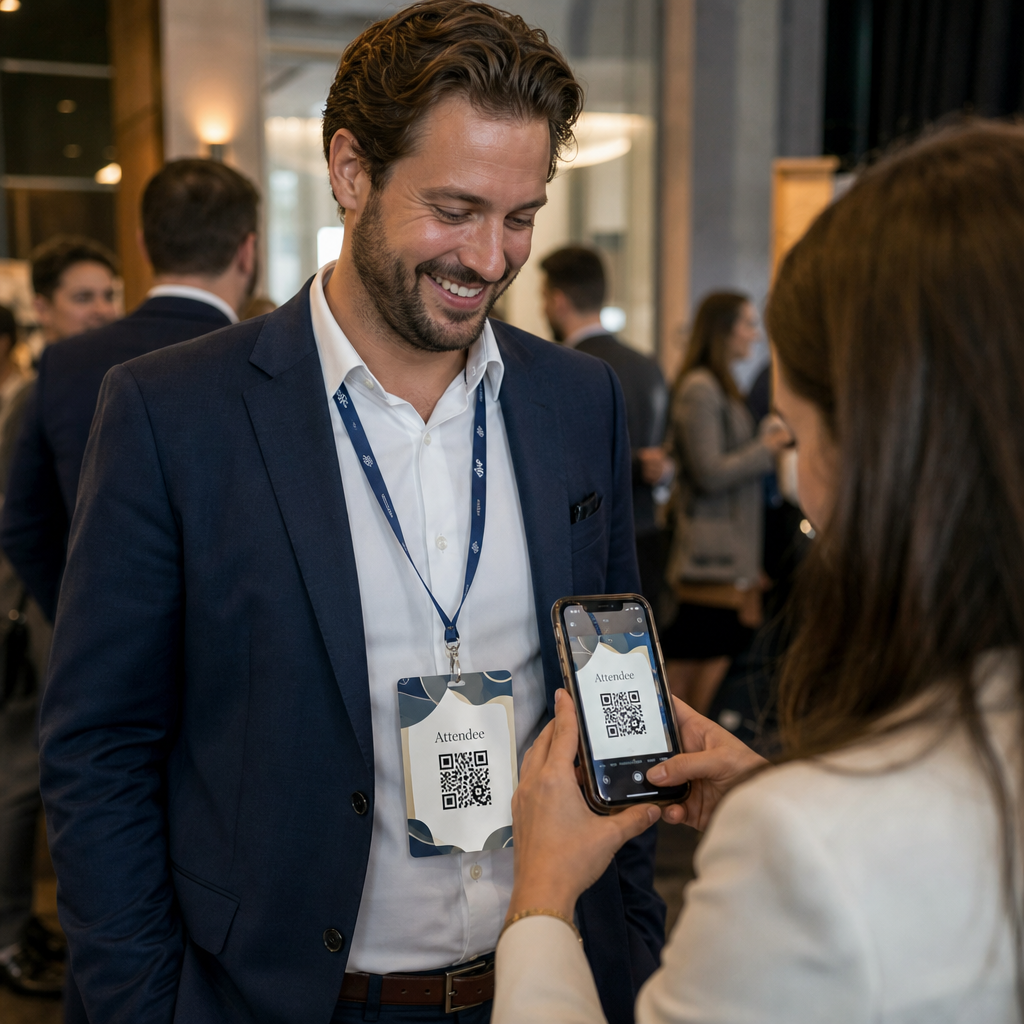
Kasus penggunaan berbagi kontak saja sudah membenarkan penambahan tersebut. Sebuah kode vCard QR mengenkode nama, nomor telepon, email, perusahaan, dan situs web dalam format yang dikenali secara native oleh iOS dan Android. Ketika seseorang memindainya, ponsel segera meminta mereka untuk menambahkan kontak – tidak perlu aplikasi, tidak ada entri manual, tidak ada kartu yang hilang.
Memilih Jenis Kode QR yang Tepat untuk Tanda Nama Anda
Tidak setiap kode QR melayani tujuan yang sama. Sebelum Anda mencetak apa pun, sesuaikan jenis kode dengan tujuan Anda.
| Tujuan | Jenis Kode QR | Fungsinya |
|---|---|---|
| Bagikan info kontak | kode vCard QR | Mengenkode nama, telepon, email, perusahaan; menyimpan langsung ke kontak telepon |
| Check-in acara | Kode QR kehadiran/acara | Tautan ke formulir pendaftaran atau sistem check-in |
| Tautkan ke profil atau situs web | Kode QR URL | Mengarahkan ke tujuan web apa pun |
| Bagikan kartu nama digital | Kode QR kartu nama | Tautan ke kartu digital lengkap dengan profil sosial dan konten kustom |
Untuk sebagian besar acara jejaring, sebuah kode vCard QR atau a kode QR kartu nama adalah pilihan yang tepat. Untuk konferensi di mana Anda juga perlu melacak siapa yang hadir dan kapan, sebuah kode QR kehadiran atau kode QR acara menangani lapisan tersebut.
Statis vs. Dinamis: Mana yang Harus Anda Gunakan?
SEBUAH kode QR statis mengenkode data langsung ke dalam polanya. Setelah dicetak, itu tidak dapat diubah. Jika URL yang ditautkan rusak atau detail kontak peserta berubah, Anda perlu mencetak ulang setiap lencana.
SEBUAH kode QR dinamis menggunakan tautan pengalihan singkat. Pola yang dicetak tetap sama, tetapi Anda dapat memperbarui tujuan kapan saja – bahkan setelah lencana sudah ada di tangan peserta. Kode dinamis juga menyediakan analitik: jumlah pemindaian, waktu pemindaian, jenis perangkat, dan lokasi. Untuk acara apa pun dengan lebih dari segelintir peserta, kode QR dinamis layak untuk langkah penyiapan tambahan.
Penting: Untuk mengakses fitur pelacakan dan pengeditan, Anda harus membuat kode dinamis sebelum proses pencetakan dimulai.
Siapkan Kode QR Tanda Nama yang Dapat Dilacak Buat kode QR dinamis yang dapat Anda perbarui dan pantau dari satu dasbor. Gunakan Generator Kode QR untuk memulai – tidak perlu mencetak ulang jika detail berubah.
Cara Membuat Kode QR vCard untuk Tanda Nama
Ini adalah kasus penggunaan tanda nama yang paling umum – berbagi kontak instan di acara jejaring, konferensi, dan pameran dagang. Untuk memulai, buka Generator kode QR vCard dan masukkan bidang yang diperlukan: minimal nama lengkap dan satu metode kontak seperti nomor telepon atau alamat email. Dari sana, tambahkan bidang opsional – nama perusahaan, jabatan, situs web, profil sosial – untuk membuat catatan kontak yang disimpan lebih berguna bagi orang yang memindai.
Setelah data dimasukkan, sesuaikan desain dengan menyesuaikan warna, menambahkan logo, dan memilih gaya bingkai yang sesuai dengan branding acara Anda. Unduh kode dalam format siap cetak – SVG atau EPS untuk output yang dapat diskalakan, PNG untuk penggunaan digital – dan uji di iOS dan Android sebelum mengirim file ke printer.
Ulangi proses ini untuk setiap peserta jika Anda membuat lencana individual, atau buat satu kode bersama untuk stan perusahaan atau titik check-in tim. Untuk melihat lebih dalam penyiapan vCard dan praktik terbaik, panduan kode QR vCard mencakup alur kerja lengkap secara detail.
Cara Menggunakan Kode QR untuk Check-In Acara pada Lencana
Untuk konferensi, lokakarya, atau acara berbayar apa pun, kode QR pada lencana berfungsi ganda sebagai kredensial check-in dan alat jejaring. Mulailah dengan membuat formulir pendaftaran menggunakan Google Forms, Typeform, atau platform manajemen acara Anda. Kemudian buat sebuah kode QR kehadiran yang menautkan langsung ke formulir atau sistem check-in dan cetak pada setiap lencana peserta sebelum acara – atau sertakan dalam email pra-acara untuk pencetakan mandiri.
Di pintu, staf memindai setiap lencana dengan ponsel pintar atau pemindai genggam untuk mendaftarkan kedatangan. Sistem mencatat pemindaian secara otomatis, tanpa daftar kertas atau pencarian manual yang diperlukan. Check-in kode QR dapat mengurangi waktu pemrosesan menjadi kurang dari dua detik per orang, yang secara signifikan memangkas durasi masuk total dibandingkan dengan metode manual. Untuk panduan lengkap pengaturan check-in acara, lihat panduan kode QR untuk check-in acara.
Anda juga dapat menggabungkan kedua fungsi pada satu lencana: kode QR vCard untuk berbagi kontak dan kode kehadiran terpisah untuk check-in. Tempatkan keduanya di area lencana yang berbeda dengan label yang jelas agar peserta dan staf tahu mana yang harus dipindai dan kapan.
Otomatiskan Check-In Acara Anda Berhentilah mengelola daftar kertas dan pencarian manual. Gunakan alat Kode QR Kehadiran untuk menyiapkan sistem check-in berbasis pemindaian yang mendaftarkan kedatangan secara real time.
Aturan Desain yang Menjaga Kode QR Name Tag Tetap Dapat Dipindai
Kode QR yang terlihat bagus tetapi gagal dipindai tidak berguna. Name tag menciptakan tantangan khusus: area cetak kecil, kondisi pencahayaan yang bervariasi, lencana yang dikenakan pada sudut yang berbeda, dan orang-orang memindai dari jarak sejauh lengan. Aturan-aturan berikut mengatasi setiap masalah ini secara langsung.
Ukuran: Terapkan Rasio 10:1
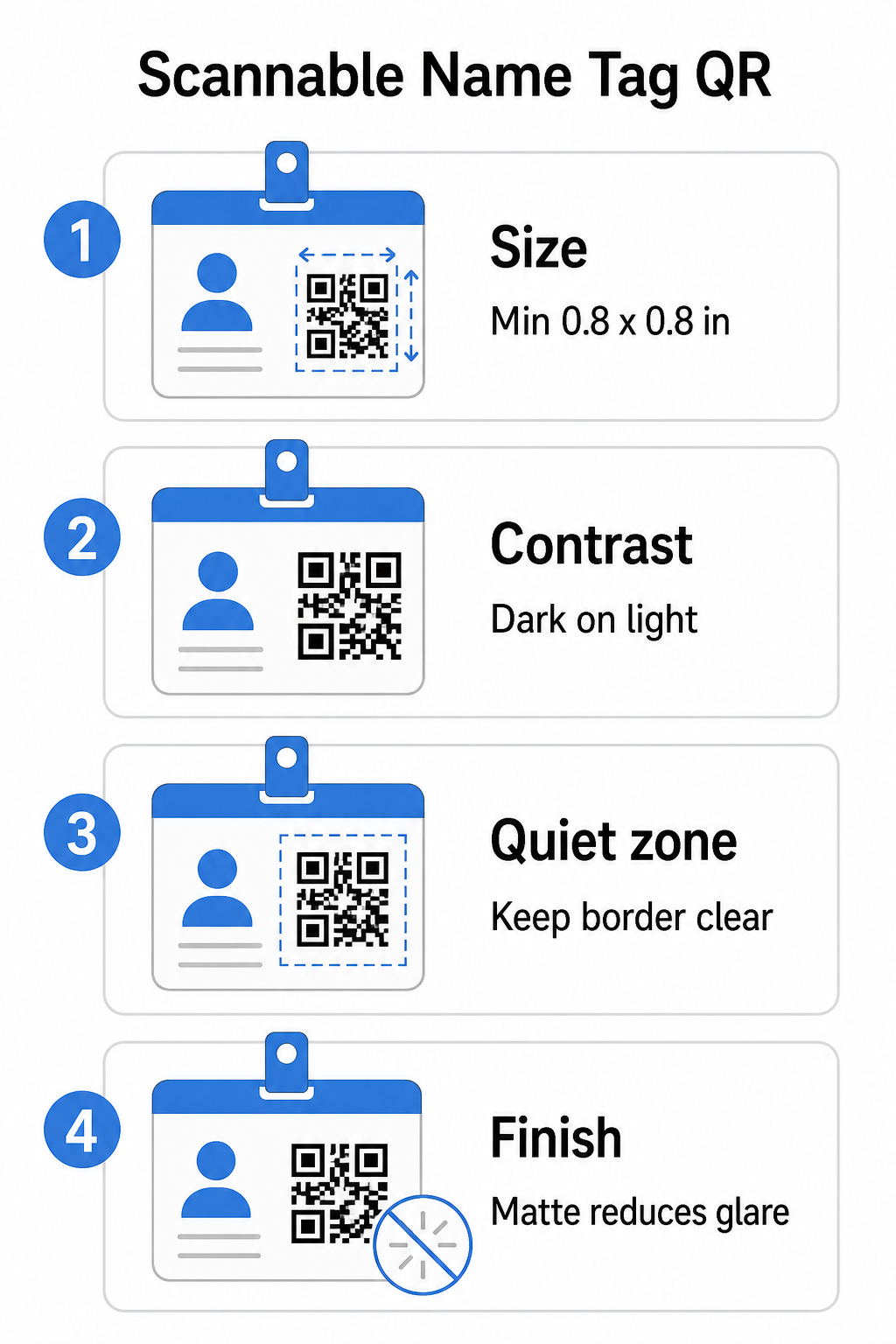
Dimensi terkecil kode QR harus kira-kira sepersepuluh dari jarak pemindaian yang diharapkan. Untuk name tag yang dipindai dari jarak sekitar 10 inci (25 cm), kode tersebut perlu memiliki lebar setidaknya 1 inci (2.5 cm). Minimum praktis untuk kode cetak jarak dekat adalah 0,8 × 0,8 inci (2 × 2 cm) – ukuran yang lebih kecil menciptakan kegagalan pemindaian yang tidak perlu, terutama pada ponsel lama. Jika lencana Anda memiliki ruang, mengukur kode mendekati 1 × 1 inci memberikan hasil yang lebih andal di berbagai perangkat. Untuk detail lebih lanjut tentang keputusan ukuran, lihat Ukuran kode QR untuk kartu nama – prinsip yang sama berlaku langsung untuk name tag.
Kontras: Gelap di Atas Terang Saja
Pemindai bekerja dengan mendeteksi kontras antara modul gelap dan latar belakang terang. Praktik terbaik adalah latar depan gelap pada latar belakang terang – hitam di atas putih tetap menjadi kombinasi yang paling andal. Kode terbalik (modul terang di atas latar belakang gelap) menyebabkan kegagalan pada banyak aplikasi pemindaian, terutama yang lebih lama. Bidik rasio kontras setidaknya 4:1, yang mendukung keterbacaan di berbagai lingkungan pencahayaan dan kamera perangkat.
Hindari gradien dan bayangan di dalam atau di sekitar area kode QR. Ini menciptakan nada tengah yang membingungkan algoritma pemindai dan mengurangi keandalan dalam pengaturan cahaya rendah. panduan praktik terbaik kontras warna kode QR menyediakan panduan kombinasi warna spesifik dan tabel perbandingan kontras jika Anda ingin menggunakan warna merek daripada hitam putih biasa.
Zona Tenang: Jaga Batas Tetap Jelas
Itu zona tenang adalah margin kosong yang mengelilingi kode QR di keempat sisinya. Ini memberi tahu pemindai di mana kode dimulai dan berakhir – tanpa itu, pemindai tidak dapat menemukan simbol dengan andal. Sesuai standar ISO/IEC 18004, margin ini harus setidaknya empat modul lebar di setiap sisi. Jika desain lencana Anda menempatkan teks, logo, atau elemen dekoratif terlalu dekat dengan kode, pemindai mungkin gagal mendeteksinya sepenuhnya. Sebagai aturan praktis: jika setiap modul dalam kode Anda selebar 2 mm, zona tenang harus setidaknya 8 mm di setiap sisi.
Koreksi Kesalahan: Tingkatkan Jika Menambahkan Logo
Kode QR memiliki empat tingkat koreksi kesalahan yang menentukan seberapa banyak kerusakan fisik atau halangan yang dapat ditoleransi kode sambil tetap dapat dipindai: L (sekitar 7%), M (sekitar 15%), Q (sekitar 25%), dan H (sekitar 30%). Jika Anda menyematkan logo atau ikon perusahaan di dalam area kode – umum untuk lencana bermerek – gunakan tingkat koreksi kesalahan H dan jaga logo agar tidak lebih dari 30% dari area kode. Ini memberi pemindai data redundan yang cukup untuk merekonstruksi pola bahkan dengan sebagian tertutup. Jika Anda tidak menambahkan logo, tingkat M atau Q cukup untuk sebagian besar aplikasi cetak.
Bentuk dan Format: Jangan Pernah Meregangkan atau Mengompres
Kode QR harus tetap berbentuk persegi sempurna. Meregangkan atau mengompres kode agar sesuai dengan tata letak membuat modul tidak sejajar dan membuatnya tidak dapat dipindai. Selalu skalakan secara proporsional dan ekspor dalam format vektor (SVG atau EPS) untuk dicetak guna menghindari pikselasi pada ukuran yang lebih besar.
Hasil Akhir: Pilih Matte Daripada Glossy
Bahan lencana glossy memantulkan cahaya dan menciptakan silau yang mengganggu pemindaian kamera. Laminasi matte atau stok tanpa lapisan berkinerja jauh lebih baik dalam pencahayaan acara dunia nyata. Jika Anda mencetak pada lencana glossy, uji kode di bawah kondisi pencahayaan aktual tempat Anda sebelum menyelesaikan proses pencetakan. praktik terbaik keterbacaan kode QR mencakup setiap faktor ini dengan kedalaman tambahan.
Penempatan pada Lencana
Di mana kode QR berada pada name tag memengaruhi seberapa sering kode tersebut dipindai. Pertimbangkan prinsip penempatan ini:
- Posisikan pada tingkat mata alami saat dikenakan – bagian bawah lencana setinggi dada mudah dipindai tanpa meminta seseorang untuk melepasnya
- Beri label kode itu dengan jelas – sertakan instruksi singkat seperti “Pindai untuk menyimpan kontak” atau “Check-in di sini” tepat di bawah atau di samping kode itu; orang jauh lebih mungkin untuk memindai ketika mereka tahu apa yang dilakukan kode itu
- Pisahkan beberapa kode – jika lencana Anda menyertakan kode check-in dan kode berbagi kontak, beri label masing-masing dengan jelas dan beri mereka ruang yang cukup untuk dipindai secara individual tanpa kebingungan
- Hindari menempatkan kode itu di dekat klip lencana atau lubang tali lanyard – area-area ini terlipat atau tertutup, yang dapat menghalangi sebagian kode atau zona tenang
Pengujian Sebelum Mencetak
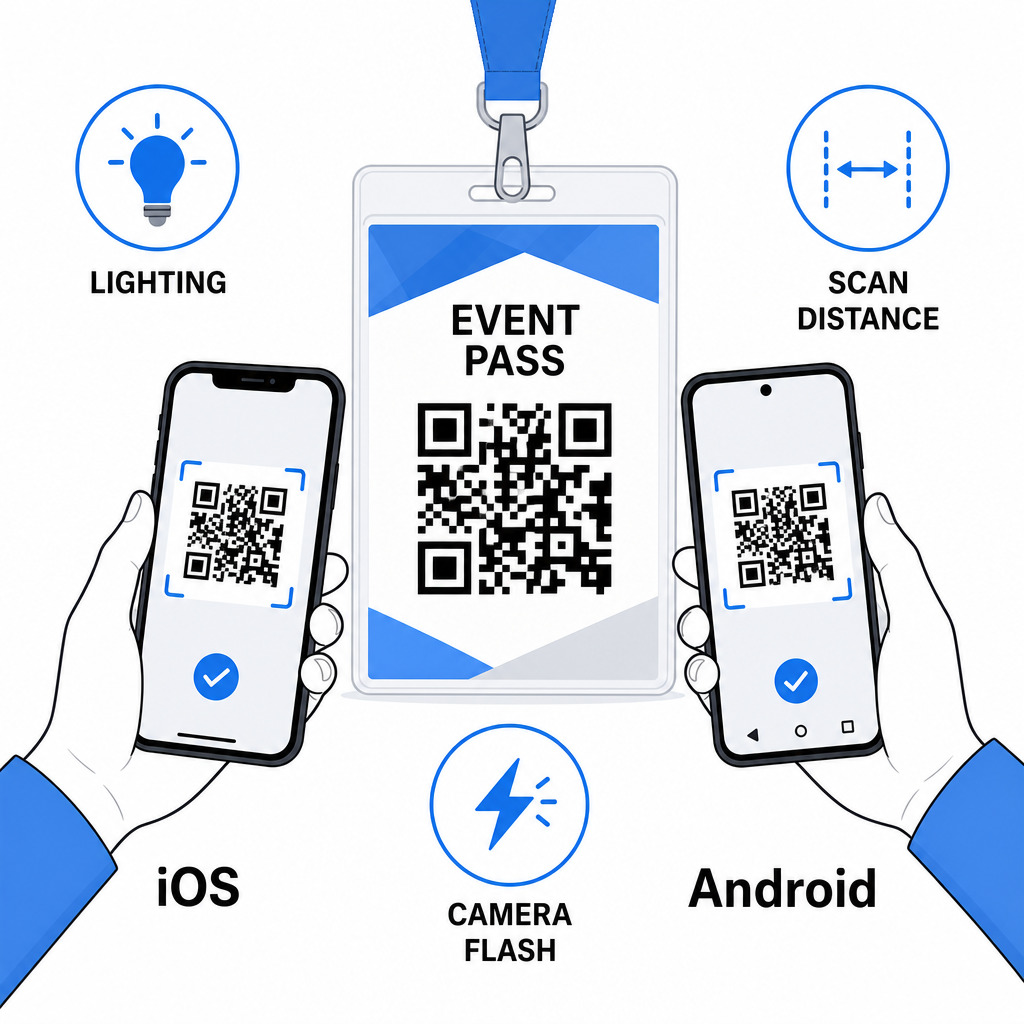
Cetak bukti dan pindai itu sebelum mengirim pesanan lencana lengkap ke produksi. Uji kode itu pada perangkat iOS dan Android, di bawah kondisi pencahayaan tempat acara Anda, pada jarak yang sebenarnya akan dipindai oleh peserta dan staf, dan dengan serta tanpa lampu kilat kamera untuk mensimulasikan skenario cahaya rendah. Kode yang lolos keempat tes itu siap untuk produksi. Kode yang gagal pada salah satunya memerlukan penyesuaian desain – apakah itu meningkatkan ukuran, meningkatkan kontras, atau memperluas zona tenang – sebelum Anda berkomitmen pada pencetakan penuh.
Kode QR pada tanda nama berfungsi paling baik ketika jenis kode yang tepat, desain bersih, dan spesifikasi cetak yang benar bersatu sebelum satu lencana pun dicetak. Pilih kode dinamis jika detail peserta mungkin berubah atau jika Anda menginginkan analitik pemindaian. Ikuti aturan ukuran, kontras, dan zona tenang untuk memastikan setiap lencana dipindai dengan andal pada hari itu. Dan selalu uji pada perangkat sebenarnya sebelum menyelesaikan produksi.
Buat Kode QR Tanda Nama Anda Buat kode QR vCard dan kehadiran yang dapat disesuaikan dengan analitik bawaan dan pengeditan dinamis. Mulai dengan Pembuat Kode QR Pageloot – gratis untuk dicoba, tidak memerlukan kartu kredit.
Pertanyaan yang sering diajukan
Anda dapat menyandikan detail kontak seperti nama, telepon, email, perusahaan, dan situs web menggunakan kode QR vCard, menautkan ke formulir check-in acara menggunakan kode QR kehadiran, atau mengarahkan ke tujuan web apa pun seperti profil LinkedIn atau portofolio digital. Pilihan yang tepat bergantung pada apakah tujuan utamanya adalah berbagi kontak, check-in, atau akses informasi umum.
Ukuran minimum praktis untuk kode QR tanda nama adalah 0,8 × 0,8 inci (2 × 2 cm). Mengurangi ukuran meningkatkan risiko kegagalan pemindaian, terutama pada ponsel pintar lama. Jika desain lencana Anda memiliki ruang, mengatur ukuran kode mendekati 1 × 1 inci memberikan hasil yang lebih andal di berbagai perangkat dan kondisi pencahayaan yang lebih luas.
Jika Anda menggunakan kode QR statis, Anda perlu mencetak ulang lencana yang terpengaruh. Jika Anda menggunakan kode QR dinamis, Anda dapat memperbarui tujuan – apakah itu vCard, halaman kontak, atau tautan formulir – dari dasbor Pageloot Anda tanpa menyentuh lencana yang dicetak. Ini adalah salah satu alasan utama untuk menggunakan kode dinamis untuk acara apa pun dengan informasi peserta yang bervariasi.