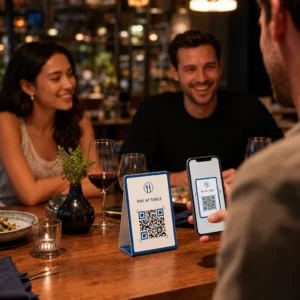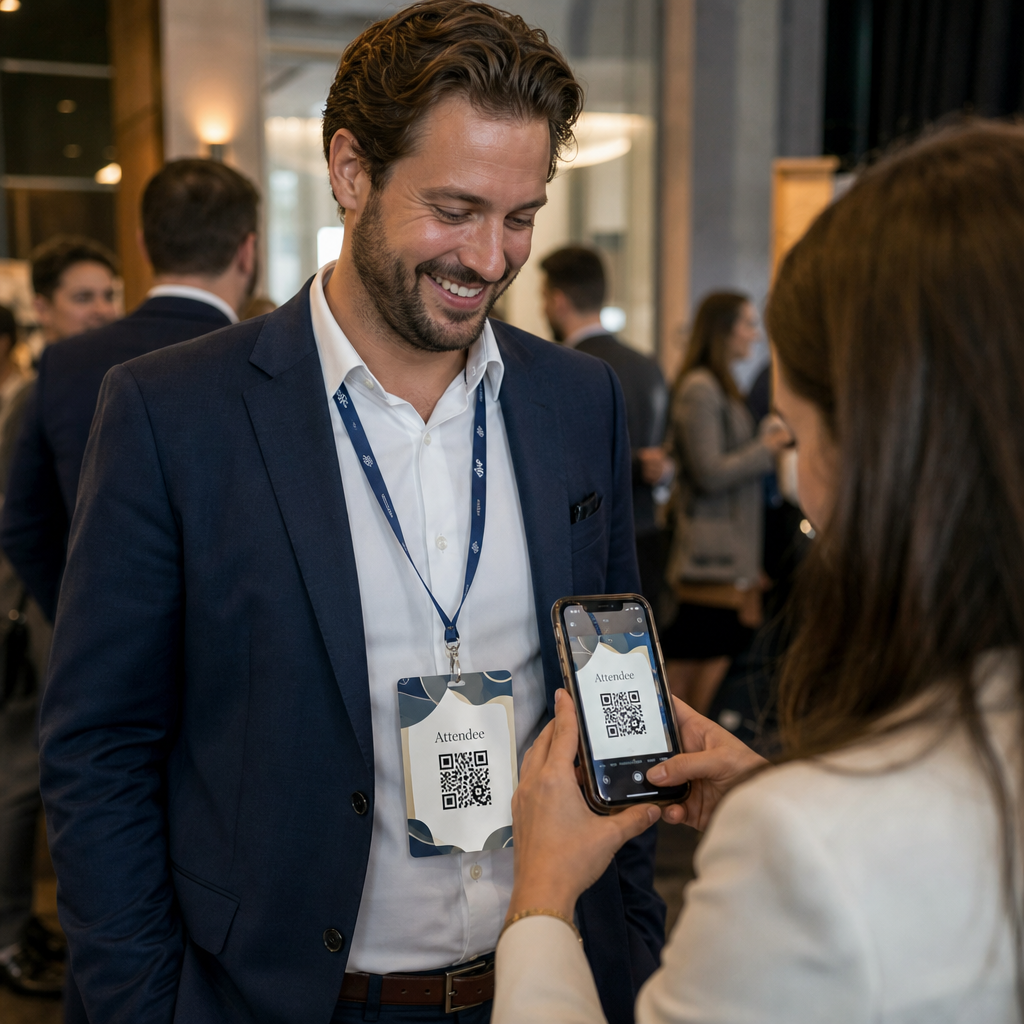
Χρειάζεστε έναν πιο γρήγορο τρόπο για να μοιραστείτε στοιχεία επικοινωνίας ή να κάνετε check-in τους συμμετέχοντες στην επόμενη εκδήλωσή σας; Τα χειροκίνητα πληκτρολογημένα στοιχεία χάνονται, οι χάρτινες επαγγελματικές κάρτες συσσωρεύονται και οι μεγάλες ουρές check-in απογοητεύουν τους πάντες. Αυτός ο οδηγός σας καθοδηγεί στο πώς να προσθέσετε κωδικούς QR με δυνατότητα σάρωσης σε ετικέτες ονόματος – καλύπτοντας τον σωστό τύπο κωδικού, τους κανόνες σχεδιασμού και τις προδιαγραφές εκτύπωσης που λειτουργούν πραγματικά.
Γιατί οι κωδικοί QR ανήκουν στις ετικέτες ονόματος
Μια ετικέτα ονόματος παραδοσιακά εμφανίζει ένα όνομα και ίσως μια εταιρεία. Αυτό είναι χρήσιμο για περίπου τρία δευτερόλεπτα συζήτησης. Ένας κωδικός QR μετατρέπει το ίδιο σήμα σε ένα επίμονο, σαρώσιμο στοιχείο που λειτουργεί καθ' όλη τη διάρκεια της εκδήλωσης.
Δείτε τι μπορεί να κάνει ένας κωδικός QR σε μια ετικέτα ονόματος:
- Μοιραστείτε στοιχεία επικοινωνίας άμεσα – Μία σάρωση αποθηκεύει μια πλήρη vCard απευθείας στο τηλέφωνο του σαρωτή, χωρίς να απαιτείται πληκτρολόγηση
- Αυτοματοποιήστε το check-in εκδήλωσης – Οι συμμετέχοντες σαρώνουν στην είσοδο, καταχωρώντας την άφιξή τους χωρίς χάρτινες λίστες ή χειροκίνητη αναζήτηση
- Συνδεθείτε σε ένα ψηφιακό προφίλ – Σύνδεση με σελίδα LinkedIn, προσωπικό ιστότοπο, χαρτοφυλάκιο ή βιογραφικό εκδήλωσης
- Παρακολούθηση αλληλεπίδρασης – Με έναν δυναμικό κωδικό, μπορείτε να δείτε ακριβώς πόσες φορές σαρώθηκε ένα σήμα, πότε και από ποια συσκευή
Η περίπτωση χρήσης κοινής χρήσης επαφών από μόνη της δικαιολογεί την προσθήκη. Ένας Κωδικός QR vCard κωδικοποιεί ένα όνομα, αριθμό τηλεφώνου, email, εταιρεία και ιστότοπο σε μια μορφή που αναγνωρίζουν εγγενώς τα iOS και Android. Όταν κάποιος το σαρώνει, το τηλέφωνο τον προτρέπει αμέσως να προσθέσει την επαφή – χωρίς να απαιτείται εφαρμογή, χωρίς χειροκίνητη εισαγωγή, χωρίς χαμένες κάρτες.
Επιλογή του σωστού τύπου κωδικού QR για την ετικέτα ονόματός σας
Δεν εξυπηρετεί κάθε κωδικός QR τον ίδιο σκοπό. Πριν εκτυπώσετε οτιδήποτε, αντιστοιχίστε τον τύπο κωδικού στον στόχο σας.
| Στόχος | Τύπος κώδικα QR | Τι κάνει |
|---|---|---|
| Κοινή χρήση στοιχείων επικοινωνίας | Κωδικός QR vCard | Κωδικοποιεί όνομα, τηλέφωνο, email, εταιρεία· αποθηκεύει απευθείας στις επαφές του τηλεφώνου |
| Check-in εκδήλωσης | Κωδικός QR παρακολούθησης/εκδήλωσης | Συνδέεται με φόρμα εγγραφής ή σύστημα check-in |
| Σύνδεση με προφίλ ή ιστότοπο | κωδικός QR URL | Κατευθύνει σε οποιονδήποτε προορισμό ιστού |
| Κοινή χρήση ψηφιακής επαγγελματικής κάρτας | Κωδικός QR επαγγελματικής κάρτας | Συνδέεται με μια πλήρη ψηφιακή κάρτα με προφίλ κοινωνικών μέσων και προσαρμοσμένο περιεχόμενο |
Για τις περισσότερες εκδηλώσεις δικτύωσης, ένας Κωδικός QR vCard ή α Κωδικός QR επαγγελματικής κάρτας είναι η σωστή επιλογή. Για συνέδρια όπου πρέπει επίσης να παρακολουθείτε ποιος εμφανίστηκε και πότε, ένας σύστημα κωδικών QR συμμετοχής ή κωδικός QR εκδήλωσης χειρίζεται αυτό το επίπεδο.
Στατικός έναντι Δυναμικού: Ποιον πρέπει να χρησιμοποιήσετε;
ΕΝΑ στατικό κωδικό QR κωδικοποιεί δεδομένα απευθείας στο μοτίβο του. Μόλις εκτυπωθεί, δεν μπορεί να αλλάξει. Εάν η συνδεδεμένη διεύθυνση URL χαλάσει ή αλλάξουν τα στοιχεία επικοινωνίας ενός συμμετέχοντα, πρέπει να επανεκτυπώσετε κάθε σήμα.
ΕΝΑ δυναμικός κωδικός QR χρησιμοποιεί έναν σύντομο σύνδεσμο ανακατεύθυνσης. Το εκτυπωμένο μοτίβο παραμένει το ίδιο, αλλά μπορείτε να ενημερώσετε τον προορισμό ανά πάσα στιγμή – ακόμα και αφού τα σήματα βρίσκονται ήδη στα χέρια των συμμετεχόντων. Οι δυναμικοί κωδικοί παρέχουν επίσης αναλυτικά στοιχεία: αριθμό σαρώσεων, ώρα σάρωσης, τύπο συσκευής και τοποθεσία. Για οποιαδήποτε εκδήλωση με περισσότερους από λίγους συμμετέχοντες, δυναμικοί κωδικοί QR αξίζουν το επιπλέον βήμα ρύθμισης.
Σημαντικό: Για να αποκτήσετε πρόσβαση σε λειτουργίες παρακολούθησης και επεξεργασίας, πρέπει να δημιουργήσετε έναν δυναμικό κωδικό πριν ξεκινήσει η διαδικασία εκτύπωσης.
Ρύθμιση κωδικών QR ετικετών ονόματος με δυνατότητα παρακολούθησης Δημιουργήστε δυναμικούς κωδικούς QR που μπορείτε να ενημερώνετε και να παρακολουθείτε από έναν ενιαίο πίνακα ελέγχου. Χρησιμοποιήστε τον Γεννήτρια Κωδικών QR για να ξεκινήσετε – δεν απαιτείται επανεκτύπωση εάν αλλάξουν τα στοιχεία.
Πώς να δημιουργήσετε έναν κωδικό QR vCard για μια ετικέτα ονόματος
Αυτή είναι η πιο κοινή περίπτωση χρήσης ετικέτας ονόματος – άμεση κοινή χρήση επαφών σε εκδηλώσεις δικτύωσης, συνέδρια και εμπορικές εκθέσεις. Για να ξεκινήσετε, ανοίξτε τον Δημιουργία QR code vCard και εισαγάγετε τα απαιτούμενα πεδία: τουλάχιστον ένα πλήρες όνομα και μία μέθοδο επικοινωνίας, όπως αριθμό τηλεφώνου ή διεύθυνση email. Από εκεί, προσθέστε προαιρετικά πεδία – όνομα εταιρείας, τίτλο εργασίας, ιστότοπο, προφίλ κοινωνικών μέσων – για να κάνετε την αποθηκευμένη εγγραφή επαφής πιο χρήσιμη για το άτομο που σαρώνει.
Μόλις εισαχθούν τα δεδομένα, προσαρμόστε το σχέδιο ρυθμίζοντας τα χρώματα, προσθέτοντας ένα λογότυπο και επιλέγοντας ένα στυλ πλαισίου που ταιριάζει με το branding της εκδήλωσής σας. Κατεβάστε τον κωδικό σε μορφή έτοιμη για εκτύπωση – SVG ή EPS για επεκτάσιμη έξοδο, PNG για ψηφιακή χρήση – και δοκιμάστε τον σε iOS και Android πριν στείλετε τα αρχεία στον εκτυπωτή.
Επαναλάβετε αυτή τη διαδικασία για κάθε συμμετέχοντα εάν δημιουργείτε εξατομικευμένα σήματα, ή δημιουργήστε έναν ενιαίο κοινό κωδικό για ένα περίπτερο εταιρείας ή σημείο check-in ομάδας. Για μια πιο εις βάθος ματιά στη ρύθμιση vCard και τις βέλτιστες πρακτικές, ο οδηγός για κωδικούς QR vCard καλύπτει την πλήρη ροή εργασίας λεπτομερώς.
Πώς να χρησιμοποιήσετε κωδικούς QR για check-in εκδήλωσης σε σήματα
Για συνέδρια, εργαστήρια ή οποιαδήποτε εκδήλωση με εισιτήριο, ένας κωδικός QR στο σήμα λειτουργεί τόσο ως διαπιστευτήριο check-in όσο και ως εργαλείο δικτύωσης. Ξεκινήστε δημιουργώντας μια φόρμα εγγραφής χρησιμοποιώντας τα Google Forms, Typeform ή την πλατφόρμα διαχείρισης εκδηλώσεών σας. Στη συνέχεια, δημιουργήστε έναν σύστημα κωδικών QR συμμετοχής που συνδέεται απευθείας με τη φόρμα ή το σύστημα check-in και εκτυπώστε τον σε κάθε σήμα συμμετέχοντα πριν από την εκδήλωση – ή συμπεριλάβετε τον σε ένα email πριν την εκδήλωση για εκτύπωση αυτοεξυπηρέτησης.
Στην είσοδο, το προσωπικό σαρώνει κάθε κονκάρδα με ένα smartphone ή φορητό σαρωτή για να καταγράψει την άφιξη. Το σύστημα καταγράφει αυτόματα τη σάρωση, χωρίς να χρειάζονται λίστες χαρτιού ή χειροκίνητη αναζήτηση. Τα check-in με κωδικό QR μπορούν να μειώσουν τον χρόνο επεξεργασίας σε λιγότερο από δύο δευτερόλεπτα ανά άτομο, γεγονός που μειώνει σημαντικά τη συνολική διάρκεια εισόδου σε σύγκριση με τις χειροκίνητες μεθόδους. Για μια πλήρη περιγραφή της ρύθμισης του check-in εκδηλώσεων, δείτε το οδηγό για κωδικούς QR για check-ins εκδηλώσεων.
Μπορείτε επίσης να συνδυάσετε και τις δύο λειτουργίες σε μία μόνο κονκάρδα: έναν κωδικό QR vCard για κοινή χρήση επαφών και έναν ξεχωριστό κωδικό παρακολούθησης για check-in. Τοποθετήστε τους σε διαφορετικές περιοχές της κονκάρδας με σαφείς ετικέτες ώστε οι παρευρισκόμενοι και το προσωπικό να γνωρίζουν ποιον να σαρώσουν και πότε.
Αυτοματοποιήστε το Check-In της Εκδήλωσής σας Σταματήστε να διαχειρίζεστε λίστες χαρτιού και χειροκίνητες αναζητήσεις. Χρησιμοποιήστε το εργαλείο κωδικών QR παρακολούθησης για να ρυθμίσετε ένα σύστημα check-in βασισμένο σε σάρωση που καταγράφει τις αφίξεις σε πραγματικό χρόνο.
Κανόνες Σχεδιασμού που Διατηρούν τους Κωδικούς QR των Ετικετών Ονόματος Σαρώσιμους
Ένας κωδικός QR που φαίνεται καλός αλλά δεν σαρώνεται είναι άχρηστος. Οι ετικέτες ονόματος δημιουργούν συγκεκριμένες προκλήσεις: μικρή περιοχή εκτύπωσης, ποικίλες συνθήκες φωτισμού, κονκάρδες που φοριούνται σε διαφορετικές γωνίες και άτομα που σαρώνουν από απόσταση ενός χεριού. Οι ακόλουθοι κανόνες αντιμετωπίζουν άμεσα καθένα από αυτά τα προβλήματα.
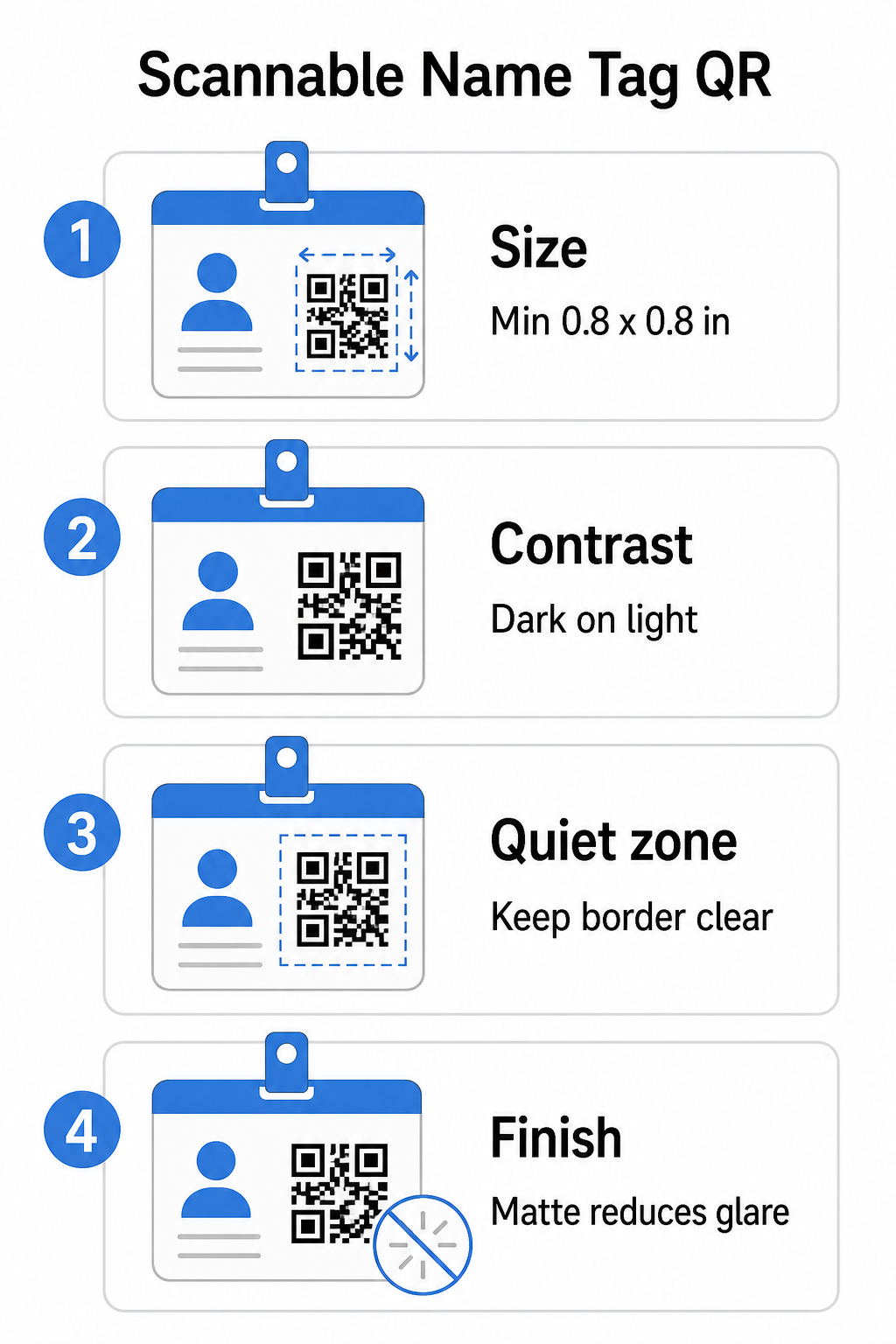
Μέγεθος: Εφαρμόστε την Αναλογία 10:1
Η μικρότερη διάσταση του κωδικού QR θα πρέπει να είναι περίπου το ένα δέκατο της αναμενόμενης απόστασης σάρωσης. Για μια ετικέτα ονόματος που σαρώνεται από περίπου 10 ίντσες (25 εκ.) μακριά, ο κωδικός πρέπει να έχει πλάτος τουλάχιστον 1 ίντσα (2,5 εκ.). Το πρακτικό ελάχιστο για οποιονδήποτε εκτυπωμένο κωδικό μικρής εμβέλειας είναι 0,8 × 0,8 ίντσες (2 × 2 εκ.) – το να πηγαίνετε σε μικρότερο μέγεθος δημιουργεί περιττές αποτυχίες σάρωσης, ειδικά σε παλαιότερα τηλέφωνα. Εάν η κονκάρδα σας έχει χώρο, το μέγεθος του κωδικού πιο κοντά στο 1 × 1 ίντσα δίνει πιο αξιόπιστα αποτελέσματα σε ένα ευρύτερο φάσμα συσκευών. Για περισσότερες λεπτομέρειες σχετικά με τις αποφάσεις μεγέθους, δείτε Μεγέθη κωδικών QR για επαγγελματικές κάρτες – οι ίδιες αρχές εφαρμόζονται απευθείας στις ετικέτες ονόματος.
Αντίθεση: Σκούρο σε Ανοιχτό Μόνο
Οι σαρωτές λειτουργούν ανιχνεύοντας την αντίθεση μεταξύ σκούρων μονάδων και ανοιχτού φόντου. Η βέλτιστη πρακτική είναι ένα σκούρο προσκήνιο σε ανοιχτό φόντο – το μαύρο σε λευκό παραμένει ο πιο αξιόπιστος συνδυασμός. Ανεστραμμένοι κωδικοί (ανοιχτόχρωμες μονάδες σε σκούρο φόντο) προκαλούν αποτυχίες σε πολλές εφαρμογές σάρωσης, ιδιαίτερα σε παλαιότερες. Στοχεύστε σε ένα αντίθεσης τουλάχιστον 4:1, το οποίο υποστηρίζει την αναγνωσιμότητα σε διαφορετικά περιβάλλοντα φωτισμού και κάμερες συσκευών.
Αποφύγετε τις διαβαθμίσεις και τις σκιές μέσα ή γύρω από την περιοχή του κωδικού QR. Αυτά δημιουργούν μεσαίους τόνους που μπερδεύουν τους αλγόριθμους του σαρωτή και μειώνουν την αξιοπιστία σε συνθήκες χαμηλού φωτισμού. Το οδηγός βέλτιστων πρακτικών αντίθεσης χρωμάτων κωδικών QR παρέχει συγκεκριμένες οδηγίες συνδυασμού χρωμάτων και έναν πίνακα σύγκρισης αντίθεσης εάν θέλετε να χρησιμοποιήσετε επώνυμα χρώματα αντί για απλό μαύρο και λευκό.
Ήσυχη Ζώνη: Διατηρήστε τα Περιθώρια Καθαρά
ο ήσυχη ζώνη είναι το κενό περιθώριο που περιβάλλει τον κωδικό QR και στις τέσσερις πλευρές. Λέει στον σαρωτή πού αρχίζει και πού τελειώνει ο κωδικός – χωρίς αυτό, ο σαρωτής δεν μπορεί να εντοπίσει αξιόπιστα το σύμβολο. Σύμφωνα με το πρότυπο ISO/IEC 18004, αυτό το περιθώριο πρέπει να είναι τουλάχιστον τέσσερις μονάδες πλάτος σε κάθε πλευρά. Εάν ο σχεδιασμός της κονκάρδας σας τοποθετεί κείμενο, λογότυπα ή διακοσμητικά στοιχεία πολύ κοντά στον κωδικό, ο σαρωτής ενδέχεται να μην τον ανιχνεύσει καθόλου. Ως πρακτικός κανόνας: εάν κάθε μονάδα στον κωδικό σας έχει πλάτος 2 mm, η ήσυχη ζώνη θα πρέπει να είναι τουλάχιστον 8 mm σε κάθε πλευρά.
Διόρθωση Σφαλμάτων: Αυξήστε το Εάν Προσθέτετε Λογότυπο
Οι κωδικοί QR έχουν τέσσερα επίπεδα διόρθωσης σφαλμάτων που καθορίζουν πόση φυσική ζημιά ή εμπόδιο μπορεί να ανεχθεί ο κωδικός ενώ παραμένει σαρώσιμος: L (περίπου 7%), M (περίπου 15%), Q (περίπου 25%) και H (περίπου 30%). Εάν ενσωματώνετε ένα λογότυπο εταιρείας ή ένα εικονίδιο μέσα στην περιοχή του κωδικού – κοινό για επώνυμες κονκάρδες – χρησιμοποιήστε επίπεδο διόρθωσης σφαλμάτων H και διατηρήστε το λογότυπο σε όχι περισσότερο από το 30% της περιοχής του κωδικού. Αυτό δίνει στον σαρωτή αρκετά πλεονάζοντα δεδομένα για να ανακατασκευάσει το μοτίβο ακόμα και αν ένα μέρος του είναι καλυμμένο. Εάν δεν προσθέτετε λογότυπο, το επίπεδο M ή Q είναι επαρκές για τις περισσότερες εφαρμογές εκτύπωσης.
Σχήμα και Μορφή: Ποτέ μην Τεντώνετε ή Συμπιέζετε
Ένας κωδικός QR πρέπει να παραμένει τέλεια τετράγωνος. Το τέντωμα ή η συμπίεση του κωδικού για να ταιριάζει σε μια διάταξη αποευθυγραμμίζει τις μονάδες και τον καθιστά μη σαρώσιμο. Να κλιμακώνετε πάντα αναλογικά και να εξάγετε σε διανυσματικές μορφές (SVG ή EPS) για εκτύπωση για να αποφύγετε την εικονοστοιχειοποίηση σε μεγαλύτερα μεγέθη.
Φινίρισμα: Επιλέξτε Ματ Έναντι Γυαλιστερού
Τα γυαλιστερά υλικά κονκάρδας αντανακλούν το φως και δημιουργούν αντανάκλαση που παρεμβαίνει στη σάρωση της κάμερας. Η ματ πλαστικοποίηση ή το μη επικαλυμμένο χαρτί αποδίδει σημαντικά καλύτερα σε πραγματικό φωτισμό εκδηλώσεων. Εάν εκτυπώνετε σε γυαλιστερές κονκάρδες, δοκιμάστε τους κωδικούς υπό τις πραγματικές συνθήκες φωτισμού του χώρου σας πριν οριστικοποιήσετε την εκτύπωση. Το οδηγός βέλτιστων πρακτικών αναγνωσιμότητας κωδικών QR καλύπτει κάθε έναν από αυτούς τους παράγοντες με πρόσθετο βάθος.
Τοποθέτηση στην Κονκάρδα
Το πού βρίσκεται ο κωδικός QR σε μια ετικέτα ονόματος επηρεάζει το πόσο συχνά σαρώνεται. Λάβετε υπόψη αυτές τις αρχές τοποθέτησης:
- Τοποθετήστε σε φυσικό ύψος ματιών όταν φοριέται – το κάτω μισό μιας κάρτας στο ύψος του στήθους είναι εύκολο να σαρωθεί χωρίς να ζητήσετε από κάποιον να την αφαιρέσει
- Επισημάνετε τον κωδικό καθαρά – συμπεριλάβετε μια σύντομη οδηγία όπως “Σαρώστε για αποθήκευση επαφής” ή “Κάντε check-in εδώ” ακριβώς κάτω ή δίπλα στον κωδικό· οι άνθρωποι είναι σημαντικά πιο πιθανό να σαρώσουν όταν γνωρίζουν τι κάνει ο κωδικός
- Διαχωρίστε πολλούς κωδικούς – αν η κά
- Αποφύγετε την τοποθέτηση του κώδικα κοντά στο κλιπ της κονκάρδας ή στην οπή του κορδονιού – αυτές οι περιοχές διπλώνονται ή καλύπτονται, κάτι που μπορεί να μπλοκάρει μέρος του κώδικα ή την ήσυχη ζώνη
Δοκιμή Πριν την Εκτύπωση
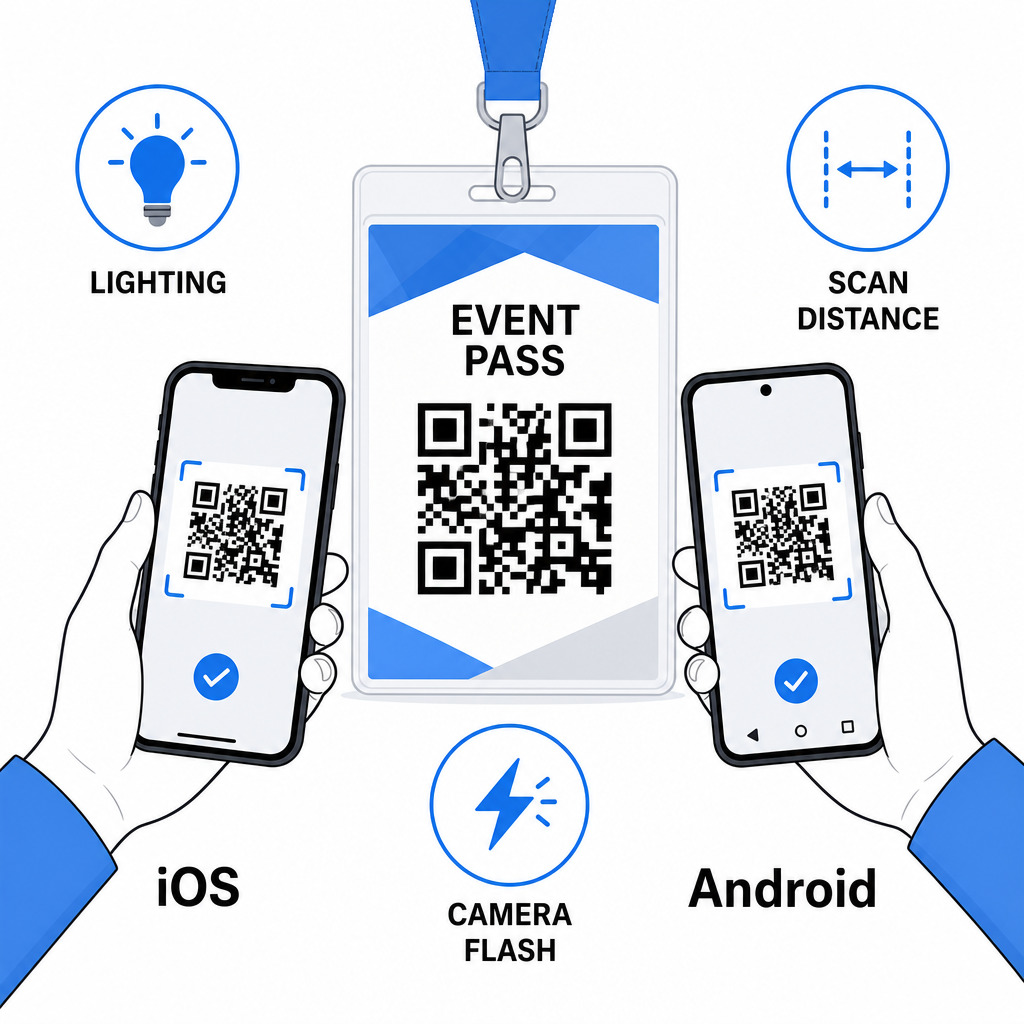
Εκτυπώστε ένα δοκίμιο και σαρώστε το πριν στείλετε την πλήρη παραγγελία κονκάρδων στην παραγωγή. Δοκιμάστε τον κώδικα σε συσκευές iOS και Android, υπό τις συνθήκες φωτισμού του χώρου της εκδήλωσής σας, στην απόσταση από την οποία θα σαρώσουν πραγματικά οι συμμετέχοντες και το προσωπικό, και με και χωρίς το φλας της κάμερας για να προσομοιώσετε σενάρια χαμηλού φωτισμού. Ένας κώδικας που περνά και τα τέσσερα τεστ είναι έτοιμος για παραγωγή. Ένας που αποτυγχάνει σε οποιοδήποτε από αυτά χρειάζεται προσαρμογή σχεδιασμού – είτε πρόκειται για αύξηση μεγέθους, βελτίωση αντίθεσης ή επέκταση της ήσυχης ζώνης – πριν δεσμευτείτε για μια πλήρη εκτύπωση.
Οι κωδικοί QR στις ετικέτες ονομάτων λειτουργούν καλύτερα όταν ο σωστός τύπος κώδικα, ο καθαρός σχεδιασμός και οι σωστές προδιαγραφές εκτύπωσης συνδυάζονται πριν εκτυπωθεί μία μόνο κονκάρδα. Επιλέξτε έναν δυναμικό κώδικα εάν τα στοιχεία των συμμετεχόντων ενδέχεται να αλλάξουν ή εάν θέλετε αναλυτικά στοιχεία σάρωσης. Ακολουθήστε τους κανόνες μεγέθους, αντίθεσης και ήσυχης ζώνης για να διασφαλίσετε ότι κάθε κονκάρδα σαρώνεται αξιόπιστα την ημέρα. Και πάντα να δοκιμάζετε σε πραγματικές συσκευές πριν οριστικοποιήσετε την παραγωγή.
Δημιουργήστε τους κωδικούς QR για τις ετικέτες ονομάτων σας Δημιουργήστε προσαρμόσιμους κωδικούς QR για vCard και παρακολούθηση με ενσωματωμένα αναλυτικά στοιχεία και δυναμική επεξεργασία. Ξεκινήστε με το Δημιουργία κώδικα Pageloot QR – δωρεάν δοκιμή, δεν απαιτείται πιστωτική κάρτα.
Συχνές ερωτήσεις
Μπορείτε να κωδικοποιήσετε στοιχεία επικοινωνίας όπως όνομα, τηλέφωνο, email, εταιρεία και ιστότοπο χρησιμοποιώντας έναν κωδικό QR vCard, να συνδεθείτε σε μια φόρμα check-in εκδήλωσης χρησιμοποιώντας έναν κωδικό QR παρακολούθησης ή να παραπέμψετε σε οποιονδήποτε προορισμό ιστού, όπως ένα προφίλ LinkedIn ή ένα ψηφιακό χαρτοφυλάκιο. Η σωστή επιλογή εξαρτάται από το αν ο πρωταρχικός στόχος είναι η κοινή χρήση επαφών, το check-in ή η γενική πρόσβαση σε πληροφορίες.
Το πρακτικό ελάχιστο για έναν κωδικό QR ετικέτας ονόματος είναι 0,8 × 0,8 ίντσες (2 × 2 εκ.). Το να το κάνετε μικρότερο αυξάνει τον κίνδυνο αποτυχιών σάρωσης, ειδικά σε παλαιότερα smartphones. Εάν ο σχεδιασμός της κονκάρδας σας έχει τον χώρο, το να μεγεθύνετε τον κωδικό πιο κοντά στο 1 × 1 ίντσα δίνει πιο αξιόπιστα αποτελέσματα σε ένα ευρύτερο φάσμα συσκευών και συνθηκών φωτισμού.
Εάν χρησιμοποιήσατε έναν στατικό κωδικό QR, θα χρειαζόταν να επανεκτυπώσετε τις επηρεαζόμενες κονκάρδες. Εάν χρησιμοποιήσατε έναν δυναμικό κωδικό QR, μπορείτε να ενημερώσετε τον προορισμό – είτε πρόκειται για vCard, σελίδα επικοινωνίας ή σύνδεσμο φόρμας – από τον πίνακα ελέγχου του Pageloot χωρίς να αγγίξετε την εκτυπωμένη κονκάρδα. Αυτός είναι ένας από τους κύριους λόγους για τη χρήση δυναμικών κωδικών για οποιαδήποτε εκδήλωση με μεταβλητές πληροφορίες συμμετεχόντων.