Keresi a módját, hogyan tehetné múzeuma kiállításait vonzóbbá anélkül, hogy teljesen átalakítaná a látogatói élményt? A statikus fali címkék és nyomtatott brosúrák csak korlátozottan hatékonyak – a látogatók egyre inkább digitális hozzáférést várnak el gazdagabb tartalomhoz saját eszközeiken. Ez az útmutató bemutatja a QR-kódok múzeumokban való alkalmazásának legpraktikusabb módjait, az audioguide-októl és digitális térképektől a jegyértékesítésig és az akadálymentesítésig.
Miért alkalmaznak a múzeumok QR-kódokat?
A QR-kódok olcsó módot biztosítanak a múzeumoknak egy rétegzett információs rendszer létrehozására, amely messze túlmutat azon, ami egy fizikai címkén elfér. Egy műtárgy előtt álló látogató beolvashat egy kódot, és azonnal hozzáférhet bővített szöveghez, képekhez, videókhoz, hangos narrációkhoz, vagy akár kiterjesztett valósághoz – mindezt saját okostelefonján, a saját tempójában.
A fő vonzerő a rugalmasság. A múzeumok bármikor frissíthetik a kódhoz kapcsolt tartalmat anélkül, hogy bármit újra kellene nyomtatniuk, ami a dinamikus QR-kódokat különösen praktikussá teszi forgó kiállítások vagy szezonális programok esetén. A tartalomtovábbításon túl a QR-kódok közvetlen csatornát is nyitnak a látogatói visszajelzések gyűjtésére, többnyelvű tartalom kínálására, valamint a fizikai kiállítások virtuális túrákhoz és online gyűjteményekhez való kapcsolására.
Frissíthető múzeumi QR-kódok létrehozása Frissítenie kell a kiállítási tartalmat anélkül, hogy újra kellene nyomtatnia a táblákat? Használja a Dinamikus QR-kód generátor a kódok létrehozásához, amelyeket bármikor szerkeszthet egy központi irányítópultról.
A QR-kódok gyakori felhasználási módjai a múzeumokban
| Használjon esetet | Mit nyújt |
|---|---|
| Audió és videó útmutatók | Elbeszélt kiállítási történetek, művészinterjúk, animált rekonstrukciók |
| Digitális térképek | Navigálható alaprajzok, amelyeket a látogatók telefonjukon érhetnek el |
| Kiállítási információk | Bővített szöveg, történelmi kontextus, műtárgy eredete |
| Interaktív élmények | Kiterjesztett valóság fedvények, kincskereső játékok, kvízek |
| Jegyértékesítés | Érintésmentes belépés szkennelhető digitális jegyekkel |
| WiFi-hozzáférés | Azonnali hálózati kapcsolat jelszavak beírása nélkül |
| Látogatói visszajelzések | Felmérések, amelyek közvetlenül a kiállítási területről érhetők el |
| Ajándékbolt promóciók | Linkek exkluzív bolti ajánlatokhoz vagy online termékoldalakhoz |
| Adományozás és tagság | Adományozási vagy csatlakozási portálok, amelyek egyetlen szkenneléssel elérhetők |
Audio és videó útmutatók
QR-kódos audiótúrák lehetővé teszik a látogatók számára, hogy minden kiállítási tárgynál beolvassanak egy kódot, és meghallgassák a narrációkat, kurátori kommentárokat vagy háttértörténeteket saját eszközeiken. Ez felváltja a terjedelmes bérelt audioberendezéseket, és támogatja a rugalmas, önálló tempójú útvonalakat a múzeumban. Azoknak az intézményeknek, amelyek tovább akarnak menni, Az AR QR kódok átalakíthatják a múzeumi történetmesélést 3D modellek vagy animációk rétegezésével közvetlenül a fizikai műtárgyakra, amikor egy látogató a telefonját a kiállítási tárgyra irányítja.
Múzeumok audió útmutatókat hozhatnak létre a(z) MP3 QR-kód generátor, amely lehetővé teszi hangfájlok feltöltését és egy szkennelhető kód generálását, amelyet a látogatók közvetlenül az eszközükről játszhatnak le. Videótartalmakhoz – például művészinterjúkhoz vagy lépésről lépésre bemutatott restaurálási vizualizációkhoz – egy YouTube QR kód generátor egyszerűvé teszi bármely kiállítási tárgy összekapcsolását egy tárolt videóval.
Digitális térképek és önvezető túrák
Nagy múzeumok használhatják a(z) PDF QR kódok interaktív digitális térképet biztosítani a látogatóknak, amely segít nekik tájékozódni a szakaszokban, megtalálni a konkrét kiállításokat, és érdeklődésük szerint megtervezni látogatásukat. A kijelölt túra “megállóknál” elhelyezett kódok, amelyek hangfájlokra vagy weboldalakra mutatnak, leírva, hogy mit lát a látogató, lehetővé teszik a teljesen önálló felfedezést, mindössze egy okostelefonnal.
Ezen élmények létrehozásának mélyebb megismeréséhez a útmutató a QR-kódok használatához virtuális túrákhoz végigvezeti a teljes beállítási folyamaton, a tartalom tárolásától a kódok tervezéséig és elhelyezéséig.
Kiállítási információk és interaktív élmények
A kiállítások közelében elhelyezett QR-kódok lehetővé teszik a látogatók számára, hogy további kontextushoz – történelmi háttérhez, művészéletrajzokhoz, gyűjteményi eredethez – férjenek hozzá anélkül, hogy zsúfolttá tennék a címkét. Egyes múzeumok ezt továbbviszik kincskereső játékok létrehozásával, ahol minden műtárgy melletti kód információt nyújt az objektumról és egy nyomot ad a következő állomásra. Ez a formátum ösztönzi az aktív felfedezést és lekötve tartja a látogatókat több galérián keresztül.
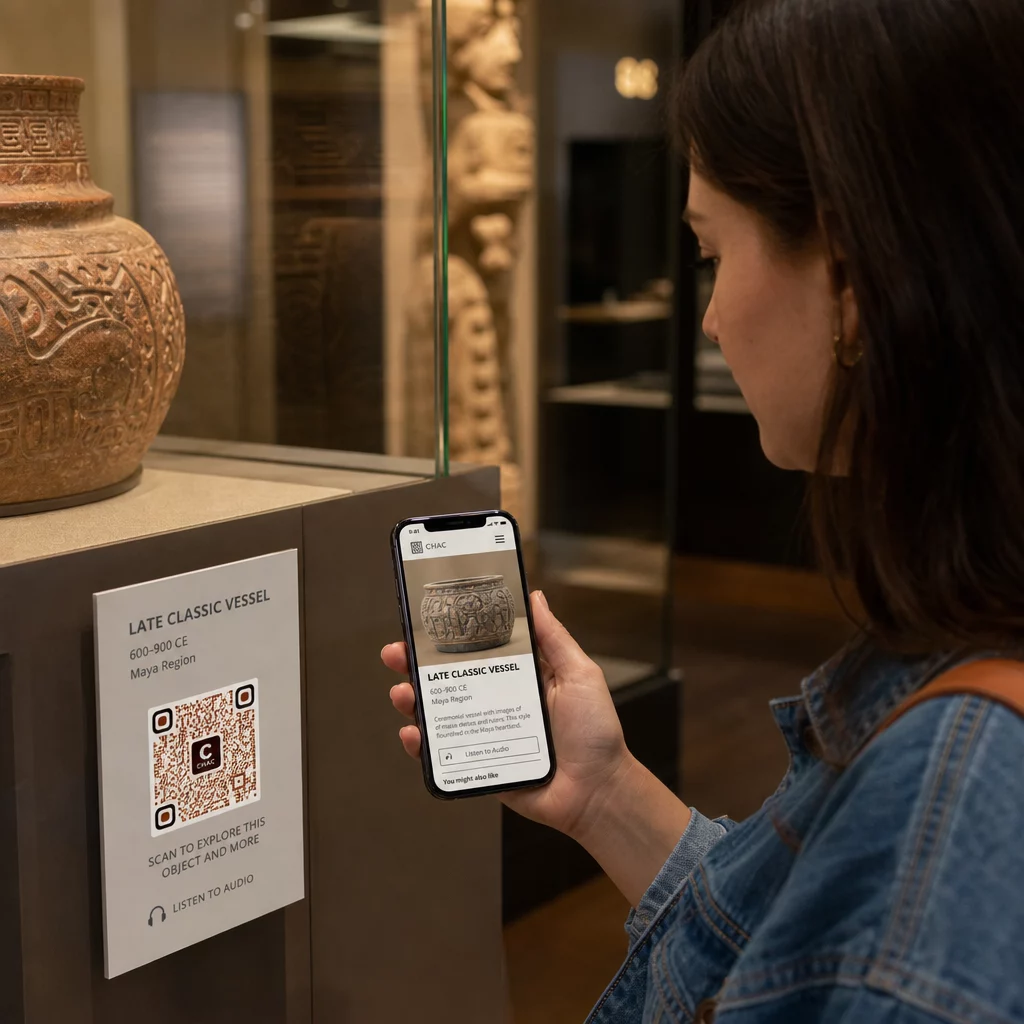
Múzeumok is használtak QR-kódokat modern művészeti installációkban a fizikai alkotások és a digitális történetmesélés összekapcsolására, beleértve a gamifikált tartalmakat és a design-történeti narratívákat, amelyek magukban a kódokban vannak beágyazva.
Jegykezelés és érintésmentes belépés
A QR-kódokon keresztüli digitális jegykezelés szkennelhető jegyeket biztosít a látogatóknak, amelyeket közvetlenül a telefonjukról mutathatnak be a belépési pontokon. Ez egyszerűsíti a beléptetés kezelését, csökkenti a sorban állást, és megszünteti a fizikai jegykészletre való támaszkodást – különösen hasznos nagy forgalmú időszakokban.
Látogatói visszajelzések
A QR-kódok elhelyezése a kijáratoknál vagy a galéria területén lehetővé teszi a látogatók számára, hogy gyorsan kitöltsenek egy visszajelzési űrlapot anélkül, hogy papír alapú felmérést kapnának. Az összegyűjtött adatok segítenek a múzeumoknak megérteni a látogatói preferenciákat, értékelni a kiállításokat és tervezni a fejlesztéseket. Egy link QR-kóddal online űrlapra mutató link a legegyszerűbb módja ennek beállítására.
Akadálymentességi szempontok
A QR-kódok jelentősen javíthatják az akadálymentességet, ha átgondoltan valósítják meg őket – de akadályokat is teremthetnek, ha ezeket az igényeket nem kezelik előre.
Kínáljon alternatívát. Nem minden látogatónak van okostelefonja, vagy nem mindenki érzi kényelmesnek a kód beolvasását. Mindig kínáljon más módot ugyanazon tartalom elérésére, például egy közeli nyomtatott URL-t, egy SMS-opciót vagy egy segítőkész munkatársat. A vak vagy gyengénlátó látogatók számára az SMS-hozzáférés használhatóbb lehet, mint a QR-kód beolvasása.
Tervezzen kontrasztra és láthatóságra. Használjon sötét kódelemeket világos háttéren, és törekedjen legalább 4:1 kontrasztarányra. Ez megfelel a WCAG 2.1 nem szöveges kontrasztra vonatkozó követelményeinek, és biztosítja, hogy a kód olvasható maradjon a gyengénlátó látogatók számára. Részletes útmutató ennek eléréséhez a QR kód használhatósági legjobb gyakorlatok hivatkozásban található.
Méretezze a kódokat a szkennelési távolsághoz. Egy durva ökölszabály a 10:1 arány – minden 10 cm várható szkennelési távolságra a kódnak legalább 1 cm szélesnek kell lennie. A legtöbb múzeumi elhelyezésnél a gyakorlati minimum 2 × 2 cm (körülbelül 0,8 × 0,8 hüvelyk), bár a nagyobb formátumok jobbak a távolról megtekintett kiállításokhoz.
Fontolja meg az elhelyezési magasságot. Helyezze el a kódokat olyan magasságban és szögben, hogy a kerekesszékes vagy alacsony növésű látogatók kényelmesen elérhessék és beolvashassák. A padlótól 3-5 láb (kb. 90-150 cm) magasságban lévő szemmagasságban történő elhelyezés jól működik az álló látogatók számára; az alacsonyabb elhelyezésekre szükség lehet a teljes inkluzivitás érdekében.
Adjon rövid, világos utasításokat. Nem minden látogató tudja, hogyan kell beolvasni egy QR-kódot. Egy rövid utasítás – “Nyissa meg a kamera alkalmazását, és irányítsa erre a kódra” – megszünteti a találgatást. Tartsa egységesen az utasításokat az egész múzeumban, hogy a látogatóknak ne kelljen újra megtanulniuk az interakciót minden kiállításnál.
Tesztelje segítő technológiákkal. Indítás előtt ellenőrizze, hogy a hivatkozott tartalom és bármely alternatív hozzáférési módszer megfelelően működik-e a képernyőolvasókkal és nagyító eszközökkel, mint például a VoiceOver és a TalkBack.
Azoknak a múzeumoknak, amelyek kifejezetten az audio-akadálymentesítés iránt érdeklődnek, hangvezérelt QR-kódok kínáljanak egy kéz nélküli alternatívát, amely összekapcsolja a szkennelést a felolvasott narrációval – ez különösen hasznos azoknak a látogatóknak, akik nem tudnak kényelmesen navigálni a vizuális felületeken.
QR-kódok beállítása a múzeumban
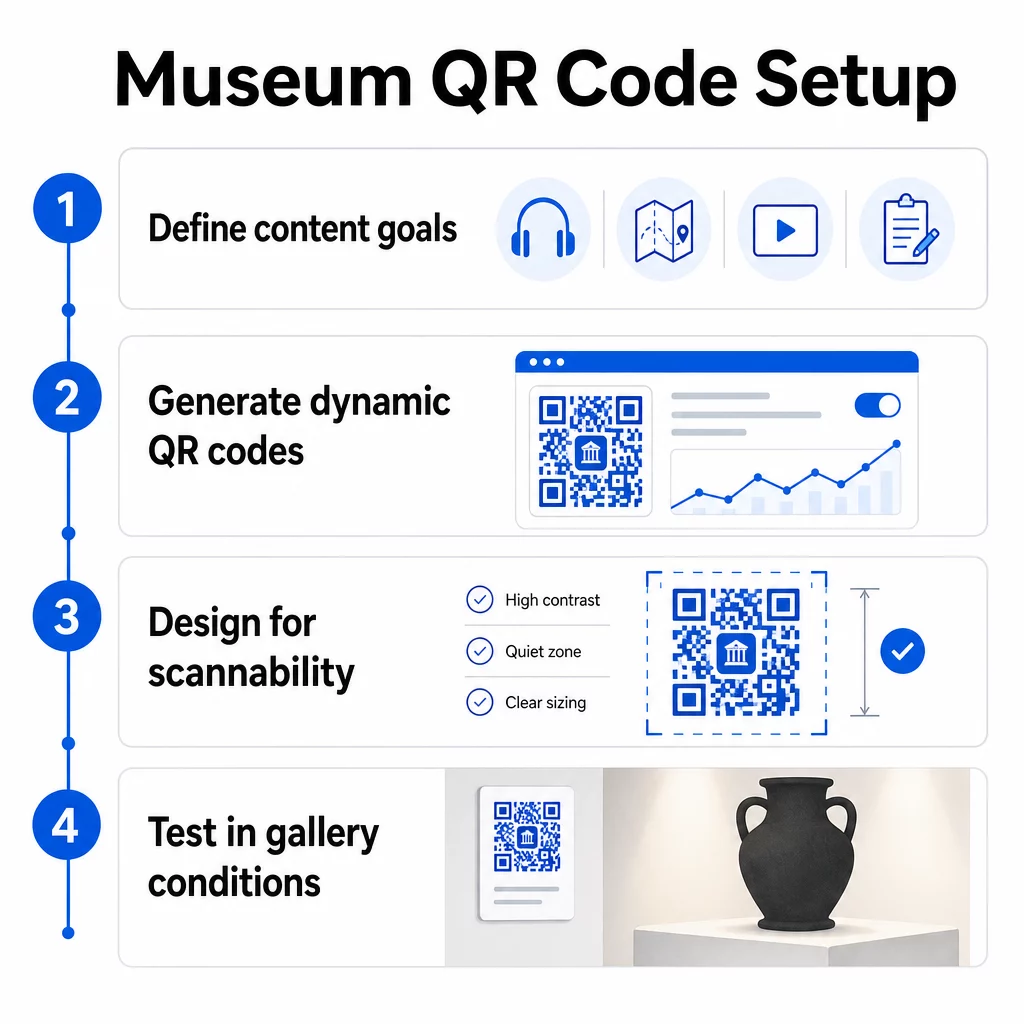
1. lépés: Határozza meg tartalmát és céljait
Mielőtt egyetlen kódot is generálnál, döntsd el, mit fog nyújtani az adott kód, és kinek szól. Egy kulcsfontosságú műtárgyhoz tartozó hangos idegenvezetőnek más követelményei vannak, mint egy visszajelzési űrlapnak a kijáratnál. Térképezd fel a kódjaid típusait – hanganyag, PDF térkép, videó, felmérés linkje – és párosítsd mindegyiket a megfelelő tartalomformátummal.
2. lépés: Kódok generálása
Használj olyan QR-kód platformot, amely támogatja a dinamikus kódokat, így újranyomtatás nélkül frissítheted a célhelyeket. A Pageloot QR Kód Generátor lehetővé teszi, hogy kódokat hozz létre URL-ekhez, PDF-ekhez, hangfájlokhoz, videókhoz és sok máshoz, majd egyetlen irányítópultról kezeld őket. A dinamikus kódok szkennelési analitikát is biztosítanak – nyomon követve a mennyiséget, helyet, eszköz típusát és időzítését – így láthatod, mely kiállítások generálják a legnagyobb érdeklődést.
Kövesd nyomon a kiállítási elkötelezettséget Szeretnéd tudni, mely műtárgyakkal foglalkoznak leginkább a látogatók? Használj dinamikus QR-kódokat beépített analitikával a szkennelési adatok nyomon követéséhez a múzeum minden kiállításán.
3. lépés: Tervezés a szkennelhetőség érdekében
Alkalmazz egységes márkajelzést – a múzeum színeit és logóját – miközben magas kontrasztot tartasz fenn a kód és háttere között. Tarts fenn egy tiszta csendes zónát (üres szegélyt) minden kód körül. Részletes tervezési útmutatásért a a QR-kód olvashatóságára vonatkozó legjobb gyakorlatokat cikk gyakorlati szempontból tárgyalja a kontrasztarányokat, a csendes zónákat, a logó elhelyezését és a hibajavítási szinteket.
4. lépés: Kódok nyomtatása és stratégiai elhelyezése
Nyomtass kódokat elegendő méretben a várható szkennelési távolsághoz, nagy felbontású vektoros formátumokat (SVG, EPS vagy PDF) használva az elmosódás elkerülése érdekében. Helyezd őket szemmagasságba a hivatkozott kiállítás közelébe – ne a szoba másik végébe. Nagyméretű vagy komplex installációk esetén a végső útmutatót a QR-kód elhelyezéséhez környezetspecifikus tanácsokat ad, amelyek jól alkalmazhatók múzeumi környezetben.
5. lépés: Tesztelés nyitás előtt
Tesztelj minden kódot iOS és Android eszközökön egyaránt, a galéria tényleges fényviszonyai között. Ellenőrizd, hogy a linkelt oldalak gyorsan betöltődnek-e mobiladat-kapcsolaton (nem csak WiFi-n), hogy a hang- és videótartalom helyesen játszódik-e le, és hogy az alternatív hozzáférési útvonalak a szándéknak megfelelően működnek-e.
Népszerű múzeumok QR-kódokkal
- A Smithsonian Nemzeti Természettudományi Múzeum QR-kódhoz kapcsolt kiterjesztett valóság élményeket használt, hogy digitális átfedésekkel és 3D rekonstrukciókkal keltse életre a fizikai kiállításokat.
- A Metropolitan Művészeti Múzeum integrálja a QR-kódos hozzáférést a standard látogatói élménybe, mint lehetőséget a digitális útmutatójához való hozzáférésre.
- Az Akropolisz Múzeum QR-alapú audio útmutatót kínál, amely lehetővé teszi az önálló túrákat, rugalmasabbá és informatívabbá téve a látogatást a nemzetközi látogatók számára.
- A British Múzeum QR-kódokat használ, hogy a látogatók további tartalmakhoz férhessenek hozzá, és saját tempójukban tudjanak többet megtudni a kiállításokról.
Az innovatív alkalmazások szélesebb körű áttekintéséhez a útmutató a QR-kódokhoz virtuális művészeti túrákhoz dokumentálja, hogyan használják az intézmények ezeket az eszközöket a múzeumi élmény kiterjesztésére a fizikai falakon túlra.
Gyakori kérdések
Egy múzeumi QR-kód szinte bármilyen digitális tartalomra hivatkozhat: hangos narrációk, videós útmutatók, kiterjesztett valóság élmények, PDF térképek, kiállítási információs oldalak, többnyelvű szöveg, visszajelzési űrlapok, adományozási portálok vagy virtuális túrák. A választott formátum attól függ, hogy mi szolgálja a legjobban az egyes kiállításokat és a látogatói igényeket.
Nem. A modern iOS és Android okostelefonok közvetlenül be tudják olvasni a QR-kódokat a beépített kamera alkalmazás segítségével – nincs szükség külön alkalmazásra. Néhány régebbi eszköz szükségessé tehet egy dedikált QR-szkennert, ezért érdemes megemlíteni ezt az utasításokban, és gondoskodni arról, hogy a hivatkozott tartalom gyorsan betöltődjön egy szabványos mobilböngészőben.
A dinamikus QR-kódok lehetővé teszik, hogy bármikor frissítse a tartalmát, amire egy kód mutat, anélkül, hogy újra kellene nyomtatni a fizikai kódot. Ez azt jelenti, hogy frissítheti a kiállítási leírásokat, lecserélheti az audiofájlokat egy új szezonra, vagy kijavíthat egy hibás linket anélkül, hogy megzavarná a nyomtatott tábláit. A dinamikus kódok szkennelési analitikát is biztosítanak – megmutatva, mely kiállítások vonzzák a legnagyobb érdeklődést, milyen időpontokban és milyen eszközökön – cselekvésre alkalmas adatokat szolgáltatva csapatának a kiállítás tervezéséhez és a látogatói élmény javításához.