¿Todavía gestiona la entrada a eventos con listas de invitados impresas y registros manuales? Ese enfoque ralentiza las filas de entrada, frustra a los asistentes y deja a los organizadores con poca visibilidad de lo que realmente está sucediendo en el terreno. Esta página cubre todas las formas prácticas de usar códigos QR en eventos – desde la emisión de boletos y los registros hasta las confirmaciones de asistencia y el seguimiento posterior al evento – para que pueda ejecutar operaciones más fluidas y obtener resultados medibles.
Por qué los Organizadores de Eventos Están Adoptando Códigos QR
La adopción de códigos QR entre los profesionales de eventos ya no es un nicho. El 43% de los especialistas en marketing usan códigos QR específicamente para eventos, lo que convierte a los eventos en el caso de uso de QR más común entre los profesionales del marketing. Esos mismos datos muestran que más del 90% de los especialistas en marketing informaron haber usado códigos QR en 2025, con un 94% aumentando su uso año tras año.
La razón de este cambio es práctica: los asistentes ya se sienten cómodos con el escaneo. Más de dos tercios de los consumidores usaron un código QR al menos una vez en el último año, y aproximadamente la mitad de la Generación Z y los Millennials escanean códigos QR al menos una vez a la semana. Con el 98% de los estadounidenses poseyendo un teléfono móvil, no hay una barrera significativa para que los asistentes escaneen.
Para los organizadores, la recompensa es el control en tiempo real. Puede rastrear la entrada, monitorear la asistencia por sesión, actualizar la información del evento sin reimprimir materiales y medir el compromiso mucho después de que termine el evento.
Casos de Uso de Códigos QR para Eventos
Los códigos QR son lo suficientemente flexibles como para manejar casi todas las necesidades operativas y de compromiso en un evento. Aquí están las aplicaciones más efectivas.
Gestión de Boletos y Entrada
El punto de partida más común es reemplazar los boletos de papel con códigos QR escaneables. Cada asistente recibe un código QR único – entregado por correo electrónico, PDF o móvil – que el personal escanea en la puerta para validar la entrada y marcar la asistencia en tiempo real.
Este enfoque elimina la necesidad de la verificación manual de listas, acelera las filas de entrada y previene el fraude por uso duplicado, ya que cada código se puede configurar para una validación de un solo escaneo. Para un recorrido detallado de la arquitectura de seguridad detrás de esto, consulte la guía sobre Cómo crear entradas con código QR seguras para eventos.
Puede generar boletos directamente usando el Generador de códigos QR para eventos ingresando la URL de su evento, título, descripción y detalles de contacto, luego personalizando el diseño del código antes de descargarlo para su distribución.
Agilice la Entrada a Su Evento Cree códigos QR de marca y rastreables para boletos, páginas de destino y registros. Pruebe el Generador de códigos QR para eventos gratis durante 14 días, no se requiere tarjeta de crédito.
Registro de Asistentes y Seguimiento de Asistencia
El registro basado en QR funciona haciendo que el personal escanee el código de cada asistente con un teléfono, tableta o aplicación de escaneo dedicada. Un escaneo válido marca automáticamente a la persona como registrada y actualiza sus registros de asistencia al instante.
Esto es significativamente más rápido que los métodos manuales. Según la guía de códigos QR para registros de eventos, los registros con códigos QR reducen el tiempo promedio de procesamiento a menos de 2 segundos por persona y pueden reducir la duración total de la entrada hasta en un 50% en comparación con los procesos manuales.
Para eventos en curso, clases o conferencias de varias sesiones, el Código QR de Asistencia herramienta permite a los asistentes registrarse por sí mismos escaneando un código vinculado a un Formulario de Google o herramienta similar, con las respuestas alimentándose automáticamente en una hoja de cálculo para un seguimiento en tiempo real. Obtenga más información sobre cómo construir este tipo de sistema en la página de seguimiento de asistencia.
Recopilación de Confirmaciones de Asistencia
En lugar de dirigir a los invitados a escribir una URL, un código QR en su invitación, folleto o página del evento los lleva directamente a su formulario de confirmación de asistencia con un solo escaneo. Esto elimina la fricción y típicamente aumenta las tasas de respuesta.
Utilice el de Pageloot Generador de código QR para Google Forms para vincular cualquier Formulario de Google a un código escaneable, luego colóquelo en invitaciones impresas, gráficos digitales o señalización de eventos. Para instrucciones paso a paso, la guía sobre códigos QR de confirmación de asistencia para eventos detalla la selección de plataforma, la generación de códigos y el cumplimiento de la privacidad.
Horarios e Información del Evento
Un código QR colocado en una credencial, tarjeta de mesa o letrero del lugar puede vincular a los asistentes a un horario de eventos en vivo, biografías de oradores, mapas de planta o detalles de la sesión. Porque códigos QR dinámicos le permiten actualizar la URL de destino después de imprimir, puede corregir cambios de horario o agregar información sin reimprimir materiales.
Este es uno de los argumentos prácticos más sólidos para usar códigos dinámicos sobre estáticos. Si un orador cancela o una sala cambia, usted actualiza el enlace – no el material impreso.
Integración con Google Calendar
Para conferencias, talleres o cualquier evento con boleto y sesiones, vincular un código QR a una entrada de Google Calendar permite a los asistentes agregar el evento directamente a su calendario con un solo escaneo. Use el Generador de código QR de Google Calendar para crear este código, luego colóquelo en correos electrónicos de confirmación, boletos o invitaciones.
Navegación del Recinto
Grandes recintos – centros de convenciones, festivales al aire libre, espacios de conferencias de varios pisos – a menudo causan fricción simplemente porque los asistentes no pueden encontrar a dónde necesitan ir. Un código QR en la señalización, entradas o invitaciones que se abre directamente en Google Maps elimina esa fricción por completo. Crea uno usando el Generador de código QR de Google Maps e inclúyelo en cualquier lugar donde los asistentes lo vean antes o durante el evento.
Compartir Fotos y Compromiso Social
Los códigos QR pueden vincular a los asistentes a una galería de fotos compartida, una página de hashtag de marca o un portal de carga para que los invitados puedan contribuir y ver fotos del evento en tiempo real. Esto crea un ciclo de participación que extiende la experiencia del evento más allá del recinto físico. Para una guía de configuración práctica, consulta cómo usar un código QR para compartir fotos.
Encuestas Post-Evento y Seguimiento
La investigación muestra que el 41% de los organizadores usan encuestas post-evento para medir el ROI, y el 40% confía en el compromiso en redes sociales. Un código QR en una credencial, folleto o señal de salida que apunta a un formulario de comentarios facilita que los asistentes respondan mientras el evento aún está fresco. Vincular ese formulario a un formulario de Google a través del generador de Pageloot significa que las respuestas fluyen directamente a una hoja de cálculo que puedes analizar inmediatamente.
Cómo Crear un Código QR para Eventos con Pageloot
El proceso toma unos minutos y no requiere habilidades técnicas.
- Abre el generador – Ve a la Generador de códigos QR para eventos y selecciona “Crear código QR para evento.”
- Añade los detalles de tu evento – Introduce la URL de la página del evento, título, descripción e información de contacto. Pageloot construye una página de destino alrededor de este contenido.
- Diseña el código QR – Ajusta los colores, formas y añade tu logo para que coincida con la marca de tu evento.
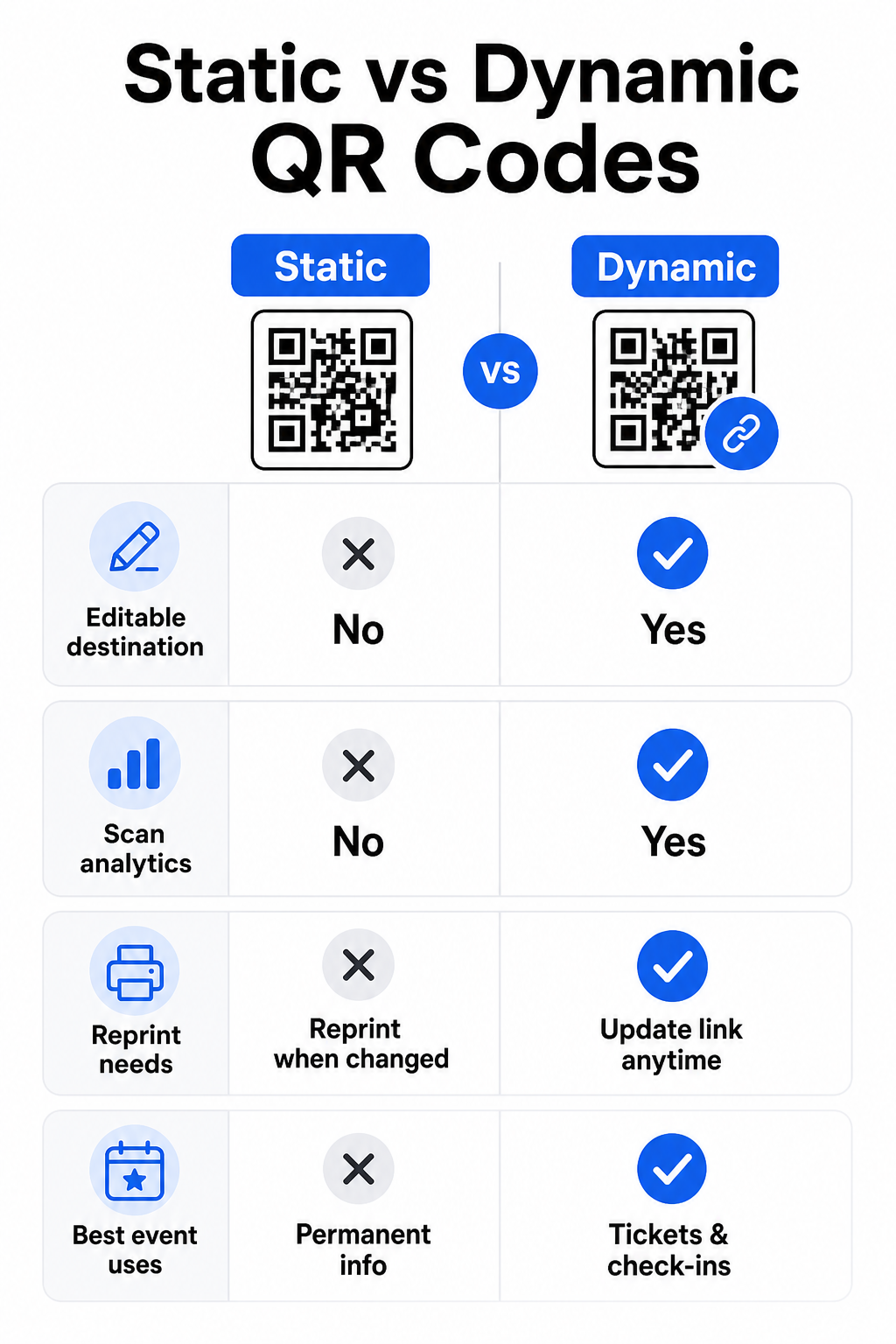
- Elige dinámico si necesitas flexibilidad – Los códigos dinámicos te permiten actualizar el enlace de destino después de imprimir. Esta es la elección correcta para cualquier cosa que pueda cambiar antes o durante el evento.
- Prueba el código – Escanéalo en dispositivos iOS y Android bajo diferentes condiciones de iluminación antes de distribuir.
- Descarga y distribuye – Exporta en PNG, PDF o SVG y colócalo en entradas, señalización, invitaciones o materiales digitales.
Códigos QR Estáticos vs. Dinámicos para Eventos
Comprender la diferencia entre códigos QR estáticos y dinámicos te ayuda a tomar la decisión correcta para cada caso de uso.
| FUNCIÓN | Código QR estático | Código QR dinámico |
|---|---|---|
| Destino editable después de la impresión | No | Sí |
| Análisis de escaneos | No | Sí |
| El código cambia si el destino cambia | Sí (se requiere reimpresión) | No |
| Mejor para | Enlaces simples y permanentes | Entradas, horarios, campañas |
| Coste | Libre | Suscripción de pago |
Para la mayoría de las operaciones de eventos – especialmente la emisión de entradas, el registro y cualquier cosa que pueda necesitar actualización – los códigos QR dinámicos son la mejor opción. También proporcionan análisis de escaneo, que te dice cuántas personas escanearon, cuándo, en qué dispositivo y desde qué ubicación. El guía para construir códigos QR dinámicos para registros de CRM explica cómo conectar estos datos a tu flujo de trabajo más amplio de gestión de asistentes.
Colocación y Tamaño de Códigos QR para Eventos
Un código QR que no se puede escanear de forma fiable anula su propósito. Las siguientes directrices reflejan la investigación de usabilidad y los escenarios prácticos de eventos.
Tamaños mínimos por tipo de material:
- Invitaciones impresas: al menos 5 × 1.5 pulgadas
- Credenciales o pulseras: al menos 5 pulgadas cuadradas
- Tarjetas de mesa o tarjetas de lugar: al menos 1 × 1 pulgada (1.5 pulgadas preferidas)
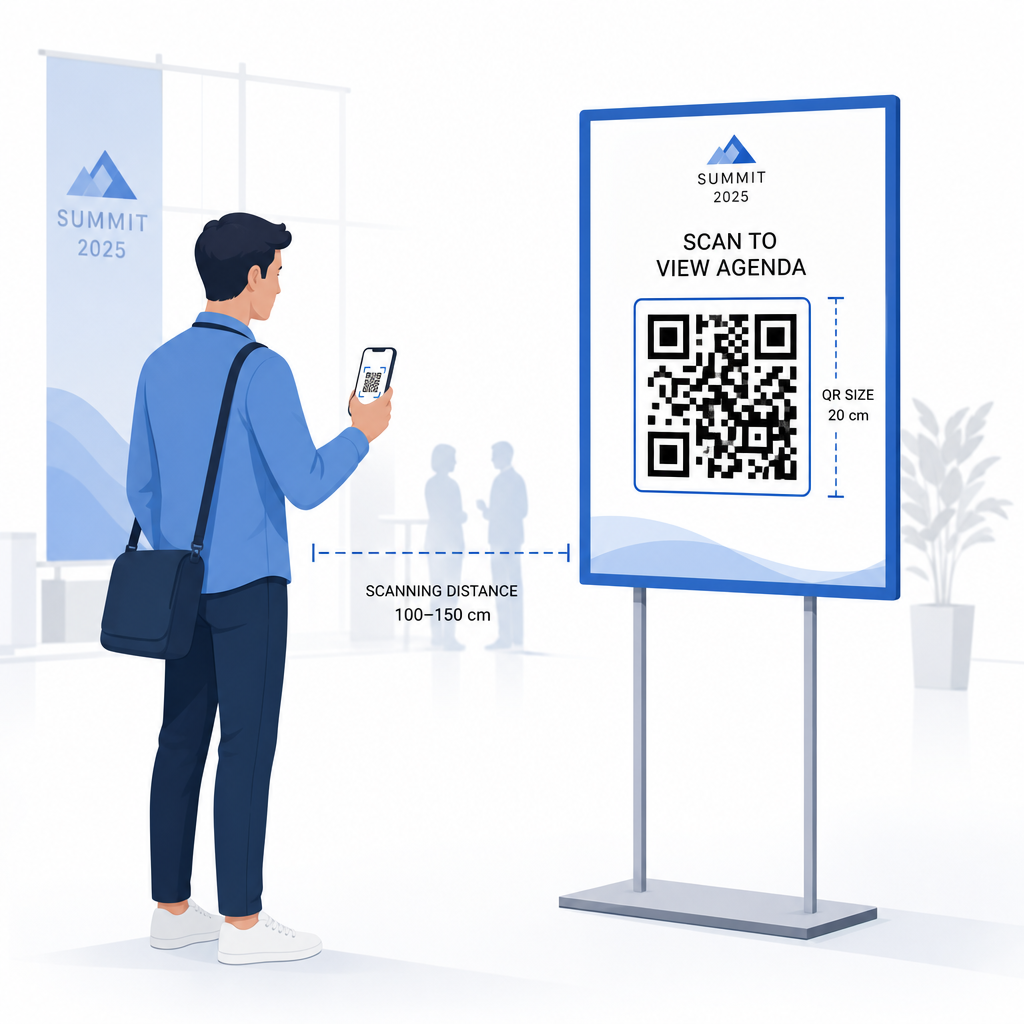
- Señalización del evento: al menos 5 × 5 pulgadas, aumentando a 7 × 7 pulgadas para recintos de más de 30 pies de ancho
Una regla general útil: la dimensión más pequeña del código QR debe ser aproximadamente una décima parte de la distancia de escaneo. Un código escaneado desde 3 pies de distancia debe tener al menos 3.6 pulgadas de ancho.
Directrices de colocación:
- Coloque los códigos a altura de los ojos o del pecho – aproximadamente de 3 a 5 pies del suelo – para que los asistentes puedan escanear sin agacharse ni estirarse
- Coloca los códigos donde la gente se detiene o espera naturalmente: entradas, mostradores de registro, mesas, cerca de las pantallas y en las colas
- Mantenga alto contraste: los módulos oscuros sobre un fondo claro se escanean de forma más fiable; evita esquemas de color invertidos o de bajo contraste
- Mantén un zona tranquila de al menos 4 módulos de espacio en blanco en los cuatro lados del código; el texto o los gráficos dentro de este margen causan fallos de escaneo
- Prueba cada código en su tamaño final impreso, desde la distancia de escaneo esperada, tanto en iOS como en Android, antes del evento
Para más orientación, el guía definitiva de códigos QR para el registro de eventos incluye requisitos técnicos detallados de escaneo y mejores prácticas de operaciones de puerta.
Seguimiento del Rendimiento del Evento con Análisis QR
Una de las ventajas subutilizadas de los códigos QR dinámicos son los datos que generan. El panel de análisis de Pageloot captura recuentos de escaneos, marcas de tiempo, tipos de dispositivos y ubicaciones geográficas en tiempo real.
Para los organizadores de eventos, estos datos responden preguntas prácticas:
- ¿Qué punto de entrada tuvo el mayor volumen de escaneo y a qué hora?
- ¿Los asistentes interactuaron con el programa o el contenido del patrocinador durante el evento?
- ¿Cuántas personas escanearon el código de la encuesta post-evento?
- ¿Qué canal promocional – folleto impreso, publicación en redes sociales, correo electrónico – generó la mayor cantidad de escaneos de entradas?
Esta información fundamenta las decisiones de personal, le ayuda a identificar cuellos de botella, y ofrece a los patrocinadores pruebas medibles del compromiso de la audiencia. Para una mirada más profunda a las herramientas disponibles, consulte el resumen de mejores herramientas para el seguimiento de eventos con código QR.
Vea Quién Escanea y Cuándo Los análisis integrados de Pageloot le proporcionan datos de escaneo en tiempo real en todos sus códigos QR de evento en un solo panel. Comience con el Generador de códigos QR para eventos y ejecute su próximo evento con total visibilidad.
Escaneo de códigos QR en su evento
Si necesita una solución de escaneo para que el personal valide entradas o registre a los asistentes, la de Pageloot Lector QR online funciona directamente en el navegador – no se requiere descarga de aplicación. El personal puede escanear desde cualquier smartphone o tablet apuntando la cámara al código o subiendo una imagen.
Para eventos más grandes con estaciones de escaneo dedicadas, las cámaras nativas de dispositivos en iOS (iOS 11 y posteriores) y Android escanean códigos QR sin ninguna aplicación adicional. Pruebe su configuración de escaneo bajo las condiciones de iluminación reales de su lugar antes del evento, y capacite al personal para que sostenga el dispositivo aproximadamente a 30 cm (unas 12 pulgadas) del código para lecturas consistentes.
Problemas comunes de códigos QR en eventos (y cómo evitarlos)
Incluso los códigos QR bien diseñados fallan cuando no se cumplen ciertas condiciones. Aquí están los problemas más frecuentes y sus soluciones:
- Código demasiado pequeño: Siga los tamaños mínimos anteriores; en caso de duda, imprima más grande
- Contraste deficiente: Use módulos oscuros sobre un fondo blanco o claro; evite colocar códigos en superficies oscuras o estampadas
- Material brillante: Los acabados mate escanean de forma más fiable porque eliminan el deslumbramiento; evite materiales brillantes para credenciales o pulseras
- Código dañado: Los arañazos o desgarros físicos bloquean el escaneo; use la configuración de corrección de errores al generar códigos para materiales físicos
- Sin zona tranquila: Verifique que nada – texto, bordes, imágenes – invada el margen en blanco alrededor del código
- Código no probado: Escanee siempre la versión impresa final en múltiples dispositivos antes de distribuir a gran escala
Para solución de problemas adicional en códigos QR impresos directamente en entradas, consulte la guía de códigos QR en entradas.
Los códigos QR ofrecen a los organizadores de eventos una línea directa entre puntos de contacto físicos y sistemas digitales – ya sea validando una entrada, registrando la asistencia, recopilando comentarios o navegando por un lugar. La clave es elegir códigos dinámicos donde la flexibilidad importa, dimensionarlos y colocarlos para un escaneo fiable, y usar análisis para comprender cómo los asistentes se están involucrando realmente.
Empieza con el Generador de códigos QR para eventos para crear su primer código QR de evento, o explore la Código QR de Asistencia herramienta para construir un sistema de registro que registra cada llegada automáticamente.
Preguntas frecuentes
Un código QR estático tiene un destino fijo que no puede ser cambiado después de ser creado. Si los detalles de su evento cambian, necesita reimprimir el código. Un código QR dinámico le permite actualizar la URL de destino en cualquier momento sin cambiar el código impreso en sí. Los códigos dinámicos también proporcionan análisis de escaneo – datos sobre cuándo, dónde y con qué frecuencia se escanea el código – lo que los códigos estáticos no hacen. Para la mayoría de las aplicaciones de eventos, particularmente la emisión de boletos y los horarios, los códigos dinámicos son la elección práctica.
Abra el Generador de códigos QR para eventos de Pageloot y seleccione la opción para crear un código QR de evento. Introduzca la URL de su evento o el enlace de registro, añada detalles del evento como el título y la descripción, luego personalice el diseño del código con su marca. Descargue el código y distribúyalo a los asistentes por correo electrónico, PDF o entrada impresa. En el evento, el personal escanea el código de cada asistente usando la cámara de un smartphone o el Escáner de códigos QR de Pageloot para marcarlos como registrados.
Para señalización de eventos estándar, se recomienda un mínimo de 5 × 5 pulgadas. Para lugares más grandes de más de 30 pies de ancho, aumente el tamaño a al menos 7 × 7 pulgadas. Una regla general fiable es que la dimensión más pequeña del código debe ser aproximadamente una décima parte de la distancia de escaneo esperada – por lo que un código visto desde 5 pies de distancia debe tener aproximadamente 6 pulgadas de ancho. Pruebe siempre el código impreso a la distancia de escaneo real antes del evento.