Gestionar la asistencia a eventos manualmente es lento, propenso a errores y desconectado de los sistemas importantes. Esta guía te muestra cómo crear códigos QR dinámicos que alimentan los datos de registro directamente en tu CRM, eliminando la entrada manual y proporcionándote un registro de asistencia en tiempo real para cada contacto.
Por qué los códigos QR dinámicos funcionan para los registros de CRM
Un código QR estático codifica una URL fija y no puede ser rastreado ni modificado después de la impresión. Un código QR dinámico, por el contrario, utiliza un enlace de redirección corto como intermediario. Puedes actualizar ese destino en cualquier momento sin reimprimir, y cada escaneo se registra con datos que incluyen la marca de tiempo, el tipo de dispositivo y la ubicación geográfica.
Para los registros de CRM, esa distinción importa enormemente. Cuando cada asistente recibe un código dinámico único vinculado a su registro de contacto, escanearlo en la entrada hace tres cosas simultáneamente: verifica la identidad, marca la asistencia y envía datos a tu CRM, todo sin que un miembro del personal escriba nada.
Plataformas como HubSpot rastrean el estado de registro, el estado de asistencia, las cancelaciones y los indicadores de no presentación contra registros de contacto individuales a través de sus herramientas de eventos de marketing. Los sistemas que utilizan registros basados en formularios pueden actualizar un registro de contacto existente añadiendo el ID único del contacto a la URL del formulario, de modo que el envío se fusiona con el perfil correcto en lugar de crear un duplicado. La misma lógica se aplica tanto si utilizas una plataforma de eventos dedicada como un CRM de propósito general con integraciones de formularios.
Para comprender la diferencia completa entre los tipos de códigos antes de construir tu flujo de trabajo, consulta la comparación de códigos QR estáticos vs dinámicos.
Crea códigos de registro rastreables en minutos Use el Generador de códigos QR dinámicos para crear códigos QR editables y listos para análisis que se conecten directamente a tus formularios de eventos y flujos de trabajo de CRM.
Lo que necesitas antes de empezar
Antes de generar un solo código, asegúrate de que tres cosas estén en su lugar:
- Un formulario web de CRM que acepte parámetros de URL. La mayoría de las herramientas de CRM y formularios, incluyendo Google Forms, formularios de HubSpot y plataformas similares, te permiten rellenar campos pasando valores a través de cadenas de consulta en la URL (por ejemplo, `?email=value&first_name=value`). Confirma que tu formulario soporta esto antes de construir el flujo de trabajo.
- Registros de contacto con campos de combinación. Tu CRM debe ser capaz de extraer datos como correo electrónico, nombre y apellido de los registros de contacto existentes e insertar esos valores dinámicamente en una plantilla de URL.
- Un generador de códigos QR dinámicos con análisis. Necesitas una plataforma que genere códigos únicos por contacto, rastree cada escaneo y te permita actualizar destinos sin reimprimir. La herramienta de código QR de asistencia está diseñada exactamente para este caso de uso.
Paso a paso: Creación de códigos QR dinámicos para registros de CRM
Configura tu formulario de registro
Crea un formulario web en tu CRM o herramienta de formularios con campos que capturen los datos que necesitas al registrarte: como mínimo, dirección de correo electrónico, nombre y apellido. Si estás utilizando Google Forms, el Generador de código QR para Google Forms te permite enlazar directamente a tu formulario y rastrear escaneos junto con los envíos.
Tu formulario también debe configurarse para actualizar un registro de contacto existente en lugar de crear uno nuevo. En sistemas que lo permiten, añadir un identificador de contacto a la URL – como `?contact_id={{contact.id}}` – vincula automáticamente el envío del formulario al registro de CRM correcto.
Crea la URL dinámica con campos de combinación
Una URL de registro dinámica utiliza la sintaxis de campos de combinación de tu CRM para insertar los datos de cada contacto como parámetros de consulta. Una plantilla se ve así:
“`
https://yourform.com/checkin?email=[Contact.Email]&firstname=[Contact.FirstName]&lastname=[Contact.LastName]
“`
Cuando tu CRM procesa esta plantilla para un contacto individual, los marcadores de posición se reemplazan con valores reales:
“`
https://yourform.com/[email protected]&firstname=Jane&lastname=Smith
“`
La sintaxis exacta de los campos de combinación depende de tu CRM. Keep/Infusionsoft utiliza etiquetas de estilo corchete; HubSpot utiliza su propio formato de token de personalización. Consulta la documentación de tu plataforma para conocer la sintaxis correcta.
Codifica la URL correctamente
Las URL se rompen cuando contienen caracteres especiales sin codificar. Espacios, ampersands y signos de igual dentro de los parámetros valores deben codificarse con porcentaje para que los navegadores y los lectores de códigos QR los interpreten correctamente. Las conversiones comunes incluyen:
- Space → `%20`
- Ampersand (`&`) → `%26`
- Equal sign (`=`) → `%3D`
La mayoría de las plataformas CRM incluyen una función de codificación de URL que puedes aplicar a la salida de campos de combinación. Úsala. Un solo carácter sin codificar en el nombre de un contacto – como un ampersand en el nombre de una empresa – puede romper silenciosamente todo el flujo de registro para ese asistente.
Genera un Código QR Dinámico Único por Contacto
Con la plantilla de URL codificada lista, genera un código QR dinámico por asistente. Cada código apunta a la URL del formulario prellenado de esa persona. Debido a que son códigos dinámicos, conservas la capacidad de actualizar el destino más tarde – útil si la URL de tu formulario cambia después de que los códigos ya han sido distribuidos.
Para eventos grandes, la mayoría de las plataformas CRM y herramientas de automatización de correo electrónico admiten la generación masiva de códigos: combina la plantilla de URL, codifícala y activa la creación de códigos QR para cada contacto en una secuencia. El código resultante se incluye luego en el correo electrónico de confirmación del asistente junto con sus detalles de registro.
El Generador de códigos QR para eventos admite este flujo de trabajo y te permite personalizar la apariencia del código – añadiendo la marca de tu evento, logotipo o esquema de color – antes de la distribución.
Distribuye y Despliega en la Entrada
Envía a cada asistente su código QR único en su correo electrónico de confirmación. En la entrada del evento, un miembro del personal escanea el código usando cualquier cámara de smartphone estándar. El escaneo abre el formulario prellenado, el asistente confirma o envía, y el registro del CRM se actualiza con la marca de tiempo de asistencia.
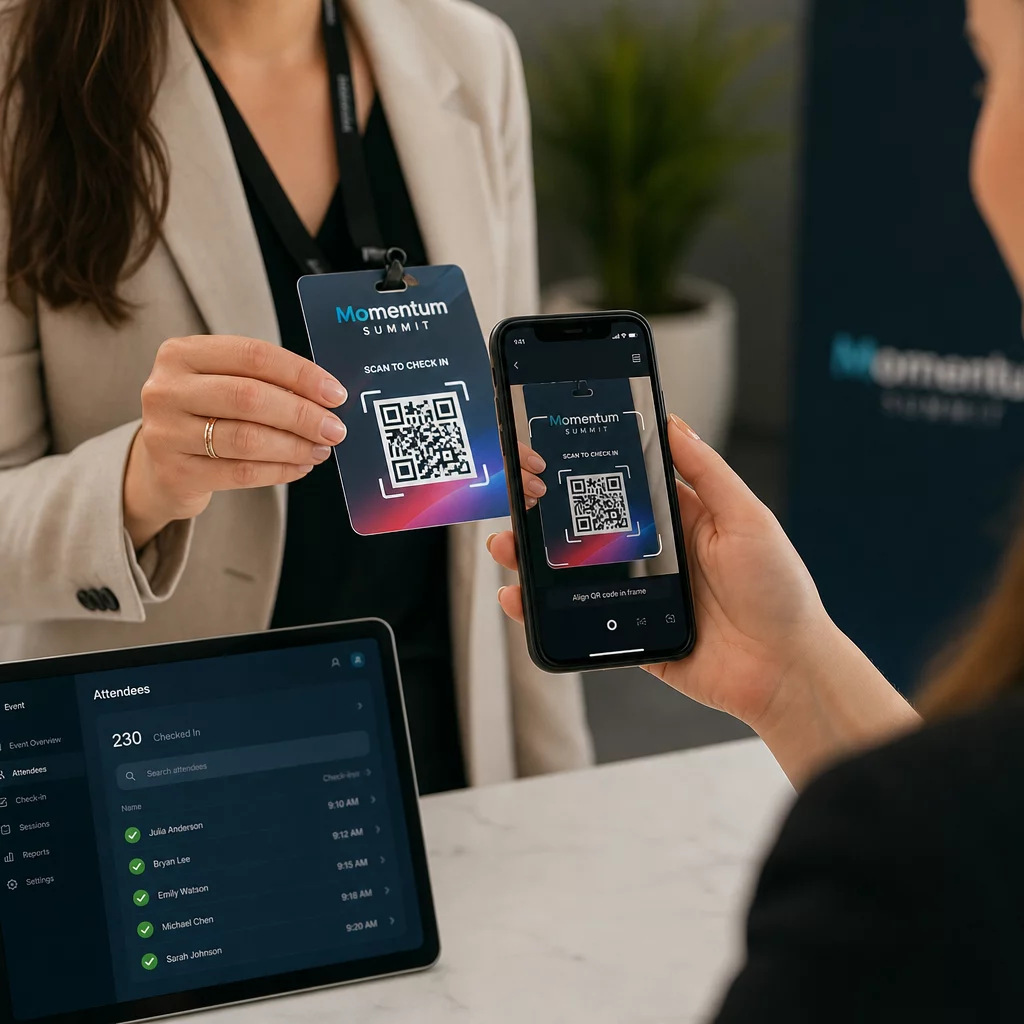
Para eventos más grandes, considera establecer estaciones de escaneo dedicadas. Capacita al personal para sostener el dispositivo de escaneo aproximadamente a 30 cm del código y para habilitar el flash de la cámara en entornos con poca luz. Si estás imprimiendo códigos en credenciales o pulseras, usa materiales mate en lugar de acabados brillantes para evitar que el deslumbramiento interfiera con el escaneo. Más detalles sobre las mejores prácticas de implementación física están disponibles en el guía definitiva de códigos QR para el registro de eventos.
Cómo Fluyen los Datos de Asistencia a Tu CRM
El escaneo de registro desencadena una cadena de eventos que termina con un registro de contacto actualizado. Esto es lo que sucede en cada paso:
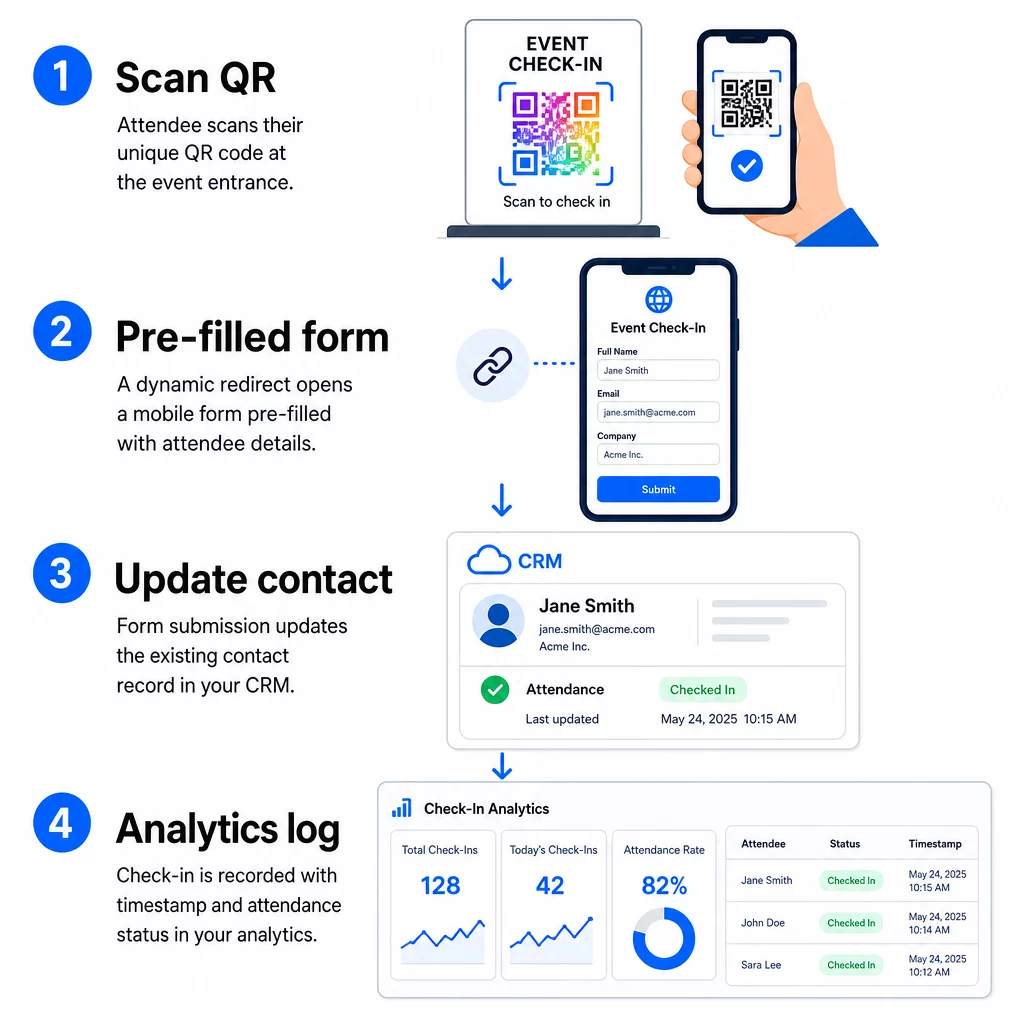
- El código QR único del asistente se escanea en la entrada.
- La redirección dinámica carga el formulario de registro prellenado en el navegador del asistente.
- El asistente envía el formulario (o el formulario se envía automáticamente después de una breve confirmación).
- El envío del formulario, vinculado al ID único del contacto, actualiza el registro CRM existente con el estado de registro, la marca de tiempo y cualquier campo adicional capturado.
- Si su CRM admite la automatización basada en webhooks, el envío puede activar simultáneamente acciones posteriores: asignar una tarea de seguimiento, enviar un correo electrónico posterior al evento o actualizar el estado de una campaña.
Plataformas como HubSpot almacenan los estados de participación – Registrado, Asistió, No se presentó, Cancelado – directamente en la tarjeta de eventos de marketing del contacto, lo que le da a su equipo un historial completo de asistencia para cada contacto sin ninguna conciliación manual. Para aprender cómo conectar los escaneos a acciones CRM automatizadas de manera más amplia, consulte la guía sobre Automatización del flujo de trabajo de escaneo de códigos QR.
Seguimiento del rendimiento del registro con análisis
Debido a que está utilizando códigos dinámicos, cada escaneo genera datos analíticos, no solo un formulario completado. Su panel de códigos QR captura:
- Escaneos totales vs. escaneos únicos – útil para identificar si alguien escaneó su código varias veces
- Marcas de tiempo de escaneo – le permite reconstruir patrones de llegada e identificar períodos pico de registro
- Tipo de dispositivo y sistema operativo – le ayuda a optimizar la experiencia móvil de su formulario de registro
- Ubicación geográfica – confirma que los escaneos se están realizando en el lugar esperado
Estos datos se encuentran junto a sus registros de asistencia de CRM y le proporcionan una segunda capa de verificación. Si el envío del formulario de un contacto falló pero su escaneo QR fue registrado, tiene un registro para investigar. Para una mirada más profunda a qué medir y cómo actuar al respecto, la guía sobre análisis de códigos QR empresariales y métricas clave cubre el panorama completo.
También puede rastrear escaneos de códigos QR y análisis a nivel de campaña, segmentando por evento, rango de fechas o código individual para comparar el rendimiento en múltiples puntos de registro.
Monitorear la asistencia en tiempo real Vea exactamente quién escaneó, cuándo y desde qué ubicación. Utilice la herramienta de Código QR de Asistencia para implementar códigos de registro con análisis de escaneo completos incorporados.
Problemas comunes y cómo solucionarlos
URLs rotas después de la sustitución de campos de combinación. Siempre pruebe su URL codificada con datos de contacto reales antes de enviar códigos a los asistentes. Preste especial atención a los contactos cuyos nombres o direcciones de correo electrónico incluyan caracteres especiales.
Registros duplicados de CRM creados al registrarse. Esto ocurre cuando la URL del formulario no lleva el identificador de contacto. Agregue el parámetro de ID de contacto a su plantilla de URL y confirme que su CRM está configurado para coincidir con ese campo en lugar de crear un nuevo registro.
Códigos QR que dejan de funcionar después de la distribución. Aquí es donde los códigos dinámicos demuestran su valor. Si la URL de su formulario cambia – porque cambió de herramientas de formulario o actualizó su dominio – puede actualizar el destino en su panel de control de gestión de códigos QR sin redistribuir nuevos códigos a los asistentes.
Códigos que escanean correctamente pero no rellenan el formulario. Verifique si su herramienta de formulario requiere nombres de parámetros de consulta específicos. Algunas plataformas usan `email` mientras que otras requieren `entry.12345` (Google Forms) o una clave de campo personalizada. Alinee su plantilla de URL con los nombres de parámetros esperados de su herramienta de formulario.
Fallos de escaneo con poca luz en la entrada. Asegúrese de que sus códigos QR impresos cumplan con la relación tamaño-distancia de 10:1: un código escaneado desde 10 pulgadas de distancia debe tener al menos 1 pulgada de ancho. Utilice impresión de alto contraste – módulos oscuros sobre un fondo blanco – y evite el papel brillante o laminado.
Puntos clave
Los códigos QR dinámicos para registros de CRM funcionan porque cada código lleva la identidad de un contacto codificada en su URL de destino, dirige esos datos a un formulario vinculado a un registro existente y registra el escaneo como un evento de análisis separado. El resultado es un registro de asistencia preciso, con marca de tiempo y conectado a su CRM sin necesidad de entrada manual de datos.
Los requisitos técnicos son sencillos: un CRM con campos de combinación y formularios web que acepten parámetros de URL, URL dinámicas correctamente codificadas y una plataforma de códigos QR que admita la generación de códigos por contacto y el seguimiento de escaneos. Si esos tres elementos son correctos, el flujo de trabajo de registro se ejecuta en gran medida por sí solo.
Comience a construir su sistema de registro con el Generador de códigos QR dinámicos – no se requiere tarjeta de crédito para la prueba de 14 días.
Preguntas frecuentes
Un código QR estático codifica una URL fija directamente en su patrón y no puede ser cambiado ni rastreado después de la impresión. Un código QR dinámico utiliza un enlace de redirección corto que puedes actualizar en cualquier momento desde tu panel de control, y cada escaneo se registra con datos que incluyen marca de tiempo, tipo de dispositivo y ubicación. Para los registros de CRM, los códigos dinámicos son esenciales porque permiten la personalización de URL por contacto y proporcionan los análisis necesarios para verificar la asistencia.
Adjunte el identificador único de CRM de su contacto como un parámetro de consulta en la URL de registro – por ejemplo, `?contact_id={{contact.id}}`. Cuando se envía el formulario, su CRM utiliza ese identificador para hacer coincidir el envío con el registro existente en lugar de crear uno nuevo. La mayoría de las plataformas de CRM también tienen una configuración para fusionar por dirección de correo electrónico como alternativa cuando no hay un ID de contacto presente.
Sí. Debido a que los códigos son dinámicos, puedes cambiar la URL de destino en tu panel de control de gestión de códigos QR en cualquier momento. El código impreso o distribuido permanece exactamente igual – solo cambia el objetivo de redirección. Esto significa que si la URL de tu formulario cambia después de que se hayan enviado los correos electrónicos de confirmación, los asistentes con los códigos originales seguirán llegando al formulario correcto.