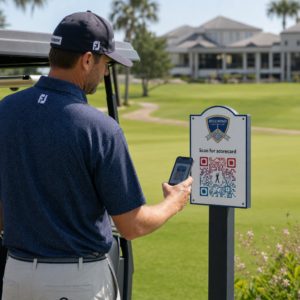
Διαχειρίζεστε ακόμα την είσοδο σε εκδηλώσεις με έντυπες λίστες καλεσμένων και χειροκίνητες εγγραφές; Αυτή η προσέγγιση επιβραδύνει τις ουρές εισόδου, απογοητεύει τους παρευρισκόμενους και αφήνει τους διοργανωτές με ελάχιστη ορατότητα για το τι συμβαίνει πραγματικά επί τόπου. Αυτή η σελίδα καλύπτει κάθε πρακτικό τρόπο χρήσης κωδικών QR σε εκδηλώσεις – από την έκδοση εισιτηρίων και τα check-in μέχρι τις επιβεβαιώσεις συμμετοχής (RSVP) και την παρακολούθηση μετά την εκδήλωση – ώστε να μπορείτε να εκτελείτε πιο ομαλές λειτουργίες και να έχετε μετρήσιμα αποτελέσματα.
Γιατί οι Διοργανωτές Εκδηλώσεων Υιοθετούν Κωδικούς QR
Η υιοθέτηση κωδικών QR μεταξύ των επαγγελματιών εκδηλώσεων δεν είναι πλέον εξειδικευμένη. Το 43% των marketers χρησιμοποιούν κωδικούς QR ειδικά για εκδηλώσεις, καθιστώντας τις εκδηλώσεις την πιο κοινή περίπτωση χρήσης QR μεταξύ των επαγγελματιών του μάρκετινγκ. Τα ίδια δεδομένα δείχνουν ότι πάνω από το 90% των marketers ανέφεραν ότι χρησιμοποιούν κωδικούς QR το 2025, με το 94% να αυξάνει τη χρήση τους χρόνο με τον χρόνο.
Ο λόγος για αυτή την αλλαγή είναι πρακτικός: οι παρευρισκόμενοι είναι ήδη εξοικειωμένοι με τη σάρωση. Περισσότερα από τα δύο τρίτα των καταναλωτών χρησιμοποίησαν έναν κωδικό QR τουλάχιστον μία φορά τον τελευταίο χρόνο, και περίπου οι μισοί από τη Γενιά Z και τους Millennials σαρώνουν κωδικούς QR τουλάχιστον μία φορά την εβδομάδα. Με το 98% των Αμερικανών να διαθέτουν κινητό τηλέφωνο, δεν υπάρχει ουσιαστικό εμπόδιο στο να κάνουν τους παρευρισκόμενους να σαρώνουν.
Για τους διοργανωτές, το όφελος είναι ο έλεγχος σε πραγματικό χρόνο. Μπορείτε να παρακολουθείτε την είσοδο, να παρακολουθείτε τη συμμετοχή ανά συνεδρία, να ενημερώνετε πληροφορίες εκδήλωσης χωρίς να ανατυπώνετε υλικά και να μετράτε την αφοσίωση πολύ μετά το τέλος της εκδήλωσης.
Περιπτώσεις Χρήσης Κωδικών QR για Εκδηλώσεις
Οι κωδικοί QR είναι αρκετά ευέλικτοι ώστε να καλύπτουν σχεδόν κάθε επιχειρησιακή ανάγκη και ανάγκη αφοσίωσης σε μια εκδήλωση. Ακολουθούν οι πιο αποτελεσματικές εφαρμογές.
Έκδοση Εισιτηρίων και Διαχείριση Εισόδου
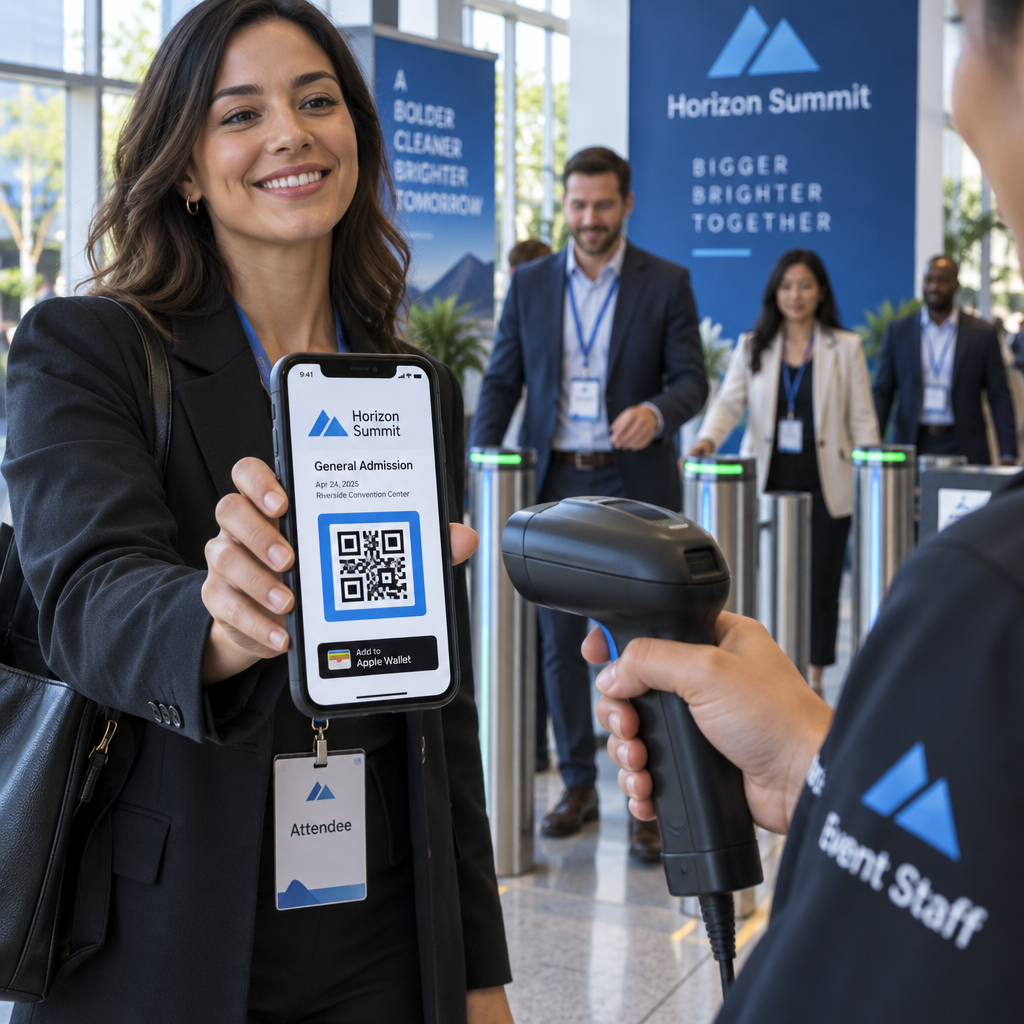
Το πιο κοινό σημείο εκκίνησης είναι η αντικατάσταση των χάρτινων εισιτηρίων με κωδικούς QR που μπορούν να σαρωθούν. Κάθε παρευρισκόμενος λαμβάνει έναν μοναδικό κωδικό QR – που παραδίδεται μέσω email, PDF ή κινητού – τον οποίο το προσωπικό σαρώνει στην είσοδο για να επικυρώσει την είσοδο και να σημειώσει τη συμμετοχή σε πραγματικό χρόνο.
Αυτή η προσέγγιση καταργεί την ανάγκη για χειροκίνητο έλεγχο λιστών, επιταχύνει τις ουρές εισόδου και αποτρέπει την απάτη διπλής χρήσης, καθώς κάθε κωδικός μπορεί να ρυθμιστεί για επικύρωση με μία μόνο σάρωση. Για μια λεπτομερή περιγραφή της αρχιτεκτονικής ασφαλείας πίσω από αυτό, δείτε τον οδηγό για πώς να δημιουργήσετε ασφαλή εισιτήρια εκδηλώσεων με κωδικό QR.
Μπορείτε να δημιουργήσετε εισιτήρια απευθείας χρησιμοποιώντας το Δημιουργία QR code για εκδήλωση εισάγοντας τη διεύθυνση URL της εκδήλωσής σας, τον τίτλο, την περιγραφή και τα στοιχεία επικοινωνίας, και στη συνέχεια προσαρμόζοντας τη σχεδίαση του κωδικού πριν τον κατεβάσετε για διανομή.
Βελτιστοποιήστε την Είσοδο στην Εκδήλωσή σας Δημιουργήστε επώνυμους, παρακολουθήσιμους κωδικούς QR για εισιτήρια, σελίδες προορισμού και check-ins. Δοκιμάστε το Δημιουργία QR code για εκδήλωση δωρεάν για 14 ημέρες – δεν απαιτείται πιστωτική κάρτα.
Check-In Παρευρισκομένων και Παρακολούθηση Συμμετοχής
Το check-in βάσει QR λειτουργεί με το προσωπικό να σαρώνει τον κωδικό κάθε παρευρισκόμενου με ένα τηλέφωνο, tablet ή ειδική εφαρμογή σάρωσης. Μια έγκυρη σάρωση σημειώνει αυτόματα το άτομο ως checked-in και ενημερώνει άμεσα τα αρχεία συμμετοχής σας.
Αυτό είναι σημαντικά ταχύτερο από τις χειροκίνητες μεθόδους. Σύμφωνα με τον οδηγό για κωδικούς QR για check-ins εκδηλώσεων, τα check-ins με κωδικούς QR μειώνουν τον μέσο χρόνο επεξεργασίας σε λιγότερο από 2 δευτερόλεπτα ανά άτομο και μπορούν να μειώσουν τη συνολική διάρκεια εισόδου έως και 50% σε σύγκριση με τις χειροκίνητες διαδικασίες.
Για συνεχιζόμενες εκδηλώσεις, μαθήματα ή συνέδρια πολλαπλών συνεδριών, το Κωδικός QR Συμμετοχής εργαλείο επιτρέπει στους παρευρισκόμενους να κάνουν self-check-in σαρώνοντας έναν κωδικό που συνδέεται με μια Φόρμα Google ή παρόμοιο εργαλείο, με τις απαντήσεις να τροφοδοτούνται αυτόματα σε ένα υπολογιστικό φύλλο για παρακολούθηση σε πραγματικό χρόνο. Μάθετε περισσότερα για τη δημιουργία αυτού του είδους συστήματος στη σελίδα παρακολούθησης συμμετοχής.
Συλλογή RSVP (Επιβεβαιώσεων Συμμετοχής)
Αντί να κατευθύνετε τους καλεσμένους να πληκτρολογήσουν μια διεύθυνση URL, ένας κωδικός QR στην πρόσκληση, το φυλλάδιο ή τη σελίδα της εκδήλωσής σας τους οδηγεί απευθείας στη φόρμα RSVP με μία μόνο σάρωση. Αυτό μειώνει την τριβή και συνήθως αυξάνει τα ποσοστά απόκρισης.
Χρησιμοποιήστε το Pageloot’s Δημιουργία QR code Google Form για να συνδέσετε οποιαδήποτε Φόρμα Google με έναν κωδικό που μπορεί να σαρωθεί, και στη συνέχεια να τον τοποθετήσετε σε έντυπες προσκλήσεις, ψηφιακά γραφικά ή σήμανση εκδηλώσεων. Για αναλυτικές οδηγίες, ο οδηγός για κωδικούς QR RSVP για εκδηλώσεις περιγράφει την επιλογή πλατφόρμας, τη δημιουργία κωδικών και τη συμμόρφωση με την προστασία προσωπικών δεδομένων.
Προγράμματα και Πληροφορίες Εκδηλώσεων
Ένας κωδικός QR τοποθετημένος σε ένα σήμα, κάρτα τραπεζιού ή πινακίδα χώρου μπορεί να συνδέσει τους παρευρισκόμενους με ένα ζωντανό πρόγραμμα εκδήλωσης, βιογραφικά ομιλητών, χάρτες ορόφων ή λεπτομέρειες συνεδριών. Επειδή δυναμικοί κωδικοί QR σας επιτρέπουν να ενημερώσετε τη διεύθυνση URL προορισμού μετά την εκτύπωση, μπορείτε να διορθώσετε αλλαγές στο πρόγραμμα ή να προσθέσετε πληροφορίες χωρίς να ανατυπώσετε υλικά.
Αυτό είναι ένα από τα ισχυρότερα πρακτικά επιχειρήματα για τη χρήση δυναμικών έναντι στατικών κωδικών. Εάν ένας ομιλητής ακυρώσει ή ένα δωμάτιο αλλάξει, ενημερώνετε τον σύνδεσμο – όχι το έντυπο υλικό.
Ενσωμάτωση με το Ημερολόγιο Google
Για συνέδρια, εργαστήρια ή οποιαδήποτε εκδήλωση με εισιτήριο και συνεδρίες, η σύνδεση ενός κωδικού QR με μια καταχώριση στο Ημερολόγιο Google επιτρέπει στους παρευρισκόμενους να προσθέσουν την εκδήλωση απευθείας στο ημερολόγιό τους με μία σάρωση. Χρησιμοποιήστε το Δημιουργία QR code για Google Calendar για να δημιουργήσετε αυτόν τον κωδικό, και στη συνέχεια τοποθετήστε τον σε email επιβεβαίωσης, εισιτήρια ή προσκλήσεις.
Πλοήγηση στον Χώρο
Μεγάλοι χώροι – συνεδριακά κέντρα, υπαίθρια φεστιβάλ, πολυώροφοι συνεδριακοί χώροι – συχνά προκαλούν προβλήματα απλώς και μόνο επειδή οι παρευρισκόμενοι δεν μπορούν να βρουν πού πρέπει να πάνε. Ένας κωδικός QR σε πινακίδες, εισιτήρια ή προσκλήσεις που ανοίγει απευθείας στους Χάρτες Google αφαιρεί εντελώς αυτό το πρόβλημα. Δημιουργήστε έναν χρησιμοποιώντας το Δημιουργία QR code Google Maps και συμπεριλάβετε τον οπουδήποτε οι παρευρισκόμενοι θα τον δουν πριν ή κατά τη διάρκεια της εκδήλωσης.
Κοινή Χρήση Φωτογραφιών και Κοινωνική Δέσμευση
Οι κωδικοί QR μπορούν να συνδέσουν τους παρευρισκόμενους με μια κοινόχρηστη γκαλερί φωτογραφιών, μια σελίδα με επώνυμο hashtag ή μια πύλη μεταφόρτωσης, ώστε οι επισκέπτες να μπορούν να συνεισφέρουν και να βλέπουν φωτογραφίες εκδηλώσεων σε πραγματικό χρόνο. Αυτό δημιουργεί έναν βρόχο συμμετοχής που επεκτείνει την εμπειρία της εκδήλωσης πέρα από τον φυσικό χώρο. Για έναν πρακτικό οδηγό ρύθμισης, δείτε πώς να χρησιμοποιήσετε έναν κωδικό QR για να μοιραστείτε φωτογραφίες.
Έρευνες Μετά την Εκδήλωση και Παρακολούθηση
Έρευνες δείχνουν ότι το 41% των διοργανωτών χρησιμοποιούν έρευνες μετά την εκδήλωση για να μετρήσουν την απόδοση επένδυσης (ROI), και το 40% βασίζονται στην αλληλεπίδραση στα μέσα κοινωνικής δικτύωσης. Ένας κωδικός QR σε ένα σήμα, ένα φυλλάδιο ή μια πινακίδα εξόδου που οδηγεί σε μια φόρμα ανατροφοδότησης διευκολύνει τους παρευρισκόμενους να απαντήσουν όσο η εκδήλωση είναι ακόμα φρέσκια. Η σύνδεση αυτής της φόρμας με μια Φόρμα Google μέσω της γεννήτριας του Pageloot σημαίνει ότι οι απαντήσεις ρέουν απευθείας σε ένα υπολογιστικό φύλλο που μπορείτε να αναλύσετε άμεσα.
Πώς να Δημιουργήσετε έναν Κωδικό QR Εκδήλωσης με το Pageloot
Η διαδικασία διαρκεί λίγα λεπτά και δεν απαιτεί τεχνικές δεξιότητες.
- Ανοίξτε τη γεννήτρια – Μεταβείτε στο Δημιουργία QR code για εκδήλωση και επιλέξτε “Δημιουργία κωδικού QR για εκδήλωση”.”
- Προσθέστε τα στοιχεία της εκδήλωσής σας – Εισαγάγετε τη διεύθυνση URL της σελίδας της εκδήλωσης, τον τίτλο, την περιγραφή και τα στοιχεία επικοινωνίας. Το Pageloot δημιουργεί μια σελίδα προορισμού γύρω από αυτό το περιεχόμενο.
- Σχεδιάστε τον κωδικό QR – Προσαρμόστε τα χρώματα, τα σχήματα και προσθέστε το λογότυπό σας για να ταιριάζει με το branding της εκδήλωσής σας.
- Επιλέξτε δυναμικό αν χρειάζεστε ευελιξία – Οι δυναμικοί κωδικοί σάς επιτρέπουν να ενημερώσετε τον σύνδεσμο προορισμού μετά την εκτύπωση. Αυτή είναι η σωστή επιλογή για οτιδήποτε μπορεί να αλλάξει πριν ή κατά τη διάρκεια της εκδήλωσης.
- Δοκιμάστε τον κωδικό – Σαρώστε τον τόσο σε συσκευές iOS όσο και Android υπό διαφορετικές συνθήκες φωτισμού πριν τον διανείμετε.
- Λήψη και διανομή – Εξαγάγετε σε PNG, PDF ή SVG και τοποθετήστε τον σε εισιτήρια, πινακίδες, προσκλήσεις ή ψηφιακά υλικά.
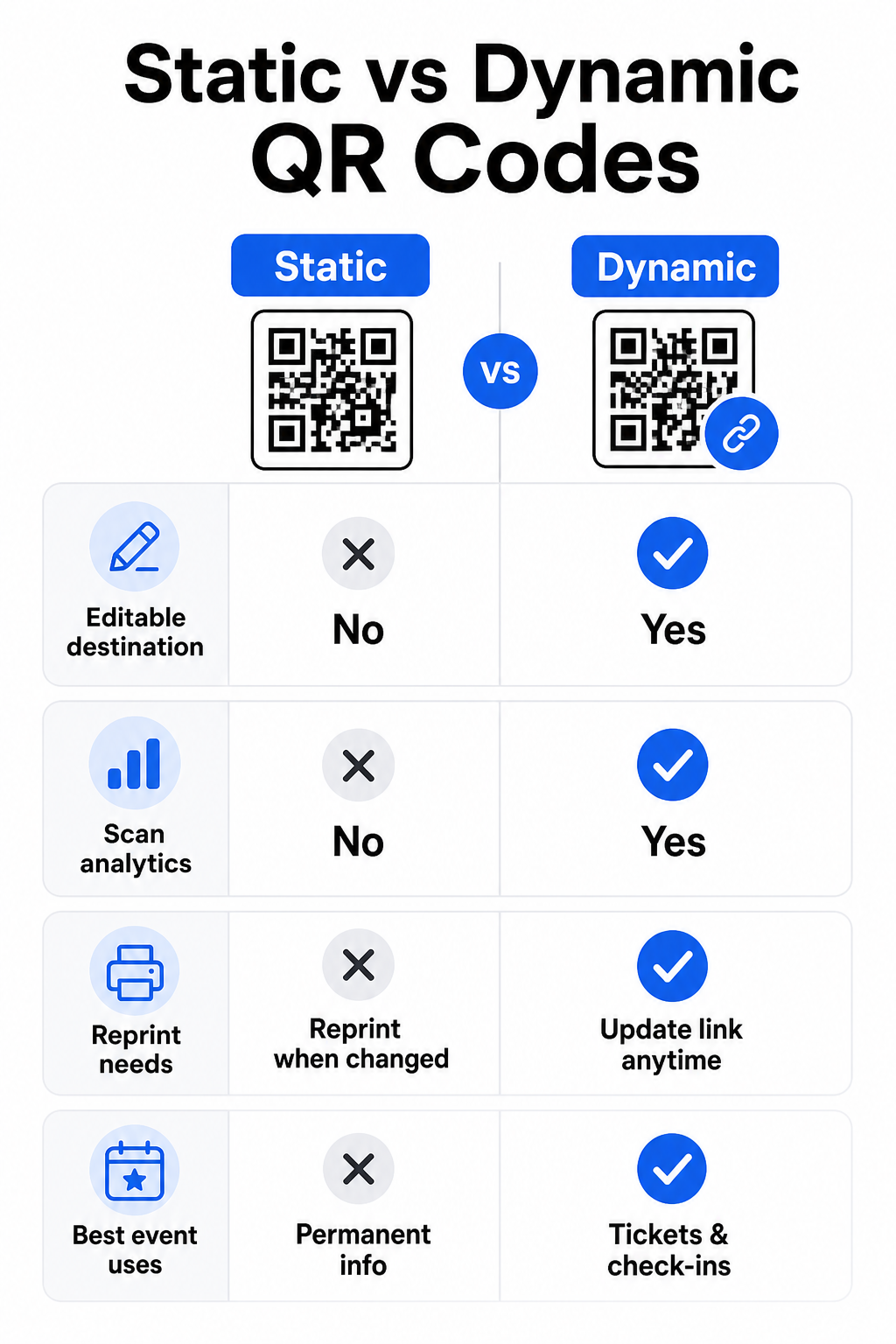
Στατικοί έναντι Δυναμικών Κωδικών QR για Εκδηλώσεις
Η κατανόηση της διαφοράς μεταξύ στατικών και δυναμικών κωδικών QR σάς βοηθά να κάνετε τη σωστή επιλογή για κάθε περίπτωση χρήσης.
| ΛΕΙΤΟΥΡΓΙΑ | Στατικός κώδικας QR | Δυναμικός κωδικός QR |
|---|---|---|
| Προορισμός επεξεργάσιμος μετά την εκτύπωση | Όχι | Ναι |
| Αναλύσεις σάρωσης | Όχι | Ναι |
| Ο κωδικός αλλάζει αν αλλάξει ο προορισμός | Ναι (απαιτείται επανεκτύπωση) | Όχι |
| Καλύτερο για | Απλοί, μόνιμοι σύνδεσμοι | Εισιτήρια, προγράμματα, καμπάνιες |
| Κόστος | Ελεύθερος | Επί πληρωμή συνδρομή |
Για τις περισσότερες λειτουργίες εκδηλώσεων – ειδικά την έκδοση εισιτηρίων, το check-in και οτιδήποτε μπορεί να χρειαστεί ενημέρωση – οι δυναμικοί κωδικοί QR είναι η καλύτερη επιλογή. Παρέχουν επίσης αναλυτικά στοιχεία σάρωσης, τα οποία σας λένε πόσα άτομα σάρωσαν, πότε, σε ποια συσκευή και από ποια τοποθεσία. Ο οδηγός για τη δημιουργία δυναμικών κωδικών QR για check-in CRM εξηγεί πώς να συνδέσετε αυτά τα δεδομένα με την ευρύτερη ροή εργασίας διαχείρισης παρευρισκομένων.
Τοποθέτηση και Μέγεθος Κωδικών QR για Εκδηλώσεις
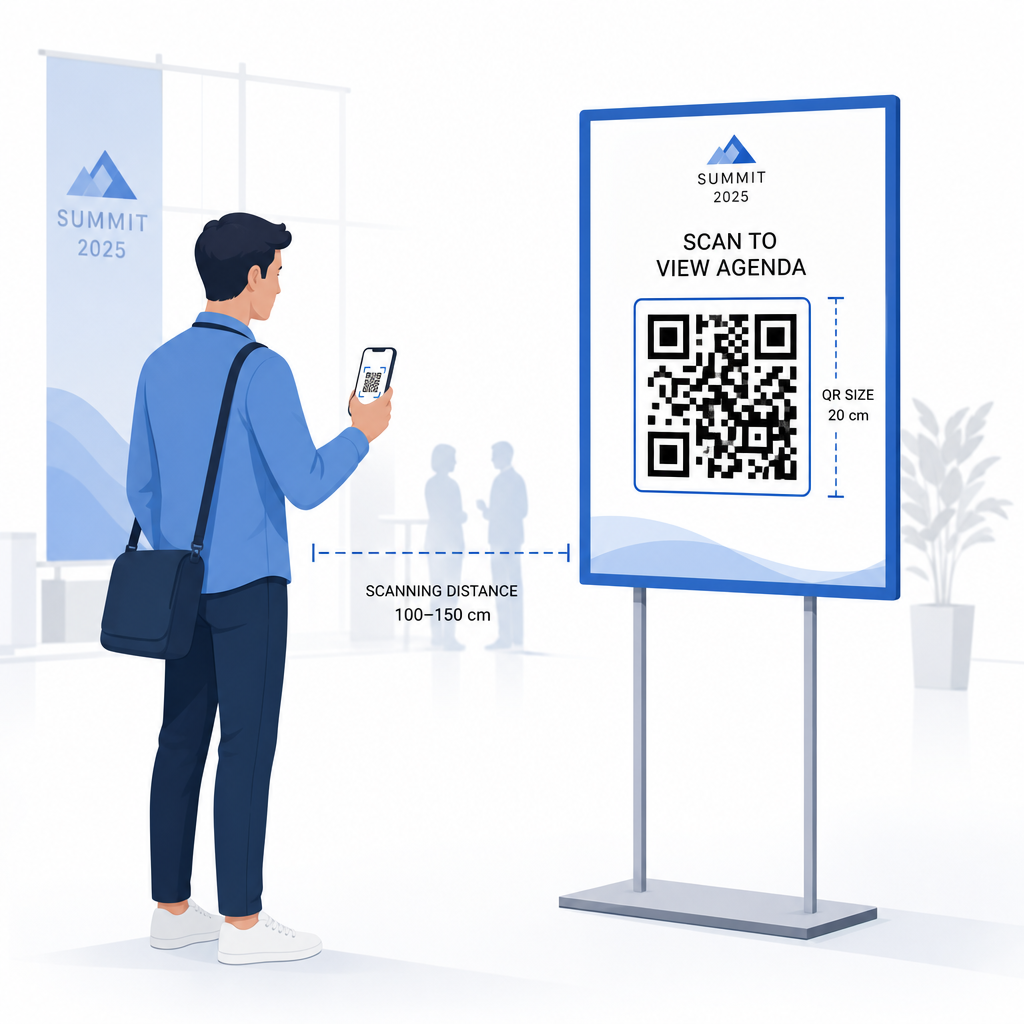
Ένας κωδικός QR που δεν μπορεί να σαρωθεί αξιόπιστα ακυρώνει τον σκοπό του. Οι ακόλουθες οδηγίες αντικατοπτρίζουν την έρευνα χρηστικότητας και τα πρακτικά σενάρια εκδηλώσεων.
Ελάχιστα μεγέθη ανά τύπο υλικού:
- Έντυπες προσκλήσεις: τουλάχιστον 1,5 × 1,5 ίντσες
- Κάρτες ή βραχιόλια: τουλάχιστον 1,5 ίντσες τετραγωνικές
- Κάρτες τραπεζιού ή κάρτες θέσης: τουλάχιστον 1 × 1 ίντσα (προτιμάται 1,5 ίντσα)
- Σήμανση εκδήλωσης: τουλάχιστον 5 × 5 ίντσες, αυξάνοντας σε 7 × 7 ίντσες για χώρους με πλάτος μεγαλύτερο από 30 πόδια
Ένας χρήσιμος εμπειρικός κανόνας: η μικρότερη διάσταση του κωδικού QR θα πρέπει να είναι περίπου το ένα δέκατο της απόστασης σάρωσης. Ένας κωδικός που σαρώνεται από απόσταση 3 ποδιών θα πρέπει να έχει πλάτος τουλάχιστον 3,6 ίντσες.
Οδηγίες τοποθέτησης:
- Τοποθετήστε τους κωδικούς στο ύψος ματιών ή στήθους – περίπου 3 έως 5 πόδια από το πάτωμα – ώστε οι παρευρισκόμενοι να μπορούν να σαρώσουν χωρίς να σκύβουν ή να τεντώνονται
- Τοποθετήστε τους κωδικούς όπου οι άνθρωποι σταματούν ή περιμένουν φυσικά: εισόδους, γραφεία εγγραφής, τραπέζια, κοντά σε οθόνες και σε ουρές
- Διατηρήστε υψηλή αντίθεση: σκούρες μονάδες σε ανοιχτόχρωμο φόντο σαρώνουν πιο αξιόπιστα· αποφύγετε ανεστραμμένα ή χαμηλής αντίθεσης χρωματικά σχήματα
- Διατηρήστε ένα ήσυχη ζώνη τουλάχιστον 4 μονάδων κενού χώρου και στις τέσσερις πλευρές του κωδικού· κείμενο ή γραφικά εντός αυτού του περιθωρίου προκαλούν αποτυχίες σάρωσης
- Δοκιμάστε κάθε κωδικό στο τελικό του εκτυπωμένο μέγεθος, από την αναμενόμενη απόσταση σάρωσης, τόσο σε iOS όσο και σε Android, πριν από την εκδήλωση
Για περισσότερες οδηγίες, το απόλυτο οδηγό για τους κωδικούς QR για check-in εκδηλώσεων περιλαμβάνει λεπτομερείς τεχνικές απαιτήσεις σάρωσης και βέλτιστες πρακτικές λειτουργίας θυρών.
Παρακολούθηση Απόδοσης Εκδήλωσης με Αναλυτικά Στοιχεία QR
Ένα από τα υποχρησιμοποιούμενα πλεονεκτήματα των δυναμικών κωδικών QR είναι τα δεδομένα που παράγουν. Ο πίνακας αναλυτικών στοιχείων του Pageloot καταγράφει τον αριθμό σαρώσεων, τις χρονικές σημάνσεις, τους τύπους συσκευών και τις γεωγραφικές τοποθεσίες σε πραγματικό χρόνο.
Για τους διοργανωτές εκδηλώσεων, αυτά τα δεδομένα απαντούν σε πρακτικές ερωτήσεις:
- Ποιο σημείο εισόδου είχε τον υψηλότερο όγκο σαρώσεων και σε ποια ώρα;
- Αλληλεπίδρασαν οι παρευρισκόμενοι με το πρόγραμμα ή το περιεχόμενο των χορηγών κατά τη διάρκεια της εκδήλωσης;
- Πόσα άτομα σάρωσαν τον κωδικό της έρευνας μετά την εκδήλωση;
- Ποιο κανάλι προώθησης – έντυπο φυλλάδιο, ανάρτηση στα μέσα κοινωνικής δικτύωσης, email – οδήγησε στις περισσότερες σαρώσεις εισιτηρίων;
Αυτές οι πληροφορίες καθοδηγούν τις αποφάσεις στελέχωσης, σας βοηθούν να εντοπίσετε σημεία συμφόρησης και δίνουν στους χορηγούς μετρήσιμη απόδειξη της συμμετοχής του κοινού. Για μια πιο εις βάθος ματιά στα διαθέσιμα εργαλεία, δείτε τη σύνοψη των κορυφαία εργαλεία για παρακολούθηση εκδηλώσεων με κωδικό QR.
Δείτε Ποιος Σαρώνει και Πότε Τα ενσωματωμένα αναλυτικά στοιχεία του Pageloot σας παρέχουν δεδομένα σάρωσης σε πραγματικό χρόνο για όλους τους κωδικούς QR της εκδήλωσής σας σε ένα μόνο ταμπλό. Ξεκινήστε με το Δημιουργία QR code για εκδήλωση και διοργανώστε την επόμενη εκδήλωσή σας με πλήρη ορατότητα.
Σάρωση Κωδικών QR στην Εκδήλωσή σας
Εάν χρειάζεστε μια λύση σάρωσης για το προσωπικό για την επικύρωση εισιτηρίων ή το check-in των συμμετεχόντων, το Pageloot’s QR code scanner online λειτουργεί απευθείας στο πρόγραμμα περιήγησης – δεν απαιτείται λήψη εφαρμογής. Το προσωπικό μπορεί να σαρώσει από οποιοδήποτε smartphone ή tablet στρέφοντας την κάμερα στον κωδικό ή ανεβάζοντας μια εικόνα.
Για μεγαλύτερες εκδηλώσεις με ειδικούς σταθμούς σάρωσης, οι ενσωματωμένες κάμερες συσκευών σε iOS (iOS 11 και νεότερες εκδόσεις) και Android σαρώνουν κωδικούς QR χωρίς καμία επιπλέον εφαρμογή. Δοκιμάστε τη ρύθμιση σάρωσης υπό τις πραγματικές συνθήκες φωτισμού του χώρου σας πριν από την εκδήλωση και εκπαιδεύστε το προσωπικό να κρατά τη συσκευή περίπου 30 cm (περίπου 12 ίντσες) από τον κωδικό για συνεπείς αναγνώσεις.
Κοινά Προβλήματα Κωδικών QR σε Εκδηλώσεις (και Πώς να τα Αποφύγετε)
Ακόμη και οι καλά σχεδιασμένοι κωδικοί QR αποτυγχάνουν όταν δεν πληρούνται ορισμένες προϋποθέσεις. Εδώ είναι τα πιο συχνά προβλήματα και οι λύσεις τους:
- Ο κωδικός είναι πολύ μικρός: Ακολουθήστε τα ελάχιστα μεγέθη παραπάνω· σε περίπτωση αμφιβολίας, εκτυπώστε μεγαλύτερο
- Κακή αντίθεση: Χρησιμοποιήστε σκούρες μονάδες σε λευκό ή ανοιχτόχρωμο φόντο· αποφύγετε την τοποθέτηση κωδικών σε σκούρες ή με σχέδια επιφάνειες
- Γυαλιστερό υλικό: Τα ματ φινιρίσματα σαρώνουν πιο αξιόπιστα επειδή εξαλείφουν τη λάμψη· αποφύγετε τα γυαλιστερά υλικά για κονκάρδες ή βραχιόλια
- Κατεστραμμένος κωδικός: Οι φυσικές γρατζουνιές ή σκισίματα εμποδίζουν τη σάρωση· χρησιμοποιήστε ρυθμίσεις διόρθωσης σφαλμάτων κατά τη δημιουργία κωδικών για φυσικά υλικά
- Χωρίς ήσυχη ζώνη: Βεβαιωθείτε ότι τίποτα – κείμενο, περιγράμματα, εικόνες – δεν παραβιάζει το κενό περιθώριο γύρω από τον κωδικό
- Μη δοκιμασμένος κωδικός: Πάντα να σαρώνετε την τελική εκτυπωμένη έκδοση σε πολλές συσκευές πριν τη διανείμετε σε μεγάλη κλίμακα
Για πρόσθετη αντιμετώπιση προβλημάτων σχετικά με τους κωδικούς QR που εκτυπώνονται απευθείας στα εισιτήρια, δείτε τον οδηγό για κωδικούς QR σε εισιτήρια.
Οι κωδικοί QR δίνουν στους διοργανωτές εκδηλώσεων μια άμεση σύνδεση μεταξύ φυσικών σημείων επαφής και ψηφιακών συστημάτων – είτε πρόκειται για επικύρωση εισιτηρίου, καταγραφή παρουσίας, συλλογή σχολίων ή πλοήγηση σε έναν χώρο. Το κλειδί είναι η επιλογή δυναμικών κωδικών όπου η ευελιξία έχει σημασία, η διαμόρφωση του μεγέθους και η τοποθέτησή τους για αξιόπιστη σάρωση και η χρήση αναλυτικών στοιχείων για την κατανόηση του τρόπου με τον οποίο οι συμμετέχοντες πραγματικά αλληλεπιδρούν.
Ξεκινήστε με το Δημιουργία QR code για εκδήλωση για να δημιουργήσετε τον πρώτο σας κωδικό QR εκδήλωσης ή εξερευνήστε το Κωδικός QR Συμμετοχής εργαλείο για να δημιουργήσετε ένα σύστημα check-in που καταγράφει αυτόματα κάθε άφιξη.
Συχνές ερωτήσεις
Ένας στατικός κωδικός QR έχει έναν σταθερό προορισμό που δεν μπορεί να αλλάξει αφού δημιουργηθεί. Εάν οι λεπτομέρειες της εκδήλωσής σας αλλάξουν, πρέπει να επανεκτυπώσετε τον κωδικό. Ένας δυναμικός κωδικός QR σας επιτρέπει να ενημερώσετε τη διεύθυνση URL προορισμού ανά πάσα στιγμή χωρίς να αλλάξετε τον ίδιο τον εκτυπωμένο κωδικό. Οι δυναμικοί κωδικοί παρέχουν επίσης αναλύσεις σάρωσης – δεδομένα για το πότε, πού και πόσο συχνά σαρώνεται ο κωδικός – κάτι που οι στατικοί κωδικοί δεν παρέχουν. Για τις περισσότερες εφαρμογές εκδηλώσεων, ιδιαίτερα για την έκδοση εισιτηρίων και τα χρονοδιαγράμματα, οι δυναμικοί κωδικοί είναι η πρακτική επιλογή.
Ανοίξτε τη Γεννήτρια Κωδικών QR Εκδηλώσεων του Pageloot και επιλέξτε την επιλογή για να δημιουργήσετε έναν κωδικό QR εκδήλωσης. Εισαγάγετε τη διεύθυνση URL της εκδήλωσής σας ή τον σύνδεσμο εγγραφής, προσθέστε λεπτομέρειες εκδήλωσης όπως τον τίτλο και την περιγραφή, και στη συνέχεια προσαρμόστε το σχέδιο του κωδικού με την επωνυμία σας. Κατεβάστε τον κωδικό και διανείμετέ τον στους συμμετέχοντες μέσω email, PDF ή έντυπου εισιτηρίου. Στην εκδήλωση, το προσωπικό σαρώνει τον κωδικό κάθε συμμετέχοντα χρησιμοποιώντας μια κάμερα smartphone ή τον Σαρωτή Κωδικών QR του Pageloot για να τους σημειώσει ως checked in.
Για τυπική σήμανση εκδηλώσεων, συνιστάται ένα ελάχιστο μέγεθος 5 × 5 ίντσες. Για μεγαλύτερους χώρους με πλάτος μεγαλύτερο από 30 πόδια, αυξήστε το μέγεθος σε τουλάχιστον 7 × 7 ίντσες. Ένας αξιόπιστος εμπειρικός κανόνας είναι ότι η μικρότερη διάσταση του κωδικού πρέπει να είναι περίπου το ένα δέκατο της αναμενόμενης απόστασης σάρωσης – οπότε ένας κωδικός που βλέπεται από 5 πόδια μακριά θα πρέπει να έχει πλάτος περίπου 6 ίντσες. Πάντα να δοκιμάζετε τον εκτυπωμένο κωδικό στην πραγματική απόσταση σάρωσης πριν από την εκδήλωση.