Da li i dalje upravljate ulaskom na događaje sa štampanim listama gostiju i ručnim prijavama? Taj pristup usporava redove za ulazak, frustrira posetioce i ostavlja organizatore sa malo uvida u to šta se zapravo dešava na terenu. Ova stranica pokriva svaki praktičan način korišćenja QR kodova na događajima – od izdavanja karata i prijava do potvrda prisustva (RSVP) i praćenja nakon događaja – tako da možete voditi lakše operacije i dobiti merljive rezultate.
Zašto organizatori događaja usvajaju QR kodove
Usvajanje QR kodova među profesionalcima za događaje više nije niša. 43% marketara koristi QR kodove specifično za događaje, čineći događaje najčešćim slučajem upotrebe QR kodova među marketinškim profesionalcima. Isti podaci pokazuju da je preko 90% marketara prijavilo korišćenje QR kodova 2025. godine, pri čemu je 94% povećalo njihovu upotrebu iz godine u godinu.
Razlog za ovu promenu je praktičan: posetioci su već naviknuti na skeniranje. Više od dve trećine potrošača koristilo je QR kod barem jednom u protekloj godini, a otprilike polovina Generacije Z i Milenijalaca skenira QR kodove barem jednom nedeljno. Sa 98% Amerikanaca koji poseduju mobilni telefon, ne postoji značajna prepreka da se posetioci navedu na skeniranje.
Za organizatore, nagrada je kontrola u realnom vremenu. Možete pratiti ulazak, nadgledati prisustvo po sesijama, ažurirati informacije o događaju bez ponovnog štampanja materijala i meriti angažman dugo nakon završetka događaja.
Slučajevi upotrebe QR kodova za događaje
QR kodovi su dovoljno fleksibilni da zadovolje gotovo svaku operativnu potrebu i potrebu za angažovanjem na događaju. Evo najefikasnijih primena.
Upravljanje ulaznicama i ulaskom
Najčešća polazna tačka je zamena papirnih ulaznica skenirajućim QR kodovima. Svaki posetilac dobija jedinstveni QR kod – isporučen putem e-pošte, PDF-a ili mobilnog telefona – koji osoblje skenira na vratima kako bi potvrdilo ulazak i zabeležilo prisustvo u realnom vremenu.
Ovaj pristup eliminiše potrebu za ručnom proverom lista, ubrzava redove za ulazak i sprečava prevaru sa duplim korišćenjem, budući da se svaki kod može podesiti za validaciju jednim skeniranjem. Za detaljan pregled bezbednosne arhitekture koja stoji iza ovoga, pogledajte vodič na kako kreirati sigurne QR kod ulaznice za događaje.
Možete generisati ulaznice direktno koristeći the QR kod za događaj: generator unošenjem URL adrese vašeg događaja, naslova, opisa i kontakt detalja, a zatim prilagođavanjem dizajna koda pre nego što ga preuzmete za distribuciju.
Pojednostavite ulazak na vaš događaj Kreirajte brendirane QR kodove koji se mogu pratiti za ulaznice, odredišne stranice i prijave. Isprobajte the QR kod za događaj: generator besplatno 14 dana – kreditna kartica nije potrebna.
Prijava posetilaca i praćenje prisustva
Prijava putem QR koda funkcioniše tako što osoblje skenira kod svakog posetioca telefonom, tabletom ili namenskom aplikacijom za skeniranje. Važeće skeniranje automatski označava osobu kao prijavljenu i trenutno ažurira vaše evidencije prisustva.
Ovo je značajno brže od ručnih metoda. Prema the Vodič za QR kodove za prijavljivanje na događaje, prijave putem QR kodova smanjuju prosečno vreme obrade na manje od 2 sekunde po osobi i mogu skratiti ukupno trajanje ulaska za do 50% u poređenju sa ručnim procesima.
Za tekuće događaje, kurseve ili konferencije sa više sesija, Pageloot-ov QR kod za prisustvo alat omogućava posetiocima da se sami prijave skeniranjem koda povezanog sa Google Formularom ili sličnim alatom, pri čemu se odgovori automatski unose u tabelu za praćenje u realnom vremenu. Saznajte više o izgradnji ovakvog sistema na the Stranica za praćenje prisustva.
Prikupljanje potvrda prisustva (RSVP)
Umesto da usmeravate goste da kucaju URL adresu, QR kod na vašoj pozivnici, flajeru ili stranici događaja ih jednim skeniranjem direktno vodi do vašeg RSVP obrasca. Ovo eliminiše trenje i obično povećava stope odgovora.
Koristite Pageloot-ov Google Form QR kod generator to link any Google Form to a scannable code, then place it on printed invitations, digital graphics, or event signage. Za uputstva korak po korak, pogledajte the Vodič o RSVP QR kodovima za događaje koji objašnjava izbor platforme, generisanje koda i usklađenost sa privatnošću.
Rasporedi i informacije o događaju
QR kod postavljen na bedžu, stonom kartici ili znaku mesta događaja može povezati posetioce sa rasporedom događaja uživo, biografijama govornika, mapama spratova ili detaljima sesija. Zato što dinamički QR kodovi allow you to update the destination URL after printing, možete ispraviti promene rasporeda ili dodati informacije bez ponovnog štampanja materijala.
Ovo je jedan od najjačih praktičnih argumenata za korišćenje dinamičkih umesto statičkih kodova. Ako govornik otkaže ili se promeni prostorija, ažurirate link – a ne štampani materijal.
Integracija sa Google kalendarom
Za konferencije, radionice ili bilo koji događaj sa ulaznicama i sesijama, povezivanje QR koda sa unosom u Google kalendar omogućava posetiocima da dodaju događaj direktno u svoj kalendar jednim skeniranjem. Koristite the Google kalendar QR kod generator to create this code, a zatim ga postavite na e-poruke za potvrdu, ulaznice ili pozivnice.
Navigacija po mestu događaja
Velika mesta događaja – kongresni centri, festivali na otvorenom, konferencijski prostori na više spratova – često izazivaju poteškoće jednostavno zato što posetioci ne mogu da pronađu gde treba da idu. QR kod na signalizaciji, kartama ili pozivnicama koji se otvara direktno u Google mapama u potpunosti uklanja te poteškoće. Kreirajte jedan koristeći Google Maps QR kod generator i uključite ga svuda gde će ga posetioci videti pre ili tokom događaja.
Deljenje fotografija i društvena angažovanost
QR kodovi mogu povezati posetioce sa zajedničkom galerijom fotografija, stranicom sa brendiranim heštegom ili portalom za otpremanje, tako da gosti mogu doprinositi i pregledati fotografije događaja u realnom vremenu. Ovo stvara petlju učešća koja proširuje iskustvo događaja izvan fizičkog mesta. Za praktičan vodič za podešavanje, pogledajte kako koristiti QR kod za deljenje fotografija.
Ankete nakon događaja i praćenje
Istraživanja pokazuju da 41% organizatora koristi ankete nakon događaja za merenje ROI-ja, a 40% se oslanja na angažovanje na društvenim mrežama. QR kod na bedžu, flajeru ili izlaznom znaku koji upućuje na obrazac za povratne informacije olakšava posetiocima da odgovore dok je događaj još uvek svež. Povezivanje tog obrasca sa Google obrascem putem Pageloot generatora znači da odgovori direktno ulaze u tabelu koju možete odmah analizirati.
Kako kreirati QR kod za događaj pomoću Pageloot-a
Proces traje nekoliko minuta i ne zahteva tehničke veštine.
- Otvorite generator – Idite na QR kod za događaj: generator i odaberite “Kreiraj QR kod za događaj.”
- Dodajte detalje o događaju – Unesite URL stranice događaja, naslov, opis i kontakt informacije. Pageloot gradi odredišnu stranicu oko ovog sadržaja.
- Dizajnirajte QR kod – Prilagodite boje, oblike i dodajte svoj logo kako bi odgovarao brendiranju vašeg događaja.
- Odaberite dinamički ako vam je potrebna fleksibilnost – Dinamički kodovi vam omogućavaju da ažurirate odredišni link nakon štampanja. Ovo je pravi izbor za sve što se može promeniti pre ili tokom događaja.
- Testirajte kod – Skenirajte ga na iOS i Android uređajima pod različitim svetlosnim uslovima pre distribucije.
- Preuzmite i distribuirajte – Izvezite u PNG, PDF ili SVG formatu i postavite ga na karte, signalizaciju, pozivnice ili digitalne materijale.
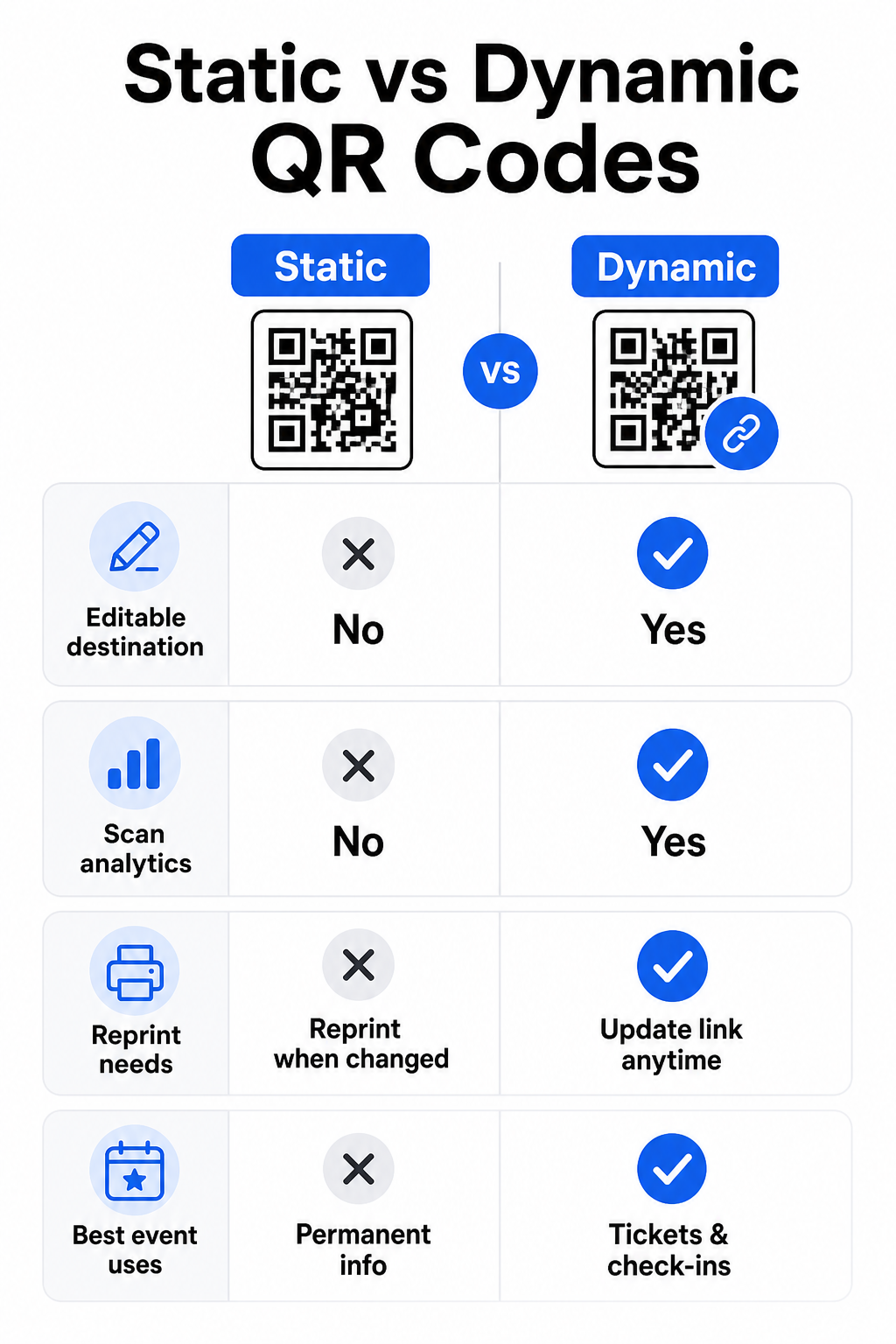
Statički vs. Dinamički QR kodovi za događaje
Razumevanje razlike između statičkih i dinamičkih QR kodova pomaže vam da napravite pravi izbor za svaki slučaj upotrebe.
| FUNKCIJA | Статички КР код | Динамички КР код |
|---|---|---|
| Odredište se može uređivati nakon štampanja | Не | да |
| Analitika skeniranja | Не | да |
| Kod se menja ako se odredište menja | Da (potrebno ponovno štampanje) | Не |
| Najbolje za | Jednostavni, trajni linkovi | Karte, rasporedi, kampanje |
| Цост | бесплатно | Plaćena pretplata |
Za većinu operacija događaja – posebno prodaju karata, prijavu i sve što bi moglo zahtevati ažuriranje – dinamički QR kodovi su bolji izbor. Oni takođe pružaju analitiku skeniranja, koja vam govori koliko je ljudi skeniralo, kada, na kom uređaju i sa koje lokacije. vodič za kreiranje dinamičkih QR kodova za CRM prijave objašnjava kako da povežete ove podatke sa vašim širim tokom rada za upravljanje posetiocima.
Postavljanje i veličina QR koda za događaje
QR kod koji se ne može pouzdano skenirati gubi svoju svrhu. Sledeće smernice odražavaju istraživanje upotrebljivosti i praktične scenarije događaja.
Minimalne veličine po vrsti materijala:
- Štampane pozivnice: najmanje 5 × 1.5 inča
- Bedževi ili narukvice: najmanje 5 inča kvadratno
- Stolne kartice ili kartice za mesta: najmanje 1 × 1 inč (1.5 inča poželjno)
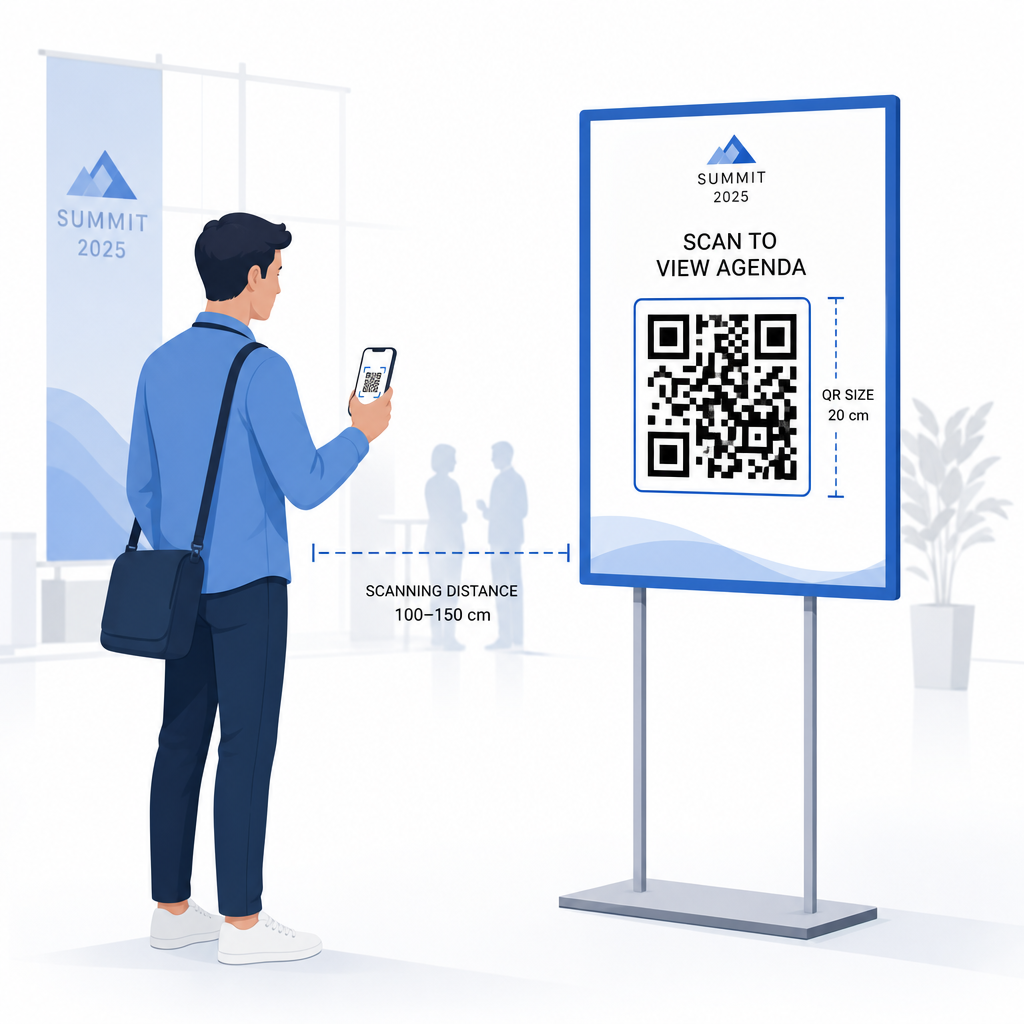
- Signalizacija događaja: najmanje 5 × 5 inča, povećavajući se na 7 × 7 inča za mesta šira od 30 stopa
Korisno pravilo: najmanja dimenzija QR koda bi trebalo da bude otprilike jedna desetina udaljenosti skeniranja. Kod skeniran sa 3 stope udaljenosti treba da bude širok najmanje 3.6 inča.
Smernice za postavljanje:
- Postavite kodove na visina očiju ili grudi – otprilike 3 do 5 stopa od poda – tako da posetioci mogu skenirati bez savijanja ili istezanja
- Postavite kodove gde se ljudi prirodno zaustavljaju ili čekaju: ulazi, registracioni pultovi, stolovi, blizu izložbenih prostora i u redovima
- Održavajte visok kontrast: tamni moduli na svetloj pozadini se najpouzdanije skeniraju; izbegavajte invertovane ili niskokontrastne šeme boja
- Održavajte tihu zonu od najmanje 4 modula praznog prostora sa sve četiri strane koda; tekst ili grafika unutar ove margine uzrokuju neuspešno skeniranje
- Testirajte svaki kod u svojoj konačnoj štampanoj veličini, sa očekivane udaljenosti skeniranja, na iOS i Android uređajima, pre događaja
Za više smernica, ultimativni vodič za QR kodove za prijavu na događaje uključuje detaljne tehničke zahteve za skeniranje i najbolje prakse za operacije na ulazu.
Praćenje performansi događaja pomoću QR analitike
Jedna od nedovoljno iskorišćenih prednosti dinamičkih QR kodova su podaci koje generišu. Pageloot-ova analitička kontrolna tabla beleži broj skeniranja, vremenske oznake, tipove uređaja i geografske lokacije u realnom vremenu.
Za organizatore događaja, ovi podaci odgovaraju na praktična pitanja:
- Koja ulazna tačka je imala najveći obim skeniranja i u koje vreme?
- Da li su posetioci bili angažovani sa rasporedom ili sponzorskim sadržajem tokom događaja?
- Koliko ljudi je skeniralo kod za anketu nakon događaja?
- Koji promotivni kanal – štampani flajer, objava na društvenim mrežama, imejl – je doneo najviše skeniranja karata?
Ove informacije informišu odluke o osoblju, pomažu vam da identifikujete uska grla i daju sponzorima merljiv dokaz angažovanja publike. Za dublji uvid u dostupne alate, pogledajte pregled najboljih alata za praćenje događaja putem QR kodova.
Pogledajte Ko skenira i Kada Pageloot-ova ugrađena analitika daje vam podatke o skeniranju u realnom vremenu za sve vaše QR kodove događaja na jednoj kontrolnoj tabli. Počnite sa QR kod za događaj: generator i vodite vaš sledeći događaj sa potpunom vidljivošću.
Skeniranje QR kodova na Vašem događaju
Ako vam je potrebno rešenje za skeniranje za osoblje da validira karte ili prijavi posetioce, Pageloot-ov Skeniranje koda: QR skener radi direktno u pregledaču – nije potrebno preuzimanje aplikacije. Osoblje može skenirati sa bilo kog pametnog telefona ili tableta usmeravanjem kamere ka kodu ili postavljanjem slike.
Za veće događaje sa namenskim stanicama za skeniranje, izvorne kamere uređaja na iOS-u (iOS 11 i noviji) i Androidu skeniraju QR kodove bez ikakve dodatne aplikacije. Testirajte svoju postavku za skeniranje pod stvarnim svetlosnim uslovima vašeg prostora pre događaja, i obučite osoblje da drži uređaj približno 30 cm (oko 12 inča) od koda za dosledna očitavanja.
Uobičajeni problemi sa QR kodovima na događajima (i kako ih izbeći)
Čak i dobro dizajnirani QR kodovi ne uspevaju kada određeni uslovi nisu ispunjeni. Evo najčešćih problema i njihovih rešenja:
- Kod je premali: Pratite minimalne veličine iznad; kada ste u nedoumici, štampajte veće
- Loš kontrast: Koristite tamne module na beloj ili svetloj pozadini; izbegavajte postavljanje kodova na tamne ili šarene površine
- Sjajni materijal: Mat završne obrade skeniraju pouzdanije jer eliminišu odsjaj; izbegavajte sjajne materijale za bedževe ili narukvice
- Oštećen kod: Fizičke ogrebotine ili cepanja blokiraju skeniranje; koristite postavke za korekciju grešaka prilikom generisanja kodova za fizičke materijale
- Nema tihe zone: Proverite da ništa – tekst, ivice, slike – ne zadire u praznu marginu oko koda
- Netestiran kod: Uvek skenirajte konačnu štampanu verziju na više uređaja pre distribucije u velikom obimu
Za dodatno rešavanje problema sa QR kodovima štampanim direktno na kartama, pogledajte vodič za QR kodove na kartama.
QR kodovi daju organizatorima događaja direktnu vezu između fizičkih dodirnih tačaka i digitalnih sistema – bilo da je to validacija karte, beleženje prisustva, prikupljanje povratnih informacija ili navigacija kroz prostor. Ključ je u odabiru dinamičkih kodova gde je fleksibilnost važna, dimenzionisanju i postavljanju za pouzdano skeniranje, i korišćenju analitike za razumevanje kako se posetioci zapravo angažuju.
Započnite sa QR kod za događaj: generator da kreirate svoj prvi QR kod događaja, ili istražite QR kod za prisustvo alat za izgradnju sistema za prijavu koji automatski beleži svaki dolazak.
Često postavljana pitanja
Statički QR kod ima fiksnu destinaciju koja se ne može promeniti nakon što je kreiran. Ako se detalji vašeg događaja promene, morate ponovo odštampati kod. Dinamički QR kod vam omogućava da ažurirate odredišni URL u bilo kom trenutku bez promene samog odštampanog koda. Dinamički kodovi takođe pružaju analitiku skeniranja – podatke o tome kada, gde i koliko često je kod skeniran – što statički kodovi ne pružaju. Za većinu aplikacija za događaje, posebno za prodaju karata i rasporede, dinamički kodovi su praktičan izbor.
Otvorite Pageloot-ov Generator QR kodova za događaje i odaberite opciju za kreiranje QR koda događaja. Unesite URL vašeg događaja ili link za registraciju, dodajte detalje događaja kao što su naslov i opis, zatim prilagodite dizajn koda vašim brendiranjem. Preuzmite kod i distribuirajte ga posetiocima putem imejla, PDF-a ili štampane karte. Na događaju, osoblje skenira kod svakog posetioca koristeći kameru pametnog telefona ili Pageloot QR Code Scanner da ih označi kao prijavljene.
Za standardnu signalizaciju događaja, preporučuje se minimum 5 × 5 inča. Za veće prostore šire od 30 stopa, povećajte veličinu na najmanje 7 × 7 inča. Pouzdano pravilo je da najmanja dimenzija koda treba da bude otprilike jedna desetina očekivane udaljenosti skeniranja – tako da kod viđen sa 5 stopa udaljenosti treba da bude širok oko 6 inča. Uvek testirajte štampani kod na stvarnoj udaljenosti skeniranja pre događaja.