> 산업 > QR Codes for Events: How to Use Them for Ticketing, Check-Ins, and Engagement
Event QR check-in

QR Codes for Events: How to Use Them for Ticketing, Check-Ins, and Engagement

Streamline event operations with QR codes for ticketing, check-ins, and RSVPs. Improve attendee engagement with digital schedules and real-time scan data.
Updated on 7월 2, 2026
목차

Are you still managing event entry with printed guest lists and manual sign-ins? That approach slows down entry lines, frustrates attendees, and leaves organizers with little visibility into what’s actually happening on the ground. This page covers every practical way to use QR codes at events – from ticketing and check-ins to RSVPs and post-event follow-up – so you can run smoother operations and get measurable results.

Why Event Organizers Are Adopting QR Codes

QR code adoption among event professionals is no longer niche. 43% of marketers use QR codes specifically for events, making events the single most common QR use case among marketing professionals. That same data shows over 90% of marketers reported using QR codes in 2025, with 94% increasing their usage year over year.

The reason for this shift is practical: attendees are already comfortable with scanning. More than two-thirds of consumers used a QR code at least once in the past year, and roughly half of Gen Z and Millennials scan QR codes at least once a week. With 98% of Americans owning a mobile phone, there is no meaningful barrier to getting attendees to scan.

For organizers, the payoff is real-time control. You can track entry, monitor attendance by session, update event information without reprinting materials, and measure engagement long after the event ends.

QR Code Use Cases for Events

QR codes are flexible enough to handle nearly every operational and engagement need at an event. Here are the most effective applications.

Ticketing and Entry Management

The most common starting point is replacing paper tickets with scannable QR codes. Each attendee receives a unique QR code – delivered by email, PDF, or mobile – that staff scan at the door to validate entry and mark attendance in real time.

This approach removes the need for manual list-checking, speeds up entry lines, and prevents duplicate-use fraud since each code can be set to single-scan validation. For a detailed walkthrough of the security architecture behind this, see the guide on 안전한 QR 코드 이벤트 티켓을 만드는 방법.

You can generate tickets directly using the 이벤트 QR코드 생성기 by entering your event URL, title, description, and contact details, then customizing the code design before downloading it for distribution.

Streamline Your Event Entry Create branded, trackable QR codes for tickets, landing pages, and check-ins. Try the 이벤트 QR코드 생성기 free for 14 days – no credit card required.

Attendee Check-In and Attendance Tracking

QR-based check-in works by having staff scan each attendee’s code with a phone, tablet, or dedicated scanning app. A valid scan automatically marks the person as checked in and updates your attendance records instantly.

This is significantly faster than manual methods. According to the guide to QR codes for event check-ins, QR code check-ins reduce average processing time to under 2 seconds per person and can cut total entry duration by up to 50% compared to manual processes.

For ongoing events, classes, or multi-session conferences, Pageloot’s Attendance QR Code tool lets attendees self-check-in by scanning a code linked to a Google Form or similar tool, with responses feeding automatically into a spreadsheet for real-time tracking. Learn more about building this kind of system on the attendance tracking page.

RSVP Collection

Instead of directing guests to type in a URL, a QR code on your invitation, flyer, or event page takes them directly to your RSVP form with a single scan. This removes friction and typically increases response rates.

Pageloot의 Google 양식 QR 코드 생성기 to link any Google Form to a scannable code, then place it on printed invitations, digital graphics, or event signage. For step-by-step instructions, the guide on RSVP QR codes for events walks through platform selection, code generation, and privacy compliance.

Schedules and Event Information

A QR code placed on a badge, table card, or venue sign can link attendees to a live event schedule, speaker bios, floor maps, or session details. Because 동적 QR 코드 allow you to update the destination URL after printing, you can correct schedule changes or add information without reprinting materials.

This is one of the strongest practical arguments for using dynamic over static codes. If a speaker cancels or a room changes, you update the link – not the printed collateral.

Google Calendar Integration

For conferences, workshops, or any ticketed event with sessions, linking a QR code to a Google Calendar entry lets attendees add the event directly to their calendar with one scan. Use the Google 캘린더 QR 코드 생성기 to create this code, then place it on confirmation emails, tickets, or invitations.

Venue Navigation

Large venues – convention centers, outdoor festivals, multi-floor conference spaces – often cause friction simply because attendees cannot find where they need to go. A QR code on signage, tickets, or invitations that opens directly in Google Maps removes that friction entirely. Create one using the Google 지도 QR 코드 생성기 and include it anywhere attendees will see it before or during the event.

Photo Sharing and Social Engagement

QR codes can link attendees to a shared photo gallery, a branded hashtag page, or an upload portal so guests can contribute and view event photos in real time. This creates a participation loop that extends the event experience beyond the physical venue. For a practical setup guide, see how to use a QR code to share photos.

Post-Event Surveys and Follow-Up

Research shows that 41% of organizers use post-event surveys to measure ROI, and 40% rely on social media engagement. A QR code on a badge, handout, or exit sign pointing to a feedback form makes it easier for attendees to respond while the event is still fresh. Linking that form to a Google Form via Pageloot’s generator means responses flow directly into a spreadsheet you can analyze immediately.

How to Create an Event QR Code with Pageloot

The process takes a few minutes and does not require technical skills.

  • Open the generator – Go to the 이벤트 QR코드 생성기 and select “Create QR Code for event.”
  • Add your event details – Enter the event page URL, title, description, and contact information. Pageloot builds a landing page around this content.
  • Design the QR code – Adjust colors, shapes, and add your logo to match your event branding.
  • Choose dynamic if you need flexibility – Dynamic codes let you update the destination link after printing. This is the right choice for anything that might change before or during the event.
  • Test the code – Scan it on both iOS and Android devices under different lighting conditions before distributing.
  • Download and distribute – Export in PNG, PDF, or SVG and place it on tickets, signage, invitations, or digital materials.

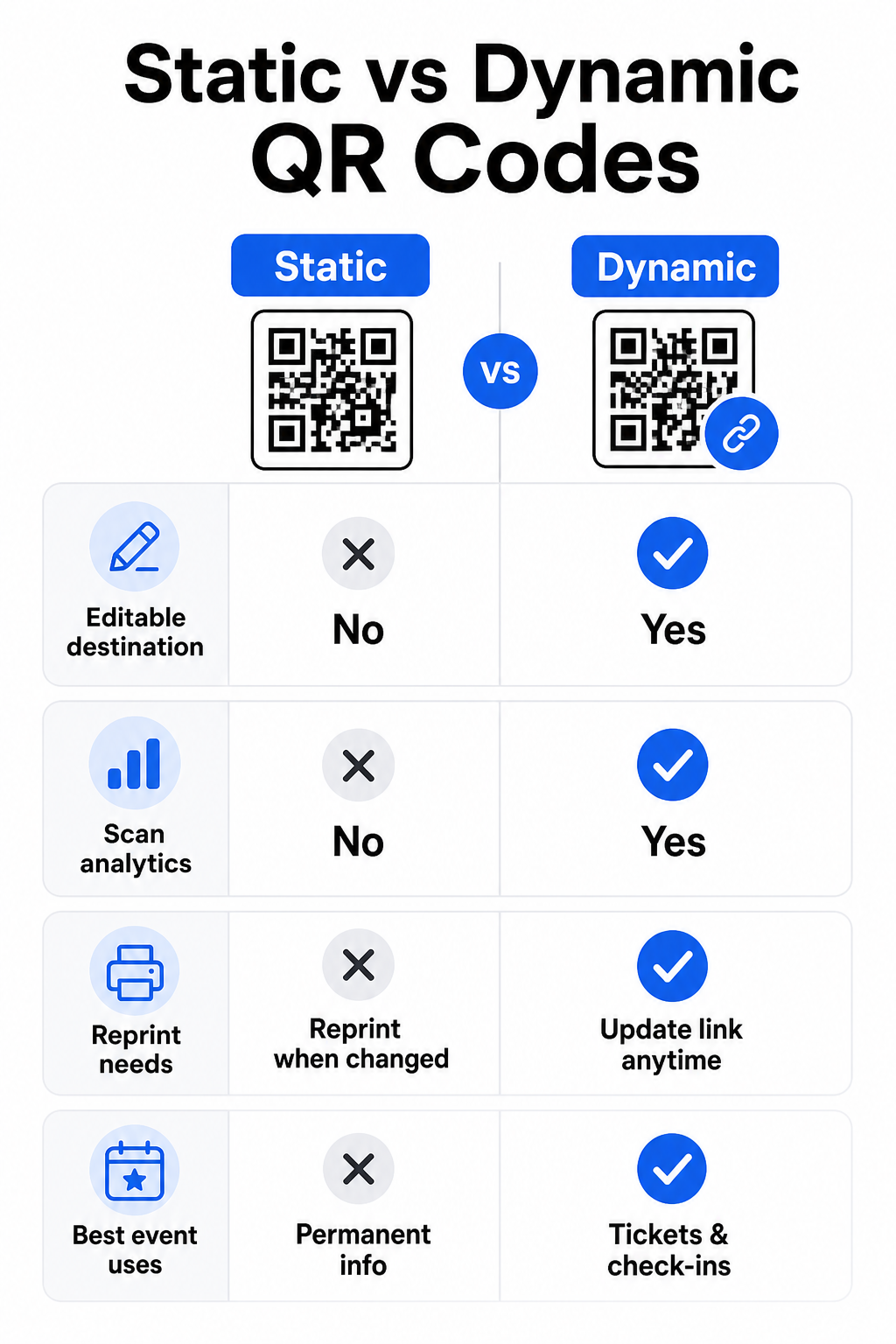
Static vs. Dynamic QR Codes for Events

Understanding the difference between static and dynamic QR codes helps you make the right choice for each use case.

기능 정적 QR 코드 동적 QR 코드
Destination editable after printing 아니요
스캔 분석 아니요
Code changes if destination changes Yes (reprint required) 아니요
가장 적합한 대상 Simple, permanent links Tickets, schedules, campaigns
비용 비어 있는 Paid subscription

For most event operations – especially ticketing, check-in, and anything that might need updating – dynamic QR codes are the better choice. They also provide scan analytics, which tells you how many people scanned, when, on what device, and from what location. The guide to building dynamic QR codes for CRM check-ins explains how to connect this data to your broader attendee management workflow.

정적 동적 비교

QR Code Placement and Sizing for Events

A QR code that cannot be scanned reliably defeats its purpose. The following guidelines reflect usability research and practical event scenarios.

Minimum sizes by material type:

  • Printed invitations: at least 1.5 × 1.5 inches
  • Badges or wristbands: at least 1.5 inches square
  • Table cards or place cards: at least 1 × 1 inch (1.5 inches preferred)
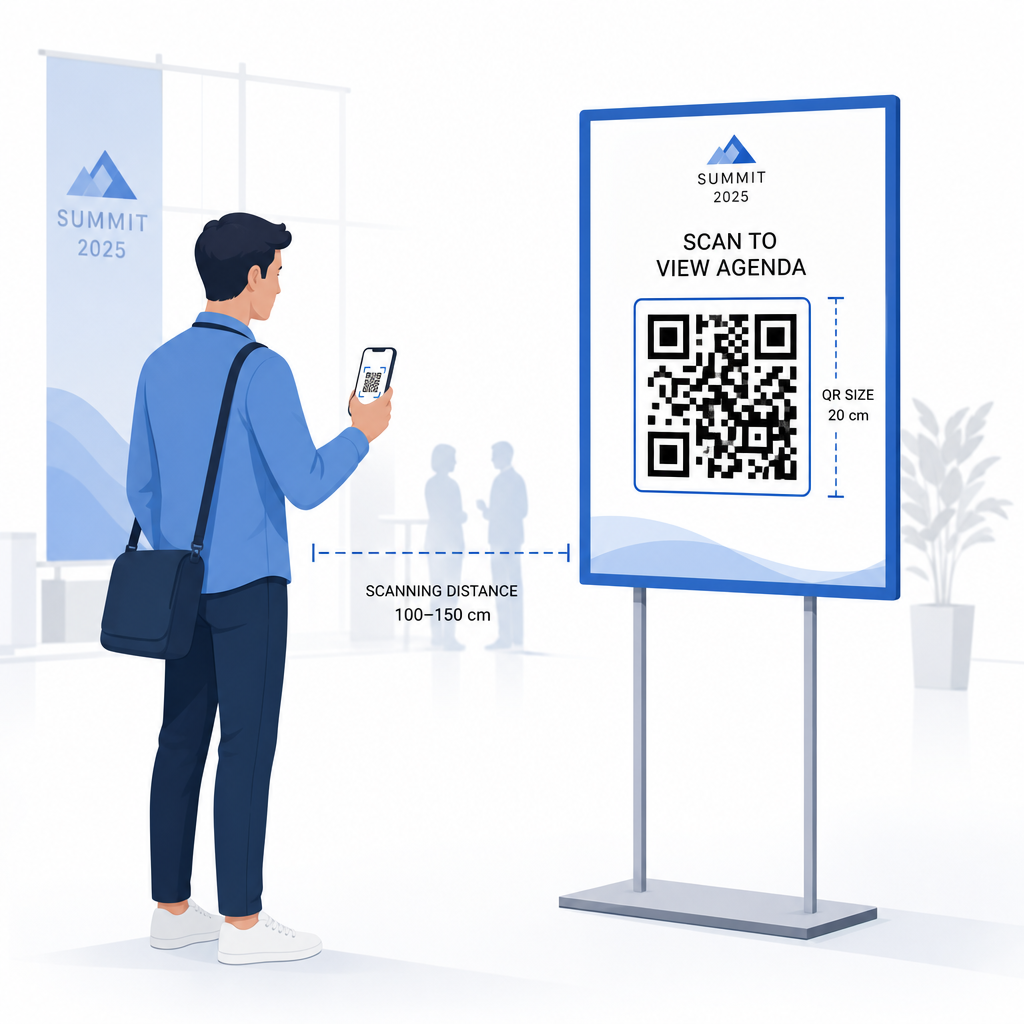
  • Event signage: at least 5 × 5 inches, increasing to 7 × 7 inches for venues wider than 30 feet

A useful rule of thumb: the smallest QR code dimension should be roughly one-tenth of the scanning distance. A code scanned from 3 feet away should be at least 3.6 inches wide.

QR 배치 가이드

Placement guidelines:

  • Position codes at eye or chest height – roughly 3 to 5 feet from the floor – so attendees can scan without bending or reaching
  • Place codes where people naturally pause or wait: entrances, registration desks, tables, near displays, and in queues
  • Maintain high contrast: dark modules on a light background scan most reliably; avoid inverted or low-contrast color schemes
  • Keep a 콰이어트 존 of at least 4 modules of blank space on all four sides of the code; text or graphics inside this margin cause scan failures
  • Test every code at its final printed size, from the expected scanning distance, on both iOS and Android, before the event

For more guidance, the 이벤트 체크인을 위한 QR 코드 궁극 가이드 includes detailed technical scanning requirements and door operations best practices.

Tracking Event Performance with QR Analytics

One of the underused advantages of dynamic QR codes is the data they generate. Pageloot’s analytics dashboard captures scan counts, timestamps, device types, and geographic locations in real time.

For event organizers, this data answers practical questions:

  • Which entry point had the highest scan volume and at what time?
  • Did attendees engage with the schedule or sponsor content during the event?
  • How many people scanned the post-event survey code?
  • Which promotional channel – printed flyer, social media post, email – drove the most ticket scans?

This information informs staffing decisions, helps you identify bottlenecks, and gives sponsors measurable proof of audience engagement. For a deeper look at the tools available, see the roundup of QR 코드 이벤트 추적을 위한 최고의 도구.

See Who’s Scanning and When Pageloot’s built-in analytics give you real-time scan data across all your event QR codes in one dashboard. Start with the 이벤트 QR코드 생성기 and run your next event with full visibility.

Scanning QR Codes at Your Event

If you need a scanning solution for staff to validate tickets or check in attendees, Pageloot’s QR 코드 스캐너 works directly in the browser – no app download required. Staff can scan from any smartphone or tablet by pointing the camera at the code or uploading an image.

For larger events with dedicated scanning stations, native device cameras on iOS (iOS 11 and later) and Android scan QR codes without any additional app. Test your scanning setup under the actual lighting conditions of your venue before the event, and train staff to hold the device approximately 30 cm (about 12 inches) from the code for consistent reads.

Common QR Code Issues at Events (and How to Avoid Them)

Even well-designed QR codes fail when certain conditions are not met. Here are the most frequent problems and their fixes:

  • Code too small: Follow the size minimums above; when in doubt, print larger
  • Poor contrast: Use dark modules on a white or light background; avoid placing codes on dark or patterned surfaces
  • Glossy material: Matte finishes scan more reliably because they eliminate glare; avoid glossy badge or wristband materials
  • Damaged code: Physical scratches or tears block scanning; use error-correction settings when generating codes for physical materials
  • No quiet zone: Verify that nothing – text, borders, images – encroaches on the blank margin around the code
  • Untested code: Always scan the final printed version on multiple devices before distributing at scale

For additional troubleshooting on QR codes printed directly on tickets, see the guide to QR codes on tickets.

QR codes give event organizers a direct line between physical touchpoints and digital systems – whether that’s validating a ticket, logging attendance, collecting feedback, or navigating a venue. The key is choosing dynamic codes where flexibility matters, sizing and placing them for reliable scanning, and using analytics to understand how attendees are actually engaging.

Get started with the 이벤트 QR코드 생성기 to create your first event QR code, or explore the Attendance QR Code tool to build a check-in system that logs every arrival automatically.

자주 묻는 질문

What is the difference between a static and dynamic QR code for events?

A static QR code has a fixed destination that cannot be changed after it is created. If your event details change, you need to reprint the code. A dynamic QR code lets you update the destination URL at any time without changing the printed code itself. Dynamic codes also provide scan analytics – data on when, where, and how often the code is scanned – which static codes do not. For most event applications, particularly ticketing and schedules, dynamic codes are the practical choice.

How do I create a QR code for event check-in?

Open Pageloot’s Event QR Code Generator and select the option to create an event QR code. Enter your event URL or registration link, add event details like the title and description, then customize the code design with your branding. Download the code and distribute it to attendees via email, PDF, or printed ticket. At the event, staff scan each attendee’s code using a smartphone camera or the Pageloot QR Code Scanner to mark them as checked in.

What size should a QR code be for event signage?

For standard event signage, a minimum of 5 × 5 inches is recommended. For larger venues wider than 30 feet, increase the size to at least 7 × 7 inches. A reliable rule of thumb is that the code’s smallest dimension should be roughly one-tenth of the expected scanning distance – so a code viewed from 5 feet away should be about 6 inches wide. Always test the printed code at the actual scanning distance before the event.

작성자 정보

시임 코스타비는 페이지루트의 콘텐츠 책임자입니다. 그는 페이지루트의 혁신적인 QR 코드 생성 서비스에 대한 글을 쓰고 있습니다. 5년 이상 QR 코드 분야에서 쌓아온 깊이 있는 전문 지식을 바탕으로, 시임은 이 분야의 전문가로 인정받고 있습니다. 그는 QR 기술을 활용하여 디지털 상호작용을 간소화하고 향상시키는 데 크게 기여하고 있습니다.

범주
에 대해 자세히 알아보기

온라인으로 QR 코드를 생성해야하는 경우 QR 코드 만들기 무료로 여기!
Pageloot는 #1 Go-To 솔루션 QR 코드를 만들고 스캔합니다.

BL-0284

블로그 세대

20,000개 이상의 브랜드로부터 신뢰를 받아 더 많은 매출, 리뷰, 팔로워를 확보했습니다.

클라이언트 로고
최고 브랜드의 신뢰
5 중 4.8 평가

4.86 / 5 별점

휴고 로랑
휴고 로랑
레스토랑 주인
가장 쉽고 안정적인 QR 코드 생성기. PDF 파일을 즉시 업로드할 수 있습니다. 이제 레스토랑 메뉴가 디지털화되었습니다.
루카스 얀센
루카스 얀센
부동산 개발사
이것은 훌륭한 도구이며 QR 코드를 사용하면 원하는 곳으로 이동할 수 있습니다. 우리는 위치 QR 코드만 사용하지만 유용한 기능이 너무 많습니다.
엠마 모레티
엠마 모레티
소매 제품
사용하기 쉽고 빠릅니다. 그것은 훌륭하게 작동하고 완벽한 이미지를 생성하므로 직원들이 내 vCard를 다운로드할 수 있습니다.
휴고 로랑
휴고 로랑
레스토랑 주인
가장 쉽고 안정적인 QR 코드 생성기. PDF 파일을 즉시 업로드할 수 있습니다. 이제 레스토랑 메뉴가 디지털화되었습니다.
루카스 얀센
루카스 얀센
부동산 개발사
이것은 훌륭한 도구이며 QR 코드를 사용하면 원하는 곳으로 이동할 수 있습니다. 우리는 위치 QR 코드만 사용하지만 유용한 기능이 너무 많습니다.
엠마 모레티
엠마 모레티
소매 제품
사용하기 쉽고 빠릅니다. 그것은 훌륭하게 작동하고 완벽한 이미지를 생성하므로 직원들이 내 vCard를 다운로드할 수 있습니다.
더 많은 QR 코드보기
여행객이 공항 QR을 스캔
QR 코드 항공사 및 공항
무엇이든 디지털 경험으로 전환하세요 3분 이내에.

14일 무료 체험.

신용카드는 필요 없습니다.

첫 구매 시 30% 할인

코드를 사용하세요:

MP3 파일 공유

PDF QR 코드를 생성하려면 가입하세요

필요한 모든 것을 업로드하고 표시합니다.

  • 오디오 파일
  • 팟캐스트
  • 음악

가입 시 14일 무료 체험.
체험 기간 후 QR 코드 만료.

오디오 mp3 QR 코드를 생성하려면 가입하세요

프레임으로 더 많은 스캔 확보

QR 코드에 더 많은 프레임을 추가하려면 가입하세요

클릭 유도 문안 프레임은 고객이 QR 코드와 쉽게 상호 작용할 수 있도록 도와줍니다. 사용해 보세요!

가입 시 14일 무료 체험.
체험 기간 후 QR 코드 만료.

QR 코드에 더 많은 프레임을 추가하려면 가입하세요

도형으로 더 많은 스타일 추가

더 많은 도형을 만들려면 가입하세요

QR 코드는 정사각형일 필요가 없습니다. 브랜드 이미지에 맞게 전환해 보세요.

가입 시 14일 무료 체험.
체험 기간 후 QR 코드 만료.

더 많은 도형을 만들려면 가입하세요

QR 코드에 로고 추가

QR 코드에 로고를 추가하려면 가입하세요

로고와 브랜드를 추가하여 QR 코드를 돋보이게 만드세요.

가입 시 14일 무료 체험.
체험 기간 후 QR 코드 만료.

QR 코드에 로고를 추가하려면 가입하세요

스마트 앱 스토어 리디렉션

앱 스토어 QR 코드를 생성하려면 가입하세요

스마트 앱 스토어 QR 코드에 앱 링크를 추가하세요. 사용자는 장치에 따라 리디렉션됩니다.

가입 시 14일 무료 체험.
체험 기간 후 QR 코드 만료.

앱 스토어 QR 코드를 생성하려면 가입하세요

QR 코드에 이미지 업로드

이미지 QR 코드를 생성하려면 가입하세요

이미지를 쉽게 공유하세요. 몇 초 안에 동적으로 이미지를 변경하십시오.

가입 시 14일 무료 체험.
체험 기간 후 QR 코드 만료.

이미지 QR 코드를 생성하려면 가입하세요

PDF 파일 공유

PDF QR 코드를 생성하려면 가입하세요

필요한 모든 것을 업로드하고 표시합니다.

  • 메뉴 및 가격표
  • 명령
  • 모든 문서

가입 시 14일 무료 체험.
체험 기간 후 QR 코드 만료.

PDF QR 코드를 생성하려면 가입하세요

인쇄 없이 나중에 편집

다시 인쇄하지 않고 QR 코드를 편집하려면 가입하세요

동적 QR 코드를 사용하면 새 QR 코드를 인쇄하지 않고도 QR 코드의 내용을 변경할 수 있습니다.

가입 시 14일 무료 체험.
체험 기간 후 QR 코드 만료.

다시 인쇄하지 않고 QR 코드를 편집하려면 가입하세요

언제? 어디서? QR 코드 스캔 추적

QR 코드를 추적하려면 가입하세요

어떤 QR 코드가 가장 많이 스캔되고 무엇이 고객을 가장 흥분시키는지 알아보십시오.

가입 시 14일 무료 체험.
체험 기간 후 QR 코드 만료.

QR 코드를 추적하려면 가입하세요

인쇄 준비 파일 제공

PDF 및 SVG와 같은 벡터 QR 코드를 생성하려면 가입하세요.

.EPS, .PDF, .SVG

HD 해상도로 QR 코드를 다운로드하고 싶으신가요? 인쇄할 준비가 된 벡터 또는 픽셀 형식을 가져옵니다.

가입 시 14일 무료 체험.
체험 기간 후 QR 코드 만료.

PDF 및 SVG와 같은 벡터 QR 코드를 생성하려면 가입하세요.

기다리세요. 귀하의 QR 코드는 로드 중... 로드 중...

나만의 것으로 만들기

나중을 위해 QR 코드를 저장하려면 가입하세요.

다양한 색상, 로고 및 클릭 유도문안 프레임으로 멋진 QR 코드를 만들어 더 많은 스캔을 받으세요.

가입 시 14일 무료 체험.
체험 기간 후 QR 코드 만료.

나중을 위해 QR 코드를 저장하려면 가입하세요.