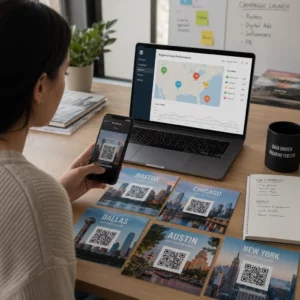
Még mindig nyomtatott vendéglistákkal és manuális bejelentkezésekkel kezeli az eseményekre való belépést? Ez a megközelítés lassítja a belépési sorokat, frusztrálja a résztvevőket, és kevés rálátást biztosít a szervezőknek arra, hogy mi is történik valójában a helyszínen. Ez az oldal bemutatja a QR-kódok eseményeken való használatának minden gyakorlati módját – a jegykezeléstől és a bejelentkezésektől az RSVP-kig és az esemény utáni nyomon követésig –, hogy zökkenőmentesebb működést biztosíthasson és mérhető eredményeket érjen el.
Miért alkalmazzák a rendezvényszervezők a QR-kódokat
A QR-kódok alkalmazása a rendezvényszakemberek körében már nem rétegpiaci jelenség. A marketingesek 43%-a kifejezetten eseményekre használ QR-kódokat, ezzel az események a leggyakoribb QR-felhasználási eset a marketing szakemberek körében. Ugyanezen adatok szerint a marketingesek több mint 90%-a számolt be arról, hogy 2025-ben QR-kódokat használt, 94%-uk pedig évről évre növelte a használatát.
Ennek a változásnak az oka gyakorlati: a résztvevők már megszokták a szkennelést. A fogyasztók több mint kétharmada használt QR-kódot legalább egyszer az elmúlt évben, és a Z generáció és a millenniumiak nagyjából fele hetente legalább egyszer szkennel QR-kódokat. Mivel az amerikaiak 98%-a rendelkezik mobiltelefonnal, nincs jelentős akadálya annak, hogy a résztvevők szkenneljenek.
A szervezők számára a megtérülés a valós idejű irányítás. Nyomon követheti a belépést, figyelemmel kísérheti a részvételt szekciónként, frissítheti az eseményinformációkat az anyagok újranyomtatása nélkül, és mérheti az elkötelezettséget sokkal az esemény befejezése után is.
QR-kód felhasználási esetek eseményekhez
A QR-kódok elég rugalmasak ahhoz, hogy szinte minden operatív és elkötelezettségi igényt kielégítsenek egy eseményen. Íme a leghatékonyabb alkalmazások.
Jegykezelés és beléptetés
A leggyakoribb kiindulópont a papírjegyek cseréje szkennelhető QR-kódokra. Minden résztvevő egyedi QR-kódot kap – e-mailben, PDF-ben vagy mobilon keresztül –, amelyet a személyzet a bejáratnál szkennel a belépés érvényesítéséhez és a részvétel valós idejű rögzítéséhez.
Ez a megközelítés megszünteti a manuális listaelemzés szükségességét, felgyorsítja a belépési sorokat, és megakadályozza a duplikált használatból eredő csalásokat, mivel minden kód beállítható egyszeri szkenneléses érvényesítésre. A mögöttes biztonsági architektúra részletes bemutatásáért lásd a következő útmutatót: hogyan készítsünk biztonságos QR-kódos rendezvényjegyeket.
Jegyeket közvetlenül generálhat a Esemény QR kód generátor segítségével, megadva az esemény URL-jét, címét, leírását és elérhetőségeit, majd testreszabva a kódtervet, mielőtt letöltené terjesztésre.
Egyszerűsítse eseménybelépését Hozzon létre márkás, nyomon követhető QR-kódokat jegyekhez, céloldalakhoz és bejelentkezésekhez. Próbálja ki a Esemény QR kód generátor ingyenesen 14 napig – hitelkártya nem szükséges.
Résztvevői bejelentkezés és részvételkövetés
A QR-alapú bejelentkezés úgy működik, hogy a személyzet telefonnal, táblagéppel vagy dedikált szkennelő alkalmazással szkenneli az egyes résztvevők kódját. Egy érvényes szkennelés automatikusan bejelentkezettként jelöli meg a személyt, és azonnal frissíti a részvételi nyilvántartásokat.
Ez jelentősen gyorsabb, mint a manuális módszerek. A útmutató szerint a QR-kódok eseményekre való bejelentkezéshez, a QR-kódos bejelentkezések az átlagos feldolgozási időt személyenként 2 másodperc alá csökkentik, és a teljes belépési időt akár 50%-kal is lerövidíthetik a manuális folyamatokhoz képest.
Folyamatos események, órák vagy több szekciós konferenciák esetén a Pageloot Részvételi QR-kód eszköze lehetővé teszi a résztvevők számára, hogy önállóan bejelentkezzenek egy Google Formhoz vagy hasonló eszközhöz kapcsolt kód beolvasásával, a válaszok pedig automatikusan bekerülnek egy táblázatba a valós idejű nyomon követéshez. Tudjon meg többet az ilyen rendszer felépítéséről a részvételkövető oldalon.
RSVP gyűjtés
Ahelyett, hogy a vendégeket egy URL beírására utasítaná, egy QR-kód a meghívóján, szórólapján vagy eseményoldalán egyetlen szkenneléssel közvetlenül az RSVP űrlapjára viszi őket. Ez megszünteti a súrlódást, és jellemzően növeli a válaszadási arányt.
Használd a Pageloot Google Forms kérdőív QR kód generátor segítségével bármely Google Formot összekapcsolhat egy szkennelhető kóddal, majd elhelyezheti nyomtatott meghívókon, digitális grafikákon vagy eseménytáblákon. A lépésről lépésre történő útmutatásért a útmutató az eseményekhez készült RSVP QR-kódokról végigvezeti a platform kiválasztásán, a kódgeneráláson és az adatvédelmi megfelelőségen.
Menetrendek és eseményinformációk
Egy jelvényen, asztali kártyán vagy helyszíni táblán elhelyezett QR-kód összekapcsolhatja a résztvevőket egy élő eseményprogrammal, előadói életrajzokkal, alaprajzokkal vagy szekciórészletekkel. Mivel a dinamikus QR kódok lehetővé teszi a cél URL frissítését nyomtatás után, így javíthatja a menetrend változásait vagy hozzáadhat információkat az anyagok újranyomtatása nélkül.
Ez az egyik legerősebb gyakorlati érv a dinamikus kódok statikus kódokkal szembeni használata mellett. Ha egy előadó lemondja, vagy egy terem megváltozik, akkor a linket frissíti – nem a nyomtatott anyagot.
Google Naptár integráció
Konferenciák, workshopok vagy bármilyen jegyes események esetén, ahol szekciók vannak, egy QR-kód összekapcsolása egy Google Naptár bejegyzéssel lehetővé teszi a résztvevők számára, hogy egyetlen szkenneléssel közvetlenül hozzáadják az eseményt a naptárukhoz. Használja a Google Naptár QR-kód generátor segítségével hozza létre ezt a kódot, majd helyezze el megerősítő e-maileken, jegyeken vagy meghívókon.
Helyszíni navigáció
A nagy helyszínek – kongresszusi központok, szabadtéri fesztiválok, többszintes konferenciatermek – gyakran okoznak súrlódást egyszerűen azért, mert a résztvevők nem találják meg, hová kell menniük. Egy QR-kód a táblákon, jegyeken vagy meghívókon, amely közvetlenül a Google Térképen nyílik meg, teljesen megszünteti ezt a súrlódást. Hozzon létre egyet a Google Térkép QR-kód generátor segítségével, és helyezze el bárhol, ahol a résztvevők látni fogják az esemény előtt vagy alatt.
Fotómegosztás és közösségi elkötelezettség
A QR-kódok összekapcsolhatják a résztvevőket egy megosztott fotógalériával, egy márkás hashtag oldallal vagy egy feltöltési portállal, így a vendégek valós időben hozzájárulhatnak és megtekinthetik az eseményfotókat. Ez egy olyan részvételi hurkot hoz létre, amely kiterjeszti az eseményélményt a fizikai helyszínen túlra. Gyakorlati beállítási útmutatóért lásd: hogyan használjunk QR-kódot fotók megosztására.
Esemény utáni felmérések és nyomon követés
A kutatások azt mutatják, hogy a szervezők 41%-a használ esemény utáni felméréseket a ROI mérésére, és 40%-a támaszkodik a közösségi média elkötelezettségére. Egy QR-kód a jelvényen, szórólapon vagy kijárati táblán, amely egy visszajelzési űrlapra mutat, megkönnyíti a résztvevők számára a válaszadást, amíg az esemény még friss. Az űrlap Pageloot generátoron keresztül történő Google Űrlaphoz való kapcsolása azt jelenti, hogy a válaszok közvetlenül egy táblázatba kerülnek, amelyet azonnal elemezhet.
Hogyan hozzunk létre esemény QR-kódot a Pageloot segítségével
A folyamat néhány percet vesz igénybe, és nem igényel technikai ismereteket.
- Nyissa meg a generátort – Lépjen a Esemény QR kód generátor oldalra, és válassza az “Esemény QR-kód létrehozása” lehetőséget.”
- Adja hozzá az esemény részleteit – Adja meg az eseményoldal URL-jét, címét, leírását és elérhetőségi adatait. A Pageloot egy céloldalt épít e tartalom köré.
- Tervezze meg a QR-kódot – Állítsa be a színeket, formákat, és adja hozzá logóját, hogy illeszkedjen az esemény márkájához.
- Válasszon dinamikusat, ha rugalmasságra van szüksége – A dinamikus kódok lehetővé teszik a célhivatkozás frissítését nyomtatás után. Ez a megfelelő választás minden olyan dologhoz, ami az esemény előtt vagy alatt változhat.
- Tesztelje a kódot – Szkennelje be iOS és Android eszközökön is, különböző fényviszonyok között, mielőtt terjesztené.
- Letöltés és terjesztés – Exportálja PNG, PDF vagy SVG formátumban, és helyezze el jegyeken, táblákon, meghívókon vagy digitális anyagokon.
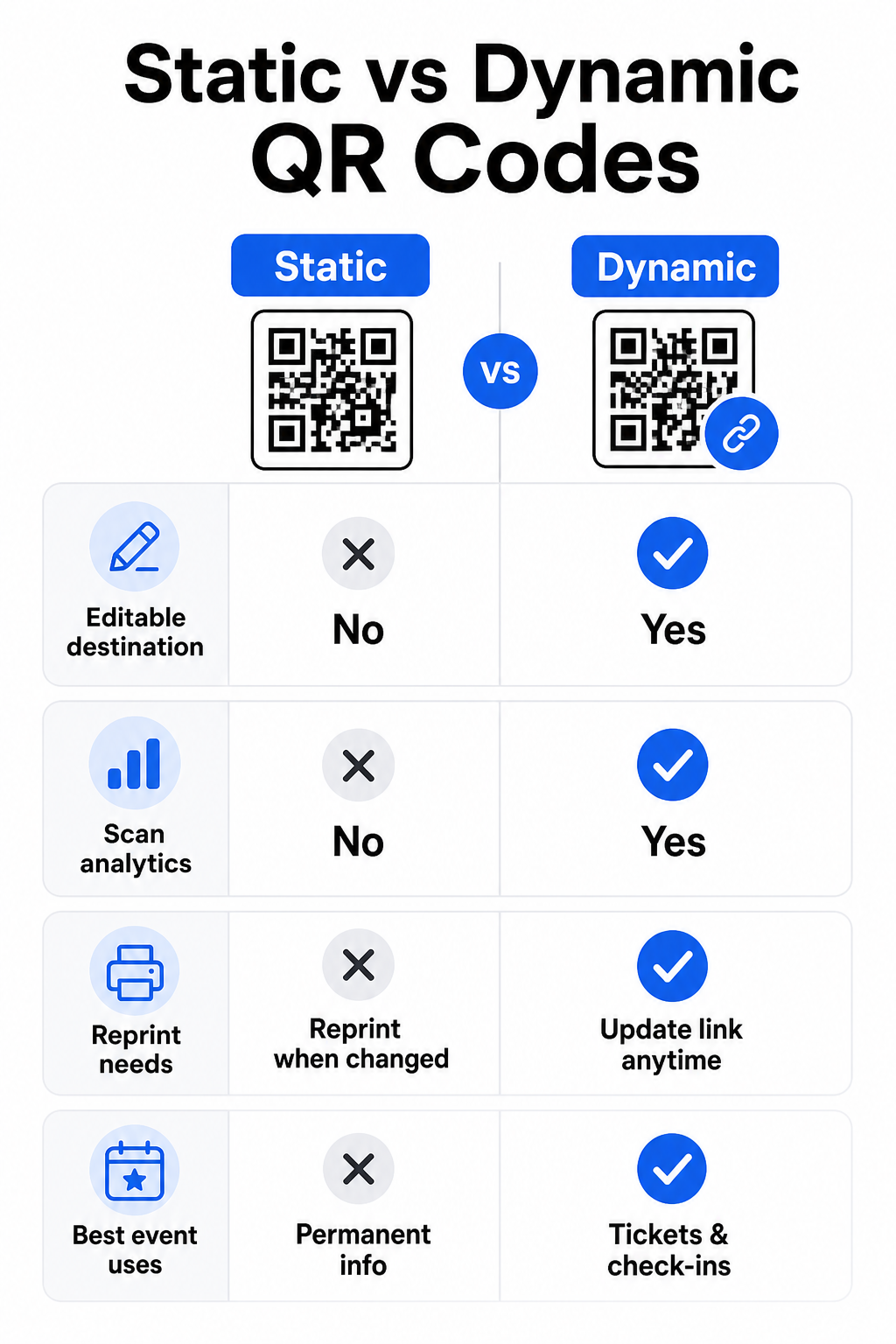
Statikus vs. Dinamikus QR-kódok eseményekhez
A statikus és dinamikus QR-kódok közötti különbség megértése segít a megfelelő választásban minden felhasználási esetre.
| FUNKCIÓ | Statikus QR-kód | Dinamikus QR-kód |
|---|---|---|
| Cél szerkeszthető nyomtatás után | Nem | Igen |
| Szkennelési analitika | Nem | Igen |
| A kód változik, ha a cél változik | Igen (újra nyomtatás szükséges) | Nem |
| Legjobb: | Egyszerű, állandó linkek | Jegyek, menetrendek, kampányok |
| Költségek | Ingyenes | Fizetős előfizetés |
A legtöbb eseménykezelési művelethez – különösen a jegykezeléshez, bejelentkezéshez és minden olyan dologhoz, ami frissítésre szorulhat – a dinamikus QR-kódok a jobb választás. Emellett szkennelési analitikát is biztosítanak, amely megmondja, hányan szkenneltek, mikor, milyen eszközön és honnan. A útmutató a dinamikus QR-kódok építéséhez CRM bejelentkezésekhez elmagyarázza, hogyan kapcsolhatja össze ezeket az adatokat a szélesebb körű résztvevőkezelési munkafolyamatával.
QR-kód elhelyezése és méretezése eseményekhez
Egy QR-kód, amelyet nem lehet megbízhatóan beolvasni, elveszíti a célját. Az alábbi irányelvek a használhatósági kutatásokat és a gyakorlati eseményforgatókönyveket tükrözik.
Minimális méretek anyagtípus szerint:
- Nyomtatott meghívók: legalább 1,5 × 1,5 hüvelyk
- Jelvények vagy karszalagok: legalább 1,5 hüvelyk négyzet
- Asztali kártyák vagy ültetőkártyák: legalább 1 × 1 hüvelyk (1,5 hüvelyk előnyben részesítve)
- Eseménytáblák: legalább 5 × 5 hüvelyk, növelve 7 × 7 hüvelyk -re a 30 lábnál szélesebb helyszíneken
Hasznos ökölszabály: a legkisebb QR-kód méretnek nagyjából a szkennelési távolság egytizedének. kell lennie. Egy 3 láb távolságból szkennelt kódnak legalább 3,6 hüvelyk szélesnek kell lennie.
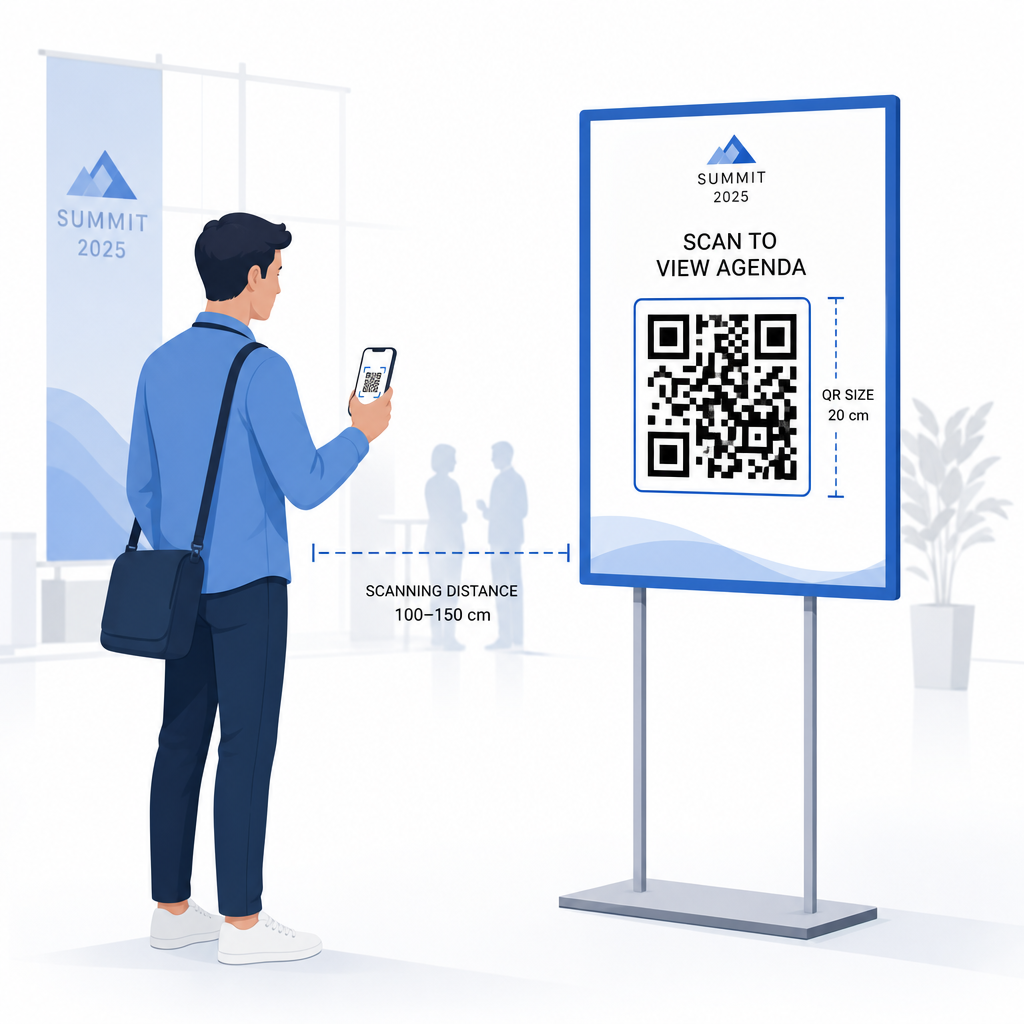
Elhelyezési irányelvek:
- Helyezze el a kódokat szem- vagy mellmagasságban – nagyjából 3-5 lábnyira a padlótól – így a résztvevők hajolás vagy nyújtózkodás nélkül szkennelhetnek
- Helyezze el a kódokat ott, ahol az emberek természetesen megállnak vagy várnak: bejáratoknál, regisztrációs pultoknál, asztaloknál, kijelzők közelében és sorokban
- Tartson fenn magas kontrasztot: sötét modulok világos háttéren szkennelhetők a legmegbízhatóbban; kerülje az invertált vagy alacsony kontrasztú színvilágokat
- Tartson legalább csendes zónára 4 modulnyi üres helyet a kód mind a négy oldalán; a margón belüli szöveg vagy grafika szkennelési hibákat okoz
- Teszteljen minden kódot a végső nyomtatott méretében, a várható szkennelési távolságból, iOS és Android eszközökön is, az esemény előtt
További útmutatásért a QR-kódok rendezvény beléptetéshez – a teljes útmutató részletes technikai szkennelési követelményeket és a bejárati műveletek legjobb gyakorlatait tartalmazza.
Eseményteljesítmény nyomon követése QR-analitikával
A dinamikus QR-kódok egyik alulhasznált előnye az általuk generált adatok. A Pageloot analitikai műszerfala valós időben rögzíti a szkennelések számát, időbélyegeket, eszköz típusokat és földrajzi helyeket.
Az eseményszervezők számára ezek az adatok gyakorlati kérdésekre adnak választ:
- Melyik belépési ponton volt a legnagyobb a szkennelési volumen és mikor?
- A résztvevők foglalkoztak-e a menetrenddel vagy a szponzori tartalommal az esemény során?
- Hányan szkennelték az esemény utáni felmérés kódját?
- Melyik promóciós csatorna – nyomtatott szórólap, közösségi média bejegyzés, e-mail – generálta a legtöbb jegybeolvasást?
Ez az információ segíti a személyzeti döntéseket, segít azonosítani a szűk keresztmetszeteket, és mérhető bizonyítékot ad a szponzoroknak a közönség elkötelezettségéről. Az elérhető eszközök mélyebb áttekintéséért lásd a gyűjteményt a legjobb eszközök a QR-kódos eseménykövetéshez.
Lásd, ki szkennel és mikor A Pageloot beépített analitikája valós idejű szkennelési adatokat biztosít az összes esemény QR-kódjára vonatkozóan egyetlen irányítópulton. Kezdje a Esemény QR kód generátor és futtassa a következő eseményét teljes átláthatósággal.
QR-kódok szkennelése az eseményén
Ha szkennelési megoldásra van szüksége a személyzet számára a jegyek érvényesítéséhez vagy a résztvevők bejelentkezéséhez, a Pageloot QR-kód olvasó közvetlenül a böngészőben működik – nincs szükség alkalmazás letöltésére. A személyzet bármilyen okostelefonról vagy táblagépről szkennelhet a kamerát a kódra irányítva vagy egy kép feltöltésével.
Nagyobb események esetén, dedikált szkennelő állomásokkal, az iOS (iOS 11 és újabb) és Android natív eszköz kamerái további alkalmazás nélkül szkennelik a QR-kódokat. Tesztelje a szkennelési beállítást a helyszín tényleges fényviszonyai között az esemény előtt, és képezze ki a személyzetet, hogy a készüléket körülbelül 30 cm-re (kb. 12 hüvelyk) tartsa a kódtól az egységes olvasás érdekében.
Gyakori QR-kód problémák az eseményeken (és hogyan kerülhetők el)
Még a jól megtervezett QR-kódok is hibáznak, ha bizonyos feltételek nem teljesülnek. Íme a leggyakoribb problémák és azok megoldásai:
- Túl kicsi a kód: Kövesse a fenti minimális méreteket; kétség esetén nyomtasson nagyobbat
- Gyenge kontraszt: Használjon sötét modulokat fehér vagy világos háttéren; kerülje a kódok elhelyezését sötét vagy mintás felületeken
- Fényes anyag: A matt felületek megbízhatóbban szkennelhetők, mert kiküszöbölik a tükröződést; kerülje a fényes jelvény- vagy karszalag anyagokat
- Sérült kód: A fizikai karcolások vagy szakadások blokkolják a szkennelést; használjon hibajavító beállításokat, amikor fizikai anyagokhoz generál kódokat
- Nincs csendes zóna: Ellenőrizze, hogy semmi – szöveg, szegélyek, képek – ne nyúljon be a kód körüli üres margóba
- Teszteletlen kód: Mindig szkennelje be a végleges nyomtatott verziót több eszközön, mielőtt nagy mennyiségben terjesztené
További hibaelhárításért a közvetlenül jegyekre nyomtatott QR-kódokkal kapcsolatban, lásd a útmutatót a jegyeken lévő QR-kódokhoz.
A QR-kódok közvetlen kapcsolatot biztosítanak az eseményszervezőknek a fizikai érintkezési pontok és a digitális rendszerek között – legyen szó jegy érvényesítéséről, részvétel rögzítéséről, visszajelzés gyűjtéséről vagy egy helyszín navigálásáról. A kulcs a dinamikus kódok kiválasztása, ahol a rugalmasság számít, méretezésük és elhelyezésük a megbízható szkennelés érdekében, és analitika használata annak megértéséhez, hogyan is kapcsolódnak be a résztvevők.
Kezdje el a Esemény QR kód generátor hogy létrehozza első esemény QR-kódját, vagy fedezze fel a Részvételi QR-kód eszközt egy bejelentkezési rendszer felépítéséhez, amely automatikusan rögzíti minden érkezést.
Gyakori kérdések
Egy statikus QR kód fix célállomással rendelkezik, ami nem változtatható meg, miután létrejött. Ha az esemény részletei megváltoznak, újra kell nyomtatnia a kódot. Egy dinamikus QR kód lehetővé teszi a cél URL frissítését bármikor anélkül, hogy magát a nyomtatott kódot megváltoztatná. A dinamikus kódok szkennelési elemzéseket is biztosítanak – adatokat arról, hogy mikor, hol és milyen gyakran szkennelték be a kódot – amit a statikus kódok nem. A legtöbb eseményalkalmazás esetén, különösen a jegykezelés és az ütemezések esetében, a dinamikus kódok a praktikus választás.
Nyissa meg a Pageloot esemény QR-kód generátorát, és válassza ki az esemény QR-kód létrehozásának lehetőségét. Adja meg az esemény URL-jét vagy regisztrációs linkjét, adja hozzá az esemény részleteit, például a címet és a leírást, majd szabja testre a kódtervet a márkájával. Töltse le a kódot, és ossza szét a résztvevőknek e-mailben, PDF-ben vagy nyomtatott jegyen keresztül. Az eseményen a személyzet beolvassa minden résztvevő kódját okostelefon kamerával vagy a Pageloot QR-kód szkennelővel, hogy bejelentkezettként jelölje meg őket.
Standard eseménytáblákhoz legalább 5 × 5 hüvelyk ajánlott. Nagyobb, 30 lábnál szélesebb helyszínek esetén növelje a méretet legalább 7 × 7 hüvelykre. Megbízható ökölszabály, hogy a kód legkisebb méretének nagyjából a várható szkennelési távolság egytizedének kell lennie – tehát egy 5 láb távolságból nézett kódnak körülbelül 6 hüvelyk szélesnek kell lennie. Mindig tesztelje a nyomtatott kódot a tényleges szkennelési távolságban az esemény előtt.