Gérez-vous toujours l'entrée des événements avec des listes d'invités imprimées et des enregistrements manuels ? Cette approche ralentit les files d'attente, frustre les participants et laisse les organisateurs avec peu de visibilité sur ce qui se passe réellement sur le terrain. Cette page couvre toutes les façons pratiques d'utiliser les codes QR lors d'événements – de la billetterie et des enregistrements aux RSVP et au suivi post-événement – afin que vous puissiez gérer des opérations plus fluides et obtenir des résultats mesurables.
Pourquoi les organisateurs d'événements adoptent les codes QR
L'adoption des codes QR parmi les professionnels de l'événementiel n'est plus une niche. 43% des marketeurs utilisent les codes QR spécifiquement pour les événements, faisant des événements le cas d'utilisation de QR le plus courant parmi les professionnels du marketing. Ces mêmes données montrent que plus de 90% des marketeurs ont déclaré utiliser des codes QR en 2025, avec 94% augmentant leur utilisation d'année en année.
La raison de ce changement est pratique : les participants sont déjà à l'aise avec le scan. Plus des deux tiers des consommateurs ont utilisé un code QR au moins une fois au cours de la dernière année, et environ la moitié de la génération Z et des Millennials scannent des codes QR au moins une fois par semaine. Avec 98% des Américains possédant un téléphone portable, il n'y a pas d'obstacle significatif pour inciter les participants à scanner.
Pour les organisateurs, le bénéfice est un contrôle en temps réel. Vous pouvez suivre les entrées, surveiller la participation par session, mettre à jour les informations de l'événement sans réimprimer de matériel, et mesurer l'engagement bien après la fin de l'événement.
Cas d'utilisation des codes QR pour les événements
Les codes QR sont suffisamment flexibles pour gérer presque tous les besoins opérationnels et d'engagement lors d'un événement. Voici les applications les plus efficaces.
Billetterie et gestion des entrées
Le point de départ le plus courant est de remplacer les billets papier par des codes QR scannables. Chaque participant reçoit un code QR unique – livré par e-mail, PDF ou mobile – que le personnel scanne à l'entrée pour valider l'accès et marquer la présence en temps réel.
Cette approche élimine le besoin de vérification manuelle des listes, accélère les files d'attente et prévient la fraude par utilisation multiple puisque chaque code peut être configuré pour une validation à scan unique. Pour une présentation détaillée de l'architecture de sécurité derrière cela, consultez le guide sur Créer des billets d'événement sécurisés avec QR code.
Vous pouvez générer des billets directement en utilisant le Générateur de QR code événement en saisissant l'URL de votre événement, le titre, la description et les coordonnées, puis en personnalisant le design du code avant de le télécharger pour distribution.
Rationalisez l'entrée de votre événement Créez des codes QR personnalisés et traçables pour les billets, les pages de destination et les enregistrements. Essayez le Générateur de QR code événement gratuitement pendant 14 jours – aucune carte de crédit requise.
Enregistrement des participants et suivi de la présence
L'enregistrement basé sur QR fonctionne en faisant scanner le code de chaque participant par le personnel avec un téléphone, une tablette ou une application de scan dédiée. Un scan valide marque automatiquement la personne comme enregistrée et met à jour instantanément vos registres de présence.
C'est significativement plus rapide que les méthodes manuelles. Selon le guide des codes QR pour l'enregistrement des événements, les enregistrements par code QR réduisent le temps de traitement moyen à moins de 2 secondes par personne et peuvent réduire la durée totale d'entrée jusqu'à 50% par rapport aux processus manuels.
Pour les événements en cours, les cours ou les conférences multi-sessions, l'outil de Pageloot Code QR de présence permet aux participants de s'enregistrer eux-mêmes en scannant un code lié à un formulaire Google ou un outil similaire, avec des réponses alimentant automatiquement une feuille de calcul pour un suivi en temps réel. Apprenez-en davantage sur la construction de ce type de système sur la page de suivi de la présence.
Collecte des RSVP
Au lieu de demander aux invités de taper une URL, un code QR sur votre invitation, flyer ou page d'événement les dirige directement vers votre formulaire RSVP avec un seul scan. Cela élimine les frictions et augmente généralement les taux de réponse.
Utilisez de Pageloot Générateur de QR code Google Forms pour lier n'importe quel formulaire Google à un code scannable, puis le placer sur des invitations imprimées, des graphiques numériques ou la signalétique de l'événement. Pour des instructions étape par étape, le guide sur les codes QR RSVP pour les événements détaille la sélection de la plateforme, la génération de codes et la conformité à la vie privée.
Horaires et informations sur l'événement
Un code QR placé sur un badge, une carte de table ou un panneau de lieu peut lier les participants à un programme d'événement en direct, des biographies de conférenciers, des plans d'étage ou des détails de session. Parce que les codes QR dynamiques vous permettent de mettre à jour l'URL de destination après l'impression, vous pouvez corriger les changements d'horaire ou ajouter des informations sans réimprimer de matériel.
C'est l'un des arguments pratiques les plus solides pour utiliser des codes dynamiques plutôt que statiques. Si un conférencier annule ou qu'une salle change, vous mettez à jour le lien – pas le support imprimé.
Intégration Google Agenda
Pour les conférences, les ateliers ou tout événement payant avec des sessions, lier un code QR à une entrée Google Agenda permet aux participants d'ajouter l'événement directement à leur calendrier en un seul scan. Utilisez le Générateur de QR code Google Agenda pour créer ce code, puis placez-le sur les e-mails de confirmation, les billets ou les invitations.
Navigation sur le lieu de l'événement
Grands lieux – centres de congrès, festivals en plein air, espaces de conférence à plusieurs étages – causent souvent des frictions simplement parce que les participants ne trouvent pas où ils doivent aller. Un code QR sur la signalisation, les billets ou les invitations qui s'ouvre directement dans Google Maps élimine entièrement cette friction. Créez-en un en utilisant le Générateur de QR code Google Maps et incluez-le partout où les participants le verront avant ou pendant l'événement.
Partage de photos et engagement social
Les codes QR peuvent relier les participants à une galerie de photos partagée, à une page de hashtag de marque ou à un portail de téléchargement afin que les invités puissent contribuer et visualiser les photos de l'événement en temps réel. Cela crée une boucle de participation qui étend l'expérience de l'événement au-delà du lieu physique. Pour un guide de configuration pratique, voir comment utiliser un code QR pour partager des photos.
Sondages post-événement et suivi
La recherche montre que 41 % des organisateurs utilisent des sondages post-événement pour mesurer le ROI, et 40 % s'appuient sur l'engagement des médias sociaux. Un code QR sur un badge, un document ou un panneau de sortie pointant vers un formulaire de commentaires facilite la réponse des participants tant que l'événement est encore frais. Lier ce formulaire à un Google Form via le générateur de Pageloot signifie que les réponses s'écoulent directement dans une feuille de calcul que vous pouvez analyser immédiatement.
Comment créer un code QR d'événement avec Pageloot
Le processus prend quelques minutes et ne nécessite pas de compétences techniques.
- Ouvrez le générateur – Allez à la Générateur de QR code événement et sélectionnez “ Créer un code QR pour un événement ”.”
- Ajoutez les détails de votre événement – Entrez l'URL de la page de l'événement, le titre, la description et les informations de contact. Pageloot construit une page de destination autour de ce contenu.
- Concevez le code QR – Ajustez les couleurs, les formes et ajoutez votre logo pour correspondre à l'image de marque de votre événement.
- Choisissez dynamique si vous avez besoin de flexibilité – Les codes dynamiques vous permettent de mettre à jour le lien de destination après l'impression. C'est le bon choix pour tout ce qui pourrait changer avant ou pendant l'événement.
- Testez le code – Scannez-le sur les appareils iOS et Android dans différentes conditions d'éclairage avant de le distribuer.
- Téléchargez et distribuez – Exportez en PNG, PDF ou SVG et placez-le sur les billets, la signalisation, les invitations ou les supports numériques.
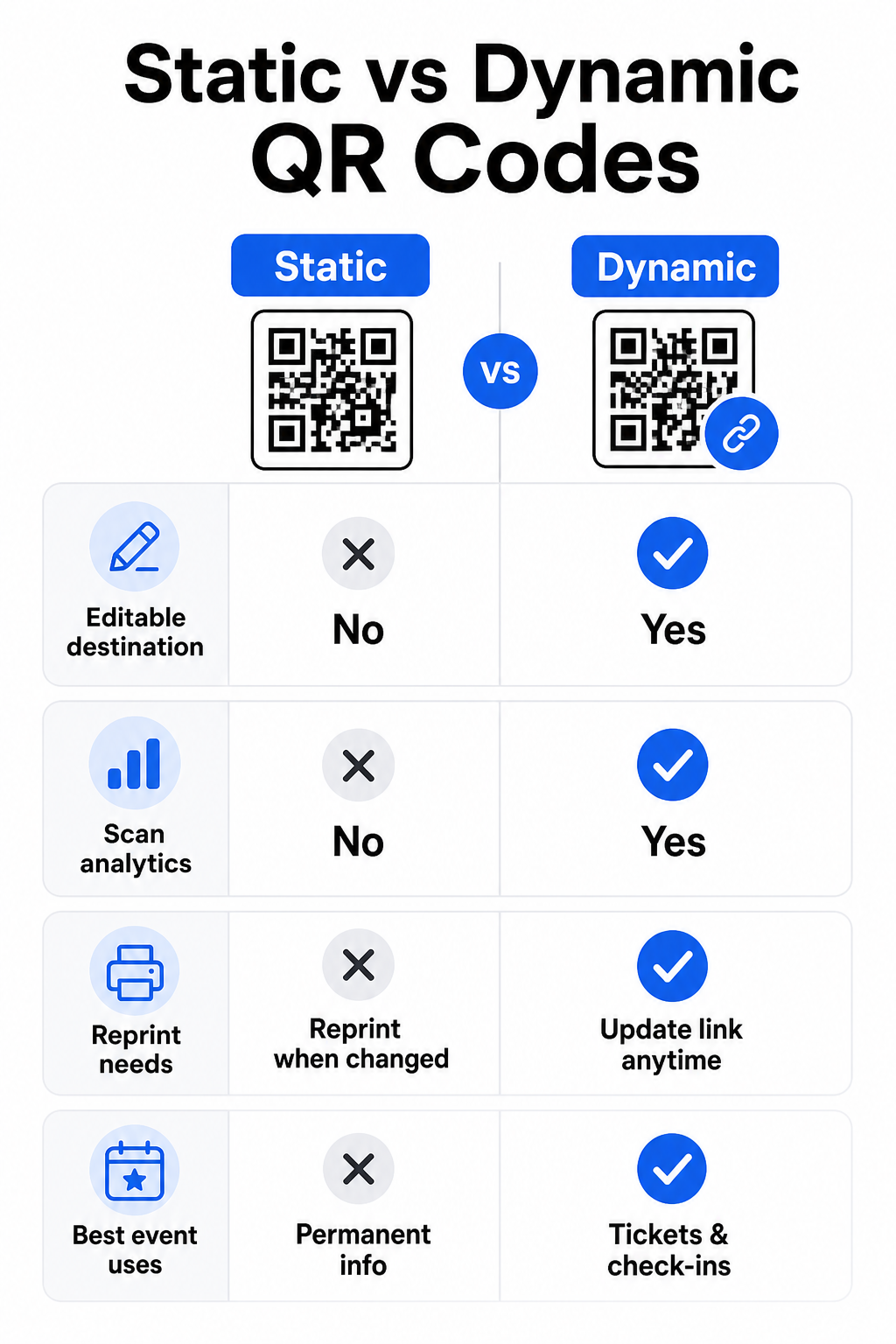
Codes QR statiques vs. dynamiques pour les événements
Comprendre la différence entre les codes QR statiques et dynamiques vous aide à faire le bon choix pour chaque cas d'utilisation.
| FONCTIONNALITÉ | Code QR statique | Code QR dynamique |
|---|---|---|
| Destination modifiable après impression | Non | Oui |
| Analyses des scans | Non | Oui |
| Le code change si la destination change | Oui (réimpression requise) | Non |
| Idéal pour | Liens simples et permanents | Billets, horaires, campagnes |
| Coût | Gratuit | Abonnement payant |
Pour la plupart des opérations événementielles – en particulier la billetterie, l'enregistrement et tout ce qui pourrait nécessiter une mise à jour – les codes QR dynamiques sont le meilleur choix. Ils fournissent également des analyses de scan, qui vous indiquent combien de personnes ont scanné, quand, sur quel appareil et depuis quel emplacement. Le guide pour créer des codes QR dynamiques pour les enregistrements CRM explique comment connecter ces données à votre flux de travail plus large de gestion des participants.
Placement et dimensionnement des codes QR pour les événements
Un code QR qui ne peut pas être scanné de manière fiable perd son utilité. Les directives suivantes reflètent la recherche sur l'utilisabilité et les scénarios d'événements pratiques.
Tailles minimales par type de matériau :
- Invitations imprimées : au moins 1,5 × 1,5 pouces
- Badges ou bracelets : au moins 1,5 pouces carrés
- Cartes de table ou marque-places : au moins 1 × 1 pouce (1,5 pouces préférés)
- Signalisation événementielle : au moins 5 × 5 pouces, augmentant à 7 × 7 pouces pour les lieux de plus de 30 pieds de large
Une règle empirique utile : la plus petite dimension du code QR devrait être d'environ un dixième de la distance de scan. Un code scanné à 3 pieds de distance devrait mesurer au moins 3,6 pouces de large.
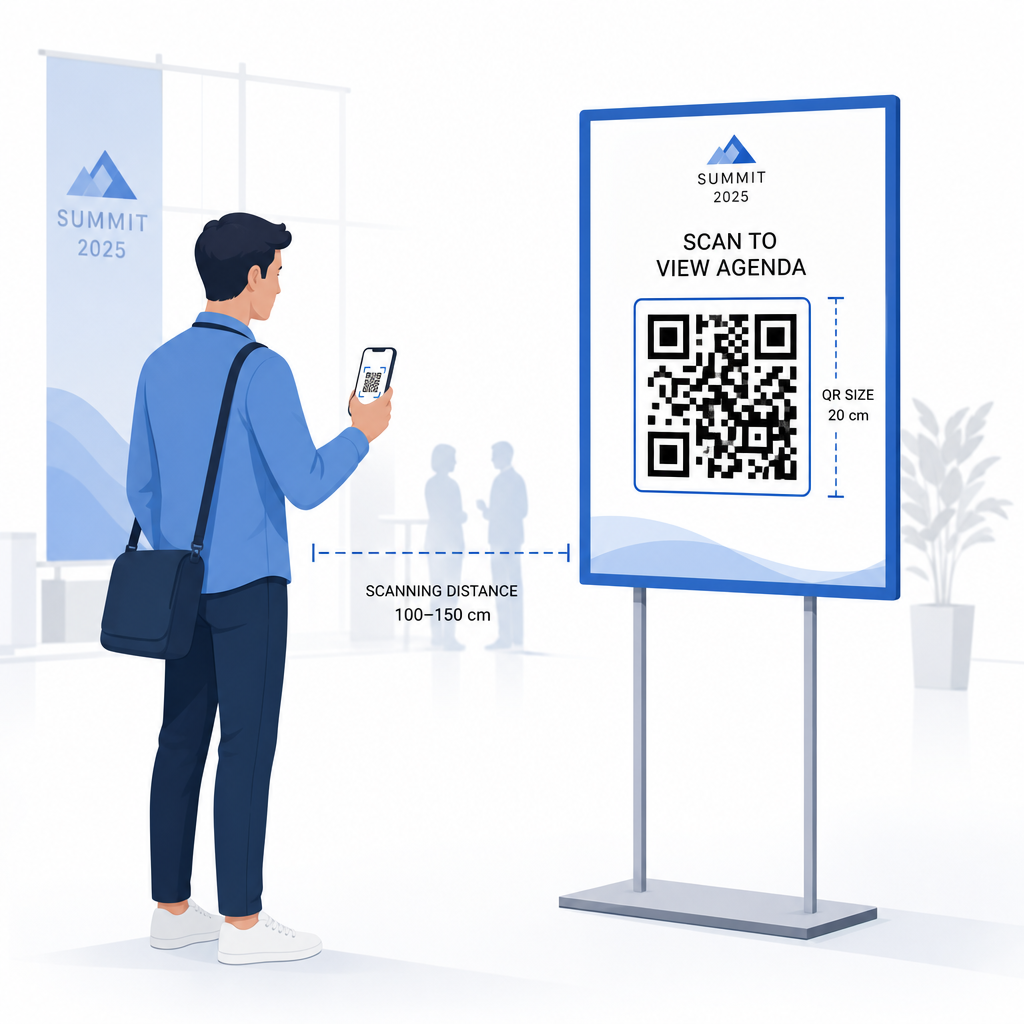
Directives de placement :
- Positionnez les codes à hauteur des yeux ou de la poitrine – environ 3 à 5 pieds du sol – afin que les participants puissent scanner sans se pencher ni s'étirer
- Placez les codes où les gens s'arrêtent ou attendent naturellement: entrées, bureaux d'inscription, tables, près des écrans et dans les files d'attente
- Maintenez un contraste élevé: les modules sombres sur un fond clair scannent le plus fiablement ; évitez les schémas de couleurs inversés ou à faible contraste
- Gardez une zone de silence d'au moins 4 modules d'espace vide sur les quatre côtés du code ; le texte ou les graphiques à l'intérieur de cette marge provoquent des échecs de scan
- Testez chaque code à sa taille d'impression finale, à la distance de scan attendue, sur iOS et Android, avant l'événement
Pour plus de conseils, le guide ultime des codes QR pour l'enregistrement aux événements comprend des exigences techniques de scan détaillées et les meilleures pratiques d'exploitation des portes.
Suivi des performances de l'événement avec l'analyse QR
L'un des avantages sous-utilisés des codes QR dynamiques est les données qu'ils génèrent. Le tableau de bord d'analyse de Pageloot capture les nombres de scans, les horodatages, les types d'appareils et les emplacements géographiques en temps réel.
Pour les organisateurs d'événements, ces données répondent à des questions pratiques :
- Quel point d'entrée a eu le volume de scan le plus élevé et à quelle heure ?
- Les participants ont-ils interagi avec le programme ou le contenu des sponsors pendant l'événement ?
- Combien de personnes ont scanné le code du sondage post-événement ?
- Quel canal promotionnel – flyer imprimé, publication sur les réseaux sociaux, e-mail – a généré le plus de scans de billets ?
Ces informations éclairent les décisions en matière de personnel, vous aident à identifier les goulots d'étranglement et donnent aux sponsors une preuve mesurable de l'engagement de l'audience. Pour un aperçu plus approfondi des outils disponibles, consultez le récapitulatif de meilleurs outils de suivi d'événements par code QR.
Voir Qui Scanne et Quand Les analyses intégrées de Pageloot vous donnent des données de scan en temps réel pour tous vos codes QR d'événement dans un seul tableau de bord. Commencez par le Générateur de QR code événement et organisez votre prochain événement avec une visibilité totale.
Scanner les codes QR lors de votre événement
Si vous avez besoin d'une solution de scan pour que le personnel valide les billets ou enregistre les participants, Pageloot Scanner QR code fonctionne directement dans le navigateur – aucun téléchargement d'application requis. Le personnel peut scanner depuis n'importe quel smartphone ou tablette en pointant l'appareil photo vers le code ou en téléchargeant une image.
Pour les événements plus importants avec des stations de scan dédiées, les appareils photo natifs sur iOS (iOS 11 et versions ultérieures) et Android scannent les codes QR sans aucune application supplémentaire. Testez votre configuration de scan dans les conditions d'éclairage réelles de votre lieu avant l'événement, et formez le personnel à tenir l'appareil à environ 30 cm (environ 12 pouces) du code pour des lectures cohérentes.
Problèmes courants de codes QR lors des événements (et comment les éviter)
Même les codes QR bien conçus échouent lorsque certaines conditions ne sont pas remplies. Voici les problèmes les plus fréquents et leurs solutions :
- Code trop petit: Respectez les tailles minimales ci-dessus ; en cas de doute, imprimez plus grand
- Contraste faible: Utilisez des modules sombres sur un fond blanc ou clair ; évitez de placer les codes sur des surfaces sombres ou à motifs
- Matériau brillant: Les finitions mates scannent plus fiablement car elles éliminent les reflets ; évitez les matériaux brillants pour les badges ou les bracelets
- Code endommagé: Les rayures ou déchirures physiques bloquent le scan ; utilisez les paramètres de correction d'erreur lors de la génération de codes pour des matériaux physiques
- Pas de zone de silence: Vérifiez que rien – texte, bordures, images – n'empiète sur la marge vierge autour du code
- Code non testé: Scannez toujours la version imprimée finale sur plusieurs appareils avant de la distribuer à grande échelle
Pour un dépannage supplémentaire sur les codes QR imprimés directement sur les billets, consultez le guide des codes QR sur les billets.
Les codes QR offrent aux organisateurs d'événements une ligne directe entre les points de contact physiques et les systèmes numériques – qu'il s'agisse de valider un billet, d'enregistrer la présence, de recueillir des commentaires ou de naviguer dans un lieu. La clé est de choisir des codes dynamiques là où la flexibilité compte, de les dimensionner et de les placer pour un scan fiable, et d'utiliser l'analyse pour comprendre comment les participants s'engagent réellement.
Commencez avec le Générateur de QR code événement pour créer votre premier code QR d'événement, ou explorez le Code QR de présence outil pour construire un système d'enregistrement qui enregistre chaque arrivée automatiquement.
Questions fréquentes
Un code QR statique a une destination fixe qui ne peut pas être modifiée après sa création.
Ouvrez le générateur de codes QR d'événement de Pageloot et sélectionnez l'option pour créer un code QR d'événement. Entrez l'URL de votre événement ou le lien d'inscription, ajoutez les détails de l'événement comme le titre et la description, puis personnalisez le design du code avec votre marque. Téléchargez le code et distribuez-le aux participants par e-mail, PDF ou billet imprimé. Lors de l'événement, le personnel scanne le code de chaque participant à l'aide d'un appareil photo de smartphone ou du scanner de codes QR Pageloot pour les marquer comme enregistrés.
Pour la signalisation événementielle standard, un minimum de 5 × 5 pouces est recommandé. Pour les lieux plus grands de plus de 30 pieds de large, augmentez la taille à au moins 7 × 7 pouces. Une règle empirique fiable est que la plus petite dimension du code doit être environ un dixième de la distance de scan attendue – donc un code vu à 5 pieds de distance devrait mesurer environ 6 pouces de large. Testez toujours le code imprimé à la distance de scan réelle avant l'événement.