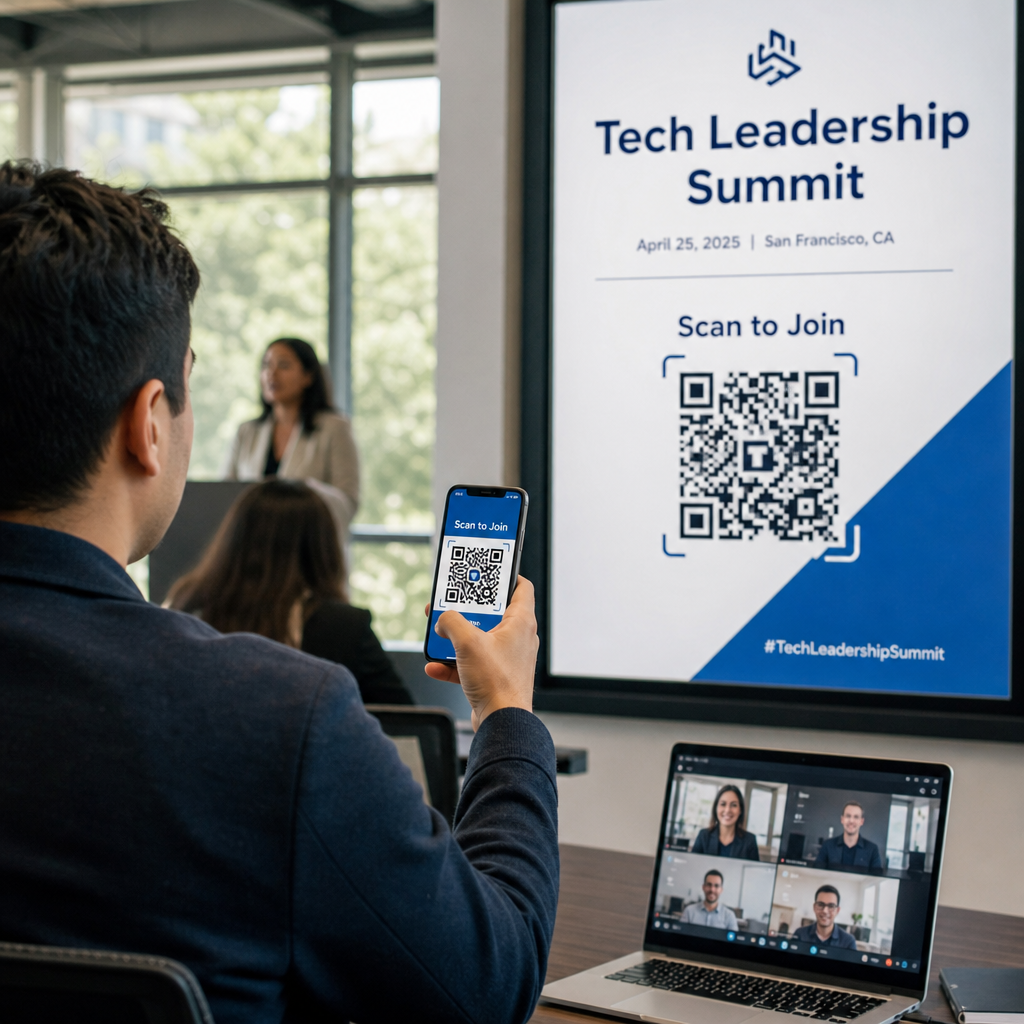
Você ainda está gerenciando a entrada de eventos com listas de convidados impressas e registros manuais? Essa abordagem atrasa as filas de entrada, frustra os participantes e deixa os organizadores com pouca visibilidade sobre o que realmente está acontecendo no local. Esta página aborda todas as formas práticas de usar códigos QR em eventos – desde a emissão de bilhetes e check-ins até RSVPs e acompanhamento pós-evento – para que você possa executar operações mais suaves e obter resultados mensuráveis.
Por que os Organizadores de Eventos Estão Adotando Códigos QR
A adoção de códigos QR entre profissionais de eventos não é mais um nicho. 43% dos profissionais de marketing usam códigos QR especificamente para eventos, tornando os eventos o caso de uso de QR mais comum entre os profissionais de marketing. Os mesmos dados mostram que mais de 90% dos profissionais de marketing relataram usar códigos QR em 2025, com 94% aumentando seu uso ano após ano.
A razão para essa mudança é prática: os participantes já estão confortáveis com a digitalização. Mais de dois terços dos consumidores usaram um código QR pelo menos uma vez no ano passado, e aproximadamente metade da Geração Z e dos Millennials escaneiam códigos QR pelo menos uma vez por semana. Com 98% dos americanos possuindo um telefone celular, não há barreira significativa para fazer com que os participantes escaneiem.
Para os organizadores, o retorno é o controle em tempo real. Você pode rastrear a entrada, monitorar a presença por sessão, atualizar informações do evento sem reimprimir materiais e medir o engajamento muito depois do término do evento.
Casos de Uso de Código QR para Eventos
Os códigos QR são flexíveis o suficiente para lidar com quase todas as necessidades operacionais e de engajamento em um evento. Aqui estão as aplicações mais eficazes.
Emissão de Bilhetes e Gerenciamento de Entrada
O ponto de partida mais comum é substituir os bilhetes de papel por códigos QR escaneáveis. Cada participante recebe um código QR exclusivo – entregue por e-mail, PDF ou celular – que a equipe escaneia na porta para validar a entrada e registrar a presença em tempo real.
Essa abordagem elimina a necessidade de verificação manual de listas, acelera as filas de entrada e previne fraudes de uso duplicado, já que cada código pode ser configurado para validação de escaneamento único. Para uma análise detalhada da arquitetura de segurança por trás disso, consulte o guia sobre Como criar ingressos de evento seguros com QR Code.
Você pode gerar bilhetes diretamente usando o Gerador de QR Code para Eventos inserindo o URL do seu evento, título, descrição e detalhes de contato, e depois personalizando o design do código antes de fazer o download para distribuição.
Otimize a Entrada do Seu Evento Crie códigos QR de marca e rastreáveis para bilhetes, landing pages e check-ins. Experimente o Gerador de QR Code para Eventos gratuitamente por 14 dias – sem necessidade de cartão de crédito.
Check-in de Participantes e Rastreamento de Presença
O check-in baseado em QR funciona fazendo com que a equipe escaneie o código de cada participante com um telefone, tablet ou aplicativo de escaneamento dedicado. Um escaneamento válido marca automaticamente a pessoa como "check-in" e atualiza seus registros de presença instantaneamente.
Isso é significativamente mais rápido do que os métodos manuais. De acordo com o guia de códigos QR para check-ins de eventos, os check-ins com código QR reduzem o tempo médio de processamento para menos de 2 segundos por pessoa e podem reduzir a duração total da entrada em até 50% em comparação com processos manuais.
Para eventos contínuos, aulas ou conferências com várias sessões, o Código QR de Presença ferramenta permite que os participantes façam o auto-check-in escaneando um código vinculado a um Google Form ou ferramenta similar, com as respostas alimentando automaticamente uma planilha para rastreamento em tempo real. Saiba mais sobre como construir esse tipo de sistema na página de rastreamento de presença.
Coleta de RSVP
Em vez de direcionar os convidados para digitar um URL, um código QR em seu convite, flyer ou página do evento os leva diretamente ao seu formulário de RSVP com um único escaneamento. Isso remove o atrito e geralmente aumenta as taxas de resposta.
Use o da Pageloot Gerador de QR Code do Google Forms para vincular qualquer Google Form a um código escaneável, e depois colocá-lo em convites impressos, gráficos digitais ou sinalização de eventos. Para instruções passo a passo, o guia sobre códigos QR de RSVP para eventos detalha a seleção da plataforma, geração de código e conformidade com a privacidade.
Horários e Informações do Evento
Um código QR colocado em um crachá, cartão de mesa ou sinalização do local pode vincular os participantes a um cronograma de eventos ao vivo, biografias de palestrantes, mapas de piso ou detalhes da sessão. Porque códigos QR dinâmicos permitem que você atualize o URL de destino após a impressão, você pode corrigir alterações de cronograma ou adicionar informações sem reimprimir materiais.
Este é um dos argumentos práticos mais fortes para usar códigos dinâmicos em vez de estáticos. Se um palestrante cancelar ou uma sala mudar, você atualiza o link – não o material impresso.
Integração com o Google Calendar
Para conferências, workshops ou qualquer evento com bilhetes e sessões, vincular um código QR a uma entrada do Google Calendar permite que os participantes adicionem o evento diretamente ao seu calendário com um único escaneamento. Use o Gerador de QR Code do Google Calendar para criar este código, e depois colocá-lo em e-mails de confirmação, bilhetes ou convites.
Navegação no Local
Grandes locais – centros de convenções, festivais ao ar livre, espaços de conferência com vários andares – frequentemente causam atrito simplesmente porque os participantes não conseguem encontrar onde precisam ir. Um código QR em sinalização, bilhetes ou convites que abre diretamente no Google Maps remove esse atrito por completo. Crie um usando o Gerador de QR Code do Google Maps e inclua-o em qualquer lugar onde os participantes o vejam antes ou durante o evento.
Partilha de Fotos e Engajamento Social
Os códigos QR podem ligar os participantes a uma galeria de fotos partilhada, a uma página de hashtag de marca ou a um portal de upload para que os convidados possam contribuir e ver fotos do evento em tempo real. Isso cria um ciclo de participação que estende a experiência do evento para além do local físico. Para um guia prático de configuração, consulte como usar um código QR para partilhar fotos.
Inquéritos Pós-Evento e Acompanhamento
A pesquisa mostra que 41% dos organizadores usam inquéritos pós-evento para medir o ROI, e 40% dependem do engajamento nas redes sociais. Um código QR num crachá, folheto ou sinal de saída apontando para um formulário de feedback facilita a resposta dos participantes enquanto o evento ainda está fresco. Ligar esse formulário a um Google Form através do gerador da Pageloot significa que as respostas fluem diretamente para uma folha de cálculo que pode analisar imediatamente.
Como Criar um Código QR de Evento com Pageloot
O processo leva alguns minutos e não requer habilidades técnicas.
- Abra o gerador – Vá para o Gerador de QR Code para Eventos e selecione “Criar Código QR para evento.”
- Adicione os detalhes do seu evento – Insira o URL da página do evento, título, descrição e informações de contacto. A Pageloot constrói uma página de destino em torno deste conteúdo.
- Desenhe o código QR – Ajuste cores, formas e adicione o seu logótipo para corresponder à marca do seu evento.
- Escolha dinâmico se precisar de flexibilidade – Os códigos dinâmicos permitem-lhe atualizar o link de destino após a impressão. Esta é a escolha certa para qualquer coisa que possa mudar antes ou durante o evento.
- Teste o código – Digitalize-o em dispositivos iOS e Android sob diferentes condições de iluminação antes de distribuir.
- Descarregue e distribua – Exporte em PNG, PDF ou SVG e coloque-o em bilhetes, sinalização, convites ou materiais digitais.
Códigos QR Estáticos vs. Dinâmicos para Eventos
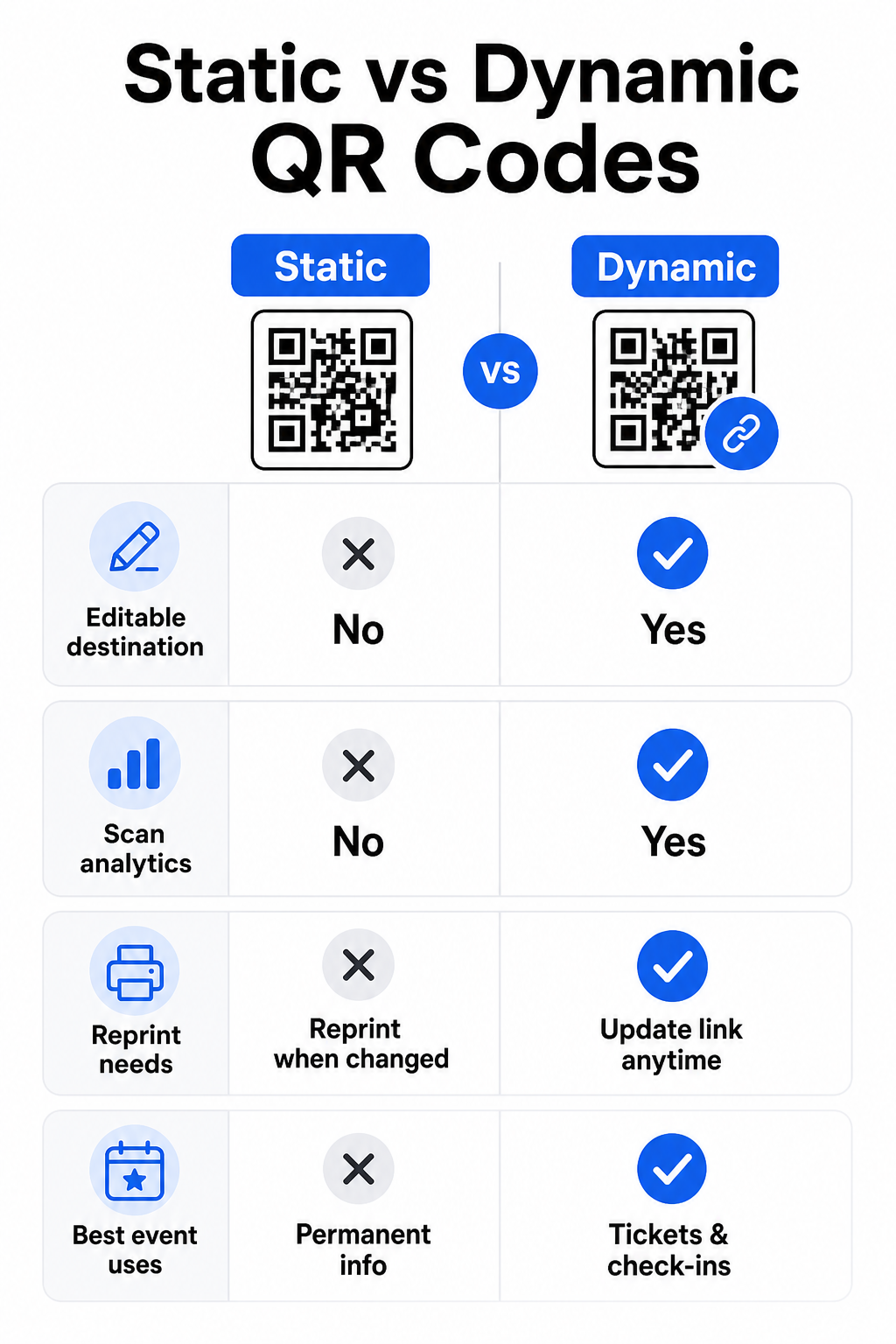
Compreender a diferença entre códigos QR estáticos e dinâmicos ajuda a fazer a escolha certa para cada caso de uso.
| RECURSO | Código QR estático | Código QR Dinâmico |
|---|---|---|
| Destino editável após a impressão | Não | Sim |
| Análise de leitura | Não | Sim |
| O código muda se o destino mudar | Sim (reimpressão necessária) | Não |
| Melhor para | Links simples e permanentes | Bilhetes, horários, campanhas |
| Custo | Grátis | Assinatura paga |
Para a maioria das operações de eventos – especialmente emissão de bilhetes, check-in e qualquer coisa que possa precisar de atualização – códigos QR dinâmicos são a melhor escolha. Eles também fornecem análises de leitura, que informam quantas pessoas escanearam, quando, em que dispositivo e de que local. O guia para criar códigos QR dinâmicos para check-ins de CRM explica como conectar esses dados ao seu fluxo de trabalho mais amplo de gerenciamento de participantes.
Posicionamento e Dimensionamento de Códigos QR para Eventos
Um código QR que não pode ser lido de forma confiável perde o seu propósito. As seguintes diretrizes refletem pesquisas de usabilidade e cenários práticos de eventos.
Tamanhos mínimos por tipo de material:
- Convites impressos: pelo menos 1,5 × 1,5 polegadas
- Crachás ou pulseiras: pelo menos 1,5 polegadas quadradas
- Cartões de mesa ou marcadores de lugar: pelo menos 1 × 1 polegada (1,5 polegadas preferencial)
- Sinalização de evento: pelo menos 5 × 5 polegadas, aumentando para 7 × 7 polegadas para locais com mais de 30 pés de largura
Uma regra prática útil: a menor dimensão do código QR deve ser aproximadamente um décimo da distância de leitura. Um código lido a 3 pés de distância deve ter pelo menos 3,6 polegadas de largura.
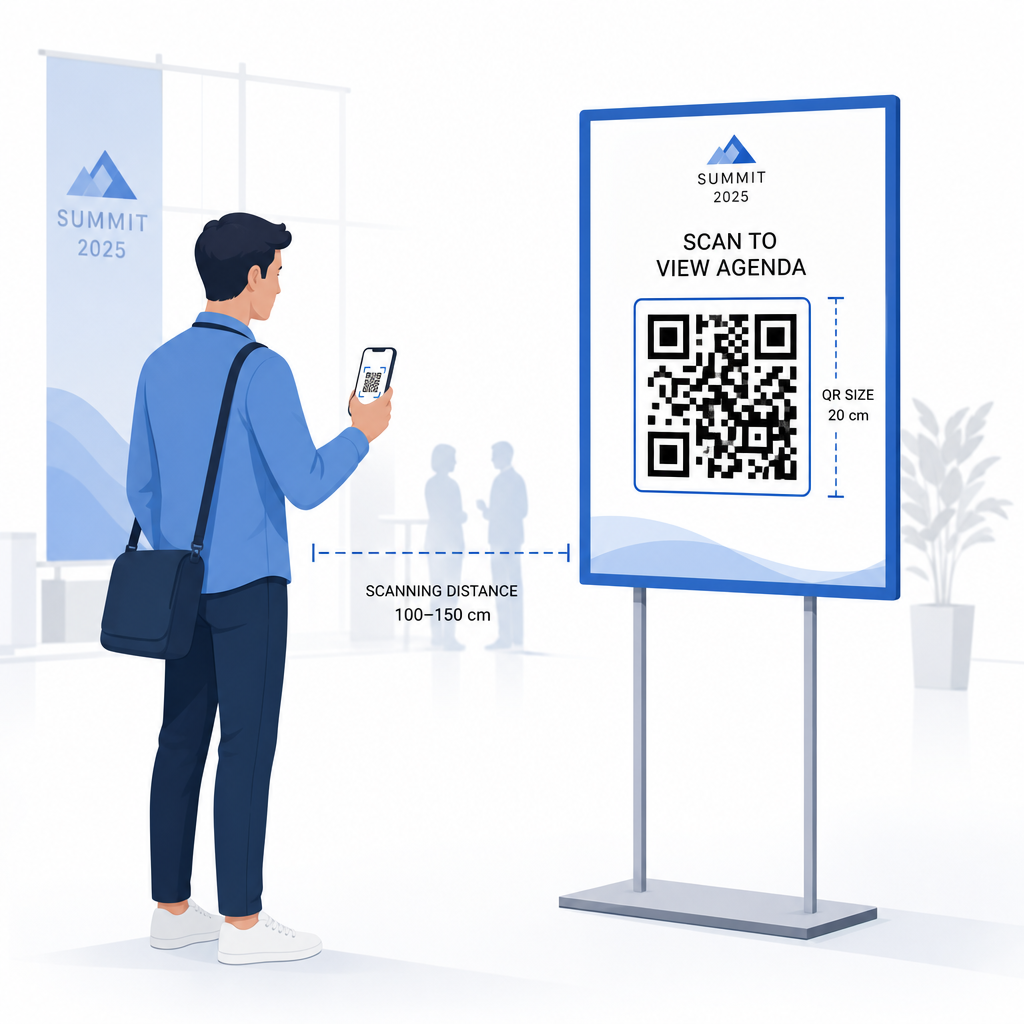
Diretrizes de posicionamento:
- Posicione os códigos em altura dos olhos ou do peito – aproximadamente 3 a 5 pés do chão – para que os participantes possam escanear sem se curvar ou esticar
- Coloque os códigos onde as pessoas naturalmente param ou esperam: entradas, balcões de registro, mesas, perto de displays e em filas
- Mantenha alto contraste: módulos escuros em um fundo claro são lidos de forma mais confiável; evite esquemas de cores invertidos ou de baixo contraste
- Mantenha uma zona de silêncio de pelo menos 4 módulos de espaço em branco em todos os quatro lados do código; texto ou gráficos dentro desta margem causam falhas de leitura
- Teste cada código no seu tamanho final impresso, da distância de digitalização esperada, tanto no iOS quanto no Android, antes do evento
Para mais orientações, o guia definitivo de códigos QR para check-ins de eventos inclui requisitos técnicos detalhados de digitalização e as melhores práticas de operação de porta.
Rastreamento do Desempenho do Evento com Análise de QR Codes
Uma das vantagens subutilizadas dos códigos QR dinâmicos são os dados que eles geram. O painel de análise da Pageloot captura contagens de digitalização, carimbos de data/hora, tipos de dispositivo e localizações geográficas em tempo real.
Para organizadores de eventos, estes dados respondem a perguntas práticas:
- Qual ponto de entrada teve o maior volume de digitalizações e a que horas?
- Os participantes interagiram com a programação ou o conteúdo do patrocinador durante o evento?
- Quantas pessoas digitalizaram o código da pesquisa pós-evento?
- Qual canal promocional – folheto impresso, publicação em redes sociais, e-mail – gerou o maior número de digitalizações de bilhetes?
Esta informação informa decisões de pessoal, ajuda a identificar gargalos e dá aos patrocinadores prova mensurável do envolvimento do público. Para uma análise mais aprofundada das ferramentas disponíveis, veja o resumo de melhores ferramentas para rastreamento de eventos com código QR.
Veja Quem Está a Digitalizar e Quando As análises integradas da Pageloot fornecem dados de digitalização em tempo real em todos os seus códigos QR de evento num único painel. Comece com o Gerador de QR Code para Eventos e execute o seu próximo evento com total visibilidade.
Digitalização de Códigos QR no Seu Evento
Se precisar de uma solução de digitalização para que o pessoal valide bilhetes ou faça o check-in dos participantes, a da Pageloot Leitor de QR Code funciona diretamente no navegador – sem necessidade de download de aplicação. O pessoal pode digitalizar a partir de qualquer smartphone ou tablet apontando a câmara para o código ou carregando uma imagem.
Para eventos maiores com estações de digitalização dedicadas, câmaras nativas de dispositivos em iOS (iOS 11 e posterior) e Android digitalizam códigos QR sem qualquer aplicação adicional. Teste a sua configuração de digitalização sob as condições de iluminação reais do seu local antes do evento, e treine o pessoal para segurar o dispositivo a aproximadamente 30 cm (cerca de 12 polegadas) do código para leituras consistentes.
Problemas Comuns de Códigos QR em Eventos (e Como Evitá-los)
Mesmo códigos QR bem desenhados falham quando certas condições não são cumpridas. Aqui estão os problemas mais frequentes e as suas soluções:
- Código muito pequeno: Siga os tamanhos mínimos acima; em caso de dúvida, imprima maior
- Contraste fraco: Use módulos escuros num fundo branco ou claro; evite colocar códigos em superfícies escuras ou padronizadas
- Material brilhante: Acabamentos mate digitalizam de forma mais fiável porque eliminam o brilho; evite materiais de crachá ou pulseira brilhantes
- Código danificado: Riscos físicos ou rasgos bloqueiam a digitalização; use configurações de correção de erros ao gerar códigos para materiais físicos
- Sem zona de silêncio: Verifique se nada – texto, bordas, imagens – invade a margem em branco ao redor do código
- Código não testado: Sempre digitalize a versão impressa final em vários dispositivos antes de distribuir em larga escala
Para resolução de problemas adicionais em códigos QR impressos diretamente em bilhetes, veja o guia para códigos QR em bilhetes.
Códigos QR dão aos organizadores de eventos uma linha direta entre pontos de contacto físicos e sistemas digitais – seja validar um bilhete, registar a presença, recolher feedback ou navegar num local. A chave é escolher códigos dinâmicos onde a flexibilidade importa, dimensioná-los e colocá-los para uma digitalização fiável, e usar análises para entender como os participantes estão realmente a interagir.
Comece com o Gerador de QR Code para Eventos para criar o seu primeiro código QR de evento, ou explore o Código QR de Presença ferramenta para construir um sistema de check-in que regista cada chegada automaticamente.
Perguntas frequentes
Um código QR estático tem um destino fixo que não pode ser alterado depois de ser criado. Se os detalhes do seu evento mudarem, você precisa reimprimir o código. Um código QR dinâmico permite que você atualize a URL de destino a qualquer momento sem alterar o próprio código impresso. Códigos dinâmicos também fornecem análises de digitalização – dados sobre quando, onde e com que frequência o código é digitalizado – o que os códigos estáticos não fazem. Para a maioria das aplicações de eventos, particularmente bilhetagem e horários, os códigos dinâmicos são a escolha prática.
Abra o Gerador de Códigos QR de Eventos da Pageloot e selecione a opção para criar um código QR de evento. Insira o URL do seu evento ou link de registo, adicione detalhes do evento como o título e a descrição, depois personalize o design do código com a sua marca. Descarregue o código e distribua-o aos participantes via e-mail, PDF ou bilhete impresso. No evento, o pessoal digitaliza o código de cada participante usando uma câmara de smartphone ou o Scanner de Códigos QR da Pageloot para os marcar como com check-in feito.
Para sinalização de eventos padrão, um mínimo de 5 × 5 polegadas é recomendado. Para locais maiores com mais de 30 pés de largura, aumente o tamanho para pelo menos 7 × 7 polegadas. Uma regra prática fiável é que a menor dimensão do código deve ser aproximadamente um décimo da distância de digitalização esperada – então um código visto a 5 pés de distância deve ter cerca de 6 polegadas de largura. Sempre teste o código impresso na distância de digitalização real antes do evento.