Вы все еще управляете входом на мероприятия с помощью печатных списков гостей и ручной регистрации? Такой подход замедляет очереди на вход, расстраивает посетителей и оставляет организаторам мало информации о том, что на самом деле происходит на месте. Эта страница охватывает все практические способы использования QR-кодов на мероприятиях – от продажи билетов и регистрации до подтверждения участия и последующих действий после мероприятия – чтобы вы могли проводить более гладкие операции и получать измеримые результаты.
Почему организаторы мероприятий внедряют QR-коды
Внедрение QR-кодов среди профессионалов в сфере мероприятий больше не является нишевым. 43% маркетологов используют QR-коды специально для мероприятий, что делает мероприятия самым распространенным вариантом использования QR-кодов среди специалистов по маркетингу. Те же данные показывают, что более 90% маркетологов сообщили об использовании QR-кодов в 2025 году, при этом 94% увеличивают их использование из года в год.
Причина этого сдвига практична: посетители уже привыкли к сканированию. Более двух третей потребителей использовали QR-код хотя бы раз за последний год, и примерно половина представителей поколений Z и миллениалов сканируют QR-коды хотя бы раз в неделю. Поскольку 98% американцев владеют мобильным телефоном, нет существенных препятствий для того, чтобы посетители сканировали коды.
Для организаторов выгода заключается в контроле в реальном времени. Вы можете отслеживать вход, контролировать посещаемость по сессиям, обновлять информацию о мероприятии без перепечатки материалов и измерять вовлеченность еще долго после окончания мероприятия.
Варианты использования QR-кодов для мероприятий
QR-коды достаточно гибки, чтобы удовлетворить практически любые операционные потребности и потребности во взаимодействии на мероприятии. Вот наиболее эффективные применения.
Продажа билетов и управление входом
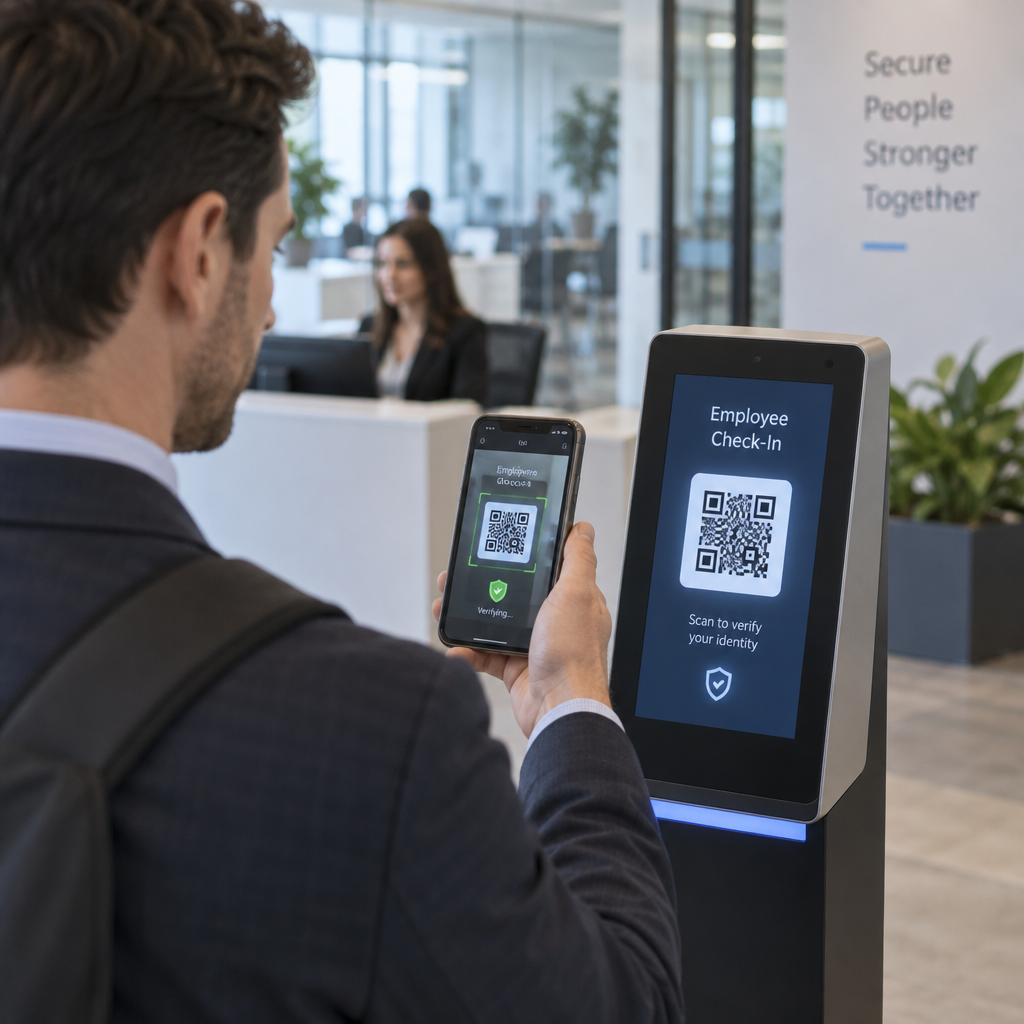
Наиболее распространенная отправная точка — замена бумажных билетов сканируемыми QR-кодами. Каждый посетитель получает уникальный QR-код – доставленный по электронной почте, в формате PDF или на мобильное устройство – который персонал сканирует у входа для подтверждения входа и отметки посещаемости в реальном времени.
Этот подход устраняет необходимость ручной проверки списков, ускоряет очереди на вход и предотвращает мошенничество с повторным использованием, поскольку каждый код может быть настроен на однократную проверку. Для подробного ознакомления с архитектурой безопасности, лежащей в основе этого, см. руководство по как создавать безопасные QR-коды для билетов на мероприятия.
Вы можете генерировать билеты непосредственно с помощью QR коды для регистрации на мероприятие введя URL-адрес вашего мероприятия, название, описание и контактные данные, затем настроив дизайн кода перед его загрузкой для распространения.
Оптимизируйте вход на ваше мероприятие Создавайте брендированные, отслеживаемые QR-коды для билетов, целевых страниц и регистраций. Попробуйте QR коды для регистрации на мероприятие бесплатно в течение 14 дней – кредитная карта не требуется.
Регистрация посетителей и отслеживание посещаемости
Регистрация на основе QR-кодов работает следующим образом: персонал сканирует код каждого посетителя с помощью телефона, планшета или специального приложения для сканирования. Действительное сканирование автоматически отмечает человека как зарегистрированного и мгновенно обновляет ваши записи о посещаемости.
Это значительно быстрее, чем ручные методы. Согласно руководству по QR-кодам для регистрации на мероприятиях, регистрация по QR-коду сокращает среднее время обработки до менее 2 секунд на человека и может сократить общую продолжительность входа до 50% по сравнению с ручными процессами.
Для текущих мероприятий, занятий или многосессионных конференций инструмент Pageloot QR-код посещаемости позволяет посетителям самостоятельно регистрироваться, сканируя код, связанный с Google Формой или аналогичным инструментом, при этом ответы автоматически поступают в электронную таблицу для отслеживания в реальном времени. Узнайте больше о создании такой системы на странице отслеживания посещаемости.
Сбор подтверждений участия (RSVP)
Вместо того чтобы направлять гостей вводить URL-адрес, QR-код на вашем приглашении, флаере или странице мероприятия переводит их непосредственно к вашей форме RSVP одним сканированием. Это устраняет трение и обычно увеличивает количество ответов.
Используйте Pageloot’s Как создать QR код для гугл формы чтобы связать любую Google Форму со сканируемым кодом, затем разместите его на печатных приглашениях, цифровой графике или вывесках мероприятия. Для пошаговых инструкций руководство по QR-кодам RSVP для мероприятий подробно описывает выбор платформы, генерацию кода и соблюдение конфиденциальности.
Расписания и информация о мероприятии
QR-код, размещенный на бейдже, настольной карточке или вывеске места проведения, может связать посетителей с актуальным расписанием мероприятия, биографиями докладчиков, планами этажей или деталями сессий. Поскольку динамические QR-коды позволяют обновлять целевой URL-адрес после печати, вы можете исправлять изменения в расписании или добавлять информацию без перепечатки материалов.
Это один из самых сильных практических аргументов в пользу использования динамических кодов вместо статических. Если докладчик отменяет выступление или меняется комната, вы обновляете ссылку, а не печатные материалы.
Интеграция с Google Календарем
Для конференций, семинаров или любого мероприятия с билетами и сессиями привязка QR-кода к записи в Google Календаре позволяет посетителям добавить мероприятие непосредственно в свой календарь одним сканированием. Используйте Генератор QR-кода для Google Календаря для создания этого кода, затем разместите его в электронных письмах с подтверждением, билетах или приглашениях.
Навигация по месту проведения
Крупные площадки – выставочные центры, фестивали на открытом воздухе, многоэтажные конференц-залы – часто вызывают затруднения просто потому, что посетители не могут найти, куда им нужно идти. QR-код на вывесках, билетах или приглашениях, который открывается непосредственно в Google Картах, полностью устраняет это затруднение. Создайте его, используя QR код на карте Google Maps и разместите его везде, где посетители увидят его до или во время мероприятия.
Обмен фотографиями и социальное взаимодействие
QR-коды могут связывать посетителей с общей фотогалереей, страницей с фирменным хэштегом или порталом для загрузки, чтобы гости могли добавлять и просматривать фотографии с мероприятия в режиме реального времени. Это создает цикл участия, который расширяет впечатления от мероприятия за пределы физического места проведения. Практическое руководство по настройке см. как использовать QR-код для обмена фотографиями.
Опросы после мероприятия и последующие действия
Исследования показывают, что 41% организаторов используют опросы после мероприятия для измерения ROI, а 40% полагаются на вовлеченность в социальных сетях. QR-код на бейдже, раздаточном материале или указателе выхода, ведущий к форме обратной связи, облегчает посетителям ответ, пока впечатления от мероприятия еще свежи. Связывание этой формы с Google Формой через генератор Pageloot означает, что ответы поступают непосредственно в электронную таблицу, которую вы можете немедленно проанализировать.
Как создать QR-код мероприятия с помощью Pageloot
Процесс занимает несколько минут и не требует технических навыков.
- Откройте генератор – Перейдите на QR коды для регистрации на мероприятие и выберите “Создать QR-код для мероприятия”.”
- Добавьте данные о вашем мероприятии – Введите URL-адрес страницы мероприятия, название, описание и контактную информацию. Pageloot создает целевую страницу на основе этого контента.
- Разработайте QR-код – Настройте цвета, формы и добавьте свой логотип, чтобы он соответствовал брендингу вашего мероприятия.
- Выберите динамический, если вам нужна гибкость – Динамические коды позволяют обновлять целевую ссылку после печати. Это правильный выбор для всего, что может измениться до или во время мероприятия.
- Протестируйте код – Отсканируйте его на устройствах iOS и Android при различных условиях освещения перед распространением.
- Загрузите и распространите – Экспортируйте в PNG, PDF или SVG и размещайте на билетах, вывесках, приглашениях или цифровых материалах.
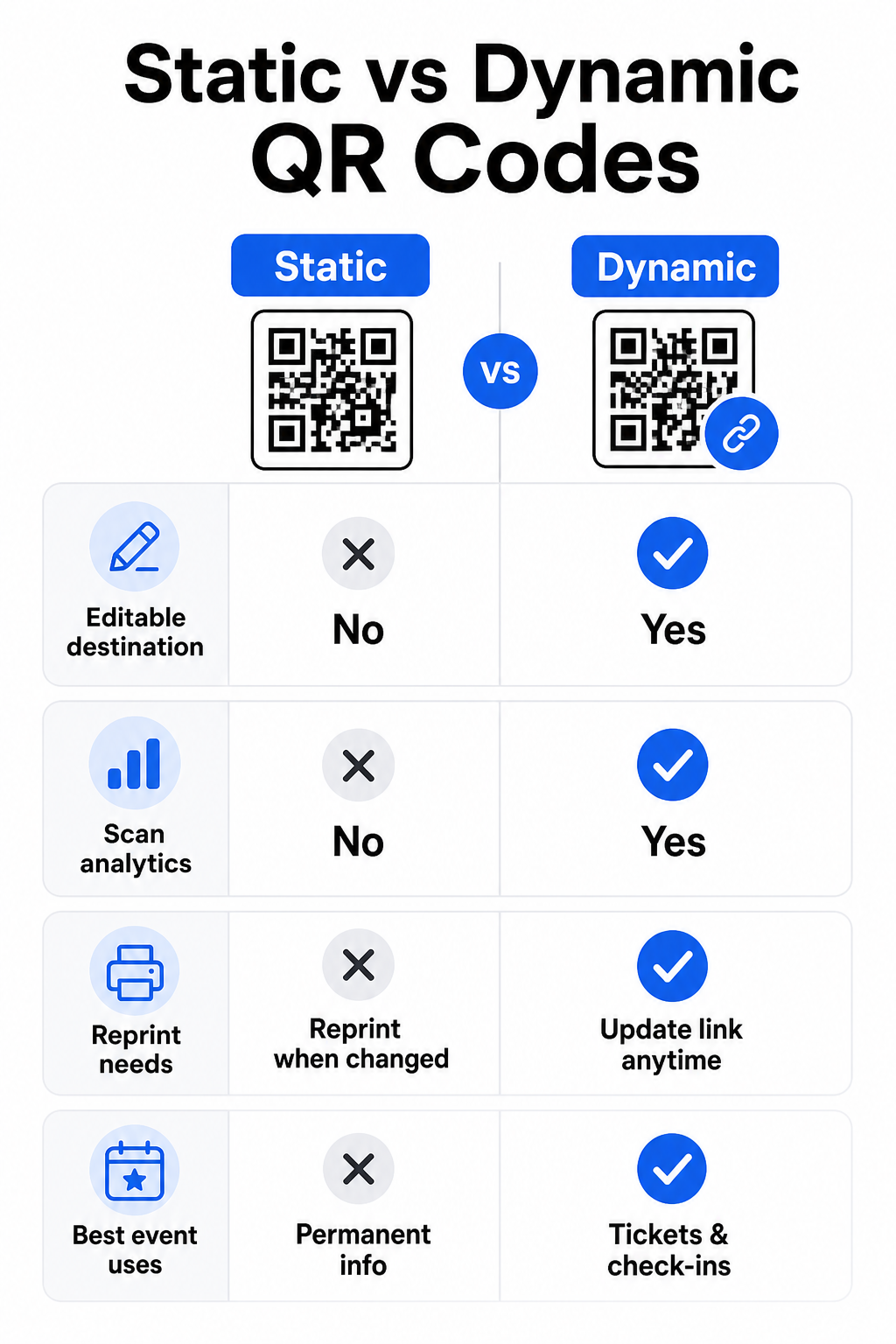
Статические и динамические QR-коды для мероприятий
Понимание разницы между статическими и динамическими QR-кодами поможет вам сделать правильный выбор для каждого сценария использования.
| ФУНКЦИЯ | Статический QR-код | Динамический QR-код |
|---|---|---|
| Пункт назначения редактируется после печати | Нет | Да |
| Аналитика сканирований | Нет | Да |
| Код меняется, если меняется пункт назначения | Да (требуется перепечатка) | Нет |
| Лучше всего для | Простые, постоянные ссылки | Билеты, расписания, кампании |
| Стоимость | Бесплатный | Платная подписка |
Для большинства операций на мероприятиях – особенно для продажи билетов, регистрации и всего, что может потребовать обновления – динамические QR-коды являются лучшим выбором. Они также предоставляют аналитику сканирований, которая показывает, сколько людей сканировали, когда, на каком устройстве и из какого места. Руководство по созданию динамических QR-кодов для регистрации в CRM объясняет, как связать эти данные с вашим общим рабочим процессом управления посетителями.
Размещение и размеры QR-кодов для мероприятий
QR-код, который невозможно надежно отсканировать, теряет свой смысл. Следующие рекомендации основаны на исследованиях удобства использования и практических.
Minimum sizes by material type:
- Printed invitations: at least 1.5 × 1.5 inches
- Badges or wristbands: at least 1.5 inches square
- Table cards or place cards: at least 1 × 1 inch (1.5 inches preferred)
- Event signage: at least 5 × 5 inches, increasing to 7 × 7 inches for venues wider than 30 feet
A useful rule of thumb: the smallest QR code dimension should be roughly one-tenth of the scanning distance. A code scanned from 3 feet away should be at least 3.6 inches wide.
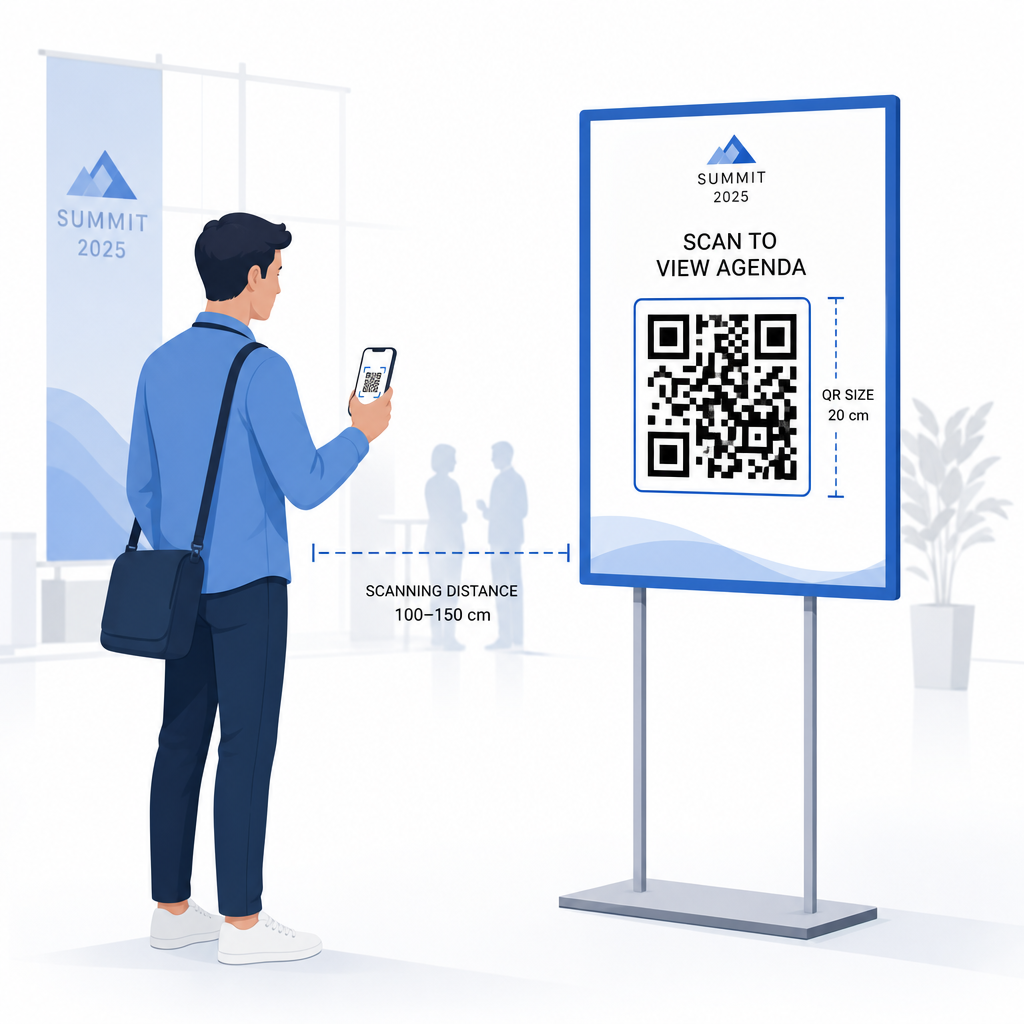
Placement guidelines:
- Размещайте коды на eye or chest height – roughly 3 to 5 feet from the floor – so attendees can scan without bending or reaching
- Place codes where people naturally pause or wait: entrances, registration desks, tables, near displays, and in queues
- Поддерживайте высокий контраст: dark modules on a light background scan most reliably; avoid inverted or low-contrast color schemes
- Keep a тихой зоны of at least 4 modules of blank space on all four sides of the code; text or graphics inside this margin cause scan failures
- Test every code в его окончательном печатном размере, с ожидаемого расстояния сканирования, как на iOS, так и на Android, до мероприятия
Для получения дополнительных рекомендаций, полному руководству по QR-кодам для регистрации на мероприятиях включает подробные технические требования к сканированию и лучшие практики организации работы на входе.
Отслеживание эффективности мероприятия с помощью QR-аналитики
Одно из недооцененных преимуществ динамических QR-кодов — это данные, которые они генерируют. Аналитическая панель Pageloot фиксирует количество сканирований, временные метки, типы устройств и географические местоположения в реальном времени.
Для организаторов мероприятий эти данные отвечают на практические вопросы:
- Какой вход имел наибольший объем сканирований и в какое время?
- Взаимодействовали ли посетители с расписанием или спонсорским контентом во время мероприятия?
- Сколько человек отсканировали код опроса после мероприятия?
- Какой рекламный канал – печатная листовка, пост в социальных сетях, электронное письмо – привел к наибольшему количеству сканирований билетов?
Эта информация помогает принимать кадровые решения, выявлять узкие места и предоставляет спонсорам измеримое доказательство вовлеченности аудитории. Для более глубокого изучения доступных инструментов см. обзор лучшие инструменты для отслеживания событий по QR-коду.
Смотрите, кто сканирует и когда Встроенная аналитика Pageloot предоставляет вам данные сканирования в реальном времени по всем вашим QR-кодам мероприятия на одной панели управления. Начните с QR коды для регистрации на мероприятие и проведите следующее мероприятие с полной видимостью.
Сканирование QR-кодов на вашем мероприятии
Если вам нужно решение для сканирования для персонала, чтобы проверять билеты или регистрировать посетителей, Pageloot Сканер QR кода работает непосредственно в браузере – загрузка приложения не требуется. Персонал может сканировать с любого смартфона или планшета, наводя камеру на код или загружая изображение.
Для более крупных мероприятий с выделенными станциями сканирования встроенные камеры устройств на iOS (iOS 11 и новее) и Android сканируют QR-коды без какого-либо дополнительного приложения. Проверьте свою настройку сканирования в реальных условиях освещения вашего места проведения перед мероприятием и обучите персонал держать устройство примерно в 30 см (около 12 дюймов) от кода для стабильного считывания.
Распространенные проблемы с QR-кодами на мероприятиях (и как их избежать)
Даже хорошо разработанные QR-коды не работают, когда не соблюдены определенные условия. Вот наиболее частые проблемы и их решения:
- Код слишком мал: Соблюдайте указанные выше минимальные размеры; при сомнении печатайте крупнее
- Низкий контраст: Используйте темные модули на белом или светлом фоне; избегайте размещения кодов на темных или узорчатых поверхностях
- Глянцевый материал: Матовые поверхности сканируются надежнее, потому что они устраняют блики; избегайте глянцевых материалов для бейджей или браслетов
- Поврежденный код: Физические царапины или разрывы блокируют сканирование; используйте настройки исправления ошибок при генерации кодов для физических материалов
- Отсутствие тихой зоны: Убедитесь, что ничто – текст, границы, изображения – не заходит на пустое поле вокруг кода
- Непроверенный код: Всегда сканируйте окончательную печатную версию на нескольких устройствах перед массовым распространением
Для дополнительного устранения неполадок с QR-кодами, напечатанными непосредственно на билетах, см. руководство по QR-кодам на билетах.
QR-коды предоставляют организаторам мероприятий прямую связь между физическими точками контакта и цифровыми системами – будь то проверка билета, регистрация посещаемости, сбор отзывов или навигация по месту проведения. Ключ к успеху – выбор динамических кодов, где важна гибкость, их правильный размер и размещение для надежного сканирования, и использование аналитики для понимания того, как посетители на самом деле взаимодействуют.
Начните с QR коды для регистрации на мероприятие чтобы создать свой первый QR-код мероприятия, или изучите QR-код посещаемости инструмент для создания системы регистрации, которая автоматически регистрирует каждое прибытие.
Часто задаваемые вопросы
Статический QR-код имеет фиксированное назначение, которое нельзя изменить после его создания. Если детали вашего мероприятия изменятся, вам нужно перепечатать код. Динамический QR-код позволяет обновлять URL-адрес назначения в любое время без изменения самого напечатанного кода. Динамические коды также предоставляют аналитику сканирований – данные о том, когда, где и как часто код сканируется – чего статические коды не предоставляют. Для большинства приложений для мероприятий, особенно для продажи билетов и расписаний, динамические коды являются практичным выбором.
Откройте Генератор QR-кодов мероприятий Pageloot и выберите опцию создания QR-кода мероприятия. Введите URL-адрес вашего мероприятия или ссылку для регистрации, добавьте детали мероприятия, такие как название и описание, затем настройте дизайн кода с вашим брендингом. Загрузите код и распространите его среди посетителей по электронной почте, в формате PDF или на печатном билете. На мероприятии персонал сканирует код каждого посетителя с помощью камеры смартфона или сканера QR-кодов Pageloot, чтобы отметить их как зарегистрированных.
Для стандартных вывесок мероприятий рекомендуется минимум 5 × 5 дюймов. Для более крупных площадок шириной более 30 футов увеличьте размер до как минимум 7 × 7 дюймов. Надежное эмпирическое правило заключается в том, что наименьший размер кода должен составлять примерно одну десятую от ожидаемого расстояния сканирования – так, код, просматриваемый с расстояния 5 футов, должен быть около 6 дюймов в ширину. Всегда проверяйте напечатанный код на фактическом расстоянии сканирования перед мероприятием.