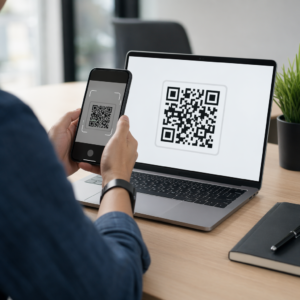
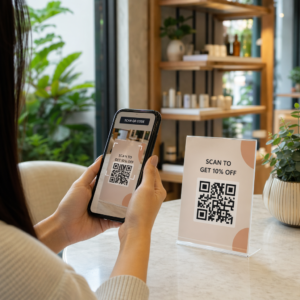
Vil du have lyttere til at finde din podcast uden at taste et eneste tegn? Når dit publikum manuelt skal lede efter et show, vil de fleste af dem ikke gøre sig ulejlighed. Denne guide dækker præcis, hvordan man opretter QR-koder til podcastpromovering, hvor man placerer dem, og hvordan man får mest muligt ud af hver scanning.
Hvorfor podcastere har brug for QR-koder
Podcasting er blevet et mainstream-medie. Anslået 158 millioner mennesker i USA lytter til podcasts hver måned, og over 70% af lytterne afslutter det meste eller hele af hvert afsnit. Det niveau af engagement er sjældent, men kun hvis du overhovedet kan få folk til at trykke på play.
Udfordringen er opdagelighed. Nogen ser din flyer, dit visitkort eller din produktemballage og har ægte interesse – men der er ingen friktionsfri vej fra det øjeblik til dit lydindhold. QR-koder løser det hul. En enkelt scanning tager en lytter direkte til dit show, afsnit eller podcastplatformside uden manuel søgning.
Virksomheder som Sephora, eBay og Microsoft bruger allerede brandede podcasts til at nå nye målgrupper. QR-koder gør disse bestræbelser målbare og mere tilgængelige for lyttere i den virkelige verden.
Hvad en podcast QR-kode faktisk gør
En podcast QR-kode er en todimensionel kode, der koder en destination – typisk et link til en streamingplatform, en podcast-hosting-side eller en lydfil – og åbner den automatisk, når den scannes med et smartphonekamera.
Afhængigt af hvad du linker til, kan lyttere sendes til:
- En specifik afsnitsside med en indlejret afspiller
- Dit shows side på Apple Podcasts, Spotify eller en anden platform
- En universel landingsside, der lader lyttere vælge deres foretrukne app
- En hostet MP3-fil, der afspilles direkte på deres enhed
Det MP3 QR-kode generator fra Pageloot håndterer lydfiler direkte, mens den Link QR-kodegenerator fungerer godt til streamingplatform-URL'er. Hvis din podcast er på Spotify, lader den Spotify QR-kode generator dig linke direkte til et specifikt afsnit, en playliste eller en kunstnerprofil.
Begynd at sende lyttere direkte til din podcast Opret en brandet, sporbar QR-kode til dit show eller din episode ved hjælp af QR-kodegenerator. Gratis 14-dages prøveperiode, intet kreditkort påkrævet.
Fordele ved QR-koder til podcastpromovering

Øjeblikkelig adgang uden ekstra trin
Når en QR-kode er på en trykt annonce, et visitkort eller en butiksudstilling, går lyttere fra at se den til at høre din lyd på få sekunder. Der er ingen søgefelt, ingen app-navigation, ingen indtastning. Den friktionsfri vej er vigtig, fordi hvert ekstra trin mister potentielle lyttere.
Dynamiske koder lader dig opdatere uden genoptryk
En af de mest praktiske fordele ved at bruge dynamiske QR-koder er, at du kan ændre destinationen, efter at koden allerede er blevet trykt. Hvis du linker til den forkerte episode, skifter hostingplatform, eller ønsker at henvise lyttere til en ny sæson, opdaterer du linket i dit dashboard – og den trykte kode forbliver den samme.
Dette beskytter enhver investering i trykte marketingmaterialer og gør det ligetil at genbruge materialer på tværs af kampagner.
Scanning sporing og analyse
QR-koder giver dig reelle data om, hvordan din podcastmarketing præsterer. Du kan se, hvornår scanninger sker, hvor de kommer fra geografisk, og hvilke placeringer der genererer mest engagement. Den information lader dig sammenligne kanaler, identificere hvilke trykte materialer der virker, og træffe informerede beslutninger for fremtidige kampagner.
Tilpasning opbygger brandgenkendelse
QR-koder er den eneste type stregkode, der understøtter visuel tilpasning. Du kan tilføje din podcasts brandfarver, et logo og en baggrund, der passer til dit shows identitet. En veldesignet kode er mere tilbøjelig til at blive scannet, fordi den ser bevidst og troværdig ud snarere end generisk.
Fejltolerance for printmiljøer
QR-koder inkluderer indbygget fejlkorrektion, der gør, at de forbliver scanbare, selvom en del af koden er beskadiget, skjult eller slidt. Dette er især nyttigt for trykte materialer, der udsættes for megen håndtering, som indkøbsposer eller eventprogrammer.
Sådan opretter du en podcast QR-kode

Trin 1 – Få dit podcastlink
Den bedste fremgangsmåde er at bruge et link, der fungerer på tværs af enheder og apps. Mulighederne omfatter:
- En direkte episode-URL fra din hostingudbyder (de fleste værter genererer en selvstændig episodeside med en indlejret afspiller)
- Din series Spotify, Apple Podcasts eller anden platforms-URL
- Et universelt smartlink, der automatisk dirigerer lyttere til deres foretrukne app
Hvis din podcast ligger på Spotify, lær hvordan du opretter en Spotify QR-kode der linker til en specifik episode, et album eller en playliste.
Trin 2 – Vælg den rigtige QR-kodetype
- Brug MP3 QR-kode generator hvis du vil uploade en lydfil direkte og lade lyttere afspille den fra en brandet landingsside
- Brug Link QR-kodegenerator hvis du linker til en streamingplatform-URL eller en podcast-hostingside
- Brug Spotify QR-kode generator til Spotify-specifikt indhold
Trin 3 – Tilpas koden
Tilføj dit podcasts logo, juster farverne, så de matcher dit brand, og konfigurer landingssiden, hvis du bruger en lyd-QR-kode. Pageloots lyd-QR-kodesider understøtter en titel, et coverbillede, brandfarver og en velkomstskærm, før afspilleren indlæses.
Hold kontrasten høj – brug mørke mønstre på en lys baggrund. Undgå omvendte farveskemaer, som er sværere for kameraer at læse.
Trin 4 – Download i det rigtige format
Til printbrug skal du altid gemme din QR-kode som en SVG-, EPS- eller PDF-vektorfil. Disse formater skalerer uden pixelering, så din kode forbliver skarp, uanset om den vises på et visitkort eller en billboard. JPEG- og PNG-formater kan blive slørede, når de forstørres, hvilket reducerer scanningsmuligheden.
Trin 5 – Test før distribution
Scan din færdige kode med flere enheder – forskellige telefonmodeller og både iOS og Android – før du sender den til print. Test hele vejen fra scanning til lydafspilning. Dynamiske QR-koder giver dig mulighed for at rette et ødelagt eller forkert link efterfølgende, men at teste først undgår problemet helt.
Hvor man kan bruge podcast QR-koder
Trykte marketingmaterialer
Trykte annoncer, plakater, flyers, bannere og billboards er stærke placeringer for podcast QR-koder, fordi de når ud til folk, der er stationære eller har et øjeblik til at scanne. Placer koden i et område med høj synlighed med tilstrækkelig hvid plads omkring den. Undgå travle eller mønstrede baggrunde, der forstyrrer scanningen.

For størrelsesvejledning bør din QR-kode være mindst 0,8 × 0,8 tommer for materialer på tæt hold som visitkort eller emballage. Større placeringer som plakater bør skaleres proportionalt – cirka 1 tomme kodebredde pr. 10 tommer forventet scanningsafstand. For detaljeret størrelsesvejledning på tværs af forskellige overflader, se QR-kodestørrelse til forskellige printmaterialer.
Din hjemmeside og sociale medier
Hvis nogen allerede besøger din hjemmeside eller sociale profiler, giver en QR-kode dem en øjeblikkelig vej til dit lydindhold uden at skulle lede gennem navigationen. Dette er især effektivt, når den er indlejret nær en podcast-episodeoversigt eller i en sidebar, der forbliver synlig på hele siden.
Butiksudstillinger og emballage
Hvis du har en fysisk detailhandel, introducerer QR-koder på butiksetiketter, hyldeudstillinger eller indkøbsposer kunder til din podcast i et øjeblik, hvor de allerede er engageret i dit brand. Mange kunder, der handler fysisk, er uvidende om et brands onlineindhold – en velplaceret QR-kode bygger bro over dette hul.
E-mailnyhedsbreve og digitale annoncer
At inkludere en QR-kode i en e-mail eller digital annonce kan virke overflødigt, da disse kanaler allerede understøtter klikbare links, men QR-koder i e-mailsignaturer eller PDF-nyhedsbreve giver modtagere en nem måde at scanne og lytte på en mobil enhed separat fra den skærm, de læser på.
Gør din QR-kode sporbar Brug en Dynamisk QR-kode så du kan opdatere dit podcastlink, spore scanningsvolumen efter placering og måle, hvilke marketingkanaler der driver flest lytninger.
Bedste praksis for podcast QR-koder

Skriv en specifik opfordring til handling
Hver QR-kode har brug for en opfordring til handling (CTA), der fortæller publikum præcis, hvad der vil ske, når de scanner. Vage koder bliver ignoreret. Eksempler på effektive CTA'er til podcastpromovering:
- “Scan for at lytte til denne uges episode”
- “Scan for hele interviewet”
- “Hør de seneste brancheindsigter – scan for at afspille”
CTA'en skal være umiddelbart ved siden af QR-koden, ikke begravet i den omkringliggende tekst. For mere vejledning om at skrive CTA'er og placere koder effektivt, se ultimativ guide til placering af QR-koder i markedsføring.
Hold landingsoplevelsen mobilvenlig
Når nogen scanner med en telefon, skal de nå en side, der indlæses hurtigt og afspiller lyd uden unødvendige barrierer. Hvis du bruger en lyd-QR-kode med en landingsside, skal designet være rent, og afspilningsknappen skal være fremtrædende. Hvis du linker til en streamingplatform, skal du sørge for, at linket åbner i platformens app i stedet for en langsom mobilbrowserside.
Følg design- og læsbarhedsstandarder
- Oprethold høj kontrast mellem QR-koden og dens baggrund
- Efterlad en klar stillezone (tom margen) omkring koden på alle sider, så scannere kan skelne den fra omgivende elementer
- Undgå at placere koder på buede, reflekterende eller teksturerede overflader, hvor det er muligt
- Brug det højeste fejlkorrektionsniveau (H), når du tilføjer et logo-overlay til koden
For en komplet oversigt over designkrav, besøg bedste praksis for QR-kodelæsbarhed.
Brug én kode pr. placeringskontekst
I stedet for en enkelt kode, der linker til hele dit show, kan du overveje at oprette forskellige QR-koder til forskellige episoder eller kampagner. Dynamiske koder gør dette håndterbart – du kan opdatere hver kodes destination uafhængigt og sammenligne scanningsdata på tværs af placeringer for at forstå, hvad der vækker genklang hos forskellige målgrupper.
Link til et universelt indgangspunkt, når det er muligt
Ikke alle dine lyttere bruger den samme podcast-app. Ved at linke til en universel showside – en, der dirigerer brugere til deres foretrukne platform eller inkluderer en indlejret afspiller – sikrer du, at ingen lytter udelukkes, fordi de ikke bruger en specifik app.
Ofte stillede spørgsmål
Den mest effektive tilgang er at bruge et link, der fungerer uanset hvilken app en lytter foretrækker. Det betyder enten din podcast-hosts episode- eller showside (som typisk inkluderer en indlejret afspiller og links til store apps), en universel smart link-tjeneste eller en Spotify/Apple Podcasts URL, hvis dit publikum primært bruger én platform. Undgå app-specifikke dybe links, der kun åbner korrekt i en enkelt app.
Ja, hvis du opretter en dynamisk QR-kode. Dynamiske koder gemmer en kort omdirigerings-URL i kodemønsteret, og du kan opdatere den endelige destination fra dit dashboard når som helst uden at genudskrive. Dette betyder, at du kan pege den samme udskrevne kode mod en ny episode hver uge, eller rette et ødelagt link, efter at materialer allerede er sendt ud.
For de fleste trykte materialer anbefales et minimum på 0,8 × 0,8 tommer. Visitkort, eventbadges og emballage, der skal scannes på armslængde, bør opfylde eller overstige dette minimum. Plakater og bannere, der skal scannes længere væk fra, skal være proportionalt større – cirka 1 tomme bred for hver 10 tommer scanningsafstand. Brug altid et vektorformat som SVG eller EPS til print, så koden forbliver skarp i enhver størrelse.