أفضل ألوان رموز QR هي الوحدات الداكنة (المربعات) على خلفية فاتحة، ونعم، يمكن تلوين رموز QR. القاعدة بسيطة: يجب أن تكون الوحدات أغمق بوضوح من الخلفية. الأسود على الأبيض يعطي نسبة تباين 21:1 وهو الخيار الأكثر أمانًا. للرمز التجاري، استهدف 4:1 على الأقل، واستخدم 7:1 أو أكثر للافتات الخارجية، حيث تقلل أشعة الشمس والمسافة التباين الفعال. يوفر هذا الدليل الأرقام وجدول الألوان وروتين الاختبار.
ما هي ألوان رموز QR التي تعمل، وهل يمكن تلوين رموز QR؟
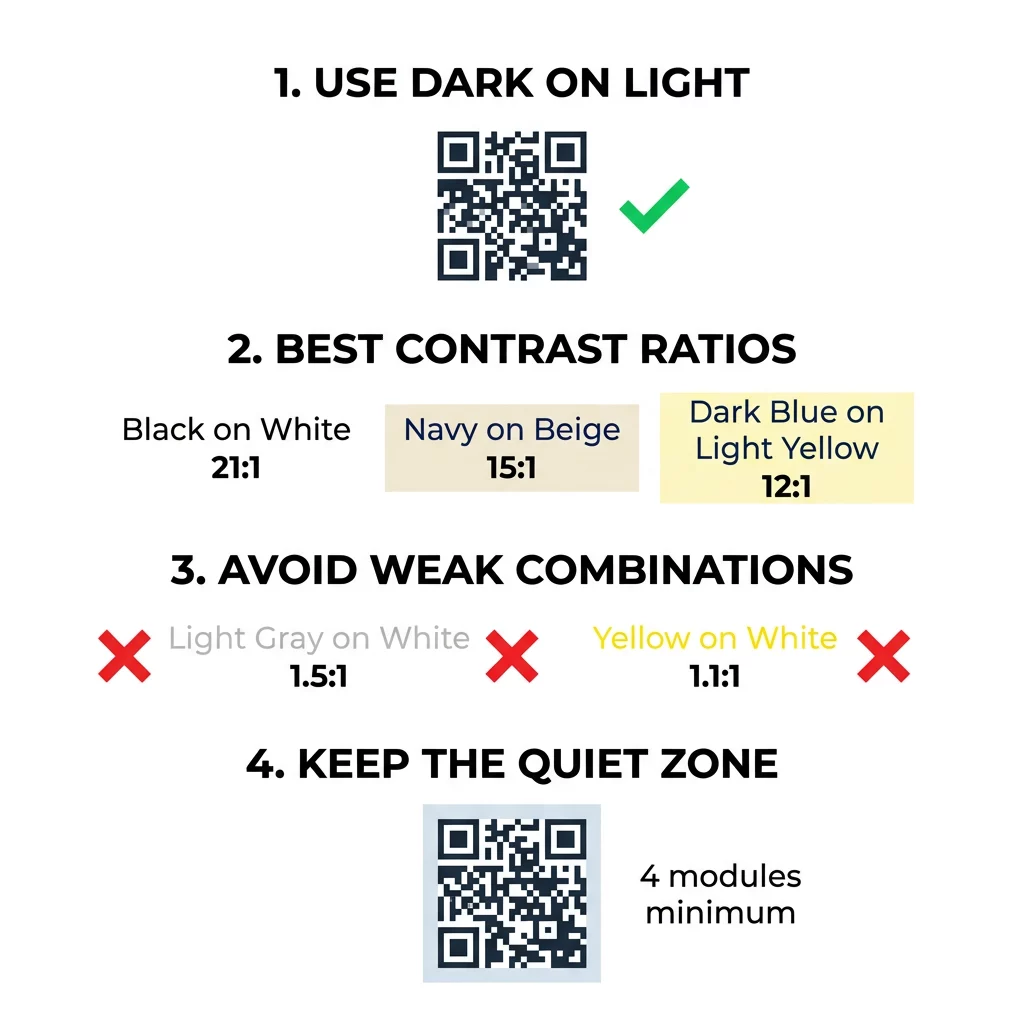
يمكن أن يكون رمز QR بأي لون تقريبًا، ويمكنه استخدام ألوان مختلفة للوحدات والخلفية. لا ترى كاميرا الهاتف درجة اللون. إنها تحول الصورة إلى تدرج رمادي وتقرر، مربعًا تلو الآخر، ما هو داكن وما هو فاتح. لذا، السؤال ليس أي لون تختاره، بل مدى اختلاف قيم التدرج الرمادي الاثنتين.
- يعمل: وحدات كحلية، خضراء داكنة، فحمية، بنفسجية داكنة، بنية داكنة أو سوداء على خلفية بيضاء، كريمية أو أي خلفية فاتحة جدًا أخرى.
- يعمل مع اختبار: أحمر داكن، أزرق مخضر داكن، وبرتقالي داكن على الأبيض. تحقق من النسبة أولاً، وامسح نسخة مطبوعة.
- لا يعمل: وحدات صفراء، رمادية فاتحة، باستيل أو نيون، وأي زوج من الألوان لهما نفس السطوع، مثل الأخضر المتوسط على الأحمر المتوسط.
- محفوف بالمخاطر: وحدات فاتحة على خلفية داكنة (رموز معكوسة). تقرأها العديد من تطبيقات الماسح الضوئي، لكن بعضها لا يقرأها، لذا تجنبها في أي شيء مهم.
لماذا يتحكم التباين في قابلية مسح رموز QR
تقرأ المستشعرات البصرية رموز QR عن طريق قياس الاختلاف في الانعكاسية بين الوحدات الداكنة والفاتحة. يفترض معيار رمز QR، ISO/IEC 18004، وحدات داكنة على خلفية فاتحة. تمتص الوحدات الداكنة الضوء وتعكسه الخلفية الفاتحة. إذا كان الفرق صغيرًا جدًا، لا يمكن للمفكك فصل نمط البيانات عن الخلفية.
في اختبار الباركود (ISO/IEC 15415)، تباين الرمز هو الفرق بين أسطع وأغمق انعكاس في الكود. يحصل تباين الرمز الذي يبلغ 70% أو أكثر على أعلى درجة، بينما يفشل ما هو أقل من 20%. يتحقق المقيمون أيضًا من التعديل، الذي يوضح مدى تساوي انعكاس الوحدات الفاتحة والداكنة عبر الرمز بأكمله. الألوان غير المتساوية أو الفصل الضعيف تجعل الماسح الضوئي يفوت حواف الوحدات.
القطبية العادية، مع وحدات داكنة على خلفية فاتحة، تعمل على كل جهاز. لا تستطيع بعض تطبيقات كاميرا الهاتف المدمجة قراءة الأكواد الفاتحة على الخلفيات الداكنة، ويختلف الدعم حسب طراز الهاتف وإصدار البرنامج. استخدم القطبية العادية ما لم تكن قد اختبرت الإصدار المقلوب على الأجهزة التي يستخدمها جمهورك.
تقييم نسب وعتبات تباين الألوان
نسبة التباين هي رقم يتراوح من 1:1 (لا يوجد فرق) إلى 21:1 (أسود على أبيض). تأتي هذه النسبة من قواعد إمكانية الوصول في إرشادات الوصول إلى محتوى الويب (WCAG)، والتي كُتبت للنصوص ولكنها طريقة عملية للتحقق من ألوان أكواد QR. مدقق التباين (ابحث عن "مدقق تباين WCAG") يقبل رمزين سداسيين (hex codes) ويعيد النسبة. لمزيد من المعلومات حول التصميم الشامل، اقرأ دليلنا حول كيفية جعل رموز QR متوافقة مع ADA.
استخدم هذه الأهداف. 4:1 على الأقل هو الحد الأدنى للطباعة الداخلية والشاشات. 7:1 أو أكثر أكثر أمانًا للتغليف والنشرات وأي شيء يتم تصويره في إضاءة متنوعة. 10:1 أو أكثر هو الهدف للافتات الخارجية. النسب أدناه تقريبية وتعتمد على درجة اللون الدقيقة.
| تركيبة الألوان | نسبة التباين التقريبية | تقييم قابلية المسح |
|---|---|---|
| أسود على أبيض | 21:1 | مثالي (معيار الصناعة) |
| أزرق داكن على بيج | ~15:1 | ممتاز |
| أزرق داكن على أصفر فاتح | ~12:1 | جيد جداً |
| بني داكن على أبيض مائل للصفرة | ~8:1 | جيد |
| أحمر نقي (#FF0000) على أبيض | ~4:1 | على الحافة، اختبر قبل الطباعة |
| أحمر داكن (#8B0000) على أبيض | ~11:1 | جيد جداً |
| رمادي فاتح على أبيض | ~1.5:1 | ضعيف (فشل متكرر في المسح) |
| أصفر على أبيض | ~1.1:1 | غير قابل للمسح الضوئي |
تخصيص الأكواد دون التضحية بإمكانية المسح اختبر الألوان وعاين تصميمك في الوقت الفعلي باستخدام مولد باركود QR مع شعار للموازنة بين جماليات العلامة التجارية والمسح الموثوق.
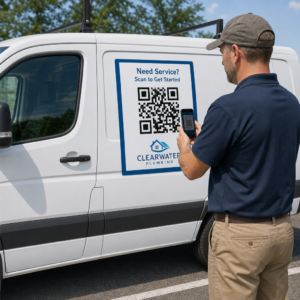
أفضل نسبة تباين لأكواد QR للافتات الخارجية
لا يوجد معيار يحدد نسبة مطلوبة لرموز QR الخارجية، ولكن الظروف الخارجية تقلل التباين بثلاث طرق: الشمس المباشرة تزيل اللون من المناطق الفاتحة، والوهج يخفي أجزاء من الرمز، والمسافة تطمس الوحدات الصغيرة. خطط لهامش أمان أكبر مما قد تفعل في الأماكن المغلقة.
- استخدم الأسود أو لونًا داكنًا جدًا على الأبيض. استهدف نسبة 10:1 أو أعلى.
- اطبع على مادة غير لامعة أو أضف طبقة حماية غير لامعة. يعكس الفينيل اللامع والزجاج الشمس ويكسر النمط.
- حدد حجم الرمز بناءً على مسافة المسح. القاعدة الشائعة هي وحدة واحدة من عرض الرمز لكل 10 وحدات من المسافة، لذا يجب أن يكون الرمز الذي يتم مسحه من 2 متر (حوالي 6.5 قدم) بعرض حوالي 20 سم (8 بوصات).
- حافظ على منطقة الهدوء الكاملة، وضع الرمز على لوحة مضيئة صلبة بدلاً من صورة.
- تجنب وضع الرمز حيث يواجه الشمس المنخفضة أو خلف الزجاج، وامسح اللافتة المطبوعة في الموقع الفعلي قبل طلب تشغيل كامل.
تباين الباركود: رموز QR مقابل الباركود الخطي
تنطبق نفس قواعد التباين على الباركود الأخرى عالية التباين، مثل Code 128 أو EAN. غالبًا ما تستخدم ماسحات التجزئة ليزرًا أحمر، والضوء الأحمر لا يرى القضبان الحمراء أو الحبر الأحمر على أنه داكن. بالنسبة للباركود الخطي، اطبع القضبان باللون الأسود أو الأزرق الداكن أو الأخضر الداكن على الأبيض، ولا تستخدم أبدًا الأحمر أو البرتقالي. رموز QR التي تقرأها كاميرا الهاتف أقل حساسية للون، ولكن نفس النصيحة تعطي النتيجة الأكثر موثوقية لكلاهما.
الحفاظ على منطقة الهدوء وأبعاد الرمز
يجب أن يمتد التباين العالي إلى حافة الرمز. الهامش الفارغ حول النمط هو منطقة الهدوء. يخبر الكاميرا بمكان بدء الرمز ومكان انتهاء الأعمال الفنية الأخرى.
- حافظ على منطقة هدوء بعرض أربع وحدات على الأقل من جميع الجوانب الأربعة.
- حافظ على هذا الهامش خاليًا من النصوص والرسوم التوضيحية والحدود.
- طابق منطقة الهدوء مع لون الخلفية الفاتح لديك بحيث تكون الحدود نظيفة.
- اطبع الرموز بحجم 2 × 2 سم (0.8 × 0.8 بوصة) على الأقل للمسح اليدوي القريب. زد الحجم للروابط الأطول، لأن المزيد من البيانات يعني وحدات أصغر.
- فضل رابطًا قصيرًا. يُنشئ عنوان URL قصير نمطًا أبسط بوحدات أكبر تُمسح ضوئيًا بشكل أفضل في الإضاءة الخافتة.
يُعد النص أو العمل الفني داخل المنطقة الهادئة سببًا شائعًا لأخطاء المسح الضوئي على المواد ذات العلامات التجارية. دليلنا لـ أفضل الممارسات لقابلية قراءة رمز الاستجابة السريعة يوضح كيفية الحفاظ على الهوامش مع ملاءمة تصميمك.
تجنب أخطاء الألوان والتصميم الشائعة
تخصيص الرمز قد يضر بالوضوح. تحول الكاميرات الصورة إلى تدرج رمادي، لذا يمكن أن ينتهي الأمر بظلين مختلفين بنفس السطوع ويندمجان في لون رمادي واحد.
- تجنب الوحدات الباستيلية مثل الأزرق السماوي أو النعناعي أو الأصفر الشاحب.
- تجنب الوحدات الحمراء أو البرتقالية الزاهية. تقرأ الماسحات الضوئية الليزرية اللون الأحمر كضوء، وغالبًا ما تكون نسبة التباين أقل من 5:1. اللون الأحمر الداكن مثل العنابي أكثر أمانًا بكثير.
- تجنب التدرجات اللونية حيث يكون الجزء الأفتح من لون الوحدة قريبًا من الخلفية.
- تجنب الخلفيات الشفافة فوق الصور أو الورق المزخرف أو التغليف المنقوش. ضع الرمز على لوحة مضيئة صلبة.
- تجنب التصميمات المقلوبة ذات الوحدات الفاتحة على خلفية داكنة ما لم تكن قد اختبرتها على الهواتف التي يستخدمها جمهورك.
- تجنب الشعارات الكبيرة. الشعار الذي يغطي عددًا كبيرًا جدًا من الوحدات يمكن أن يتجاوز تصحيح الخطأ للرمز.
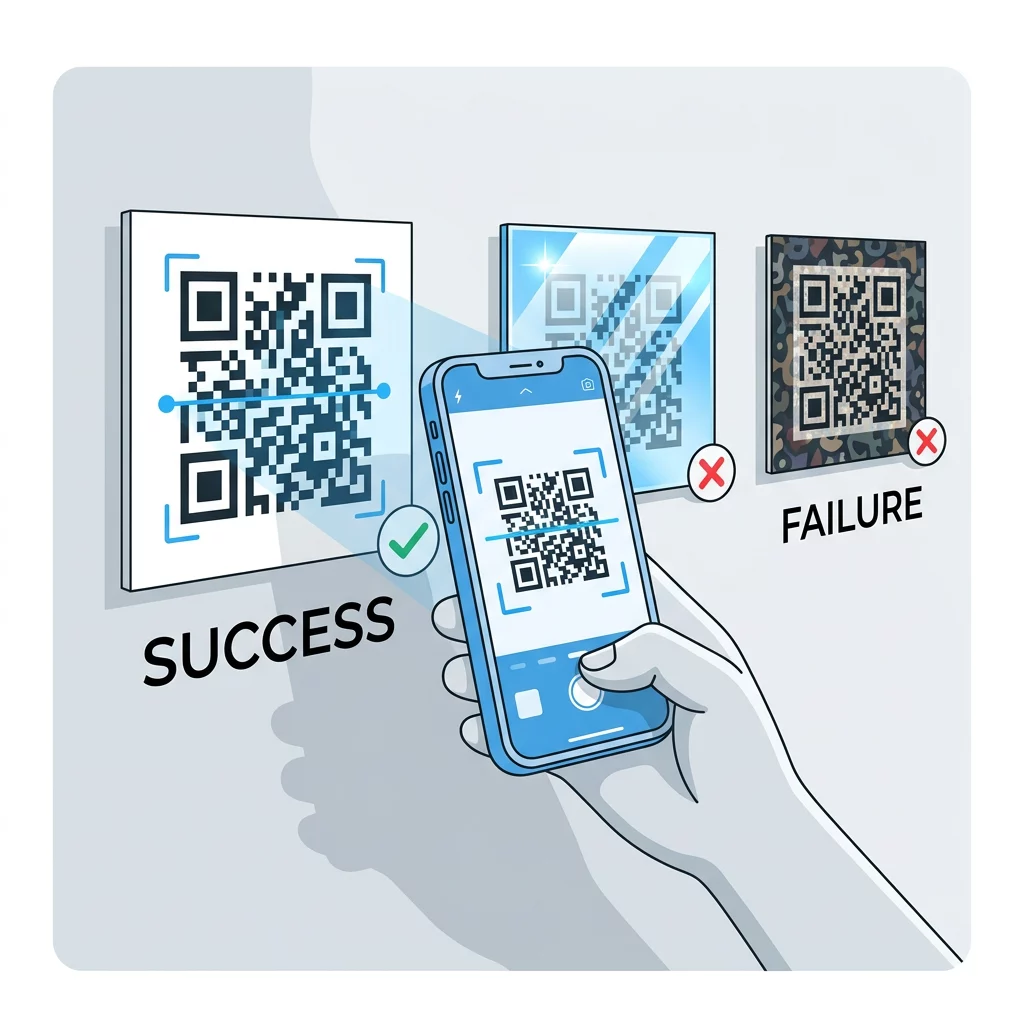
معرفة هذه الحدود تتيح لك تعلم كيفية إنشاء رمز QR مخصص الذي يعرض علامتك التجارية دون الإخلال بفك التشفير.
الاختبار والتحقق في بيئات العالم الحقيقي
رمز يُمسح ضوئيًا من شاشة ساطعة قد يفشل على الورق. يغير ضوء الغرفة وزاوية الرؤية وملمس المادة التباين الذي يصل إلى العدسة. أشعة الشمس المباشرة تزيل الفروق اللونية الصغيرة، والغرف الخافتة تقلل من قدرة المستشعر على فصل الوحدات، والتشطيبات اللامعة تضيف وهجًا.
قم بهذا الفحص قبل كل مهمة طباعة:
- تحقق من زوج الألوان في مدقق التباين. يجب أن تكون النسبة 4:1 على الأقل، و 7:1 أو أكثر للتغليف والاستخدام الخارجي.
- اطبع نسخة تجريبية على المادة الحقيقية، بالحجم الحقيقي، بالتشطيب الحقيقي.
- امسحه ضوئيًا باستخدام الكاميرا المدمجة في هاتف iPhone واحد على الأقل وهاتف Android واحد، وهاتف قديم واحد إذا استطعت، ومستند إلى المتصفح ماسح الباركود QR.
- امسح الرمز ضوئيًا في أسوأ إضاءة قد يواجهها: غرفة خافتة، شمس مباشرة، وبزاوية.
- إذا تردد الماسح، ارفع التباين، كبّر الرمز، اختصر الرابط أو استعد المنطقة الهادئة.
دليلنا حول كيفية اختبار رمز QR قبل الطباعة يغطي هذا بمزيد من التفصيل، و كيفية تحسين قابلية قراءة رمز QR يغطي الإصلاحات للرموز التي تفشل.
زيادة موثوقية رمز الاستجابة السريعة (QR) ومشاركته إلى أقصى حد
تعامل مع التباين كمتطلب تقني، وليس لمسة نهائية. اختر لونًا داكنًا على خلفية فاتحة، وحافظ على المنطقة الهادئة، واختبر نسخة مطبوعة تحت الإضاءة التي ستواجهها. هذا يحمي ميزانية الطباعة الخاصة بك من الرموز التي لا يمكن مسحها ضوئيًا.
أنشئ رمزك عالي التباين باستخدام مولد رمز الاستجابة السريعة (QR code). اضبط ألوان الوحدة والخلفية، وحمّل ملف PNG أو SVG أو PDF. إذا قمت بطباعة رمز وقد تحتاج إلى تغيير الرابط لاحقًا، فاستخدم رمزًا ديناميكيًا: يمكنك تعديل الوجهة بعد الطباعة والاطلاع على إحصائيات المسح. تأتي الرموز الديناميكية مع نسخة تجريبية مجانية لمدة 14 يومًا، والخطط مدرجة على https://pageloot.com/pricing/.
الأسئلة الشائعة
استهدف نسبة 4:1 على الأقل بين الوحدات والخلفية. استخدم 7:1 أو أكثر للتعبئة والنشرات الإعلانية، و 10:1 أو أكثر للافتات الخارجية. الأسود على الأبيض هو 21:1.
نعم. أي لون ينجح إذا كانت الوحدات أغمق بوضوح من الخلفية. ألوان مثل الكحلي الداكن، الأخضر الغابي، الفحمي، والأحمر العنابي على خلفية بيضاء أو كريمية تعمل جيدًا. أما الأصفر، الرمادي الفاتح، وألوان الباستيل فلا تعمل.
يمكن أن تكون الوحدات والخلفية بألوان مختلفة، ويمكنك استخدام أي درجة لون، ولكن المهم هو اختلاف السطوع فقط. يقرأ الهاتف الرمز بتدرج الرمادي، لذلك سيفشل لونان لهما نفس السطوع. تحقق من النسبة وامسح نسخة مطبوعة ضوئيًا.
لا يوجد معيار رسمي. نسبة 10:1 أو أعلى هي هدف آمن، مثل الأسود على الأبيض. استخدم لمسة نهائية غير لامعة لتقليل الوهج، وحدد حجم الرمز بما يقرب من 1/10 من مسافة المسح، واختبره في الموقع.
نعم، إذا كان لون علامتك التجارية داكنًا بما فيه الكفاية، مثل الكحلي الداكن، الأخضر الغابي، أو الفحمي، ويوضع على خلفية فاتحة موحدة. إذا كان لون علامتك التجارية فاتحًا، فاستخدم درجة داكنة منه للوحدات.
يحدد معيار QR الوحدات الداكنة على خلفية فاتحة. تبحث العديد من تطبيقات الكاميرا عن هذا النمط أولاً، وبعضها لا يستطيع قراءة الوحدات الفاتحة على خلفية داكنة. يختلف الدعم حسب الهاتف، لذا اختبر قبل الطباعة.
نعم. يحتاج الباركود الخطي مثل Code 128 أو EAN أيضًا إلى أشرطة داكنة على خلفية فاتحة. تستخدم ماسحات الليزر الخاصة بالتجزئة ضوءًا أحمر، لذا لا تطبع الأشرطة أبدًا باللون الأحمر أو البرتقالي.