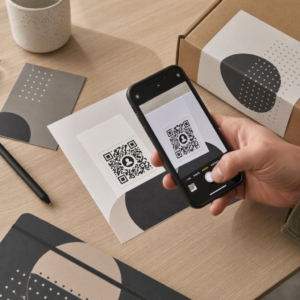
الحد الأدنى لحجم رمز الاستجابة السريعة (QR) لبطاقة العمل هو حوالي 0.6 × 0.6 بوصة (1.5 × 1.5 سم)، وذلك فقط إذا كان الرمز يحتوي على رابط قصير، ويُطبع بوضوح، ولديه تباين قوي. لضمان مسح ضوئي موثوق به، اجعله 0.8 × 0.8 بوصة (2 × 2 سم) على الأقل. يقدم هذا الدليل الأحجام الدقيقة، وقواعد الطباعة الكامنة وراءها، وقائمة تحقق لاختبار بطاقتك قبل الطلب.
ما هو الحجم المناسب لرمز QR على بطاقة العمل؟
بالنسبة لبطاقة العمل القياسية، الحجم الموصى به هو 0.8 × 0.8 بوصة (2 × 2 سم). بهذا الحجم، تركز كاميرات الهواتف بسرعة، حتى في الإضاءة الخافتة أو بزاوية طفيفة. عادةً ما يمسك الأشخاص البطاقة على بعد 4 إلى 10 بوصات (10 إلى 25 سم) من الهاتف، لذلك يجب أن يكون الرمز كبيرًا بما يكفي لملء جزء جيد من رؤية الكاميرا عند تلك المسافة.
القاعدة الشائعة هي نسبة 10:1: لكل 10 سم من مسافة المسح، يجب أن يكون الرمز بعرض 1 سم على الأقل. على مسافة 10 بوصات (25 سم)، يعطي ذلك حوالي 1 بوصة (2.5 سم) لأسهل مسح، وتسمح المسافات الأقصر برموز أصغر. هذا هو السبب في أن 0.8 بوصة يعمل لمعظم البطاقات، وأي شيء أقل من 0.6 بوصة يبدأ في الفشل على الهواتف القديمة.
الحد الأدنى لحجم رمز QR والحجم الموصى به
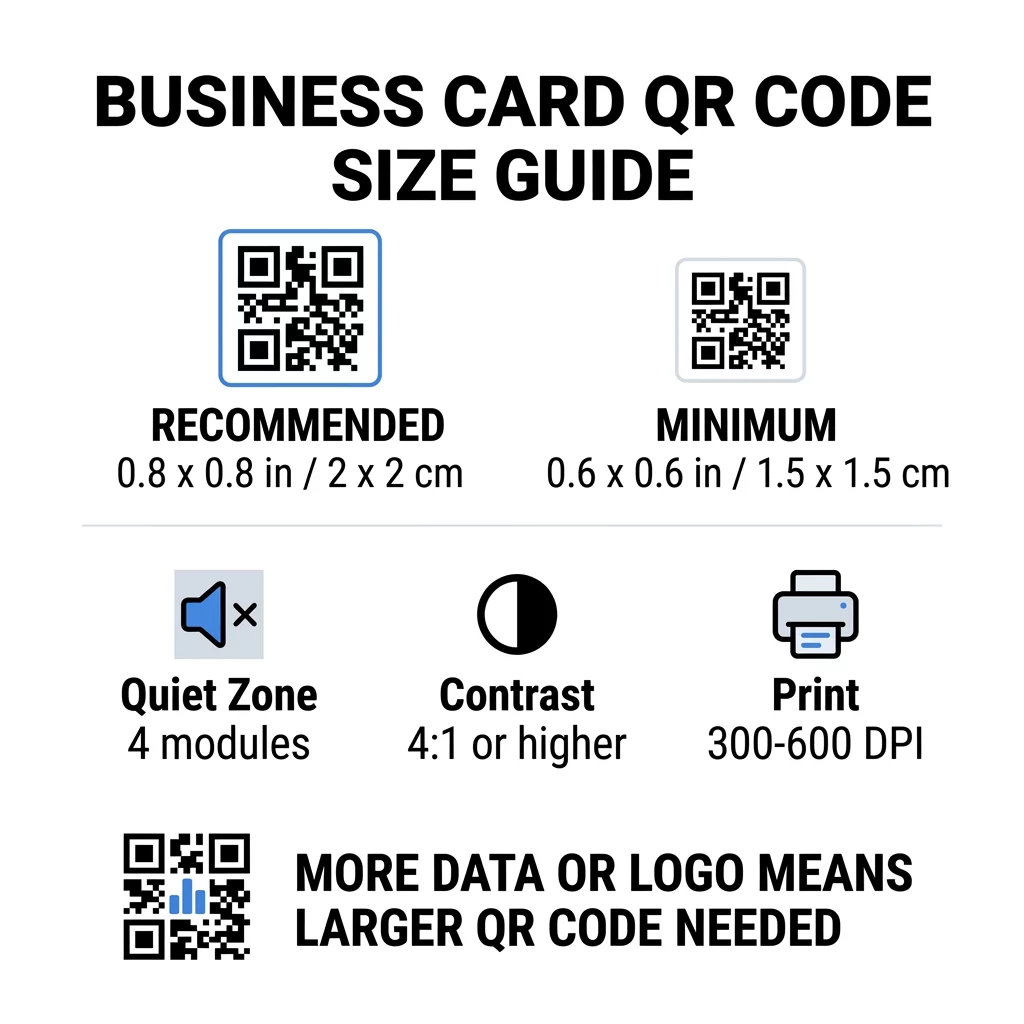
لا تترك بطاقات العمل مساحة كبيرة، لذا من المفيد تحديد حجم الرمز أولاً ثم التصميم حوله. الحجم الموصى به هو 0.8 × 0.8 بوصة (2 × 2 سم). إذا كانت البطاقة مزدحمة، فالحد الأدنى هو 0.6 × 0.6 بوصة (1.5 × 1.5 سم). هذا هو الجواب على مدى صغر رمز QR على بطاقة العمل: 0.6 بوصة، مع رابط قصير، وتباين عالٍ، وطباعة نظيفة.
| فئة الحجم | الأبعاد (بالبوصة) | الأبعاد (بالسم) | الموثوقية | أفضل حالة استخدام |
|---|---|---|---|---|
| الحد الأدنى | 0.6 × 0.6 بوصة | 1.5 × 1.5 سم | معتدل | عناوين URL قصيرة وبيانات منخفضة الكثافة |
| موصى به | 0.8 × 0.8 بوصة | 2.0 × 2.0 سم | عالي | بطاقات العمل القياسية وروابط الاتصال |
| كثافة عالية | 1.0 × 1.0 بوصة+ | 2.5 × 2.5 سم+ | عالي | بطاقات الاتصال التفصيلية والشعارات المضمنة |
هذه الأحجام مخصصة للمربعات السوداء فقط. الهامش الفارغ حول الرمز إضافي، لذا يحتاج رمز بحجم 0.8 بوصة إلى حوالي 0.1 بوصة من المساحة الواضحة على كل جانب (انظر المنطقة الهادئة أدناه).
QR Code Size on a Business Card by Card Format
- US standard card (3.5 x 2 inches): a 0.8 inch code takes 40% of the card height. Place it on the back so the front stays clean.
- European standard card (85 x 55 mm): use 20 to 25 mm. The same 2 cm rule applies.
- Folded or square cards: you have more room, so use 1 inch (2.5 cm) or larger and keep the code away from the fold.
- Back of the card only: if the front is full, put a 1 inch code on the back with a short line such as “Scan to save my contact”.
How Data Density Dictates Code Size
The size of your QR code depends on how much data it holds. A QR code is a grid of small squares called modules. Version 1 has 21 x 21 modules and Version 40 has 177 x 177 modules. More data means more modules, and each module gets smaller when the code size stays the same. If the modules print smaller than a camera can resolve, the scan fails.
Here is the math for a 2 cm (0.8 inch) code. A short link usually fits in a Version 2 code (25 modules), so each module is about 0.8 mm. A full contact record can need Version 10 or higher (57 modules or more), and each module drops to about 0.35 mm. The second code is much harder to print and scan at the same size.
A direct vCard with your name, phone numbers, email addresses and office address creates a dense grid. Using a مولد رمز QR لبطاقة vCard to create a direct static file often needs a code of 1 inch (2.5 cm) or more to stay readable.
To keep your code compact and easy to scan on a small card:
- Encode a short link to your contact page instead of long raw contact text.
- Keep only the essential contact channels.
- Keep the module count low so each square stays large and sharp.
- Follow the principles for how to design a business card with a QR code to balance layout and function.
الرابط المختصر هو أبسط طريقة للقيام بذلك. رمز الاستجابة السريعة الديناميكي يخزن رابطًا قصيرًا ويتيح لك تغيير صفحة الوجهة بعد طباعة البطاقات. تقدم Pageloot رموزًا ديناميكية مع تجربة مجانية لمدة 14 يومًا، ويمكنك رؤية الخطط على pageloot.com/pricing. يكفي الرمز الثابت إذا لم يتغير رابطك أبدًا.
أنشئ رمز بطاقة عملك المخصص هل أنت مستعد لإنشاء رمز جهة اتصال قابل للمسح والتتبع؟ استخدم الـ مولد رمز QR لبطاقة العمل لتصميم رموز عالية الدقة ومشاركة تفاصيلك بمسحة واحدة.
هل رموز QR على بطاقات العمل جيدة أم سيئة؟
تكون رموز QR على بطاقات العمل جيدة عندما يكون الرمز كبيرًا بما يكفي وسهل المسح ويؤدي إلى شيء مفيد. وتكون سيئة عندما يكون الرمز صغيرًا جدًا، أو يكون الرابط معطلاً، أو الصفحة غير مصممة للهواتف.
الفوائد حقيقية. يمكن للشخص حفظ جهة اتصالك أو فتح محفظتك في ثانيتين، ويمكنك وضع معلومات أكثر مما تسمح به البطاقة. المخاطر حقيقية أيضًا: رمز لا يتم مسحه يبدو مهملًا، ولا يمكن إصلاح رمز مطبوع برابط خاطئ على رمز ثابت. اتبع هذه القواعد:
- اجعل الرمز 0.8 بوصة (2 سم) على الأقل.
- وجهه إلى صفحة تفتح بسرعة على الهاتف.
- أضف سطرًا قصيرًا بجانبه يوضح ما يحصل عليه الشخص، مثل “احفظ جهة اتصالي” أو “شاهد أعمالي”.
- اختبر النسخة المطبوعة قبل طلب الكمية كاملة.
المعايير الفنية الأساسية للمسح الموثوق
الحجم وحده لا يضمن مسحًا جيدًا. هذه القواعد الطباعية تحدد ما إذا كانت الكاميرا تستطيع قراءة النمط.
الحفاظ على المنطقة الهادئة
المنطقة الهادئة هي الهامش الفارغ حول رمز QR بأكمله. يتطلب معيار ISO/IEC أربعة وحدات على الأقل من كل جانب. لرمز بحجم 2 سم و25 وحدة، يكون هذا الهامش حوالي 3 مم. المساحة الفارغة تخبر الماسح الضوئي أين يبدأ الرمز. النصوص أو الحدود أو صور الخلفية داخل هذا الهامش هي أحد الأسباب الأكثر شيوعًا لفشل عمليات المسح.
تطبيق تباين ألوان عالٍ
تقرأ الماسحات الضوئية الفرق في السطوع بين الوحدات الداكنة والخلفية الفاتحة. الأسود على الأبيض هو الخيار الأكثر أمانًا. الأزرق الداكن أو الأخضر الداكن أو الأسود على خلفية فاتحة يعمل أيضًا بشكل جيد. تجنب الوحدات الفاتحة على خلفية داكنة (الأكواد المقلوبة)، لأن بعض تطبيقات الكاميرا الافتراضية لا تستطيع قراءتها. لا تستخدم لونين متوسطي الدرجة، مثل البرتقالي على الأحمر. اقرأ الـ إرشادات تباين ألوان رمز QR لاختيار زوج ألوان آمن.
تصدير صيغ الطباعة المتجهية
الملفات منخفضة الدقة، مثل صور JPEG بدقة 72 نقطة في البوصة، تُطبع بحواف ضبابية. للطباعة، أرسل الملف بصيغة SVG أو EPS أو PDF (متجه)، والتي تظل واضحة بأي حجم. إذا كان بإمكانك إرسال ملف PNG فقط، فقم بتصديره بدقة 300 نقطة في البوصة أو أعلى بالحجم النهائي للطباعة. هذه الـ أفضل الممارسات لقابلية قراءة رمز الاستجابة السريعة تساعدك على تجنب المشاكل قبل وصول الملف إلى المطبعة.
تصحيح الأخطاء ودمج الشعار
تستخدم رموز QR تصحيح الأخطاء بطريقة ريد-سولومون. يسمح هذا للماسح الضوئي بإعادة بناء البيانات عندما يكون جزء من الرمز متآكلًا أو مجعدًا أو مغطى. هناك أربعة مستويات:
- المستوى L يستعيد حوالي 7% من البيانات التالفة. استخدمه للأكواد الصغيرة والبسيطة بدون شعار.
- المستوى M يستعيد حوالي 15% من البيانات التالفة. إنه الخيار الافتراضي الشائع لبطاقات العمل.
- المستوى Q يستعيد حوالي 25% من البيانات التالفة. إنه خيار جيد للبطاقات التي تُحفظ في المحافظ.
- المستوى H يستعيد حوالي 30% من البيانات التالفة. استخدمه إذا وضعت شعارًا في المنتصف.
المستويات الأعلى تضيف المزيد من الوحدات، وبالتالي تصبح الشبكة أكثر كثافة. إذا استخدمت المستوى H لشعار في المنتصف، فزد الحجم المطبوع إلى 1.0 × 1.0 بوصة (2.5 × 2.5 سم) على الأقل، وحافظ على الشعار صغيرًا، حوالي خمس عرض الرمز.
اختيار نوع الورق والتشطيبات
يغير سطح البطاقة طريقة وصول الضوء إلى كاميرا الهاتف. الأوراق غير اللامعة وغير المطلية تُمسح ضوئيًا بشكل أفضل لأنها توزع الضوء بالتساوي.
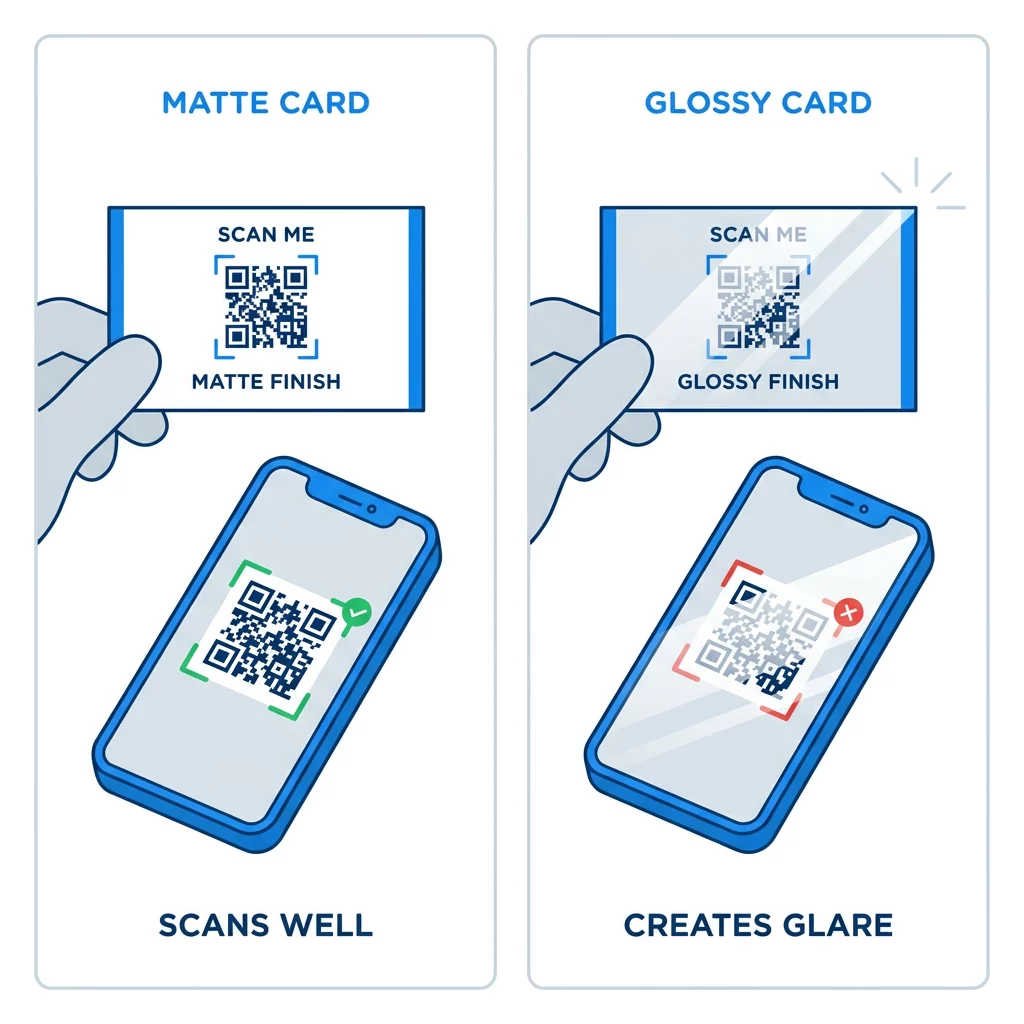
الطبقات عالية اللمعان، والرقائق المعدنية، والرقائق العاكسة تخلق وهجًا تحت الأضواء الكاشفة، وهذا الوهج يمحو التباين. إذا استخدمت تشطيبًا خاصًا، فاحتفظ بالرمز في منطقة مسطحة غير لامعة. أبقِ الرمز بعيدًا عن الطيات، والزوايا الدائرية، والحافة التي تمسك بها الأصابع البطاقة.
اختبر رمز QR لبطاقة عملك قبل الطباعة
- اطبع نسخة تجريبية على ورق البطاقة الحقيقي بمقياس 100%. لا تحكم على الرمز من الشاشة.
- امسحه ضوئيًا باستخدام هاتف iPhone واحد على الأقل وهاتف Android واحد.
- امسحه ضوئيًا في ضوء النهار الساطع وفي غرفة خافتة الإضاءة.
- امسحه ضوئيًا من مسافة حوالي 4 بوصات (10 سم) ومن مسافة حوالي 10 بوصات (25 سم).
- افتح صفحة الوجهة على بيانات الجوال وتأكد من أنها تتحمل بسرعة.
- عندها فقط اطلب دفعة الطباعة الكاملة.
رمز QR لبطاقة العمل لا يمسح ضوئيًا؟ تحقق من هذه الأمور
- الرمز أصغر من 0.6 بوصة (1.5 سم)، أو الرابط طويل والوحدات صغيرة جدًا. قم بتكبير الرمز أو تقصير الرابط.
- يوجد نص أو حد داخل المنطقة الهادئة. ابعده بمسافة لا تقل عن أربع وحدات.
- التباين منخفض جدًا أو الألوان معكوسة. استخدم وحدات داكنة على خلفية فاتحة.
- الملف عبارة عن صورة منخفضة الدقة. أعد الطباعة من ملف متجه أو ملف PNG بدقة 300 نقطة في البوصة بالحجم النهائي.
- وهج من تشطيب لامع أو رقائق معدنية. انقل الرمز إلى منطقة غير لامعة.
- رابط الوجهة خاطئ أو الصفحة بطيئة. افتح الرابط على هاتفك وقم بإصلاحه.
رمز QR بالحجم المناسب يجعل بطاقة عملك جسرًا موثوقًا بين المصافحة وملفك الشخصي عبر الإنترنت. حافظ على حجم الرمز 0.8 × 0.8 بوصة أو أكبر، واحمِ المنطقة الهادئة واطبع من ملفات المتجهات النظيفة. لإنشاء واختبار بطاقتك التالية، استخدم Pageloot مولد رمز الاستجابة السريعة (QR code).
الأسئلة الشائعة
خطط لـ 0.8 × 0.8 بوصة (2 × 2 سم). هذا الحجم يُمسح ضوئيًا بسرعة على الهواتف الذكية الحالية من مسافة حمل عادية. استخدم 1 بوصة (2.5 سم) أو أكثر إذا كان الكود يحتوي على الكثير من البيانات أو شعارًا.
أصغر حجم هو حوالي 0.6 × 0.6 بوصة (1.5 × 1.5 سم). يعمل فقط مع رابط قصير، وتباين عالٍ، ومنطقة هادئة واضحة، وطباعة حادة. بالنسبة للهواتف القديمة، اجعل الكود بحجم 0.8 بوصة (2 سم) أو أكبر.
حوالي 0.6 بوصة (1.5 سم) لكل جانب في أفضل الأحوال. أصغر من ذلك، لا تستطيع معظم كاميرات الهواتف التركيز على بطاقة تُمسك على مسافة عادية. تقصير الرابط يجعل المربعات أكبر ويساعد الرموز الصغيرة على المسح الضوئي.
نعم، ولكن استخدم تصحيح الخطأ من المستوى H حتى يتمكن الكود من استعادة البيانات المخفية. يضيف المستوى H وحدات، لذا كبّر الكود إلى 1.0 × 1.0 بوصة (2.5 سم) على الأقل وحافظ على الشعار صغيراً.
الأسباب الشائعة هي منطقة هادئة صغيرة جدًا، تباين ألوان منخفض، ملف بدقة منخفضة، وهج من تشطيب لامع أو رمز صغير جدًا. تحقق من كل منها على النسخة التجريبية المطبوعة وقم بإصلاحه قبل دورة الطباعة التالية.
تكون جيدة عندما يكون الكود 0.8 بوصة على الأقل، ويتم مسحه ضوئيًا بشكل جيد ويفتح صفحة مصممة للهواتف. وتكون سيئة عندما يكون الكود صغيرًا جدًا، أو يصعب مسحه ضوئيًا، أو يؤدي إلى رابط معطل. اختبر دائمًا نسخة مطبوعة.
الكود الثابت يكفي إذا لم يتغير الرابط أبدًا، والأكواد الثابتة لا تنتهي صلاحيتها أبدًا. الكود الديناميكي يستحق العناء إذا كنت قد تغير الوظائف، أو المواقع الإلكترونية، أو صفحات الاتصال، لأنه يمكنك تعديل الوجهة دون الحاجة إلى إعادة الطباعة. تأتي الأكواد الديناميكية من Pageloot مع نسخة تجريبية مجانية لمدة 14 يومًا، والخطط مدرجة على pageloot.com/pricing.