QR kodu tarama verilerini bir varlık yerine bir yükümlülük haline gelmeden önce ne kadar süreyle saklamalısınız? Verileri çok uzun süre saklamak sizi uyumluluk riskine maruz bırakır; çok erken silmek ise kampanya raporlamanızda boşluklar bırakır. Bu kılavuz, analiz verileriniz için doğru saklama süresini belirleyen temel faktörleri açıklamaktadır.
Gerçekte Hangi QR Kodu Analiz Verileri Toplanır
Bir saklama süresi belirlemeden önce, neyi sakladığınızı bilmeniz gerekir. Biri bir şeyi taradığında dinamik QR kodu, tarama, kullanıcıyı nihai hedefe göndermeden önce bir izleme sunucusu üzerinden yönlendirilir. Bu süreç, aşağıdakileri içerebilecek bir dizi veri noktasını yakalar:
- Tarama zaman damgaları (her taramanın tarihi ve saati)
- Coğrafi konum (ülke, bölge, şehir – IP adresinden veya izinle GPS'ten türetilir)
- Cihaz türü ve işletim sistemi
- Toplam tarama sayısı ve benzersiz tarama sayısı
- Yönlendirme kaynağı veya kampanya tanımlayıcısı
Statik QR kodları ise verileri doğrudan kod desenine gömer ve hiçbir şey toplamaz – sunucu yönlendirmesi olmadığı için hiçbir analiz verisi üretilmez. Eğer izleme kampanyanız için önemliyse, dinamik QR kodları pratik başlangıç noktasıdır.
Topladığınız verilerin hassasiyeti, onları ne kadar süreyle saklamanız gerektiğini doğrudan etkiler. Örneğin, bireysel bir taramayla ilişkili konum verileri, haftalık toplam tarama sayısından daha hassastır ve ikisi farklı saklama kurallarına tabi olmalıdır.
Temel İlke: Verileri Yalnızca Gerekli Olduğu Sürece Saklayın
Hiçbir tek düzenleme, analiz verilerinin saklanması için evrensel bir gün veya yıl sayısı belirlemez. Bunun yerine, ABD gizlilik rehberliği – FTC, CCPA/CPRA ve sektöre özgü kurallardan – ortak bir standartta birleşir: kişisel verileri yalnızca toplandığı amaç için makul ölçüde gerekli olduğu sürece saklayın, ardından silin veya güvenli bir şekilde yok edin.
FTC, bu durumu yaptırım eylemlerinde pekiştirmiş, şirketlerin “kişisel verilerin saklanmasını, toplandığı amaçları yerine getirmek için gereken en kısa süreyle sınırlayan” saklama politikaları uygulamalarını zorunlu kılmıştır. Benzer şekilde, CPRA, işletmelerin veri toplama anında veya öncesinde saklama sürelerini açıklamasını ve kişisel bilgileri açıklanan amaç için makul ölçüde gerekenden daha uzun süre saklamasını yasaklar.
Pratikte bu, saklama sürenizin rastgele bir sayı olmadığı – belgelenmiş bir iş amacı ile gerekçelendirilmesi gerektiği anlamına gelir.
QR Kod Kampanyalarınızı Gerçek Zamanlı Takip Edin Dahili analiz özelliklerine sahip dinamik QR kodları oluşturun ve saklama ayarlarını tek bir kontrol panelinden yönetin. Başlamak için Dinamik QR Kod Oluşturucu.
Saklama Sürenizi Belirleyen Faktörler
Raporlama ve Kampanya Döngünüz
Bir saklama süresi için en pratik dayanak, gerçek raporlama sıklığınızdır. Kendinize sorun: Bir karar vermek için tarama verilerini düzenli olarak ne kadar geriye dönük çekmeniz gerekiyor?
Çoğu pazarlama kampanyası için 30 ila 90 günlük bir pencere, bir kampanyanın aktif aşamasını kapsar. Üç aylık incelemeler yapıyorsanız, en az 90 günlük veriye ihtiyacınız vardır. Yıllık raporlama döngüleri veya mevsimsel karşılaştırma analizleri, tarama düzeyindeki verilerin 12 ila 14 ay boyunca saklanmasını haklı çıkarabilir.
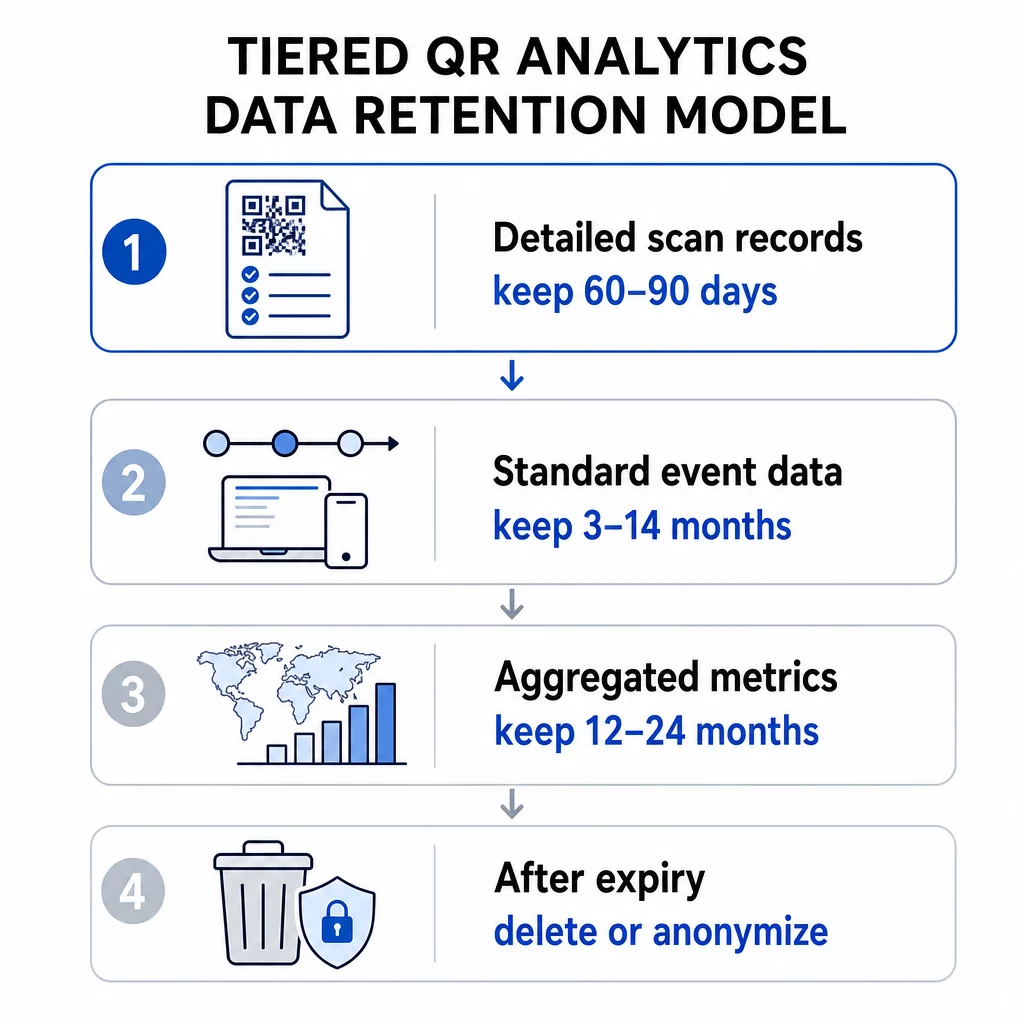
Toplu veriler – haftalık toplam taramalar, bölgeye göre tarama sayıları – genellikle bireysel düzeydeki olay verilerinden daha uzun süre saklanabilir, çünkü daha düşük gizlilik riski taşır. Katmanlı bir yaklaşım burada iyi sonuç verir: ayrıntılı tarama kayıtlarını daha kısa bir pencere için (örn. 60-90 gün) tutun ve toplanmış metrikleri daha uzun bir süre için (örn. 12-24 ay) saklayın.
QR Kod Platformunuzun Dahili Sınırları
Analiz platformunuz, politikanız ne olursa olsun kendi saklama üst sınırını uygulayabilir. Platform düzeyindeki sınırlar, planlama yapılması gereken pratik bir gerçektir.
Referans olarak, Google Analytics 4 gibi araçlar, standart mülklerde kullanıcı düzeyinde ve olay düzeyinde veri saklama ayarlarını 2 ay veya 14 ay olarak sunar; kurumsal katmanlarda daha uzun seçenekler mevcuttur. Bu pencere sona erdiğinde, ayrıntılı kullanıcı verileri GA4 sunucularından silinir – standart toplu raporlar kalır, ancak eski verilerin keşif düzeyinde analizi artık mümkün olmaz.
Değerlendirirken QR kodu abonelik planları, her katmanın sağladığı tarama geçmişi penceresini kontrol edin. Giriş seviyesi planlar 60 günlük tarama geçmişi sunabilirken, daha yüksek katmanlar bu pencereyi uzatır. Planınızın veri penceresi, tarama davranışını ne kadar geriye dönük analiz edebileceğinizin pratik üst sınırı haline gelir.
Yasal ve Düzenleyici Gereklilikler
Farklı sektörler, genel en iyi uygulamaları geçersiz kılan ek saklama yükümlülükleri taşır:
- Sağlık Hizmetleri: HIPAA'ya tabi kuruluşlar şifreleme, erişim kontrolleri ve denetim izleri uygulamalıdır. Hasta odaklı hizmetler için kullanılan QR kodları bu gereklilikleri miras alır.
- Finansal hizmetler: Gramm-Leach-Bliley Yasası ve PCI DSS gibi düzenlemeler, işlemler veya hesap erişiminde kullanılan QR kodları aracılığıyla başlatılanlar da dahil olmak üzere kullanıcı etkileşimlerinin ayrıntılı kayıtlarının tutulmasını gerektirir.
- Eğitim: Öğrenci hizmetleri için QR kodları kullanan kurumlar, özellikle tanımlanabilir öğrencilere bağlı kayıtlar konusunda FERPA gerekliliklerine uymalıdır.
- Perakende ve e-ticaret: Ödeme ile ilgili QR kodları PCI uyumluluk yükümlülükleri kapsamına girer ve tüketici koruma yasaları, denetim amaçları için belirli işlemle ilgili kayıtların saklanmasını gerektirebilir.
İçin QR kod kampanyalarına özel GDPR uyumluluk rehberliği, temel yükümlülükler kişisel verileri toplamadan önce açık rıza almak, saklama sürenizi belirten sade bir dille yazılmış gizlilik bildirimi yayınlamak ve silme taleplerini gerekli süreler içinde yerine getirmektir.
Veri Hassasiyeti ve Granülerliği
Tüm QR kod analizi verileri aynı riski taşımaz. Ülke düzeyinde bir tarama sayısı, bir zaman damgası ve cihaz kimliğiyle ilişkilendirilmiş hassas bir GPS koordinatından çok daha az hassastır. Saklama politikanız bu ayrımı yansıtmalıdır.
İşlevsel bir katmanlı çerçeve şöyle görünür:
- Toplu metrikler (toplam taramalar, bölgeye göre tarama sayıları): trend ve mevsimsel analizi desteklemek için 12–36 ay saklayın
- Standart olay verileri (zaman damgaları, cihaz türü, işletim sistemi): raporlama ihtiyaçlarına ve platform sınırlamalarına bağlı olarak 3–14 ay saklayın
- Bireysel düzeyde ayrıntılı konum verileri (şehir düzeyinde veya GPS tabanlı): en kısa savunulabilir süre boyunca, tipik olarak 30–90 gün saklayın ve yalnızca belgelenmiş kullanıcı rızasıyla.
- Güvenlik ve denetim günlükleri: olay müdahale amaçları için genellikle 180 güne kadar saklanır
QR kodları için coğrafi konum analizi özel dikkat gerektirir, çünkü IP tabanlı ve GPS tabanlı izleme, saklama sırasında farklı onay yükümlülükleri ve farklı risk profilleri taşır.
Depolama Maliyetleri ve Operasyonel Verimlilik
Verileri süresiz olarak saklamak ücretsiz değildir. Büyük hacimli geçmiş tarama verilerini depolamak ve işlemek, kampanya ölçeğinizle birlikte büyüyen bir ek yük oluşturur. Maliyetin ötesinde, büyük, yönetilmeyen veri kümelerinin güvenliğini sağlamak ve denetlemek daha zordur. Eski toplu verileri arşivlemek – her şeyi aktif bir sorgu katmanında tutmak yerine – verileri erken silmek ile gereksiz depolama maliyetleri biriktirmek arasında pratik bir orta yoldur.
Savunulabilir Bir Saklama Politikası Nasıl Uygulanır
Saklama Programınızı Veri Türüne Göre Belgeleyin
Tek bir genel saklama süresi savunulması ve uygulanması daha zordur. Bunun yerine, topladığınız her veri kategorisini, toplama amacını, saklama süresini ve silme yöntemini listeleyen yazılı bir program oluşturun. Bu dokümantasyon, düzenleyici denetimlere veya kullanıcı veri taleplerine yanıt vermek için çok önemlidir.
Gizlilik bildiriminiz – taramadan önce veya tarama noktasında gösterilen – bu saklama sürelerini yansıtmalıdır. Kullanıcılar, QR kodunuzla etkileşime geçmeden önce verilerinin ne kadar süreyle saklanacağı konusunda bilgilendirilmelidir.
Silmeyi Otomatikleştirin
Manuel silme süreçleri boşluklar yaratır. Saklama penceresi kapandığında verileri otomatik olarak silmek veya anonimleştirmek için analiz platformunuzu yapılandırın. Çoğu kurumsal analiz aracı, otomatik saklama kontrollerini destekler. Özellikle QR kod kampanyalarınız için, kullanın dinamik QR kodları fiziksel materyalleri yeniden basmadan izleme ayarlarını, yönlendirme kurallarını ve kampanya parametrelerini güncellemenize olanak tanıyan – saklama ihtiyaçlarınız değişirse, yeni bir kod oluşturmadan uyum sağlayabilirsiniz.
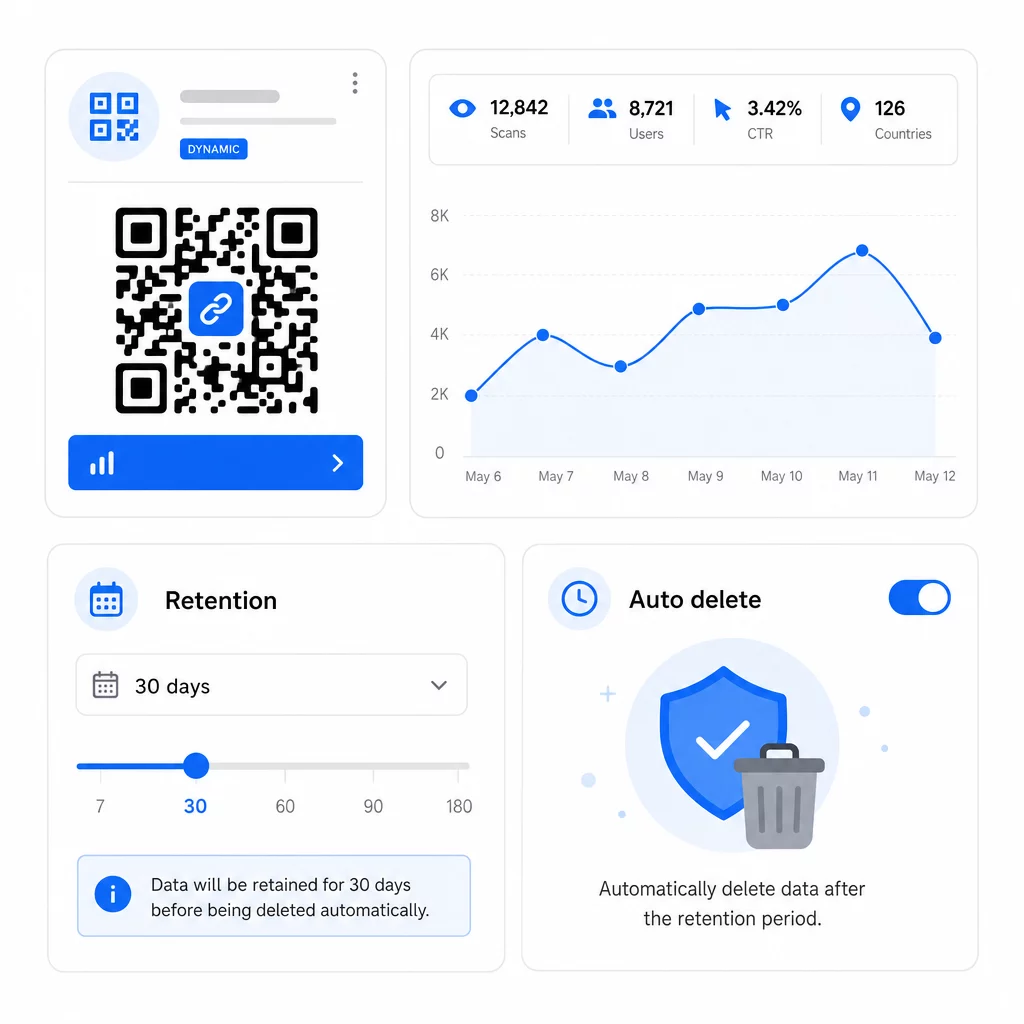
Ayrıca ayarlayabilirsiniz QR kodlarında son kullanma tarihleri bir kampanya sona erdiğinde yeni veri toplamayı otomatik olarak durdurmak için, bu da sonraki saklama yönetimini basitleştirir.
Kullanıcı Haklarına Hızla Saygı Gösterin
Hem GDPR hem de CCPA kapsamında, kullanıcılar verilerine erişim talep edebilir, silinmesini isteyebilir ve bazı durumlarda taşınabilirlik talep edebilir. Veri saklama sisteminiz bu talepleri gerekli zaman dilimleri içinde yerine getirebilmelidir. Bu, verilerinizin belirli bir kullanıcı veya tarama olayıyla ilişkili kayıtları bulabilecek kadar iyi organize edilmiş olması gerektiği anlamına gelir – süresiz, yapılandırılmamış veri birikiminden kaçınmak için başka bir neden.
Politikanızı Düzenli Olarak Denetleyin
Yönetmelikler geliştikçe ve kampanyalarınız değiştikçe veri saklama gereksinimleri de değişir. Aşağıdakileri doğrulamak için en az yılda bir politika incelemesi planlayın:
- Silme programları yapılandırıldığı gibi çalışıyor
- Hiçbir veri kategorisi belirtilen sürenin ötesinde saklanmıyor
- Gizlilik bildirimleriniz hala mevcut uygulamaları doğru bir şekilde yansıtıyor
- Yeni kampanya formatları tarafından tanıtılan tüm yeni veri türleri politika kapsamındadır
Eksiksiz bir analiz takip sistemi oluşturma hakkında daha fazla bilgi için, QR kodu analiz panoları rehberi izleme parametrelerinin nasıl ayarlanacağını ve tarama verilerinin daha geniş raporlama iş akışınızla nasıl entegre edileceğini kapsar.
QR Kodu Verilerini Tek Bir Yerden Yönetin Pageloot'un platformu, gerçek zamanlı analizlerle dinamik QR kodları oluşturmanıza, düzenlemenize ve izlemenize olanak tanır – böylece ihtiyacınız olan verilere, gerekenden fazlasını biriktirmeden sahip olursunuz. Şunu keşfedin: QR Kod Oluşturucu Başlamak için.
Kullanım Durumuna Göre Pratik Saklama Aralıkları
| Kullanım Örneği | Önerilen Veri Türü | Önerilen Saklama Süresi |
|---|---|---|
| Kısa süreli promosyon kampanyası | Etkinlik düzeyinde tarama verileri | Kampanya bitiminden 60–90 gün sonra |
| Mevsimsel pazarlama (yıllık karşılaştırma) | Toplu tarama metrikleri | 12–24 ay |
| Sürekli ürün ambalajı QR kodları | Toplu metrikler; aktif analiz için etkinlik düzeyinde | 14 aylık sürekli |
| Sağlık veya finans QR kodları | Değişir; HIPAA/PCI DSS gerekliliklerine uyun | Sektör düzenlemesine göre |
| Güvenlik ve denetim günlükleri | Erişim ve silme kayıtları | 180 güne kadar |
Bu aralıklar başlangıç noktalarıdır, yasal tavsiye değildir. Özel yükümlülükleriniz, toplanan verilerin niteliğine, kullanıcılarınızın bulunduğu yargı bölgelerine ve işletmenize uygulanan sektöre özel kurallara bağlıdır.
Sonuç olarak: daha kısa saklama süreleri uyumluluk riskini azaltır, depolama maliyetlerini düşürür ve kullanıcı güvenini artırır. Detaylı tarama verilerini kararları aktif olarak bilgilendirdiği sürece saklayın, trend analizi için toplu saklamaya geçin ve savunabileceğiniz belgelenmiş bir programa göre diğer her şeyi silin.
Sıkça sorulan sorular
Evet. Statik QR kodları herhangi bir analiz verisi toplamaz veya depolamaz – sunucu yönlendirmesi yoktur, bu nedenle tarama bilgisi yakalanmaz. Dinamik QR kodları, taramaları bir takip sunucusu aracılığıyla yönlendirir ve bu sunucu zaman damgaları, cihaz türü, konum ve tarama sayıları gibi veri noktalarını kaydeder. Yalnızca dinamik QR kodları, saklama politikalarına tabi analiz verileri üretir.
Platform düzeyinde saklama pencereleri plan katmanına göre değişir. Giriş seviyesi abonelikler yalnızca son 60 günlük tarama geçmişine erişim sağlayabilirken, daha yüksek katmanlı planlar bu pencereyi uzatır. Raporlama veya uyumluluk ihtiyaçlarınız daha uzun geçmiş erişimi gerektiriyorsa, bir plana taahhüt etmeden önce tarama geçmişi penceresini doğrulayın. Platformunuzun saklama tavanı, dahili politikanızdan bağımsız olarak pratik bir kısıtlamadır.
CCPA/CPRA ve GDPR ilkeleri uyarınca, gizlilik bildiriminiz her bir kişisel veri kategorisinin ne kadar süreyle saklanacağını açıklamalı veya bu süreyi belirlemek için kullanılan kriterleri belirtmelidir. Bu, veri toplama noktasında veya öncesinde gösterilmelidir – genellikle bir kullanıcı QR kodunuzla etkileşime geçmeden önce. Bunu sade bir dille yazın ve saklama süreleriniz değiştiğinde güncelleyin.