Zastanawiasz się, jak umieścić skanowalny kod QR na kubku do kawy tak, aby nie zawodził za każdym razem, gdy klient skieruje na niego swój telefon? Źle zaprojektowany kod na zakrzywionej powierzchni frustruje klientów i marnuje nakład druku. Ten przewodnik przeprowadzi Cię przez każdą decyzję, od umiejscowienia po treść, tak aby Twoje kubki faktycznie przynosiły rezultaty.
Dlaczego kubki do kawy są cenną powierzchnią dla kodu QR
Kubki do kawy spędzają kilka minut w rękach klienta. Ten czas kontaktu to szansa marketingowa, którą większość marek niedostatecznie wykorzystuje.
Prawie 83,4 miliona dorosłych Amerykanów zeskanowało kod QR w 2022 roku, a liczba ta ma osiągnąć 42,6% dorosłych użytkowników smartfonów do 2025 roku. Oddzielnie, 45% amerykańskich kupujących zeskanowało kod QR związany z marketingiem w ciągu trzech miesięcy, przy czym osoby w wieku 18–29 lat przodowały w adaptacji. Kawiarnie, kawiarnie i programy markowych produktów znajdują się na przecięciu dwóch głównych zastosowań kodu QR, o których informują konsumenci: menu restauracyjnych oraz informacji o produktach spożywczych i napojach.
Kubek z dobrze wykonanym kodem QR może osiągnąć każdy z poniższych celów bez zwiększania czasu pracy personelu:
- Kierowanie klientów do cyfrowego menu lub sezonowych promocji
- Zachęcanie do recenzji w Google natychmiast po pozytywnym doświadczeniu
- Dostarczanie kuponu rabatowego na kolejną wizytę
- Zwiększanie liczby obserwujących w mediach społecznościowych lub zgłoszeń do konkursów
- Dostarczanie informacji o alergenach lub pochodzeniu produktów dla klientów dbających o zdrowie
Wyzwanie jest czysto techniczne: kubki są zakrzywione, a kody QR nie.
Jak zakrzywione powierzchnie wpływają na skanowalność
Kod QR wydrukowany płasko na papierze skanuje się łatwo, ponieważ każdy moduł – małe kwadraty tworzące kod – znajduje się na tej samej płaszczyźnie. Kiedy ten sam kod owija się wokół cylindra, moduły na krawędziach odginają się od linii wzroku kamery. Skaner widzi zniekształconą siatkę, a dekodowanie zawodzi.
To nie jest problem hipotetyczny. Jest to najczęstszy powód, dla którego kody QR na kubkach nie działają. Zrozumienie geometrii pomaga w projektowaniu.
Trzy czynniki fizyczne działają na Twoją niekorzyść:
- Zniekształcenie krzywizny: Moduły po bokach kodu odginają się od kamery, przez co wydają się skompresowane lub niewidoczne.
- Odblaskowe wykończenia: Błyszczące powłoki kubków lub laminaty tworzą odblaski, które zmywają kontrast, szczególnie przy górnym oświetleniu kawiarnianym.
- Pasowanie druku: Produkcja kubków papierowych wiąże się ze szwami i łączeniami; kod, który obejmuje szew, nie będzie skanowany niezawodnie.
Każdy z nich ma bezpośrednie techniczne rozwiązanie, omówione w poniższych sekcjach.
Rozmiar i umiejscowienie na kubku
Umieść kod na możliwie najbardziej płaskiej powierzchni
Umieść swój kod QR na tej części kubka, która ma najmniejszą krzywiznę. W przypadku standardowego kubka papierowego oznacza to unikanie samej góry w pobliżu krawędzi i zwężenia podstawy. Środkowy pas kubka zazwyczaj oferuje najbardziej płaską strefę do druku.
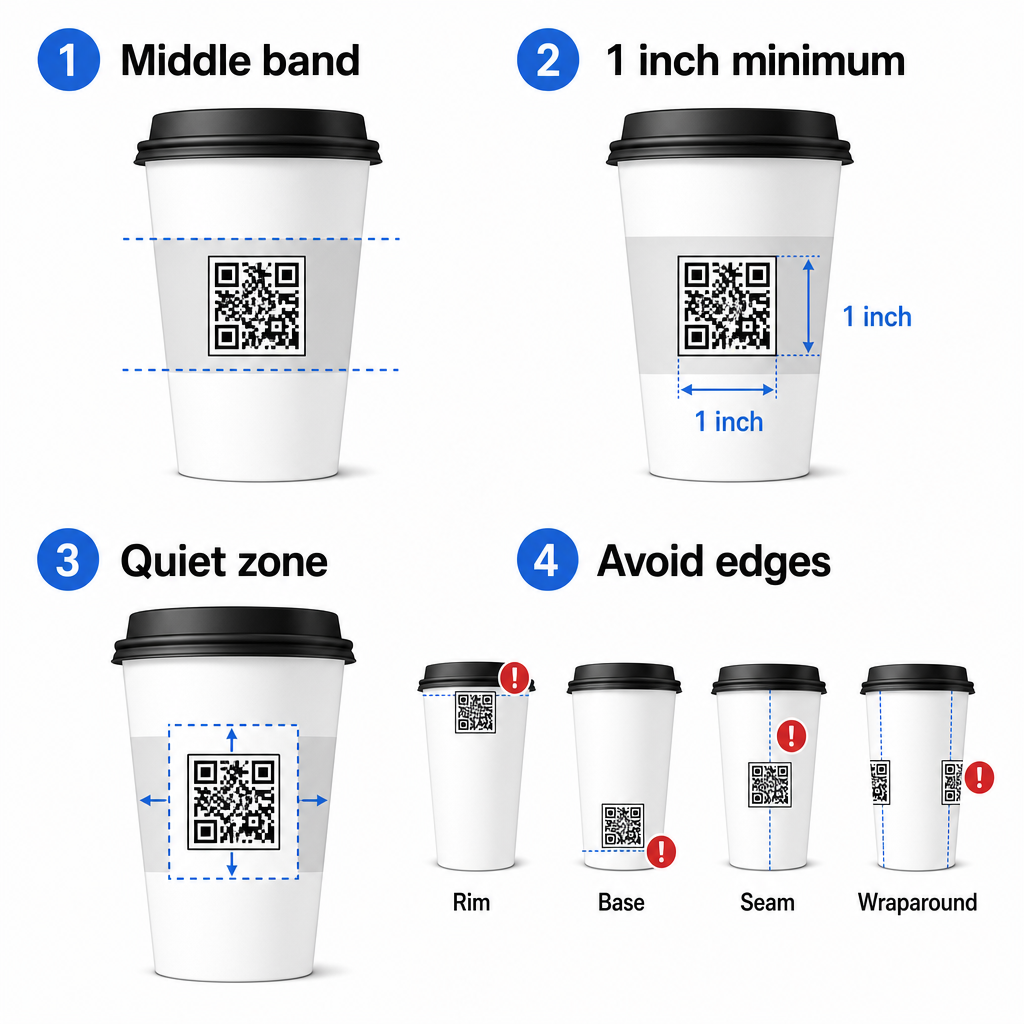
Jeśli pracujesz z płaskim kubkiem promocyjnym lub kwadratowym kubkiem podróżnym, masz naturalny płaski panel – użyj go. W przypadku cylindrycznych kubków ceramicznych, traktuj przednią powierzchnię jako swoją strefę docelową.
Dopasuj rozmiar kodu do zakrzywionych powierzchni
Dla płaskiego druku, minimalny rozmiar 0,8 cala × 0,8 cala (około 2 cm × 2 cm) jest standardową rekomendacją dla skanowania z bliskiej odległości. Na zakrzywionej powierzchni to minimum nie jest wystarczające. Ponieważ krzywizna zniekształca postrzegany rozmiar kodu, zaleca się zwiększenie rozmiaru kodu o 20–30% dla zastosowań na zakrzywionych powierzchniach.
W praktyce, celuj w co najmniej 1,0 cala × 1,0 cala na standardowym kubku papierowym o pojemności 12 uncji, a jeszcze większy na wysokim kubku o pojemności 20 uncji, gdzie średnica korpusu jest większa, a krzywizna mniej wyraźna.
Kod musi mieścić się w całości na jednej powierzchni kubka, nie owijając się wokół boków. Jeśli którykolwiek róg kodu zniknie za krzywizną, kod zawiedzie.
Strefa ciszy jest bezwzględnie wymagana
Strefa ciszy to pusta przestrzeń otaczająca kod. Normy ISO określają minimum czterech modułów wolnej przestrzeni ze wszystkich czterech stron. Na kubku do kawy ten margines działa również jako bufor przed zakrzywioną krawędzią.
Nie umieszczaj logo, grafik kubka, tekstu żywieniowego ani wzorów marki wewnątrz strefy ciszy. Ten przewodnik po najlepszych praktykach czytelności kodów QR szczegółowo omawia wymagania dotyczące strefy ciszy wraz z innymi czynnikami wpływającymi na niezawodne skanowanie.
Kontrast i kolor na materiałach kubków
Użyj ciemnego na jasnym
Skanery kodów QR działają poprzez wykrywanie kontrastu między ciemnymi modułami a jasnym tłem. Zalecany minimalny współczynnik kontrastu to 4:1, choć wyższy jest zawsze lepszy – czerń na bieli osiąga 21:1.
Na kubkach do kawy dwa problemy powierzchniowe zmniejszają efektywny kontrast:
- Papier kraftowy lub brązowy: Ciemny kod wydrukowany bezpośrednio na niepowlekanym papierze kraft traci kontrast, ponieważ tło nie jest białe. Użyj białego panelu drukowanego lub białej powłoki pod kodem.
- Laminat błyszczący: Odblaskowe wykończenia odbijają światło z powrotem do kamery, rozmywając ciemne moduły. Poproś o matowe wykończenie w obszarze kodu, nawet jeśli reszta kubka jest błyszcząca.
Unikaj gradientów i wzorzystych teł
Tło gradientowe pod kodem QR tworzy strefy akceptowalnego kontrastu i strefy słabego kontrastu. Skaner ocenia cały kod, a każdy obszar, który spadnie poniżej progu kontrastu, może spowodować błąd. Użyj jednolitego, jasnego tła pod kodem.
W przypadku markowych kubków, gdzie kolor jest ważny dla projektu, możesz użyć ciemnego koloru marki jako pierwszego planu na białym lub jasnym tle – ale przetestuj dokładnie przed pełną produkcją. Na przewodnikiem po najlepszych praktykach kontrastu kolorów kodów QR dostarcza konkretne kombinacje kolorów i współczynniki kontrastu, aby pomóc w podejmowaniu tych decyzji.
Specyfikacje techniczne dla druku
Rozdzielczość i format pliku
Wydrukuj kod na 300 DPI lub wyższej. Obraz rastrowy o niskiej rozdzielczości tworzy rozmyte krawędzie modułów, co zmniejsza skanowalność i wygląda nieprofesjonalnie z bliska.
Zawsze, gdy to możliwe, użyj formatu wektorowego (SVG lub EPS) zamiast PNG lub JPG. Pliki wektorowe skalują się bez utraty jakości, co ma znaczenie, ponieważ producenci kubków często zmieniają rozmiar grafiki podczas przygotowania do druku. Pageloot generator kodów QR eksportuje gotowe do druku pliki wektorowe (.EPS, .PDF, .SVG) nadające się do wysłania bezpośrednio do drukarni kubków.
Poziom korekcji błędów
Kody QR mają cztery poziomy korekcji błędów: L, M, Q i H. Wyższe poziomy pozwalają na większe uszkodzenie lub zasłonięcie kodu, a mimo to nadal skanowanie jest udane. Dla zastosowań na kubkach:
- Poziom H jest zalecany, jeśli osadzasz logo wewnątrz kodu, ponieważ pozwala na zasłonięcie do 30% kodu.
- Poziom Q lub H jest wskazany dla każdej zakrzywionej powierzchni, ponieważ zniekształcenie powierzchni skutecznie uszkadza części kodu podczas skanowania.
Nie używaj Poziomu L na kubku. Nie zapewnia tolerancji na fizyczne zniekształcenia nieodłącznie związane z drukowaniem na zakrzywionych powierzchniach.
Wzory wyszukiwania muszą pozostać wyraźne
Trzy duże kwadraty w rogach kodu QR to wzory wyszukiwania. Informują skaner, gdzie kod się zaczyna, kończy i jak jest zorientowany. Nie przycinaj, nie nakładaj ani nie modyfikuj wzorów wyszukiwania grafiką marki. Jest to jeden z najczęstszych błędów projektowych na opakowaniach drukowanych na zamówienie i powoduje, że kody wyglądają profesjonalnie, ale nigdy się nie skanują.
Twórz gotowe do druku kody QR dla swoich kubków Wygeneruj w pełni konfigurowalny kod QR o wysokiej rozdzielczości z prawidłowym poziomem korekcji błędów, eksportem wektorowym i opcjami brandingu, używając Pageloot Generator kodów QR. Pobierz w formacie .EPS, .PDF lub .SVG gotowy do wysłania do producenta kubków.
Wybór, do czego prowadzi kod QR
Fizyczne wykonanie ma znaczenie, ale także to, co dzieje się po zeskanowaniu. Klient, który skanuje kod na kubku, sam zidentyfikował się jako zaangażowany – nie wysyłaj go na ogólną stronę główną.
Dopasuj miejsce docelowe do kontekstu:
| Skrzynia użytkowa | Zalecany typ kodu QR | Narzędzie |
|---|---|---|
| Cyfrowe menu lub napoje sezonowe | Kod QR menu | Generator kodów QR do menu |
| Zniżka na kolejną wizytę | Strona docelowa z kuponem | Generator kodów QR do kuponów |
| Recenzja Google po zakupie | Bezpośredni link do recenzji | Generator kodów QR do opinii Google |
| Strona internetowa, społecznościowa lub promocyjna | Przekierowanie URL | Generator kodów QR do linków |
Dla kawiarni i kawiarni, Narzędzia Pageloot do kodów QR dla restauracji obsługują cyfrowe menu, zamawianie i zbieranie recenzji na jednej platformie.
Używaj dynamicznych kodów QR do kampanii na kubkach
Statyczny kod QR koduje docelowy adres URL na stałe. Jeśli Twoja sezonowa promocja się zakończy, nie możesz zaktualizować kodu – a wszystkie pozostałe kubki z tym kodem stają się ślepym zaułkiem.
A dynamiczny kod QR przechowuje krótki adres URL przekierowania w samym kodzie. Kontrolujesz, dokąd prowadzi to przekierowanie z pulpitu nawigacyjnego i możesz je zmienić w dowolnym momencie bez ponownego drukowania ani jednego kubka. Jest to kluczowe dla kampanii na kubkach, ponieważ:
- Nakłady druku kubków często liczą tysiące, a ponowne drukowanie jest kosztowne
- Promocje, menu i oferty zmieniają się sezonowo
- Możesz przeprowadzać testy A/B, zmieniając miejsca docelowe w trakcie kampanii
Dynamiczne kody zapewniają również analizom skanowania – dane o tym, kiedy nastąpiły skany, jakie urządzenia zostały użyte i gdzie znajdowali się klienci. Te dane pozwalają zmierzyć, które projekty kubków lub umiejscowienia wywołały największe zaangażowanie, i odpowiednio dostosować przyszłe nakłady druku.
Śledź każde skanowanie z kampanii na kubkach Przełącz się na dynamiczny kod QR, aby aktualizować miejsca docelowe na bieżąco i monitorować wydajność w czasie rzeczywistym. Na Pageloot Generator kodów QR daje Ci pełny pulpit analityczny wraz z kontrolkami edycji – wszystko bez ponownego drukowania kubków.
Branding Twojego kodu QR na kubku
Zwykły czarno-biały kod QR działa, ale markowy kod wzmacnia rozpoznawalność i generuje więcej skanów. Pageloot Generator kodów QR z logo pozwala na:
- Osadź logo swojej marki w centrum kodu
- Zastosuj kolory marki do modułów i tła
- Wybierz spośród szablonów projektowych dla wzoru korpusu i stylu krawędzi
- Dodaj ramkę wezwania do działania (np. “Zeskanuj, aby otrzymać 10% zniżki na następne zamówienie”)
Dodając logo, zachowaj jego rozmiar nie większy niż 30% obszaru kodu i ustaw korekcję błędów na Poziom H. Logo zajmuje przestrzeń, która w innym przypadku przenosiłaby zakodowane dane, a korekcja błędów Poziomu H kompensuje to nakładanie się.
Dla spójności w przypadku dużego zamówienia kubków lub kampanii wielolokalizacyjnej, Pageloot’s Foldery kodów QR pozwalają organizować kody według kampanii, lokalizacji lub rozmiaru kubka, aby Twój zespół mógł nimi zarządzać bez gubienia się.
Aby uzyskać powiązane wskazówki dotyczące zastosowań opakowaniowych, strony dotyczące kody QR na opakowaniach produktów oraz kody QR na opakowaniach żywności obejmują rozważania, które mają zastosowanie bezpośrednio do kubków.
Testowanie przed serią wydruków
Żaden staranny projekt nie zastąpi fizycznego testowania na rzeczywistym kubku. Zanim zdecydujesz się na pełną serię produkcyjną:
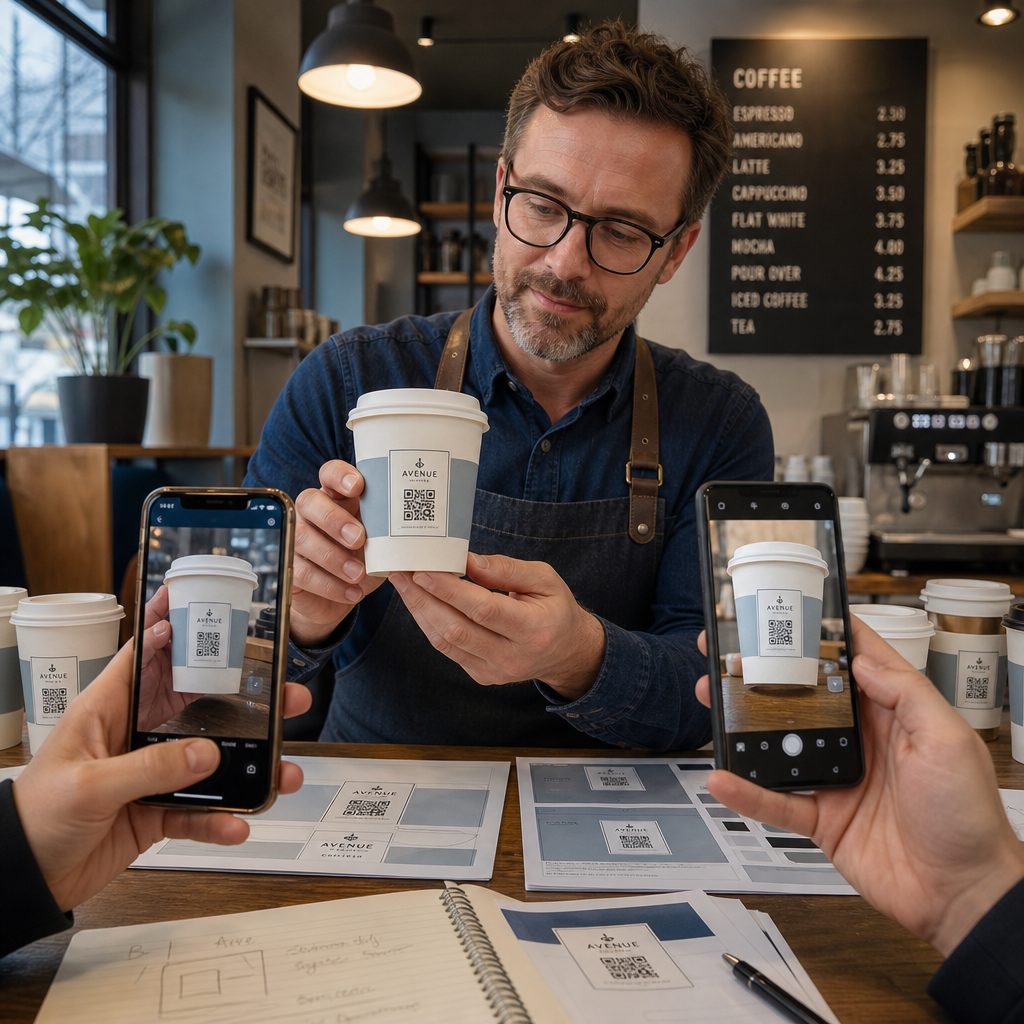
- Wydrukuj próbkę na zamierzonym materiale – nie tylko próbki papierowe. Materiał kubka, powłoka i metoda druku wpływają na końcowy rezultat.
- Testuj za pomocą wielu urządzeń – co najmniej, najnowszy iPhone i średniej klasy Android. Starsze urządzenia z kamerami o niższej rozdzielczości stanowią najbardziej wymagający test.
- Skanuj z realistycznych kątów – klienci trzymają kubki pod różnymi kątami, nie bezpośrednio prostopadle do etykiety. Testuj pod kątem 15° i 30° poza osią.
- Testuj w rzeczywistym środowisku oświetleniowym – górne oświetlenie kawiarniane jest często ciepłe i kierunkowe, co wpływa na kontrast inaczej niż standardowe oświetlenie biurowe.
- Zweryfikuj, czy miejsce docelowe ładuje się poprawnie – zeskanuj kod za pomocą danych komórkowych, nie tylko Wi-Fi, i potwierdź, że strona docelowa jest zoptymalizowana pod kątem urządzeń mobilnych i ładuje się w mniej niż trzy sekundy.
Jeśli kod nie przejdzie żadnego z tych testów, dostosuj rozmiar, kontrast lub umiejscowienie przed drukowaniem tysięcy sztuk. Aby uzyskać kompleksową listę kontrolną, przewodnik po kodach QR na etykietach produktów omawia te same zasady kontroli jakości bardziej szczegółowo.
Napisz wezwanie do działania, które zachęci do skanowania
Sam kod QR nic nie komunikuje o tym, dlaczego klient powinien go zeskanować. Zawsze łącz kod z krótkim wezwaniem do działania – zazwyczaj czterema do ośmiu słów umieszczonymi bezpośrednio nad lub pod kodem. Przykłady:
- “Zeskanuj, aby zobaczyć dzisiejsze promocje”
- “Otrzymaj 15% zniżki na następne zamówienie”
- “Zostaw nam recenzję”
- “Zobacz, co jest w Twoim kubku”
Wezwanie do działania odpowiada na ukryte pytanie klienta: co się stanie, jeśli to zrobię? Bez niego, nawet technicznie doskonały kod QR będzie działać poniżej oczekiwań.
Umieszczenie działającego, markowego kodu QR na kubku kawy jest całkowicie osiągalne dzięki odpowiedniej konfiguracji technicznej. Dopasuj rozmiar do zakrzywionych powierzchni, zachowaj czystą strefę ciszy, użyj wysokiego kontrastu na matowym wykończeniu, ustaw korekcję błędów na Poziom H i zawsze testuj na fizycznej próbce przed produkcją. Wybierz dynamiczne kody, aby móc aktualizować miejsca docelowe i mierzyć wydajność bez ponownego drukowania.
Zacznij tworzyć swój kod QR na kubek z Pageloot Generator kodów QR – eksportuj w gotowych do druku formatach wektorowych, dodaj swoje logo i kolory marki oraz połącz go z analityką od pierwszego dnia.
Najczęściej zadawane pytania
Dla płaskiego nadruku, standardowe minimum wynosi 0.8 in × 0.8 in (2 cm × 2 cm). Na zakrzywionej powierzchni kubka, zwiększ to o 20–30% aby skompensować zniekształcenie krzywizny – więc celuj w co najmniej 1.0 in × 1.0 in. Kod musi mieścić się w całości w płaskiej strefie kubka bez owijania się wokół boków.
Tak, ale umiejscowienie jest kluczowe. Użyj najbardziej płaskiego obszaru przedniej ścianki kubka, powiększ kod bardziej niż w przypadku płaskiego druku, zapewnij silny kontrast z ciemnymi modułami na jasnym tle, unikaj błyszczących wykończeń w obszarze kodu i ustaw korekcję błędów na Poziom H. Zawsze testuj fizyczną próbkę za pomocą wielu urządzeń przed zamówieniem hurtowym.
Dopasuj miejsce docelowe do celu kampanii. Typowe zastosowania to cyfrowe menu, promocje sezonowe, kupony rabatowe, strony z recenzjami Google lub profile w mediach społecznościowych. Użyj dynamicznego kodu QR, aby móc zaktualizować miejsce docelowe po wydrukowaniu – jest to szczególnie ważne w przypadku kubków drukowanych w dużych ilościach, ponieważ kodów nie można ponownie wydrukować, jeśli oferta wygaśnie lub zmieni się adres URL.