תוהה איך לשים קוד QR סריקה על כוס קפה מבלי שהוא ייכשל בכל פעם שלקוח מכוון אליו את הטלפון שלו? קוד מעוצב בצורה גרועה על משטח מעוקל מתסכל לקוחות ומבזבז את סדרת ההדפסה שלך. מדריך זה מלווה אותך בכל החלטה, ממיקום ועד תוכן, כך שהכוסות שלך באמת יספקו תוצאות.
מדוע כוסות קפה הן משטח קוד QR בעל ערך
כוסות קפה מבלות מספר דקות בידי לקוח. זמן שהייה זה הוא הזדמנות שיווקית שרוב המותגים ממעיטים בשימוש בה.
כמעט 83.4 מיליון מבוגרים בארה"ב סרקו קוד QR בשנת 2022, מספר שצפוי להגיע ל-42.6% ממשתמשי סמארטפונים מבוגרים עד 2025. בנפרד, 45% מהקונים בארה"ב סרקו קוד QR הקשור לשיווק בחלון של שלושה חודשים, כאשר בני 18–29 מובילים את האימוץ. בתי קפה, בתי קפה ותוכניות מוצרי מותג נמצאים בצומת של שניים ממקרי השימוש המובילים בקוד QR שלקוחות מדווחים עליהם: תפריטי מסעדות ומידע על מוצרי מזון ומשקאות.
כוס עם קוד QR מבוצע היטב יכולה להשיג כל אחד מהבאים מבלי להוסיף זמן צוות:
- הפנה לקוחות לתפריט דיגיטלי או למבצעים עונתיים
- בקש ביקורת בגוגל מיד לאחר חוויה חיובית
- ספק קופון הנחה לביקור חוזר
- הגבר עוקבים ברשתות חברתיות או כניסות לתחרויות
- ספק מידע על אלרגנים או מקורות ללקוחות מודעים לבריאות
האתגר הוא טכני גרידא: כוסות מתעקלות, וקודי QR לא.
כיצד משטחים מעוקלים משפיעים על יכולת הסריקה
קוד QR המודפס שטוח על נייר נסרק בקלות מכיוון שכל מודול – הריבועים הקטנים המרכיבים את הקוד – יושב על אותו מישור. כאשר אותו קוד עוטף גליל, המודולים בקצוות מתעקלים הרחק מקו הראייה של המצלמה. הסורק רואה רשת מעוותת, והפענוח נכשל.
זו אינה בעיה היפותטית. זו הסיבה הנפוצה ביותר לכך שקודי QR על כוסות אינם עובדים. הבנת הגיאומטריה עוזרת לך לתכנן סביבה.
שלושה גורמים פיזיים פועלים נגדך:
- עיוות עקמומיות: מודולים בצדי הקוד מתכופפים הרחק מהמצלמה, מה שגורם להם להיראות דחוסים או בלתי נראים.
- גימורים מחזירי אור: ציפויי כוסות מבריקים או למינציות יוצרים בוהק שמטשטש את הניגודיות, במיוחד תחת תאורת תקרה של בית קפה.
- רישום הדפסה: ייצור כוסות נייר כרוך בתפרים וחיבורים; קוד החוצה תפר לא ייסרק באופן אמין.
לכל אחד מאלה יש פתרון טכני ישיר, המכוסה בסעיפים הבאים.
גודל ומיקום על כוס
שמור את הקוד על האזור השטוח ביותר האפשרי
מקם את קוד ה-QR שלך על החלק של הכוס עם העקמומיות הנמוכה ביותר. עבור כוס נייר סטנדרטית, זה אומר להימנע מהחלק העליון ביותר ליד השפה ומהבסיס המתחדד. הרצועה האמצעית של הכוס מציעה בדרך כלל את אזור ההדפסה השטוח ביותר.
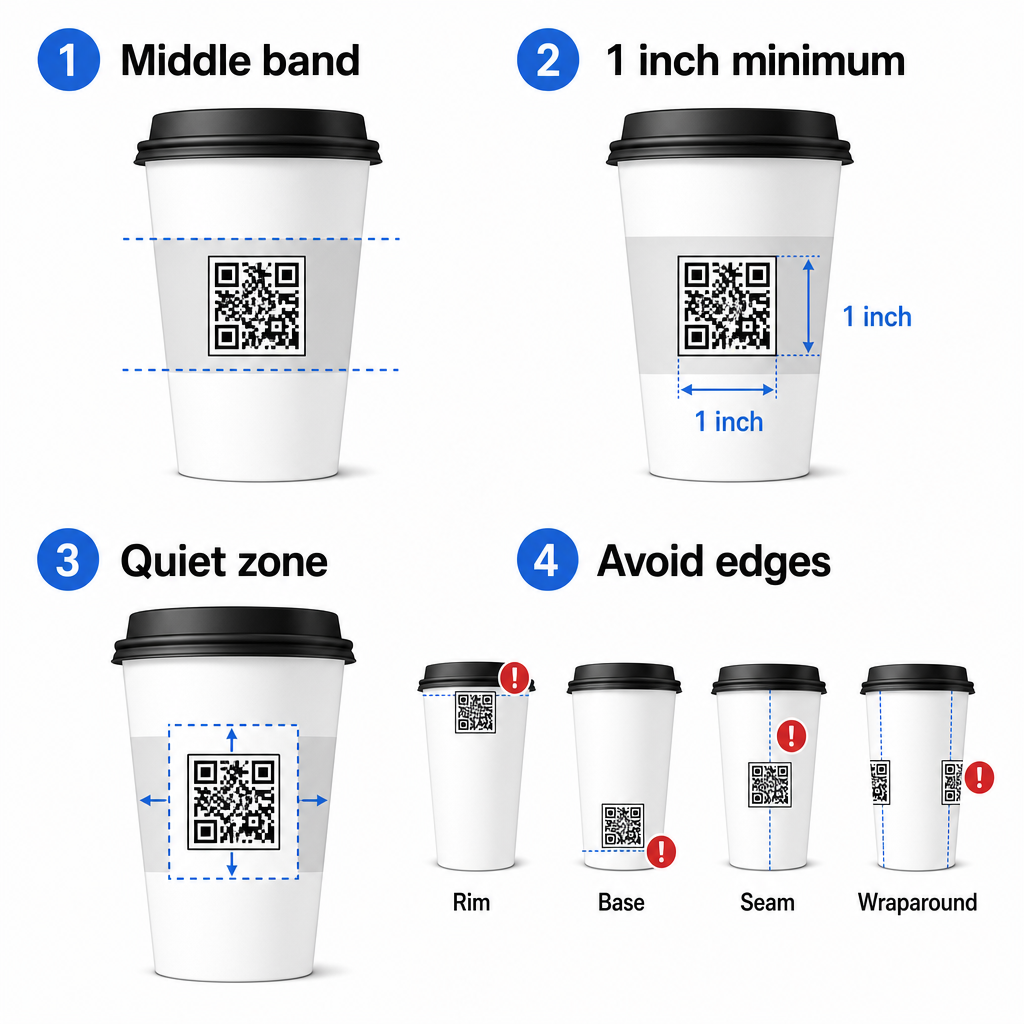
אם אתה עובד עם ספל קידום מכירות בעל צד שטוח או כוס נסיעות מרובעת, יש לך פאנל שטוח טבעי – השתמש בו. עבור ספלי קרמיקה גליליים, התייחס לחזית כאל אזור היעד שלך.
גודל את הקוד עבור משטחים מעוקלים
להדפסה שטוחה, גודל מינימלי של 8 in × 0.8 in (כ-2 ס"מ × 2 ס"מ) היא ההמלצה הסטנדרטית לסריקה מטווח קרוב. על משטח מעוקל, מינימום זה אינו מספיק. מכיוון שעקמומיות מעוותת את גודלו הנתפס של הקוד, מומלץ להגדיל את גודל הקוד ב-20–30% עבור יישומים מעוקלים.
במונחים מעשיים, כוון לפחות ל- 0 in × 1.0 in על כוס נייר סטנדרטית של 12 אונקיות, וגדול יותר עדיין על כוס גבוהה של 20 אונקיות שבה קוטר הגוף גדול יותר והעקמומיות פחות חמורה.
הקוד חייב להתאים במלואו בתוך פאה אחת של הכוס מבלי לעטוף את הצדדים. אם פינה כלשהי של הקוד נעלמת סביב העקמומיות, הקוד ייכשל.
אזור השקט אינו ניתן למשא ומתן
אזור השקט הוא השוליים הריקים המקיפים את הקוד. תקני ISO מציינים מינימום של ארבעה מודולים שטח פנוי מכל ארבעת הצדדים. על כוס קפה, שוליים אלה משמשים גם כחיץ מפני הקצה המעוקל.
אל תמקם לוגואים, גרפיקת כוסות, טקסט תזונתי או דפוסי מותג בתוך אזור השקט. ה- מדריך שיטות עבודה מומלצות לקריאות קוד QR מכסה את דרישות אזור השקט בפירוט לצד גורמים נוספים המשפיעים על סריקה אמינה.
ניגודיות וצבע על חומרי כוסות
השתמש בכהה על בהיר
סורקי קוד QR פועלים על ידי זיהוי הניגודיות בין מודולים כהים לרקע בהיר. יחס הניגודיות המינימלי המומלץ הוא 4:1, אם כי גבוה יותר תמיד עדיף – שחור על לבן משיג 21:1.
על כוסות קפה, שתי בעיות משטח מפחיתות את הניגודיות האפקטיבית:
- מלאי נייר קראפט או חום: קוד כהה המודפס ישירות על נייר קראפט לא מצופה מאבד ניגודיות מכיוון שהרקע אינו לבן. השתמש בלוח לבן מודפס או בציפוי לבן מתחת לקוד.
- למינציה מבריקה: גימורים מחזירי אור מחזירים אור למצלמה, ומטשטשים את המודולים הכהים. בקש גימור מט באזור הקוד, גם אם שאר הכוס מבריקה.
הימנע ממעברי צבע ורקעים עם דוגמאות
רקע עם מעבר צבע מתחת לקוד QR יוצר אזורים בעלי ניגודיות מקובלת ואזורים בעלי ניגודיות ירודה. הסורק מעריך את כל הקוד, וכל אזור שנופל מתחת לסף הניגודיות עלול לגרום לכשל. השתמש ברקע בהיר אחיד ומוצק מתחת לקוד.
עבור כוסות ממותגות שבהן צבע חשוב לעיצוב, תוכל להשתמש בצבע מותג כהה כחזית על רקע לבן או בהיר – אך בדוק היטב לפני ייצור מלא. ה מדריך שיטות עבודה מומלצות לניגודיות צבע של קוד QR מספק שילובי צבעים ספציפיים ויחסי ניגודיות כדי להנחות החלטות אלו.
מפרט טכני להדפסה
רזולוציה ופורמט קובץ
הדפס את הקוד ב 300 DPI או יותר. תמונת רסטר ברזולוציה נמוכה מייצרת קצוות מודולים מטושטשים, מה שמפחית את יכולת הסריקה ונראה לא מקצועי מטווח קרוב.
בכל הזדמנות אפשרית, השתמש ב פורמט וקטורי (SVG או EPS) במקום PNG או JPG. קבצי וקטור משתנים בגודלם ללא כל אובדן איכות, וזה חשוב מכיוון שיצרני כוסות משנים לעיתים קרובות את גודל הגרפיקה במהלך ההכנה לדפוס. ה מחולל קודי QR של Pageloot מייצא קבצי וקטור מוכנים להדפסה (.EPS, .PDF, .SVG) המתאימים לשליחה ישירה למדפסת הכוסות שלך.
רמת תיקון שגיאות
לקודי QR יש ארבע רמות תיקון שגיאות: L, M, Q ו-H. רמות גבוהות יותר מאפשרות ליותר מהקוד להינזק או להיות מוסתר ועדיין להיסרק בהצלחה. עבור יישומי כוסות:
- רמה H מומלץ אם אתה משבץ לוגו בתוך הקוד, מכיוון שהוא מאפשר להסתיר עד 30% מהקוד.
- רמה Q או H מומלץ לכל משטח מעוקל, מכיוון שעיוות פני השטח פוגע למעשה בחלקים מהקוד במהלך הסריקה.
אל תשתמש ברמה L על כוס. היא אינה מספקת סובלנות לעיוותים הפיזיים הטבועים בהדפסה מעוקלת.
דפוסי איתור חייבים להישאר ברורים
שלושת הריבועים הגדולים בפינות קוד QR הם דפוסי איתור. הם אומרים לסורק היכן הקוד מתחיל, נגמר וכיצד הוא מכוון. אל תחתוך, תכסה או תשנה את דפוסי האיתור עם גרפיקת מותג. זוהי אחת מטעויות העיצוב הנפוצות ביותר באריזות מודפסות בהתאמה אישית, והיא מייצרת קודים שנראים מקצועיים אך לעולם אינם נסרקים.
צור קודי QR מוכנים להדפסה עבור הכוסות שלך צור קוד QR הניתן להתאמה אישית מלאה, ברזולוציה גבוהה, עם רמת תיקון השגיאות הנכונה, ייצוא וקטורי ואפשרויות מיתוג באמצעות ה מחולל קוד QR של Pageloot. הורד בפורמט .EPS, .PDF או .SVG מוכן לשליחה ליצרן הכוסות שלך.
בחירת היעד אליו מקשר קוד ה-QR
הביצוע הפיזי חשוב, אך גם מה שקורה לאחר הסריקה. לקוח שסורק קוד כוס זיהה את עצמו כמעורב – אל תשלח אותו לדף בית גנרי.
התאם את היעד להקשר:
| שימוש במקרה | סוג קוד QR מומלץ | כלי |
|---|---|---|
| תפריט דיגיטלי או משקאות עונתיים | קוד QR בתפריט | תפריט דיגיטלי למסעדה עם קוד QR |
| הנחה לביקור חוזר | דף נחיתה לקופון | קוד הטבה עם QR לקופונים |
| סקירת גוגל לאחר רכישה | קישור ישיר לסקירה | גוגל ברקוד לביקורות |
| אתר אינטרנט, חברתי או דף נחיתה לקידום מכירות | הפניית URL | מחולל קודי QR לקישורים |
עבור בתי קפה וחנויות קפה, כלי קוד ה-QR למסעדות של Pageloot תומכים בתפריטים דיגיטליים, הזמנות ואיסוף ביקורות בפלטפורמה אחת.
השתמש בקודי QR דינמיים לקמפיינים של כוסות
קוד QR סטטי מקודד את כתובת ה-URL של היעד לצמיתות. אם המבצע העונתי שלך מסתיים, אינך יכול לעדכן את הקוד – וכל הכוסות הנותרות עם קוד זה הופכות למבוי סתום.
א קוד QR דינמי מאחסן כתובת URL קצרה להפניה מחדש בקוד עצמו. אתה שולט לאן ההפניה הזו מצביעה מלוח מחוונים, ואתה יכול לשנות אותה בכל עת מבלי להדפיס מחדש כוס אחת. זה קריטי לקמפיינים של כוסות מכיוון ש:
- הדפסות כוסות הן לעיתים קרובות באלפים, והדפסה מחדש יקרה
- מבצעים, תפריטים והצעות משתנים עונתית
- אתה יכול להריץ בדיקות A/B על ידי החלפת יעדים באמצע קמפיין
קודים דינמיים מספקים גם ניתוח סריקות – נתונים על מתי התרחשו סריקות, אילו מכשירים שימשו והיכן היו ממוקמים הלקוחות. נתונים אלה מאפשרים לך למדוד אילו עיצובי כוסות או מיקומים הניעו את מירב המעורבות, ולהתאים את ההדפסות העתידיות בהתאם.
עקוב אחר כל סריקה מקמפיין הכוסות שלך עבור לקוד QR דינמי כדי לעדכן יעדים תוך כדי תנועה ולנטר ביצועים בזמן אמת. ה מחולל קוד QR של Pageloot נותן לך לוח מחוונים מלא של אנליטיקה לצד בקרות עריכה – הכל מבלי להדפיס מחדש את הכוסות שלך.
מיתוג קוד ה-QR של הכוס שלך
קוד QR פשוט בשחור-לבן עובד, אך קוד ממותג מחזק את הזיהוי ומרוויח יותר סריקות. ה יצירת QR מעוצב עם לוגו של Pageloot מאפשר לך:
- הטמע את לוגו המותג שלך במרכז הקוד
- להחיל צבעי מותג למודולים ולרקע
- בחר מתוך תבניות עיצוב עבור דפוס גוף וסגנון קצה
- הוסף מסגרת קריאה לפעולה (לדוגמה, “סרוק לקבלת 10% הנחה על ההזמנה הבאה שלך”)
בעת הוספת לוגו, שמור אותו לא יותר מ-30% משטח הקוד וקבע תיקון שגיאות לרמה H. הלוגו תופס מקום שאחרת היה נושא נתונים מקודדים, ותיקון שגיאות ברמה H מפצה על חפיפה זו.
לעקביות על פני הזמנת כוסות גדולה או קמפיין רב-מיקומי, של Pageloot תיקיות לקודי QR מאפשרים לך לארגן קודים לפי קמפיין, מיקום או גודל כוס כך שהצוות שלך יוכל לנהל אותם מבלי לאבד מעקב.
להדרכה קשורה על יישומי אריזה, העמודים ב- קודי QR על אריזות מוצרים ו קודי QR על אריזות מזון מכסים שיקולים החלים ישירות על כוסות.
בדיקה לפני הפקת ההדפסה שלך
שום כמות של עיצוב קפדני לא מחליפה בדיקה פיזית על הכוס בפועל. לפני שאתה מתחייב להפקה מלאה:
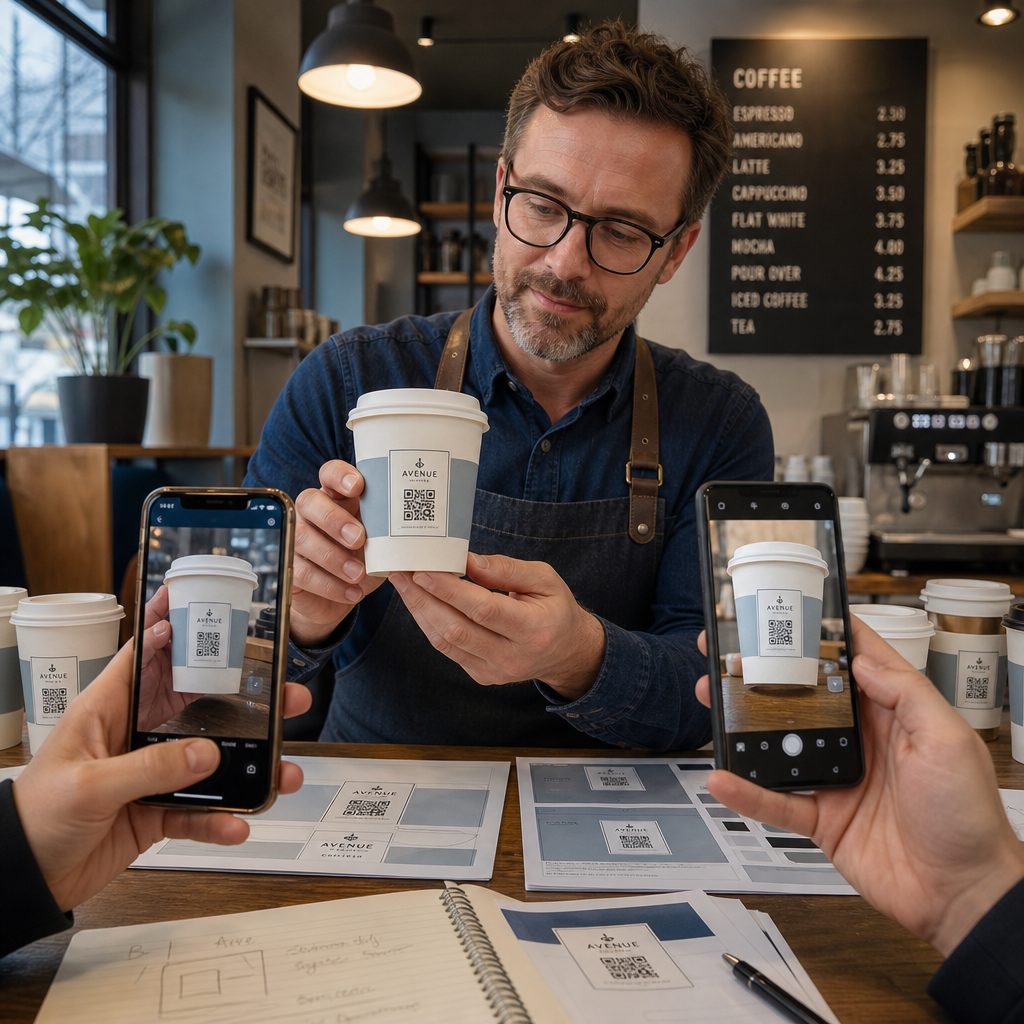
- הדפס דוגמה על החומר המיועד – לא רק הגהות נייר. חומר הכוס, הציפוי ושיטת ההדפסה כולם משפיעים על התוצאה הסופית.
- בדוק עם מספר מכשירים – לכל הפחות, אייפון עדכני ואנדרואיד בינוני. מכשירים ישנים יותר עם מצלמות ברזולוציה נמוכה יותר מציגים את הבדיקה התובענית ביותר.
- סרוק מזוויות מציאותיות – לקוחות מחזיקים כוסות בזוויות שונות, לא בניצב ישיר לתווית. בדוק ב-15° ו-30° מחוץ לציר.
- בדוק בסביבת התאורה בפועל – תאורת תקרה בבתי קפה היא לרוב חמה וכיוונית, מה שמשפיע על הניגודיות באופן שונה מתאורת משרד סטנדרטית.
- ודא שהיעד נטען כהלכה – סרוק את הקוד על נתונים סלולריים, לא רק Wi-Fi, ואשר שדף הנחיתה מותאם למובייל ונטען בפחות משלוש שניות.
אם הקוד נכשל באחת מהבדיקות הללו, התאם גודל, ניגודיות או מיקום לפני הדפסת אלפי יחידות. לרשימת בדיקה מקיפה, ה- מדריך לקודי QR על תוויות מוצרים עובר על אותם עקרונות בקרת איכות בפירוט רב יותר.
כתוב קריאה לפעולה שמרוויחה את הסריקה
הקוד QR עצמו אינו מתקשר דבר לגבי מדוע לקוח צריך לסרוק אותו. תמיד צמד את הקוד עם קריאה לפעולה קצרה – בדרך כלל ארבע עד שמונה מילים ממוקמות ישירות מעל או מתחת לקוד. דוגמאות:
- “סרוק למבצעי היום”
- “קבל 15% הנחה על ההזמנה הבאה שלך”
- “השאר לנו ביקורת”
- “ראה מה יש בכוס שלך”
הקריאה לפעולה עונה על השאלה המרומזת של הלקוח: מה יקרה אם אעשה זאת? בלעדיה, אפילו קוד QR מושלם מבחינה טכנית יתפקד בחסר.
הצבת קוד QR עובד וממותג על כוס קפה ניתנת להשגה לחלוטין עם ההגדרה הטכנית הנכונה. התאם את גודלו למשטחים מעוקלים, שמור על האזור השקט נקי, השתמש בניגודיות גבוהה על גימור מט, קבע תיקון שגיאות לרמה H, ותמיד בדוק על דוגמה פיזית לפני הייצור. בחר בקודים דינמיים כך שתוכל לעדכן יעדים ולמדוד ביצועים מבלי להדפיס מחדש.
התחל לבנות את קוד ה-QR של הכוס שלך עם ה- מחולל קוד QR של Pageloot – ייצא בפורמטים וקטוריים מוכנים להדפסה, הוסף את הלוגו שלך וצבעי המותג, וחבר אותו לניתוח נתונים מהיום הראשון.
שאלות נפוצות
להדפסה שטוחה, המינימום הסטנדרטי הוא 0.8 אינץ' × 0.8 אינץ' (2 ס"מ × 2 ס"מ). על משטח כוס מעוקל, הגדל זאת ב-20–30% כדי לפצות על עיוות עקמומיות – לכן כוון ללפחות 1.0 אינץ' × 1.0 אינץ'. הקוד חייב להתאים במלואו בתוך האזור השטוח של הכוס מבלי להתעקם סביב הצדדים.
כן, אך המיקום קריטי. השתמש באזור השטוח ביותר של חזית הספל, הגדל את הקוד יותר מאשר להדפסה שטוחה, ודא ניגודיות חזקה עם מודולים כהים על רקע בהיר, הימנע מגימורים מבריקים באזור הקוד, וקבע תיקון שגיאות לרמה H. תמיד בדוק דוגמה פיזית עם מספר מכשירים לפני הזמנה בכמויות גדולות.
התאם את היעד למטרת הקמפיין שלך. שימושים נפוצים כוללים תפריטים דיגיטליים, מבצעים עונתיים, קופוני הנחה, דפי ביקורות בגוגל, או פרופילי מדיה חברתית. השתמש בקוד QR דינמי כדי שתוכל לעדכן את היעד לאחר ההדפסה – זה חשוב במיוחד עבור כוסות המודפסות בכמויות גדולות, מכיוון שלא ניתן להדפיס מחדש את הקודים אם הצעה פגה או כתובת URL משתנה.