Bir müşteri telefonunu her doğrulttuğunda başarısız olmadan kahve fincanına taranabilir bir QR kodu nasıl yerleştireceğinizi mi merak ediyorsunuz? Kavisli bir yüzeydeki kötü tasarlanmış bir kod müşterileri hayal kırıklığına uğratır ve baskı maliyetlerinizi boşa harcar. Bu kılavuz, yerleşimden içeriğe kadar her kararda size yol gösterir, böylece fincanlarınız gerçekten sonuç verir.
Kahve Fincanları Neden Değerli Bir QR Kod Yüzeyidir?
Kahve fincanları bir müşterinin elinde birkaç dakika kalır. Bu bekleme süresi, çoğu markanın yeterince kullanmadığı bir pazarlama fırsatıdır.
Yaklaşık 83,4 milyon ABD'li yetişkin 2022'de bir QR kodu taradı; bu sayının 2025 yılına kadar yetişkin akıllı telefon kullanıcılarının ,6'sına ulaşması bekleniyor. Ayrı olarak, ABD'li alışveriş yapanların 'i üç aylık bir dönemde pazarlama ile ilgili bir QR kodu taradı ve 18-29 yaş arası kişiler benimsemede başı çekti. Kahve dükkanları, kafeler ve markalı ürün programları, tüketicilerin bildirdiği en popüler iki QR kod kullanım durumunun kesişim noktasında yer alıyor: restoran menüleri ve yiyecek-içecek ürün bilgileri.
İyi uygulanmış bir QR kodu içeren bir fincan, personel süresi eklemeden aşağıdakilerden herhangi birini başarabilir:
- Müşterileri dijital bir menüye veya mevsimlik özel ürünlere yönlendirin
- Olumlu bir deneyimden hemen sonra bir Google incelemesi isteyin
- Tekrar ziyaret için bir indirim kuponu sunun
- Sosyal medya takipçilerini veya yarışma katılımlarını artırın
- Sağlık bilincine sahip müşteriler için alerjen veya kaynak bilgisi sağlayın
Zorluk tamamen teknik: fincanlar kavisli, QR kodları ise değil.
Kavisli Yüzeyler Taranabilirliği Nasıl Etkiler?
Kağıda düz basılmış bir QR kodu, kodu oluşturan her modül – küçük kareler – aynı düzlemde oturduğu için kolayca taranır. Aynı kod bir silindirin etrafına sarıldığında, kenarlardaki modüller kameranın görüş hattından uzağa doğru kıvrılır. Tarayıcı bozuk bir ızgara görür ve kod çözme başarısız olur.
Bu varsayımsal bir sorun değil. Fincanlardaki QR kodlarının çalışmamasının en yaygın nedenidir. Geometriyi anlamak, onu aşacak şekilde tasarım yapmanıza yardımcı olur.
Üç fiziksel faktör aleyhinize çalışır:
- Eğrilik bozulması: Kodun yanlarındaki modüller kameradan uzağa doğru bükülerek sıkıştırılmış veya görünmez görünmelerine neden olur.
- Yansıtıcı yüzeyler: Parlak fincan kaplamaları veya laminatlar, özellikle tavan tipi kafe aydınlatması altında kontrastı bozan parlamalar oluşturur.
- Baskı kaydı: Kağıt fincan üretimi dikişler ve birleşim yerleri içerir; bir dikişin üzerine gelen bir kod güvenilir bir şekilde taranmaz.
Bunların her birinin, aşağıdaki bölümlerde ele alınan doğrudan teknik bir çözümü vardır.
Bir Fincan Üzerinde Boyutlandırma ve Yerleştirme
Kodu Mümkün Olan En Düz Alanda Tutun
QR kodunuzu fincanın en az eğriliğe sahip bölümüne yerleştirin. Standart bir kağıt fincan için bu, kenara yakın en üst kısmı ve taban konikliğini önlemek anlamına gelir. Fincanın orta bandı genellikle en düz yazdırılabilir alanı sunar.
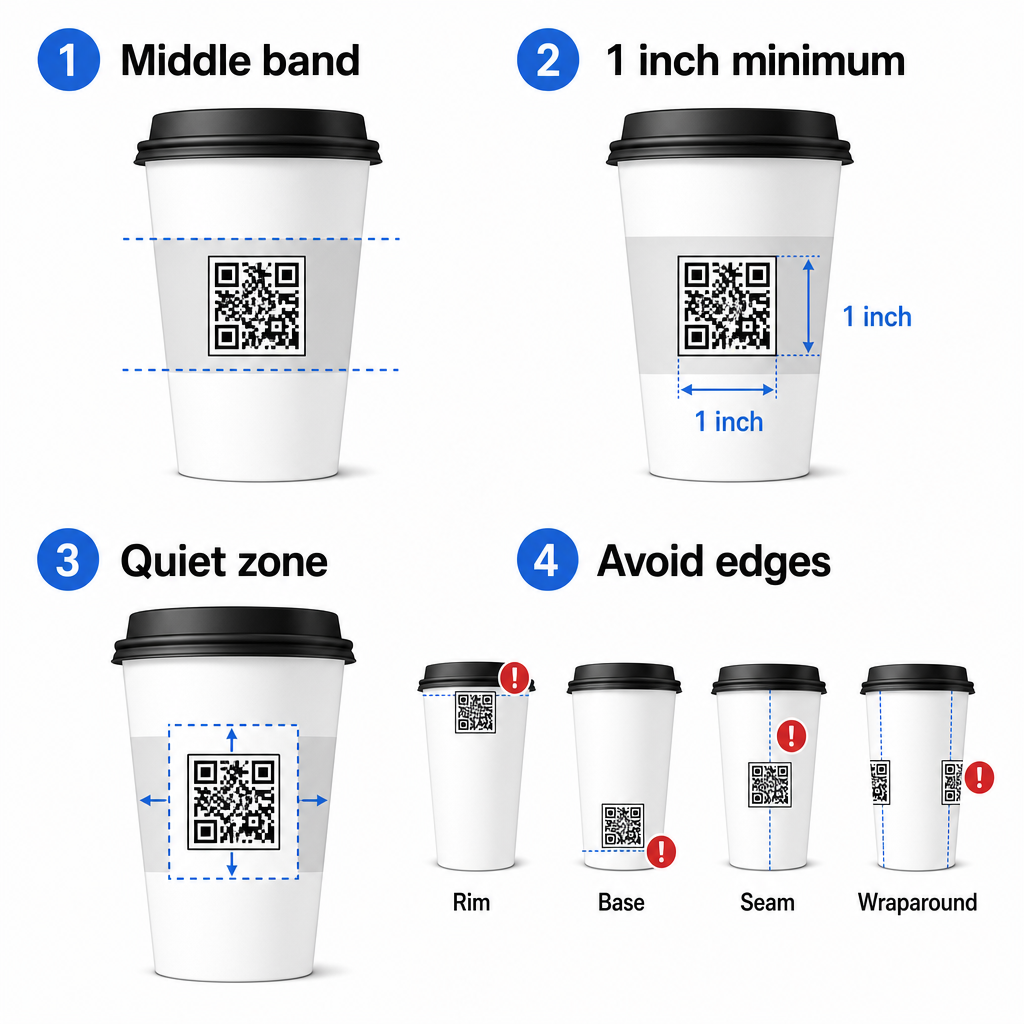
Düz kenarlı bir promosyon kupa veya kare bir seyahat fincanı ile çalışıyorsanız, doğal bir düz paneliniz var demektir – onu kullanın. Silindirik seramik kupalar için ön yüzeyi hedef bölgeniz olarak kabul edin.
Kavisli Yüzeyler İçin Kodu Boyutlandırın
Düz baskı için minimum boyut 0,8 inç × 0,8 inç (yaklaşık 2 cm × 2 cm) yakın mesafeli tarama için standart öneridir. Kavisli bir yüzeyde bu minimum yeterli değildir. Eğrilik, kodun algılanan boyutunu bozduğu için, kavisli uygulamalar için kod boyutunu -30 artırmak tavsiye edilir.
Pratik olarak, en az 1,0 inç × 1,0 inç standart 12 oz'luk bir kağıt fincan üzerinde ve namlu çapının daha büyük ve eğriliğin daha az şiddetli olduğu uzun 20 oz'luk bir fincan üzerinde daha da büyük.
Kod, fincanın bir yüzeyine tamamen sığmalı, yanlara sarılmamalıdır. Kodun herhangi bir köşesi eğriliğin etrafında kaybolursa, kod başarısız olur.
Sessiz Bölge Pazarlık Konusu Değildir
Sessiz bölge, kodu çevreleyen boş kenar boşluğudur. ISO standartları minimum dört modül dört tarafında boş alan. Bir kahve fincanında, bu kenar boşluğu aynı zamanda kavisli kenara karşı bir tampon görevi görür.
Sessiz bölgenin içine logo, fincan grafiği, beslenme metni veya marka desenleri yerleştirmeyin. QR kodu okunabilirlik en iyi uygulamalar kılavuzu güvenilir taramayı etkileyen diğer faktörlerin yanı sıra sessiz bölge gereksinimlerini ayrıntılı olarak kapsar.
Fincan Malzemelerinde Kontrast ve Renk
Açık Üzerine Koyu Kullanın
QR kod tarayıcıları, koyu modüller ile açık bir arka plan arasındaki kontrastı algılayarak çalışır. Önerilen minimum kontrast oranı 4:1, ancak daha yüksek her zaman daha iyidir – siyah beyaz üzerinde 21:1 oranını sağlar.
Kahve fincanlarında, iki yüzey sorunu etkili kontrastı azaltır:
- Kraft veya kahverengi kağıt stoğu: Kaplamasız kraft kağıda doğrudan basılan koyu bir kod, arka plan beyaz olmadığı için kontrastı kaybeder. Kodun altına beyaz baskılı bir panel veya beyaz bir zemin kaplaması kullanın.
- Parlak laminat: Yansıtıcı yüzeyler ışığı kameraya geri yansıtır, koyu modülleri soluklaştırır. Bir mat yüzey kodun alanında, fincanın geri kalanı parlak olsa bile.
Gradyanlardan ve Desenli Arka Planlardan Kaçının
Bir QR kodunun altındaki gradyan bir arka plan, kabul edilebilir kontrast bölgeleri ve zayıf kontrast bölgeleri oluşturur. Tarayıcı tüm kodu değerlendirir ve kontrast eşiğinin altına düşen herhangi bir bölge bir hataya neden olabilir. Kodun altına düz, tek tip açık bir arka plan kullanın.
Renk tasarım için önemli olduğu markalı fincanlar için, beyaz veya soluk bir arka plan üzerinde koyu bir marka rengini ön plan olarak kullanabilirsiniz – ancak tam üretimden önce dikkatlice test edin. Bu QR kodu renk kontrastı en iyi uygulamalar kılavuzu bu kararlara rehberlik etmek için belirli renk kombinasyonları ve kontrast oranları sağlar.
Baskı için Teknik Özellikler
Çözünürlük ve Dosya Biçimi
Kodu şurada yazdırın 300 DPI veya daha yüksek. Düşük çözünürlüklü bir raster görüntü, bulanık modül kenarları üretir, bu da taranabilirliği azaltır ve yakın mesafeden profesyonel görünmez.
Mümkün olduğunda, bir kullanın vektör formatı (SVG veya EPS) bir PNG veya JPG yerine. Vektör dosyaları kaliteden ödün vermeden ölçeklenir, bu önemlidir çünkü fincan üreticileri genellikle baskı öncesi sırasında çizimleri yeniden boyutlandırır. Pageloot'un QR kod oluşturucu baskıya hazır vektör dosyalarını (.EPS, .PDF, .SVG) dışa aktarır, doğrudan fincan yazıcınıza göndermek için uygundur.
Hata Düzeltme Seviyesi
QR kodlarının dört hata düzeltme seviyesi vardır: L, M, Q ve H. Daha yüksek seviyeler, kodun daha fazlasının hasar görmesine veya gizlenmesine rağmen başarılı bir şekilde taranmasına izin verir. Fincan uygulamaları için:
- Seviye H kodu içine bir logo yerleştiriyorsanız önerilir, çünkü kodun 'una kadarının gizlenmesine izin verir.
- Seviye Q veya H herhangi bir kavisli yüzey için tavsiye edilir, çünkü yüzey bozulması tarama sırasında kodun bazı kısımlarını etkili bir şekilde bozar.
Bir fincan üzerinde L Seviyesini kullanmayın. Kavisli baskıya özgü fiziksel bozulmalara karşı tolerans sağlamaz.
Bulucu Desenleri Net Kalmalıdır
Bir QR kodunun köşelerindeki üç büyük kare bulucu desenlerdir. Tarayıcıya kodun nerede başladığını, bittiğini ve nasıl yönlendirildiğini söylerler. Bulucu desenlerini marka grafikleriyle kırpmayın, üst üste bindirmeyin veya değiştirmeyin. Bu, özel baskılı ambalajlardaki en yaygın tasarım hatalarından biridir ve profesyonel görünen ancak asla taranmayan kodlar üretir.
Fincanlarınız İçin Baskıya Hazır QR Kodları Oluşturun Tamamen özelleştirilebilir, yüksek çözünürlüklü bir QR kodu oluşturun, doğru hata düzeltme seviyesi, vektör dışa aktarma ve markalama seçenekleriyle birlikte Pageloot QR Kodu Oluşturucu. .EPS, .PDF veya .SVG formatında indirin, fincan üreticinize göndermeye hazır.
QR Kodunun Nereye Bağlandığını Seçme
Fiziksel uygulama önemlidir, ancak taramadan sonra ne olduğu da önemlidir. Bir fincan kodunu tarayan bir müşteri kendini ilgili olarak tanımlamıştır – onları genel bir ana sayfaya göndermeyin.
Hedefi bağlama uygun hale getirin:
| Kullanım Örneği | Önerilen QR Tipi | Araç |
|---|---|---|
| Dijital menü veya mevsimlik içecekler | Menü QR kodu | Menü QR Kod Oluşturucu |
| Tekrar ziyaret için indirim | Kupon açılış sayfası | Kupon QR Kod Oluşturucu |
| Satış sonrası Google incelemesi | Doğrudan inceleme bağlantısı | Google Yorum QR Kod Oluşturucu |
| Web sitesi, sosyal veya promosyon açılış sayfası | URL yönlendirmesi | Bağlantı QR Kod Oluşturucu |
Kafeler ve kahve dükkanları için, Pageloot'un restoran QR kod araçları tek bir platformda dijital menüleri, siparişleri ve inceleme toplamayı destekler.
Fincan Kampanyaları İçin Dinamik QR Kodları Kullanın
Statik bir QR kodu, hedef URL'yi kalıcı olarak kodlar. Mevsimlik promosyonunuz sona ererse, kodu güncelleyemezsiniz – ve o kodla kalan fincanlar bir çıkmaz sokak haline gelir.
Bir dinamik QR kodu kısa bir yönlendirme URL'sini kodun kendisinde saklar. Bu yönlendirmenin bir kontrol panelinden nereye işaret ettiğini siz kontrol edersiniz ve tek bir fincanı yeniden basmadan istediğiniz zaman değiştirebilirsiniz. Bu, fincan kampanyaları için kritik öneme sahiptir çünkü:
- Fincan baskı sayıları genellikle binlercedir ve yeniden baskı pahalıdır
- Promosyonlar, menüler ve teklifler mevsimsel olarak değişir
- Kampanya ortasında hedefleri değiştirerek A/B testleri yapabilirsiniz
Dinamik kodlar ayrıca sağlar tarama analizi – taramaların ne zaman gerçekleştiği, hangi cihazların kullanıldığı ve müşterilerin nerede bulunduğu hakkında veriler. Bu veriler, hangi fincan tasarımlarının veya yerleşimlerinin en çok etkileşimi sağladığını ölçmenize ve gelecekteki baskı sayılarını buna göre ayarlamanıza olanak tanır.
Fincan Kampanyanızdaki Her Taramayı Takip Edin Hedefleri anında güncellemek ve gerçek zamanlı performansı izlemek için dinamik bir QR koduna geçin. Bu Pageloot QR Kodu Oluşturucu size düzenleme kontrolleriyle birlikte tam bir analiz paneli sunar – hepsi fincanlarınızı yeniden basmadan.
Fincan QR Kodunuzu Markalama
Düz siyah-beyaz bir QR kodu işe yarar, ancak markalı bir kod tanınmayı pekiştirir ve daha fazla tarama kazandırır. Pageloot'un Logolu QR Kod Oluşturucu şunları yapmanızı sağlar:
- Marka logonuzu kodun ortasına yerleştirin
- Modüllere ve arka plana marka renklerini uygulayın
- Gövde deseni ve kenar stili için tasarım şablonlarından seçim yapın
- Bir harekete geçirici mesaj çerçevesi ekleyin (örn., “Bir sonraki siparişinizde indirim için tarayın”)
Logo eklerken, kod alanının 'undan fazla olmamasına dikkat edin ve hata düzeltmeyi Seviye H olarak ayarlayın. Logo, aksi takdirde kodlanmış veri taşıyacak alanı kaplar ve Seviye H hata düzeltme bu çakışmayı telafi eder.
Büyük bir bardak siparişinde veya çok konumlu bir kampanyada tutarlılık için Pageloot'un QR kod klasörleri kodları kampanya, konum veya bardak boyutuna göre düzenlemenizi sağlar, böylece ekibiniz onları takip etmeden yönetebilir.
Ambalaj uygulamaları hakkında ilgili rehberlik için, üzerindeki sayfalar ürün ambalajlarındaki QR kodlarını tarar ve gıda ambalajlarındaki QR kodları doğrudan bardaklara uygulanan hususları kapsar.
Baskı Öncesi Test Etme
Hiçbir dikkatli tasarım, gerçek bardak üzerindeki fiziksel testin yerini tutmaz. Tam bir üretim çalışmasına başlamadan önce:
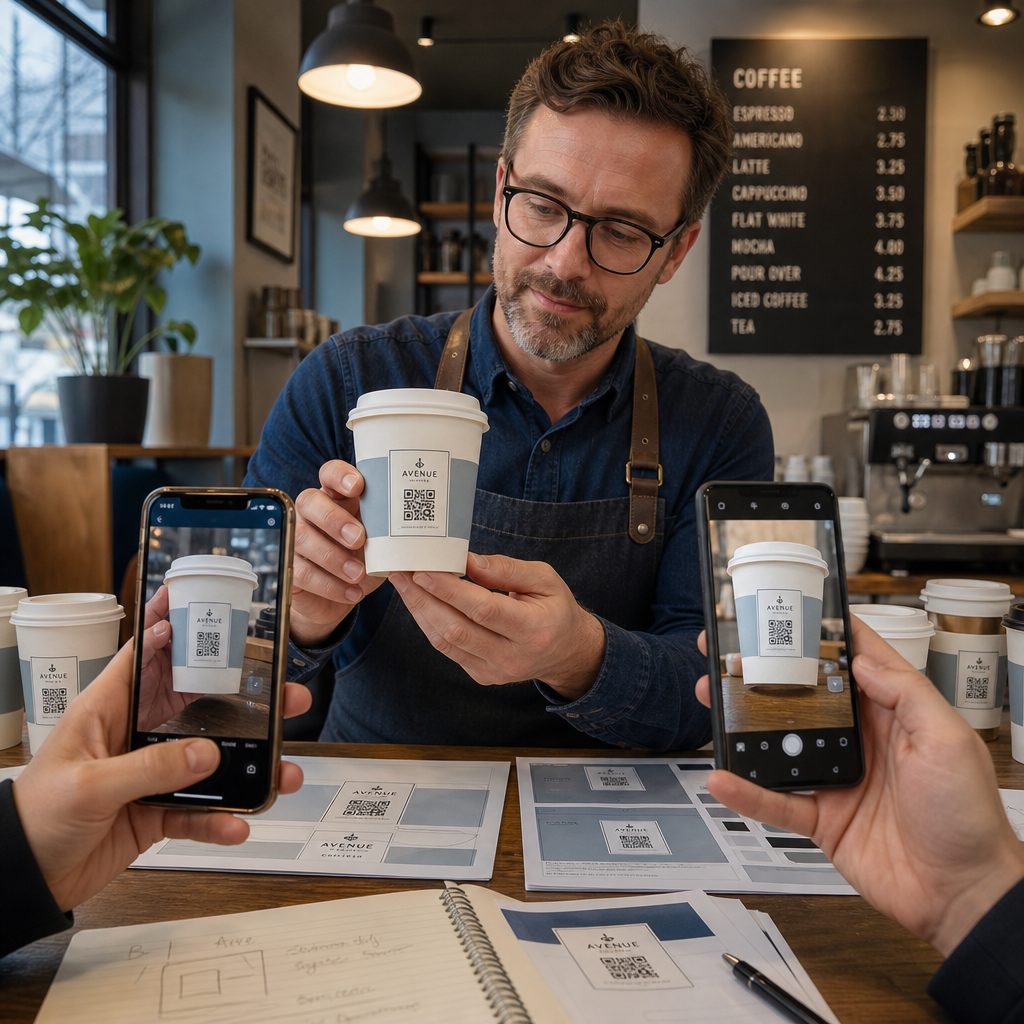
- Amaçlanan malzeme üzerine bir örnek yazdırın – sadece kağıt provaları değil. Bardak stoğu, kaplama ve baskı yöntemi hepsi nihai sonucu etkiler.
- Birden fazla cihazla test edin – en azından yeni bir iPhone ve orta seviye bir Android ile. Düşük çözünürlüklü kameralara sahip eski cihazlar en zorlu testi sunar.
- Gerçekçi açılardan tarayın – müşteriler bardakları çeşitli açılardan tutar, etikete doğrudan dik değil. Eksen dışı 15° ve 30°'de test edin.
- Gerçek aydınlatma ortamında test edin – tavan kafe aydınlatması genellikle sıcak ve yönlüdür, bu da kontrastı standart ofis aydınlatmasından farklı şekilde etkiler.
- Hedefin doğru yüklendiğini doğrulayın – kodu sadece Wi-Fi ile değil, hücresel veriyle tarayın ve açılış sayfasının mobil uyumlu olduğunu ve üç saniyeden kısa sürede yüklendiğini onaylayın.
Kod bu testlerden herhangi birinde başarısız olursa, binlerce birim basmadan önce boyutu, kontrastı veya yerleşimi ayarlayın. Kapsamlı bir kontrol listesi için, ürün etiketlerindeki QR kodları kılavuzuna bakın aynı kalite kontrol prensiplerini daha ayrıntılı olarak ele alır.
Taramayı Sağlayan Bir Harekete Geçirici Mesaj Yazın
QR kodun kendisi, bir müşterinin neden taraması gerektiği hakkında hiçbir şey iletmez. Kodu her zaman kısa bir harekete geçirici mesajla eşleştirin – genellikle kodun hemen üstüne veya altına yerleştirilmiş dört ila sekiz kelime. Örnekler:
- “Günün özel fırsatları için tarayın”
- “Bir sonraki siparişinizde indirim kazanın”
- “Bize bir yorum bırakın”
- “Bardağınızda ne olduğunu görün”
Harekete geçirici mesaj, müşterinin zımni sorusunu yanıtlar: bunu yaparsam ne olur? Onsuz, teknik olarak mükemmel bir QR kod bile düşük performans gösterecektir.
Çalışan, markalı bir QR kodu bir kahve bardağına yerleştirmek, doğru teknik kurulumla tamamen başarılabilir. Kavisli yüzeyler için boyutlandırın, sessiz bölgeyi temiz tutun, mat bir yüzeyde yüksek kontrast kullanın, hata düzeltmeyi Seviye H olarak ayarlayın ve üretimden önce her zaman fiziksel bir örnek üzerinde test edin. Hedefleri güncelleyebilmek ve yeniden baskı yapmadan performansı ölçebilmek için dinamik kodları seçin.
Bardak QR kodunuzu oluşturmaya başlayın Pageloot QR Kodu Oluşturucu – baskıya hazır vektör formatlarında dışa aktarın, logonuzu ve marka renklerinizi ekleyin ve ilk günden itibaren analitiklere bağlayın.
Sıkça sorulan sorular
Düz baskı için, standart minimum 0.8 inç × 0.8 inç (2 cm × 2 cm)'dir. Kavisli bir fincan yüzeyinde, eğrilik bozulmasını telafi etmek için bunu 20–30% oranında artırın – yani en az 1.0 inç × 1.0 inç hedefleyin. Kod, fincanın düz bölgesine yanlara sarılmadan tamamen sığmalıdır.
Evet, ancak yerleşim kritiktir. Kupun ön yüzünün en düz alanını kullanın, kodu düz baskıdan daha büyük boyutlandırın, açık bir arka plan üzerinde koyu modüllerle güçlü kontrast sağlayın, kod alanında parlak yüzeylerden kaçının ve hata düzeltmeyi Seviye H olarak ayarlayın. Toplu sipariş vermeden önce her zaman birden fazla cihazla fiziksel bir örneği test edin.
Hedefi kampanya hedefinize eşleştirin. Yaygın kullanımlar arasında dijital menüler, mevsimlik promosyonlar, indirim kuponları, Google inceleme sayfaları veya sosyal medya profilleri bulunur. Dinamik bir QR kodu kullanın, böylece baskıdan sonra hedefi güncelleyebilirsiniz – bu, özellikle büyük miktarlarda basılan bardaklar için önemlidir, çünkü bir teklif sona ererse veya bir URL değişirse kodlar yeniden basılamaz.