Pitate se kako da stavite skenabilni QR kod na šolju za kafu, a da ne zakaže svaki put kada kupac uperi telefon u nju? Loše dizajniran kod na zakrivljenoj površini frustrira kupce i troši vašu štampu. Ovaj vodič vas vodi kroz svaku odluku, od postavljanja do sadržaja, tako da vaše šolje zaista daju rezultate.
Zašto su šolje za kafu vredna površina za QR kod
Šolje za kafu provode nekoliko minuta u rukama kupca. To vreme zadržavanja je marketinška prilika koju većina brendova nedovoljno koristi.
Skoro 83,4 miliona odraslih u SAD skeniralo je QR kod u 2022. godini, a predviđa se da će taj broj dostići 42,6% odraslih korisnika pametnih telefona do 2025. godine. Odvojeno, 45% američkih kupaca skeniralo je QR kod vezan za marketing u tromesečnom periodu, pri čemu su mladi od 18 do 29 godina prednjačili u usvajanju. Kafići, restorani i programi brendirane robe nalaze se na preseku dva najčešća slučaja upotrebe QR koda koje potrošači prijavljuju: jelovnici restorana i informacije o prehrambenim proizvodima i pićima.
Šolja sa dobro izvršenim QR kodom može postići bilo šta od sledećeg bez dodavanja vremena osoblja:
- Uputite kupce na digitalni jelovnik ili sezonske specijalitete
- Podstaknite Google recenziju odmah nakon pozitivnog iskustva
- Dostavite kupon za popust za povratnu posetu
- Podstaknite praćenje na društvenim mrežama ili prijave za takmičenja
- Pružite informacije o alergenima ili poreklu za kupce koji vode računa o zdravlju
Izazov je čisto tehnički: šolje se krive, a QR kodovi ne.
Kako zakrivljene površine utiču na mogućnost skeniranja
QR kod odštampan ravno na papiru lako se skenira jer svaki modul – mali kvadrati koji čine kod – leži na istoj ravni. Kada se isti kod obavije oko cilindra, moduli na ivicama se zakrivljuju od linije vida kamere. Skener vidi izobličenu mrežu, i dekodiranje ne uspeva.
Ovo nije hipotetički problem. To je najčešći razlog zašto QR kodovi na šoljama ne rade. Razumevanje geometrije pomaže vam da dizajnirate rešenje.
Tri fizička faktora rade protiv vas:
- Izobličenje zakrivljenosti: Moduli na stranama koda se savijaju od kamere, čineći ih komprimovanim ili nevidljivim.
- Reflektujuće završne obrade: Sjajni premazi ili laminati na šoljama stvaraju odsjaj koji ispire kontrast, posebno pod gornjim osvetljenjem kafića.
- Registracija štampe: Proizvodnja papirnih šolja uključuje šavove i spojeve; kod koji prelazi preko šava neće se pouzdano skenirati.
Svaki od ovih problema ima direktno tehničko rešenje, obrađeno u odeljcima ispod.
Veličina i postavljanje na šolji
Držite kod na najravnijoj mogućoj površini
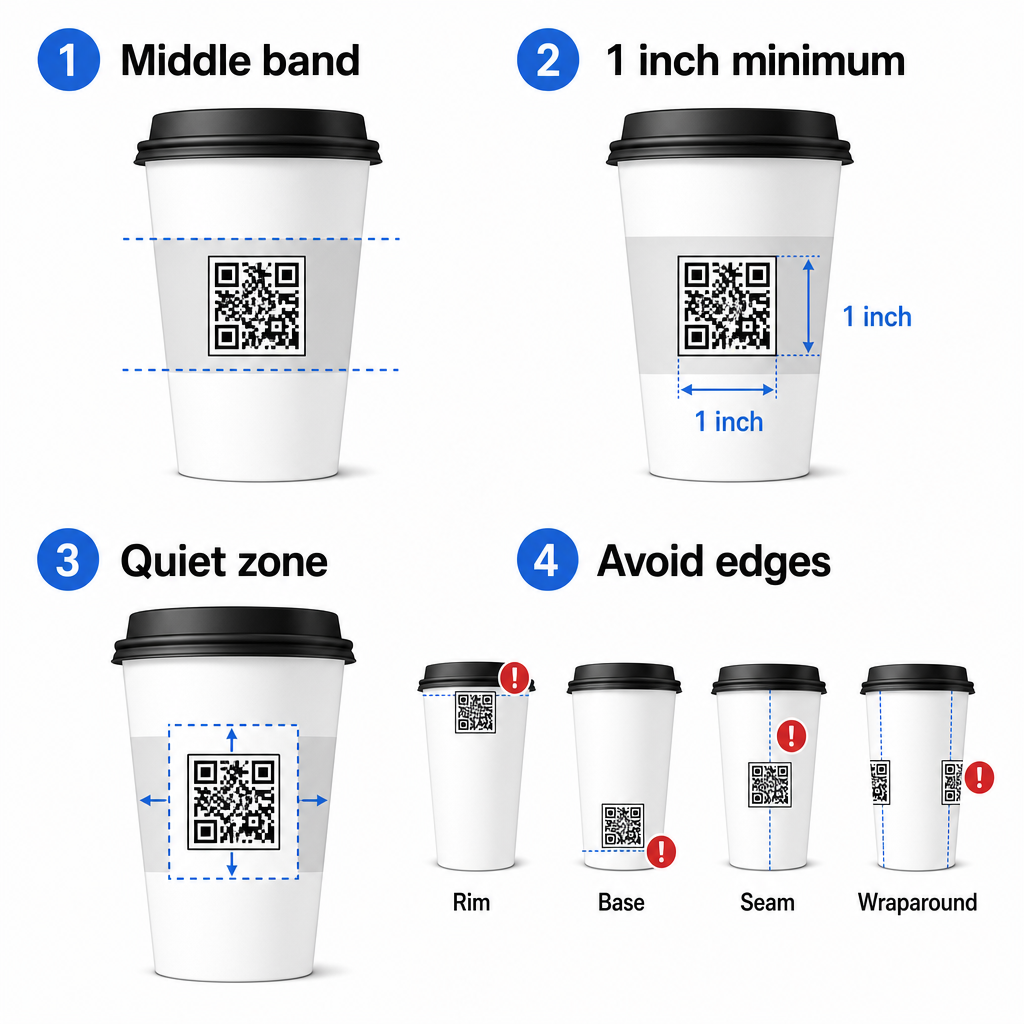
Postavite svoj QR kod na deo šolje sa najmanjom zakrivljenošću. Za standardnu papirnu šolju, to znači izbegavanje samog vrha blizu oboda i suženja baze. Srednji pojas šolje obično nudi najravniju zonu za štampanje.
Ako radite sa promotivnom šoljom sa ravnim stranama ili četvrtastom putnom šoljom, imate prirodnu ravnu površinu – iskoristite je. Za cilindrične keramičke šolje, tretirajte prednju stranu kao svoju ciljnu zonu.
Odredite veličinu koda za zakrivljene površine
Za ravnu štampu, minimalna veličina je 8 in × 0.8 in (oko 2 cm × 2 cm) je standardna preporuka za skeniranje izbliza. Na zakrivljenoj površini, taj minimum nije dovoljan. Pošto zakrivljenost izobličava percipiranu veličinu koda, preporučljivo je povećati veličinu koda za 20–30% za zakrivljene primene.
U praktičnom smislu, ciljajte na najmanje 0 in × 1.0 in na standardnoj papirnoj šolji od 12 oz, i još veće na visokoj šolji od 20 oz gde je prečnik bureta veći i zakrivljenost manje izražena.
Kod mora u potpunosti stati unutar jedne strane šolje, a da se ne obavija oko bočnih strana. Ako bilo koji ugao koda nestane oko zakrivljenosti, kod će zakazati.
Tiha zona je nepregovaračka
Tiha zona je prazna margina koja okružuje kod. ISO standardi propisuju minimum od četiri modula čistog prostora na sve četiri strane. Na šolji za kafu, ova margina takođe deluje kao zaštita od zakrivljene ivice.
Ne postavljajte logotipe, grafike šolja, nutritivni tekst ili obrasce brenda unutar tihe zone. The vodič za najbolje prakse čitljivosti QR kodova pokriva zahteve tihe zone u detalje, zajedno sa drugim faktorima koji utiču na pouzdano skeniranje.
Kontrast i boja na materijalima šolja
Koristite tamno na svetlom
Skeneri QR koda rade tako što detektuju kontrast između tamnih modula i svetle pozadine. Preporučeni minimalni odnos kontrasta je 4:1, iako je veći uvek bolji – crna na beloj postiže 21:1.
Na šoljama za kafu, dva površinska problema smanjuju efikasan kontrast:
- Kraft ili braon papir: Tamni kod odštampan direktno na nepremazanom kraft papiru gubi kontrast jer pozadina nije bela. Koristite beli odštampani panel ili beli premaz ispod koda.
- Sjajni laminat: Reflektujuće površine odbijaju svetlost nazad ka kameri, ispirajući tamne module. Zatražite mat završnu obradu u području koda, čak i ako je ostatak šolje sjajan.
Izbegavajte gradijente i pozadine sa šarama
Gradijentna pozadina ispod QR koda stvara zone prihvatljivog kontrasta i zone lošeg kontrasta. Skener procenjuje ceo kod, i bilo koji region koji padne ispod praga kontrasta može izazvati grešku. Koristite jednobojnu, ujednačenu svetlu pozadinu ispod koda.
Za brendirane šolje gde je boja važna za dizajn, možete koristiti tamnu boju brenda kao prednji plan na beloj ili bledoj pozadini – ali pažljivo testirajte pre pune proizvodnje. vodič za najbolje prakse kontrasta boja QR koda pruža specifične kombinacije boja i odnose kontrasta za vođenje tih odluka.
Tehničke specifikacije za štampu
Rezolucija i format datoteke
Odštampajte kod na 300 DPI ili više. Rasterska slika niske rezolucije proizvodi mutne ivice modula, što smanjuje mogućnost skeniranja i izgleda neprofesionalno izbliza.
Kad god je moguće, koristite vektorski format (SVG ili EPS) umesto PNG ili JPG. Vektorski fajlovi se skaliraju bez gubitka kvaliteta, što je važno jer proizvođači šolja često menjaju veličinu umetničkih dela tokom pripreme za štampu. Pagelootov generator QR kodova izvozi vektorske fajlove spremne za štampu (.EPS, .PDF, .SVG) pogodne za direktno slanje vašem štampaču šolja.
Ниво исправке грешке
QR kodovi imaju četiri nivoa korekcije grešaka: L, M, Q i H. Viši nivoi omogućavaju da više koda bude oštećeno ili zaklonjeno, a da se i dalje uspešno skenira. Za primene na šoljama:
- Nivo H se preporučuje ako ugrađujete logo unutar koda, jer omogućava da do 30% koda bude zaklonjeno.
- Nivo Q ili H je preporučljivo za bilo koju zakrivljenu površinu, jer izobličenje površine efektivno oštećuje delove koda tokom skeniranja.
Ne koristite nivo L na šolji. Ne pruža toleranciju za fizička izobličenja svojstvena zakrivljenoj štampi.
Obrasci za pronalaženje moraju ostati jasni
Tri velika kvadrata u uglovima QR koda su obrasci za pronalaženje. Oni govore skeneru gde kod počinje, završava se i kako je orijentisan. Ne sečite, ne preklapajte i ne modifikujte obrasce za pronalaženje grafičkim elementima brenda. Ovo je jedna od najčešćih grešaka u dizajnu na prilagođenoj štampanoj ambalaži, i proizvodi kodove koji izgledaju profesionalno, ali se nikada ne skeniraju.
Kreirajte QR kodove spremne za štampu za vaše šolje Generišite potpuno prilagodljiv QR kod visoke rezolucije sa ispravnim nivoom korekcije grešaka, vektorskim izvozom i opcijama brendiranja koristeći Пагелоот генератор КР кодова. Preuzmite u .EPS, .PDF ili .SVG formatu spremnom za slanje vašem proizvođaču šolja.
Odabir na šta QR kod vodi
Fizička izvedba je važna, ali i ono što se dešava nakon skeniranja. Kupac koji skenira kod na šolji se sam identifikovao kao angažovan – ne šaljite ga na generičku početnu stranicu.
Uskladite odredište sa kontekstom:
| Случај употребе | Preporučeni tip QR koda | Alat |
|---|---|---|
| Digitalni meni ili sezonska pića | КР код менија | QR kod za jelovnik: generator |
| Popust za povratnu posetu | Stranica za kupon | Generator QR koda za kupone |
| Google recenzija nakon kupovine | Direktna veza za recenziju | Google recenzije QR kod generator |
| Veb-sajt, društvene mreže ili odredišna stranica za promociju | URL preusmeravanje | Generator QR kodova za linkove |
Za kafiće i poslastičarnice, Pagelootovi alati za QR kodove za restorane podržavaju digitalne menije, naručivanje i prikupljanje recenzija na jednoj platformi.
Koristite dinamičke QR kodove za kampanje sa šoljama
Statički QR kod trajno kodira odredišni URL. Ako se vaša sezonska promocija završi, ne možete ažurirati kod – i sve preostale šolje sa tim kodom postaju ćorsokak.
А. динамички КР код čuva kratak URL za preusmeravanje u samom kodu. Vi kontrolišete gde to preusmeravanje vodi sa kontrolne table, i možete ga promeniti u bilo kom trenutku bez ponovnog štampanja ijedne šolje. Ovo je ključno za kampanje sa šoljama jer:
- Tiraži šolja su često u hiljadama, a ponovno štampanje je skupo
- Promocije, meniji i ponude se menjaju sezonski
- Možete pokrenuti A/B testove prebacivanjem odredišta usred kampanje
Dinamički kodovi takođe pružaju analitikom skeniranja – podatke o tome kada su se skeniranja dogodila, koji su uređaji korišćeni i gde su se kupci nalazili. Ti podaci vam omogućavaju da izmerite koji dizajn šolja ili plasmani su doveli do najvećeg angažovanja, i da shodno tome prilagodite buduće tiraže.
Pratite svako skeniranje iz vaše kampanje sa šoljama Pređite na dinamički QR kod da biste ažurirali odredišta u hodu i pratili performanse u realnom vremenu. Пагелоот генератор КР кодова vam pruža potpunu analitičku kontrolnu tablu zajedno sa kontrolama za uređivanje – sve to bez ponovnog štampanja vaših šolja.
Brendiranje vašeg QR koda na šolji
Običan crno-beli QR kod funkcioniše, ali brendirani kod pojačava prepoznavanje i donosi više skeniranja. Pagelootov QR kod generator sa logom vam omogućava da:
- Ugradite logo vašeg brenda u centar koda
- Primeni boje brenda na module i pozadinu
- Izaberite iz šablona dizajna za uzorak tela i stil ivice
- Dodajte okvir poziva na akciju (npr. “Skenirajte za 10% popusta na vašu sledeću porudžbinu”)
Prilikom dodavanja logotipa, neka ne zauzima više od 30% površine koda i podesite korekciju grešaka na Nivo H. Logotip zauzima prostor koji bi inače nosio kodirane podatke, i korekcija grešaka Nivoa H kompenzuje to preklapanje.
Za doslednost u velikoj porudžbini šolja ili kampanji na više lokacija, Pageloot-ovi Fascikle za QR kodove omogućavaju vam da organizujete kodove po kampanji, lokaciji ili veličini šolje tako da vaš tim može da ih upravlja bez gubljenja traga.
Za srodne smernice o primenama pakovanja, stranice o QR kodove na pakovanju proizvoda и QR kodovi na pakovanju hrane pokrivaju razmatranja koja se direktno primenjuju na šolje.
Testiranje Pre Vaše Serije Štampanja
Nikakva količina pažljivog dizajna ne zamenjuje fizičko testiranje na stvarnoj šolji. Pre nego što se obavežete na punu proizvodnu seriju:
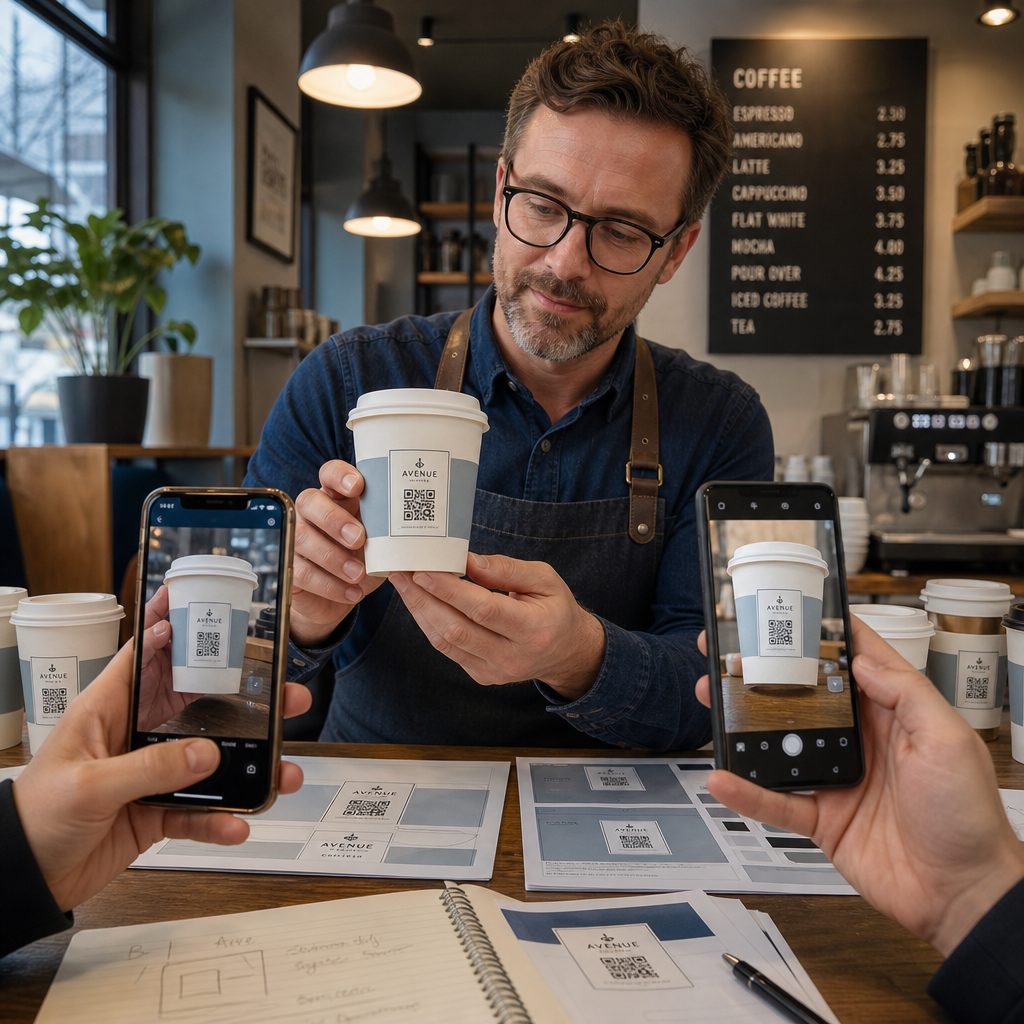
- Odštampajte uzorak na predviđenom materijalu – ne samo papirne probe. Materijal šolje, premaz i metoda štampanja svi utiču na konačni rezultat.
- Testirajte sa više uređaja – najmanje, noviji iPhone i Android srednje klase. Stariji uređaji sa kamerama niže rezolucije predstavljaju najzahtevniji test.
- Skenirajte iz realističnih uglova – kupci drže šolje pod različitim uglovima, ne direktno okomito na etiketu. Testirajte pod uglom od 15° i 30° van ose.
- Testirajte u stvarnom svetlosnom okruženju – gornje osvetljenje kafića je često toplo i usmereno, što drugačije utiče na kontrast od standardnog kancelarijskog osvetljenja.
- Proverite da li se odredište pravilno učitava – skenirajte kod na mobilnim podacima, ne samo na Wi-Fi, i potvrdite da je odredišna stranica optimizovana za mobilne uređaje i učitava se za manje od tri sekunde.
Ako kod ne prođe bilo koji od ovih testova, podesite veličinu, kontrast ili položaj pre štampanja hiljada jedinica. Za sveobuhvatnu kontrolnu listu, vodič za QR kodove na etiketama proizvoda prolazi kroz iste principe kontrole kvaliteta detaljnije.
Napišite Poziv na Akciju Koji Zaslužuje Skeniranje
Sam QR kod ne komunicira ništa o tome zašto bi ga kupac trebalo skenirati. Uvek uparite kod sa kratkim pozivom na akciju – obično četiri do osam reči pozicioniranih direktno iznad ili ispod koda. Primeri:
- “Skenirajte za današnje specijalitete”
- “Ostvarite 15% popusta na vašu sledeću porudžbinu”
- “Ostavite nam recenziju”
- “Pogledajte šta je u vašoj šolji”
Poziv na akciju odgovara na implicitno pitanje kupca: šta se dešava ako ovo uradim? Bez toga, čak i tehnički savršen QR kod će imati lošije performanse.
Postavljanje funkcionalnog, brendiranog QR koda na šolju za kafu je potpuno ostvarivo sa pravim tehničkim podešavanjem. Dimenzionirajte ga za zakrivljene površine, držite tihu zonu čistom, koristite visok kontrast na mat završnoj obradi, podesite korekciju grešaka na Nivo H, i uvek testirajte na fizičkom uzorku pre proizvodnje. Izaberite dinamičke kodove tako da možete ažurirati odredišta i meriti performanse bez ponovnog štampanja.
Počnite da pravite svoj QR kod za šolju sa Пагелоот генератор КР кодова – izvezite u vektorskim formatima spremnim za štampu, dodajte svoj logotip i boje brenda, i povežite ga sa analitikom od prvog dana.
Često postavljana pitanja
Za ravnu štampu, standardni minimum je 0.8 in × 0.8 in (2 cm × 2 cm). Na zakrivljenoj površini šolje, povećajte to za 20–30% da biste kompenzovali izobličenje zakrivljenosti – pa ciljajte na najmanje 1.0 in × 1.0 in. Kod mora u potpunosti stati unutar ravne zone šolje bez obmotavanja oko strana.
Da, ali je položaj kritičan. Koristite najravniju površinu prednje strane šolje, dimenzionirajte kod veći nego što biste za ravnu štampu, obezbedite jak kontrast sa tamnim modulima na svetloj pozadini, izbegavajte sjajne završne obrade u oblasti koda, i podesite korekciju grešaka na Nivo H. Uvek testirajte fizički uzorak sa više uređaja pre naručivanja na veliko.
Uskladite odredište sa ciljem vaše kampanje. Uobičajene upotrebe uključuju digitalne menije, sezonske promocije, kupone za popust, stranice za Google recenzije ili profile na društvenim mrežama. Koristite dinamički QR kod kako biste mogli da ažurirate odredište nakon štampanja – ovo je posebno važno za šolje štampane u velikim količinama, pošto se kodovi ne mogu ponovo štampati ako ponuda istekne ili se URL adresa promeni.