Te întrebi cum să pui un cod QR scanabil pe o ceașcă de cafea fără ca acesta să eșueze de fiecare dată când un client își îndreaptă telefonul spre el? Un cod prost conceput pe o suprafață curbată frustrează clienții și îți irosește tirajul. Acest ghid te ghidează prin fiecare decizie, de la plasare la conținut, astfel încât ceștile tale să ofere de fapt rezultate.
De ce ceștile de cafea sunt o suprafață valoroasă pentru codurile QR
Ceștile de cafea petrec câteva minute în mâinile unui client. Acest timp de staționare este o oportunitate de marketing pe care majoritatea brandurilor o subutilizează.
Aproape 83,4 milioane de adulți americani au scanat un cod QR în 2022, un număr proiectat să atingă 42,6% din utilizatorii adulți de smartphone-uri până în 2025. Separat, 45% dintre cumpărătorii americani au scanat un cod QR legat de marketing într-o fereastră de trei luni, cu tinerii de 18-29 de ani conducând adopția. Cafenelele, cafenelele și programele de produse de marcă se află la intersecția a două dintre cele mai importante cazuri de utilizare a codurilor QR raportate de consumatori: meniurile de restaurant și informațiile despre produse alimentare și băuturi.
O ceașcă cu un cod QR bine executat poate realiza oricare dintre următoarele fără a adăuga timp personalului:
- Direcționează clienții către un meniu digital sau oferte speciale de sezon
- Solicită o recenzie Google imediat după o experiență pozitivă
- Oferă un cupon de reducere pentru o vizită ulterioară
- Generează urmăritori pe rețelele sociale sau înscrieri la concursuri
- Oferă informații despre alergeni sau proveniență pentru clienții conștienți de sănătate
Provocarea este pur tehnică: ceștile se curbează, iar codurile QR nu.
Cum afectează suprafețele curbate scanabilitatea
Un cod QR imprimat plat pe hârtie se scanează ușor deoarece fiecare modul – pătrățelele mici care alcătuiesc codul – se află pe același plan. Când același cod se înfășoară în jurul unui cilindru, modulele de la margini se curbează departe de linia de vedere a camerei. Scanerul vede o grilă distorsionată, iar decodarea eșuează.
Aceasta nu este o problemă ipotetică. Este cel mai comun motiv pentru care codurile QR de pe cești nu funcționează. Înțelegerea geometriei te ajută să proiectezi în jurul ei.
Trei factori fizici lucrează împotriva ta:
- Distorsiunea curburii: Modulele de pe laturile codului se îndoaie departe de cameră, făcându-le să pară comprimate sau invizibile.
- Finisaje reflectorizante: Acoperirile lucioase ale ceștilor sau laminatele creează o strălucire care estompează contrastul, în special sub iluminatul de deasupra capului din cafenea.
- Înregistrarea imprimării: Fabricarea ceștilor de hârtie implică cusături și îmbinări; un cod care se întinde peste o cusătură nu se va scana fiabil.
Fiecare dintre acestea are o soluție tehnică directă, acoperită în secțiunile de mai jos.
Dimensionarea și plasarea pe o ceașcă
Păstrează codul pe cea mai plată zonă posibilă
Plasează codul QR pe secțiunea ceștii cu cea mai mică curbură. Pentru o ceașcă de hârtie standard, asta înseamnă să eviți partea superioară, lângă margine, și conicitatea bazei. Banda de mijloc a ceștii oferă de obicei cea mai plată zonă imprimabilă.
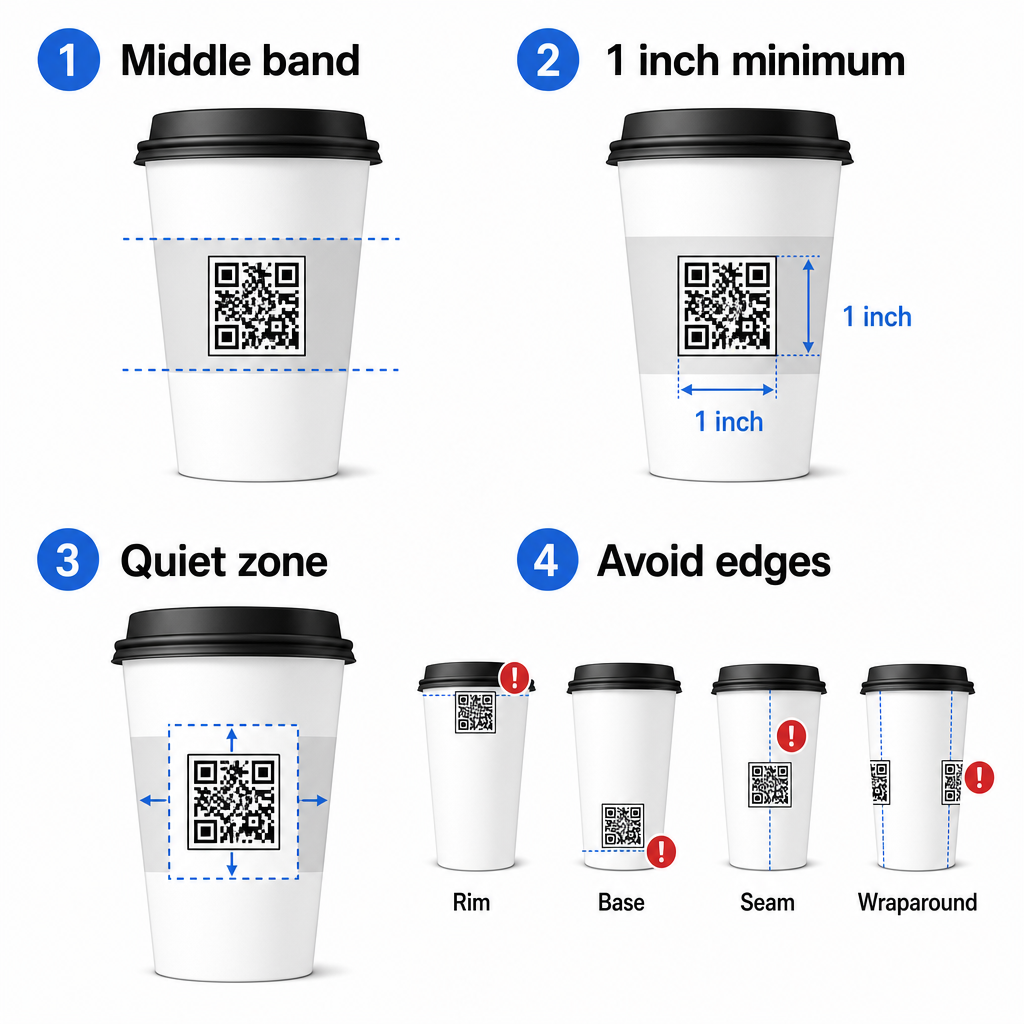
Dacă lucrezi cu o cană promoțională cu laturi plate sau o ceașcă de călătorie pătrată, ai un panou plat natural – folosește-l. Pentru căni ceramice cilindrice, tratează fața frontală ca zonă țintă.
Dimensionează codul pentru suprafețe curbate
Pentru imprimare plată, o dimensiune minimă de 0,8 in × 0,8 in (aproximativ 2 cm × 2 cm) este recomandarea standard pentru scanarea de la distanță scurtă. Pe o suprafață curbată, acest minim nu este suficient. Deoarece curbura distorsionează dimensiunea percepută a codului, creșterea dimensiunii codului cu 20–30% pentru aplicațiile curbate este recomandabilă.
În termeni practici, vizează cel puțin 1,0 in × 1,0 in pe o ceașcă de hârtie standard de 12 oz, și chiar mai mare pe o ceașcă înaltă de 20 oz unde diametrul butoiului este mai mare și curbura este mai puțin severă.
Codul trebuie să se încadreze în întregime într-o singură față a ceștii fără a se înfășura în jurul laturilor. Dacă orice colț al codului dispare în jurul curburii, codul va eșua.
Zona de liniște este nenegociabilă
Zona de liniște este marginea goală care înconjoară codul. Standardele ISO specifică un minim de patru module de spațiu liber pe toate cele patru laturi. Pe o ceașcă de cafea, această margine acționează și ca un tampon împotriva marginii curbate.
Nu plasați logo-uri, grafice de ceașcă, text nutrițional sau modele de brand în interiorul zonei de liniște. de bune practici pentru lizibilitatea codurilor QR acoperă cerințele zonei de liniște în detaliu, alături de alți factori care afectează scanarea fiabilă.
Contrast și culoare pe materialele ceștilor
Folosește întunecat pe deschis
Scanerele de coduri QR funcționează detectând contrastul dintre modulele întunecate și un fundal deschis. Raportul minim de contrast recomandat este 4:1, deși mai mare este întotdeauna mai bine – negru pe alb atinge 21:1.
Pe ceștile de cafea, două probleme de suprafață reduc contrastul efectiv:
- Hârtie kraft sau maro: Un cod întunecat imprimat direct pe hârtie kraft necretată pierde contrastul deoarece fundalul nu este alb. Utilizați un panou alb imprimat sau un strat alb de acoperire sub cod.
- Laminat lucios: Finisajele reflectorizante reflectă lumina înapoi spre cameră, estompând modulele întunecate. Solicitați un finisaj mat în zona codului, chiar dacă restul paharului este lucios.
Evitați gradienții și fundalurile cu model
Un fundal gradient sub un cod QR creează zone de contrast acceptabil și zone de contrast slab. Scanerul evaluează întregul cod, și orice regiune care scade sub pragul de contrast poate provoca o eroare. Utilizați un fundal deschis, solid și uniform sub cod.
Pentru pahare personalizate unde culoarea este importantă pentru design, puteți utiliza o culoare închisă a mărcii ca prim-plan pe un fundal alb sau pal – dar testați cu atenție înainte de producția completă. Ghidul de bune practici privind contrastul culorilor codurilor QR oferă combinații specifice de culori și rapoarte de contrast pentru a ghida aceste decizii.
Specificații tehnice pentru imprimare
Rezoluție și Format Fișier
Imprimați codul la 300 DPI sau mai mult. O imagine raster de rezoluție scăzută produce margini neclare ale modulelor, ceea ce reduce scanabilitatea și arată neprofesional de aproape.
Ori de câte ori este posibil, utilizați un format vectorial (SVG sau EPS) mai degrabă decât un PNG sau JPG. Fișierele vectoriale se scalează fără nicio pierdere de calitate, ceea ce contează deoarece producătorii de pahare redimensionează adesea grafica în timpul pre-tiparului. Pageloot’s generatorul de coduri QR exportă fișiere vectoriale gata de imprimare (.EPS, .PDF, .SVG) potrivite pentru a fi trimise direct imprimantei dvs. de pahare.
Nivelul de corecție a erorilor
Codurile QR au patru niveluri de corecție a erorilor: L, M, Q și H. Nivelurile superioare permit ca o parte mai mare a codului să fie deteriorată sau obturată în timp ce se scanează cu succes. Pentru aplicațiile pe pahare:
- Nivel H este recomandat dacă încorporați un logo în interiorul codului, deoarece permite ca până la 30% din cod să fie obturat.
- Nivel Q sau H este recomandabil pentru orice suprafață curbată, deoarece distorsiunea suprafeței deteriorează efectiv porțiuni ale codului în timpul scanării.
Nu utilizați Nivelul L pe un pahar. Acesta nu oferă toleranță pentru distorsiunile fizice inerente imprimării curbate.
Modelele de căutare trebuie să rămână clare
Cele trei pătrate mari din colțurile unui cod QR sunt modele de căutare. Ele îi spun scanerului unde începe, se termină și cum este orientat codul. Nu decupați, suprapuneți sau modificați modelele de căutare cu grafică de brand. Aceasta este una dintre cele mai comune erori de design pe ambalajele personalizate, și produce coduri care arată profesional, dar nu se scanează niciodată.
Creați coduri QR gata de imprimare pentru paharele dvs. Generați un cod QR complet personalizabil, de înaltă rezoluție, cu nivelul corect de corecție a erorilor, export vectorial și opțiuni de branding utilizând Generator de coduri QR Pageloot. Descărcați în format .EPS, .PDF sau .SVG gata de trimis producătorului dvs. de pahare.
Alegerea destinației codului QR
Execuția fizică contează, dar și ceea ce se întâmplă după scanare. Un client care scanează un cod de pahar s-a identificat ca fiind implicat – nu-l trimiteți la o pagină de pornire generică.
Potriviți destinația cu contextul:
| Utilizare caz | Tip de QR recomandat | Instrument |
|---|---|---|
| Meniu digital sau băuturi sezoniere | Codul QR al meniului | Meniu QR pentru restaurant |
| Reducere pentru vizita ulterioară | Pagină de destinație pentru cupoane | Generator cod cupon QR |
| Recenzie Google post-cumpărare | Link direct de recenzie | Generator cod QR recenzii Google |
| Site web, rețele sociale sau pagină de destinație promoțională | Redirecționare URL | Generator de coduri QR pentru linkuri |
Pentru cafenele și cofetării, instrumentele Pageloot pentru coduri QR de restaurant suportă meniuri digitale, comenzi și colectare de recenzii într-o singură platformă.
Utilizați coduri QR dinamice pentru campanii pe pahare
Un cod QR static codifică permanent URL-ul destinației. Dacă promoția dvs. sezonieră se încheie, nu puteți actualiza codul – și orice pahare rămase cu acel cod devin o fundătură.
A cod QR dinamic stochează un URL scurt de redirecționare în codul însuși. Dvs. controlați unde indică acea redirecționare dintr-un tablou de bord, și o puteți schimba oricând fără a reimprima un singur pahar. Acest lucru este critic pentru campaniile pe pahare deoarece:
- Tirajele de imprimare a paharelor sunt adesea de mii, iar reimprimarea este costisitoare
- Promoțiile, meniurile și ofertele se schimbă sezonier
- Puteți rula teste A/B schimbând destinațiile la mijlocul campaniei
Codurile dinamice oferă, de asemenea, analize de scanare – date despre când au avut loc scanările, ce dispozitive au fost utilizate și unde se aflau clienții. Aceste date vă permit să măsurați ce designuri sau plasamente de pahare au generat cel mai mare angajament și să ajustați tirajele viitoare în consecință.
Urmăriți fiecare scanare din campania dvs. pe pahare Treceți la un cod QR dinamic pentru a actualiza destinațiile din mers și a monitoriza performanța în timp real. Generator de coduri QR Pageloot vă oferă un tablou de bord complet de analiză alături de controale de editare – totul fără a reimprima paharele dvs.
Personalizarea codului QR al paharului dvs.
Un cod QR simplu alb-negru funcționează, dar un cod personalizat întărește recunoașterea și generează mai multe scanări. Pageloot’s Creare cod QR cu logo vă permite:
- Încorporați logo-ul mărcii dvs. în centrul codului
- Aplică culorile brandului modulelor și fundalului
- Alegeți din șabloane de design pentru modelul corpului și stilul marginii
- Adăugați un cadru de apel la acțiune (de ex., “Scanați pentru 10% reducere la următoarea comandă”)
Când adăugați un logo, păstrați-l la nu mai mult de 30% din zona codului și setați corecția erorilor la Nivel H. Logo-ul ocupă spațiu care altfel ar transporta date codificate, iar corecția erorilor de Nivel H compensează această suprapunere.
Pentru consistență într-o comandă mare de căni sau o campanie multi-locație, Pageloot’s Foldere pentru coduri QR vă permit să organizați codurile după campanie, locație sau dimensiunea cănii, astfel încât echipa dumneavoastră să le poată gestiona fără a pierde evidența.
Pentru îndrumări conexe privind aplicațiile de ambalare, paginile despre coduri QR pe ambalajul produselor și Coduri QR pe ambalajele alimentare acoperă considerații care se aplică direct cănilor.
Testare înainte de tirajul dumneavoastră de imprimare
Nicio cantitate de design atent nu înlocuiește testarea fizică pe cana reală. Înainte de a vă angaja într-o producție completă:
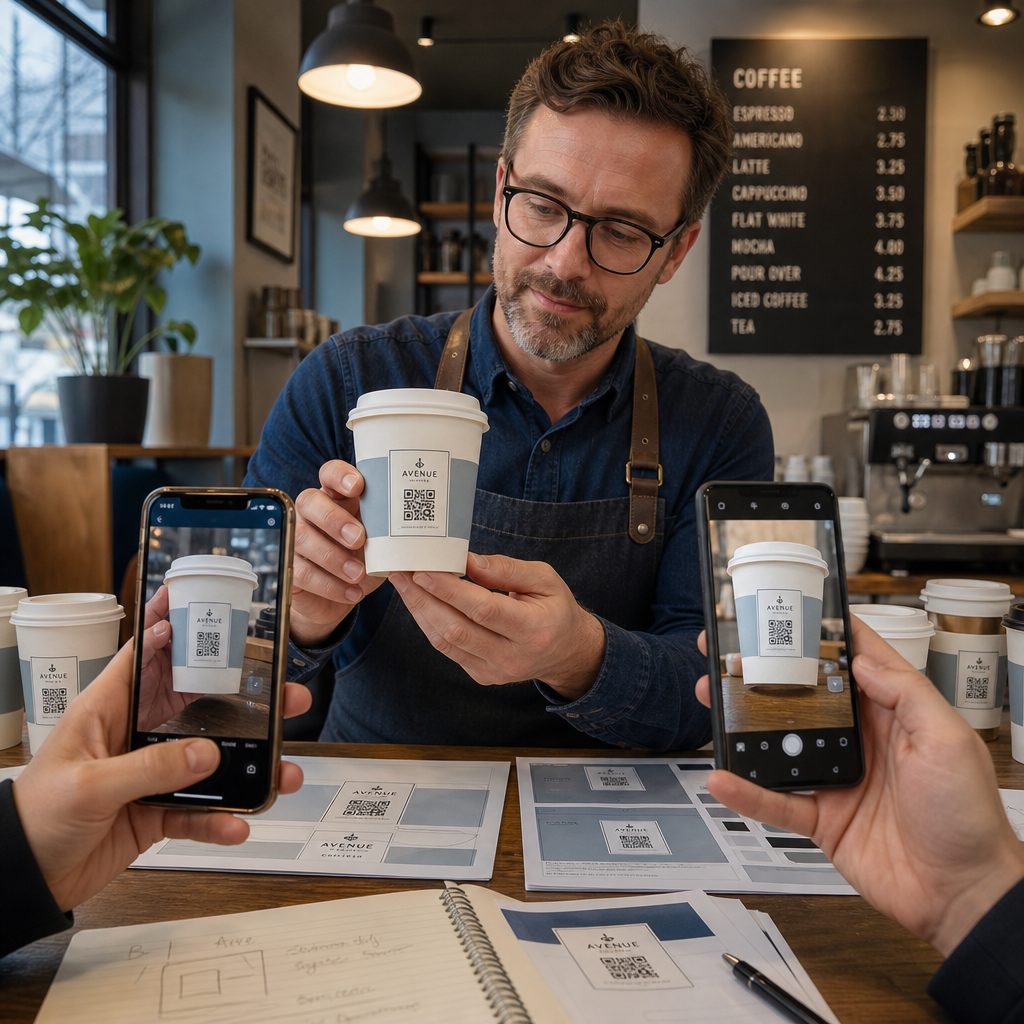
- Imprimați o mostră pe materialul intenționat – nu doar probe pe hârtie. Materialul cănii, stratul de acoperire și metoda de imprimare afectează toate rezultatul final.
- Testați cu mai multe dispozitive – cel puțin, un iPhone recent și un Android de gamă medie. Dispozitivele mai vechi cu camere de rezoluție mai mică prezintă cel mai solicitant test.
- Scanați din unghiuri realiste – clienții țin cănile la diverse unghiuri, nu direct perpendicular pe etichetă. Testați la 15° și 30° în afara axei.
- Testați în mediul de iluminare real – iluminatul de deasupra al cafenelei este adesea cald și direcțional, ceea ce afectează contrastul diferit față de iluminatul standard de birou.
- Verificați dacă destinația se încarcă corect – scanați codul pe date celulare, nu doar Wi-Fi, și confirmați că pagina de destinație este optimizată pentru mobil și se încarcă în mai puțin de trei secunde.
Dacă codul eșuează la oricare dintre aceste teste, ajustați dimensiunea, contrastul sau plasarea înainte de a imprima mii de unități. Pentru o listă de verificare cuprinzătoare, cel ghidul pentru codurile QR pe etichetele produselor parcurge aceleași principii de control al calității în mai multe detalii.
Scrieți un apel la acțiune care să merite scanarea
Codul QR în sine nu comunică nimic despre motivul pentru care un client ar trebui să-l scaneze. Asociați întotdeauna codul cu un scurt apel la acțiune – de obicei patru până la opt cuvinte poziționate direct deasupra sau sub cod. Exemple:
- “Scanați pentru ofertele speciale de astăzi”
- “Obțineți 15% reducere la următoarea comandă”
- “Lăsați-ne o recenzie”
- “Vedeți ce este în cana dumneavoastră”
Apelul la acțiune răspunde întrebării implicite a clientului: ce se întâmplă dacă fac asta? Fără el, chiar și un cod QR perfect din punct de vedere tehnic va subperforma.
Plasarea unui cod QR funcțional, de marcă, pe o cană de cafea este pe deplin realizabilă cu configurația tehnică potrivită. Dimensionați-l pentru suprafețe curbate, păstrați zona liniștită clară, utilizați contrast ridicat pe un finisaj mat, setați corecția erorilor la Nivel H și testați întotdeauna pe o mostră fizică înainte de producție. Alegeți coduri dinamice, astfel încât să puteți actualiza destinațiile și măsura performanța fără a reimprima.
Începeți să construiți codul QR al cănii dumneavoastră cu cel Generator de coduri QR Pageloot – exportați în formate vectoriale gata de imprimare, adăugați logo-ul și culorile mărcii dumneavoastră și conectați-l la analize din prima zi.
Întrebări frecvente
Pentru imprimare plată, minimul standard este 0,8 țoli × 0,8 țoli (2 cm × 2 cm). Pe o suprafață curbată a ceștii, măriți asta cu 20–30% pentru a compensa distorsiunea curburii – deci vizați cel puțin 1,0 țoli × 1,0 țoli. Codul trebuie să se încadreze în întregime în zona plată a ceștii fără a se înfășura în jurul laturilor.
Da, dar plasarea este critică. Utilizați cea mai plată zonă a feței frontale a cănii, dimensionați codul mai mare decât ați face pentru imprimarea pe suprafețe plane, asigurați un contrast puternic cu module întunecate pe un fundal deschis, evitați finisajele lucioase în zona codului și setați corecția erorilor la Nivel H. Testați întotdeauna o mostră fizică cu mai multe dispozitive înainte de a comanda în vrac.
Potriviți destinația cu obiectivul campaniei dumneavoastră. Utilizările comune includ meniuri digitale, promoții sezoniere, cupoane de reducere, pagini de recenzii Google sau profiluri de social media. Utilizați un cod QR dinamic astfel încât să puteți actualiza destinația după imprimare – acest lucru este deosebit de important pentru paharele imprimate în cantități mari, deoarece codurile nu pot fi reimprimate dacă o ofertă expiră sau o adresă URL se modifică.