ホーム > ユースケース > QR Codes on Coffee Cups: A Design and Implementation Guide
Scanning coffee cup

QR Codes on Coffee Cups: A Design and Implementation Guide

Learn how to design scannable QR codes for coffee cups. This guide covers sizing, placement, and contrast to ensure reliable scanning on curved surfaces.
Updated on 7月 2, 2026
目次

Wondering how to put a scannable QR code on a coffee cup without it failing every time a customer points their phone at it? A poorly designed code on a curved surface frustrates customers and wastes your print run. This guide walks you through every decision, from placement to content, so your cups actually deliver results.

Why Coffee Cups Are a Valuable QR Code Surface

Coffee cups spend several minutes in a customer’s hands. That dwell time is a marketing opportunity most brands underuse.

Nearly 83.4 million U.S. adults scanned a QR code in 2022, a number projected to reach 42.6% of adult smartphone users by 2025. Separately, 45% of U.S. shoppers scanned a marketing-related QR code in a three-month window, with 18–29-year-olds leading adoption. Coffee shops, cafes, and branded merchandise programs sit at the intersection of two of the top QR code use cases consumers report: restaurant menus and food and beverage product information.

A cup with a well-executed QR code can accomplish any of the following without adding staff time:

  • Direct customers to a digital menu or seasonal specials
  • Prompt a Google review immediately after a positive experience
  • Deliver a discount coupon for a return visit
  • Drive social media follows or contest entries
  • Provide allergen or sourcing information for health-conscious customers

The challenge is purely technical: cups curve, and QR codes do not.

How Curved Surfaces Affect Scannability

A QR code printed flat on paper scans easily because every module – the small squares that make up the code – sits on the same plane. When that same code wraps around a cylinder, the modules at the edges curve away from the camera’s line of sight. The scanner sees a distorted grid, and decoding fails.

This is not a hypothetical problem. It is the most common reason QR codes on cups do not work. Understanding the geometry helps you design around it.

Three physical factors work against you:

  • Curvature distortion: Modules on the sides of the code bend away from the camera, making them appear compressed or invisible.
  • Reflective finishes: Glossy cup coatings or laminates create glare that washes out contrast, particularly under overhead cafe lighting.
  • Print registration: Paper cup manufacturing involves seams and joins; a code that straddles a seam will not scan reliably.

Each of these has a direct technical fix, covered in the sections below.

Sizing and Placement on a Cup

Keep the Code on the Flattest Possible Area

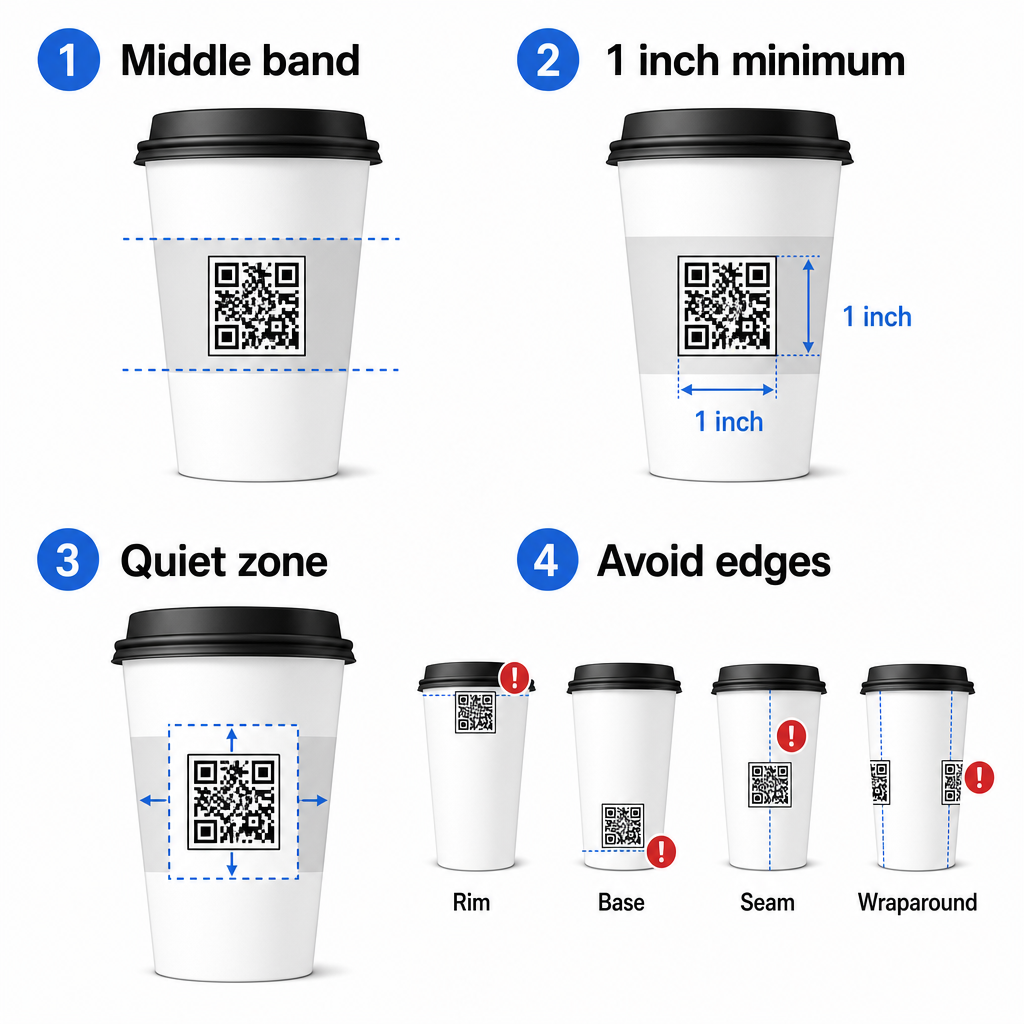
Place your QR code on the section of the cup with the least curvature. For a standard paper cup, that means avoiding the very top near the rim and the base taper. The middle band of the cup typically offers the flattest printable zone.

Cup placement guide

If you are working with a flat-sided promotional mug or a squared travel cup, you have a natural flat panel – use it. For cylindrical ceramic mugs, treat the front face as your target zone.

Size the Code for Curved Surfaces

For flat print, a minimum size of 0.8 in × 0.8 in (about 2 cm × 2 cm) is the standard recommendation for close-range scanning. On a curved surface, that minimum is not sufficient. Because curvature distorts the perceived size of the code, increasing the code size by 20–30% for curved applications is advisable.

In practical terms, target at least 1.0 in × 1.0 in on a standard 12 oz paper cup, and larger still on a tall 20 oz cup where the barrel diameter is bigger and the curvature is less severe.

The code must fit entirely within one face of the cup without wrapping around the sides. If any corner of the code disappears around the curvature, the code will fail.

The Quiet Zone Is Non-Negotiable

The quiet zone is the blank margin surrounding the code. ISO standards specify a minimum of four modules of clear space on all four sides. On a coffee cup, this margin also acts as a buffer against the curved edge.

Do not place logos, cup graphics, nutritional text, or brand patterns inside the quiet zone. The QR code readability best practices guide covers quiet zone requirements in detail alongside other factors that affect reliable scanning.

Contrast and Color on Cup Materials

Use Dark on Light

QR code scanners work by detecting the contrast between dark modules and a light background. The recommended minimum contrast ratio is 4:1, though higher is always better – black on white achieves 21:1.

On coffee cups, two surface problems reduce effective contrast:

  • Kraft or brown paper stock: A dark code printed directly on uncoated kraft paper loses contrast because the background is not white. Use a white printed panel or a white flood-coat beneath the code.
  • Gloss laminate: Reflective finishes bounce light back at the camera, washing out the dark modules. Request a matte finish in the area of the code, even if the rest of the cup is glossy.

Avoid Gradients and Patterned Backgrounds

A gradient background beneath a QR code creates zones of acceptable contrast and zones of poor contrast. The scanner evaluates the whole code, and any region that falls below the contrast threshold can cause a failure. Use a solid, uniform light background beneath the code.

For branded cups where color is important to the design, you can use a dark brand color as the foreground on a white or pale background – but test carefully before full production. The QR code color contrast best practices guide provides specific color combinations and contrast ratios to guide those decisions.

Technical Specifications for Print

解像度とファイル形式

Print the code at 300 DPI以上. A low-resolution raster image produces fuzzy module edges, which reduces scannability and looks unprofessional at close range.

Whenever possible, use a vector format (SVG or EPS) rather than a PNG or JPG. Vector files scale without any loss of quality, which matters because cup manufacturers often resize artwork during prepress. Pageloot’s QRコードジェネレーター exports print-ready vector files (.EPS, .PDF, .SVG) suitable for sending directly to your cup printer.

エラー訂正レベル

QR codes have four error correction levels: L, M, Q, and H. Higher levels allow more of the code to be damaged or obscured while still scanning successfully. For cup applications:

  • レベルH is recommended if you are embedding a logo inside the code, as it allows up to 30% of the code to be obscured.
  • レベルQまたはH is advisable for any curved surface, because surface distortion effectively damages portions of the code during scanning.

Do not use Level L on a cup. It provides no tolerance for the physical distortions inherent to curved printing.

Finder Patterns Must Stay Clear

The three large squares in the corners of a QR code are finder patterns. They tell the scanner where the code starts, ends, and how it is oriented. Do not crop, overlap, or modify the finder patterns with brand graphics. This is one of the most common design errors on custom-printed packaging, and it produces codes that look professional but never scan.

Create Print-Ready QR Codes for Your Cups Generate a fully customizable, high-resolution QR code with the correct error correction level, vector export, and branding options using the Pageloot QRコードジェネレータ. Download in .EPS, .PDF, or .SVG format ready to send to your cup manufacturer.

Choosing What the QR Code Links To

The physical execution matters, but so does what happens after the scan. A customer who scans a cup code has self-identified as engaged – do not send them to a generic homepage.

Match the destination to the context:

使用事例 推奨QRタイプ ツール
Digital menu or seasonal drinks メニューQRコード メニューQRコードジェネレーター
Discount for return visit Coupon landing page クーポンQRコードジェネレーター
Post-purchase Google review Direct review link GoogleレビューQRコードジェネレーター
Website, social, or promo landing page URL redirect リンクQRコードジェネレーター

For cafes and coffee shops, Pageloot’s restaurant QR code tools support digital menus, ordering, and review collection in a single platform.

Use Dynamic QR Codes for Cup Campaigns

A static QR code encodes the destination URL permanently. If your seasonal promotion ends, you cannot update the code – and any remaining cups with that code become a dead end.

ダイナミックQRコード stores a short redirect URL in the code itself. You control where that redirect points from a dashboard, and you can change it at any time without reprinting a single cup. This is critical for cup campaigns because:

  • Cup print runs are often in the thousands, and reprinting is expensive
  • Promotions, menus, and offers change seasonally
  • You can run A/B tests by switching destinations mid-campaign

Dynamic codes also provide スキャン分析 – data on when scans occurred, what devices were used, and where customers were located. That data lets you measure which cup designs or placements drove the most engagement, and adjust future print runs accordingly.

Track Every Scan from Your Cup Campaign Switch to a dynamic QR code to update destinations on the fly and monitor real-time performance. The Pageloot QRコードジェネレータ gives you a full analytics dashboard alongside editing controls – all without reprinting your cups.

Branding Your Cup QR Code

A plain black-and-white QR code works, but a branded code reinforces recognition and earns more scans. Pageloot’s ロゴ付きQRコードジェネレーター lets you:

  • Embed your brand logo in the center of the code
  • Apply brand colors to the modules and background
  • Choose from design templates for body pattern and edge style
  • Add a call-to-action frame (e.g., “Scan for 10% off your next order”)

When adding a logo, keep it to no more than 30% of the code area and set error correction to Level H. The logo occupies space that would otherwise carry encoded data, and Level H error correction compensates for that overlap.

For consistency across a large cup order or a multi-location campaign, Pageloot’s QRコードフォルダ let you organize codes by campaign, location, or cup size so your team can manage them without losing track.

For related guidance on packaging applications, the pages on 製品パッケージのQRコード そして 食品パッケージのQRコード cover considerations that apply directly to cups.

Testing Before Your Print Run

No amount of careful design replaces physical testing on the actual cup. Before you commit to a full production run:

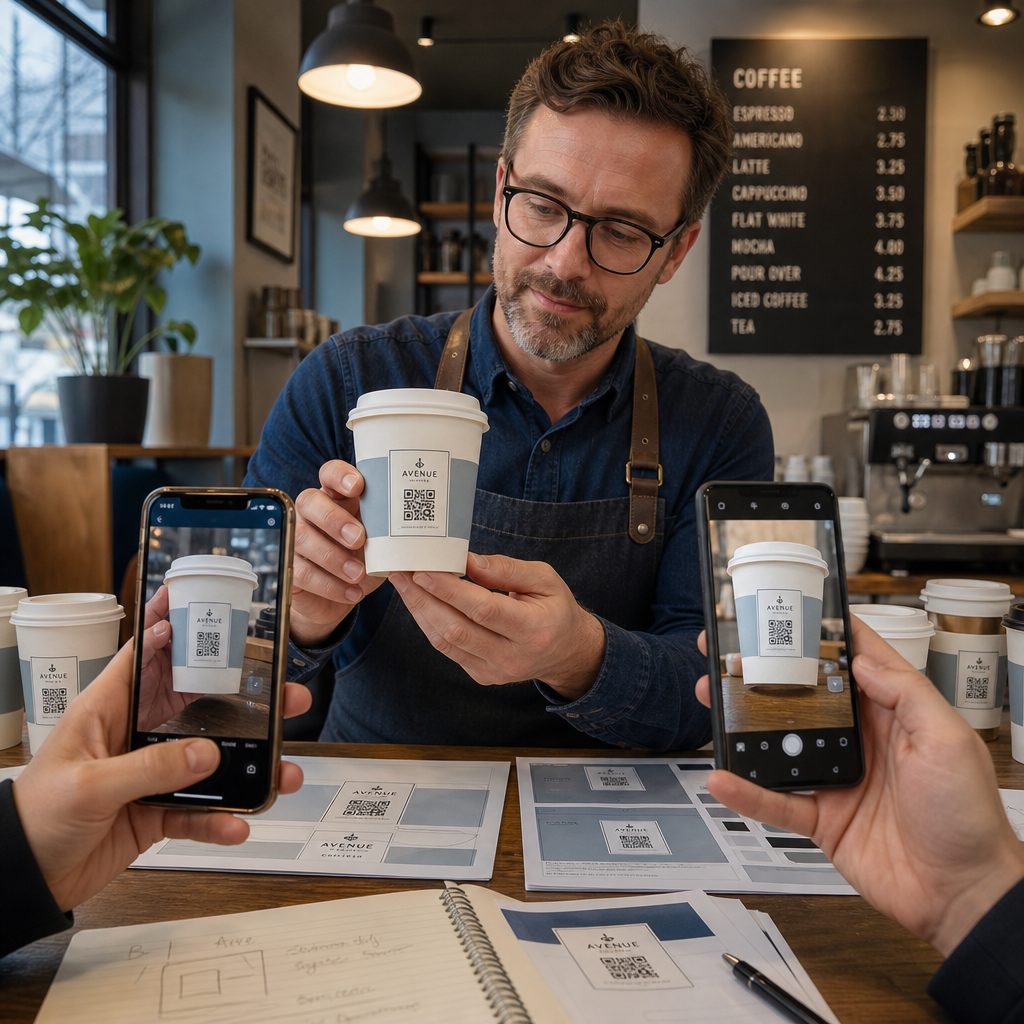
Testing QR cup
  • Print a sample on the intended material – not just paper proofs. Cup stock, coating, and print method all affect the final result.
  • Test with multiple devices – at minimum, a recent iPhone and a mid-range Android. Older devices with lower-resolution cameras present the most demanding test.
  • Scan from realistic angles – customers hold cups at various angles, not directly perpendicular to the label. Test at 15° and 30° off-axis.
  • Test in the actual lighting environment – overhead cafe lighting is often warm and directional, which affects contrast differently than standard office lighting.
  • Verify the destination loads correctly – scan the code on cellular data, not just Wi-Fi, and confirm the landing page is mobile-optimized and loads in under three seconds.

If the code fails any of these tests, adjust size, contrast, or placement before printing thousands of units. For a comprehensive checklist, the guide to QR codes on product labels walks through the same quality control principles in more detail.

Write a Call-to-Action That Earns the Scan

The QR code itself communicates nothing about why a customer should scan it. Always pair the code with a brief call-to-action – typically four to eight words positioned directly above or below the code. Examples:

  • “Scan for today’s specials”
  • “Get 15% off your next order”
  • “Leave us a review”
  • “See what’s in your cup”

The call-to-action answers the customer’s implicit question: what happens if I do this? Without it, even a technically perfect QR code will underperform.

Putting a working, branded QR code on a coffee cup is entirely achievable with the right technical setup. Size it for curved surfaces, keep the quiet zone clear, use high contrast on a matte finish, set error correction to Level H, and always test on a physical sample before production. Choose dynamic codes so you can update destinations and measure performance without reprinting.

Start building your cup QR code with the Pageloot QRコードジェネレータ – export in print-ready vector formats, add your logo and brand colors, and connect it to analytics from day one.

よくある質問

What is the minimum QR code size for a coffee cup?

For flat print, the standard minimum is 0.8 in × 0.8 in (2 cm × 2 cm). On a curved cup surface, increase that by 20–30% to compensate for curvature distortion – so target at least 1.0 in × 1.0 in. The code must fit entirely within the flat zone of the cup without wrapping around the sides.

Can I put a QR code on a curved ceramic mug?

Yes, but placement is critical. Use the flattest area of the mug’s front face, size the code larger than you would for flat print, ensure strong contrast with dark modules on a light background, avoid glossy finishes in the code area, and set error correction to Level H. Always test a physical sample with multiple devices before ordering in bulk.

What should a QR code on a coffee cup link to?

Match the destination to your campaign goal. Common uses include digital menus, seasonal promotions, discount coupons, Google review pages, or social media profiles. Use a dynamic QR code so you can update the destination after printing – this is especially important for cups printed in large quantities, since the codes cannot be reprinted if an offer expires or a URL changes.

著者について

Siim KostabiはPagelootのコンテンツリードです。Pagelootの革新的なQRコード生成サービスについて執筆しています。5年以上にわたるQRコードに関する深い専門知識を持つSiimは、この分野の専門家です。QRテクノロジーを活用してデジタルインタラクションを簡素化・拡張する上で、大きな進歩を遂げています。.

カテゴリー
について詳しくはこちら
Scanning product label
なぜ必要なのか 製品のQRコード
顧客がQRポスターをスキャンしている様子
のQRコード ソーシャルメディア
✅ QRコードの#1ソリューション

オンラインでQRコードを作成する必要がある場合は QRコードを作る ここで無料で
ページルートは #1のGo-Toソリューション でQRコードを作成してスキャンすることができます。

BL-0278

ブログジェネ

売上、レビュー、フォロワーを増やすために 20,000 を超えるブランドから信頼されています。

クライアントのロゴ
トップブランドから信頼される
5 のうち 4.8 と評価しました

4.86 / 5つ星評価

ユーゴ・ローラン
ユーゴ・ローラン
レストランオーナー
最も簡単で信頼性の高いQRコードジェネレータです。PDFファイルを即座にアップロードできます。レストランのメニューがデジタル化されました。
ルーカス・ジャンセン
ルーカス・ジャンセン
不動産開発業者
これは優れたツールで、QRコードでちょうど欲しいところに連れて行ってくれます。私たちは位置情報のQRコードしか使っていませんが、とても便利な機能がたくさんあります。
エマ・モレッティ
エマ・モレッティ
小売製品
使いやすいし、早い。素晴らしい機能で、完璧な画像を作成してくれるので、社員は私のvCardをダウンロードすることができます。
ユーゴ・ローラン
ユーゴ・ローラン
レストランオーナー
最も簡単で信頼性の高いQRコードジェネレータです。PDFファイルを即座にアップロードできます。レストランのメニューがデジタル化されました。
ルーカス・ジャンセン
ルーカス・ジャンセン
不動産開発業者
これは優れたツールで、QRコードでちょうど欲しいところに連れて行ってくれます。私たちは位置情報のQRコードしか使っていませんが、とても便利な機能がたくさんあります。
エマ・モレッティ
エマ・モレッティ
小売製品
使いやすいし、早い。素晴らしい機能で、完璧な画像を作成してくれるので、社員は私のvCardをダウンロードすることができます。
QRコードをもっと見る
QRコードのスキャン
URL を次のように変換します QRコード
QR table tent
QRコードの テーブルテント
あらゆるものをデジタル体験に変えよう 3分以内に。

14日間の無料トライアル。

クレジットカードは必要ありません。

初回購入で30%オフ

次のコードを使用してください:

MP3ファイルを共有

PDF QRコードを作成するにはサインアップしてください

必要なものをすべてアップロードして表示する。

  • オーディオファイル
  • ポッドキャスト
  • 音楽

サインアップで14日間無料トライアル。.
トライアル終了後、QRコードは期限切れになります。.

オーディオmp3 QRコードを作成するにはサインアップしてください

フレームでより多くのスキャンを獲得

QRコードにフレームを追加するにはサインアップしてください

コールトゥアクションフレームは、お客様が簡単にQRコードと対話できるようにします。ぜひお試しください。

サインアップで14日間無料トライアル。.
トライアル終了後、QRコードは期限切れになります。.

QRコードにフレームを追加するにはサインアップしてください

シェイプでスタイルを追加

より多くの図形を作成するにはサインアップしてください

QRコードは四角いものである必要はありません。あなたのブランドのイメージに合わせて変えてみてください。

サインアップで14日間無料トライアル。.
トライアル終了後、QRコードは期限切れになります。.

より多くの図形を作成するにはサインアップしてください

QRコードにロゴを追加

QRコードにロゴを追加するにはサインアップしてください

QRコードにロゴやブランドを入れることで、目立たせることができます。

サインアップで14日間無料トライアル。.
トライアル終了後、QRコードは期限切れになります。.

QRコードにロゴを追加するにはサインアップしてください

スマートなApp Storeリダイレクト

アプリストアのQRコードを作成するにはサインアップしてください

スマートなApp StoreのQRコードに、あなたのアプリのリンクを追加します。ユーザーは、デバイスに応じてリダイレクトされます。

サインアップで14日間無料トライアル。.
トライアル終了後、QRコードは期限切れになります。.

アプリストアのQRコードを作成するにはサインアップしてください

QRコードに画像をアップロード

画像QRコードを作成するにはサインアップしてください

画像を簡単に共有できます。どんな画像も、数秒でダイナミックに変化します。

サインアップで14日間無料トライアル。.
トライアル終了後、QRコードは期限切れになります。.

画像QRコードを作成するにはサインアップしてください

PDFファイルを共有

PDF QRコードを作成するにはサインアップしてください

必要なものをすべてアップロードして表示する。

  • メニュー&プライスリスト
  • 指示
  • 任意の書類

サインアップで14日間無料トライアル。.
トライアル終了後、QRコードは期限切れになります。.

PDF QRコードを作成するにはサインアップしてください

印刷せずに後で編集

再度印刷せずにQRコードを編集するにはサインアップしてください

ダイナミックQRコードは、新たにQRコードを印刷することなく、QRコードの内容を変更することができます。

サインアップで14日間無料トライアル。.
トライアル終了後、QRコードは期限切れになります。.

再度印刷せずにQRコードを編集するにはサインアップしてください

いつ?どこで?QRコードのスキャンを追跡

QRコードを追跡するにはサインアップしてください

どのQRコードが最も多くスキャンされ、何が最も顧客を喜ばせているのかを知ることができます。

サインアップで14日間無料トライアル。.
トライアル終了後、QRコードは期限切れになります。.

QRコードを追跡するにはサインアップしてください

印刷可能なファイルが利用可能

PDFやSVGのようなベクターQRコードを作成するにはサインアップしてください

.eps、.pdf、.svg

QRコードをHD解像度でダウンロードしたいですか?すぐに印刷できるベクターまたはピクセル形式を入手しましょう。

サインアップで14日間無料トライアル。.
トライアル終了後、QRコードは期限切れになります。.

PDFやSVGのようなベクターQRコードを作成するにはサインアップしてください

しばらくお待ちください。あなたのQRコードは ロード... ロード...

あなただけのものに

サインアップしてQRコードを後で保存してください

異なる色、ロゴ、コールトゥアクションフレームで素晴らしいQRコードを作成することで、より多くのスキャンを得ることができます。

サインアップで14日間無料トライアル。.
トライアル終了後、QRコードは期限切れになります。.

サインアップしてQRコードを後で保存してください