Vous vous demandez comment mettre un code QR scannable sur une tasse à café sans qu'il ne rate à chaque fois qu'un client pointe son téléphone dessus ? Un code mal conçu sur une surface incurvée frustre les clients et gâche votre tirage. Ce guide vous accompagne à travers chaque décision, du placement au contenu, afin que vos tasses donnent réellement des résultats.
Pourquoi les tasses à café sont une surface précieuse pour les codes QR
Les tasses à café passent plusieurs minutes dans les mains d'un client. Ce temps de rétention est une opportunité marketing que la plupart des marques sous-utilisent.
Près de 83,4 millions d'adultes américains ont scanné un code QR en 2022, un nombre qui devrait atteindre 42,6% des utilisateurs de smartphones adultes d'ici 2025. Séparément, 45% des acheteurs américains ont scanné un code QR lié au marketing sur une période de trois mois, les 18-29 ans étant en tête de l'adoption. Les cafés, les cafétérias et les programmes de produits dérivés de marque se situent à l'intersection de deux des principaux cas d'utilisation de codes QR signalés par les consommateurs : les menus de restaurant et les informations sur les produits alimentaires et les boissons.
Une tasse avec un code QR bien exécuté peut accomplir l'une des actions suivantes sans ajouter de temps de personnel :
- Diriger les clients vers un menu numérique ou des offres saisonnières
- Inviter à un avis Google immédiatement après une expérience positive
- Offrir un bon de réduction pour une visite de retour
- Stimuler les abonnements sur les réseaux sociaux ou les participations à des concours
- Fournir des informations sur les allergènes ou l'approvisionnement pour les clients soucieux de leur santé
Le défi est purement technique : les tasses sont incurvées, et les codes QR ne le sont pas.
Comment les surfaces incurvées affectent la scannabilité
Un code QR imprimé à plat sur du papier se scanne facilement car chaque module – les petits carrés qui composent le code – se trouve sur le même plan. Lorsque ce même code s'enroule autour d'un cylindre, les modules aux bords s'éloignent de la ligne de visée de la caméra. Le scanner voit une grille déformée, et le décodage échoue.
Ce n'est pas un problème hypothétique. C'est la raison la plus courante pour laquelle les codes QR sur les tasses ne fonctionnent pas. Comprendre la géométrie vous aide à concevoir en tenant compte de cela.
Trois facteurs physiques jouent contre vous :
- Distorsion de courbure : Les modules sur les côtés du code s'éloignent de la caméra, les faisant apparaître compressés ou invisibles.
- Finitions réfléchissantes : Les revêtements ou laminés brillants des tasses créent un éblouissement qui atténue le contraste, en particulier sous l'éclairage de plafond des cafés.
- Repérage d'impression : La fabrication de gobelets en papier implique des coutures et des jonctions ; un code qui chevauche une couture ne sera pas scanné de manière fiable.
Chacun de ces problèmes a une solution technique directe, abordée dans les sections ci-dessous.
Dimensionnement et placement sur une tasse
Gardez le code sur la zone la plus plate possible
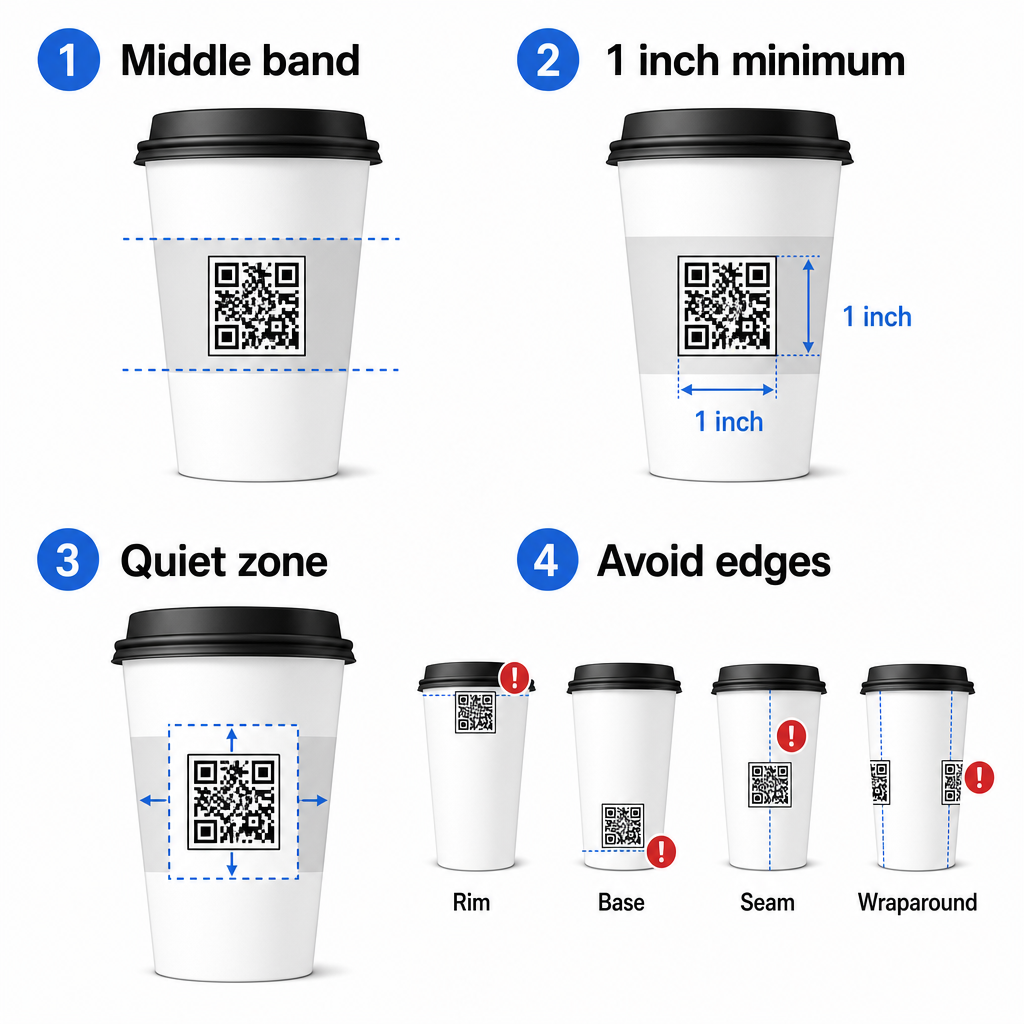
Placez votre code QR sur la section de la tasse présentant le moins de courbure. Pour un gobelet en papier standard, cela signifie éviter le haut près du bord et le rétrécissement de la base. La bande médiane de la tasse offre généralement la zone imprimable la plus plate.
Si vous travaillez avec une tasse promotionnelle à côtés plats ou une tasse de voyage carrée, vous disposez d'un panneau plat naturel – utilisez-le. Pour les tasses en céramique cylindriques, considérez la face avant comme votre zone cible.
Dimensionnez le code pour les surfaces incurvées
Pour une impression à plat, une taille minimale de 0,8 po × 0,8 po (environ 2 cm × 2 cm) est la recommandation standard pour le balayage à courte portée. Sur une surface incurvée, ce minimum n'est pas suffisant. Étant donné que la courbure déforme la taille perçue du code, il est conseillé d'augmenter la taille du code de 20 à 30% pour les applications incurvées.
En termes pratiques, visez au moins 1,0 po × 1,0 po sur un gobelet en papier standard de 12 oz, et encore plus grand sur un gobelet haut de 20 oz où le diamètre du corps est plus grand et la courbure est moins prononcée.
Le code doit tenir entièrement sur une seule face de la tasse sans s'enrouler sur les côtés. Si un coin du code disparaît autour de la courbure, le code échouera.
La zone de silence est non négociable
La zone de silence est la marge vierge entourant le code. Les normes ISO spécifient un minimum de quatre modules d'espace clair sur les quatre côtés. Sur une tasse à café, cette marge agit également comme un tampon contre le bord incurvé.
Ne placez pas de logos, de graphiques de tasse, de texte nutritionnel ou de motifs de marque à l'intérieur de la zone de silence. Le guide des meilleures pratiques de lisibilité des codes QR couvre en détail les exigences de la zone de silence ainsi que d'autres facteurs qui affectent la fiabilité du balayage.
Contraste et couleur sur les matériaux des tasses
Utilisez du foncé sur du clair
Les scanners de codes QR fonctionnent en détectant le contraste entre les modules sombres et un arrière-plan clair. Le rapport de contraste minimum recommandé est de 4:1, bien que plus élevé soit toujours mieux – le noir sur blanc atteint 21:1.
Sur les tasses à café, deux problèmes de surface réduisent le contraste effectif :
- Papier kraft ou brun : Un code sombre imprimé directement sur du papier kraft non couché perd du contraste parce que l'arrière-plan n'est pas blanc. Utilisez un panneau imprimé blanc ou une couche de fond blanche sous le code.
- Stratifié brillant : Les finitions réfléchissantes renvoient la lumière vers l'appareil photo, estompant les modules sombres. Demandez une finition mate dans la zone du code, même si le reste de la tasse est brillant.
Évitez les dégradés et les arrière-plans à motifs
Un arrière-plan dégradé sous un code QR crée des zones de contraste acceptable et des zones de faible contraste. Le scanner évalue l'ensemble du code, et toute région qui tombe en dessous du seuil de contraste peut provoquer un échec. Utilisez un arrière-plan clair, solide et uniforme sous le code.
Pour les tasses de marque où la couleur est importante pour le design, vous pouvez utiliser une couleur de marque foncée comme premier plan sur un fond blanc ou pâle – mais testez attentivement avant la production complète. Le guide des meilleures pratiques de contraste des couleurs des codes QR fournit des combinaisons de couleurs spécifiques et des rapports de contraste pour guider ces décisions.
Spécifications techniques pour l'impression
Résolution et format de fichier
Imprimez le code à 300 DPI ou plus. Une image raster basse résolution produit des bords de module flous, ce qui réduit la scannabilité et semble non professionnel à courte portée.
Dans la mesure du possible, utilisez un format vectoriel (SVG ou EPS) plutôt qu'un PNG ou un JPG. Les fichiers vectoriels s'adaptent sans aucune perte de qualité, ce qui est important car les fabricants de tasses redimensionnent souvent les illustrations pendant la prépresse. Pageloot Générateur de code QR exporte des fichiers vectoriels prêts à imprimer (.EPS, .PDF, .SVG) adaptés à l'envoi direct à votre imprimeur de tasses.
Niveau de correction des erreurs
Les codes QR ont quatre niveaux de correction d'erreur : L, M, Q et H. Des niveaux plus élevés permettent à une plus grande partie du code d'être endommagée ou obscurcie tout en étant scannable avec succès. Pour les applications sur tasses :
- Niveau H est recommandé si vous intégrez un logo à l'intérieur du code, car il permet d'obscurcir jusqu'à 30 % du code.
- Niveau Q ou H est conseillé pour toute surface incurvée, car la distorsion de la surface endommage efficacement des portions du code pendant le scan.
N'utilisez pas le niveau L sur une tasse. Il n'offre aucune tolérance pour les distorsions physiques inhérentes à l'impression sur surface courbe.
Les motifs de recherche doivent rester clairs
Les trois grands carrés dans les coins d'un code QR sont des motifs de recherche. Ils indiquent au scanner où le code commence, se termine et comment il est orienté. Ne recadrez pas, ne chevauchez pas et ne modifiez pas les motifs de recherche avec des graphiques de marque. C'est l'une des erreurs de conception les plus courantes sur les emballages imprimés personnalisés, et cela produit des codes qui semblent professionnels mais ne scannent jamais.
Créez des codes QR prêts à imprimer pour vos tasses Générez un code QR entièrement personnalisable, haute résolution avec le niveau de correction d'erreur correct, l'exportation vectorielle et les options de marque en utilisant le Générateur de code QR Pageloot. Téléchargez au format .EPS, .PDF ou .SVG prêt à envoyer à votre fabricant de tasses.
Choisir vers quoi le code QR renvoie
L'exécution physique est importante, mais ce qui se passe après le scan l'est aussi. Un client qui scanne un code de tasse s'est identifié comme engagé – ne l'envoyez pas vers une page d'accueil générique.
Adaptez la destination au contexte :
| Cas d'utilisation | Type de QR recommandé | Outil |
|---|---|---|
| Menu numérique ou boissons saisonnières | Code QR des menus | Générateur de QR code pour menu |
| Réduction pour une prochaine visite | Page de destination du coupon | Générateur de QR code coupon |
| Avis Google après achat | Lien direct vers l'avis | Générateur de QR code pour avis Google |
| Site web, réseaux sociaux ou page de destination promotionnelle | Redirection d'URL | Générateur de codes QR de liens |
Pour les cafés et les coffee shops, les outils de code QR pour restaurants de Pageloot prennent en charge les menus numériques, la commande et la collecte d'avis sur une seule plateforme.
Utilisez des codes QR dynamiques pour les campagnes sur tasses
Un code QR statique encode l'URL de destination de manière permanente. Si votre promotion saisonnière se termine, vous ne pouvez pas mettre à jour le code – et toutes les tasses restantes avec ce code deviennent une impasse.
UNE code QR dynamique stocke une courte URL de redirection dans le code lui-même. Vous contrôlez où cette redirection pointe depuis un tableau de bord, et vous pouvez la modifier à tout moment sans réimprimer une seule tasse. C'est essentiel pour les campagnes sur tasses car :
- Les tirages de tasses se comptent souvent par milliers, et la réimpression est coûteuse
- Les promotions, menus et offres changent selon les saisons
- Vous pouvez effectuer des tests A/B en changeant de destination en cours de campagne
Les codes dynamiques fournissent également analyses de scan – des données sur le moment où les scans ont eu lieu, quels appareils ont été utilisés, et où les clients se trouvaient. Ces données vous permettent de mesurer quels designs ou emplacements de tasses ont généré le plus d'engagement, et d'ajuster les futurs tirages en conséquence.
Suivez chaque scan de votre campagne sur tasses Passez à un code QR dynamique pour mettre à jour les destinations à la volée et surveiller les performances en temps réel. Le Générateur de code QR Pageloot vous offre un tableau de bord d'analyse complet ainsi que des contrôles d'édition – le tout sans réimprimer vos tasses.
Personnalisation de votre code QR de tasse
Un code QR noir et blanc simple fonctionne, mais un code de marque renforce la reconnaissance et génère plus de scans. Pageloot Générateur de QR code avec logo vous permet de :
- Intégrez le logo de votre marque au centre du code
- Appliquez les couleurs de votre marque aux modules et à l'arrière-plan
- Choisissez parmi des modèles de conception pour le motif du corps et le style des bords
- Ajoutez un cadre d'appel à l'action (par exemple, “ Scannez pour 10% de réduction sur votre prochaine commande ”)
Lorsque vous ajoutez un logo, ne le laissez pas dépasser 30% de la zone du code et réglez la correction d'erreur au niveau H. Le logo occupe un espace qui, autrement, contiendrait des données encodées, et la correction d'erreur de niveau H compense ce chevauchement.
Pour une cohérence sur une grande commande de tasses ou une campagne multi-sites, les Dossiers de QR codes vous permettent d'organiser les codes par campagne, emplacement ou taille de tasse afin que votre équipe puisse les gérer sans perdre le fil.
Pour des conseils connexes sur les applications d'emballage, les pages sur des codes QR sur les emballages de produits et les codes QR sur les emballages alimentaires couvrent les considérations qui s'appliquent directement aux tasses.
Tests avant votre tirage
Aucune conception minutieuse ne remplace les tests physiques sur la tasse réelle. Avant de vous engager dans une production complète :
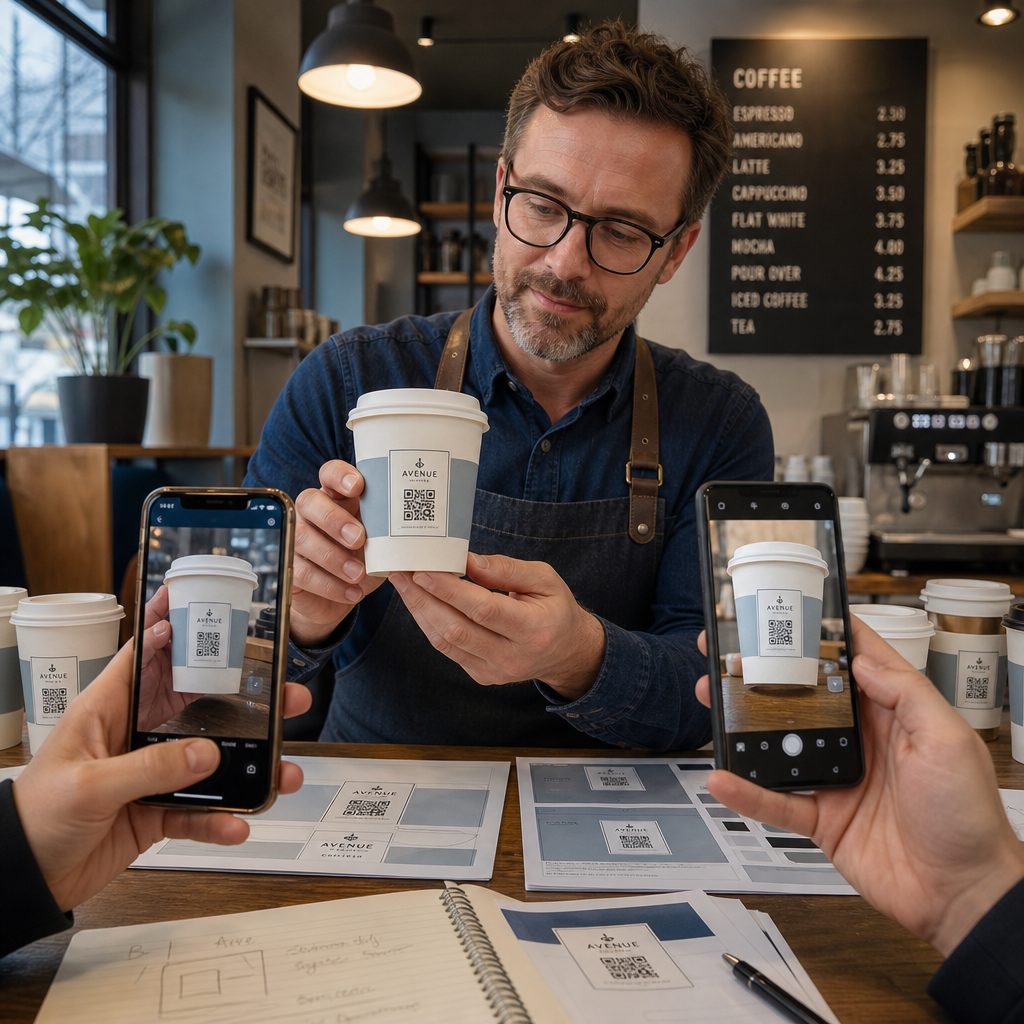
- Imprimez un échantillon sur le matériau prévu – pas seulement des épreuves papier. Le matériau de la tasse, le revêtement et la méthode d'impression affectent tous le résultat final.
- Testez avec plusieurs appareils – au minimum, un iPhone récent et un Android de milieu de gamme. Les appareils plus anciens avec des caméras à faible résolution présentent le test le plus exigeant.
- Scannez sous des angles réalistes – les clients tiennent les tasses sous différents angles, pas directement perpendiculaires à l'étiquette. Testez à 15° et 30° hors axe.
- Testez dans l'environnement d'éclairage réel – l'éclairage de plafond des cafés est souvent chaud et directionnel, ce qui affecte le contraste différemment de l'éclairage de bureau standard.
- Vérifiez que la destination se charge correctement – scannez le code sur les données cellulaires, pas seulement le Wi-Fi, et confirmez que la page de destination est optimisée pour les mobiles et se charge en moins de trois secondes.
Si le code échoue à l'un de ces tests, ajustez la taille, le contraste ou le placement avant d'imprimer des milliers d'unités. Pour une liste de contrôle complète, le guide des codes QR sur les étiquettes de produits détaille les mêmes principes de contrôle qualité.
Rédigez un appel à l'action qui incite au scan
Le code QR lui-même ne communique rien sur la raison pour laquelle un client devrait le scanner. Associez toujours le code à un bref appel à l'action – généralement quatre à huit mots positionnés directement au-dessus ou en dessous du code. Exemples :
- “ Scannez pour les promotions du jour ”
- “ Obtenez 15% de réduction sur votre prochaine commande ”
- “ Laissez-nous un avis ”
- “ Découvrez ce qu'il y a dans votre tasse ”
L'appel à l'action répond à la question implicite du client : que se passe-t-il si je fais cela ? Sans cela, même un code QR techniquement parfait sous-performera.
Placer un code QR fonctionnel et de marque sur une tasse à café est tout à fait réalisable avec la bonne configuration technique. Adaptez sa taille aux surfaces courbes, gardez la zone de silence dégagée, utilisez un contraste élevé sur une finition mate, réglez la correction d'erreur au niveau H, et testez toujours sur un échantillon physique avant la production. Choisissez des codes dynamiques afin de pouvoir mettre à jour les destinations et mesurer les performances sans réimpression.
Commencez à créer votre code QR de tasse avec le Générateur de code QR Pageloot – exportez dans des formats vectoriels prêts à l'impression, ajoutez votre logo et les couleurs de votre marque, et connectez-le aux analyses dès le premier jour.
Questions fréquentes
Pour l'impression à plat, le minimum standard est de 0,8 po × 0,8 po (2 cm × 2 cm). Sur une surface de tasse courbe, augmentez cela de 20 à 30 % pour compenser la distorsion due à la courbure – visez donc au moins 1,0 po × 1,0 po. Le code doit tenir entièrement dans la zone plate de la tasse sans s'enrouler sur les côtés.
Oui, mais le placement est critique. Utilisez la zone la plus plate de la face avant de la tasse, dimensionnez le code plus grand que vous ne le feriez pour une impression à plat, assurez un contraste fort avec des modules sombres sur un fond clair, évitez les finitions brillantes dans la zone du code, et réglez la correction d'erreur au niveau H. Testez toujours un échantillon physique avec plusieurs appareils avant de commander en vrac.
Associez la destination à votre objectif de campagne. Les utilisations courantes incluent les menus numériques, les promotions saisonnières, les coupons de réduction, les pages d'avis Google ou les profils de médias sociaux. Utilisez un code QR dynamique afin de pouvoir mettre à jour la destination après l'impression – ceci est particulièrement important pour les gobelets imprimés en grande quantité, car les codes ne peuvent pas être réimprimés si une offre expire ou si une URL change.