هل تتساءل كيف تضع رمز QR قابلاً للمسح على كوب قهوة دون أن يفشل في كل مرة يوجه العميل هاتفه إليه؟ رمز مصمم بشكل سيء على سطح منحني يحبط العملاء ويهدر دفعة الطباعة الخاصة بك. يرشدك هذا الدليل خلال كل قرار، من الموضع إلى المحتوى، حتى تحقق أكوابك النتائج المرجوة بالفعل.
لماذا تعتبر أكواب القهوة سطحًا قيمًا لرمز QR
تقضي أكواب القهوة عدة دقائق في أيدي العميل. هذا الوقت الذي يقضيه العميل هو فرصة تسويقية لا تستغلها معظم العلامات التجارية بشكل كافٍ.
قام ما يقرب من 83.4 مليون بالغ أمريكي بمسح رمز QR في عام 2022، وهو رقم من المتوقع أن يصل إلى 42.6% من مستخدمي الهواتف الذكية البالغين بحلول عام 2025. وبشكل منفصل، قام 45% من المتسوقين الأمريكيين بمسح رمز QR متعلق بالتسويق في نافذة مدتها ثلاثة أشهر، مع تصدر الفئة العمرية 18-29 عامًا لعملية التبني. تقع محلات القهوة والمقاهي وبرامج البضائع ذات العلامات التجارية عند تقاطع اثنتين من أهم حالات استخدام رمز QR التي يبلغ عنها المستهلكون: قوائم المطاعم ومعلومات منتجات الأطعمة والمشروبات.
يمكن لكوب يحمل رمز QR منفذًا جيدًا أن يحقق أيًا مما يلي دون إضافة وقت للموظفين:
- توجيه العملاء إلى قائمة رقمية أو عروض موسمية خاصة
- حث على مراجعة جوجل فورًا بعد تجربة إيجابية
- تقديم قسيمة خصم لزيارة عودة
- زيادة المتابعات على وسائل التواصل الاجتماعي أو المشاركات في المسابقات
- توفير معلومات عن مسببات الحساسية أو مصادر المكونات للعملاء المهتمين بالصحة
التحدي تقني بحت: الأكواب منحنية، ورموز QR ليست كذلك.
كيف تؤثر الأسطح المنحنية على قابلية المسح
يتم مسح رمز QR المطبوع بشكل مسطح على الورق بسهولة لأن كل وحدة – المربعات الصغيرة التي تشكل الرمز – تقع على نفس المستوى. عندما يلتف نفس الرمز حول أسطوانة، تنحني الوحدات الموجودة على الحواف بعيدًا عن خط رؤية الكاميرا. يرى الماسح شبكة مشوهة، ويفشل فك التشفير.
هذه ليست مشكلة افتراضية. إنها السبب الأكثر شيوعًا لعدم عمل رموز QR على الأكواب. يساعدك فهم الهندسة على التصميم مع مراعاة ذلك.
ثلاثة عوامل مادية تعمل ضدك:
- تشوه الانحناء: تنحني الوحدات على جوانب الرمز بعيدًا عن الكاميرا، مما يجعلها تبدو مضغوطة أو غير مرئية.
- التشطيبات العاكسة: تخلق طبقات الأكواب اللامعة أو التغليف اللامع وهجًا يزيل التباين، خاصة تحت إضاءة المقهى العلوية.
- تسجيل الطباعة: تتضمن صناعة الأكواب الورقية درزات ووصلات؛ الرمز الذي يمتد على درزة لن يتم مسحه بشكل موثوق.
لكل من هذه المشاكل حل تقني مباشر، يتم تغطيته في الأقسام أدناه.
التحجيم والموضع على الكوب
حافظ على الرمز في المنطقة الأكثر تسطحًا الممكنة
ضع رمز QR الخاص بك على الجزء من الكوب الذي يحتوي على أقل انحناء. بالنسبة لكوب ورقي قياسي، يعني ذلك تجنب الجزء العلوي جدًا بالقرب من الحافة وقاعدة الكوب المخروطية. عادةً ما توفر الحزمة الوسطى من الكوب المنطقة الأكثر تسطحًا القابلة للطباعة.
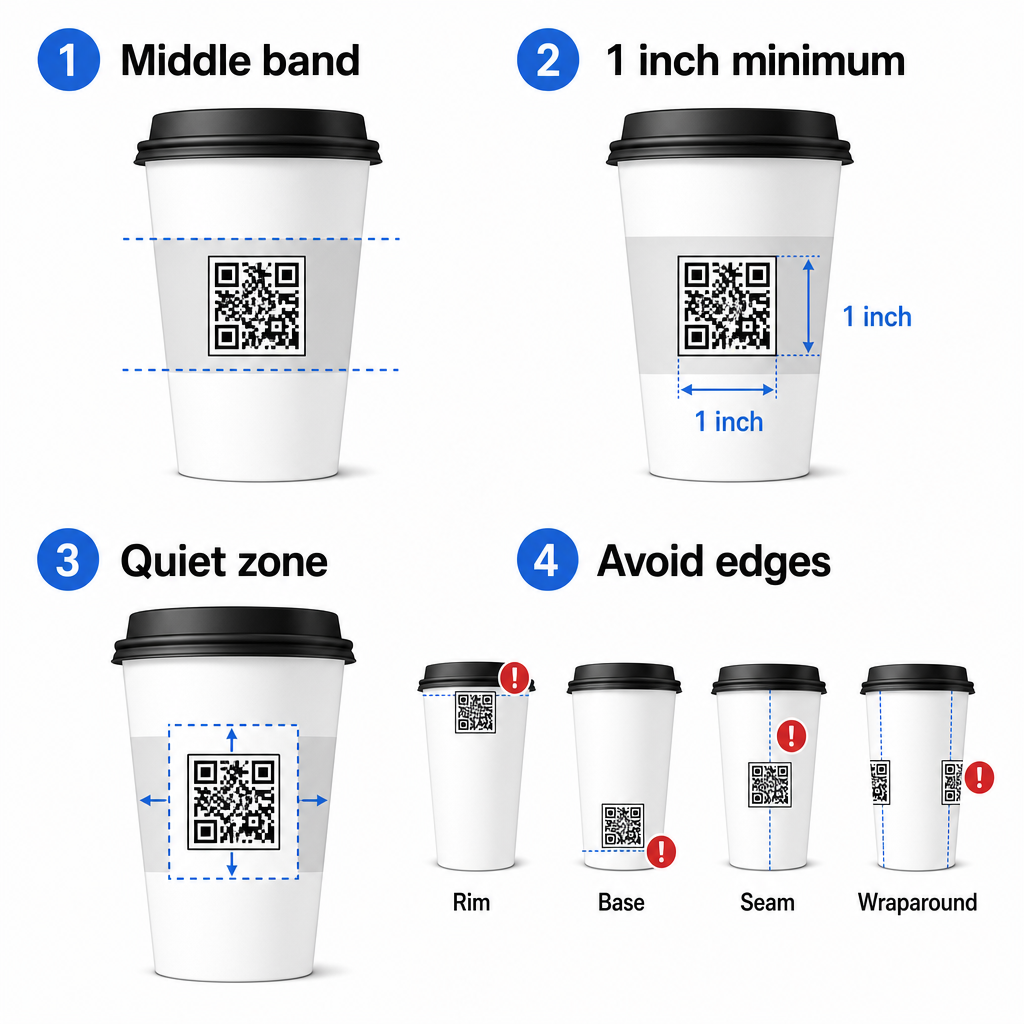
إذا كنت تعمل مع كوب ترويجي ذي جوانب مسطحة أو كوب سفر مربع، فلديك لوحة مسطحة طبيعية – استخدمها. بالنسبة للأكواب الخزفية الأسطوانية، تعامل مع الوجه الأمامي كمنطقة مستهدفة لك.
حجم الرمز للأسطح المنحنية
للطباعة المسطحة، حجم أدنى قدره 8 بوصة × 0.8 بوصة (حوالي 2 سم × 2 سم) هو التوصية القياسية للمسح من مسافة قريبة. على سطح منحني، هذا الحد الأدنى غير كافٍ. نظرًا لأن الانحناء يشوه الحجم المدرك للرمز، فمن المستحسن زيادة حجم الرمز بنسبة 20-30% للتطبيقات المنحنية.
من الناحية العملية، استهدف ما لا يقل عن 0 بوصة × 1.0 بوصة على كوب ورقي قياسي بحجم 12 أونصة، وأكبر من ذلك على كوب طويل بحجم 20 أونصة حيث يكون قطر البرميل أكبر والانحناء أقل حدة.
يجب أن يتناسب الرمز بالكامل ضمن وجه واحد من الكوب دون أن يلتف حول الجوانب. إذا اختفت أي زاوية من الرمز حول الانحناء، فسيفشل الرمز.
المنطقة الهادئة غير قابلة للتفاوض
المنطقة الهادئة هي الهامش الفارغ المحيط بالرمز. تحدد معايير ISO حدًا أدنى قدره أربع وحدات من المساحة الواضحة على الجوانب الأربعة. على كوب القهوة، يعمل هذا الهامش أيضًا كحاجز ضد الحافة المنحنية.
لا تضع الشعارات أو رسومات الكوب أو النصوص الغذائية أو أنماط العلامة التجارية داخل المنطقة الهادئة. الـ دليل أفضل الممارسات لقابلية قراءة رمز QR يغطي متطلبات المنطقة الهادئة بالتفصيل إلى جانب العوامل الأخرى التي تؤثر على المسح الموثوق.
التباين واللون على مواد الكوب
استخدم الداكن على الفاتح
تعمل ماسحات رمز QR عن طريق الكشف عن التباين بين الوحدات الداكنة والخلفية الفاتحة. نسبة التباين الدنيا الموصى بها هي 4:1, ، على الرغم من أن الأعلى دائمًا أفضل – الأسود على الأبيض يحقق 21:1.
على أكواب القهوة، مشكلتان في السطح تقللان من التباين الفعال:
- ورق كرافت أو ورق بني: رمز داكن مطبوع مباشرة على ورق كرافت غير مطلي يفقد التباين لأن الخلفية ليست بيضاء.
- يفقد الرمز الداكن المطبوع مباشرة على ورق الكرافت غير المطلي التباين لأن الخلفية ليست بيضاء. استخدم لوحة بيضاء مطبوعة أو طبقة بيضاء تحت الرمز. Gloss laminate: طبقة لامعة: Reflective finishes bounce light back at the camera, washing out the dark modules. Request a.
تعكس التشطيبات العاكسة الضوء مرة أخرى على الكاميرا، مما يزيل وضوح الوحدات الداكنة. اطلب
matte finish.
تشطيب غير لامع دليل أفضل الممارسات لتباين ألوان رمز الاستجابة السريعة (QR code) in the area of the code, even if the rest of the cup is glossy.
في منطقة الرمز، حتى لو كان باقي الكوب لامعًا.
الدقة وتنسيق الملف
Avoid Gradients and Patterned Backgrounds 300 نقطة في البوصة أو أعلى. تجنب التدرجات والخلفيات المنقوشة.
A gradient background beneath a QR code creates zones of acceptable contrast and zones of poor contrast. The scanner evaluates the whole code, and any region that falls below the contrast threshold can cause a failure. Use a solid, uniform light background beneath the code. تخلق الخلفية المتدرجة تحت رمز QR مناطق تباين مقبولة ومناطق تباين ضعيفة. يقوم الماسح الضوئي بتقييم الرمز بالكامل، وأي منطقة تقل عن عتبة التباين يمكن أن تسبب فشلاً. استخدم خلفية فاتحة صلبة وموحدة تحت الرمز. For branded cups where color is important to the design, you can use a dark brand color as the foreground on a white or pale background – but test carefully before full production. The مولد رمز الاستجابة السريعة (QR code) بالنسبة للأكواب ذات العلامات التجارية حيث يكون اللون مهمًا للتصميم، يمكنك استخدام لون علامة تجارية داكن كواجهة على خلفية بيضاء أو فاتحة – ولكن اختبر بعناية قبل الإنتاج الكامل. الـ.
مستوى تصحيح الخطأ
provides specific color combinations and contrast ratios to guide those decisions.
- المستوى H يوفر مجموعات ألوان ونسب تباين محددة لتوجيه تلك القرارات.
- 11. المستوى Q أو H Technical Specifications for Print.
المواصفات الفنية للطباعة.
Print the code at
اطبع الرمز على.
A low-resolution raster image produces fuzzy module edges, which reduces scannability and looks unprofessional at close range. . تنتج الصورة النقطية منخفضة الدقة حواف وحدات ضبابية، مما يقلل من إمكانية المسح الضوئي ويبدو غير احترافي من مسافة قريبة. Pageloot مولد رمز الاستجابة السريعة. Whenever possible, use a.
كلما أمكن، استخدم
vector format (SVG or EPS).
تنسيق متجه (SVG أو EPS)
| حالة الاستخدام | نوع رمز الاستجابة السريعة الموصى به | الأداة |
|---|---|---|
| rather than a PNG or JPG. Vector files scale without any loss of quality, which matters because cup manufacturers often resize artwork during prepress. Pageloot’s | رمز الاستجابة السريعة القائمة | مولّد رمز QR للقائمة |
| بدلاً من PNG أو JPG. تتوسع ملفات المتجهات دون أي فقدان للجودة، وهو أمر مهم لأن مصنعي الأكواب غالبًا ما يغيرون حجم الأعمال الفنية أثناء ما قبل الطباعة. Pageloot's | exports print-ready vector files (.EPS, .PDF, .SVG) suitable for sending directly to your cup printer. | مولد باركود QR للكوبون |
| يصدر ملفات متجهة جاهزة للطباعة (.EPS, .PDF, .SVG) مناسبة للإرسال مباشرة إلى طابعة الأكواب الخاصة بك. | QR codes have four error correction levels: L, M, Q, and H. Higher levels allow more of the code to be damaged or obscured while still scanning successfully. For cup applications: | مولد باركود QR لتقييمات Google |
| تحتوي رموز QR على أربعة مستويات لتصحيح الأخطاء: L، M، Q، و H. تسمح المستويات الأعلى بتلف أو إخفاء المزيد من الرمز مع استمرار المسح الضوئي بنجاح. لتطبيقات الأكواب: | is recommended if you are embedding a logo inside the code, as it allows up to 30% of the code to be obscured. | مولد رمز الاستجابة السريعة للروابط |
يوصى به إذا كنت تقوم بتضمين شعار داخل الرمز، حيث يسمح بإخفاء ما يصل إلى 30% من الرمز., is advisable for any curved surface, because surface distortion effectively damages portions of the code during scanning. يُنصح به لأي سطح منحني، لأن تشوه السطح يتلف أجزاء من الرمز بشكل فعال أثناء المسح الضوئي.
Do not use Level L on a cup. It provides no tolerance for the physical distortions inherent to curved printing.
لا تستخدم المستوى L على كوب. فهو لا يوفر أي تسامح مع التشوهات المادية المتأصلة في الطباعة المنحنية.
أ رمز الاستجابة السريعة الديناميكي Finder Patterns Must Stay Clear
- يجب أن تظل أنماط البحث واضحة
- The three large squares in the corners of a QR code are finder patterns. They tell the scanner where the code starts, ends, and how it is oriented. Do not crop, overlap, or modify the finder patterns with brand graphics. This is one of the most common design errors on custom-printed packaging, and it produces codes that look professional but never scan.
- المربعات الثلاثة الكبيرة في زوايا رمز QR هي أنماط بحث. تخبر الماسح الضوئي بمكان بدء الرمز وانتهائه وكيفية توجيهه. لا تقم بقص أو تداخل أو تعديل أنماط البحث برسومات العلامة التجارية. هذا هو أحد أكثر أخطاء التصميم شيوعًا في التعبئة والتغليف المطبوعة حسب الطلب، وينتج رموزًا تبدو احترافية ولكنها لا تُمسح أبدًا.
Create Print-Ready QR Codes for Your Cups تحليلات المسح أنشئ رموز QR جاهزة للطباعة لأكوابك.
Generate a fully customizable, high-resolution QR code with the correct error correction level, vector export, and branding options using the أنشئ رمز QR قابل للتخصيص بالكامل وعالي الدقة مع مستوى تصحيح الأخطاء الصحيح، وتصدير المتجهات، وخيارات العلامة التجارية باستخدام الـ Pageloot مولد رمز الاستجابة السريعة Download in .EPS, .PDF, or .SVG format ready to send to your cup manufacturer.
. قم بالتنزيل بتنسيق .EPS أو .PDF أو .SVG جاهزًا للإرسال إلى مصنع الأكواب الخاص بك.
Choosing What the QR Code Links To مولد باركود QR مع شعار اختيار ما يربط إليه رمز QR
- The physical execution matters, but so does what happens after the scan. A customer who scans a cup code has self-identified as engaged – do not send them to a generic homepage.
- التنفيذ المادي مهم، ولكن ما يحدث بعد المسح الضوئي كذلك. العميل الذي يمسح رمز كوب قد عرّف نفسه على أنه مهتم – لا ترسله إلى صفحة رئيسية عامة.
- اختر من قوالب تصميم لنمط الجسم ونمط الحافة
- أضف إطار دعوة لاتخاذ إجراء (على سبيل المثال، “امسح للحصول على خصم 10% على طلبك التالي”)
عند إضافة شعار، حافظ على ألا يتجاوز 30% من منطقة الرمز واضبط تصحيح الخطأ على المستوى H. يشغل الشعار مساحة كانت ستحمل بيانات مشفرة لولا ذلك، ويعوض تصحيح الخطأ من المستوى H هذا التداخل.
لتحقيق الاتساق عبر طلب أكواب كبير أو حملة متعددة المواقع، فإن Pageloot’s مجلدات رموز QR تتيح لك تنظيم الرموز حسب الحملة أو الموقع أو حجم الكوب حتى يتمكن فريقك من إدارتها دون فقدان التتبع.
للحصول على إرشادات ذات صلة حول تطبيقات التعبئة والتغليف، فإن الصفحات على رموز QR على عبوات المنتجات و رموز QR على عبوات المواد الغذائية تغطي الاعتبارات التي تنطبق مباشرة على الأكواب.
الاختبار قبل تشغيل الطباعة الخاص بك
لا يحل أي قدر من التصميم الدقيق محل الاختبار الفعلي على الكوب الفعلي. قبل الالتزام بتشغيل إنتاج كامل:
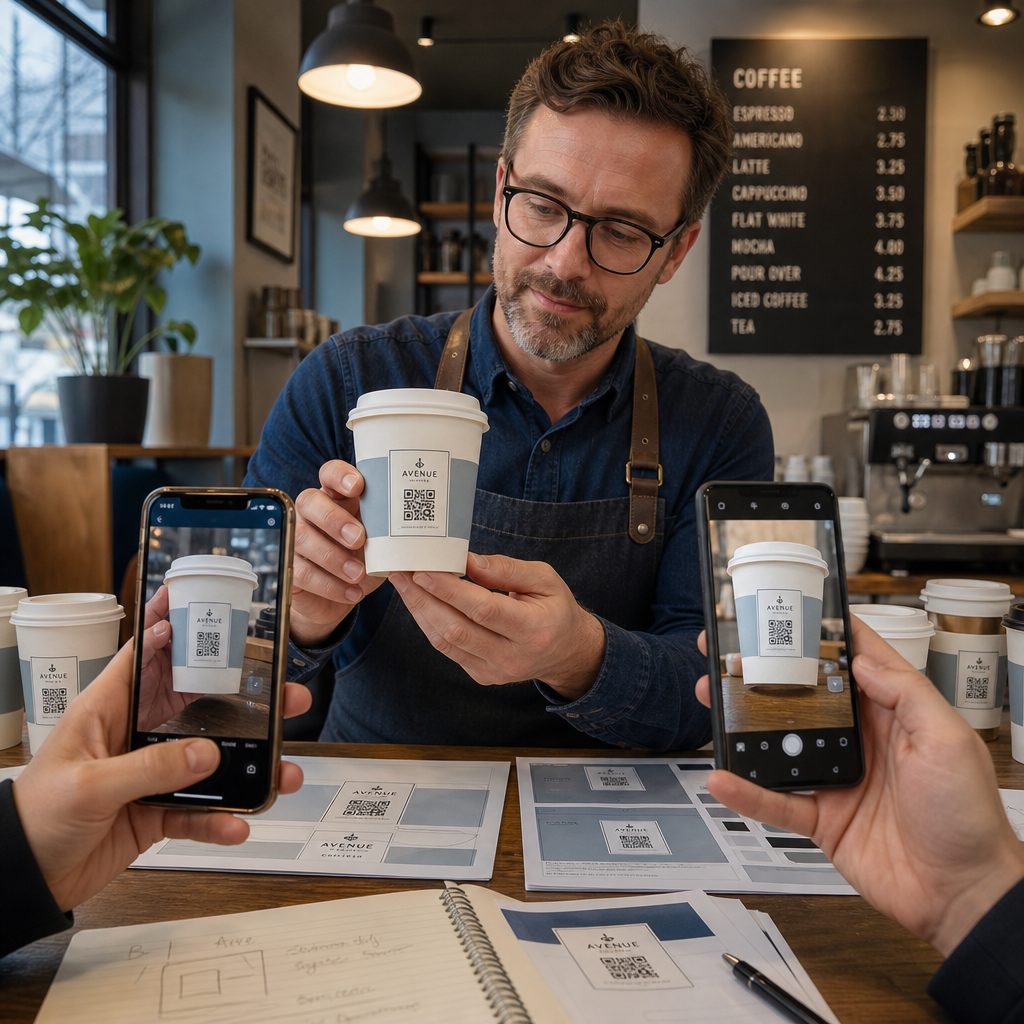
- اطبع عينة على المادة المقصودة – ليس مجرد بروفات ورقية. يؤثر مخزون الكوب والطلاء وطريقة الطباعة جميعها على النتيجة النهائية.
- اختبر باستخدام أجهزة متعددة – على الأقل، جهاز iPhone حديث وجهاز Android متوسط المدى. تمثل الأجهزة القديمة ذات الكاميرات منخفضة الدقة الاختبار الأكثر تطلبًا.
- امسح من زوايا واقعية – يمسك العملاء الأكواب بزوايا مختلفة، ليس عموديًا مباشرة على الملصق. اختبر بزاوية 15 درجة و 30 درجة خارج المحور.
- اختبر في بيئة الإضاءة الفعلية – غالبًا ما تكون إضاءة المقهى العلوية دافئة وموجهة، مما يؤثر على التباين بشكل مختلف عن إضاءة المكتب القياسية.
- تحقق من تحميل الوجهة بشكل صحيح – امسح الرمز على بيانات الهاتف المحمول، وليس فقط Wi-Fi، وتأكد من أن الصفحة المقصودة محسّنة للجوال ويتم تحميلها في أقل من ثلاث ثوانٍ.
إذا فشل الرمز في أي من هذه الاختبارات، اضبط الحجم أو التباين أو الموضع قبل طباعة آلاف الوحدات. للحصول على قائمة تحقق شاملة، فإن دليل لرموز الاستجابة السريعة (QR) على ملصقات المنتجات يستعرض نفس مبادئ مراقبة الجودة بمزيد من التفصيل.
اكتب دعوة لاتخاذ إجراء تكسب المسح
لا يوصل رمز QR نفسه شيئًا حول سبب وجوب مسح العميل له. قم دائمًا بإقران الرمز بدعوة موجزة لاتخاذ إجراء – عادةً ما تكون من أربع إلى ثماني كلمات توضع مباشرة فوق الرمز أو تحته. أمثلة:
- “امسح للحصول على عروض اليوم الخاصة”
- “احصل على خصم 15% على طلبك التالي”
- “اترك لنا مراجعة”
- “شاهد ما بداخل كوبك”
تجيب دعوة اتخاذ الإجراء على سؤال العميل الضمني: ماذا يحدث إذا فعلت هذا؟ بدونه، حتى رمز QR المثالي تقنيًا سيؤدي أداءً ضعيفًا.
وضع رمز QR فعال وذو علامة تجارية على كوب قهوة يمكن تحقيقه بالكامل بالإعداد التقني الصحيح. قم بتغيير حجمه للأسطح المنحنية، حافظ على المنطقة الهادئة واضحة، استخدم تباينًا عاليًا على سطح غير لامع، اضبط تصحيح الخطأ على المستوى H، واختبر دائمًا على عينة مادية قبل الإنتاج. اختر الرموز الديناميكية حتى تتمكن من تحديث الوجهات وقياس الأداء دون إعادة الطباعة.
ابدأ في بناء رمز QR الخاص بكوبك باستخدام Pageloot مولد رمز الاستجابة السريعة – قم بالتصدير بتنسيقات متجهة جاهزة للطباعة، أضف شعارك وألوان علامتك التجارية، وقم بتوصيله بالتحليلات من اليوم الأول.
الأسئلة الشائعة
للطباعة المسطحة، الحد الأدنى القياسي هو 0.8 بوصة × 0.8 بوصة (2 سم × 2 سم). على سطح كوب منحني، قم بزيادة ذلك بنسبة 20-30% للتعويض عن تشوه الانحناء – لذا استهدف 1.0 بوصة × 1.0 بوصة على الأقل. يجب أن يتناسب الرمز بالكامل ضمن المنطقة المسطحة من الكوب دون أن يلتف حول الجوانب.
نعم، لكن الموضع حاسم. استخدم المنطقة الأكثر تسطحًا من الوجه الأمامي للكوب، اجعل حجم الرمز أكبر مما تفعله للطباعة المسطحة، تأكد من وجود تباين قوي مع الوحدات الداكنة على خلفية فاتحة، تجنب التشطيبات اللامعة في منطقة الرمز، واضبط تصحيح الخطأ على المستوى H. اختبر دائمًا عينة مادية بأجهزة متعددة قبل الطلب بكميات كبيرة.
طابق الوجهة بهدف حملتك. تشمل الاستخدامات الشائعة القوائم الرقمية، والعروض الترويجية الموسمية، وكوبونات الخصم، وصفحات مراجعات Google، أو ملفات تعريف وسائل التواصل الاجتماعي. استخدم رمز QR ديناميكيًا حتى تتمكن من تحديث الوجهة بعد الطباعة – وهذا مهم بشكل خاص للأكواب المطبوعة بكميات كبيرة، حيث لا يمكن إعادة طباعة الرموز إذا انتهى عرض أو تغير عنوان URL.