Undrar du hur man sätter en skanningsbar QR-kod på en kaffekopp utan att den misslyckas varje gång en kund riktar sin telefon mot den? En dåligt designad kod på en böjd yta frustrerar kunder och slösar bort din tryckupplaga. Denna guide går igenom varje beslut, från placering till innehåll, så att dina koppar faktiskt levererar resultat.
Varför kaffekoppar är en värdefull QR-kodyta
Kaffekoppar tillbringar flera minuter i en kunds händer. Denna uppehållstid är en marknadsföringsmöjlighet som de flesta varumärken underutnyttjar.
Nästan 83,4 miljoner amerikanska vuxna skannade en QR-kod under 2022, ett antal som beräknas nå 42,6% av vuxna smartphoneanvändare år 2025. Separat skannade 45% av amerikanska shoppare en marknadsföringsrelaterad QR-kod under en tremånadersperiod, där 18–29-åringar ledde antagandet. Kaféer, caféer och program för märkesvaror befinner sig i skärningspunkten mellan två av de vanligaste användningsområdena för QR-koder som konsumenter rapporterar: restaurangmenyer och produktinformation för mat och dryck.
En kopp med en väl utförd QR-kod kan åstadkomma något av följande utan att lägga till personaltid:
- Dirigera kunder till en digital meny eller säsongserbjudanden
- Uppmana till en Google-recension omedelbart efter en positiv upplevelse
- Leverera en rabattkupong för ett återbesök
- Driva följare på sociala medier eller tävlingsbidrag
- Tillhandahålla allergen- eller ursprungsinformation för hälsomedvetna kunder
Utmaningen är rent teknisk: koppar är böjda, och QR-koder är det inte.
Hur böjda ytor påverkar skanningsbarheten
En QR-kod tryckt platt på papper skannas enkelt eftersom varje modul – de små rutorna som utgör koden – sitter på samma plan. När samma kod lindas runt en cylinder, böjer sig modulerna vid kanterna bort från kamerans synfält. Skannern ser ett förvrängt rutnät, och avkodningen misslyckas.
Detta är inte ett hypotetiskt problem. Det är den vanligaste anledningen till att QR-koder på koppar inte fungerar. Att förstå geometrin hjälper dig att designa runt det.
Tre fysiska faktorer arbetar emot dig:
- Krökningsförvrängning: Moduler på sidorna av koden böjer sig bort från kameran, vilket gör att de verkar komprimerade eller osynliga.
- Reflekterande ytor: Glansiga koppbeläggningar eller laminat skapar bländning som tvättar bort kontrasten, särskilt under takbelysning på kaféer.
- Tryckregistrering: Tillverkning av pappersmuggar involverar sömmar och skarvar; en kod som sträcker sig över en söm kommer inte att skannas tillförlitligt.
Var och en av dessa har en direkt teknisk lösning, som behandlas i avsnitten nedan.
Storlek och placering på en kopp
Håll koden på den plattaste möjliga ytan
Placera din QR-kod på den del av koppen med minst krökning. För en standardpappersmugg innebär det att man undviker den allra översta delen nära kanten och basens avsmalning. Mittenbandet på koppen erbjuder vanligtvis den plattaste utskrivbara zonen.
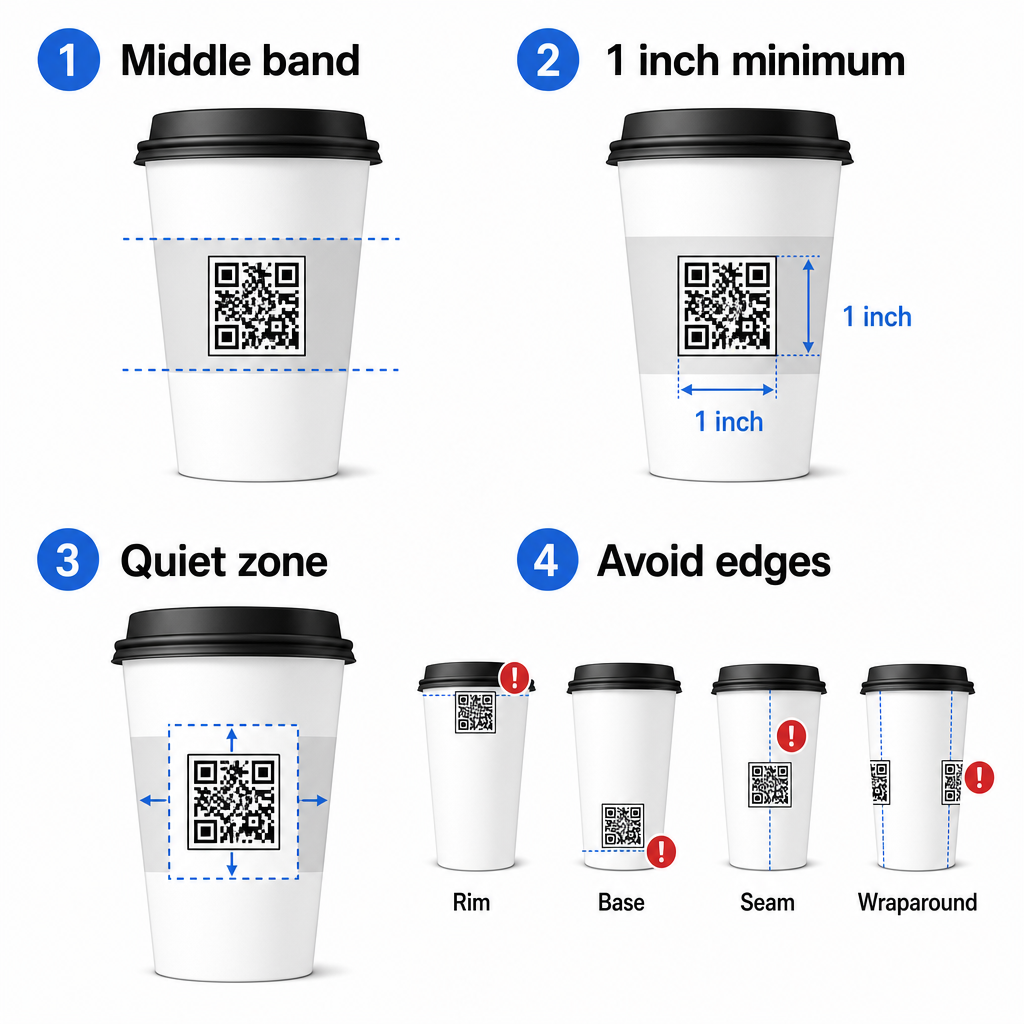
Om du arbetar med en platt-sidig reklammugg eller en fyrkantig resemugg, har du en naturlig platt panel – använd den. För cylindriska keramikmuggar, behandla framsidan som din målzona.
Anpassa koden för böjda ytor
För platt tryck, en minsta storlek på 0,8 tum × 0,8 tum (cirka 2 cm × 2 cm) är standardrekommendationen för skanning på nära håll. På en böjd yta är det minimumet inte tillräckligt. Eftersom krökning förvränger kodens upplevda storlek, är det lämpligt att öka kodstorleken med 20–30% för böjda applikationer.
I praktiska termer, sikta på minst 1,0 tum × 1,0 tum på en standard 12 oz pappersmugg, och ännu större på en hög 20 oz mugg där cylinderns diameter är större och krökningen är mindre allvarlig.
Koden måste passa helt inom en yta av koppen utan att lindas runt sidorna. Om något hörn av koden försvinner runt krökningen, kommer koden att misslyckas.
Den tysta zonen är icke förhandlingsbar
Den tysta zonen är den tomma marginalen som omger koden. ISO-standarder specificerar ett minimum av fyra moduler fritt utrymme på alla fyra sidor. På en kaffekopp fungerar denna marginal också som en buffert mot den böjda kanten.
Placera inte logotyper, koppgrafik, näringstext eller varumärkesmönster inuti den tysta zonen. Den guide för bästa praxis för QR-kodläsbarhet täcker krav på tyst zon i detalj tillsammans med andra faktorer som påverkar tillförlitlig skanning.
Kontrast och färg på koppmaterial
Använd mörkt på ljust
QR-kodskannrar fungerar genom att detektera kontrasten mellan mörka moduler och en ljus bakgrund. Det rekommenderade minsta kontrastförhållandet är 4:1, även om högre alltid är bättre – svart på vitt uppnår 21:1.
På kaffekoppar minskar två ytfel den effektiva kontrasten:
- Kraft- eller brunt pappersmaterial: En mörk kod tryckt direkt på obestruket kraftpapper förlorar kontrast eftersom bakgrunden inte är vit. Använd en vit tryckt panel eller en vit heltäckande beläggning under koden.
- Glanslaminat: Reflekterande ytor studsar ljus tillbaka mot kameran, vilket bleker ut de mörka modulerna. Begär en matt yta i området för koden, även om resten av koppen är glansig.
Undvik övertoningar och mönstrade bakgrunder
En övertoningsbakgrund under en QR-kod skapar zoner med acceptabel kontrast och zoner med dålig kontrast. Skannern utvärderar hela koden, och varje område som faller under kontrasttröskeln kan orsaka ett misslyckande. Använd en solid, enhetlig ljus bakgrund under koden.
För märkta koppar där färg är viktig för designen, kan du använda en mörk varumärkesfärg som förgrund på en vit eller blek bakgrund – men testa noggrant före full produktion. Den guide för bästa praxis för färgkontrast i QR-koder tillhandahåller specifika färgkombinationer och kontrastförhållanden för att vägleda dessa beslut.
Tekniska specifikationer för tryck
Upplösning och filformat
Tryck koden vid 300 DPI eller högre. En lågupplöst rasterbild producerar suddiga modulkanter, vilket minskar skanningsbarheten och ser oprofessionellt ut på nära håll.
Använd om möjligt ett vektorformat (SVG eller EPS) snarare än en PNG eller JPG. Vektorfiler skalas utan kvalitetsförlust, vilket är viktigt eftersom kopptillverkare ofta ändrar storlek på konstverk under prepress. Pageloots QR-kodgenerator exporterar tryckfärdiga vektorfiler (.EPS, .PDF, .SVG) lämpliga att skicka direkt till din koppskrivare.
Felrättningsnivå
QR-koder har fyra felkorrigeringsnivåer: L, M, Q och H. Högre nivåer tillåter att mer av koden skadas eller döljs samtidigt som den fortfarande skannas framgångsrikt. För koppapplikationer:
- Nivå H rekommenderas om du bäddar in en logotyp i koden, eftersom det tillåter att upp till 30% av koden döljs.
- Nivå Q eller H är lämpligt för alla böjda ytor, eftersom ytförvrängning effektivt skadar delar av koden under skanning.
Använd inte nivå L på en kopp. Den ger ingen tolerans för de fysiska förvrängningar som är inneboende i böjd tryckning.
Sökarmönster måste förbli tydliga
De tre stora rutorna i hörnen på en QR-kod är sökarmönster. De talar om för skannern var koden börjar, slutar och hur den är orienterad. Beskär, överlappa eller modifiera inte sökarmönstren med varumärkesgrafik. Detta är ett av de vanligaste designfelen på specialtryckta förpackningar, och det producerar koder som ser professionella ut men aldrig skannas.
Skapa tryckfärdiga QR-koder för dina koppar Generera en helt anpassningsbar, högupplöst QR-kod med rätt felkorrigeringsnivå, vektorexport och varumärkesalternativ med hjälp av Pageloot QR-kodgenerator. Ladda ner i .EPS-, .PDF- eller .SVG-format redo att skickas till din kopptillverkare.
Välja vad QR-koden länkar till
Den fysiska utförandet är viktigt, men det är också viktigt vad som händer efter skanningen. En kund som skannar en koppkod har identifierat sig som engagerad – skicka dem inte till en generisk hemsida.
Matcha destinationen med sammanhanget:
| Användningsfall | Rekommenderad QR-typ | 6. Verktyg |
|---|---|---|
| Digital meny eller säsongsbetonade drycker | Meny QR-kod | QR-kodgenerator för meny |
| Rabatt för återbesök | Kuponglandningssida | QR-kodgenerator för kuponger |
| Google-recension efter köp | Direkt recensionslänk | QR-kodgenerator för Google-recensioner |
| Webbplats, sociala medier eller kampanjlandningssida | URL-omdirigering | Länk QR-kodgenerator |
För kaféer och kaffebarer, Pageloots verktyg för QR-koder för restauranger stöder digitala menyer, beställningar och recensionsinsamling i en enda plattform.
Använd dynamiska QR-koder för koppkampanjer
En statisk QR-kod kodar destinations-URL:en permanent. Om din säsongskampanj slutar kan du inte uppdatera koden – och alla återstående koppar med den koden blir en återvändsgränd.
A dynamisk QR-kod lagrar en kort omdirigerings-URL i själva koden. Du styr vart omdirigeringen pekar från en instrumentpanel, och du kan ändra den när som helst utan att trycka om en enda kopp. Detta är avgörande för koppkampanjer eftersom:
- Kopptryckningar är ofta i tusentals, och omtryck är dyrt
- Kampanjer, menyer och erbjudanden ändras säsongsvis
- Du kan köra A/B-tester genom att byta destinationer mitt i kampanjen
Dynamiska koder tillhandahåller också skanningsanalys – data om när skanningar skedde, vilka enheter som användes och var kunderna befann sig. Den datan låter dig mäta vilka koppdesigner eller placeringar som drev mest engagemang, och justera framtida tryckningar därefter.
Spåra varje skanning från din koppkampanj Byt till en dynamisk QR-kod för att uppdatera destinationer i farten och övervaka prestanda i realtid. Den Pageloot QR-kodgenerator ger dig en fullständig analysinstrumentpanel tillsammans med redigeringskontroller – allt utan att trycka om dina koppar.
Varumärkesanpassa din kopp-QR-kod
En enkel svartvit QR-kod fungerar, men en märkt kod förstärker igenkänningen och genererar fler skanningar. Pageloots QR-kodgenerator med logotyp låter dig:
- Bädda in din varumärkeslogotyp i mitten av koden
- Applicera varumärkesfärger på modulerna och bakgrunden
- Välj bland designmallar för kroppsmönster och kantstil
- Lägg till en uppmaningsram (t.ex., “Skanna för 10% rabatt på din nästa beställning”)
När du lägger till en logotyp, håll den till högst 30% av kodområdet och ställ in felkorrigering till nivå H. Logotypen upptar utrymme som annars skulle bära kodad data, och felkorrigering på nivå H kompenserar för den överlappningen.
För konsekvens över en stor koppbeställning eller en kampanj med flera platser, Pageloots QR-kodmappar låter dig organisera koder efter kampanj, plats eller koppstorlek så att ditt team kan hantera dem utan att tappa bort sig.
För relaterad vägledning om förpackningsapplikationer, sidorna om QR-koder på produktförpackningar och QR-koder på livsmedelsförpackningar täcker överväganden som gäller direkt för koppar.
Testa före din tryckning
Ingen mängd noggrann design ersätter fysisk testning på den faktiska koppen. Innan du förbinder dig till en full produktionskörning:
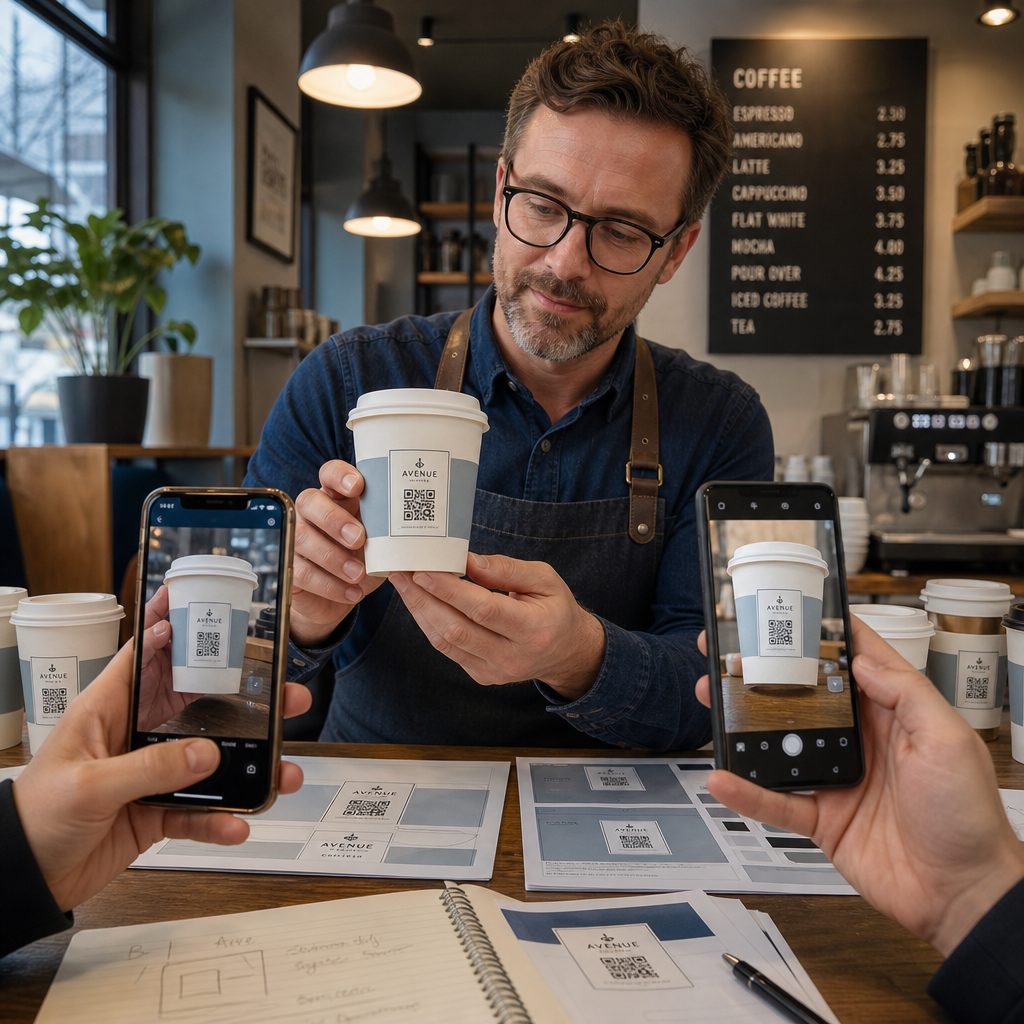
- Skriv ut ett prov på det avsedda materialet – inte bara pappersprov. Koppmaterial, beläggning och tryckmetod påverkar alla slutresultatet.
- Testa med flera enheter – åtminstone en ny iPhone och en mellanklass Android. Äldre enheter med kameror med lägre upplösning presenterar det mest krävande testet.
- Skanna från realistiska vinklar – kunder håller koppar i olika vinklar, inte direkt vinkelrätt mot etiketten. Testa vid 15° och 30° utanför axeln.
- Testa i den faktiska ljusmiljön – takbelysning på kaféer är ofta varm och riktad, vilket påverkar kontrasten annorlunda än standardkontorsbelysning.
- Verifiera att destinationen laddas korrekt – skanna koden på mobildata, inte bara Wi-Fi, och bekräfta att landningssidan är mobiloptimerad och laddas på under tre sekunder.
Om koden misslyckas med något av dessa tester, justera storlek, kontrast eller placering innan du trycker tusentals enheter. För en omfattande checklista, den guide till QR-koder på produktetiketter går igenom samma principer för kvalitetskontroll mer i detalj.
Skriv en uppmaning som förtjänar skanningen
QR-koden i sig kommunicerar inget om varför en kund ska skanna den. Koppla alltid koden med en kort uppmaning – vanligtvis fyra till åtta ord placerade direkt ovanför eller under koden. Exempel:
- “Skanna för dagens specialerbjudanden”
- “Få 15% rabatt på din nästa beställning”
- “Lämna en recension”
- “Se vad som finns i din kopp”
Uppmaningen svarar på kundens implicita fråga: vad händer om jag gör detta? Utan den kommer även en tekniskt perfekt QR-kod att underprestera.
Att placera en fungerande, märkes-QR-kod på en kaffekopp är helt uppnåeligt med rätt teknisk installation. Anpassa storleken för böjda ytor, håll den tysta zonen fri, använd hög kontrast på en matt yta, ställ in felkorrigering till nivå H, och testa alltid på ett fysiskt prov före produktion. Välj dynamiska koder så att du kan uppdatera destinationer och mäta prestanda utan att trycka om.
Börja bygga din kopp-QR-kod med Pageloot QR-kodgenerator – exportera i tryckfärdiga vektorformat, lägg till din logotyp och varumärkesfärger, och anslut den till analys från dag ett.
Vanliga frågor
För platt tryck är standardminimum 0,8 tum × 0,8 tum (2 cm × 2 cm). På en böjd koppyta, öka det med 20–30 % för att kompensera för krökningsdistorsion – så sikta på minst 1,0 tum × 1,0 tum. Koden måste passa helt inom koppens platta zon utan att svepa runt sidorna.
Ja, men placeringen är avgörande. Använd den plattaste ytan på muggens framsida, storleksanpassa koden större än du skulle göra för platt tryck, säkerställ stark kontrast med mörka moduler på en ljus bakgrund, undvik glansiga ytor i kodområdet, och ställ in felkorrigering till nivå H. Testa alltid ett fysiskt prov med flera enheter innan du beställer i bulk.
Matcha destinationen med ditt kampanjmål. Vanliga användningsområden inkluderar digitala menyer, säsongskampanjer, rabattkuponger, Google-recensionssidor eller profiler på sociala medier. Använd en dynamisk QR-kod så att du kan uppdatera destinationen efter utskrift – detta är särskilt viktigt för muggar som trycks i stora kvantiteter, eftersom koderna inte kan tryckas om om ett erbjudande går ut eller en URL ändras.