Czy Twoi pacjenci mają trudności z czytaniem drobnego tekstu na butelkach z lekami lub pomijają kluczowe instrukcje dotyczące dawkowania? Nieprzestrzeganie zaleceń dotyczących leczenia i błędy w podawaniu leków prowadzą do możliwych do uniknięcia zagrożeń zdrowotnych i częstych konsultacji farmaceutycznych. Dodanie skanowalnych kodów QR do etykiet na receptach daje pacjentom natychmiastowy dostęp do cyfrowych przewodników po lekach, instrukcji dźwiękowych i portali do ponownego zamawiania.
Jakie informacje mogą dostarczyć kody QR na receptach?
Etykiety na opakowaniach leków mają ograniczoną przestrzeń fizyczną. Przepisy federalne i stanowe wymagają obowiązkowego tekstu drukowanego, w tym nazwy apteki, numeru recepty, danych osoby przepisującej, nazwiska pacjenta i instrukcji dawkowania. Kod szybkiej odpowiedzi (QR) działa jako cyfrowe rozszerzenie etykiety, dostarczając dodatkowe informacje bez zagracania butelki.
Apteki mogą wykorzystywać kody QR na receptach do dostarczania pacjentom zasobów, takich jak:
- Cyfrowe Przewodniki po Lekach: Linkuj pacjentów bezpośrednio do elektronicznych ulotek informacyjnych dla pacjentów (e-ulotek) lub dokumentów sformatowanych za pomocą Generator kodów QR do PDF.
- Formaty Dźwiękowe i Dostępne: Pomóż pacjentom z wadami wzroku zeskanować opakowanie, aby usłyszeć mówione instrukcje dawkowania lub uzyskać dostęp do tekstu z dużą czcionką i opcji elektronicznego brajla.
- Filmy Demonstracyjne: Pokaż samouczki wideo krok po kroku dla złożonych systemów podawania leków, takich jak peny insulinowe, inhalatory lub urządzenia do samodzielnego wstrzykiwania.
- Portale do Ponownego Zamawiania: Kieruj pacjentów bezpośrednio do aptecznych portali internetowych do ponownego zamawiania, aby szybko przesyłać prośby o odnowienie.
- Informacje Tekstowe Offline: Przechowuj ostrzeżenia w postaci zwykłego tekstu, numery kontaktowe w nagłych wypadkach lub instrukcje przechowywania bezpośrednio w macierzy kodu za pomocą Generator kodów QR z tekstu.
Kluczowe Korzyści dla Bezpieczeństwa Pacjenta i Przestrzegania Zaleceń Dotyczących Leków
Nieprzestrzeganie zaleceń dotyczących leczenia jest poważnym problemem zdrowia publicznego. Badania pokazują, że około 50% pacjentów nie przyjmuje leków zgodnie z zaleceniami, co prowadzi do ponad 125 000 możliwych do uniknięcia zgonów rocznie. Umieszczenie informacji do zeskanowania na opakowaniu recepty pomaga rozwiązać typowe źródła błędów w podawaniu i zamieszania.
Zmniejszanie Błędów w Podawaniu Leków
Standardowe etykiety na butelkach używają małych czcionek, które są trudne do odczytania dla osób starszych lub niedowidzących. Badania eksperymentalne porównujące opakowania wyposażone w kody QR ze standardowymi etykietami na butelkach wykazały, że dostęp do skanowalnych cyfrowych szczegółów prowadził do znacznie większej liczby prawidłowych decyzji dotyczących samodzielnego podawania leków w obu grupach pacjentów – młodszych i starszych.
Poprawa Dostępności
Zapewnienie dostępnych szczegółów recepty jest kluczowe dla bezpieczeństwa pacjenta. Kody QR, zakodowane z dostępnym tekstem lub połączone ze stronami docelowymi przyjaznymi dla czytników ekranu, umożliwiają pacjentom z niską ostrością wzroku niezależne weryfikowanie nazw leków, harmonogramów dawkowania i uwag ostrzegawczych.
Wspieranie Śledzenia Przestrzegania Zaleceń i Zaangażowania
Cyfrowe rozwiązania do śledzenia przyjmowania leków, wykorzystujące skanowalne kody na opakowaniach, wykazały wysoką wykonalność kliniczną. Badania kliniczne pokazują, że samodzielne raportowanie pacjentów poprzez skanowanie kodów QR osiąga około 90,1% dokładności w porównaniu do ręcznego liczenia tabletek. Integracja skanowalnych opakowań z szerszymi szpitalnymi i zdrowotnymi systemami kodów QR usprawnia komunikację z pacjentem i długoterminowe zarządzanie opieką. Aby dowiedzieć się więcej o nowoczesnych zastosowaniach klinicznych, zapoznaj się z naszym kompleksowym przewodnikiem po kodach QR w opiece zdrowotnej.
Dostarczaj Aktualne Instrukcje dla Pacjenta Chcesz aktualizować przewodniki po lekach lub zasoby cyfrowe bez ponownego drukowania fizycznych etykiet? Użyj Generator dynamicznych kodów QR aby Twoje linki docelowe były edytowalne i dokładne.
Zgodność z przepisami i zabezpieczenia HIPAA dla aptek
Integracja narzędzi cyfrowych z procesami pracy aptek wymaga ścisłej uwagi na standardy regulacyjne i przepisy dotyczące prywatności pacjentów.
| Obszar Wymagań | Standard / Wytyczna | Kluczowe Działanie Apteki |
|---|---|---|
| Przepisy FDA | Dobrowolne informacje dla pacjenta | Traktuj kody QR jako dobrowolne uzupełnienia; nigdy nie zastępuj wymaganego tekstu pisanego na etykiecie. |
| Serializacja DSCSA | Kody kreskowe GS1 2D Data Matrix | Utrzymuj kody kreskowe łańcucha dostaw DSCSA oddzielnie od konsumenckich kodów QR. |
| Zasada Prywatności HIPAA | Chronione Informacje Zdrowotne (PHI) | Nigdy nie koduj nazwisk pacjentów, dat urodzenia ani schorzeń bezpośrednio w kodzie. |
| Kontrola dostępu | Zabezpieczenia uwierzytelniania | Wymagaj uwierzytelnienia logowania pacjenta dla każdego miejsca docelowego QR wyświetlającego osobiste dane zdrowotne. |
Rozróżnianie kodów QR od kodów kreskowych łańcucha dostaw
Zgodnie z ustawą o bezpieczeństwie łańcucha dostaw leków (DSCSA), zserializowane kody kreskowe GS1 2D Data Matrix są obowiązkowe na opakowaniach hurtowych w celu śledzenia przez dystrybutorów. Są to techniczne, regulowane kody kreskowe 2D przeznaczone dla skanerów łańcucha dostaw. Kody QR przeznaczone dla pacjentów, w przeciwieństwie do nich, są dobrowolnymi narzędziami zaprojektowanymi dla smartfonów konsumentów w celu dostarczania treści edukacyjnych i operacyjnych.
Egzekwowanie standardów prywatności i bezpieczeństwa HIPAA
Apteki są podmiotami objętymi HIPAA. Przy wdrażaniu kodów QR na opakowaniach recept:
- Unikaj kodowania surowych PHI: Nigdy nie osadzaj niezaszyfrowanych identyfikatorów pacjentów, numerów ubezpieczenia społecznego ani konkretnych diagnoz w statycznym kodzie.
- Używaj bezpiecznych miejsc docelowych w sieci: Kieruj kody QR do bezpiecznych stron internetowych HTTPS wspieranych ścisłą kontrolą dostępu, uwierzytelnianiem wieloskładnikowym i zaszyfrowanymi bazami danych.
- Eliminuj nieuregulowane śledzenie: Upewnij się, że strony docelowe przeznaczone dla pacjentów nie wykorzystują pikseli analitycznych stron trzecich, które mogłyby niedozwolnie ujawniać dane.
- Współpracuj z dostawcami zgodnymi z przepisami: Wybieraj platformy oprogramowania, które egzekwują protokoły bezpieczeństwa danych i wykonują Umowy z Partnerem Biznesowym (BAA). Aby uzyskać pełne zestawienie standardów prawnych, zapoznaj się z naszym przewodnikiem dotyczącym przepisów i regulacji dotyczących prywatności kodów QR.
Najlepsze praktyki drukowania skanowalnych etykiet recept
Etykiety recept są często poddawane manipulacji, wilgoci i ograniczeniom przestrzeni. Jeśli wydrukowany kod nie skanuje się, zaufanie pacjenta spada, a liczba połączeń do apteki w celu uzyskania wsparcia wzrasta.
Zalecany rozmiar kodu
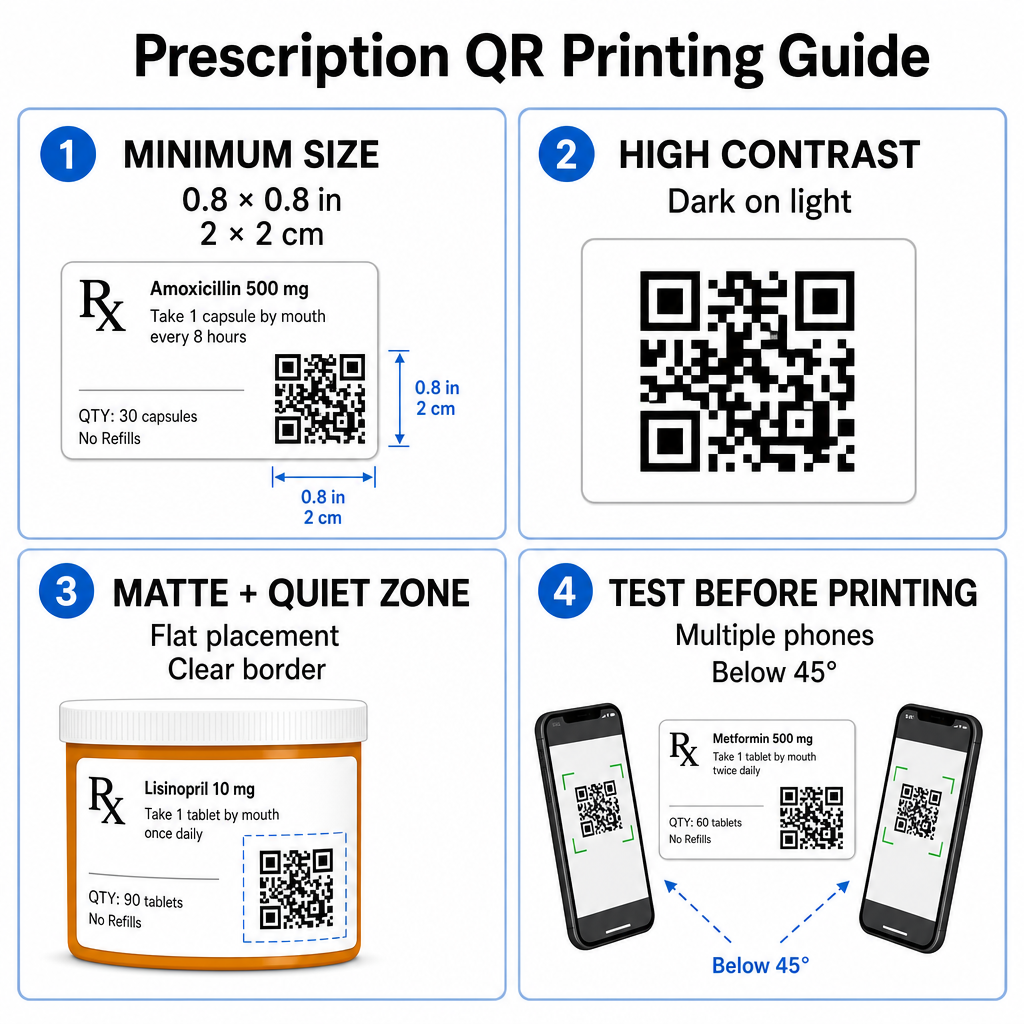
Powierzchnie ampułek na recepty są ograniczone. Zachowaj standardowy rozmiar co najmniej 0.8" x 0.8" (2 cm x 2 cm) dla niezawodnego skanowania. Na bardzo małych opakowaniach, absolutny minimalny rozmiar wydruku to 1 cm x 1 cm może być używany, pod warunkiem, że gęstość zakodowanych danych pozostaje niska. Dokładne współczynniki skalowania można sprawdzić w naszym przewodniku po rozmiarach kodów QR.
Kontrast kolorów i materiały powierzchniowe
Drukarki termiczne powszechnie używane w aptekach detalicznych wymagają specyficznej kalibracji dla optymalnej skanowalności:
- Wysoki kontrast: Drukuj jednolite ciemne wzory (idealnie czarne) na czystych, nieprzezroczystych jasnych tłach.
- Matowe wykończenia: Unikaj błyszczących powłok etykiet lub przezroczystych plastikowych fiolek, które odbijają światło z pomieszczenia i oślepiają sensory aparatu. Jeśli błyszczące lub przezroczyste pojemniki są nieuniknione, wydrukuj białą, matową warstwę bezpośrednio pod kodem QR.
- Zarządzanie krzywizną: Umieść kod QR na najbardziej płaskiej części butelki lub pudełka, aby zapobiec zniekształceniom geometrycznym.
Aby ocenić, jak atramenty termiczne, podłoża i materiały etykiet wpływają na prędkość skanowania, przeczytaj naszą szczegółową analizę na temat jak techniki drukowania wpływają na skanowalność kodów QR.
Strefy ciszy i testy weryfikacyjne
Zawsze utrzymuj wyraźną zewnętrzną ramkę – zwaną strefą ciszy – wokół kodu, aby oddzielić go od otaczającego tekstu etykiety i obramowań. Przed masowym drukowaniem testuj wydrukowane kody na wielu urządzeniach smartfonowych, pod różnymi kątami (poniżej 45 stopni) i w różnych warunkach oświetleniowych. Zapoznaj się z naszymi podstawowymi najlepszymi praktykami w zakresie czytelności kodów QR aby zapewnić niezawodne działanie układu Twojej etykiety.
Zweryfikuj skanowalność wydrukowanej etykiety Chcesz sprawdzić, czy opakowanie Twojej recepty szybko skanuje się na wszystkich kamerach urządzeń? Błyskawicznie przetestuj swoje projekty wydrukowanych etykiet za pomocą bezpłatnego internetowego skanera kodów QR.
Wdrażanie kodów QR na receptach w procesach aptecznych
Wdrażanie skanowalnych etykiet w operacjach aptecznych wymaga prostego, ustrukturyzowanego podejścia:
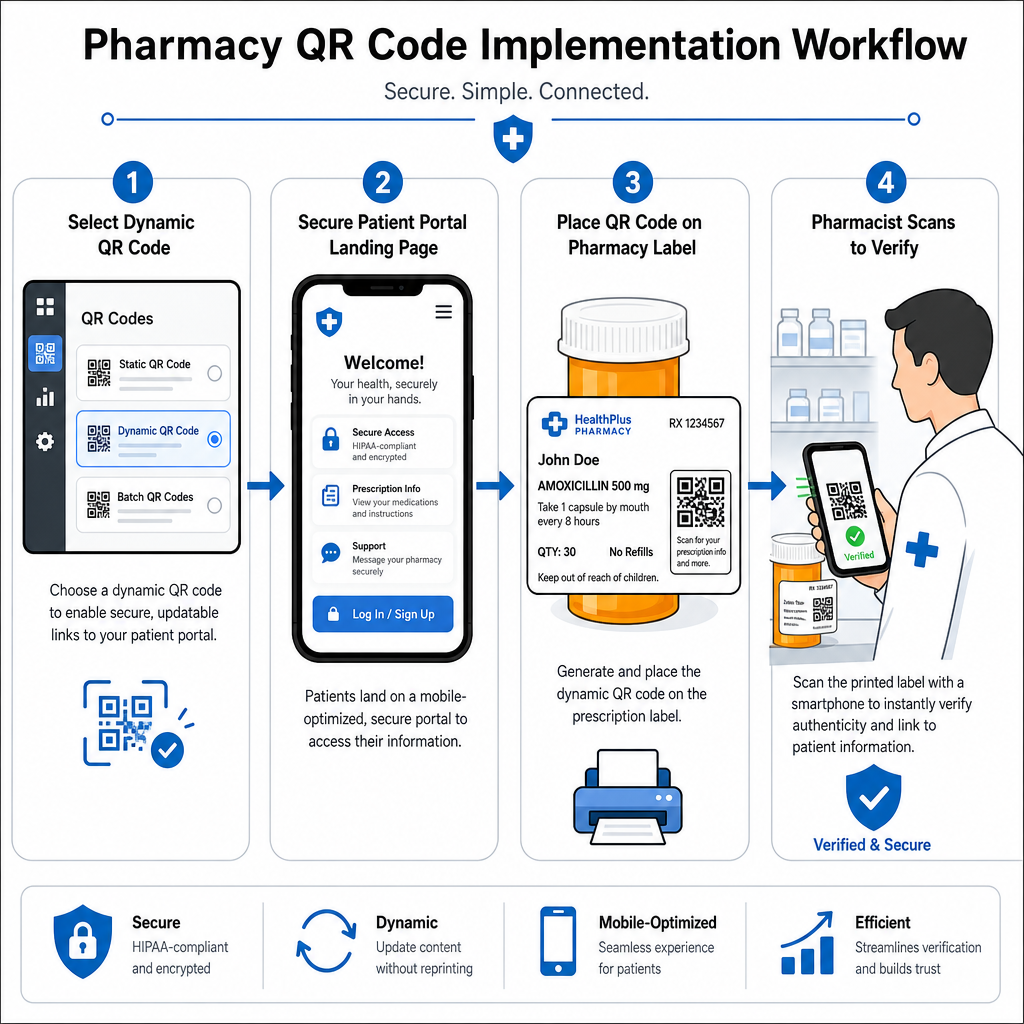
- Wybierz typ kodu: Wybierz dynamiczne kody QR dla linków internetowych, aby móc aktualizować edukacyjne pliki PDF, adresy URL wideo lub linki do portali bez ponownego drukowania fizycznych etykiet pojemników.
- Skonfiguruj bezpieczne strony docelowe: Połącz linki docelowe z zoptymalizowanymi pod kątem urządzeń mobilnych, zgodnymi z HIPAA portalami pacjentów lub publicznymi przewodnikami po lekach.
- Zintegruj szablony etykiet: Dodaj wygenerowany kod QR do szablonów wydruku termicznego systemu zarządzania apteką, upewniając się, że rozmiar, strefy ciszy i parametry kontrastu są zablokowane.
- Szkolenie personelu apteki: Edukuj farmaceutów i techników, aby wskazywali kod QR podczas konsultacji z pacjentami, zachęcając pacjentów do skanowania opakowania leku w domu.
- Weryfikacja skanowalności: Wykonuj rutynowe kontrole jakości na stanowiskach wydawania leków za pomocą internetowego Czytnik kodów QR aby potwierdzić czytelność kodu przed przekazaniem.
Badanie, jak inne sektory zarządzają skanowalnymi opakowaniami, może dostarczyć dodatkowych informacji o przepływie pracy w różnych zastosowaniach branżowych.
Dodawanie skanowalnych kodów QR do etykiet recept pomostuje lukę między fizycznym opakowaniem leku a kluczowymi cyfrowymi zasobami zdrowotnymi. Przestrzegając odpowiednich standardów drukowania, chroniąc prywatność pacjentów i zarządzając edytowalnymi linkami docelowymi, Twoja apteka może zredukować błędy administracyjne i poprawić ogólne wyniki leczenia pacjentów. Rozpocznij tworzenie zgodnych, skanowalnych procedur etykietowania recept z Pageloot już dziś.
Najczęściej zadawane pytania
Nie. Amerykańskie przepisy federalne i wytyczne FDA nie wymagają kodów QR skierowanych do konsumentów na etykietach opakowań leków na receptę. Obowiązkowe elementy etykiety (takie jak imię i nazwisko pacjenta, instrukcje dotyczące leku oraz dane apteki) muszą być nadal drukowane bezpośrednio w tekście czytelnym dla człowieka. Kody QR pozostają dobrowolnym, uzupełniającym narzędziem do poprawy edukacji pacjentów i dostępu cyfrowego.
Apteki muszą unikać kodowania niezaszyfrowanych chronionych informacji zdrowotnych (PHI) – takich jak imiona i nazwiska pacjentów, daty urodzenia lub szczegóły dotyczące leków – bezpośrednio w kodzie QR. Zamiast tego, należy używać bezpiecznych dynamicznych linków kierujących do zaszyfrowanych, chronionych hasłem portali pacjenta, które wymagają uwierzytelnienia pacjenta przed wyświetleniem danych osobowych.
Zalecany minimalny rozmiar wydruku dla etykiet recept wynosi 0.8″ x 0.8″ (2 cm x 2 cm). Chociaż kody technicznie mogą być skanowane nawet z rozmiaru 1 cm x 1 cm na małych opakowaniach, większe wymiary z silnym kontrastem kolorów i wyraźnymi strefami ciszy zapewniają niezawodne skanowanie przez wszystkie kamery urządzeń mobilnych.