¿Se pregunta cómo poner un código QR escaneable en una taza de café sin que falle cada vez que un cliente apunta su teléfono hacia ella? Un código mal diseñado en una superficie curva frustra a los clientes y desperdicia su tirada de impresión. Esta guía le acompaña a través de cada decisión, desde la ubicación hasta el contenido, para que sus tazas realmente entreguen resultados.
Por qué las tazas de café son una superficie valiosa para códigos QR
Las tazas de café pasan varios minutos en las manos de un cliente. Ese tiempo de permanencia es una oportunidad de marketing que la mayoría de las marcas subutilizan.
Casi 83.4 millones de adultos estadounidenses escanearon un código QR en 2022, un número proyectado para alcanzar el 42.6% de usuarios adultos de teléfonos inteligentes para 2025. Por separado, el 45% de los compradores estadounidenses escanearon un código QR relacionado con marketing en una ventana de tres meses, con los jóvenes de 18 a 29 años liderando la adopción. Las cafeterías, los cafés y los programas de merchandising de marca se encuentran en la intersección de dos de los principales casos de uso de códigos QR que los consumidores reportan: menús de restaurantes e información de productos de alimentos y bebidas.
Una taza con un código QR bien ejecutado puede lograr cualquiera de los siguientes sin añadir tiempo al personal:
- Dirigir a los clientes a un menú digital o a especiales de temporada
- Solicitar una reseña de Google inmediatamente después de una experiencia positiva
- Entregar un cupón de descuento para una visita de regreso
- Impulsar seguidores en redes sociales o participaciones en concursos
- Proporcionar información sobre alérgenos o procedencia para clientes conscientes de la salud
El desafío es puramente técnico: las tazas se curvan, y los códigos QR no.
Cómo las superficies curvas afectan la escaneabilidad
Un código QR impreso plano en papel se escanea fácilmente porque cada módulo – los pequeños cuadrados que componen el código – se asienta en el mismo plano. Cuando ese mismo código se envuelve alrededor de un cilindro, los módulos en los bordes se curvan alejándose de la línea de visión de la cámara. El escáner ve una cuadrícula distorsionada, y la decodificación falla.
Este no es un problema hipotético. Es la razón más común por la que los códigos QR en las tazas no funcionan. Comprender la geometría le ayuda a diseñar en torno a ello.
Tres factores físicos juegan en su contra:
- Distorsión por curvatura: Los módulos en los lados del código se doblan alejándose de la cámara, haciéndolos aparecer comprimidos o invisibles.
- Acabados reflectantes: Los recubrimientos o laminados brillantes de las tazas crean un resplandor que desvanece el contraste, particularmente bajo la iluminación cenital de la cafetería.
- Registro de impresión: La fabricación de tazas de papel implica costuras y uniones; un código que se extiende sobre una costura no se escaneará de forma fiable.
Cada uno de estos tiene una solución técnica directa, cubierta en las secciones siguientes.
Tamaño y ubicación en una taza
Mantenga el código en el área más plana posible
Coloque su código QR en la sección de la taza con la menor curvatura. Para una taza de papel estándar, eso significa evitar la parte superior cerca del borde y el estrechamiento de la base. La banda central de la taza suele ofrecer la zona imprimible más plana.
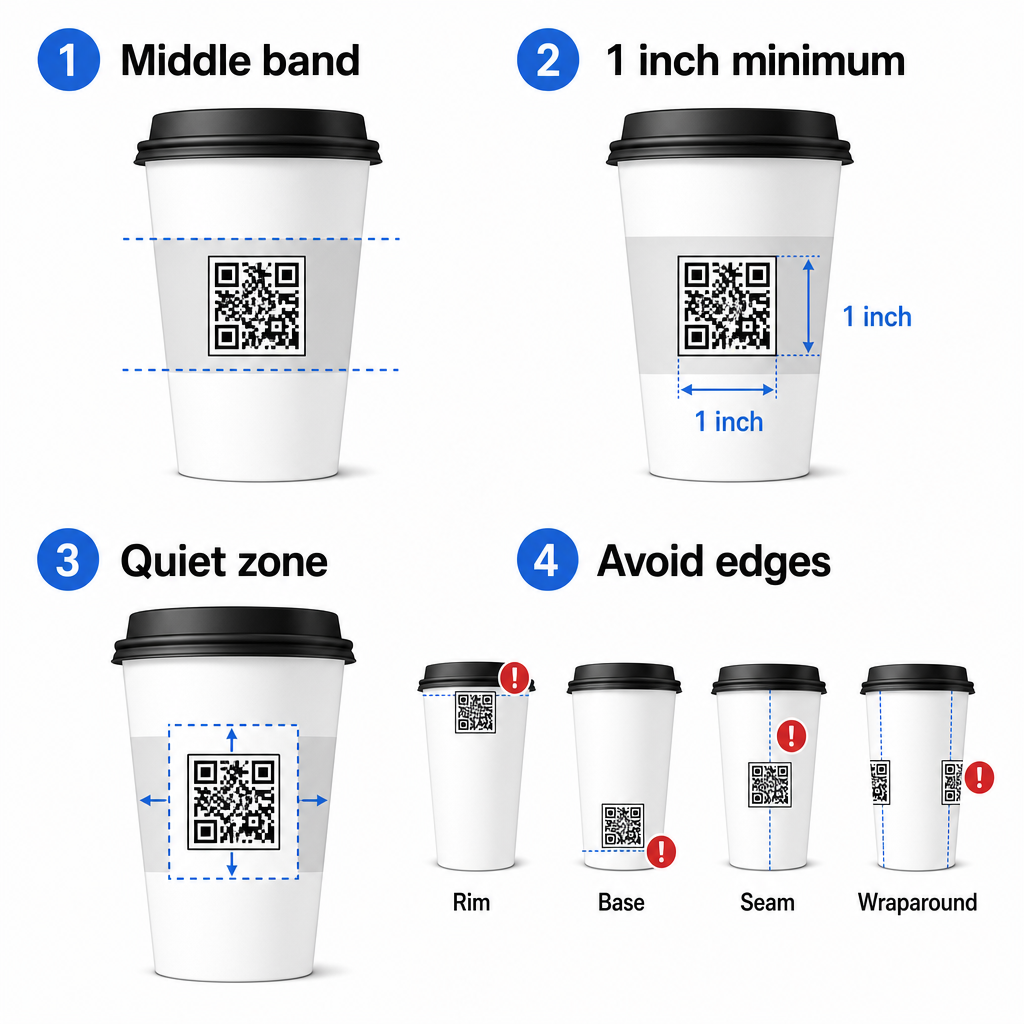
Si trabaja con una taza promocional de lados planos o una taza de viaje cuadrada, tiene un panel plano natural – úselo. Para tazas de cerámica cilíndricas, trate la cara frontal como su zona objetivo.
Tamaño del código para superficies curvas
Para impresión plana, un tamaño mínimo de 8 pulg. × 0.8 pulg. (aproximadamente 2 cm × 2 cm) es la recomendación estándar para el escaneo a corta distancia. En una superficie curva, ese mínimo no es suficiente. Debido a que la curvatura distorsiona el tamaño percibido del código, es aconsejable aumentar el tamaño del código en un 20–30% para aplicaciones curvas.
En términos prácticos, apunte al menos a 0 pulg. × 1.0 pulg. en una taza de papel estándar de 12 oz, y aún más grande en una taza alta de 20 oz donde el diámetro del barril es mayor y la curvatura es menos severa.
El código debe encajar completamente dentro de una cara de la taza sin envolver los lados. Si cualquier esquina del código desaparece alrededor de la curvatura, el código fallará.
La Zona Silenciosa No Es Negociable
La zona silenciosa es el margen en blanco que rodea el código. Las normas ISO especifican un mínimo de cuatro módulos de espacio libre en los cuatro lados. En una taza de café, este margen también actúa como un amortiguador contra el borde curvo.
No coloque logotipos, gráficos de tazas, texto nutricional o patrones de marca dentro de la zona silenciosa. El guía de mejores prácticas de legibilidad de códigos QR cubre los requisitos de la zona silenciosa en detalle junto con otros factores que afectan el escaneo fiable.
Contraste y color en los materiales de la taza
Usar oscuro sobre claro
Los escáneres de códigos QR funcionan detectando el contraste entre módulos oscuros y un fondo claro. La relación de contraste mínima recomendada es 4:1, aunque más alto siempre es mejor – el negro sobre blanco logra 21:1.
En las tazas de café, dos problemas de superficie reducen el contraste efectivo:
- Cartulina kraft o marrón: Un código oscuro impreso directamente en papel kraft sin recubrimiento pierde contraste porque el fondo no es blanco. Utilice un panel impreso blanco o una capa de inundación blanca debajo del código.
- Laminado brillante: Los acabados reflectantes reflejan la luz hacia la cámara, desvaneciendo los módulos oscuros. Solicite un acabado mate en el área del código, incluso si el resto de la taza es brillante.
Evite los degradados y fondos estampados
Un fondo degradado debajo de un código QR crea zonas de contraste aceptable y zonas de contraste deficiente. El escáner evalúa todo el código, y cualquier región que caiga por debajo del umbral de contraste puede causar un fallo. Utilice un fondo claro, sólido y uniforme debajo del código.
Para tazas de marca donde el color es importante para el diseño, puede utilizar un color de marca oscuro como primer plano sobre un fondo blanco o pálido, pero pruebe con cuidado antes de la producción completa. El guía de mejores prácticas de contraste de color de códigos QR proporciona combinaciones de colores específicas y relaciones de contraste para guiar esas decisiones.
Especificaciones técnicas para impresión
Resolución y formato de archivo
Imprima el código en 300 DPI o superior. Una imagen ráster de baja resolución produce bordes de módulo borrosos, lo que reduce la escaneabilidad y se ve poco profesional a corta distancia.
Siempre que sea posible, utilice un formato vectorial (SVG o EPS) en lugar de un PNG o JPG. Los archivos vectoriales escalan sin pérdida de calidad, lo cual es importante porque los fabricantes de tazas a menudo redimensionan las ilustraciones durante la preimpresión. Pageloot’s generador de códigos QR exporta archivos vectoriales listos para imprimir (.EPS, .PDF, .SVG) adecuados para enviar directamente a su impresora de tazas.
Nivel de corrección de errores
Los códigos QR tienen cuatro niveles de corrección de errores: L, M, Q y H. Los niveles más altos permiten que más parte del código se dañe u oculte mientras se sigue escaneando con éxito. Para aplicaciones en tazas:
- Nivel H se recomienda si está incrustando un logotipo dentro del código, ya que permite que hasta el 30% del código quede oculto.
- Nivel Q o H es aconsejable para cualquier superficie curva, porque la distorsión de la superficie daña eficazmente porciones del código durante el escaneo.
No utilice el Nivel L en una taza. No proporciona tolerancia para las distorsiones físicas inherentes a la impresión curva.
Los patrones de búsqueda deben permanecer claros
Los tres cuadrados grandes en las esquinas de un código QR son patrones de búsqueda. Le dicen al escáner dónde comienza, termina y cómo está orientado el código. No recorte, superponga ni modifique los patrones de búsqueda con gráficos de marca. Este es uno de los errores de diseño más comunes en envases impresos personalizados, y produce códigos que parecen profesionales pero nunca escanean.
Cree códigos QR listos para imprimir para sus tazas Genere un código QR totalmente personalizable y de alta resolución con el nivel de corrección de errores correcto, exportación vectorial y opciones de marca utilizando el Generador de códigos QR de Pageloot. Descargue en formato .EPS, .PDF o .SVG listo para enviar a su fabricante de tazas.
Elegir a qué enlaza el código QR
La ejecución física importa, pero también lo que sucede después del escaneo. Un cliente que escanea un código de taza se ha autoidentificado como comprometido; no lo envíe a una página de inicio genérica.
Haga coincidir el destino con el contexto:
| Caso de uso | Tipo de QR Recomendado | Herramienta |
|---|---|---|
| Menú digital o bebidas de temporada | Menú Código QR | Generador de códigos QR para menús |
| Descuento por visita de regreso | Página de destino de cupón | Generador de código QR para cupones |
| Reseña de Google post-compra | Enlace directo de reseña | Generador de QR para reseñas de Google |
| Página de destino de sitio web, redes sociales o promoción | Redirección de URL | Generador de códigos QR de enlace |
Para cafeterías y tiendas de café, Herramientas de código QR para restaurantes de Pageloot admiten menús digitales, pedidos y recopilación de reseñas en una única plataforma.
Utilice códigos QR dinámicos para campañas de tazas
Un código QR estático codifica la URL de destino de forma permanente. Si su promoción de temporada termina, no puede actualizar el código, y cualquier taza restante con ese código se convierte en un callejón sin salida.
UNA código QR dinámico almacena una URL de redirección corta en el propio código. Usted controla a dónde apunta esa redirección desde un panel de control, y puede cambiarla en cualquier momento sin reimprimir una sola taza. Esto es fundamental para las campañas de tazas porque:
- Las tiradas de impresión de tazas suelen ser de miles, y reimprimir es caro
- Las promociones, menús y ofertas cambian estacionalmente
- Puede realizar pruebas A/B cambiando destinos a mitad de campaña
Los códigos dinámicos también proporcionan análisis de escaneo – datos sobre cuándo ocurrieron los escaneos, qué dispositivos se utilizaron y dónde se encontraban los clientes. Esos datos le permiten medir qué diseños o ubicaciones de tazas generaron la mayor participación, y ajustar las futuras tiradas de impresión en consecuencia.
Rastree cada escaneo de su campaña de tazas Cambie a un código QR dinámico para actualizar destinos sobre la marcha y monitorear el rendimiento en tiempo real. El Generador de códigos QR de Pageloot le ofrece un panel de análisis completo junto con controles de edición, todo sin reimprimir sus tazas.
Marca de su código QR de taza
Un código QR simple en blanco y negro funciona, pero un código de marca refuerza el reconocimiento y genera más escaneos. Pageloot’s Generador de código QR con logo le permite:
- Incruste el logotipo de su marca en el centro del código
- Aplique los colores de la marca a los módulos y al fondo
- Elija entre plantillas de diseño para el patrón del cuerpo y el estilo del borde
- Agregue un marco de llamada a la acción (por ejemplo, “Escanee para obtener un 10% de descuento en su próximo pedido”)
Al agregar un logotipo, manténgalo en no más del 30% del área del código y configure la corrección de errores en Nivel H. El logotipo ocupa espacio que de otro modo llevaría datos codificados, y la corrección de errores de Nivel H compensa esa superposición.
Para la consistencia en un pedido grande de tazas o una campaña de múltiples ubicaciones, los de Pageloot Carpetas de códigos QR le permiten organizar códigos por campaña, ubicación o tamaño de taza para que su equipo pueda gestionarlos sin perder el rastro.
Para obtener orientación relacionada sobre aplicaciones de empaque, las páginas sobre códigos QR en el embalaje del producto y códigos QR en el embalaje de alimentos cubren consideraciones que se aplican directamente a las tazas.
Pruebas antes de su tirada de impresión
Ninguna cantidad de diseño cuidadoso reemplaza las pruebas físicas en la taza real. Antes de comprometerse con una tirada de producción completa:
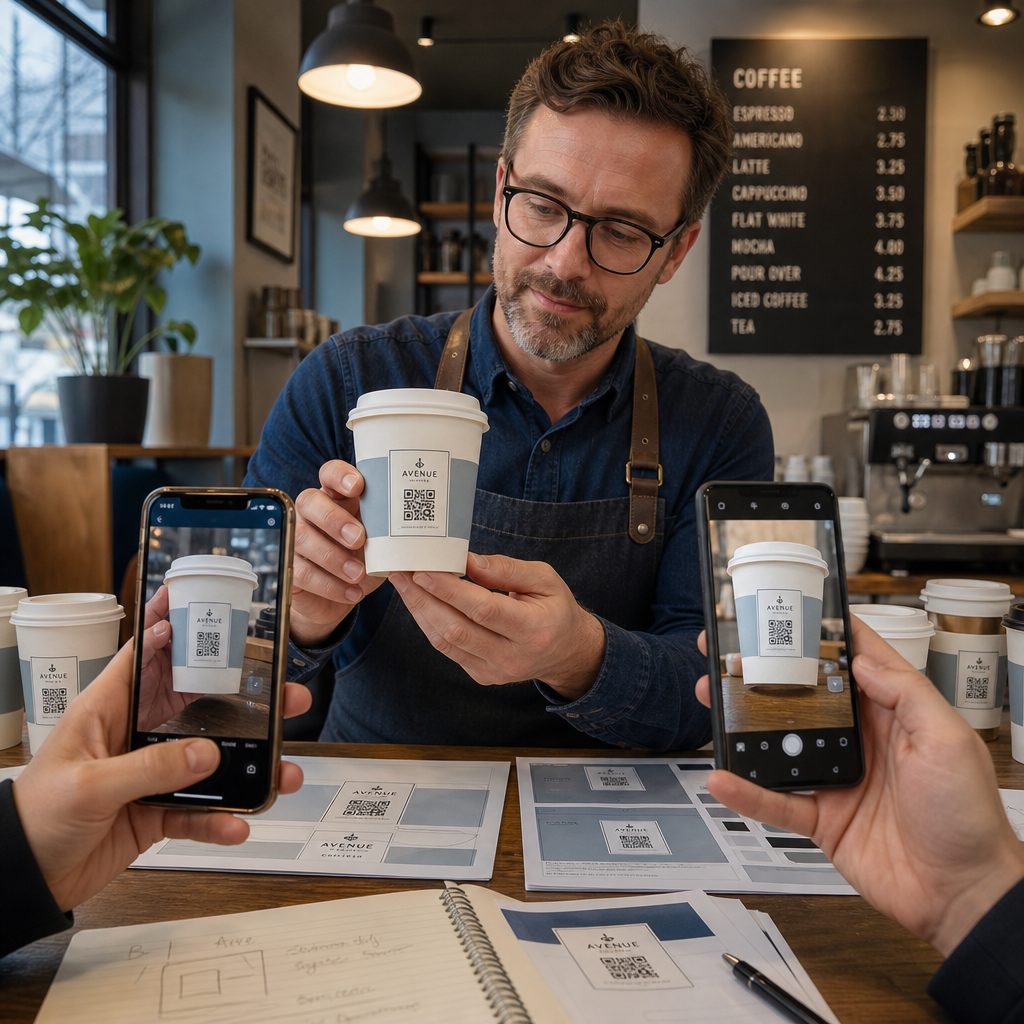
- Imprima una muestra en el material previsto – no solo pruebas en papel. El material de la taza, el recubrimiento y el método de impresión afectan el resultado final.
- Pruebe con múltiples dispositivos – como mínimo, un iPhone reciente y un Android de gama media. Los dispositivos más antiguos con cámaras de menor resolución presentan la prueba más exigente.
- Escanee desde ángulos realistas – los clientes sostienen las tazas en varios ángulos, no directamente perpendiculares a la etiqueta. Pruebe a 15° y 30° fuera del eje.
- Pruebe en el entorno de iluminación real – la iluminación cenital de la cafetería suele ser cálida y direccional, lo que afecta el contraste de manera diferente a la iluminación de oficina estándar.
- Verifique que el destino se cargue correctamente – escanee el código con datos móviles, no solo Wi-Fi, y confirme que la página de destino esté optimizada para móviles y se cargue en menos de tres segundos.
Si el código falla en alguna de estas pruebas, ajuste el tamaño, el contraste o la ubicación antes de imprimir miles de unidades. Para una lista de verificación completa, el guía de códigos QR en etiquetas de productos recorre los mismos principios de control de calidad con más detalle.
Escriba una llamada a la acción que gane el escaneo
El código QR en sí mismo no comunica nada sobre por qué un cliente debería escanearlo. Siempre empareje el código con una breve llamada a la acción – típicamente de cuatro a ocho palabras posicionadas directamente encima o debajo del código. Ejemplos:
- “Escanee para ver las ofertas de hoy”
- “Obtenga un 15% de descuento en su próximo pedido”
- “Déjenos una reseña”
- “Vea qué hay en su taza”
La llamada a la acción responde a la pregunta implícita del cliente: ¿qué pasa si hago esto? Sin ella, incluso un código QR técnicamente perfecto tendrá un rendimiento inferior.
Poner un código QR funcional y de marca en una taza de café es totalmente factible con la configuración técnica adecuada. Ajústelo para superficies curvas, mantenga la zona tranquila despejada, use alto contraste en un acabado mate, configure la corrección de errores en Nivel H, y siempre pruebe en una muestra física antes de la producción. Elija códigos dinámicos para que pueda actualizar destinos y medir el rendimiento sin reimprimir.
Comience a construir su código QR para tazas con el Generador de códigos QR de Pageloot – exporte en formatos vectoriales listos para imprimir, agregue su logotipo y colores de marca, y conéctelo a análisis desde el primer día.
Preguntas frecuentes
Para impresión plana, el mínimo estándar es de 0.8 pulg. × 0.8 pulg. (2 cm × 2 cm). En una superficie de taza curvada, aumente eso en un 20–30% para compensar la distorsión por curvatura – así que apunte a al menos 1.0 pulg. × 1.0 pulg. El código debe caber completamente dentro de la zona plana de la taza sin envolver los lados.
Sí, pero la ubicación es crítica. Use el área más plana de la cara frontal de la taza, haga el código más grande de lo que lo haría para una impresión plana, asegure un fuerte contraste con módulos oscuros sobre un fondo claro, evite acabados brillantes en el área del código, y configure la corrección de errores en Nivel H. Siempre pruebe una muestra física con múltiples dispositivos antes de ordenar al por mayor.
Asocia el destino a tu objetivo de campaña. Los usos comunes incluyen menús digitales, promociones de temporada, cupones de descuento, páginas de reseñas de Google o perfiles de redes sociales. Usa un código QR dinámico para que puedas actualizar el destino después de la impresión – esto es especialmente importante para vasos impresos en grandes cantidades, ya que los códigos no se pueden reimprimir si una oferta expira o una URL cambia.