Tertanya-tanya bagaimana untuk meletakkan kod QR yang boleh diimbas pada cawan kopi tanpa ia gagal setiap kali pelanggan menghalakan telefon mereka kepadanya? Kod yang direka bentuk dengan buruk pada permukaan melengkung mengecewakan pelanggan dan membazirkan cetakan anda. Panduan ini membimbing anda melalui setiap keputusan, dari penempatan hingga kandungan, supaya cawan anda benar-benar memberikan hasil.
Mengapa Cawan Kopi Adalah Permukaan Kod QR yang Berharga
Cawan kopi berada di tangan pelanggan selama beberapa minit. Masa pegangan itu adalah peluang pemasaran yang kebanyakan jenama kurang gunakan.
Hampir 83.4 juta orang dewasa A.S. mengimbas kod QR pada tahun 2022, jumlah yang diunjurkan mencapai 42.6% pengguna telefon pintar dewasa menjelang 2025. Secara berasingan, 45% pembeli A.S. mengimbas kod QR berkaitan pemasaran dalam tempoh tiga bulan, dengan golongan berusia 18–29 tahun menerajui penggunaan. Kedai kopi, kafe, dan program barangan berjenama berada di persimpangan dua kes penggunaan kod QR teratas yang dilaporkan pengguna: menu restoran dan maklumat produk makanan dan minuman.
Cawan dengan kod QR yang dilaksanakan dengan baik boleh mencapai mana-mana yang berikut tanpa menambah masa kakitangan:
- Mengarahkan pelanggan ke menu digital atau tawaran istimewa bermusim
- Mendorong ulasan Google serta-merta selepas pengalaman positif
- Memberikan kupon diskaun untuk kunjungan semula
- Mendorong ikutan media sosial atau penyertaan peraduan
- Menyediakan maklumat alergen atau sumber untuk pelanggan yang mementingkan kesihatan
Cabarannya adalah semata-mata teknikal: cawan melengkung, dan kod QR tidak.
Bagaimana Permukaan Melengkung Mempengaruhi Kebolehimbasan
Kod QR yang dicetak rata pada kertas mudah diimbas kerana setiap modul – petak kecil yang membentuk kod itu – berada pada satah yang sama. Apabila kod yang sama itu melilit silinder, modul-modul di tepi melengkung menjauhi garis penglihatan kamera. Pengimbas melihat grid yang herot, dan penyahkodan gagal.
Ini bukan masalah hipotesis. Ia adalah sebab paling biasa kod QR pada cawan tidak berfungsi. Memahami geometri membantu anda mereka bentuk mengatasinya.
Tiga faktor fizikal yang menentang anda:
- Herotan kelengkungan: Modul-modul di sisi kod melengkung menjauhi kamera, menjadikannya kelihatan termampat atau tidak kelihatan.
- Kemasan reflektif: Salutan cawan berkilat atau lamina menghasilkan silau yang menghilangkan kontras, terutamanya di bawah pencahayaan kafe atas kepala.
- Pendaftaran cetakan: Pembuatan cawan kertas melibatkan jahitan dan sambungan; kod yang merentasi jahitan tidak akan mengimbas dengan boleh dipercayai.
Setiap satu daripadanya mempunyai penyelesaian teknikal langsung, yang dibincangkan dalam bahagian di bawah.
Saiz dan Penempatan pada Cawan
Pastikan Kod pada Kawasan Paling Rata yang Mungkin
Letakkan kod QR anda pada bahagian cawan dengan kelengkungan paling sedikit. Untuk cawan kertas standard, itu bermakna mengelakkan bahagian paling atas berhampiran bibir dan tirusan tapak. Jalur tengah cawan biasanya menawarkan zon cetakan paling rata.
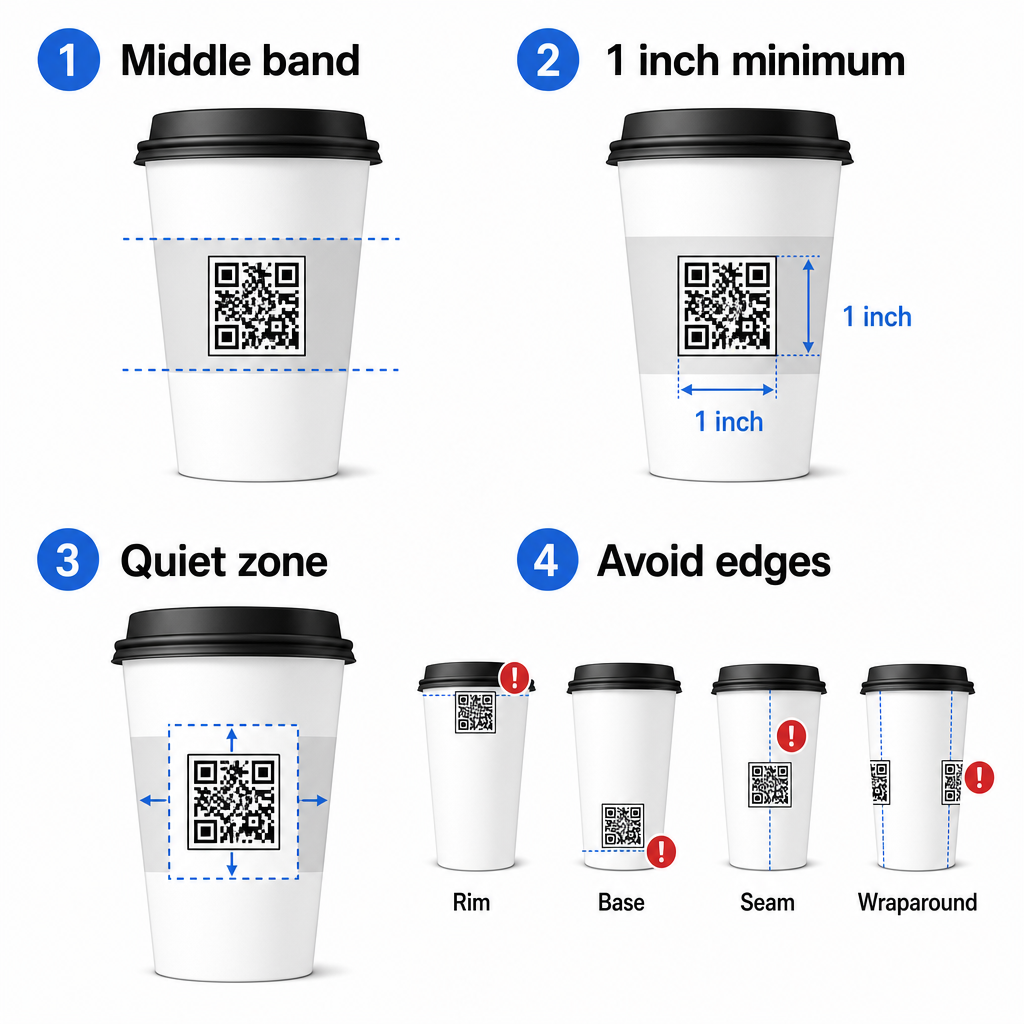
Jika anda bekerja dengan mug promosi sisi rata atau cawan perjalanan berbentuk segi empat, anda mempunyai panel rata semula jadi – gunakannya. Untuk mug seramik silinder, anggap muka hadapan sebagai zon sasaran anda.
Saiz Kod untuk Permukaan Melengkung
Untuk cetakan rata, saiz minimum 8 inci × 0.8 inci (kira-kira 2 cm × 2 cm) adalah cadangan standard untuk pengimbasan jarak dekat. Pada permukaan melengkung, minimum itu tidak mencukupi. Kerana kelengkungan mengherotkan saiz kod yang dilihat, meningkatkan saiz kod sebanyak 20–30% untuk aplikasi melengkung adalah dinasihatkan.
Secara praktikal, sasarkan sekurang-kurangnya 0 inci × 1.0 inci pada cawan kertas standard 12 oz, dan lebih besar lagi pada cawan tinggi 20 oz di mana diameter tong lebih besar dan kelengkungan kurang teruk.
Kod itu mesti muat sepenuhnya dalam satu muka cawan tanpa melilit sisi. Jika mana-mana sudut kod hilang di sekeliling kelengkungan, kod itu akan gagal.
Zon Senyap Tidak Boleh Dirunding
Zon senyap adalah margin kosong yang mengelilingi kod. Piawaian ISO menetapkan minimum empat modul ruang kosong di keempat-empat sisi. Pada cawan kopi, margin ini juga bertindak sebagai penampan terhadap tepi melengkung.
Jangan letakkan logo, grafik cawan, teks nutrisi, atau corak jenama di dalam zon senyap. panduan amalan terbaik kebolehbacaan kod QR meliputi keperluan zon senyap secara terperinci bersama faktor-faktor lain yang mempengaruhi pengimbasan yang boleh dipercayai.
Kontras dan Warna pada Bahan Cawan
Gunakan Gelap pada Terang
Pengimbas kod QR berfungsi dengan mengesan kontras antara modul gelap dan latar belakang terang. Nisbah kontras minimum yang disyorkan ialah 4:1, walaupun lebih tinggi sentiasa lebih baik – hitam pada putih mencapai 21:1.
Pada cawan kopi, dua masalah permukaan mengurangkan kontras yang berkesan:
- Stok kertas kraft atau coklat: Sebuah kod gelap dicetak terus pada kertas kraf tidak bersalut kehilangan kontras kerana latar belakang itu tidak putih. Gunakan panel bercetak putih atau lapisan banjir putih di bawah kod itu.
- Laminat berkilat: Kemasan reflektif memantulkan cahaya kembali ke kamera, memudarkan modul gelap. Minta kemasan matte di kawasan kod itu, walaupun sisa cawan itu berkilat.
Elakkan Kecerunan dan Latar Belakang Bercorak
Latar belakang kecerunan di bawah kod QR mencipta zon kontras yang boleh diterima dan zon kontras yang lemah. Pengimbas itu menilai keseluruhan kod itu, dan mana-mana kawasan yang jatuh di bawah ambang kontras boleh menyebabkan kegagalan. Gunakan latar belakang cahaya yang padu dan seragam di bawah kod itu.
Untuk cawan berjenama di mana warna penting kepada reka bentuk, anda boleh menggunakan warna jenama gelap sebagai latar depan pada latar belakang putih atau pucat – tetapi uji dengan teliti sebelum pengeluaran penuh. Yang panduan amalan terbaik kontras warna kod QR menyediakan kombinasi warna dan nisbah kontras tertentu untuk membimbing keputusan itu.
Spesifikasi Teknikal untuk Cetakan
Resolusi dan Format Fail
Cetak kod itu pada 300 DPI atau lebih tinggi. Imej raster resolusi rendah menghasilkan tepi modul kabur, yang mengurangkan kebolehimbasan dan kelihatan tidak profesional pada jarak dekat.
Bila-bila masa yang mungkin, gunakan format vektor (SVG atau EPS) daripada PNG atau JPG. Fail vektor berskala tanpa kehilangan kualiti, yang penting kerana pengeluar cawan sering mengubah saiz karya seni semasa pra-cetak. Pageloot penjana kod QR mengeksport fail vektor sedia cetak (.EPS, .PDF, .SVG) sesuai untuk dihantar terus kepada pencetak cawan anda.
Tahap Pembetulan Ralat
Kod QR mempunyai empat tahap pembetulan ralat: L, M, Q, dan H. Tahap yang lebih tinggi membenarkan lebih banyak kod itu rosak atau tersembunyi sambil masih mengimbas dengan jayanya. Untuk aplikasi cawan:
- Tahap H disyorkan jika anda membenamkan logo di dalam kod itu, kerana ia membenarkan sehingga 30% daripada kod itu tersembunyi.
- Tahap Q atau H adalah dinasihatkan untuk mana-mana permukaan melengkung, kerana herotan permukaan secara berkesan merosakkan bahagian kod itu semasa pengimbasan.
Jangan gunakan Tahap L pada cawan. Ia tidak memberikan toleransi untuk herotan fizikal yang wujud pada percetakan melengkung.
Corak Pencari Mesti Kekal Jelas
Tiga segi empat sama besar di sudut-sudut kod QR adalah corak pencari. Ia memberitahu pengimbas itu di mana kod itu bermula, berakhir, dan bagaimana ia diorientasikan. Jangan pangkas, bertindih, atau ubah suai corak pencari itu dengan grafik jenama. Ini adalah salah satu ralat reka bentuk yang paling biasa pada pembungkusan bercetak tersuai, dan ia menghasilkan kod yang kelihatan profesional tetapi tidak pernah mengimbas.
Cipta Kod QR Sedia Cetak untuk Cawan Anda Jana kod QR resolusi tinggi yang boleh disesuaikan sepenuhnya dengan tahap pembetulan ralat yang betul, eksport vektor, dan pilihan penjenamaan menggunakan Penjana Kod Pageloot QR. Muat turun dalam format .EPS, .PDF, atau .SVG sedia untuk dihantar kepada pengeluar cawan anda.
Memilih Apa yang Dipautkan oleh Kod QR
Pelaksanaan fizikal itu penting, tetapi begitu juga apa yang berlaku selepas imbasan. Pelanggan yang mengimbas kod cawan telah mengenal pasti diri sebagai terlibat – jangan hantar mereka ke halaman utama generik.
Padankan destinasi itu dengan konteks:
| Gunakan Kes | Jenis QR yang Disyorkan | Alat |
|---|---|---|
| Menu digital atau minuman bermusim | Kod QR menu | Penjana menu QR untuk kedai makan |
| Diskaun untuk lawatan kembali | Halaman pendaratan kupon | Penjana QR code eCoupon |
| Ulasan Google selepas pembelian | Pautan ulasan langsung | Cara buat QR Google review |
| Laman web, sosial, atau halaman pendaratan promosi | Ubah hala URL | Penjana Kod QR Pautan |
Untuk kafe dan kedai kopi, alat kod QR restoran Pageloot menyokong menu digital, pesanan, dan pengumpulan ulasan dalam satu platform.
Gunakan Kod QR Dinamik untuk Kempen Cawan
Kod QR statik mengekod URL destinasi secara kekal. Jika promosi bermusim anda berakhir, anda tidak boleh mengemas kini kod itu – dan mana-mana cawan yang tinggal dengan kod itu menjadi jalan buntu.
A kod QR dinamik menyimpan URL ubah hala pendek dalam kod itu sendiri. Anda mengawal ke mana ubah hala itu menunjuk dari papan pemuka, dan anda boleh mengubahnya pada bila-bila masa tanpa mencetak semula satu cawan pun. Ini penting untuk kempen cawan kerana:
- Cetakan cawan sering dalam ribuan, dan pencetakan semula adalah mahal
- Promosi, menu, dan tawaran berubah mengikut musim
- Anda boleh menjalankan ujian A/B dengan menukar destinasi di tengah kempen
Kod dinamik juga menyediakan analitik imbasan – data tentang bila imbasan berlaku, peranti apa yang digunakan, dan di mana pelanggan berada. Data itu membolehkan anda mengukur reka bentuk atau penempatan cawan mana yang mendorong penglibatan paling banyak, dan menyesuaikan cetakan masa depan dengan sewajarnya.
Jejaki Setiap Imbasan dari Kempen Cawan Anda Tukar kepada kod QR dinamik untuk mengemas kini destinasi dengan pantas dan memantau prestasi masa nyata. Yang Penjana Kod Pageloot QR memberikan anda papan pemuka analitik penuh bersama kawalan penyuntingan – semuanya tanpa mencetak semula cawan anda.
Penjenamaan Kod QR Cawan Anda
Kod QR hitam-putih biasa berfungsi, tetapi kod berjenama mengukuhkan pengiktirafan dan memperoleh lebih banyak imbasan. Pageloot QR code with logo membolehkan anda:
- Benamkan logo jenama anda di tengah kod itu
- Gunakan warna jenama pada modul dan latar belakang
- Pilih daripada templat reka bentuk untuk corak badan dan gaya tepi
- Tambah bingkai seruan tindakan (cth., “Imbas untuk diskaun 10% pada pesanan anda yang seterusnya”)
Apabila menambah logo, pastikan ia tidak melebihi 30% daripada kawasan kod dan tetapkan pembetulan ralat kepada Tahap H. Logo menduduki ruang yang sebaliknya akan membawa data terkod, dan pembetulan ralat Tahap H mengimbangi pertindihan itu.
Untuk konsistensi merentasi pesanan cawan yang besar atau kempen berbilang lokasi, Pageloot’s Folder kod QR membolehkan anda menyusun kod mengikut kempen, lokasi, atau saiz cawan supaya pasukan anda dapat menguruskannya tanpa kehilangan jejak.
Untuk panduan berkaitan aplikasi pembungkusan, halaman-halaman pada kod QR pada pembungkusan produk dan kod QR pada pembungkusan makanan meliputi pertimbangan yang terpakai secara langsung pada cawan.
Pengujian Sebelum Cetakan Anda
Tiada jumlah reka bentuk yang teliti dapat menggantikan pengujian fizikal pada cawan sebenar. Sebelum anda komited kepada pengeluaran penuh:
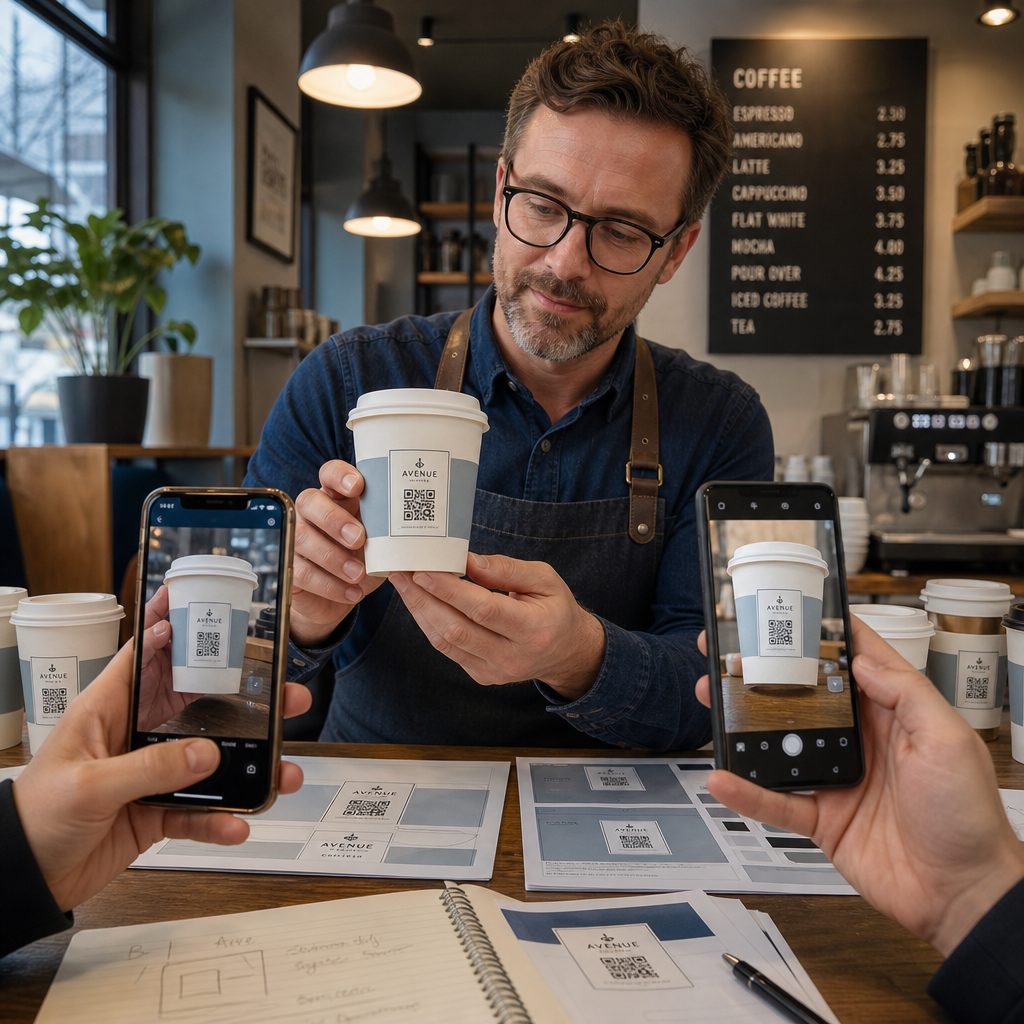
- Cetak sampel pada bahan yang dimaksudkan – bukan sekadar bukti kertas. Stok cawan, salutan, dan kaedah cetakan semuanya mempengaruhi hasil akhir.
- Uji dengan pelbagai peranti – sekurang-kurangnya, iPhone terkini dan Android pertengahan. Peranti lama dengan kamera resolusi rendah memberikan ujian yang paling mencabar.
- Imbas dari sudut yang realistik – pelanggan memegang cawan pada pelbagai sudut, bukan secara langsung berserenjang dengan label. Uji pada 15° dan 30° di luar paksi.
- Uji dalam persekitaran pencahayaan sebenar – pencahayaan kafe atas kepala selalunya hangat dan berarah, yang mempengaruhi kontras secara berbeza daripada pencahayaan pejabat standard.
- Sahkan destinasi dimuatkan dengan betul – imbas kod pada data selular, bukan hanya Wi-Fi, dan sahkan halaman pendaratan dioptimumkan untuk mudah alih dan dimuatkan dalam masa kurang daripada tiga saat.
Jika kod gagal mana-mana ujian ini, laraskan saiz, kontras, atau penempatan sebelum mencetak ribuan unit. Untuk senarai semak yang komprehensif, panduan kod QR pada label produk menjelaskan prinsip kawalan kualiti yang sama dengan lebih terperinci.
Tulis Seruan Tindakan Yang Mendapat Imbasan
Kod QR itu sendiri tidak menyampaikan apa-apa tentang mengapa pelanggan perlu mengimbasnya. Sentiasa pasangkan kod dengan seruan tindakan ringkas – biasanya empat hingga lapan perkataan yang diletakkan secara langsung di atas atau di bawah kod. Contoh:
- “Imbas untuk tawaran istimewa hari ini”
- “Dapatkan diskaun 15% pada pesanan anda yang seterusnya”
- “Tinggalkan ulasan untuk kami”
- “Lihat apa yang ada dalam cawan anda”
Seruan tindakan menjawab soalan tersirat pelanggan: apa yang berlaku jika saya melakukan ini? Tanpa itu, walaupun kod QR yang sempurna secara teknikal akan berprestasi rendah.
Meletakkan kod QR berjenama yang berfungsi pada cawan kopi adalah sepenuhnya boleh dicapai dengan persediaan teknikal yang betul. Saizkannya untuk permukaan melengkung, pastikan zon senyap jelas, gunakan kontras tinggi pada kemasan matte, tetapkan pembetulan ralat kepada Tahap H, dan sentiasa uji pada sampel fizikal sebelum pengeluaran. Pilih kod dinamik supaya anda boleh mengemas kini destinasi dan mengukur prestasi tanpa mencetak semula.
Mula membina kod QR cawan anda dengan Penjana Kod Pageloot QR – eksport dalam format vektor sedia cetak, tambah logo dan warna jenama anda, dan sambungkannya kepada analitik dari hari pertama.
Soalan lazim
Untuk cetakan rata, minimum standard ialah 0.8 inci × 0.8 inci (2 cm × 2 cm). Pada permukaan cawan melengkung, tingkatkan itu sebanyak 20–30% untuk mengimbangi herotan kelengkungan – jadi sasarkan sekurang-kurangnya 1.0 inci × 1.0 inci. Kod mesti muat sepenuhnya dalam zon rata cawan tanpa melilit di sekeliling sisi.
Ya, tetapi penempatan adalah kritikal. Gunakan kawasan paling rata pada muka hadapan mug, saizkan kod lebih besar daripada yang anda lakukan untuk cetakan rata, pastikan kontras yang kuat dengan modul gelap pada latar belakang terang, elakkan kemasan berkilat di kawasan kod, dan tetapkan pembetulan ralat kepada Tahap H. Sentiasa uji sampel fizikal dengan pelbagai peranti sebelum membuat pesanan secara pukal.
Padankan destinasi dengan matlamat kempen anda. Kegunaan biasa termasuk menu digital, promosi bermusim, kupon diskaun, halaman ulasan Google, atau profil media sosial. Gunakan kod QR dinamik supaya anda boleh mengemas kini destinasi selepas mencetak – ini amat penting untuk cawan yang dicetak dalam kuantiti yang banyak, kerana kod tidak boleh dicetak semula jika tawaran tamat tempoh atau URL berubah.