Ti stai chiedendo come mettere un codice QR scansionabile su una tazza da caffè senza che fallisca ogni volta che un cliente punta il telefono su di essa? Un codice mal progettato su una superficie curva frustra i clienti e spreca la tua tiratura di stampa. Questa guida ti accompagna attraverso ogni decisione, dal posizionamento al contenuto, in modo che le tue tazze forniscano effettivamente risultati.
Perché le tazze da caffè sono una preziosa superficie per codici QR
Le tazze da caffè trascorrono diversi minuti nelle mani di un cliente. Quel tempo di permanenza è un'opportunità di marketing che la maggior parte dei marchi sottoutilizza.
Quasi 83,4 milioni di adulti statunitensi hanno scansionato un codice QR nel 2022, un numero che si prevede raggiungerà il 42,6% degli utenti di smartphone adulti entro il 2025. Separatamente, il 45% degli acquirenti statunitensi ha scansionato un codice QR legato al marketing in una finestra di tre mesi, con i 18-29enni in testa all'adozione. Caffetterie, bar e programmi di merchandising di marca si trovano all'intersezione di due dei principali casi d'uso dei codici QR segnalati dai consumatori: menu di ristoranti e informazioni sui prodotti alimentari e bevande.
Una tazza con un codice QR ben eseguito può realizzare uno qualsiasi dei seguenti obiettivi senza aggiungere tempo al personale:
- Indirizzare i clienti a un menu digitale o a offerte stagionali
- Sollecitare una recensione su Google immediatamente dopo un'esperienza positiva
- Consegnare un buono sconto per una visita di ritorno
- Guidare i follower sui social media o le iscrizioni a concorsi
- Fornire informazioni su allergeni o provenienza per i clienti attenti alla salute
La sfida è puramente tecnica: le tazze si curvano, e i codici QR no.
Come le superfici curve influenzano la scansionabilità
Un codice QR stampato in piano su carta si scansiona facilmente perché ogni modulo – i piccoli quadrati che compongono il codice – si trova sullo stesso piano. Quando lo stesso codice si avvolge attorno a un cilindro, i moduli ai bordi si curvano allontanandosi dalla linea di vista della fotocamera. Lo scanner vede una griglia distorta, e la decodifica fallisce.
Questo non è un problema ipotetico. È la ragione più comune per cui i codici QR sulle tazze non funzionano. Comprendere la geometria ti aiuta a progettare tenendone conto.
Tre fattori fisici lavorano contro di te:
- Distorsione della curvatura: I moduli sui lati del codice si piegano lontano dalla fotocamera, facendoli apparire compressi o invisibili.
- Finiture riflettenti: Rivestimenti lucidi per tazze o laminati creano un bagliore che annulla il contrasto, in particolare sotto l'illuminazione a soffitto del caffè.
- Registrazione di stampa: La produzione di tazze di carta comporta cuciture e giunzioni; un codice che si estende su una cucitura non si scansionerà in modo affidabile.
Ognuno di questi ha una soluzione tecnica diretta, trattata nelle sezioni seguenti.
Dimensionamento e posizionamento su una tazza
Mantieni il codice sull'area più piatta possibile
Posiziona il tuo codice QR sulla sezione della tazza con la minore curvatura. Per una tazza di carta standard, ciò significa evitare la parte superiore vicino al bordo e la conicità della base. La fascia centrale della tazza offre tipicamente la zona stampabile più piatta.
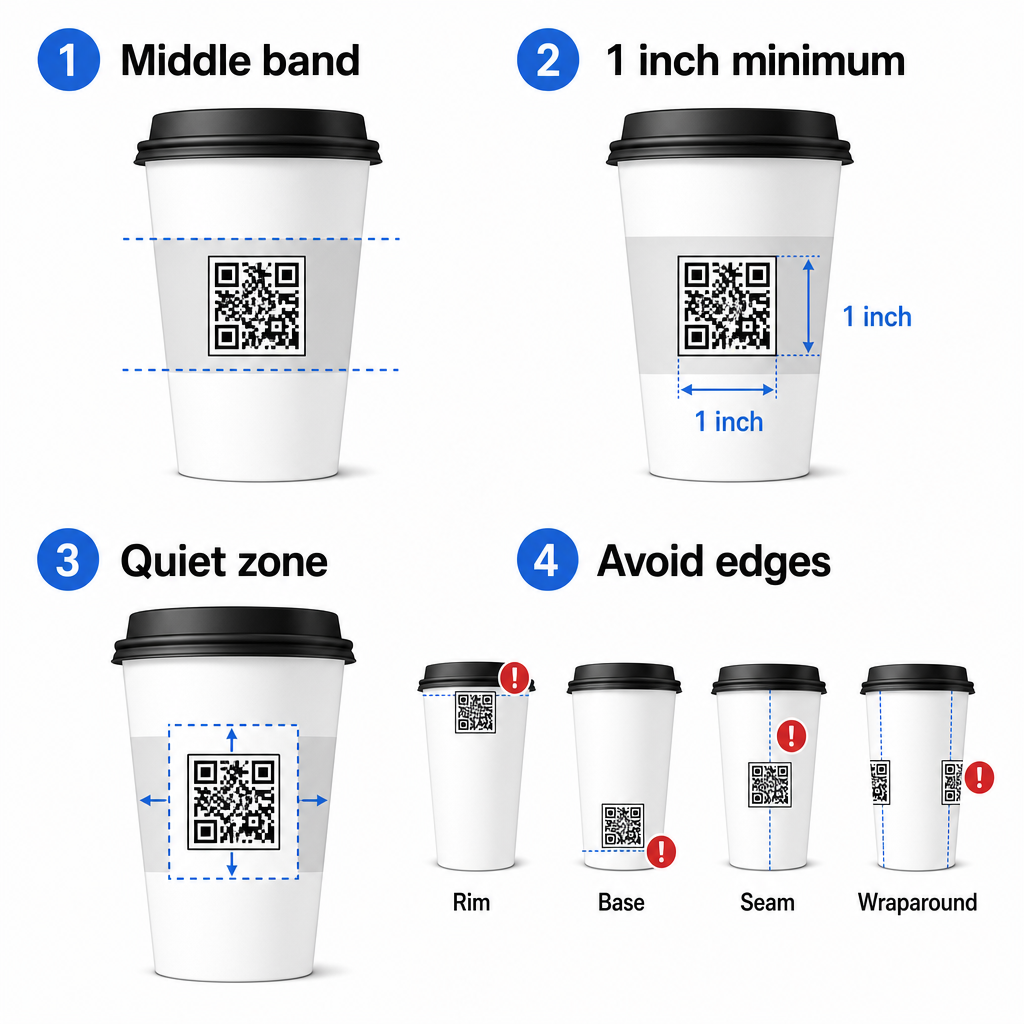
Se stai lavorando con una tazza promozionale a lati piatti o una tazza da viaggio squadrata, hai un pannello piatto naturale – usalo. Per le tazze in ceramica cilindriche, tratta la faccia anteriore come la tua zona target.
Dimensiona il codice per superfici curve
Per la stampa piatta, una dimensione minima di 0,8 pollici × 0,8 pollici (circa 2 cm × 2 cm) è la raccomandazione standard per la scansione a distanza ravvicinata. Su una superficie curva, quel minimo non è sufficiente. Poiché la curvatura distorce la dimensione percepita del codice, è consigliabile aumentare la dimensione del codice del 20–30% per applicazioni curve.
In termini pratici, punta almeno a 1,0 pollici × 1,0 pollici su una tazza di carta standard da 12 once, e ancora più grande su una tazza alta da 20 once dove il diametro del corpo è maggiore e la curvatura è meno severa.
Il codice deve rientrare interamente in una faccia della tazza senza avvolgersi attorno ai lati. Se un qualsiasi angolo del codice scompare attorno alla curvatura, il codice fallirà.
La zona di silenzio è non negoziabile
La zona di silenzio è il margine bianco che circonda il codice. Gli standard ISO specificano un minimo di quattro moduli di spazio libero su tutti e quattro i lati. Su una tazza da caffè, questo margine agisce anche come un cuscinetto contro il bordo curvo.
Non posizionare loghi, grafiche della tazza, testo nutrizionale o motivi del marchio all'interno della zona di silenzio. Il guida alle migliori pratiche per la leggibilità dei codici QR copre i requisiti della zona di silenzio in dettaglio insieme ad altri fattori che influenzano la scansione affidabile.
Contrasto e colore sui materiali delle tazze
Usa scuro su chiaro
Gli scanner di codici QR funzionano rilevando il contrasto tra moduli scuri e uno sfondo chiaro. Il rapporto di contrasto minimo raccomandato è 4:1, sebbene un contrasto maggiore sia sempre migliore – il nero su bianco raggiunge 21:1.
Sulle tazze da caffè, due problemi di superficie riducono il contrasto effettivo:
- Carta kraft o marrone: Un codice scuro stampato direttamente su carta kraft non patinata perde contrasto perché lo sfondo non è bianco. Utilizzare un pannello stampato bianco o una base bianca sotto il codice.
- Laminato lucido: Le finiture riflettenti riflettono la luce verso la fotocamera, sbiadendo i moduli scuri. Richiedere una finitura opaca nell'area del codice, anche se il resto della tazza è lucido.
Evitare sfumature e sfondi a fantasia
Uno sfondo sfumato sotto un codice QR crea zone di contrasto accettabile e zone di scarso contrasto. Lo scanner valuta l'intero codice, e qualsiasi regione che scende al di sotto della soglia di contrasto può causare un errore. Utilizzare uno sfondo chiaro, solido e uniforme sotto il codice.
Per le tazze brandizzate dove il colore è importante per il design, è possibile utilizzare un colore scuro del marchio come primo piano su uno sfondo bianco o chiaro – ma testare attentamente prima della produzione completa. Il guida alle migliori pratiche di contrasto colore per codici QR fornisce specifiche combinazioni di colori e rapporti di contrasto per guidare tali decisioni.
Specifiche tecniche per la stampa
Risoluzione e Formato File
Stampare il codice a 300 DPI o superiore. Un'immagine raster a bassa risoluzione produce bordi dei moduli sfocati, il che riduce la scansionabilità e appare poco professionale a distanza ravvicinata.
Quando possibile, utilizzare un formato vettoriale (SVG o EPS) piuttosto che un PNG o JPG. I file vettoriali si scalano senza alcuna perdita di qualità, il che è importante perché i produttori di tazze spesso ridimensionano le opere d'arte durante la prestampa. Il generatore di codici QR esporta file vettoriali pronti per la stampa (.EPS, .PDF, .SVG) adatti per l'invio diretto alla stampante delle tazze.
Livello di correzione degli errori
I codici QR hanno quattro livelli di correzione degli errori: L, M, Q ed H. Livelli più alti consentono che una maggiore parte del codice sia danneggiata o oscurata pur consentendo una scansione riuscita. Per le applicazioni su tazza:
- Livello H è consigliato se si incorpora un logo all'interno del codice, poiché consente che fino al 30% del codice sia oscurato.
- Livello Q o H è consigliabile per qualsiasi superficie curva, perché la distorsione della superficie danneggia efficacemente porzioni del codice durante la scansione.
Non utilizzare il Livello L su una tazza. Non offre alcuna tolleranza per le distorsioni fisiche inerenti alla stampa curva.
I pattern di ricerca devono rimanere chiari
I tre grandi quadrati negli angoli di un codice QR sono pattern di ricerca. Indicano allo scanner dove il codice inizia, finisce e come è orientato. Non ritagliare, sovrapporre o modificare i pattern di ricerca con grafiche del marchio. Questo è uno degli errori di design più comuni sugli imballaggi stampati su misura, e produce codici che sembrano professionali ma non scansionano mai.
Crea codici QR pronti per la stampa per le tue tazze Genera un codice QR completamente personalizzabile e ad alta risoluzione con il livello di correzione degli errori corretto, l'esportazione vettoriale e le opzioni di branding utilizzando il Generatore di codici QR di Pageloot. Scarica in formato .EPS, .PDF o .SVG pronto per essere inviato al tuo produttore di tazze.
Scegliere a cosa si collega il codice QR
L'esecuzione fisica è importante, ma lo è anche ciò che accade dopo la scansione. Un cliente che scansiona un codice su una tazza si è auto-identificato come coinvolto – non inviarlo a una homepage generica.
Abbina la destinazione al contesto:
| Caso d'uso | Tipo di QR Consigliato | Strumento |
|---|---|---|
| Menu digitale o bevande stagionali | Codice QR del menu | Generatore di QR code per menu |
| Sconto per la visita di ritorno | Pagina di destinazione del coupon | Generatore di QR code per coupon |
| Recensione Google post-acquisto | Link diretto alla recensione | Generatore di QR code per recensioni Google |
| Sito web, social o pagina di destinazione promozionale | Reindirizzamento URL | Generatore di codici QR per link |
Per caffè e caffetterie, gli strumenti per codici QR per ristoranti di Pageloot supportano menu digitali, ordinazioni e raccolta di recensioni in un'unica piattaforma.
Utilizzare codici QR dinamici per campagne su tazza
Un codice QR statico codifica l'URL di destinazione in modo permanente. Se la tua promozione stagionale termina, non puoi aggiornare il codice – e qualsiasi tazza rimanente con quel codice diventa un vicolo cieco.
UN codice QR dinamico memorizza un URL di reindirizzamento breve nel codice stesso. Controlli dove punta quel reindirizzamento da una dashboard, e puoi cambiarlo in qualsiasi momento senza ristampare una singola tazza. Questo è fondamentale per le campagne su tazza perché:
- Le tirature di stampa delle tazze sono spesso nell'ordine delle migliaia, e la ristampa è costosa
- Promozioni, menu e offerte cambiano stagionalmente
- Puoi eseguire test A/B cambiando le destinazioni a metà campagna
I codici dinamici forniscono anche dati di scansione – dati su quando sono avvenute le scansioni, quali dispositivi sono stati utilizzati e dove si trovavano i clienti. Questi dati ti consentono di misurare quali design o posizionamenti delle tazze hanno generato il maggior coinvolgimento, e di adattare di conseguenza le future tirature di stampa.
Traccia ogni scansione dalla tua campagna su tazza Passa a un codice QR dinamico per aggiornare le destinazioni al volo e monitorare le prestazioni in tempo reale. Il Generatore di codici QR di Pageloot ti offre una dashboard di analisi completa insieme ai controlli di modifica – il tutto senza ristampare le tue tazze.
Branding del tuo codice QR su tazza
Un semplice codice QR in bianco e nero funziona, ma un codice brandizzato rafforza il riconoscimento e genera più scansioni. Il Generatore di QR code con logo ti consente di:
- Incorporare il logo del tuo marchio al centro del codice
- Applicare i colori del marchio ai moduli e allo sfondo
- Scegli tra modelli di design per il motivo del corpo e lo stile del bordo
- Aggiungi una cornice di invito all'azione (ad es., “Scansiona per il 10% di sconto sul tuo prossimo ordine”)
Quando aggiungi un logo, mantienilo non più del 30% dell'area del codice e imposta la correzione degli errori a Livello H. Il logo occupa spazio che altrimenti conterrebbe dati codificati, e la correzione degli errori di Livello H compensa tale sovrapposizione.
Per coerenza tra un grande ordine di tazze o una campagna multi-sede, Pageloot’s Cartelle per QR code ti permettono di organizzare i codici per campagna, posizione o dimensione della tazza in modo che il tuo team possa gestirli senza perdere traccia.
Per indicazioni correlate sulle applicazioni di imballaggio, le pagine su codici QR sulle confezioni dei prodotti e i codici QR sugli imballaggi alimentari coprono considerazioni che si applicano direttamente alle tazze.
Test prima della tua tiratura di stampa
Nessuna quantità di design accurato sostituisce i test fisici sulla tazza reale. Prima di impegnarti in una tiratura di produzione completa:

- Stampa un campione sul materiale previsto – non solo prove su carta. Il materiale della tazza, il rivestimento e il metodo di stampa influenzano tutti il risultato finale.
- Testa con più dispositivi – come minimo, un iPhone recente e un Android di fascia media. I dispositivi più vecchi con fotocamere a bassa risoluzione presentano il test più impegnativo.
- Scansiona da angolazioni realistiche – i clienti tengono le tazze a varie angolazioni, non direttamente perpendicolari all'etichetta. Testa a 15° e 30° fuori asse.
- Testa nell'ambiente di illuminazione reale – l'illuminazione del caffè dall'alto è spesso calda e direzionale, il che influisce sul contrasto in modo diverso rispetto all'illuminazione standard dell'ufficio.
- Verifica che la destinazione si carichi correttamente – scansiona il codice su dati cellulari, non solo Wi-Fi, e conferma che la pagina di destinazione sia ottimizzata per dispositivi mobili e si carichi in meno di tre secondi.
Se il codice fallisce uno di questi test, regola dimensione, contrasto o posizionamento prima di stampare migliaia di unità. Per una checklist completa, il guida ai codici QR sulle etichette dei prodotti illustra gli stessi principi di controllo qualità più in dettaglio.
Scrivi un invito all'azione che guadagni la scansione
Il codice QR stesso non comunica nulla sul motivo per cui un cliente dovrebbe scansionarlo. Abbina sempre il codice a un breve invito all'azione – tipicamente da quattro a otto parole posizionate direttamente sopra o sotto il codice. Esempi:
- “Scansiona per le offerte di oggi”
- “Ottieni il 15% di sconto sul tuo prossimo ordine”
- “Lasciaci una recensione”
- “Scopri cosa c'è nella tua tazza”
L'invito all'azione risponde alla domanda implicita del cliente: cosa succede se lo faccio? Senza di esso, anche un codice QR tecnicamente perfetto avrà prestazioni inferiori.
Mettere un codice QR funzionante e di marca su una tazza di caffè è del tutto realizzabile con la giusta configurazione tecnica. Dimensionarlo per superfici curve, mantenere chiara la zona di silenzio, utilizzare un contrasto elevato su una finitura opaca, impostare la correzione degli errori a Livello H e testare sempre su un campione fisico prima della produzione. Scegli codici dinamici in modo da poter aggiornare le destinazioni e misurare le prestazioni senza ristampare.
Inizia a costruire il tuo codice QR per tazza con il Generatore di codici QR di Pageloot – esporta in formati vettoriali pronti per la stampa, aggiungi il tuo logo e i colori del marchio, e collegalo all'analisi dal primo giorno.
Domande frequenti
Per la stampa piatta, il minimo standard è 0,8 pollici × 0,8 pollici (2 cm × 2 cm). Su una superficie curva della tazza, aumentalo del 20–30% per compensare la distorsione della curvatura – quindi punta ad almeno 1,0 pollici × 1,0 pollici. Il codice deve rientrare interamente all'interno della zona piatta della tazza senza avvolgersi sui lati.
Sì, ma il posizionamento è fondamentale. Usa l'area più piatta della parte anteriore della tazza, dimensiona il codice più grande di quanto faresti per la stampa piatta, assicura un forte contrasto con moduli scuri su uno sfondo chiaro, evita finiture lucide nell'area del codice, e imposta la correzione degli errori a Livello H. Testa sempre un campione fisico con più dispositivi prima di ordinare in blocco.
Abbina la destinazione al tuo obiettivo di campagna. Gli usi comuni includono menu digitali, promozioni stagionali, buoni sconto, pagine di recensioni Google o profili sui social media. Utilizza un codice QR dinamico in modo da poter aggiornare la destinazione dopo la stampa – questo è particolarmente importante per le tazze stampate in grandi quantità, poiché i codici non possono essere ristampati se un'offerta scade o un URL cambia.