Gondolkodik azon, hogyan helyezhet el egy beolvasható QR kódot egy kávéscsészén anélkül, hogy az minden alkalommal hibát jelezne, amikor egy vásárló ráirányítja a telefonját? Egy rosszul megtervezett kód egy ívelt felületen frusztrálja a vásárlókat és pazarlást okoz a nyomtatás során. Ez az útmutató végigvezeti Önt minden döntésen, az elhelyezéstől a tartalomig, hogy a csészéi valóban eredményeket hozzanak.
Miért értékes QR kód felület a kávéscsésze
A kávéscsészék több percet töltenek a vásárló kezében. Ez a tartózkodási idő egy olyan marketinglehetőség, amelyet a legtöbb márka alulhasznál.
Közel 83,4 millió amerikai felnőtt szkennelt be QR kódot 2022-ben, ez a szám előrejelzések szerint 2025-re eléri a felnőtt okostelefon-használók 42,6%-át. Külön, az amerikai vásárlók 45%-a szkennelt be marketinggel kapcsolatos QR kódot egy három hónapos időszakban, a 18-29 évesek vezették az elfogadást. A kávézók, kávéházak és márkás termékprogramok a fogyasztók által jelentett két leggyakoribb QR kód felhasználási eset metszéspontjában helyezkednek el: éttermi menük és élelmiszer- és italtermék-információk.
Egy jól kivitelezett QR kóddal ellátott csésze a következőket érheti el anélkül, hogy további személyzeti időt igényelne:
- Közvetlenül digitális menühöz vagy szezonális különlegességekhez irányítja a vásárlókat
- Google értékelés kérése azonnal egy pozitív élmény után
- Kedvezményes kupon biztosítása visszatérő látogatáshoz
- Közösségi média követések vagy versenynevezések ösztönzése
- Allergén- vagy származási információk biztosítása egészségtudatos vásárlók számára
A kihívás tisztán technikai: a csészék íveltek, a QR kódok pedig nem.
Hogyan befolyásolják az ívelt felületek a beolvashatóságot
Egy papírra síkban nyomtatott QR kód könnyen beolvasható, mert minden modul – a kódot alkotó kis négyzetek – ugyanazon a síkon helyezkedik el. Amikor ugyanaz a kód egy henger köré tekeredik, a széleken lévő modulok elhajlanak a kamera látóteréből. A szkenner torz rácsot lát, és a dekódolás sikertelen.
Ez nem egy hipotetikus probléma. Ez a leggyakoribb ok, amiért a csészéken lévő QR kódok nem működnek. A geometria megértése segít a tervezésben.
Három fizikai tényező dolgozik Ön ellen:
- Görbület torzítás: A kód oldalain lévő modulok elhajlanak a kamerától, így összenyomottnak vagy láthatatlannak tűnnek.
- Fényvisszaverő felületek: A fényes csészebevonatok vagy laminátumok tükröződést okoznak, amely elmossa a kontrasztot, különösen a felső kávéházi világítás alatt.
- Nyomtatási illesztés: A papírpohár gyártása varratokat és illesztéseket tartalmaz; egy varratot átívelő kód nem fog megbízhatóan beolvasódni.
Mindegyiknek van közvetlen technikai megoldása, amelyet az alábbi szakaszok tárgyalnak.
Méretezés és elhelyezés egy csészén
Tartsa a kódot a lehető leglaposabb területen
Helyezze a QR kódot a csésze azon részére, ahol a legkevésbé ívelt. Egy szabványos papírpohár esetében ez azt jelenti, hogy kerülni kell a perem közelében lévő legfelső részt és az alap kúposságát. A csésze középső sávja jellemzően a leglaposabb nyomtatható zónát kínálja.
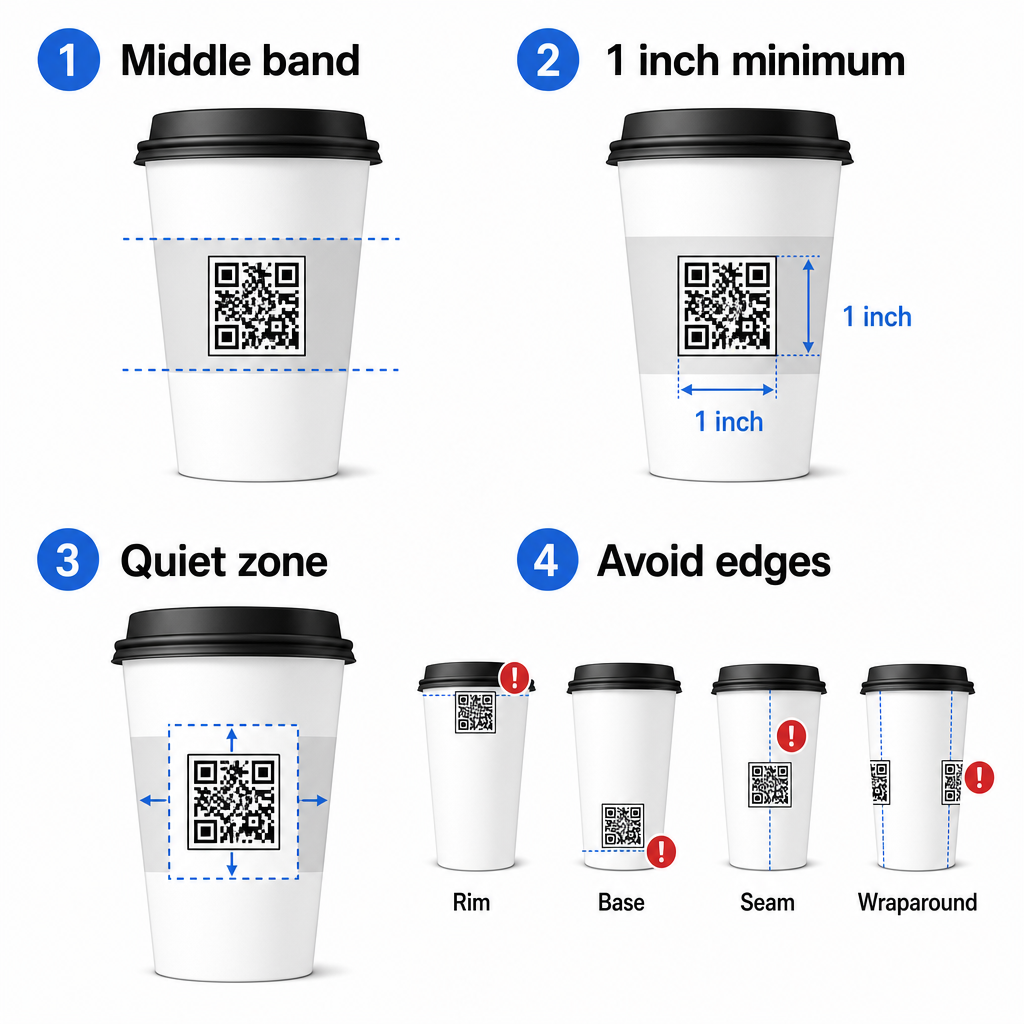
Ha lapos oldalú promóciós bögrével vagy szögletes utazóbögrével dolgozik, van egy természetes lapos panelje – használja azt. Hengeres kerámia bögrék esetén az elülső felületet tekintse célzónának.
Méretezze a kódot ívelt felületekhez
Sík nyomtatáshoz a minimális méret: 0,8 hüvelyk × 0,8 hüvelyk (kb. 2 cm × 2 cm) a szabványos ajánlás közeli szkenneléshez. Ívelt felületen ez a minimum nem elegendő. Mivel a görbület torzítja a kód érzékelt méretét, tanácsos a kód méretét 20-30%-kal növelni ívelt alkalmazások esetén.
Gyakorlati szempontból célozzon legalább 1,0 hüvelyk × 1,0 hüvelyk egy szabványos 12 unciás papírpoháron, és még nagyobb egy magas 20 unciás poháron, ahol a henger átmérője nagyobb és a görbület kevésbé súlyos.
A kódnak teljesen bele kell férnie a csésze egyik felületébe anélkül, hogy az oldalak köré tekeredne. Ha a kód bármely sarka eltűnik a görbület körül, a kód hibát jelez.
A csendes zóna nem tárgyalható
A csendes zóna a kódot körülvevő üres margó. Az ISO szabványok minimumot írnak elő: négy modult tiszta tér mind a négy oldalon. Egy kávéscsészén ez a margó pufferként is szolgál az ívelt éllel szemben.
Ne helyezzen el logókat, csésze grafikákat, táplálkozási szöveget vagy márkajelzéseket a csendes zónán belül. A QR-kód olvashatósági legjobb gyakorlatok útmutató részletesen tárgyalja a csendes zóna követelményeit, valamint más, a megbízható szkennelést befolyásoló tényezőket.
Kontraszt és szín a csésze anyagokon
Használjon sötétet világoson
A QR kód szkennerek a sötét modulok és a világos háttér közötti kontraszt érzékelésével működnek. Az ajánlott minimális kontrasztarány: 4:1, bár a magasabb mindig jobb – a fekete fehéren 21:1 arányt ér el.
Kávéscsészéken két felületi probléma csökkenti a hatékony kontrasztot:
- Kraft vagy barna papír alapanyag: Egy sötét kód, amelyet közvetlenül bevonat nélküli kraftpapírra nyomtatnak, elveszíti a kontrasztot, mert a háttér nem fehér. Használjon fehér nyomtatott panelt vagy fehér alapozó réteget a kód alatt.
- Fényes laminálás: A fényvisszaverő felületek visszaverik a fényt a kamerába, kimossák a sötét modulokat. Kérjen egy matt felületet a kód területén, még akkor is, ha a csésze többi része fényes.
Kerülje a színátmenetes és mintás háttereket
A QR kód alatti színátmenetes háttér elfogadható kontrasztú zónákat és gyenge kontrasztú zónákat hoz létre. A szkenner kiértékeli az egész kódot, és bármely régió, amely a kontrasztküszöb alá esik, hibát okozhat. Használjon egyszínű, egységes világos hátteret a kód alatt.
Márkás csészék esetén, ahol a szín fontos a tervezés szempontjából, használhat sötét márkaszínt előtérként fehér vagy halvány háttéren – de alaposan tesztelje a teljes gyártás előtt. A QR-kód színkontraszt legjobb gyakorlatok útmutatója specifikus színkombinációkat és kontrasztarányokat biztosít ezen döntések irányításához.
Műszaki specifikációk nyomtatáshoz
Felbontás és fájlformátum
Nyomtassa ki a kódot 300 DPI vagy magasabb felbontásban. Az alacsony felbontású raszterkép homályos moduléleket eredményez, ami csökkenti a szkennelhetőséget és szakszerűtlennek tűnik közelről.
Amikor csak lehetséges, használjon vektoros formátumot (SVG vagy EPS) PNG vagy JPG helyett. A vektoros fájlok minőségromlás nélkül skálázhatók, ami azért fontos, mert a csészegyártók gyakran átméretezik a grafikát a nyomdai előkészítés során. A Pageloot QR-kód generátorunk felfedezésével kezdheti. exportál nyomdakész vektoros fájlokat (.EPS, .PDF, .SVG), amelyek közvetlenül elküldhetők a csészegyártó nyomtatójának.
Hibajavítási szint
A QR kódoknak négy hibajavító szintjük van: L, M, Q és H. A magasabb szintek lehetővé teszik, hogy a kód nagyobb része sérüljön vagy elhomályosuljon, miközben még mindig sikeresen szkennelhető. Csésze alkalmazásokhoz:
- H szint ajánlott, ha logót ágyaz be a kódba, mivel lehetővé teszi a kód akár 30%-ának elhomályosítását.
- Q vagy H szint tanácsos bármilyen ívelt felületre, mert a felületi torzítás hatékonyan károsítja a kód részeit a szkennelés során.
Ne használjon L szintet csészén. Nem biztosít toleranciát az ívelt nyomtatásra jellemző fizikai torzításokhoz.
A keresőmintáknak tisztáknak kell maradniuk
A QR kód sarkain lévő három nagy négyzet keresőminták. Ezek megmondják a szkennernek, hol kezdődik, hol végződik a kód, és hogyan van tájolva. Ne vágja le, ne fedje át, és ne módosítsa a keresőmintákat márkagrafikával. Ez az egyik leggyakoribb tervezési hiba az egyedi nyomtatású csomagolásokon, és olyan kódokat eredményez, amelyek professzionálisnak tűnnek, de soha nem szkennelhetők.
Készítsen nyomdakész QR kódokat csészéihez Hozzon létre egy teljesen testreszabható, nagy felbontású QR kódot a megfelelő hibajavító szinttel, vektoros exporttal és márkázási lehetőségekkel a Pageloot QR Kód Generátor. segítségével. Töltse le .EPS, .PDF vagy .SVG formátumban, készen arra, hogy elküldje a csészegyártójának.
Annak kiválasztása, mire hivatkozik a QR kód
A fizikai kivitelezés számít, de az is, ami a szkennelés után történik. Egy ügyfél, aki beszkennel egy csésze kódot, elkötelezettnek azonosította magát – ne küldje őket egy általános kezdőlapra.
Illessze a célállomást a kontextushoz:
| Használjon esetet | Ajánlott QR-típus | Eszköz |
|---|---|---|
| Digitális menü vagy szezonális italok | Menü QR-kód | QR kódos digitális menü generátor |
| Kedvezmény visszatérő látogatásra | Kupon céloldal | Kuponkód generátor QR kóddal |
| Vásárlás utáni Google értékelés | Közvetlen értékelési link | Google értékelés QR kód generátor |
| Weboldal, közösségi média vagy promóciós céloldal | URL átirányítás | Link QR-kód generátor |
Kávézók és kávéházak számára, A Pageloot éttermi QR kód eszközei támogatják a digitális menüket, rendelést és értékelésgyűjtést egyetlen platformon.
Használjon dinamikus QR kódokat csésze kampányokhoz
Egy statikus QR kód véglegesen kódolja a cél URL-t. Ha a szezonális promóciója véget ér, nem tudja frissíteni a kódot – és a kóddal ellátott összes megmaradt csésze zsákutcává válik.
A dinamikus QR-kód egy rövid átirányítási URL-t tárol magában a kódban. Ön irányítja, hová mutat az átirányítás egy műszerfalról, és bármikor megváltoztathatja anélkül, hogy egyetlen csészét is újra kellene nyomtatnia. Ez kritikus fontosságú a csésze kampányokhoz, mert:
- A csésze nyomtatási sorozatok gyakran több ezer darabosak, és az újranyomtatás drága
- A promóciók, menük és ajánlatok szezonálisan változnak
- Futtathat A/B teszteket a célállomások kampány közbeni váltásával
A dinamikus kódok is biztosítanak szkennelési analitika – adatokat arról, hogy mikor történtek szkennelések, milyen eszközöket használtak, és hol tartózkodtak az ügyfelek. Ez az adat lehetővé teszi, hogy mérje, mely csésze minták vagy elhelyezések generálták a legnagyobb elkötelezettséget, és ennek megfelelően módosítsa a jövőbeli nyomtatási sorozatokat.
Kövesse nyomon minden szkennelést a csésze kampányából Váltson dinamikus QR kódra, hogy menet közben frissítse a célállomásokat és valós idejű teljesítményt figyeljen. A Pageloot QR Kód Generátor teljes analitikai műszerfalat biztosít szerkesztési vezérlőkkel együtt – mindezt anélkül, hogy újra kellene nyomtatnia a csészéit.
A csésze QR kódjának márkázása
Egy egyszerű fekete-fehér QR kód működik, de egy márkás kód erősíti az ismertséget és több szkennelést eredményez. A Pageloot QR kód generálás logóval lehetővé teszi, hogy:
- Ágyazza be márkája logóját a kód közepébe
- Alkalmazzon márkaszíneket a modulokra és a háttérre
- Válasszon tervezési sablonok közül a testminta és az élszín tekintetében
- Adjon hozzá cselekvésre ösztönző keretet (pl. “Olvassa be a következő rendeléséből 10% kedvezményért”)
Logó hozzáadásakor tartsa a kódterület legfeljebb 30%-án, és állítsa a hibajavítást H szintre. A logó olyan helyet foglal el, amely egyébként kódolt adatokat tartalmazna, és a H szintű hibajavítás kompenzálja ezt az átfedést.
A konzisztencia érdekében egy nagy pohárrendelés vagy egy több helyszínes kampány esetén a Pageloot QR-kód mappák lehetővé teszi a kódok rendszerezését kampány, helyszín vagy pohárméret szerint, így a csapata kezelheti őket anélkül, hogy elveszítené a fonalat.
Kapcsolódó útmutatásért a csomagolási alkalmazásokról, az oldalak QR-kódokat a termékcsomagoláson és QR-kódok élelmiszer-csomagoláson áttekintik azokat a szempontokat, amelyek közvetlenül vonatkoznak a poharakra.
Tesztelés a nyomtatás előtt
Semmilyen gondos tervezés nem helyettesíti a fizikai tesztelést a tényleges poháron. Mielőtt elkötelezné magát egy teljes gyártási sorozat mellett:
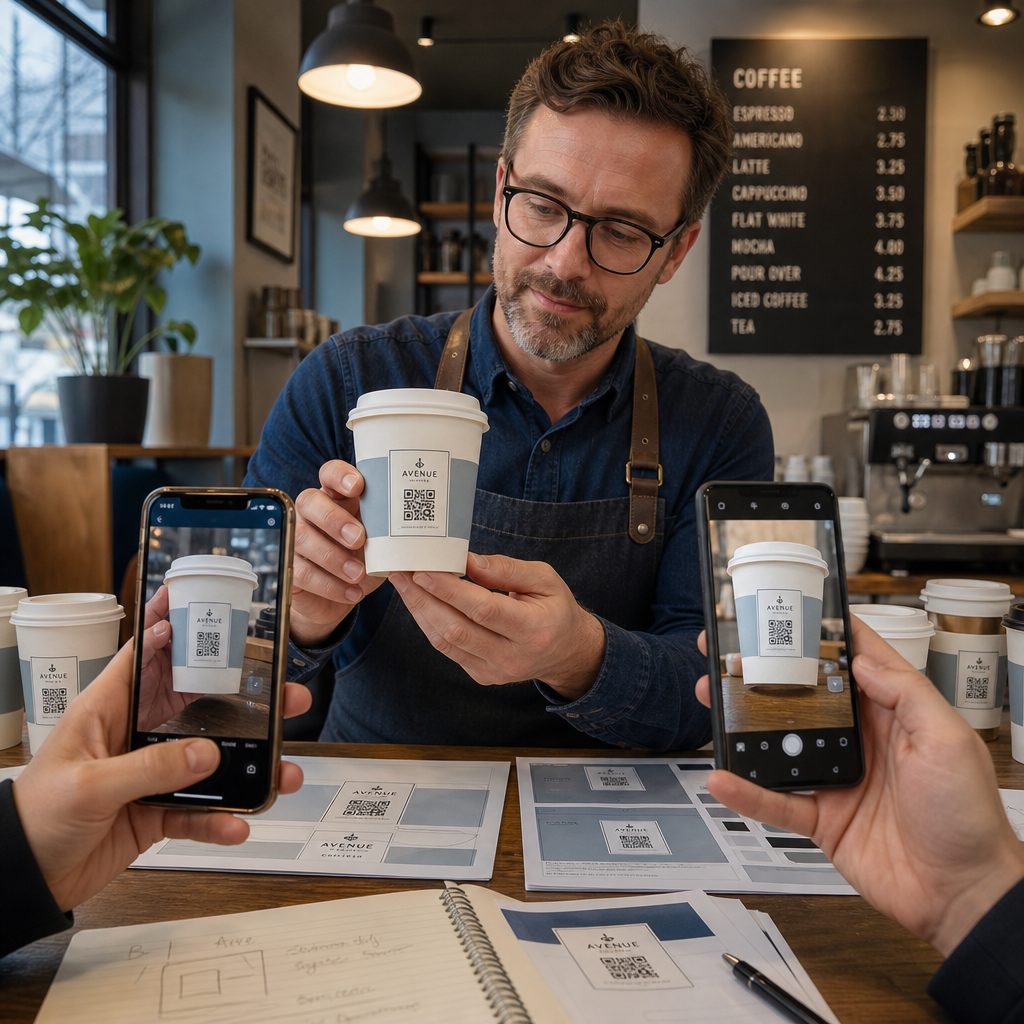
- Nyomtasson mintát a tervezett anyagra – nem csak papírpróbákat. Pohár alapanyag, bevonat és nyomtatási módszer mind befolyásolják a végeredményt.
- Teszteljen több eszközzel – minimum, egy újabb iPhone és egy középkategóriás Android. Régebbi, alacsonyabb felbontású kamerákkal rendelkező eszközök jelentik a legigényesebb tesztet.
- Olvassa be valósághű szögekből – a vásárlók különböző szögekben tartják a poharakat, nem közvetlenül merőlegesen a címkére. Teszteljen 15° és 30° tengelyen kívüli szögben.
- Teszteljen a tényleges világítási környezetben – a kávézó mennyezeti világítása gyakran meleg és irányított, ami másképp befolyásolja a kontrasztot, mint a standard irodai világítás.
- Ellenőrizze, hogy a céloldal helyesen töltődik-e be – olvassa be a kódot mobiladat-kapcsolaton, nem csak Wi-Fi-n, és erősítse meg, hogy a céloldal mobilra optimalizált és három másodpercen belül betöltődik.
Ha a kód bármelyik teszten megbukik, állítsa be a méretet, kontrasztot vagy elhelyezést, mielőtt több ezer egységet nyomtatna. Egy átfogó ellenőrzőlistaért a útmutatót a QR-kódokról a termékcímkéken részletezi ugyanazokat a minőségellenőrzési elveket részletesebben.
Írjon cselekvésre ösztönző felhívást, amely beolvasásra ösztönöz
A QR
- “Olvassa be a mai ajánlatokért”
- “Kapjon 15% kedvezményt következő rendeléséből”
- “Hagyjon nekünk egy értékelést”
- “Nézze meg, mi van a poharában”
A cselekvésre ösztönző felhívás megválaszolja az ügyfél burkolt kérdését: mi történik, ha ezt teszem? Enélkül még egy technikailag tökéletes QR-kód is alulteljesít.
Egy működő, márkás QR-kód elhelyezése egy kávéspoháron teljesen megvalósítható a megfelelő technikai beállítással. Méretezze ívelt felületekre, tartsa tisztán a csendes zónát, használjon magas kontrasztot matt felületen, állítsa a hibajavítást H szintre, és mindig tesztelje fizikai mintán a gyártás előtt. Válasszon dinamikus kódokat, így frissítheti a célhelyeket és mérheti a teljesítményt újranyomtatás nélkül.
Kezdje el építeni pohár QR-kódját a Pageloot QR Kód Generátor – exportálja nyomdakész vektoros formátumban, adja hozzá logóját és márkaszíneit, és kapcsolja össze az analitikával az első naptól kezdve.
Gyakori kérdések
Sík nyomtatáshoz a szabványos minimum 0,8 hüvelyk × 0,8 hüvelyk (2 cm × 2 cm). Ívelt csésze felületén növelje ezt 20–30%-kal az ívtorzítás kompenzálására – tehát célozzon legalább 1,0 hüvelyk × 1,0 hüvelyk méretet. A kódnak teljesen bele kell férnie a csésze sík zónájába anélkül, hogy körbeérné az oldalakat.
Igen, de az elhelyezés kritikus. Használja a bögre elülső felületének leglaposabb részét, méretezze a kódot nagyobbra, mint sík nyomtatás esetén tenné, biztosítson erős kontrasztot sötét modulokkal világos háttéren, kerülje a fényes felületeket a kód területén, és állítsa a hibajavítást H szintre. Mindig teszteljen fizikai mintát több eszközzel, mielőtt tömegesen rendelne.
Illeszd a célállomást a kampánycélodhoz. Gyakori felhasználási területek közé tartoznak a digitális menük, szezonális promóciók, kedvezménykuponok, Google értékelési oldalak vagy közösségi média profilok. Használj dinamikus QR-kódot, hogy nyomtatás után is frissíthesd a célállomást – ez különösen fontos a nagy mennyiségben nyomtatott poharak esetében, mivel a kódok nem nyomtathatók újra, ha egy ajánlat lejár, vagy egy URL megváltozik.