Αναρωτιέστε πώς να βάλετε έναν σαρώσιμο κωδικό QR σε ένα φλιτζάνι καφέ χωρίς να αποτυγχάνει κάθε φορά που ένας πελάτης στρέφει το τηλέφωνό του σε αυτό; Ένας κακοσχεδιασμένος κωδικός σε μια καμπύλη επιφάνεια απογοητεύει τους πελάτες και σπαταλά την εκτύπωσή σας. Αυτός ο οδηγός σας καθοδηγεί σε κάθε απόφαση, από την τοποθέτηση έως το περιεχόμενο, ώστε τα φλιτζάνια σας να αποδίδουν πραγματικά αποτελέσματα.
Γιατί τα Φλιτζάνια Καφέ Είναι μια Πολύτιμη Επιφάνεια για Κωδικούς QR
Τα φλιτζάνια καφέ περνούν αρκετά λεπτά στα χέρια ενός πελάτη. Αυτός ο χρόνος παραμονής είναι μια ευκαιρία μάρκετινγκ που οι περισσότερες μάρκες υποχρησιμοποιούν.
Σχεδόν 83,4 εκατομμύρια ενήλικες των ΗΠΑ σάρωσαν έναν κωδικό QR το 2022, ένας αριθμός που προβλέπεται να φτάσει το 42,6% των ενήλικων χρηστών smartphone έως το 2025. Ξεχωριστά, το 45% των αγοραστών των ΗΠΑ σάρωσαν έναν κωδικό QR που σχετίζεται με το μάρκετινγκ σε ένα τρίμηνο παράθυρο, με τους 18–29 ετών να ηγούνται της υιοθέτησης. Τα καφέ, οι καφετέριες και τα προγράμματα επώνυμων προϊόντων βρίσκονται στη διασταύρωση δύο από τις κορυφαίες περιπτώσεις χρήσης κωδικών QR που αναφέρουν οι καταναλωτές: μενού εστιατορίων και πληροφορίες προϊόντων τροφίμων και ποτών.
Ένα φλιτζάνι με έναν καλά εκτελεσμένο κωδικό QR μπορεί να επιτύχει οποιοδήποτε από τα ακόλουθα χωρίς να προσθέσει χρόνο προσωπικού:
- Κατευθύνετε τους πελάτες σε ένα ψηφιακό μενού ή εποχιακές προσφορές
- Προτρέψτε για μια κριτική Google αμέσως μετά από μια θετική εμπειρία
- Παρέχετε ένα κουπόνι έκπτωσης για μια επαναλαμβανόμενη επίσκεψη
- Οδηγήστε σε ακολούθους στα μέσα κοινωνικής δικτύωσης ή συμμετοχές σε διαγωνισμούς
- Παρέχετε πληροφορίες για αλλεργιογόνα ή προέλευση για πελάτες που ενδιαφέρονται για την υγεία τους
Η πρόκληση είναι καθαρά τεχνική: τα φλιτζάνια καμπυλώνουν, και οι κωδικοί QR όχι.
Πώς οι Καμπύλες Επιφάνειες Επηρεάζουν τη Δυνατότητα Σάρωσης
Ένας κωδικός QR τυπωμένος επίπεδα σε χαρτί σαρώνεται εύκολα επειδή κάθε μονάδα – τα μικρά τετράγωνα που αποτελούν τον κωδικό – βρίσκεται στο ίδιο επίπεδο. Όταν ο ίδιος κωδικός τυλίγεται γύρω από έναν κύλινδρο, οι μονάδες στις άκρες καμπυλώνουν μακριά από την οπτική γωνία της κάμερας. Ο σαρωτής βλέπει ένα παραμορφωμένο πλέγμα, και η αποκωδικοποίηση αποτυγχάνει.
Αυτό δεν είναι ένα υποθετικό πρόβλημα. Είναι ο συνηθέστερος λόγος που οι κωδικοί QR σε φλιτζάνια δεν λειτουργούν. Η κατανόηση της γεωμετρίας σας βοηθά να σχεδιάσετε γύρω από αυτό.
Τρεις φυσικοί παράγοντες λειτουργούν εναντίον σας:
- Παραμόρφωση καμπυλότητας: Οι μονάδες στις πλευρές του κωδικού κάμπτονται μακριά από την κάμερα, κάνοντάς τες να φαίνονται συμπιεσμένες ή αόρατες.
- Ανακλαστικές επιστρώσεις: Οι γυαλιστερές επιστρώσεις φλιτζανιών ή οι πλαστικοποιήσεις δημιουργούν αντανάκλαση που ξεθωριάζει την αντίθεση, ιδιαίτερα κάτω από τον φωτισμό οροφής καφετέριας.
- Καταχώριση εκτύπωσης: Η κατασκευή χάρτινων φλιτζανιών περιλαμβάνει ραφές και ενώσεις· ένας κωδικός που εκτείνεται σε μια ραφή δεν θα σαρωθεί αξιόπιστα.
Καθένα από αυτά έχει μια άμεση τεχνική λύση, που καλύπτεται στις παρακάτω ενότητες.
Μέγεθος και Τοποθέτηση σε ένα Φλιτζάνι
Κρατήστε τον Κωδικό στην Πιο Επίπεδη Δυνατή Περιοχή
Τοποθετήστε τον κωδικό QR σας στο τμήμα του φλιτζανιού με την λιγότερη καμπυλότητα. Για ένα τυπικό χάρτινο φλιτζάνι, αυτό σημαίνει αποφυγή της κορυφής κοντά στο χείλος και της κωνικής βάσης. Η μεσαία ζώνη του φλιτζανιού προσφέρει συνήθως την πιο επίπεδη εκτυπώσιμη περιοχή.
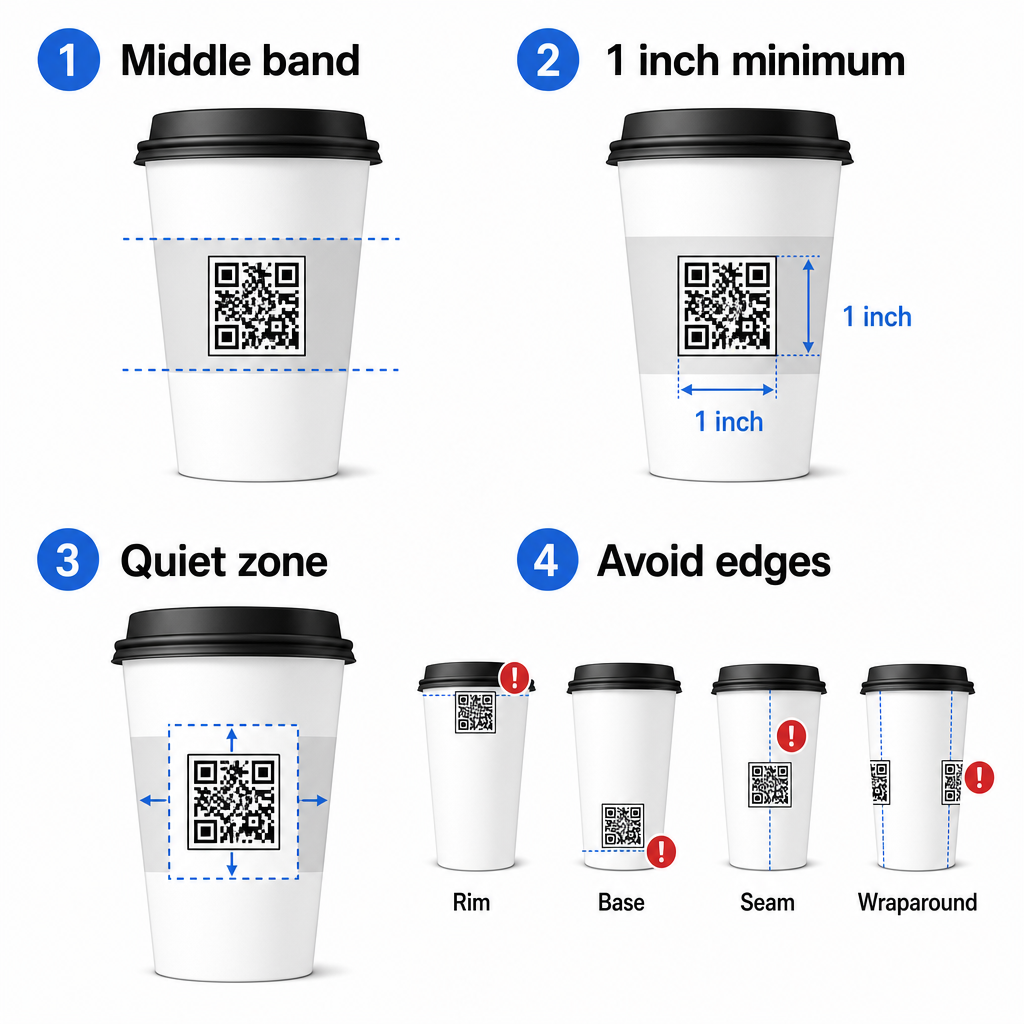
Εάν εργάζεστε με μια διαφημιστική κούπα με επίπεδες πλευρές ή ένα τετράγωνο φλιτζάνι ταξιδιού, έχετε ένα φυσικό επίπεδο πάνελ – χρησιμοποιήστε το. Για κυλινδρικές κεραμικές κούπες, αντιμετωπίστε την μπροστινή όψη ως τη ζώνη στόχο σας.
Μεγεθύνετε τον Κωδικό για Καμπύλες Επιφάνειες
Για επίπεδη εκτύπωση, ένα ελάχιστο μέγεθος 8 in × 0.8 in (περίπου 2 εκ. × 2 εκ.) είναι η τυπική σύσταση για σάρωση από κοντινή απόσταση. Σε μια καμπύλη επιφάνεια, αυτό το ελάχιστο δεν είναι επαρκές. Επειδή η καμπυλότητα παραμορφώνει το αντιληπτό μέγεθος του κωδικού, συνιστάται η αύξηση του μεγέθους του κωδικού κατά 20–30% για καμπύλες εφαρμογές.
Σε πρακτικούς όρους, στοχεύστε τουλάχιστον 0 in × 1.0 in σε ένα τυπικό χάρτινο φλιτζάνι 12 oz, και ακόμα μεγαλύτερο σε ένα ψηλό φλιτζάνι 20 oz όπου η διάμετρος του κυλίνδρου είναι μεγαλύτερη και η καμπυλότητα είναι λιγότερο σοβαρή.
Ο κωδικός πρέπει να χωράει εξ ολοκλήρου μέσα σε μία όψη του φλιτζανιού χωρίς να τυλίγεται γύρω από τις πλευρές. Εάν οποιαδήποτε γωνία του κωδικού εξαφανιστεί λόγω της καμπυλότητας, ο κωδικός θα αποτύχει.
Η Ήσυχη Ζώνη Είναι Μη Διαπραγματεύσιμη
Η ήσυχη ζώνη είναι το κενό περιθώριο που περιβάλλει τον κωδικό. Τα πρότυπα ISO καθορίζουν ένα ελάχιστο τέσσερις μονάδες καθαρού χώρου και στις τέσσερις πλευρές. Σε ένα φλιτζάνι καφέ, αυτό το περιθώριο λειτουργεί επίσης ως προστατευτικό έναντι της καμπύλης άκρης.
Μην τοποθετείτε λογότυπα, γραφικά φλιτζανιών, διατροφικό κείμενο ή μοτίβα επωνυμίας μέσα στην ήσυχη ζώνη. Το οδηγός βέλτιστων πρακτικών αναγνωσιμότητας κωδικών QR καλύπτει λεπτομερώς τις απαιτήσεις της ήσυχης ζώνης μαζί με άλλους παράγοντες που επηρεάζουν την αξιόπιστη σάρωση.
Αντίθεση και Χρώμα στα Υλικά Φλιτζανιών
Χρησιμοποιήστε Σκούρο σε Ανοιχτό
Οι σαρωτές κωδικών QR λειτουργούν ανιχνεύοντας την αντίθεση μεταξύ σκούρων μονάδων και ανοιχτού φόντου. Η συνιστώμενη ελάχιστη αναλογία αντίθεσης είναι 4:1, αν και το υψηλότερο είναι πάντα καλύτερο – το μαύρο σε λευκό επιτυγχάνει 21:1.
Σε φλιτζάνια καφέ, δύο προβλήματα επιφάνειας μειώνουν την αποτελεσματική αντίθεση:
- Χαρτί Kraft ή καφέ: Ένας σκούρος κωδικός τυπωμένος απευθείας σε μη επικαλυμμένο χαρτί κραφτ χάνει την αντίθεση επειδή το φόντο δεν είναι λευκό. Χρησιμοποιήστε ένα λευκό τυπωμένο πάνελ ή μια λευκή επίστρωση κάτω από τον κωδικό.
- Γυαλιστερή πλαστικοποίηση: Οι ανακλαστικές επιστρώσεις ανακλούν το φως πίσω στην κάμερα, ξεθωριάζοντας τις σκούρες μονάδες. Ζητήστε ένα ματ φινίρισμα στην περιοχή του κωδικού, ακόμα κι αν το υπόλοιπο κύπελλο είναι γυαλιστερό.
Αποφύγετε τις διαβαθμίσεις και τα μοτίβα φόντου
Ένα φόντο διαβάθμισης κάτω από έναν κωδικό QR δημιουργεί ζώνες αποδεκτής αντίθεσης και ζώνες χαμηλής αντίθεσης. Ο σαρωτής αξιολογεί ολόκληρο τον κωδικό, και οποιαδήποτε περιοχή που πέφτει κάτω από το όριο αντίθεσης μπορεί να προκαλέσει αποτυχία. Χρησιμοποιήστε ένα συμπαγές, ομοιόμορφο ανοιχτό φόντο κάτω από τον κωδικό.
Για επώνυμα κύπελλα όπου το χρώμα είναι σημαντικό για τον σχεδιασμό, μπορείτε να χρησιμοποιήσετε ένα σκούρο χρώμα μάρκας ως προσκήνιο σε λευκό ή ανοιχτόχρωμο φόντο – αλλά δοκιμάστε προσεκτικά πριν από την πλήρη παραγωγή. Το οδηγός βέλτιστων πρακτικών αντίθεσης χρωμάτων κωδικών QR παρέχει συγκεκριμένους συνδυασμούς χρωμάτων και αναλογίες αντίθεσης για να καθοδηγήσει αυτές τις αποφάσεις.
Τεχνικές Προδιαγραφές Εκτύπωσης
Ανάλυση και Μορφή Αρχείου
Εκτυπώστε τον κωδικό σε 300 DPI ή υψηλότερη. Μια εικόνα ράστερ χαμηλής ανάλυσης παράγει θολές άκρες μονάδων, γεγονός που μειώνει τη δυνατότητα σάρωσης και φαίνεται αντιεπαγγελματικό από κοντινή απόσταση.
Όποτε είναι δυνατόν, χρησιμοποιήστε μια διανυσματική μορφή (SVG ή EPS) αντί για PNG ή JPG. Τα διανυσματικά αρχεία κλιμακώνονται χωρίς απώλεια ποιότητας, κάτι που έχει σημασία επειδή οι κατασκευαστές κυπέλλων συχνά αλλάζουν το μέγεθος του έργου τέχνης κατά την προεκτύπωση. Το Pageloot γεννήτρια κωδικών QR εξάγει έτοιμα για εκτύπωση διανυσματικά αρχεία (.EPS, .PDF, .SVG) κατάλληλα για αποστολή απευθείας στον εκτυπωτή κυπέλλων σας.
Επίπεδο διόρθωσης σφαλμάτων
Οι κωδικοί QR έχουν τέσσερα επίπεδα διόρθωσης σφαλμάτων: L, M, Q και H. Τα υψηλότερα επίπεδα επιτρέπουν σε μεγαλύτερο μέρος του κωδικού να υποστεί ζημιά ή να αποκρυφθεί ενώ εξακολουθεί να σαρώνεται με επιτυχία. Για εφαρμογές κυπέλλων:
- Επίπεδο H συνιστάται εάν ενσωματώνετε ένα λογότυπο μέσα στον κωδικό, καθώς επιτρέπει έως και το 30% του κωδικού να αποκρυφθεί.
- Επίπεδο Q ή H συνιστάται για οποιαδήποτε καμπύλη επιφάνεια, επειδή η παραμόρφωση της επιφάνειας καταστρέφει αποτελεσματικά τμήματα του κωδικού κατά τη σάρωση.
Μην χρησιμοποιείτε το Επίπεδο L σε ένα κύπελλο. Δεν παρέχει καμία ανοχή για τις φυσικές παραμορφώσεις που είναι εγγενείς στην καμπύλη εκτύπωση.
Τα μοτίβα εντοπισμού πρέπει να παραμένουν καθαρά
Τα τρία μεγάλα τετράγωνα στις γωνίες ενός κωδικού QR είναι μοτίβα εντοπισμού. Λένε στον σαρωτή πού αρχίζει, τελειώνει και πώς είναι προσανατολισμένος ο κωδικός. Μην περικόπτετε, μην επικαλύπτετε ή τροποποιείτε τα μοτίβα εντοπισμού με γραφικά μάρκας. Αυτό είναι ένα από τα πιο κοινά λάθη σχεδιασμού σε προσαρμοσμένες εκτυπωμένες συσκευασίες, και παράγει κωδικούς που φαίνονται επαγγελματικοί αλλά δεν σαρώνουν ποτέ.
Δημιουργήστε έτοιμους για εκτύπωση κωδικούς QR για τα κύπελλά σας Δημιουργήστε έναν πλήρως προσαρμόσιμο, υψηλής ανάλυσης κωδικό QR με το σωστό επίπεδο διόρθωσης σφαλμάτων, εξαγωγή διανυσματικών αρχείων και επιλογές επωνυμίας χρησιμοποιώντας το Δημιουργία κώδικα Pageloot QR. Κατεβάστε σε μορφή .EPS, .PDF ή .SVG έτοιμο για αποστολή στον κατασκευαστή κυπέλλων σας.
Επιλογή του πού συνδέεται ο κωδικός QR
Η φυσική εκτέλεση έχει σημασία, αλλά και το τι συμβαίνει μετά τη σάρωση. Ένας πελάτης που σαρώνει έναν κωδικό κυπέλλου έχει αυτοπροσδιοριστεί ως αφοσιωμένος – μην τους στέλνετε σε μια γενική αρχική σελίδα.
Αντιστοιχίστε τον προορισμό στο πλαίσιο:
| Χρήση θήκης | Προτεινόμενος Τύπος QR | Εργαλείο |
|---|---|---|
| Ψηφιακό μενού ή εποχιακά ποτά | Κωδικός QR του μενού | Δημιουργία QR menu |
| Έκπτωση για επιστροφή | Σελίδα προορισμού κουπονιού | Δημιουργία QR code για κουπόνια |
| Αξιολόγηση Google μετά την αγορά | Απευθείας σύνδεσμος αξιολόγησης | QR code αξιολόγησης Google |
| Ιστοσελίδα, κοινωνικά δίκτυα ή σελίδα προορισμού προσφοράς | Ανακατεύθυνση URL | Γεννήτρια Κωδικών QR Συνδέσμων |
Για καφετέριες και καφέ, τα εργαλεία κωδικών QR εστιατορίων του Pageloot υποστηρίζουν ψηφιακά μενού, παραγγελίες και συλλογή αξιολογήσεων σε μία ενιαία πλατφόρμα.
Χρησιμοποιήστε δυναμικούς κωδικούς QR για καμπάνιες κυπέλλων
Ένας στατικός κωδικός QR κωδικοποιεί μόνιμα το URL προορισμού. Εάν η εποχιακή σας προσφορά λήξει, δεν μπορείτε να ενημερώσετε τον κωδικό – και τυχόν εναπομείναντα κύπελλα με αυτόν τον κωδικό γίνονται αδιέξοδο.
ΕΝΑ δυναμικός κωδικός QR αποθηκεύει ένα σύντομο URL ανακατεύθυνσης στον ίδιο τον κωδικό. Ελέγχετε πού δείχνει αυτή η ανακατεύθυνση από έναν πίνακα ελέγχου, και μπορείτε να το αλλάξετε ανά πάσα στιγμή χωρίς να επανεκτυπώσετε ούτε ένα κύπελλο. Αυτό είναι κρίσιμο για τις καμπάνιες κυπέλλων επειδή:
- Οι εκτυπώσεις κυπέλλων είναι συχνά σε χιλιάδες, και η επανεκτύπωση είναι ακριβή
- Οι προσφορές, τα μενού και οι προσφορές αλλάζουν εποχιακά
- Μπορείτε να εκτελέσετε δοκιμές A/B αλλάζοντας προορισμούς στη μέση της καμπάνιας
Οι δυναμικοί κωδικοί παρέχουν επίσης δεδομένα ανάλυσης σάρωσης – δεδομένα για το πότε έγιναν σαρώσεις, ποιες συσκευές χρησιμοποιήθηκαν και πού βρίσκονταν οι πελάτες. Αυτά τα δεδομένα σάς επιτρέπουν να μετρήσετε ποια σχέδια κυπέλλων ή τοποθετήσεις οδήγησαν στη μεγαλύτερη αφοσίωση και να προσαρμόσετε ανάλογα τις μελλοντικές εκτυπώσεις.
Παρακολουθήστε κάθε σάρωση από την καμπάνια κυπέλλων σας Μεταβείτε σε έναν δυναμικό κωδικό QR για να ενημερώνετε τους προορισμούς εν κινήσει και να παρακολουθείτε την απόδοση σε πραγματικό χρόνο. Το Δημιουργία κώδικα Pageloot QR σας δίνει έναν πλήρη πίνακα ελέγχου αναλυτικών στοιχείων μαζί με στοιχεία ελέγχου επεξεργασίας – όλα χωρίς να επανεκτυπώσετε τα κύπελλά σας.
Επωνυμία του κωδικού QR του κυπέλλου σας
Ένας απλός ασπρόμαυρος κωδικός QR λειτουργεί, αλλά ένας επώνυμος κωδικός ενισχύει την αναγνώριση και κερδίζει περισσότερες σαρώσεις. Το Pageloot Δημιουργία QR με λογότυπο σας επιτρέπει:
- Ενσωματώστε το λογότυπο της επωνυμίας σας στο κέντρο του κωδικού
- Εφαρμόστε χρώματα επωνυμίας στις μονάδες και το φόντο
- Επιλέξτε από πρότυπα σχεδίασης για μοτίβο σώματος και στυλ άκρων
- Προσθέστε ένα πλαίσιο παρότρυνσης για δράση (π.χ., “Σαρώστε για 10% έκπτωση στην επόμενη παραγγελία σας”)
Όταν προσθέτετε ένα λογότυπο, διατηρήστε το σε όχι περισσότερο από 30% της περιοχής του κωδικού και ρυθμίστε τη διόρθωση σφαλμάτων σε Επίπεδο H. Το λογότυπο καταλαμβάνει χώρο που διαφορετικά θα μετέφερε κωδικοποιημένα δεδομένα, και η διόρθωση σφαλμάτων Επιπέδου H αντισταθμίζει αυτή την επικάλυψη.
Για συνέπεια σε μια μεγάλη παραγγελία κυπέλλων ή μια καμπάνια πολλαπλών τοποθεσιών, το Pageloot’s Φάκελοι QR code σας επιτρέπουν να οργανώνετε κωδικούς ανά καμπάνια, τοποθεσία ή μέγεθος κυπέλλου, ώστε η ομάδα σας να μπορεί να τους διαχειρίζεται χωρίς να χάνει τον έλεγχο.
Για σχετική καθοδήγηση σχετικά με εφαρμογές συσκευασίας, οι σελίδες στο κωδικούς QR σε συσκευασίες προϊόντων και κωδικοί QR σε συσκευασίες τροφίμων καλύπτουν ζητήματα που εφαρμόζονται απευθείας στα κύπελλα.
Δοκιμές Πριν από την Εκτύπωση
Καμία ποσότητα προσεκτικού σχεδιασμού δεν αντικαθιστά τη φυσική δοκιμή στο πραγματικό κύπελλο. Πριν δεσμευτείτε σε μια πλήρη παραγωγή:
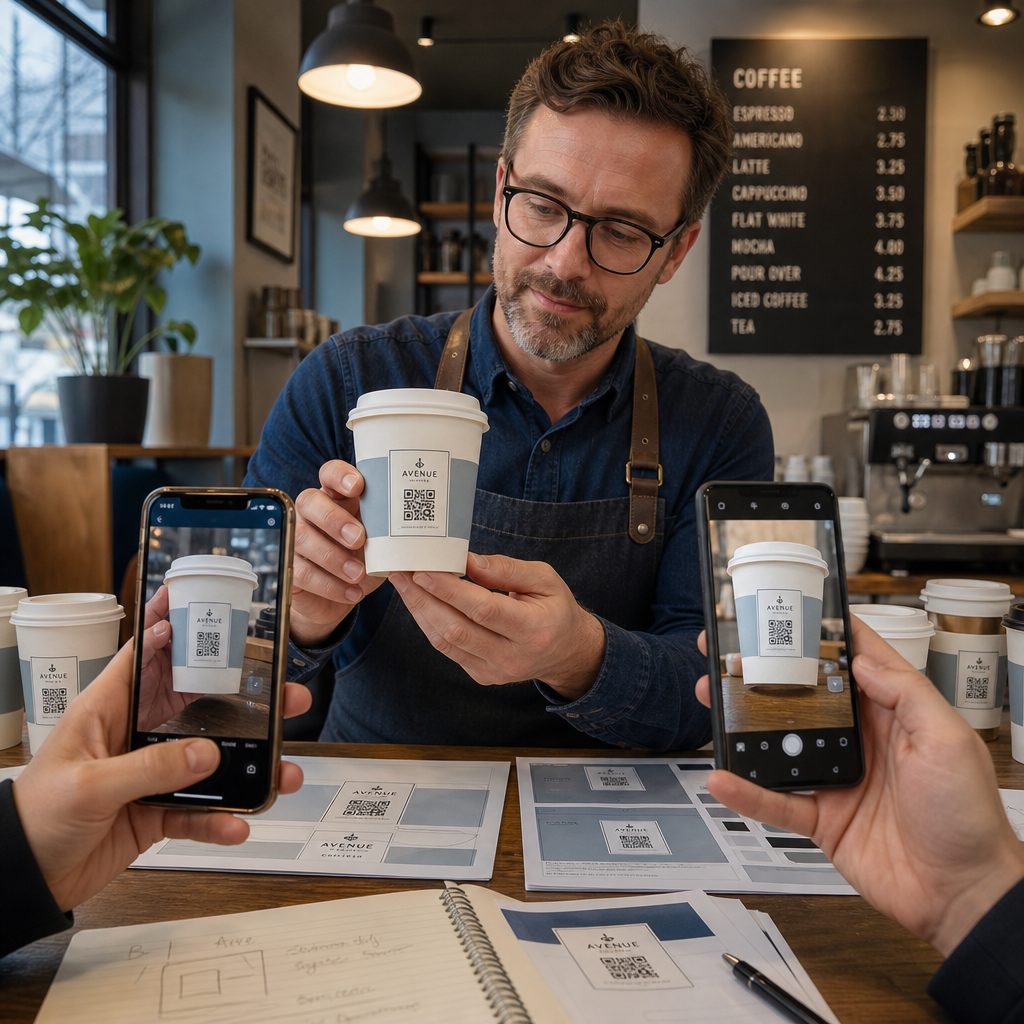
- Εκτυπώστε ένα δείγμα στο προβλεπόμενο υλικό – όχι μόνο χάρτινες δοκιμές. Το υλικό του κυπέλλου, η επίστρωση και η μέθοδος εκτύπωσης επηρεάζουν όλα το τελικό αποτέλεσμα.
- Δοκιμάστε με πολλαπλές συσκευές – τουλάχιστον, ένα πρόσφατο iPhone και ένα Android μεσαίας κατηγορίας. Παλαιότερες συσκευές με κάμερες χαμηλότερης ανάλυσης παρουσιάζουν την πιο απαιτητική δοκιμή.
- Σαρώστε από ρεαλιστικές γωνίες – οι πελάτες κρατούν τα κύπελλα σε διάφορες γωνίες, όχι κάθετα στην ετικέτα. Δοκιμάστε σε 15° και 30° εκτός άξονα.
- Δοκιμάστε στο πραγματικό περιβάλλον φωτισμού – ο φωτισμός καφετέριας από πάνω είναι συχνά ζεστός και κατευθυντικός, κάτι που επηρεάζει την αντίθεση διαφορετικά από τον τυπικό φωτισμό γραφείου.
- Επαληθεύστε ότι ο προορισμός φορτώνει σωστά – σαρώστε τον κωδικό σε δεδομένα κινητής τηλεφωνίας, όχι μόνο σε Wi-Fi, και επιβεβαιώστε ότι η σελίδα προορισμού είναι βελτιστοποιημένη για κινητά και φορτώνει σε λιγότερο από τρία δευτερόλεπτα.
Εάν ο κωδικός αποτύχει σε οποιαδήποτε από αυτές τις δοκιμές, προσαρμόστε το μέγεθος, την αντίθεση ή την τοποθέτηση πριν εκτυπώσετε χιλιάδες μονάδες. Για μια ολοκληρωμένη λίστα ελέγχου, το οδηγό για τους κωδικούς QR στις ετικέτες προϊόντων αναλύει τις ίδιες αρχές ελέγχου ποιότητας με περισσότερες λεπτομέρειες.
Γράψτε μια Παρότρυνση για Δράση που Κερδίζει τη Σάρωση
Ο ίδιος ο κωδικός QR δεν επικοινωνεί τίποτα σχετικά με το γιατί ένας πελάτης πρέπει να τον σαρώσει. Πάντα να συνδυάζετε τον κωδικό με μια σύντομη παρότρυνση για δράση – συνήθως τέσσερις έως οκτώ λέξεις τοποθετημένες ακριβώς πάνω ή κάτω από τον κωδικό. Παραδείγματα:
- “Σαρώστε για τις σημερινές προσφορές”
- “Λάβετε 15% έκπτωση στην επόμενη παραγγελία σας”
- “Αφήστε μας μια κριτική”
- “Δείτε τι υπάρχει στο κύπελλό σας”
Η παρότρυνση για δράση απαντά στην υπονοούμενη ερώτηση του πελάτη: τι συμβαίνει αν το κάνω αυτό; Χωρίς αυτήν, ακόμη και ένας τεχνικά τέλειος κωδικός QR θα υποαποδώσει.
Η τοποθέτηση ενός λειτουργικού, επώνυμου κωδικού QR σε ένα φλιτζάνι καφέ είναι απολύτως εφικτή με τη σωστή τεχνική ρύθμιση. Προσαρμόστε το μέγεθός του για καμπύλες επιφάνειες, διατηρήστε την ήσυχη ζώνη καθαρή, χρησιμοποιήστε υψηλή αντίθεση σε ματ φινίρισμα, ρυθμίστε τη διόρθωση σφαλμάτων σε Επίπεδο H, και πάντα να δοκιμάζετε σε ένα φυσικό δείγμα πριν από την παραγωγή. Επιλέξτε δυναμικούς κωδικούς ώστε να μπορείτε να ενημερώνετε προορισμούς και να μετράτε την απόδοση χωρίς επανεκτύπωση.
Ξεκινήστε να δημιουργείτε τον κωδικό QR του κυπέλλου σας με το Δημιουργία κώδικα Pageloot QR – εξαγάγετε σε μορφές διανυσματικών αρχείων έτοιμων για εκτύπωση, προσθέστε το λογότυπο και τα χρώματα της επωνυμίας σας, και συνδέστε το με αναλυτικά στοιχεία από την πρώτη μέρα.
Συχνές ερωτήσεις
Για επίπεδη εκτύπωση, το ελάχιστο πρότυπο είναι 0,8 in × 0,8 in (2 cm × 2 cm). Σε μια κυρτή επιφάνεια κούπας, αυξήστε το κατά 20–30% για να αντισταθμίσετε την παραμόρφωση λόγω καμπυλότητας – οπότε στοχεύστε σε τουλάχιστον 1,0 in × 1,0 in. Ο κωδικός πρέπει να χωράει εξ ολοκλήρου εντός της επίπεδης ζώνης της κούπας χωρίς να τυλίγεται γύρω από τις πλευρές.
Ναι, αλλά η τοποθέτηση είναι κρίσιμη. Χρησιμοποιήστε την πιο επίπεδη περιοχή της μπροστινής όψης της κούπας, μεγεθύνετε τον κωδικό περισσότερο από ό,τι θα κάνατε για επίπεδη εκτύπωση, εξασφαλίστε ισχυρή αντίθεση με σκούρες μονάδες σε ανοιχτόχρωμο φόντο, αποφύγετε τα γυαλιστερά φινιρίσματα στην περιοχή του κωδικού, και ρυθμίστε τη διόρθωση σφαλμάτων σε Επίπεδο H. Πάντα να δοκιμάζετε ένα φυσικό δείγμα με πολλαπλές συσκευές πριν παραγγείλετε χύμα.
Αντιστοιχίστε τον προορισμό με τον στόχο της καμπάνιας σας. Συνηθισμένες χρήσεις περιλαμβάνουν ψηφιακά μενού, εποχιακές προσφορές, κουπόνια έκπτωσης, σελίδες κριτικών Google ή προφίλ μέσων κοινωνικής δικτύωσης. Χρησιμοποιήστε έναν δυναμικό κωδικό QR ώστε να μπορείτε να ενημερώσετε τον προορισμό μετά την εκτύπωση – αυτό είναι ιδιαίτερα σημαντικό για ποτήρια που εκτυπώνονται σε μεγάλες ποσότητες, καθώς οι κωδικοί δεν μπορούν να επανεκτυπωθούν εάν μια προσφορά λήξει ή μια διεύθυνση URL αλλάξει.