Чудите се как да поставите сканируем QR код на чаша за кафе, без той да се проваля всеки път, когато клиент насочи телефона си към него? Лошо проектиран код на извита повърхност разочарова клиентите и пропилява вашия тираж. Това ръководство ви превежда през всяко решение, от разположението до съдържанието, така че вашите чаши наистина да дават резултати.
Защо чашите за кафе са ценна повърхност за QR код
Чашите за кафе прекарват няколко минути в ръцете на клиента. Това време на задържане е маркетингова възможност, която повечето марки подценяват.
Близо 83,4 милиона възрастни в САЩ са сканирали QR код през 2022 г., като се очаква този брой да достигне 42,6% от възрастните потребители на смартфони до 2025 г. Отделно, 45% от американските купувачи са сканирали QR код, свързан с маркетинг, в рамките на три месеца, като младежите на възраст 18–29 години са водещи в приемането. Кафенета, кафенета и програми за брандирани стоки се намират на пресечната точка на два от най-често срещаните случаи на употреба на QR кодове, които потребителите съобщават: менюта на ресторанти и информация за хранителни продукти и напитки.
Чаша с добре изпълнен QR код може да постигне някое от следните неща, без да добавя време за персонал:
- Насочете клиентите към цифрово меню или сезонни промоции
- Подканете за преглед в Google веднага след положително преживяване
- Доставете купон за отстъпка за повторно посещение
- Стимулирайте последователи в социалните медии или участия в конкурси
- Предоставяне на информация за алергени или произход за клиенти, загрижени за здравето си
Предизвикателството е чисто техническо: чашите се извиват, а QR кодовете не.
Как извитите повърхности влияят на възможността за сканиране
QR код, отпечатан плоско върху хартия, се сканира лесно, защото всеки модул – малките квадратчета, които съставляват кода – се намира на една и съща равнина. Когато същият код се увие около цилиндър, модулите по краищата се извиват далеч от зрителната линия на камерата. Скенерът вижда изкривена мрежа и декодирането се проваля.
Това не е хипотетичен проблем. Това е най-честата причина QR кодовете на чаши да не работят. Разбирането на геометрията ви помага да проектирате около него.
Три физически фактора работят срещу вас:
- Изкривяване от извивка: Модулите отстрани на кода се извиват далеч от камерата, което ги кара да изглеждат компресирани или невидими.
- Отразяващи покрития: Гланцовите покрития или ламинати на чашите създават отблясъци, които измиват контраста, особено при горно осветление в кафене.
- Регистрация на печата: Производството на хартиени чаши включва шевове и съединения; код, който пресича шев, няма да се сканира надеждно.
Всяко от тях има директно техническо решение, разгледано в разделите по-долу.
Оразмеряване и разположение на чаша
Дръжте кода на възможно най-плоската област
Поставете вашия QR код на частта от чашата с най-малка извивка. За стандартна хартиена чаша това означава избягване на самия връх близо до ръба и конусовидната основа. Средната лента на чашата обикновено предлага най-плоската зона за печат.
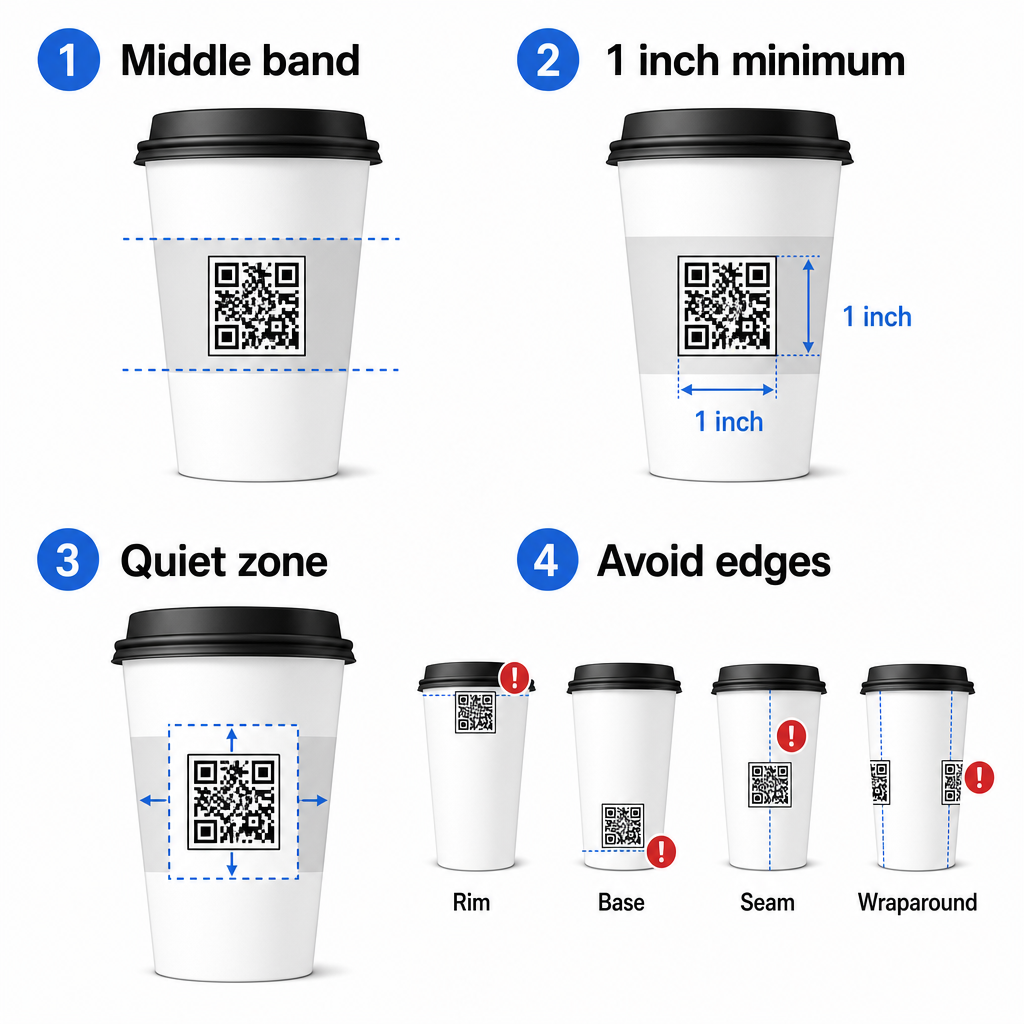
Ако работите с рекламна чаша с плоски страни или квадратна пътна чаша, имате естествен плосък панел – използвайте го. За цилиндрични керамични чаши, третирайте предната страна като ваша целева зона.
Оразмерете кода за извити повърхности
За плосък печат, минимален размер от 0,8 инча × 0,8 инча (около 2 см × 2 см) е стандартната препоръка за сканиране от близко разстояние. На извита повърхност този минимум не е достатъчен. Тъй като извивката изкривява възприемания размер на кода, препоръчително е увеличаване на размера на кода с 20–30% за извити приложения.
На практика, целете поне 1,0 инча × 1,0 инча на стандартна хартиена чаша от 12 унции, и още по-голям на висока чаша от 20 унции, където диаметърът на тялото е по-голям и извивката е по-малко изразена.
Кодът трябва да се побира изцяло в една страна на чашата, без да се увива около страните. Ако някой ъгъл на кода изчезне около извивката, кодът ще се провали.
Тихата зона е безкомпромисна
Тихата зона е празният марж, заобикалящ кода. ISO стандартите определят минимум от четири модула чисто пространство от всички четири страни. На чаша за кафе този марж също действа като буфер срещу извития ръб.
Не поставяйте лога, графики на чаши, хранителен текст или брандови шарки в тихата зона. The ръководство за най-добри практики за четливост на QR кодове обхваща изискванията за тиха зона в детайли, заедно с други фактори, които влияят на надеждното сканиране.
Контраст и цвят на материалите за чаши
Използвайте тъмно върху светло
Скенерите за QR кодове работят, като откриват контраста между тъмни модули и светъл фон. Препоръчителното минимално съотношение на контраст е 4:1, въпреки че по-високото винаги е по-добре – черно върху бяло постига 21:1.
При чашите за кафе два повърхностни проблема намаляват ефективния контраст:
- Крафт или кафява хартия: Тъмен код, отпечатан директно върху негланцирана крафт хартия, губи контраст, защото фонът не е бял. Използвайте бял отпечатан панел или бяло покритие под кода.
- Гланцов ламинат: Отразяващите покрития отразяват светлината обратно към камерата, избледнявайки тъмните модули. Поискайте матово покритие в областта на кода, дори ако останалата част от чашата е гланцирана.
Избягвайте градиенти и шарени фонове
Градиентен фон под QR код създава зони с приемлив контраст и зони с лош контраст. Скенерът оценява целия код, и всеки регион, който попада под прага на контраст, може да причини грешка. Използвайте плътен, еднороден светъл фон под кода.
За брандирани чаши, където цветът е важен за дизайна, можете да използвате тъмен цвят на марката като преден план върху бял или блед фон – но тествайте внимателно преди пълно производство. ръководство за най-добри практики за цветови контраст на QR кодове предоставя специфични цветови комбинации и съотношения на контраст, за да насочва тези решения.
Технически спецификации за печат
Разделителна способност и файлов формат
Отпечатайте кода на 300 DPI или по-висока. Растерно изображение с ниска разделителна способност произвежда размити ръбове на модулите, което намалява възможността за сканиране и изглежда непрофесионално от близко разстояние.
Когато е възможно, използвайте векторен формат (SVG или EPS) вместо PNG или JPG. Векторните файлове се мащабират без загуба на качество, което е важно, защото производителите на чаши често преоразмеряват графики по време на предпечат. Pageloot’s генератор на QR кодове експортира готови за печат векторни файлове (.EPS, .PDF, .SVG), подходящи за изпращане директно до вашия принтер за чаши.
Ниво на корекция на грешките
QR кодовете имат четири нива на корекция на грешки: L, M, Q и H. По-високите нива позволяват по-голяма част от кода да бъде повредена или скрита, докато все още се сканира успешно. За приложения за чаши:
- Ниво H се препоръчва, ако вграждате лого в кода, тъй като позволява до 30% от кода да бъде скрит.
- Ниво Q или H е препоръчително за всяка извита повърхност, тъй като изкривяването на повърхността ефективно поврежда части от кода по време на сканиране.
Не използвайте ниво L на чаша. То не осигурява толеранс за физическите изкривявания, присъщи на извития печат.
Шаблоните за търсене трябва да останат ясни
Трите големи квадрата в ъглите на QR код са шаблони за търсене. Те казват на скенера къде започва, свършва и как е ориентиран кодът. Не изрязвайте, не припокривайте и не променяйте шаблоните за търсене с графики на марката. Това е една от най-честите грешки в дизайна при персонализирани опаковки, и произвежда кодове, които изглеждат професионално, но никога не се сканират.
Създайте готови за печат QR кодове за вашите чаши Генерирайте напълно персонализиран QR код с висока разделителна способност с правилното ниво на корекция на грешки, векторен експорт и опции за брандиране, използвайки Генератор на QR кодове на PageLoot. Изтеглете във формат .EPS, .PDF или .SVG, готов за изпращане до вашия производител на чаши.
Избор на това, към което води QR кодът
Физическото изпълнение е от значение, но също така и това, което се случва след сканирането. Клиент, който сканира код на чаша, се е идентифицирал като ангажиран – не ги изпращайте към обща начална страница.
Съобразете дестинацията с контекста:
| Случай за употреба | Препоръчителен тип QR | Инструмент |
|---|---|---|
| Цифрово меню или сезонни напитки | QR код на менюто | QR меню |
| Отстъпка за повторно посещение | Целева страница за купони | QR код за купон |
| Отзив в Google след покупка | Директна връзка за отзив | QR код Google отзиви |
| Уебсайт, социална или промоционална целева страница | Пренасочване на URL | Генератор на QR кодове за връзки |
За кафенета и кафенета, Инструменти за QR код за ресторанти на Pageloot поддържат цифрови менюта, поръчки и събиране на отзиви в една платформа.
Използвайте динамични QR кодове за кампании с чаши
Статичен QR код кодира URL адреса на дестинацията за постоянно. Ако вашата сезонна промоция приключи, не можете да актуализирате кода – и всички останали чаши с този код стават задънена улица.
A динамичен QR код съхранява кратък URL адрес за пренасочване в самия код. Вие контролирате къде сочи това пренасочване от табло за управление, и можете да го промените по всяко време, без да препечатвате нито една чаша. Това е от решаващо значение за кампаниите с чаши, защото:
- Тиражите на чаши често са хиляди, а препечатването е скъпо
- Промоциите, менютата и офертите се променят сезонно
- Можете да провеждате A/B тестове, като сменяте дестинациите по средата на кампанията
Динамичните кодове също така предоставят анализи на сканиранията – данни за това кога са настъпили сканирания, какви устройства са използвани и къде са били разположени клиентите. Тези данни ви позволяват да измервате кои дизайни или разположения на чаши са довели до най-голяма ангажираност, и да коригирате бъдещите тиражи съответно.
Проследявайте всяко сканиране от вашата кампания с чаши Преминете към динамичен QR код, за да актуализирате дестинациите в движение и да наблюдавате производителността в реално време. Генератор на QR кодове на PageLoot ви дава пълно табло за анализ заедно с контроли за редактиране – всичко това без да препечатвате чашите си.
Брандиране на вашия QR код за чаша
Обикновен черно-бял QR код работи, но брандиран код засилва разпознаването и печели повече сканирания. Pageloot’s QR code generator с лого ви позволява:
- Вградете логото на вашата марка в центъра на кода
- Приложете цветове на марката към модулите и фона
- Изберете от дизайнерски шаблони за модел на тялото и стил на ръба
- Добавете рамка с призив за действие (напр. “Сканирайте за 10% отстъпка от следващата ви поръчка”)
Когато добавяте лого, запазете го до не повече от 30% от площта на кода и задайте корекция на грешките на Ниво H. Логото заема място, което иначе би съдържало кодирани данни, а корекцията на грешките от Ниво H компенсира това припокриване.
За последователност при голяма поръчка на чаши или кампания на няколко места, Pageloot’s Папки за QR кодове ви позволяват да организирате кодове по кампания, местоположение или размер на чашата, така че екипът ви да може да ги управлява, без да губи следа.
За свързани насоки относно приложенията за опаковки, страниците на QR кодове върху опаковки на продукти и QR кодове върху опаковки за храни обхващат съображения.
Тестване преди вашия печатен тираж
Колкото и внимателен да е дизайнът, той не замества физическото тестване върху действителната чаша. Преди да се ангажирате с пълен производствен цикъл:
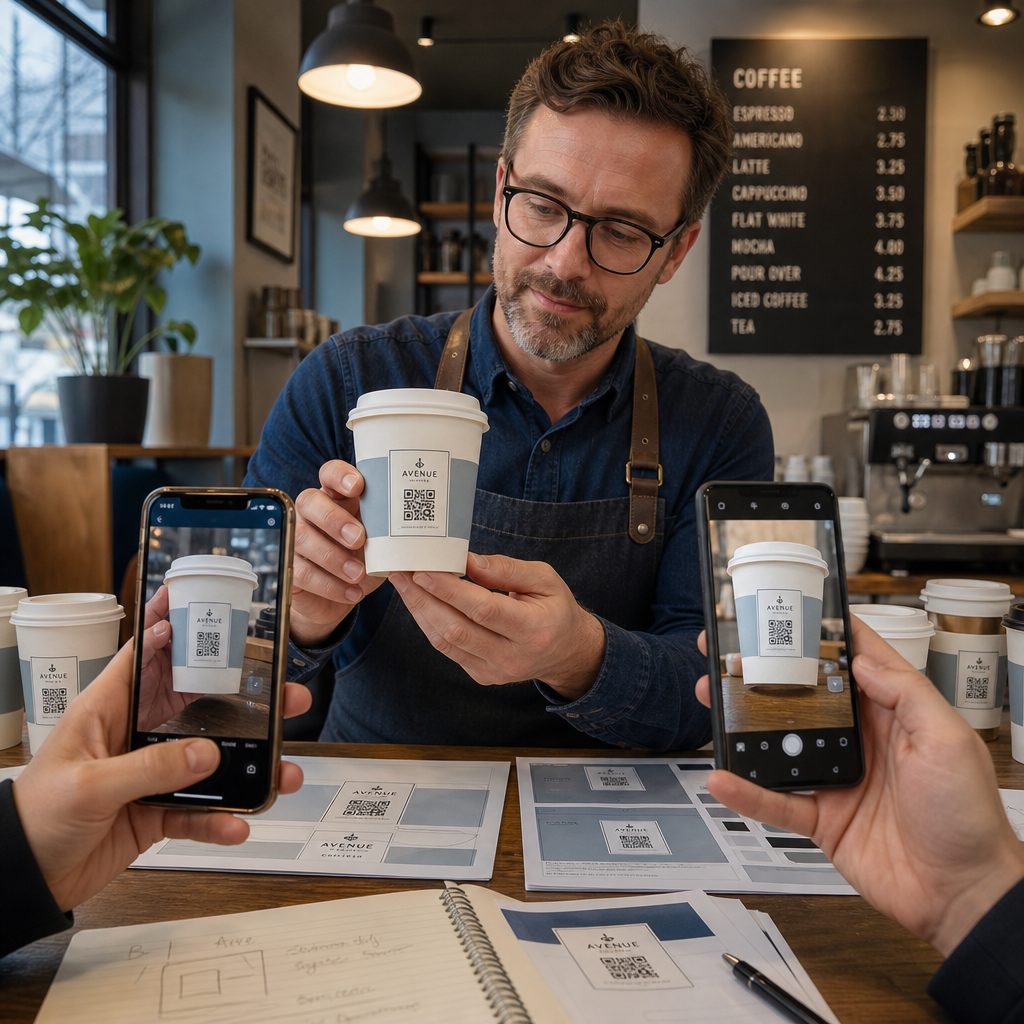
- Отпечатайте мостра върху предвидения материал – не само хартиени проби. Материалът на чашата, покритието и методът на печат влияят на крайния резултат.
- Тествайте с множество устройства – най-малко, скорошен iPhone и Android от среден клас. По-старите устройства с камери с по-ниска резолюция представляват най-взискателния тест.
- Сканирайте от реалистични ъгли – клиентите държат чаши под различни ъгли, не директно перпендикулярно на етикета. Тествайте при 15° и 30° извън ос.
- Тествайте в реалната светлинна среда – горното осветление в кафенетата често е топло и насочено, което влияе на контраста по различен начин от стандартното офис осветление.
- Проверете дали дестинацията се зарежда правилно – сканирайте кода с мобилни данни, не само с Wi-Fi, и потвърдете, че целевата страница е оптимизирана за мобилни устройства и се зарежда за по-малко от три секунди.
Ако кодът не премине някой от тези тестове, коригирайте размера, контраста или разположението, преди да отпечатате хиляди бройки. За изчерпателен контролен списък, ръководство за QR кодове върху етикети на продукти разглежда същите принципи за контрол на качеството по-подробно.
Напишете призив за действие, който печели сканирането
Самият QR код не съобщава нищо защо клиентът трябва да го сканира. Винаги съчетавайте кода с кратък призив за действие – обикновено от четири до осем думи, разположени директно над или под кода. Примери:
- “Сканирайте за днешните промоции”
- “Вземете 15% отстъпка от следващата си поръчка”
- “Оставете ни отзив”
- “Вижте какво има във вашата чаша”
Призивът за действие отговаря на подразбиращия се въпрос на клиента: какво ще стане, ако направя това? Без него, дори технически перфектен QR код ще се представи под очакванията.
Поставянето на работещ, брандиран QR код върху чаша за кафе е напълно постижимо с правилната техническа настройка. Оразмерете го за извити повърхности, поддържайте тихата зона чиста, използвайте висок контраст върху матово покритие, задайте корекция на грешките на Ниво H и винаги тествайте върху физическа мостра преди производство. Изберете динамични кодове, така че да можете да актуализирате дестинациите и да измервате ефективността без повторно отпечатване.
Започнете да изграждате вашия QR код за чаша с Генератор на QR кодове на PageLoot – експортирайте във векторни формати, готови за печат, добавете вашето лого и цветове на марката и го свържете с анализи от първия ден.
Често задавани въпроси
За плосък печат, стандартният минимум е 0,8 инча × 0,8 инча (2 см × 2 см). На извита повърхност на чаша, увеличете това с 20–30% за да компенсирате изкривяването от извивка – така че целта е поне 1,0 инча × 1,0 инча. Кодът трябва да се побере изцяло в плоската зона на чашата, без да се увива около страните.
Да, но разположението е от решаващо значение. Използвайте най-равната част от предната страна на чашата, оразмерете кода по-голям, отколкото бихте направили за плосък печат, осигурете силен контраст с тъмни моду.
Свържете дестинацията с целта на вашата кампания. Често срещани употреби включват дигитални менюта, сезонни промоции, купони за отстъпка, страници за отзиви в Google или профили в социалните медии. Използвайте динамичен QR код, за да можете да актуализирате дестинацията след отпечатване – това е особено важно за чаши, отпечатани в големи количества, тъй като кодовете не могат да бъдат препечатани, ако дадена оферта изтече или URL адрес се промени.