Pernahkah anda terfikir apakah kod segi empat sama atau berjalur itu pada pas masuk anda sebenarnya lakukan? Memahaminya boleh menyelamatkan anda daripada kelewatan yang mengecewakan di keselamatan atau pintu masuk. Panduan ini menerangkan dengan tepat bagaimana kod pas masuk berfungsi dan apa yang perlu dijangka apabila anda mengimbasnya di lapangan terbang.
Apakah Jenis Kod Ada pada Pas Masuk
Tidak semua kod pas masuk adalah sama, dan perbezaannya penting apabila anda berdiri di hadapan pengimbas.
Syarikat penerbangan mengikut piawaian global yang dipanggil Pas Masuk Berkod Bar IATA (BCBP), ditakrifkan di bawah Resolusi 792. Piawaian ini menyatakan format kod bar mana yang boleh digunakan oleh syarikat penerbangan dan bagaimana data di dalamnya mesti distrukturkan supaya mana-mana pengimbas lapangan terbang di dunia boleh membaca pas yang sama.
Di bawah piawaian ini, dua keluarga kod yang luas digunakan:
- PDF417 – Kod bar bertindan segi empat tepat yang kelihatan seperti satu siri garisan mendatar yang dibahagikan kepada lajur. Ini adalah format lalai untuk pas masuk bercetak dan merupakan format paling biasa yang akan anda lihat di atas kertas.
- Kod matriks 2D (Aztec, Data Matrix, kod QR) – Kod berasaskan grid segi empat sama atau padat. Ini adalah format standard untuk pas masuk mudah alih yang dipaparkan pada skrin telefon, walaupun ia juga boleh muncul pada pas bercetak di bawah versi semasa piawaian BCBP.
Jadi, walaupun ramai orang memanggilnya “kod QR,” pas masuk anda mungkin secara teknikal membawa kod Aztec, kod Data Matrix, atau kod bar PDF417 bergantung pada syarikat penerbangan dan sama ada anda menggunakan versi mudah alih atau bercetak. Perkara utama ialah kesemuanya mengekod data berstruktur yang sama. Untuk memahami lebih lanjut tentang bagaimana kod QR digunakan secara khusus di seluruh syarikat penerbangan dan lapangan terbang, kod QR untuk syarikat penerbangan dan lapangan terbang gambaran keseluruhan adalah rujukan yang berguna.
Data Apa Yang Disimpan Di Dalam Kod
Kod bar pada pas masuk anda bukan sekadar nombor tiket. Ia mengekod mesej data berstruktur yang mengandungi set medan wajib tertentu, termasuk:
- Nama penuh penumpang anda
- Yang PNR (Rekod Nama Penumpang) – kod rujukan tempahan anda
- Kod lapangan terbang asal dan destinasi (cth., JFK → LAX)
- Kod syarikat penerbangan pengendali dan nombor penerbangan
- Tarikh penerbangan
- Nombor tempat duduk dan kod kelas kabin
- Nombor urutan daftar masuk
- Status penumpang
Piawaian ini juga menyokong pengekodan beberapa segmen penerbangan ke dalam satu kod bar, itulah sebabnya jadual perjalanan sambungan kadangkala boleh muncul sebagai satu kod yang boleh diimbas pada pas masuk anda dan bukannya dua yang berasingan.
Sesetengah syarikat penerbangan juga menyertakan pilihan medan keselamatan yang mengandungi tandatangan digital. Ini membolehkan sistem lapangan terbang mengesahkan kod bar belum diubah atau dipalsukan, menambah lapisan perlindungan terhadap pas palsu.
Bagaimana Proses Pengimbasan Berfungsi di Lapangan Terbang
Apabila anda menunjukkan pas masuk anda di pusat pemeriksaan atau pintu masuk, pengimbas membaca semua medan yang dikodkan itu dalam sekelip mata. Berikut adalah apa yang berlaku pada setiap peringkat.
Di keselamatan TSA: Pegawai atau pembaca automatik memeriksa identiti anda dan mengesahkan anda mempunyai tempahan yang sah, telah daftar masuk untuk penerbangan berlepas. Di lebih daripada 225 lapangan terbang A.S., TSA telah memasang Teknologi Pengesahan Kelayakan (CAT), yang boleh memaparkan butiran penerbangan anda dengan mengimbas ID keluaran kerajaan anda sahaja – bermakna anda mungkin tidak perlu menunjukkan pas masuk di pusat pemeriksaan keselamatan sama sekali. Walau bagaimanapun, jika peralatan CAT di lorong tertentu tidak tersedia, seorang pegawai masih boleh meminta pas masuk anda.
Di pintu masuk: Di sinilah imbasan sentiasa berlaku, tanpa mengira lapangan terbang mana anda berada. Pengimbas ejen pintu masuk membaca kod pas masuk anda, mengesahkan tempat duduk dan status penumpang anda, dan mencatat bahawa anda telah menaiki pesawat. Anda akan memerlukan pas masuk anda – mudah alih atau bercetak – pada ketika ini setiap masa.
Imbas Mana-mana Format Pas Masuk Serta-merta Perlu mengesahkan apa yang dikodkan dalam kod QR atau kod bar? Gunakan Pengimbas Kod QR Pageloot atau Pengimbas Kod Bar untuk membaca dan menyahkod mana-mana format yang disokong terus dari pelayar anda – tiada aplikasi diperlukan.
Pas Masuk Mudah Alih lwn. Bercetak: Perbezaan Praktikal
Kedua-dua format mengekod data yang sama. Perbezaannya adalah sepenuhnya mengenai sejauh mana data itu boleh dibaca dengan andal dalam keadaan lapangan terbang dunia sebenar.
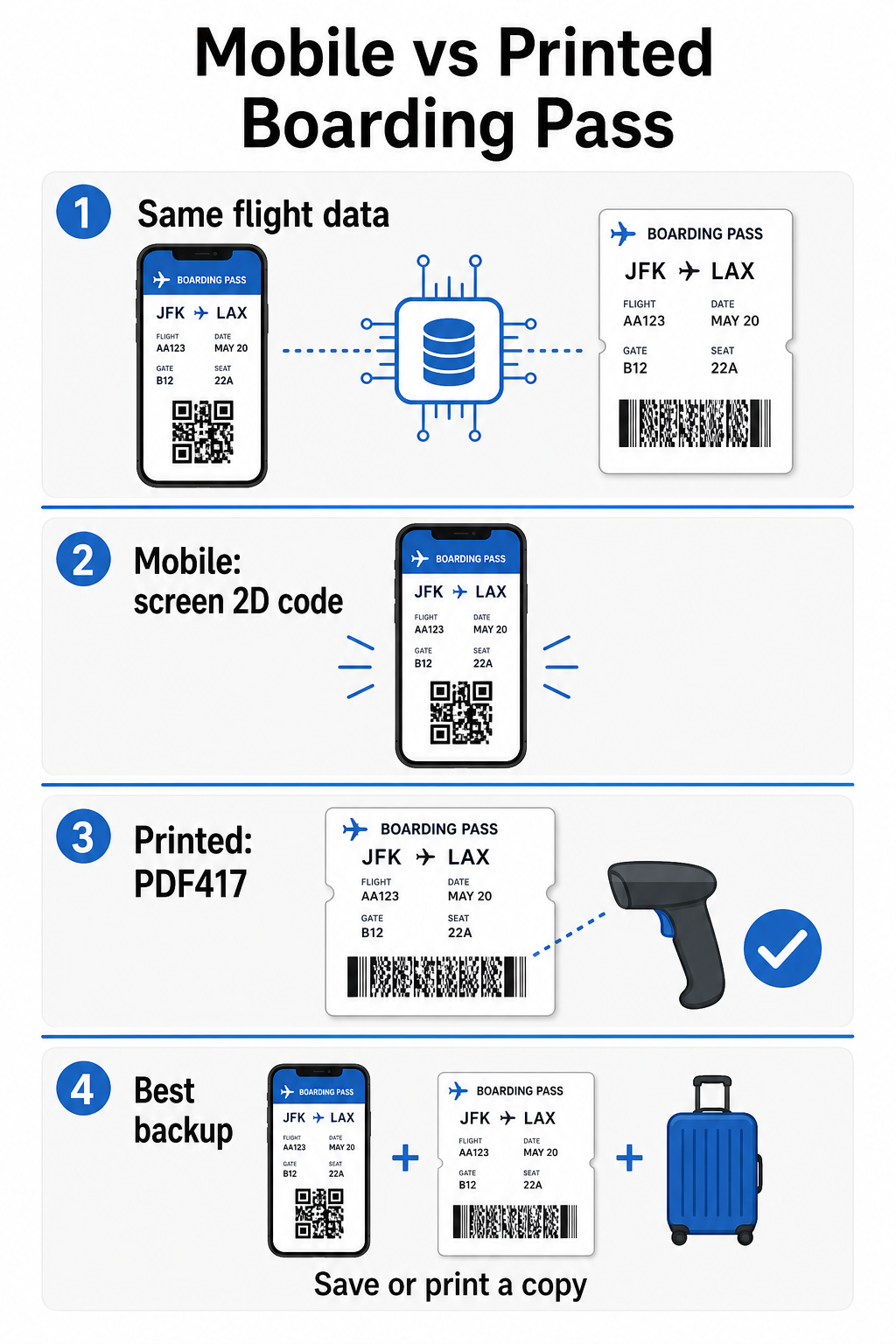
| Faktor | Pas Masuk Mudah Alih | Pas Masuk Bercetak |
|---|---|---|
| Format diterima | Aztec, Data Matrix, atau kod QR | PDF417 (lalai); juga Aztec, Data Matrix, QR |
| Keserasian pengimbas | Kebanyakan pengimbas 2D moden; sesetengah pengimbas laser lama mungkin menghadapi masalah | Serasi secara meluas dengan semua pengimbas lapangan terbang |
| Risiko silau skrin | Ya – pencahayaan lapangan terbang yang terang boleh menyebabkan pantulan | Tiada |
| Risiko corak Moiré | Ya – skrin LCD/LED boleh menghasilkan jalur gangguan visual | Tiada |
| Risiko kerosakan fizikal | Skrin retak atau kotor boleh menghalang kod | Kertas boleh berkedut, koyak, atau comot |
| Keselesaan | Tiada pencetakan diperlukan; sentiasa ada pada telefon anda | Berfungsi di mana-mana, tiada bateri diperlukan |
| Penerimaan di lapangan terbang | Tidak universal – beberapa lapangan terbang A.S. memerlukan pas bercetak | Diterima di semua lapangan terbang |
Cabaran utama dengan pas masuk mudah alih adalah bahawa pengimbas laser tradisional dioptimumkan untuk cahaya yang dipantulkan dari kertas, bukan cahaya yang dipancarkan dari skrin. Apabila anda memegang telefon di bawah pencahayaan terminal yang terang, skrin boleh menghasilkan silau atau gangguan pantulan yang mengurangkan kontras yang diperlukan oleh pengimbas untuk menyahkod kod bar dengan tepat. Corak Moiré – jalur visual yang boleh dihasilkan oleh skrin LCD dan LED – adalah satu lagi sumber gangguan yang tidak dimiliki oleh pas bercetak.
Untuk meminimumkan isu-isu ini apabila menggunakan pas masuk mudah alih:
- Maksimumkan kecerahan skrin anda sebelum mendekati pengimbas
- Bersihkan skrin anda – cap jari dan kotoran terus di atas kod bar mengganggu penyahkodan
- Pastikan keseluruhan kod bar kelihatan pada skrin tanpa dipotong atau disembunyikan sebahagiannya oleh bar pemberitahuan
- Putar jika perlu – sesetengah pengimbas lebih suka kod dalam orientasi tertentu
Untuk maklumat lanjut tentang apa yang mempengaruhi kebolehbacaan kod bar secara umum, amalan terbaik untuk kebolehbacaan kod QR panduan ini merangkumi kontras, saiz, dan faktor persekitaran secara terperinci.
Bila Anda Perlu Membawa Pas Masuk Bercetak
Pas mudah alih berfungsi dengan lancar di sebahagian besar lapangan terbang utama A.S. Walau bagaimanapun, terdapat situasi tertentu di mana mempunyai salinan bercetak adalah pilihan yang lebih selamat:
- Lapangan terbang serantau yang lebih kecil yang belum menaik taraf pengimbas mereka untuk membaca kod skrin mudah alih dengan andal
- Sambungan antarabangsa, di mana dasar penerimaan pas masuk berbeza dengan ketara mengikut negara dan syarikat penerbangan
- Perjalanan jauh atau perjalanan ke kawasan dengan akses pengecasan terhad, di mana bateri telefon anda mungkin menjadi kebimbangan
- Peranti lama atau rosak di mana keretakan skrin atau kecerahan rendah menyukarkan kod untuk dibaca
Jika anda tidak pasti sama ada lapangan terbang berlepas anda menerima pas mudah alih, semak terus dengan syarikat penerbangan anda sebelum anda melakukan perjalanan. Sesetengah syarikat penerbangan secara jelas menyenaraikan keserasian lapangan terbang pada halaman pas masuk mudah alih mereka. Jika anda berminat tentang bagaimana prinsip kod QR yang sama digunakan untuk jenis tiket dan pas acara lain, kod QR pada tiket halaman ini merangkumi kes penggunaan itu secara mendalam.
Apa Yang Berlaku Jika Pas Masuk Anda Tidak Dapat Diimbas
Jika pengimbas menolak pas masuk anda – mudah alih atau bercetak – punca-punca yang paling biasa patut diketahui sebelum anda berada di hadapan barisan menaiki pesawat yang sibuk.
Silau skrin atau kecerahan rendah adalah punca utama dengan pas mudah alih. Cuba condongkan telefon sedikit atau letakkan tangan anda di sekeliling skrin untuk menghalang cahaya ambien, dan sentiasa tetapkan paparan anda kepada kecerahan penuh sebelum mendekati pengimbas. Cap jari atau kotoran di atas kod bar adalah satu lagi isu kerap yang boleh diselesaikan dengan lap cepat. Untuk pas bercetak, kod bar yang sangat berkedut atau koyak sebahagiannya mungkin tidak menyahkod dengan betul, jadi melipat pas kertas terus melalui kod itu patut dielakkan.
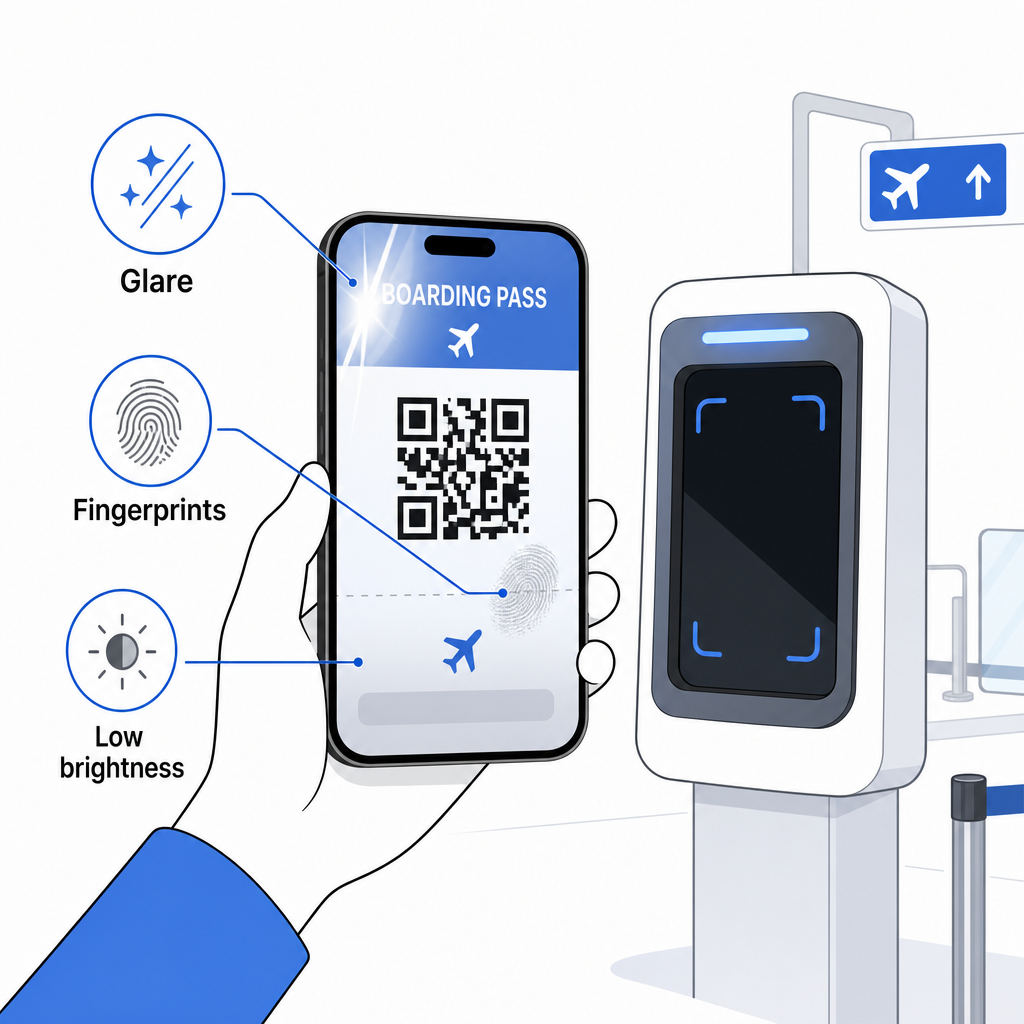
Paparan yang tidak lengkap juga merupakan masalah biasa – pastikan kod penuh kelihatan dan tidak terhalang oleh sarung telefon anda atau sepanduk pemberitahuan. Ejen pintu berurusan dengan kegagalan pengimbasan secara rutin dan boleh mencari tempahan anda secara manual menggunakan nama dan PNR anda. Imbasan yang gagal jarang menjadi masalah serius, tetapi ia melambatkan keadaan semasa menaiki pesawat yang sesak.
Memahami bagaimana kod QR meningkatkan pengalaman perjalanan secara lebih meluas juga boleh membantu anda memanfaatkan sepenuhnya alat digital yang kini ditawarkan oleh syarikat penerbangan sepanjang perjalanan.
Kod bar pas masuk anda – sama ada kod QR, kod Aztec, atau jalur PDF417 – membawa muatan data yang tepat dan piawai yang diandalkan oleh sistem lapangan terbang untuk mengesahkan identiti dan penetapan tempat duduk anda dalam masa nyata. Pas mudah alih adalah mudah dan berfungsi dengan baik di kebanyakan lapangan terbang utama A.S., tetapi pas bercetak kekal sebagai pilihan yang paling serasi secara universal. Pendekatan paling selamat adalah untuk mengetahui lapangan terbang anda terlebih dahulu dan menyimpan pilihan sandaran tersedia apabila melakukan perjalanan di laluan yang kurang biasa.
Jika anda ingin menyahkod apa yang sebenarnya disimpan dalam kod bar pas masuk, Pengimbas Kod Bar Pageloot membolehkan anda membaca sebarang format yang disokong terus dari pelayar anda tanpa memasang aplikasi.
Soalan lazim
Tidak selalu. Pas masuk bercetak paling biasa menggunakan kod bar PDF417 – format berjalur segi empat tepat itu – sebagai lalai di bawah piawaian IATA BCBP. Pas masuk mudah alih menggunakan format matriks 2D seperti Aztec, Data Matrix, atau kod QR. Semua ini mengekod data penumpang berstruktur yang sama; format itu berbeza mengikut medium dan syarikat penerbangan.
Tidak semestinya. Di lebih daripada 225 lapangan terbang A.S. yang dilengkapi dengan Teknologi Pengesahan Kelayakan TSA (CAT), ID keluaran kerajaan anda sudah cukup untuk mengesahkan butiran penerbangan anda di pusat pemeriksaan keselamatan – tiada pas masuk diperlukan. Walau bagaimanapun, anda masih perlu mendaftar masuk dengan syarikat penerbangan anda untuk mendapatkan pas masuk (mudah alih atau bercetak), dan anda akan sentiasa perlu mengimbasnya di pintu masuk pesawat apabila anda menaiki pesawat.
Punca yang paling biasa adalah silau skrin daripada pencahayaan lapangan terbang yang terang, cap jari atau kotoran pada kod bar, kecerahan skrin yang rendah, dan corak moiré yang boleh dihasilkan oleh skrin LCD atau LED. Untuk meningkatkan kebolehpercayaan, bersihkan skrin anda sebelum sampai ke pengimbas, tetapkan kecerahan anda ke tahap maksimum, dan pastikan keseluruhan kod bar kelihatan sepenuhnya dan tidak terhalang.