Έχετε αναρωτηθεί ποτέ τι κάνει αυτός ο τετράγωνος ή ριγέ κωδικός στην κάρτα επιβίβασής σας στην πραγματικότητα; Η κατανόησή του μπορεί να σας σώσει από μια εκνευριστική καθυστέρηση στον έλεγχο ασφαλείας ή στην πύλη. Αυτός ο οδηγός εξηγεί ακριβώς πώς λειτουργούν οι κωδικοί της κάρτας επιβίβασης και τι να περιμένετε όταν τους σαρώνετε στο αεροδρόμιο.
Τι Τύπος Κωδικού Υπάρχει σε μια Κάρτα Επιβίβασης
Δεν είναι όλοι οι κωδικοί της κάρτας επιβίβασης ίδιοι, και η διαφορά έχει σημασία όταν στέκεστε μπροστά σε έναν σαρωτή.
Οι αεροπορικές εταιρείες ακολουθούν ένα παγκόσμιο πρότυπο που ονομάζεται το Κάρτα Επιβίβασης με Γραμμωτό Κώδικα IATA (BCBP), που ορίζεται βάσει της Απόφασης 792. Αυτό το πρότυπο καθορίζει ποιες μορφές γραμμωτού κώδικα μπορούν να χρησιμοποιούν οι αεροπορικές εταιρείες και πώς πρέπει να δομούνται τα δεδομένα εντός αυτών ώστε οποιοσδήποτε σαρωτής αεροδρομίου στον κόσμο να μπορεί να διαβάσει την ίδια κάρτα.
Σύμφωνα με αυτό το πρότυπο, χρησιμοποιούνται δύο ευρείες οικογένειες κωδικών:
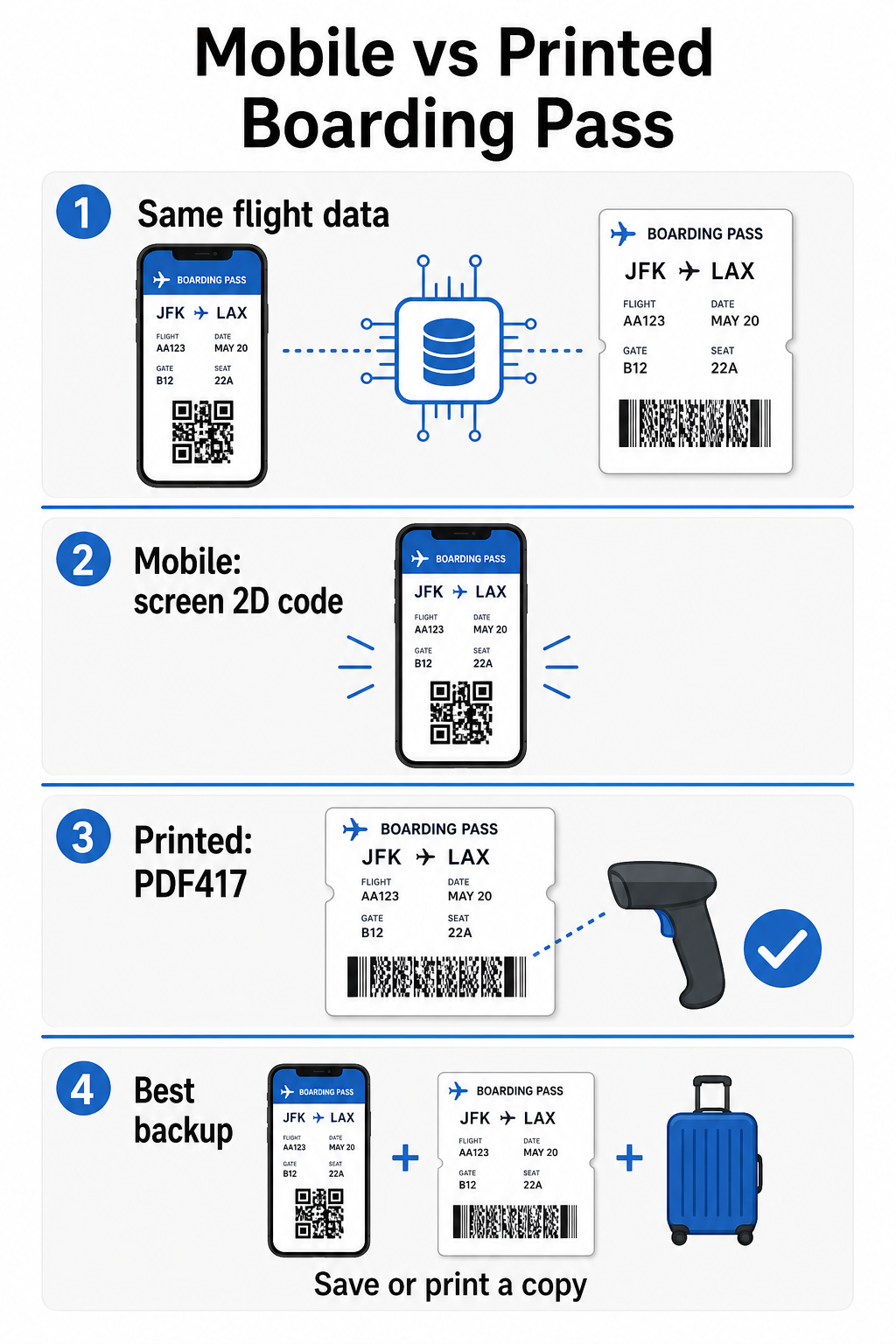
- PDF417 – Ένας ορθογώνιος, στοιβαγμένος γραμμωτός κώδικας που μοιάζει με μια σειρά οριζόντιων γραμμών χωρισμένων σε στήλες. Αυτή είναι η προεπιλεγμένη μορφή για τις έντυπες κάρτες επιβίβασης και είναι η πιο κοινή μορφή που θα δείτε σε χαρτί.
- Κώδικες μήτρας 2D (Aztec, Data Matrix, κώδικας QR) – Τετράγωνοι ή συμπαγείς κωδικοί βασισμένοι σε πλέγμα. Αυτές είναι οι τυπικές μορφές για τις κάρτες επιβίβασης κινητού που εμφανίζονται σε οθόνη τηλεφώνου, αν και μπορούν επίσης να εμφανίζονται σε έντυπες κάρτες σύμφωνα με την τρέχουσα έκδοση του προτύπου BCBP.
Έτσι, ενώ πολλοί άνθρωποι το αποκαλούν “κωδικό QR”, η κάρτα επιβίβασής σας μπορεί τεχνικά να φέρει έναν κωδικό Aztec, έναν κωδικό Data Matrix ή έναν γραμμωτό κώδικα PDF417 ανάλογα με την αεροπορική εταιρεία και το αν χρησιμοποιείτε μια έκδοση για κινητό ή έντυπη. Το βασικό σημείο είναι ότι όλοι τους κωδικοποιούν τα ίδια δομημένα δεδομένα. Για να κατανοήσετε περισσότερα σχετικά με το πώς χρησιμοποιούνται οι κωδικοί QR ειδικά σε αεροπορικές εταιρείες και αεροδρόμια, το κωδικών QR για αεροπορικές εταιρείες και αεροδρόμια επισκόπηση είναι μια χρήσιμη αναφορά.
Τι Δεδομένα Αποθηκεύονται Μέσα στον Κωδικό
Ο γραμμωτός κώδικας στην κάρτα επιβίβασής σας δεν είναι απλώς ένας αριθμός εισιτηρίου. Κωδικοποιεί ένα δομημένο μήνυμα δεδομένων που περιέχει ένα συγκεκριμένο σύνολο υποχρεωτικών πεδίων, συμπεριλαμβανομένων:
- Το πλήρες όνομα του επιβάτη σας
- ο PNR (Καταχώριση Ονόματος Επιβάτη) – ο κωδικός αναφοράς κράτησής σας
- Κωδικοί αεροδρομίων αναχώρησης και προορισμού (π.χ., JFK → LAX)
- Κωδικός λειτουργούσας αεροπορικής εταιρείας και αριθμός πτήσης
- Ημερομηνία πτήσης
- Αριθμός θέσης και κωδικός κατηγορίας καμπίνας
- Αριθμός σειράς check-in
- Κατάσταση επιβάτη
Το πρότυπο υποστηρίζει επίσης την κωδικοποίηση πολλαπλών τμημάτων πτήσης σε έναν ενιαίο γραμμωτό κώδικα, γι' αυτό ένα δρομολόγιο με ανταπόκριση μπορεί μερικές φορές να εμφανίζεται ως ένας σαρώσιμος κωδικός στην κάρτα επιβίβασής σας αντί για δύο ξεχωριστούς.
Ορισμένες αεροπορικές εταιρείες περιλαμβάνουν επίσης ένα προαιρετικό πεδίο ασφαλείας που περιέχει μια ψηφιακή υπογραφή. Αυτό επιτρέπει στα συστήματα του αεροδρομίου να επαληθεύουν ότι ο γραμμωτός κώδικας δεν έχει αλλοιωθεί ή πλαστογραφηθεί, προσθέτοντας ένα επίπεδο προστασίας έναντι πλαστών καρτών.
Πώς Λειτουργεί η Διαδικασία Σάρωσης στο Αεροδρόμιο
Όταν παρουσιάζετε την κάρτα επιβίβασής σας σε ένα σημείο ελέγχου ή πύλη, ο σαρωτής διαβάζει όλα αυτά τα κωδικοποιημένα πεδία σε κλάσματα του δευτερολέπτου. Δείτε τι συμβαίνει σε κάθε στάδιο.
Στον έλεγχο ασφαλείας της TSA: Ο υπάλληλος ή ο αυτοματοποιημένος αναγνώστης ελέγχει την ταυτότητά σας και επιβεβαιώνει ότι έχετε μια έγκυρη, επιβεβαιωμένη κράτηση για μια αναχωρούσα πτήση. Σε περισσότερα από 225 αεροδρόμια των ΗΠΑ, η TSA έχει εγκαταστήσει την Τεχνολογία Επαλήθευσης Διαπιστευτηρίων (CAT), η οποία μπορεί να εμφανίσει τα στοιχεία της πτήσης σας σαρώνοντας μόνο την κρατική σας ταυτότητα – πράγμα που σημαίνει ότι μπορεί να μην χρειάζεται να δείξετε κάρτα επιβίβασης στο σημείο ελέγχου ασφαλείας καθόλου. Ωστόσο, εάν ο εξοπλισμός CAT σε μια συγκεκριμένη λωρίδα είναι μη διαθέσιμος, ένας υπάλληλος μπορεί να ζητήσει την κάρτα επιβίβασής σας.
Στην πύλη επιβίβασης: Εδώ γίνεται πάντα η σάρωση, ανεξάρτητα από το ποιο αεροδρόμιο βρίσκεστε. Ο σαρωτής του υπαλλήλου της πύλης διαβάζει τον κωδικό της κάρτας επιβίβασής σας, επιβεβαιώνει τη θέση και την κατάσταση του επιβάτη σας, και καταγράφει ότι έχετε επιβιβαστεί. Θα χρειάζεστε την κάρτα επιβίβασής σας – κινητή ή έντυπη – σε αυτό το σημείο κάθε φορά.
Σαρώστε Οποιαδήποτε Μορφή Κάρτας Επιβίβασης Άμεσα Χρειάζεται να επαληθεύσετε τι είναι κωδικοποιημένο σε έναν κωδικό QR ή γραμμωτό κώδικα; Χρησιμοποιήστε το Σαρωτής κώδικα Pageloot QR ή Σάρωση γραμμοκώδικα για να διαβάσετε και να αποκωδικοποιήσετε οποιαδήποτε υποστηριζόμενη μορφή απευθείας από το πρόγραμμα περιήγησής σας – χωρίς να χρειάζεται εφαρμογή.
Κάρτες Επιβίβασης Κινητού έναντι Έντυπων: Πρακτικές Διαφορές
Και οι δύο μορφές κωδικοποιούν πανομοιότυπα δεδομένα. Η διάκριση αφορά αποκλειστικά πόσο αξιόπιστα μπορούν να διαβαστούν αυτά τα δεδομένα σε πραγματικές συνθήκες αεροδρομίου.
| Παράγοντας | Κάρτα Επιβίβασης Κινητού | Έντυπη Κάρτα Επιβίβασης |
|---|---|---|
| Αποδεκτή μορφή | Aztec, Data Matrix, ή κώδικας QR | PDF417 (προεπιλογή)· επίσης Aztec, Data Matrix, QR |
| Συμβατότητα σαρωτή | Οι περισσότεροι σύγχρονοι σαρωτές 2D· ορισμένοι παλαιότεροι σαρωτές λέιζερ ενδέχεται να δυσκολεύονται | Ευρέως συμβατό με όλους τους σαρωτές αεροδρομίου |
| Κίνδυνος αντανάκλασης οθόνης | Ναι – ο έντονος φωτισμός του αεροδρομίου μπορεί να προκαλέσει αντανακλάσεις | Καμία |
| Κίνδυνος μοτίβου Moiré | Ναι – οι οθόνες LCD/LED μπορούν να δημιουργήσουν οπτικές ζώνες παρεμβολής | Καμία |
| Κίνδυνος φυσικής ζημιάς | Ραγισμένη ή βρώμικη οθόνη μπορεί να εμποδίσει τον κωδικό | Το χαρτί μπορεί να τσαλακωθεί, να σκιστεί ή να λερωθεί |
| Ευκολία | Δεν απαιτείται εκτύπωση· πάντα στο τηλέφωνό σας | Λειτουργεί παντού, δεν απαιτείται μπαταρία |
| Αποδοχή στα αεροδρόμια | Δεν είναι καθολικό – ορισμένα αεροδρόμια των ΗΠΑ απαιτούν έντυπα πάσα | Γίνεται δεκτό σε όλα τα αεροδρόμια |
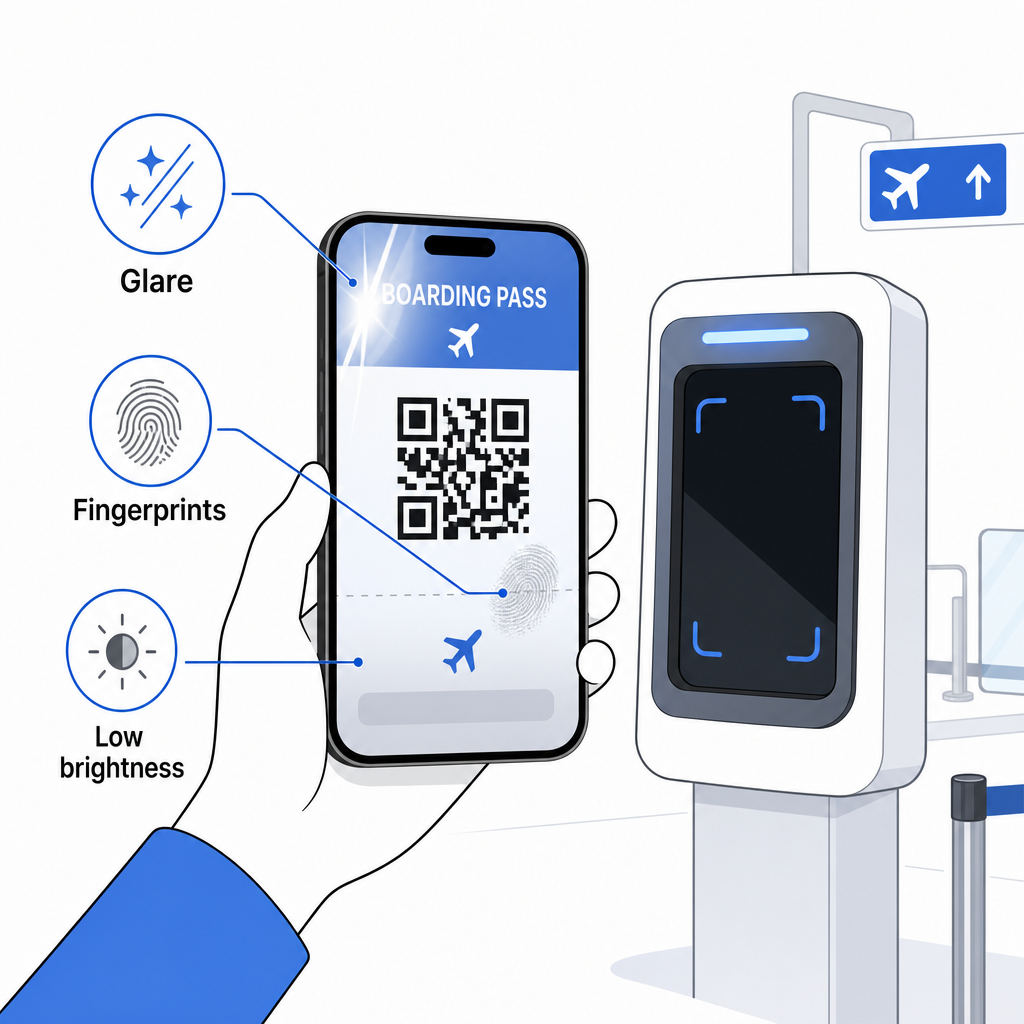
Η βασική πρόκληση με τις κάρτες επιβίβασης κινητού είναι ότι οι παραδοσιακοί σαρωτές λέιζερ είναι βελτιστοποιημένοι για φως που ανακλάται από χαρτί, όχι για φως που εκπέμπεται από οθόνη. Όταν κρατάτε ένα τηλέφωνο κάτω από έντονο φωτισμό τερματικού, η οθόνη μπορεί να δημιουργήσει αντανάκλαση ή ανακλαστική παρεμβολή που μειώνει την αντίθεση που χρειάζεται ο σαρωτής για να αποκωδικοποιήσει με ακρίβεια τον γραμμωτό κώδικα. Τα μοτίβα Moiré – οπτικές ζώνες που μπορούν να παράγουν οι οθόνες LCD και LED – είναι μια άλλη πηγή παρεμβολής που τα έντυπα πάσα απλά δεν έχουν.
Για να ελαχιστοποιήσετε αυτά τα ζητήματα όταν χρησιμοποιείτε κάρτα επιβίβασης κινητού:
- Μεγιστοποιήστε τη φωτεινότητα της οθόνης σας πριν πλησιάσετε
- Clean your screen – fingerprints and smudges directly over the barcode disrupt decoding
- Keep the entire barcode visible on screen without being cropped or partially hidden by notification bars
- Rotate if needed – some scanners prefer the code in a specific orientation
For more on what affects barcode readability in general, the βέλτιστες πρακτικές για την αναγνωσιμότητα των κωδικών QR guide covers contrast, sizing, and environmental factors in detail.
When You Should Carry a Printed Boarding Pass
A mobile pass works smoothly at the vast majority of major U.S. airports. However, there are specific situations where having a printed copy is the safer choice:
- Smaller regional airports that have not yet upgraded their scanners to reliably read mobile screen codes
- International connections, where boarding pass acceptance policies vary significantly by country and carrier
- Long trips or travel to areas with limited charging access, where your phone battery may be a concern
- Older or damaged devices where screen cracks or low brightness make the code difficult to read
Εάν δεν είστε σίγουροι αν το αεροδρόμιο αναχώρησής σας δέχεται κινητές κάρτες επιβίβασης, ελέγξτε απευθείας με την αεροπορική σας εταιρεία πριν ταξιδέψετε. Ορισμένες αεροπορικές εταιρείες αναφέρουν ρητά τη συμβατότητα αεροδρομίων στις σελίδες των κινητών καρτών επιβίβασης. Εάν ενδιαφέρεστε για το πώς οι ίδιες αρχές κωδικών QR εφαρμόζονται σε άλλους τύπους εισιτηρίων και καρτών εκδηλώσεων, η QR κωδικούς σε εισιτήρια σελίδα καλύπτει αυτή την περίπτωση χρήσης σε βάθος.
Τι Συμβαίνει Αν η Κάρτα Επιβίβασής σας Δεν Σκανάρεται
Εάν ένας σαρωτής απορρίψει την κάρτα επιβίβασής σας – κινητή ή έντυπη – αξίζει να γνωρίζετε τις πιο συνηθισμένες αιτίες πριν βρεθείτε στην αρχή μιας πολυσύχναστης ουράς επιβίβασης.
Η αντανάκλαση της οθόνης ή η χαμηλή φωτεινότητα είναι ο κύριος ένοχος με τις κινητές κάρτες επιβίβασης. Δοκιμάστε να γείρετε ελαφρώς το τηλέφωνο ή να καλύψετε την οθόνη με το χέρι σας για να μπλοκάρετε το φως του περιβάλλοντος, και πάντα να ρυθμίζετε την οθόνη σας σε πλήρη φωτεινότητα πριν πλησιάσετε έναν σαρωτή. Δακτυλικά αποτυπώματα ή μουτζούρες πάνω από τον γραμμωτό κώδικα είναι ένα άλλο συχνό πρόβλημα που μπορεί να επιλυθεί με ένα γρήγορο σκούπισμα. Για τις έντυπες κάρτες, ένας πολύ τσαλακωμένος ή μερικώς σκισμένος γραμμωτός κώδικας ενδέχεται να μην αποκωδικοποιηθεί σωστά, οπότε αξίζει να αποφύγετε το δίπλωμα μιας χάρτινης κάρτας απευθείας πάνω στον κώδικα.
Μια ατελής εμφάνιση είναι επίσης ένα συχνό πρόβλημα – βεβαιωθείτε ότι ο πλήρης κωδικός είναι ορατός και δεν καλύπτεται από τη θήκη του τηλεφώνου σας ή ένα banner ειδοποιήσεων. Οι υπάλληλοι της πύλης αντιμετωπίζουν τακτικά αποτυχίες σάρωσης και μπορούν να αναζητήσουν την κράτησή σας χειροκίνητα χρησιμοποιώντας το όνομά σας και τον κωδικό PNR. Μια αποτυχημένη σάρωση σπάνια αποτελεί σοβαρό πρόβλημα, αλλά επιβραδύνει τις διαδικασίες κατά την επιβίβαση με μεγάλη κίνηση.
Κατανόηση πώς οι κωδικοί QR βελτιώνουν τις ταξιδιωτικές εμπειρίες ευρύτερα μπορεί επίσης να σας βοηθήσει να αξιοποιήσετε στο έπακρο τα ψηφιακά εργαλεία που προσφέρουν πλέον οι αεροπορικές εταιρείες καθ' όλη τη διάρκεια του ταξιδιού.
Ο γραμμωτός κώδικας της κάρτας επιβίβασής σας – είτε πρόκειται για κωδικό QR, κωδικό Aztec, είτε για λωρίδα PDF417 – φέρει ένα ακριβές, τυποποιημένο φορτίο δεδομένων στο οποίο βασίζονται τα συστήματα των αεροδρομίων για να επαληθεύσουν την ταυτότητά σας και την ανάθεση θέσης σε πραγματικό χρόνο. Οι κάρτες επιβίβασης για κινητά είναι βολικές και λειτουργούν καλά στα περισσότερα μεγάλα αεροδρόμια των ΗΠΑ, αλλά οι έντυπες κάρτες παραμένουν η πιο καθολικά συμβατή επιλογή. Η ασφαλέστερη προσέγγιση είναι να γνωρίζετε τα αεροδρόμιά σας εκ των προτέρων και να έχετε μια εφεδρική επιλογή διαθέσιμη όταν ταξιδεύετε σε λιγότερο οικείες διαδρομές.
Αν θέλετε να αποκωδικοποιήσετε τι πραγματικά αποθηκεύεται σε έναν γραμμωτό κώδικα κάρτας επιβίβασης, το Σαρωτής γραμμωτού κώδικα Pageloot σας επιτρέπει να διαβάσετε οποιαδήποτε υποστηριζόμενη μορφή απευθείας από το πρόγραμμα περιήγησής σας χωρίς να εγκαταστήσετε εφαρμογή.
Συχνές ερωτήσεις
Όχι πάντα. Οι έντυπες κάρτες επιβίβασης χρησιμοποιούν πιο συχνά έναν γραμμωτό κώδικα PDF417 – την ορθογώνια ριγέ μορφή – ως την προεπιλογή σύμφωνα με το πρότυπο IATA BCBP. Οι κάρτες επιβίβασης κινητού χρησιμοποιούν μορφές μήτρας 2D όπως Aztec, Data Matrix ή κωδικό QR. Όλες αυτές κωδικοποιούν τα ίδια δομημένα δεδομένα επιβατών· η μορφή ποικίλλει ανάλογα με το μέσο και την αεροπορική εταιρεία.
Όχι απαραίτητα. Σε περισσότερα από 225 αεροδρόμια των ΗΠΑ εξοπλισμένα με την Τεχνολογία Ελέγχου Διαπιστευτηρίων (CAT) της TSA, η κυβερνητική σας ταυτότητα αρκεί για να επιβεβαιώσετε τα στοιχεία της πτήσης σας στο σημείο ελέγχου ασφαλείας – δεν απαιτείται κάρτα επιβίβασης. Ωστόσο, πρέπει ακόμα να κάνετε check-in με την αεροπορική σας εταιρεία για να λάβετε μια κάρτα επιβίβασης (κινητή ή εκτυπωμένη), και θα πρέπει πάντα να τη σαρώνετε στην πύλη επιβίβασης όταν επιβιβάζεστε στο αεροσκάφος.
Οι πιο συχνές αιτίες είναι η αντανάκλαση της οθόνης από έντονο φωτισμό αεροδρομίου, δακτυλικά αποτυπώματα ή μουτζούρες πάνω από τον γραμμωτό κώδικα, χαμηλή φωτεινότητα οθόνης, και μοτίβα moiré που μπορούν να παράγουν οι οθόνες LCD ή LED. Για να βελτιώσετε την αξιοπιστία, καθαρίστε την οθόνη σας πριν φτάσετε στον σαρωτή, ρυθμίστε τη φωτεινότητά σας στο μέγιστο, και βεβαιωθείτε ότι ολόκληρος ο γραμμωτός κώδικας είναι πλήρως ορατός και ανεμπόδιστος.