Haben Sie sich jemals gefragt, was dieser quadratische oder gestreifte Code auf Ihrer Bordkarte tatsächlich tut? Ihn zu verstehen, kann Sie vor einer frustrierenden Verzögerung an der Sicherheitskontrolle oder am Gate bewahren. Dieser Leitfaden erklärt genau, wie Bordkarten-Codes funktionieren und was Sie erwarten können, wenn Sie sie am Flughafen scannen.
Welcher Code-Typ befindet sich auf einer Bordkarte
Nicht alle Bordkarten-Codes sind gleich, und der Unterschied ist wichtig, wenn Sie vor einem Scanner stehen.
Fluggesellschaften folgen einem globalen Standard, der als der IATA Barcode-Bordkarte (BCBP), definiert unter Resolution 792. Dieser Standard legt fest, welche Barcode-Formate Fluggesellschaften verwenden können und wie die Daten darin strukturiert sein müssen, damit jeder Flughafen-Scanner auf der Welt dieselbe Bordkarte lesen kann.
Gemäß diesem Standard werden zwei große Code-Familien verwendet:
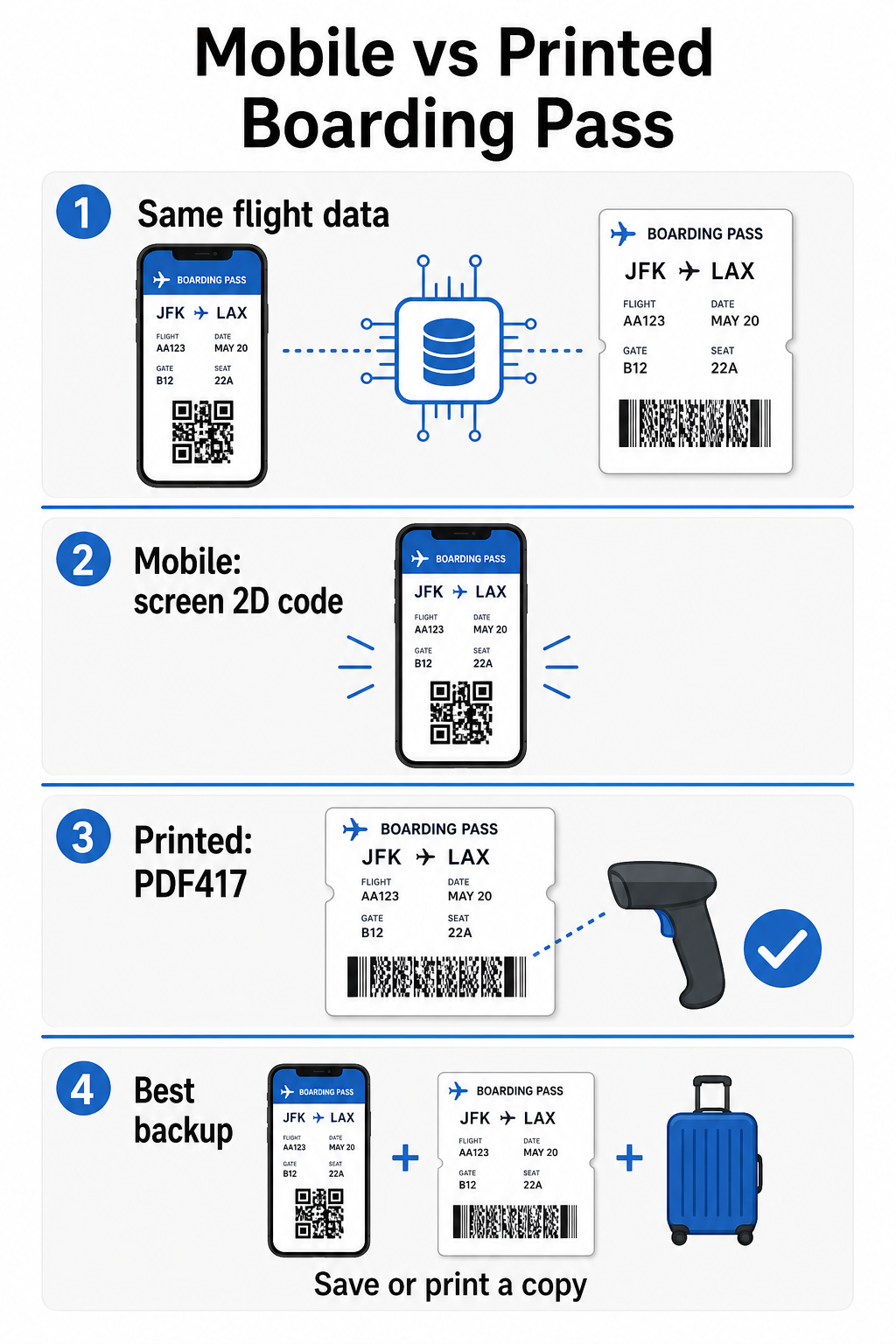
- PDF417 – Ein rechteckiger, gestapelter Barcode, der wie eine Reihe horizontaler Linien aussieht, die in Spalten unterteilt sind. Dies ist das Standardformat für gedruckte Bordkarten und ist das häufigste Format, das Sie auf Papier sehen werden.
- 2D-Matrix-Codes (Aztec, Data Matrix, QR-Code) – Quadratische oder kompakte, rasterbasierte Codes. Dies sind die Standardformate für mobile Bordkarten, die auf einem Telefonbildschirm angezeigt werden, obwohl sie auch auf gedruckten Bordkarten unter der aktuellen Version des BCBP-Standards erscheinen können.
Während viele Leute es einen “QR-Code” nennen, kann Ihre Bordkarte technisch gesehen einen Aztec-Code, einen Data Matrix-Code oder einen PDF417-Barcode tragen, abhängig von der Fluggesellschaft und davon, ob Sie eine mobile oder gedruckte Version verwenden. Der entscheidende Punkt ist, dass alle von ihnen dieselben strukturierten Daten kodieren. Um mehr darüber zu erfahren, wie QR-Codes speziell bei Fluggesellschaften und Flughäfen verwendet werden, ist der QR-Codes für Fluggesellschaften und Flughäfen Überblick eine nützliche Referenz.
Welche Daten sind im Code gespeichert
Der Barcode auf Ihrer Bordkarte ist nicht nur eine Ticketnummer. Er kodiert eine strukturierte Datennachricht, die eine bestimmte Reihe obligatorischer Felder enthält, darunter:
- Ihr vollständiger Passagiername
- Die PNR (Fluggastdatensatz) – Ihr Buchungsreferenzcode
- Abflug- und Zielflughafencodes (z.B. JFK → LAX)
- Code des ausführenden Luftfrachtführers und Flugnummer
- Flugdatum
- Sitzplatznummer und Kabinenklassencode
- Check-in-Sequenznummer
- Passagierstatus
Der Standard unterstützt auch die Kodierung von mehreren Flugabschnitten in einem einzigen Barcode, weshalb eine Anschlussreiseroute manchmal als ein scannbarer Code auf Ihrer Bordkarte erscheinen kann, anstatt als zwei separate.
Einige Fluggesellschaften fügen auch ein optionales Sicherheitsfeld mit einer digitalen Signatur hinzu. Dies ermöglicht Flughafensystemen zu überprüfen, ob der Barcode nicht verändert oder gefälscht wurde, und fügt eine Schutzschicht gegen gefälschte Bordkarten hinzu.
Wie der Scanvorgang am Flughafen funktioniert
Wenn Sie Ihre Bordkarte an einem Kontrollpunkt oder Gate vorlegen, liest der Scanner alle diese kodierten Felder in einem Bruchteil einer Sekunde. Hier ist, was in jeder Phase passiert.
Bei der TSA-Sicherheitskontrolle: Der Beamte oder automatisierte Leser überprüft Ihre Identität und bestätigt, dass Sie eine gültige, eingecheckte Buchung für einen abfliegenden Flug haben. An mehr als 225 US-Flughäfen hat die TSA die Credential Authentication Technology (CAT) installiert, die Ihre Flugdaten abrufen kann, indem sie nur Ihren staatlich ausgestellten Ausweis scannt – was bedeutet, dass Sie möglicherweise keine Bordkarte an der Sicherheitskontrolle vorzeigen müssen. Wenn jedoch die CAT-Ausrüstung an einer bestimmten Spur nicht verfügbar ist, kann ein Beamter immer noch nach Ihrer Bordkarte fragen.
Am Flugsteig: Hier findet der Scan immer statt, unabhängig davon, an welchem Flughafen Sie sich befinden. Der Scanner des Gate-Agenten liest Ihren Bordkarten-Code, bestätigt Ihren Sitzplatz und Passagierstatus und protokolliert, dass Sie an Bord gegangen sind. Sie benötigen Ihre Bordkarte – mobil oder gedruckt – zu diesem Zeitpunkt jedes Mal.
Scannen Sie jedes Bordkartenformat sofort Müssen Sie überprüfen, was in einem QR- oder Barcode kodiert ist? Verwenden Sie den Pageloot-QR-Code-Scanner oder Barcodelesegerät , um jedes unterstützte Format direkt von Ihrem Browser aus zu lesen und zu dekodieren – keine App erforderlich.
Mobile vs. gedruckte Bordkarten: Praktische Unterschiede
Beide Formate kodieren identische Daten. Der Unterschied liegt ausschließlich darin, wie zuverlässig diese Daten unter realen Flughafenbedingungen gelesen werden können.
| Faktor | Mobile Bordkarte | Gedruckte Bordkarte |
|---|---|---|
| Akzeptiertes Format | Aztec, Data Matrix oder QR-Code | PDF417 (Standard); auch Aztec, Data Matrix, QR |
| Scanner-Kompatibilität | Die meisten modernen 2D-Scanner; einige ältere Laserscanner könnten Schwierigkeiten haben | Weitgehend kompatibel mit allen Flughafen-Scannern |
| Risiko von Bildschirmblendung | Ja – helle Flughafenbeleuchtung kann Reflexionen verursachen | Keine |
| Moiré-Muster-Risiko | Ja – LCD/LED-Bildschirme können visuelle Interferenzbänder erzeugen | Keine |
| Risiko physischer Beschädigung | Rissiger oder verschmutzter Bildschirm kann den Code verdecken | Papier kann knittern, reißen oder verschmieren |
| Bequemlichkeit | Kein Drucken erforderlich; immer auf Ihrem Telefon | Funktioniert überall, keine Batterie erforderlich |
| Akzeptanz am Flughafen | Nicht universell – einige US-Flughäfen verlangen gedruckte Bordkarten | An allen Flughäfen akzeptiert |
Die größte Herausforderung bei mobilen Bordkarten besteht darin, dass herkömmliche Laserscanner für Licht optimiert sind, das von Papier reflektiert wird, nicht für Licht, das von einem Bildschirm ausgeht. Wenn Sie ein Telefon unter heller Terminalbeleuchtung halten, kann der Bildschirm Blendung oder reflektierende Interferenzen erzeugen, die den Kontrast reduzieren, den der Scanner zum genauen Dekodieren des Barcodes benötigt. Moiré-Muster – visuelle Bänder, die LCD- und LED-Bildschirme erzeugen können – sind eine weitere Störquelle, die gedruckte Bordkarten einfach nicht haben.
Um diese Probleme bei der Verwendung einer mobilen Bordkarte zu minimieren:
- Maximieren Sie Ihre Bildschirmhelligkeit bevor Sie sich dem Scanner nähern
- Reinigen Sie Ihren Bildschirm – Fingerabdrücke und Schlieren direkt über dem Barcode stören die Dekodierung
- Halten Sie den gesamten Barcode sichtbar auf dem Bildschirm, ohne beschnitten oder teilweise durch Benachrichtigungsleisten verdeckt zu werden
- Drehen Sie bei Bedarf – einige Scanner bevorzugen den Code in einer bestimmten Ausrichtung
Für weitere Informationen darüber, was die Lesbarkeit von Barcodes im Allgemeinen beeinflusst, ist der Best Practices für die Lesbarkeit von QR-Codes Leitfaden behandelt Kontrast, Größe und Umgebungsfaktoren im Detail.
Wann Sie eine gedruckte Bordkarte mitführen sollten
Eine mobile Bordkarte funktioniert an der überwiegenden Mehrheit der großen US-Flughäfen reibungslos. Es gibt jedoch bestimmte Situationen, in denen eine gedruckte Kopie die sicherere Wahl ist:
- Kleinere Regionalflughäfen die ihre Scanner noch nicht aufgerüstet haben, um mobile Bildschirmcodes zuverlässig zu lesen
- Internationale Verbindungen, wo die Akzeptanzrichtlinien für Bordkarten je nach Land und Fluggesellschaft erheblich variieren
- Lange Reisen oder Reisen in Gebiete mit begrenztem Ladezugang, wo Ihre Telefonbatterie Anlass zur Sorge geben könnte
- Ältere oder beschädigte Geräte wo Bildschirmrisse oder geringe Helligkeit den Code schwer lesbar machen
Wenn Sie uns unsicher sind, ob Ihr Abflughafen mobile Pässe akzeptiert, erkundigen Sie sich vor Ihrer Reise direkt bei Ihrer Fluggesellschaft. Einige Fluggesellschaften listen die Flughafenkompatibilität explizit auf ihren Seiten für mobile Bordkarten auf. Wenn Sie daran interessiert sind, wie dieselben QR-Code-Prinzipien auf andere Arten von Tickets und Veranstaltungspässen angewendet werden, behandelt die QR-Codes auf Tickets Seite diesen Anwendungsfall ausführlich.
Was passiert, wenn Ihre Bordkarte nicht gescannt werden kann
Wenn ein Scanner Ihre Bordkarte – mobil oder gedruckt – ablehnt, sind die häufigsten Ursachen wissenswert, bevor Sie ganz vorne in einer belebten Warteschlange stehen.
Bildschirmreflexionen oder geringe Helligkeit sind die Hauptursachen bei mobilen Pässen. Versuchen Sie, das Telefon leicht zu neigen oder Ihre Hand um den Bildschirm zu legen, um Umgebungslicht zu blockieren, und stellen Sie Ihr Display immer auf volle Helligkeit ein, bevor Sie sich einem Scanner nähern. Fingerabdrücke oder Verschmutzungen über dem Barcode sind ein weiteres häufiges Problem, das durch schnelles Abwischen behoben werden kann. Bei gedruckten Pässen kann ein stark zerknitterter oder teilweise zerrissener Barcode möglicherweise nicht korrekt dekodiert werden, daher sollte vermieden werden, einen Papierpass direkt durch den Code zu falten.
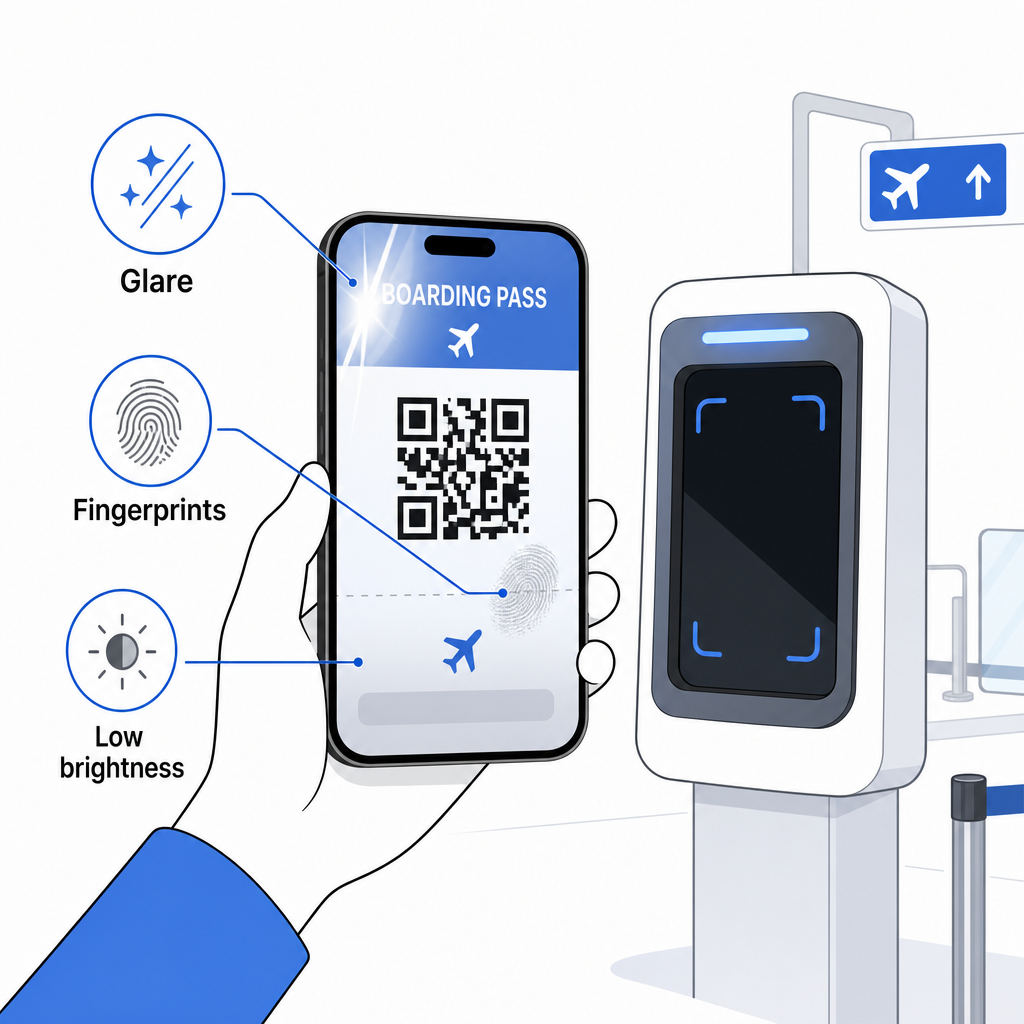
Eine unvollständige Anzeige ist ebenfalls ein häufiges Problem – stellen Sie sicher, dass der vollständige Code sichtbar und nicht durch Ihre Handyhülle oder ein Benachrichtigungsbanner verdeckt ist. Gate-Mitarbeiter sind routinemäßig mit Scanfehlern konfrontiert und können Ihre Buchung manuell anhand Ihres Namens und Ihrer PNR nachschlagen. Ein fehlgeschlagener Scan ist selten ein ernstes Problem, verlangsamt aber den Vorgang beim Boarding mit hohem Passagieraufkommen.
Verstehen Wie QR-Codes das Reiseerlebnis verbessern im weiteren Sinne kann Ihnen auch helfen, das Beste aus den digitalen Tools herauszuholen, die Fluggesellschaften jetzt während der gesamten Reise anbieten.
Ihr Bordkarten-Barcode – ob es sich um einen QR-Code, Aztec-Code oder PDF417-Streifen handelt – enthält eine präzise, standardisierte Datenlast, auf die Flughafensysteme angewiesen sind, um Ihre Identität und Sitzplatzzuweisung in Echtzeit zu überprüfen. Mobile Bordkarten sind praktisch und funktionieren an den meisten großen US-Flughäfen gut, aber gedruckte Bordkarten bleiben die universell kompatibelste Option. Der sicherste Ansatz ist, Ihre Flughäfen im Voraus zu kennen und eine Backup-Option bereitzuhalten, wenn Sie auf weniger bekannten Routen reisen.
Wenn Sie entschlüsseln möchten, was tatsächlich in einem Bordkarten-Barcode gespeichert ist, dann Pageloot Barcode-Scanner ermöglicht es Ihnen, jedes unterstützte Format direkt in Ihrem Browser zu lesen, ohne eine App installieren zu müssen.
Häufig gestellte Fragen
Nicht immer. Gedruckte Bordkarten verwenden am häufigsten einen PDF417-Barcode – das rechteckige gestreifte Format – als Standard gemäß dem IATA BCBP-Standard. Mobile Bordkarten verwenden 2D-Matrixformate wie Aztec, Data Matrix oder QR-Code. Alle diese kodieren die gleichen strukturierten Passagierdaten; das Format variiert je nach Medium und Fluggesellschaft.
Nicht unbedingt. An mehr als 225 US-Flughäfen, die mit der TSA Credential Authentication Technology (CAT) ausgestattet sind, ist Ihr staatlich ausgestellter Ausweis ausreichend, um Ihre Flugdaten am Sicherheitskontrollpunkt zu bestätigen – keine Bordkarte erforderlich. Sie müssen jedoch weiterhin bei Ihrer Fluggesellschaft einchecken, um eine Bordkarte (mobil oder gedruckt) zu erhalten, und Sie müssen diese immer am Flugsteig scannen, wenn Sie das Flugzeug betreten.
Die häufigsten Ursachen sind Bildschirmblendung durch helle Flughafenbeleuchtung, Fingerabdrücke oder Verschmutzungen über dem Barcode, geringe Bildschirmhelligkeit und Moiré-Muster, die LCD- oder LED-Bildschirme erzeugen können. Um die Zuverlässigkeit zu verbessern, reinigen Sie Ihren Bildschirm, bevor Sie den Scanner erreichen, stellen Sie Ihre Helligkeit auf Maximum ein und stellen Sie sicher, dass der gesamte Barcode vollständig sichtbar und ungehindert ist.