Вы когда-нибудь задумывались, что на самом деле делает квадратный или полосатый код на вашем посадочном талоне? Его понимание может избавить вас от досадной задержки на контроле безопасности или у выхода на посадку. Это руководство объясняет, как именно работают коды посадочных талонов и чего ожидать при их сканировании в аэропорту.
Какой тип кода находится на посадочном талоне
Не все коды посадочных талонов одинаковы, и разница имеет значение, когда вы стоите у сканера.
Авиакомпании следуют глобальному стандарту под названием Штрих-кодированный посадочный талон IATA (BCBP), определенному в Резолюции 792. Этот стандарт определяет, какие форматы штрих-кодов могут использовать авиакомпании и как данные внутри них должны быть структурированы, чтобы любой аэропортовый сканер в мире мог прочитать один и тот же талон.
В соответствии с этим стандартом используются два широких семейства кодов:
- PDF417 – Прямоугольный, многострочный штрих-код, который выглядит как серия горизонтальных линий, разделенных на столбцы. Это формат по умолчанию для печатных посадочных талонов и является наиболее распространенным форматом, который вы увидите на бумаге.
- 2D матричные коды (Aztec, Data Matrix, QR-код) – Квадратные или компактные коды на основе сетки. Это стандартные форматы для мобильных посадочных талонов, отображаемых на экране телефона, хотя они также могут появляться на печатных талонах в соответствии с текущей версией стандарта BCBP.
Итак, хотя многие называют его “QR-кодом”, ваш посадочный талон технически может содержать код Aztec, код Data Matrix или штрих-код PDF417 в зависимости от авиакомпании и от того, используете ли вы мобильную или печатную версию. Ключевой момент заключается в том, что все они кодируют одни и те же структурированные данные. Чтобы узнать больше о том, как QR-коды используются конкретно в авиакомпаниях и аэропортах, QR-кодов для авиакомпаний и аэропортов обзор является полезным справочником.
Какие данные хранятся внутри кода
Штрих-код на вашем посадочном талоне — это не просто номер билета. Он кодирует структурированное сообщение данных, которое содержит определенный набор обязательных полей, включая:
- Ваше полное имя пассажира
- В PNR (Запись имени пассажира) – ваш код бронирования
- Коды аэропортов отправления и назначения (например, JFK → LAX)
- Код эксплуатирующего перевозчика и номер рейса
- Дата рейса
- Номер места и код класса обслуживания
- Порядковый номер регистрации
- Статус пассажира
Стандарт также поддерживает кодирование нескольких сегментов полета в один штрих-код, поэтому стыковочный маршрут иногда может отображаться как один сканируемый код на вашем посадочном талоне, а не как два отдельных.
Некоторые авиакомпании также включают необязательное поле безопасности содержащее цифровую подпись. Это позволяет аэропортовым системам проверять, что штрих-код не был изменен или подделан, добавляя уровень защиты от поддельных талонов.
Как работает процесс сканирования в аэропорту
Когда вы предъявляете свой посадочный талон на контрольно-пропускном пункте или у выхода на посадку, сканер считывает все эти закодированные поля за долю секунды. Вот что происходит на каждом этапе.
На контроле безопасности TSA: Сотрудник или автоматический считыватель проверяет вашу личность и подтверждает, что у вас есть действительное, зарегистрированное бронирование на вылетающий рейс. В более чем 225 аэропортах США TSA установила технологию аутентификации учетных данных (CAT), которая может получить данные о вашем рейсе, просто отсканировав ваше удостоверение личности государственного образца – это означает, что вам может вообще не понадобиться предъявлять посадочный талон на контрольно-пропускном пункте безопасности. Однако, если оборудование CAT на данной полосе недоступно, сотрудник все равно может попросить ваш посадочный талон.
У выхода на посадку: Именно здесь сканирование происходит всегда, независимо от того, в каком аэропорту вы находитесь. Сканер агента у выхода на посадку считывает код вашего посадочного талона, подтверждает ваше место и статус пассажира и регистрирует вашу посадку. Вам понадобится ваш посадочный талон – мобильный или печатный – в этот момент каждый раз.
Мгновенно сканируйте любой формат посадочного талона Нужно проверить, что закодировано в QR-коде или штрих-коде? Используйте Страничный сканер QR-кодов или Сканер штрих-кода для чтения и декодирования любого поддерживаемого формата прямо из вашего браузера – приложение не требуется.
Мобильные против печатных посадочных талонов: Практические различия
Оба формата кодируют идентичные данные. Различие заключается исключительно в том, насколько надежно эти данные могут быть прочитаны в реальных условиях аэропорта.
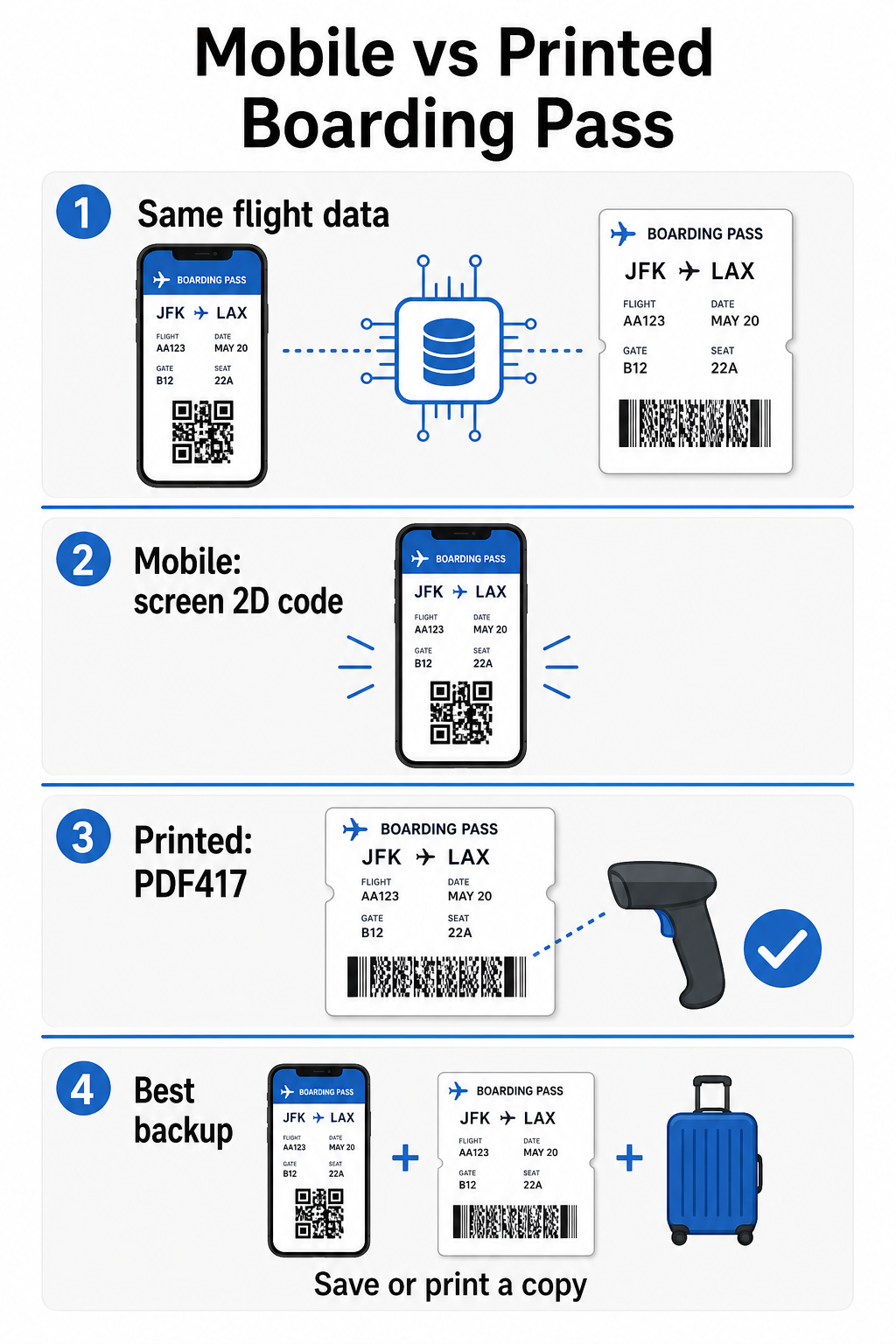
| Фактор | Мобильный посадочный талон | Печатный посадочный талон |
|---|---|---|
| Принимаемый формат | Aztec, Data Matrix или QR-код | PDF417 (по умолчанию); также Aztec, Data Matrix, QR |
| Совместимость со сканерами | Большинство современных 2D-сканеров; некоторые старые лазерные сканеры могут испытывать трудности | Широко совместим со всеми аэропортовыми сканерами |
| Риск бликов на экране | Да – яркое освещение аэропорта может вызывать отражения | Отсутствуют |
| Риск муарового узора | Да – ЖК/LED экраны могут создавать визуальные полосы помех | Отсутствуют |
| Риск физического повреждения | Треснувший или грязный экран может препятствовать считыванию кода | Бумага может мяться, рваться или пачкаться |
| Удобство | Печать не требуется; всегда на вашем телефоне | Работает везде, не требует батареи |
| Приемлемость в аэропорту | Не универсально – некоторые аэропорты США требуют распечатанные посадочные талоны | Принимается во всех аэропортах |
Основная проблема с мобильными посадочными талонами заключается в том, что традиционные лазерные сканеры оптимизированы для света, отраженного от бумаги, а не света, излучаемого экраном. Когда вы держите телефон при ярком освещении терминала, экран может создавать блики или отражающие помехи, которые уменьшают контрастность, необходимую сканеру для точного декодирования штрих-кода. Муаровые узоры – визуальные полосы, которые могут создавать ЖК- и LED-экраны – являются еще одним источником помех, которых у распечатанных талонов просто нет.
Чтобы минимизировать эти проблемы при использовании мобильного посадочного талона:
- Максимизируйте яркость вашего экрана перед приближением к сканеру
- Очистите ваш экран – отпечатки пальцев и пятна непосредственно над штрих-кодом нарушают декодирование
- Держите весь штрих-код видимым на экране без обрезки или частичного скрытия полосами уведомлений
- Поверните при необходимости – некоторые сканеры предпочитают код в определенной ориентации
Для получения дополнительной информации о том, что влияет на читаемость штрих-кода в целом, лучшим практикам читаемости QR-кодов руководство подробно охватывает контрастность, размер и факторы окружающей среды.
Когда вам следует иметь при себе распечатанный посадочный талон
Мобильный талон работает без проблем в подавляющем большинстве крупных аэропортов США. Однако существуют определенные ситуации, когда наличие распечатанной копии является более безопасным выбором:
- Небольшие региональные аэропорты которые еще не обновили свои сканеры для надежного считывания кодов с мобильных экранов
- Международные пересадки, где правила приема посадочных талонов значительно различаются в зависимости от страны и перевозчика
- Длительные поездки или путешествия в районы с ограниченным доступом к зарядке, где заряд батареи вашего телефона может вызывать беспокойство
- Старые или поврежденные устройства где трещины на экране или низкая яркость затрудняют чтение кода
Если вы не уверены, принимает ли ваш аэропорт вылета мобильные талоны, уточните непосредственно у вашей авиакомпании перед поездкой. Некоторые авиакомпании явно указывают совместимость аэропортов на своих страницах мобильных посадочных талонов. Если вас интересует, как те же принципы QR-кодов применяются к другим типам билетов и пропусков на мероприятия, QR-коды на билетах страница подробно охватывает этот вариант использования.
Что произойдет, если ваш посадочный талон не сканируется
Если сканер отклоняет ваш посадочный талон – мобильный или распечатанный – наиболее распространенные причины стоит знать, прежде чем вы окажетесь в начале оживленной очереди на посадку.
Блики на экране или низкая яркость являются основной причиной проблем с мобильными талонами. Попробуйте слегка наклонить телефон или прикрыть экран рукой, чтобы заблокировать окружающий свет, и всегда устанавливайте яркость дисплея на полную перед приближением к сканеру. Отпечатки пальцев или пятна над штрих-кодом являются еще одной частой проблемой, которую можно решить быстрым протиранием. Для распечатанных талонов сильно помятый или частично порванный штрих-код может не декодироваться правильно, поэтому складывание бумажного талона непосредственно по коду стоит избегать.
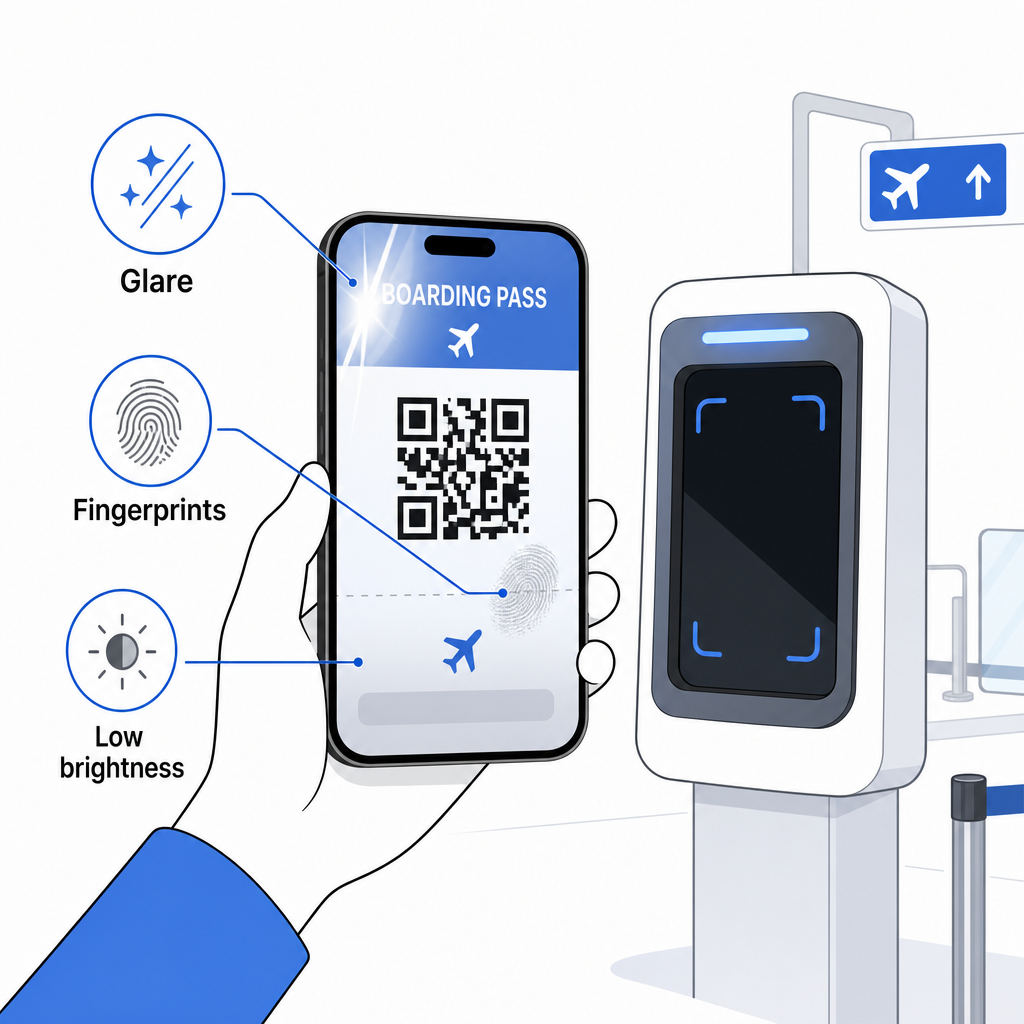
Неполное отображение также является распространенной проблемой – убедитесь, что весь код виден и не скрыт чехлом вашего телефона или баннером уведомлений. Агенты у выхода на посадку регулярно сталкиваются с отказами сканирования и могут найти ваше бронирование вручную, используя ваше имя и PNR. Неудачное сканирование редко является серьезной проблемой, но это замедляет процесс во время посадки с большим потоком пассажиров.
Понимание как QR-коды улучшают впечатления от путешествий в более широком смысле также может помочь вам получить максимальную отдачу от цифровых инструментов, которые авиакомпании теперь предлагают на протяжении всего путешествия.
Штрих-код вашего посадочного талона – будь то QR-код, код Aztec или полоса PDF417 – несет точную, стандартизированную полезную нагрузку данных, на которую полагаются системы аэропорта для проверки вашей личности и назначения места в реальном времени. Мобильные талоны удобны и хорошо работают в большинстве крупных аэропортов США, но распечатанные талоны остаются наиболее универсально совместимым вариантом. Самый безопасный подход – заранее знать свои аэропорты и иметь запасной вариант при путешествии по менее знакомым маршрутам.
Если вы хотите декодировать, что на самом деле хранится в штрих-коде посадочного талона, Сканер штрихкодов Pageloot позволяет вам читать любой поддерживаемый формат непосредственно из вашего браузера без установки приложения.
Часто задаваемые вопросы
Не всегда. Печатные посадочные талоны чаще всего используют штрих-код PDF417 – прямоугольный полосатый формат – в качестве стандарта по умолчанию согласно стандарту IATA BCBP. Мобильные посадочные талоны используют форматы 2D-матрицы, такие как Aztec, Data Matrix или QR-код. Все они кодируют одни и те же структурированные данные о пассажирах; формат варьируется в зависимости от носителя и авиакомпании.
Не обязательно. В более чем 225 аэропортах США, оборудованных технологией аутентификации учетных данных TSA (CAT), вашего удостоверения личности государственного образца достаточно, чтобы подтвердить ваши данные рейса на контрольно-пропускном пункте – посадочный талон не требуется. Однако вам все равно необходимо зарегистрироваться у вашей авиакомпании, чтобы получить посадочный талон (мобильный или распечатанный), и вам всегда нужно будет сканировать его у выхода на посадку, когда вы будете садиться на самолет.
Наиболее распространенными причинами являются блики экрана от яркого освещения аэропорта, отпечатки пальцев или пятна на штрих-коде, низкая яркость экрана и муаровые узоры, которые могут создавать ЖК- или LED-экраны. Чтобы повысить надежность, очистите ваш экран перед тем, как подойти к сканеру, установите максимальную яркость и убедитесь, что весь штрих-код полностью виден и ничем не загорожен.